Expert Review & Guide

Best CPU Coolers for i7-14700K in 2026

Intel’s Core i7-14700K is a 20-core (8P+12E) unlocked desktop chip that can surge well past everyday TDP labels when P-cores and E-cores boost together. Stock or weak coolers often let package power climb, clocks pull back, and fans scream—especially in poorly ventilated mid-towers. Choosing a cooler for this CPU is less about chasing a brand logo and more about matching heat-pipe or radiator capacity, case clearance, and how hard you plan to run multi-threaded workloads versus gaming.

This roundup uses only the products in our i7-14700K cooler pack: dual-tower air coolers from Thermalright and be quiet!, a 360 mm CORSAIR AIO, proven single-tower options from Cooler Master, Noctua, and Thermalright, a digital-display SK700V tower, two low-profile Intel coolers that are honest about their limits, and the 14700K itself as the reference processor these coolers are meant to serve. Ratings reflect Amazon feedback at research time. We never list dollar prices; deals move constantly, so compare thermals, socket support, and noise first.

Start with the three top picks if you want a clear shortlist for liquid headroom, silent dual-tower air, or high-value dual-tower cooling. Use the comparison table to filter by style and height, then read each review for LGA 1700/1851 notes, RAM clearance, and when a slim or low-profile cooler is the wrong tool for a 14700K build.

Top CPU Cooler Picks for the i7-14700K

Best Premium Air Cooler

be quiet! Dark Rock Pro 5 CPU Cooler

★★★★★9.4/10
be quiet! Dark Rock Pro 5 CPU Cooler
  • Seven copper heat pipes and dual Silent Wings PWM fans for overclocked systems
  • Quiet/Performance speed switch balances acoustics vs thermal headroom
  • Black ceramic-particle coating and refined mounting for LGA 1700 builds
Check Price →

As an Amazon Associate we earn from qualifying purchases. We may earn a commission at no additional cost to you.

i7-14700K Cooler Comparison: Air, AIO, and Compact Options

Filter by cooler type and height before rating. Specs omit prices so you can shortlist by LGA 1700 support, heat-pipe or radiator capacity, and whether a low-profile unit is realistic for a 14700K’s boost behavior.

#ProductSpecificationsScore
1
  • Single tower, 4 heat pipes, copper base
  • SickleFlow 120 Edge PWM, 690–2500 RPM
  • 152 mm tall; AM5 and LGA 1851/1700 kits
9.4
2
  • Dual tower, 6×6 mm AGHP heat pipes
  • Twin TL-C12C 120 mm PWM, ≤25.6 dB(A)
  • 125×135×155 mm; LGA 1700/1851, AM4/AM5
9.4
3
  • 20 cores (8P+12E), 28 threads, unlocked
  • Up to 5.6 GHz Turbo Boost Max 3.0
  • LGA 1700; Intel 600/700 series; DDR4/DDR5
9.2
4
  • 70 mm low-profile; copper insert base
  • 120 mm PWM ARGB fan, 650–1800 RPM
  • Rated ~95W TDP; LGA 1700/1851 only
8.8
5
  • Slim single tower, 4×6 mm AGHP pipes
  • One TL-C12C 120 mm PWM, ≤25.6 dB(A)
  • 125×71×148 mm; LGA 1700/1851 compatible
9.4
6
  • 92 mm low-profile; ~95W class cooling
  • 7-blade fan; ~31.3 CFM, ~21.3 dB
  • LGA 1200/115x only — not LGA 1700
9.2
7
  • Compact single tower, 125 mm height
  • NF-A9 92 mm PWM fan + Low-Noise Adaptor
  • SecuFirm2; LGA 1851/1700/1200/115x, AM5/AM4
9.6
8
  • Single tower, 7 heat pipes, black shroud
  • MACH120 PWM fan, 500–3000 RPM ±10%
  • Top digital temp/usage/power/freq display
9.8
9
  • 360 mm AIO with 3× RS120 ARGB fans
  • Quiet pump ~20 dBA; convex cold plate
  • LGA 1851/1700 and AMD AM5/AM4 ready
9.4
10
  • Dual tower, 7 copper heat pipes
  • 2× Silent Wings FDB PWM; Quiet/Perf switch
  • Ceramic-particle black coating; OC-focused
9.4

1. Cooler Master Hyper 212 Black - Reliable Single-Tower Classic

Cooler Master Hyper 212 Black CPU Air Cooler

Cooler Master Hyper 212 Black CPU Air Cooler

9.4/10★★★★★

The Cooler Master Hyper 212 Black remains the default answer many builders reach for when upgrading off a stock cooler, and for an i7-14700K that reputation needs a careful reality check. Four heat pipes and a copper base are marketed for AMD R7 and Intel i7 cooling, which is honest for gaming and mixed workloads in a well-ventilated case—but the 14700K’s multi-core power spikes can outrun a classic single tower if you leave power limits fully open and run long compiles or encodes. Treat this cooler as a capable mainstream upgrade, not as a license to ignore case airflow or motherboard power limits.

  • Four heat pipes with copper base for Intel i7-class chips
  • SickleFlow 120 Edge PWM fan, 690–2500 RPM
  • 152 mm height; simplified AM5 and LGA 1851/1700 brackets
Check Price →
✓ Pros
  • Familiar single-tower footprint fits a huge range of mid-tower cases
  • PWM SickleFlow fan covers quiet idle through aggressive load curves
  • Updated brackets ease LGA 1700 installation versus older Hyper 212 kits
  • Included thermal paste and straightforward mount suit first-time builders
  • Black finish blends with most non-RGB and RGB gaming builds
✕ Cons
  • Four heat pipes leave less headroom than dual-tower coolers on sustained 14700K loads
  • Heavy all-core rendering may force earlier clock pullback than a 360 mm AIO
  • Tall RAM or front fans can still crowd the 120 mm fan on dense boards

Detailed review

The SickleFlow 120 Edge fan with Dynamic PWM from roughly 690 to 2500 RPM is one of the Hyper 212 Black’s practical strengths. At the low end it stays out of the way during desktop use and light gaming; when package temperature climbs, the curve can push meaningful airflow across the fin stack. That wide RPM range matters more on a 14700K than on a 65 W chip because boost behavior is bursty—you want fans that idle quietly and still have headroom when all cores wake up. Pair the cooler with a sane BIOS fan curve so you are not living at 2500 RPM during every game menu.

Cooler Master’s redesigned brackets for AM5 and LGA 1851/1700 simplify what used to be a fiddly Hyper 212 install. On a 14700K build you will use the Intel LGA 1700 path; take time to seat the backplate evenly and tighten in a cross pattern so the copper base meets the IHS flat. The included paste is enough for a first mount—apply a rice-grain or X pattern, remount if you see uneven squeeze-out, and avoid overtightening that can warp contact. A clean mount often gains more than swapping fans on day one.

At 152 mm tall, the Hyper 212 Black clears most ATX mid-towers while remaining friendlier than bulky dual towers in compact chassis. Still measure from motherboard tray to side panel, and check GPU length if your case has a vertical GPU mount that steals CPU cooler volume. Front-intake mesh cases help this cooler punch above its heat-pipe count by feeding cool air across the tower; glass-front boxes with weak intake will make the 14700K look hotter than the cooler alone deserves.

Where the Hyper 212 Black makes sense for a 14700K is a gaming-focused PC with modest background productivity, or a builder who wants a known quantity before investing in a larger dual tower or AIO. Where it struggles is sustained all-core work with aggressive power limits and a warm ambient room. If your workload is Blender, HandBrake, or long Cinebench-style sessions, prioritize the Peerless Assassin, Dark Rock Pro 5, or Nautilus 360 from this same pack. If you mostly game and browse, the Hyper 212 Black can still keep the chip in a usable range with smart limits.

Acoustically, expect a clear step up from a tiny stock cooler but more fan noise under load than a premium dual-tower running slower fans. The black shroud and fin stack look intentional in photos without demanding ARGB headers. For many first 14700K builds, that simplicity is the point: install, set a power limit or undervolt if needed, and move on to the GPU and storage choices that shape day-to-day performance.

Who should pick the Hyper 212 Black for a 14700K

Choose this cooler if you are replacing a stock Intel cooler, your case clearance is around 155–160 mm, and your 14700K will mostly game with occasional office or light creative work. Skip it if you plan heavy sustained multi-threaded loads without a power limit, or if you already know you want near-silent fans at full boost.

Setup tips on LGA 1700

Confirm you are using the LGA 1700 bracket pieces, not leftover 115x hardware. Route the PWM cable to a CPU_FAN header, enable PWM mode in BIOS, and consider a modest PL1/PL2 or an undervolt if temperatures climb during stress tests. Good case intake matters as much as the cooler brand on this chip.

Versus stronger options in this pack

Against the Peerless Assassin 120 SE, the Hyper 212 trades dual-tower capacity for easier clearance and a familiar install. Against the CORSAIR Nautilus 360, it avoids radiator mounting and pump maintenance but cannot match sustained radiator surface area when the 14700K is fully unleashed.

Check Price on Amazon →

We may earn a commission at no additional cost to you.

2. Thermalright Peerless Assassin 120 SE - Best Value Dual

Thermalright Peerless Assassin 120 SE CPU Cooler

Thermalright Peerless Assassin 120 SE CPU Cooler

9.4/10★★★★★

The Thermalright Peerless Assassin 120 SE is the air cooler most 14700K builders in this pack should shortlist first if they want dual-tower performance without jumping to liquid. Six AGHP heat pipes, a pure copper base, and a dual-tower aluminum stack give it the surface area a single Hyper 212-style tower simply does not have when P-cores and E-cores boost together. For gaming plus streaming, photo editing, and many mid-length encodes, this is the sweet spot between clearance drama and thermal headroom.

  • Dual-tower 125×135×155 mm aluminum heatsink
  • Six 6 mm AGHP copper heat pipes and copper base
  • Twin TL-C12C 120 mm PWM fans, ≤25.6 dB(A), ~1550 RPM
Check Price →
✓ Pros
  • Dual towers and six heat pipes handle 14700K gaming and many creative loads well
  • Twin TL-C12C fans stay relatively quiet while moving solid airflow
  • LGA 1700/1851 metal mounting included for modern Intel boards
  • Design leaves room for many memory kits compared with denser towers
  • Strong performance-per-dollar reputation without needing ARGB complexity
✕ Cons
  • 155 mm height still fails some small form-factor and low-profile cases
  • AMD installs require the motherboard’s stock backplate, which is not in the box
  • Stock ~1550 RPM fans are not as aggressive as some high-RPM aftermarket pairs

Detailed review

Thermalright’s AGHP heat-pipe process is meant to reduce orientation-related performance quirks so the cooler behaves more consistently whether your case airflow is front-to-back or the motherboard sits in an unusual orientation. In practice, what you notice more is the dual TL-C12C fans: 120×120×25 mm PWM units rated around 1550 RPM with a claimed noise ceiling near 25.6 dB(A) and roughly 66 CFM max. That fan pairing is tuned for balance rather than screaming static pressure contests, which suits a 14700K that spends most of its life in games rather than 24/7 stress loops.

Physical size is 125×135×155 mm. Measure your case’s CPU cooler clearance carefully—many mid-towers list 160 mm or more, but cable covers, top radiators, and thick side glass can steal those last millimeters. The Peerless Assassin’s layout is relatively memory-friendly compared with some dual towers that bury DIMM slots, yet tall RGB RAM can still scrape the front fan. If you run high-profile memory, dry-fit the front fan or shift to a lower-profile kit before you commit paste.

Socket support covers Intel 115x/1200/1700/1851 and AMD AM4/AM5 with metal fasteners. For the 14700K you care about LGA 1700. Follow Thermalright’s Intel plate orientation, keep the backplate snug, and install fans as intake through the front tower and exhaust through the rear tower unless your case airflow strongly suggests otherwise. On AMD systems (if you ever reuse the cooler), remember the product notes that the motherboard’s original backplate is required and not included.

Thermally, expect a clear win over four-pipe single towers on all-core workloads and more stable boost behavior when ambient temperatures rise. You will not always match a well-mounted 360 mm AIO on the hottest multi-hour encodes, but for the majority of 14700K gaming PCs the Peerless Assassin 120 SE is enough cooling that you can focus on case fans and a light undervolt instead of chasing liquid. Noise stays reasonable if you avoid locking fans at 100% in BIOS.

Cosmetically the SE version is utilitarian black and silver rather than a light show, which is a feature if you want performance without another ARGB controller. Builders who want RGB can look at other pack options or swap fans later. As a value dual tower that still takes the 14700K seriously, the Peerless Assassin 120 SE earns its top-picks badge in this guide.

Best fit for 14700K workloads

Ideal for gaming, content creation in bursts, and everyday multitasking where you want dual-tower headroom and quiet-ish fans. If you regularly render for hours with unlocked power limits, compare it against the Dark Rock Pro 5 or the Nautilus 360 before buying.

Clearance checklist

Verify at least 155 mm cooler height, check DIMM height against the front fan, and confirm your case front intakes are not blocked. A dual tower only works if cool air can reach both fin stacks.

Versus Dark Rock Pro 5

The Peerless Assassin usually wins on purchase simplicity and value. The Dark Rock Pro 5 typically wins on premium fans, coating, and acoustic polish for builders who prioritize silence under load.

Check Price on Amazon →

We may earn a commission at no additional cost to you.

3. Intel Core i7-14700K - Reference 14700K Processor

Intel® Core™ i7-14700K New Gaming Desktop Processor 20 cores (8 P-cores + 12 E-c

Intel® Core™ i7-14700K New Gaming Desktop Processor 20 cores (8 P-cores + 12 E-c

9.2/10★★★★★

This pack includes the Intel Core i7-14700K itself because every cooler recommendation here only makes sense against the chip’s actual behavior. It is a 20-core hybrid desktop processor—eight Performance cores and twelve Efficient cores, twenty-eight threads—with Turbo Boost Max Technology 3.0 up to 5.6 GHz for responsive gaming and snappy single-thread tasks. It is unlocked, so board vendors expose power limits, ratios, and voltage controls that dramatically change how hot the package gets.

  • 20 cores (8 P-cores + 12 E-cores) and 28 threads
  • Up to 5.6 GHz with Turbo Boost Max Technology 3.0
  • Unlocked; Intel UHD Graphics 770; DDR4 and DDR5 support
Check Price →
✓ Pros
  • Strong gaming and productivity hybrid-core design for mainstream high-end builds
  • Unlocked multiplier enables tuning, undervolting, and controlled overclocking
  • Integrated UHD Graphics 770 helps for troubleshooting without a discrete GPU
  • Works with Intel 600-series (often with BIOS update) and 700-series boards
  • DDR4 or DDR5 flexibility lets you balance platform cost and bandwidth
✕ Cons
  • Not a cooler—thermal results depend entirely on the cooler and case you pair with it
  • Multi-core power draw can overwhelm 95 W low-profile coolers in this pack
  • Needs a capable LGA 1700 motherboard VRM and updated BIOS for best stability

Detailed review

Cooling advice for the 14700K fails when people treat the marketing wattage as a fixed heat number. With generous motherboard power limits, multi-core loads can push far beyond what a 95 W low-profile cooler was designed to reject. Gaming often looks fine on mid-tier air coolers because average package power is lower; long encodes, compiles, and stress tests expose weak coolers quickly. That is why this guide ranks dual-tower air and 360 mm liquid above slim and low-profile options for serious 14700K builds.

Platform basics matter as much as the cooler. The 14700K sits on LGA 1700 and targets Intel 700-series boards, with 600-series support often possible after a BIOS update. Confirm your motherboard’s QVL and BIOS version before you buy the CPU. Memory can be DDR4 or DDR5 depending on the board—faster kits help productivity and some games, but unstable XMP/EXPO can look like a cooling problem when the real issue is memory training.

Integrated Intel UHD Graphics 770 is useful for POST troubleshooting, quick HTPC-style use, or waiting on a GPU shipment. It does not reduce the need for a strong cooler when the CPU cores are loaded; iGPU use still sits on the same package. For discrete-GPU gaming PCs, treat the cooler as a CPU-focused purchase and keep case airflow oriented so GPU exhaust is not reheating the CPU cooler intake.

If you are shopping this pack for a new build, buy the 14700K together with a cooler from the stronger half of the list—Peerless Assassin 120 SE, Dark Rock Pro 5, SK700V-MACH, or CORSAIR Nautilus 360—rather than assuming a leftover 92 mm cooler will suffice. Pair the chip with quality thermal paste application, a firm mount, and a BIOS that sets reasonable power limits if noise or thermals become uncomfortable. An undervolt often improves sustained clocks more gracefully than forcing fans to 100%.

Think of this entry as the workload definition for the rest of the article: high single-thread boost, lots of threads, unlocked tuning, and a real need for LGA 1700-compatible coolers with enough mass or radiator area. The following reviews judge each cooler against that definition, including honest notes when a product simply is not intended for this CPU class.

Cooling implications of hybrid cores

P-cores and E-cores can wake together during content creation and heavy multitasking, raising package power faster than a gaming session. Size the cooler for your worst sustained load, not only for average FPS charts.

Board and BIOS checklist

Update to a BIOS that lists 14th Gen support, set XMP/EXPO carefully, and decide on power limits before you judge a cooler as ‘bad.’ Many thermal complaints are power-limit and case-airflow problems in disguise.

Check Price on Amazon →

We may earn a commission at no additional cost to you.

4. Cooler Master i70C ARGB - Low-Profile SFF Option

Cooler Master i70C ARGB Low Profile CPU Air Cooler for Intel LGA 1700/1851 Only

Cooler Master i70C ARGB Low Profile CPU Air Cooler for Intel LGA 1700/1851 Only

8.8/10★★★★☆

The Cooler Master i70C ARGB is in this pack as a compatibility reality check. At roughly 70 mm tall with a copper-insert base and a 120 mm PWM ARGB fan, it is built for low-profile Intel chassis on LGA 1700 and 1851—not for chasing maximum 14700K boost clocks. Cooler Master positions the copper insert for efficient dissipation around a 95W TDP class, which aligns with many U-series and lower-power desktop scenarios far more than with an unlocked 125 W-class chip that can spike much higher.

  • 70 mm tall low-profile aluminum heatsink with copper insert
  • 120 mm PWM ARGB fan, 650–1800 RPM
  • About 95W TDP class; Intel LGA 1700/1851 only
Check Price →
✓ Pros
  • True low-profile 70 mm height for slim and SFF chassis that reject tall towers
  • LGA 1700/1851 native mounting matches modern Intel sockets including 14700K boards
  • Copper insert and anodized black fins look clean in small builds
  • PWM ARGB fan adds lighting without a separate RGB cooler ecosystem
  • Simplified brackets reduce install friction on supported Intel platforms
✕ Cons
  • 95W TDP rating is well below what an unlocked 14700K can demand under load
  • Not suitable as a primary cooler for sustained all-core 14700K work
  • Intel-only mount excludes reuse on AMD systems

Detailed review

If your project is a slim ITX or low-profile desktop that must use a 14700K for some software reason, the i70C can physically mount and keep the system from immediate thermal shutdown—especially if you set strict power limits, undervolt, and accept that all-core performance will be capped. That is a valid engineering compromise for silent office HTPCs or kiosk-style boxes. It is not the same as recommending the i70C as a ‘best cooler’ for a gaming 14700K in a mid-tower.

The PWM fan’s 650–1800 RPM range and frosted blades for ARGB dispersion prioritize aesthetics and moderate airflow. In a sandwich-style SFF case, ducting and side intakes matter more than the cooler logo. Expect fans to ramp early when the 14700K hits a compile or game shader compilation spike. If noise is unacceptable, lower PL2 and enable a more aggressive thermal velocity or power limit strategy in BIOS rather than blaming the tiny heatsink alone.

Installation uses redesigned brackets for LGA 1700/1851 only. That focus simplifies the box contents but means you cannot migrate the cooler to an AM5 rebuild later. Apply paste sparingly—low-profile coolers punish crooked mounts because there is little fin mass to hide poor contact. Verify the ARGB cable reaches a 5V header without straining the small form-factor layout.

Include the i70C in your shortlist only after you have measured case height and consciously accepted power limiting. For a standard ATX 14700K gaming PC, skip straight to the Peerless Assassin, Dark Rock Pro 5, SK700V-MACH, or Nautilus 360. Those options exist in this same pack specifically because the 14700K needs more thermal mass than a 95W low-profile design can offer.

As an honest pack member, the i70C still earns a review: it is a clean-looking Intel low-profile cooler with real LGA 1700 support, and that matters for SFF builders. Just do not confuse socket compatibility with thermal suitability. The 14700K will expose the difference within minutes of a stress test.

When a 95W cooler is acceptable

Only when case height forbids taller coolers and you are willing to limit CPU power for silence and survival. Document those limits so future you does not wonder why Cinebench scores look low.

Better pack alternatives for full performance

If you can fit 148–155 mm towers, the Assassin X120 Refined SE or Hyper 212 Black are safer starting points; if you can fit dual towers or a 360 mm radiator, choose those instead.

Check Price on Amazon →

We may earn a commission at no additional cost to you.

5. Thermalright Assassin X120 Refined SE - Best Slim Single

Thermalright Assassin X120 Refined SE CPU Air Cooler

Thermalright Assassin X120 Refined SE CPU Air Cooler

9.4/10★★★★★

The Thermalright Assassin X120 Refined SE is the slim-tower answer when a Peerless Assassin will not clear your RAM or side panel but you still want a real LGA 1700 air cooler for the 14700K. At 125×71×148 mm and about 0.645 kg, it is a single tower with four 6 mm AGHP heat pipes, an aluminum heatsink cover, and one TL-C12C PWM fan. That formula will not beat a dual tower in a head-to-head all-core torture test, yet it often keeps gaming temperatures acceptable while solving mechanical fit problems that force people into inadequate low-profile coolers.

  • Slim 125×71×148 mm single-tower heatsink
  • Four 6 mm AGHP heat pipes with aluminum cover
  • One TL-C12C 120 mm PWM fan, ≤25.6 dB(A)
Check Price →
✓ Pros
  • Narrow 71 mm width avoids many tall RAM and VRM heatsink conflicts
  • 148 mm height fits medium cases that reject 155–160 mm dual towers
  • Quiet TL-C12C fan keeps noise reasonable during gaming
  • Full Intel LGA 1700/1851 and AMD AM4/AM5 hardware in the kit
  • AGHP heat pipes improve orientation flexibility versus basic pipes
✕ Cons
  • Four pipes and one fan trail dual-tower coolers on sustained 14700K loads
  • Less thermal headroom for aggressive overclocking than Dark Rock Pro 5
  • Single fan means less redundancy if you want a push-pull setup out of the box

Detailed review

Noise is a highlight: the TL-C12C is rated around 1550 RPM with ≤25.6 dB(A) and roughly 66 CFM, the same family of fan Thermalright uses on several value coolers. On a 14700K, that means the cooler can stay calm during desktop use and rise predictably in games. If you push unlocked power limits during encoding, expect higher temps and more fan speed than a Peerless Assassin—physics still applies—but the acoustic floor remains friendlier than many stock coolers.

Compatibility is broad: Intel 1150/1151/1155/1156/1200/1700/1851 and AMD AM4/AM5 with metal fasteners. For the 14700K, use the LGA 1700 path and verify the mounting plate orientation against the manual. The 148 mm height suits medium cases; still measure, especially in mesh ITX cubes that advertise ‘140 mm cooler support’ with caveats around cable channels.

The slim width is the Assassin X120’s party trick. High-profile RGB memory, chunky VRM sinks, and first PCIe slot GPUs all compete for space around the socket. A 71 mm tower often slides between those obstacles where a dual tower would demand RAM relocation or fan removal. If your 14700K build uses tall Dominator-style DIMMs, dry-fit this cooler before assuming you need liquid cooling solely for clearance reasons.

Workload guidance: choose the Assassin X120 Refined SE for gaming PCs, quiet living-room builds, and compact ATX/mATX cases where dual towers are tight. Prefer the Peerless Assassin 120 SE or Dark Rock Pro 5 when you have clearance and regularly run long multi-threaded jobs. Prefer the Nautilus 360 when you want maximum sustained headroom and already planned a top or front 360 mm mount.

Build quality follows Thermalright’s value playbook—functional, not luxurious. S-FDB bearings and industrial-oriented materials are called out for long service life. For most owners, the practical longevity story is simpler: keep dust filters clean, remount paste every few years if temps climb, and do not treat the single fan as immortal in a dusty carpeted room.

Who it is for

Builders who need LGA 1700 cooling in a medium case with tall RAM, and who accept that a slim four-pipe tower is a gaming-first compromise on a 14700K.

Tuning tips

A mild undervolt and sensible PL1/PL2 settings make this cooler feel much more capable. Combine with strong front intake so the single fan is not recirculating GPU heat.

Versus Hyper 212 Black

Both are four-pipe single towers. The Assassin X120 is narrower and often clearer of DIMMs; the Hyper 212 Black offers a wider RPM fan range and the familiar Cooler Master ecosystem. Fit and fan curve preference usually decide the winner.

Check Price on Amazon →

We may earn a commission at no additional cost to you.

6. Thermaltake Gravity i2 - Legacy Socket Only

Thermaltake Gravity i2 95W Intel LGA 1200/1156/1155/1150/1151 92mm CPU Cooler CL

Thermaltake Gravity i2 95W Intel LGA 1200/1156/1155/1150/1151 92mm CPU Cooler CL

9.2/10★★★★★

The Thermaltake Gravity i2 appears in the pack, so it receives a full entry—but it is not a cooler you should buy for an i7-14700K. Official support lists Intel LGA 1200/1156/1155/1150/1151. The 14700K uses LGA 1700. Without the correct socket hardware, this cooler does not belong on a 14th Gen build, and socket adapters are not a recommended path for a high-power unlocked chip.

  • 92 mm low-profile cooler optimized for ~95W CPUs
  • About 31.3 CFM airflow and 21.3 dB noise level
  • Supports Intel LGA 1200/1156/1155/1150/1151 only
Check Price →
✓ Pros
  • Compact low-profile design for older slim Intel desktops
  • Quiet 7-blade fan suited to low-power office CPUs
  • Simple installation and a two-year warranty from Thermaltake
  • Inexpensive legacy spare for LGA 1200 refreshes and HTPCs
  • Low noise footprint when paired with truly low-TDP chips
✕ Cons
  • No LGA 1700 support—cannot mount on a 14700K motherboard
  • 95W design is thermally inadequate even if adapters existed
  • Irrelevant as a primary recommendation for this guide’s CPU

Detailed review

Even on its supported platforms, the Gravity i2 is a 95W-class low-profile unit with a 92 mm fan, roughly 31.3 CFM, and about 21.3 dB of noise. That profile is aimed at low-power desktop CPUs in slim chassis. It is quiet and easy to install in the right context, and Thermaltake backs it with a two-year warranty. None of that changes the socket mismatch for this article’s keyword.

Why keep it in the roundup? Product packs sometimes include adjacent or legacy SKUs, and calling them out prevents a costly mistake. If you arrived here while upgrading an older LGA 1200 office PC, the Gravity i2 can still be a sensible quiet cooler. If you arrived here to cool a 14700K, treat this review as a stop sign and move to LGA 1700-ready options: Peerless Assassin, Assassin X120, Hyper 212 Black, Noctua NH-U9S, SK700V-MACH, Dark Rock Pro 5, or CORSAIR Nautilus 360.

Attempting to force incompatible coolers onto new platforms invites mounting damage, uneven pressure, and warranty confusion. The Gravity i2’s quick install design assumes its native Intel brackets. There is no benefit to improvising when this pack already contains multiple correct-socket coolers at several performance tiers.

Acoustically and mechanically, the Gravity i2 is inoffensive in a low-power HTPC: low-profile height, modest airflow, easy screws. That personality is why it earns decent ratings from owners of older systems. Ratings alone do not transfer to a 14700K recommendation—socket support and heat capacity both fail the use case.

Bottom line for this guide: skip the Gravity i2 for any LGA 1700 14700K build. Use it only if you are maintaining a legacy Intel platform that matches the listed sockets and stays near the 95W thermal envelope.

Compatibility warning

If your motherboard says LGA 1700 or LGA 1851, do not buy the Gravity i2 for that board. Choose any of the LGA 1700-capable coolers elsewhere in this pack.

Legacy use cases

Fine for older slim Intel desktops and quiet office refreshes on LGA 1200/115x. Not fine for unlocked 14th Gen gaming CPUs.

Check Price on Amazon →

We may earn a commission at no additional cost to you.

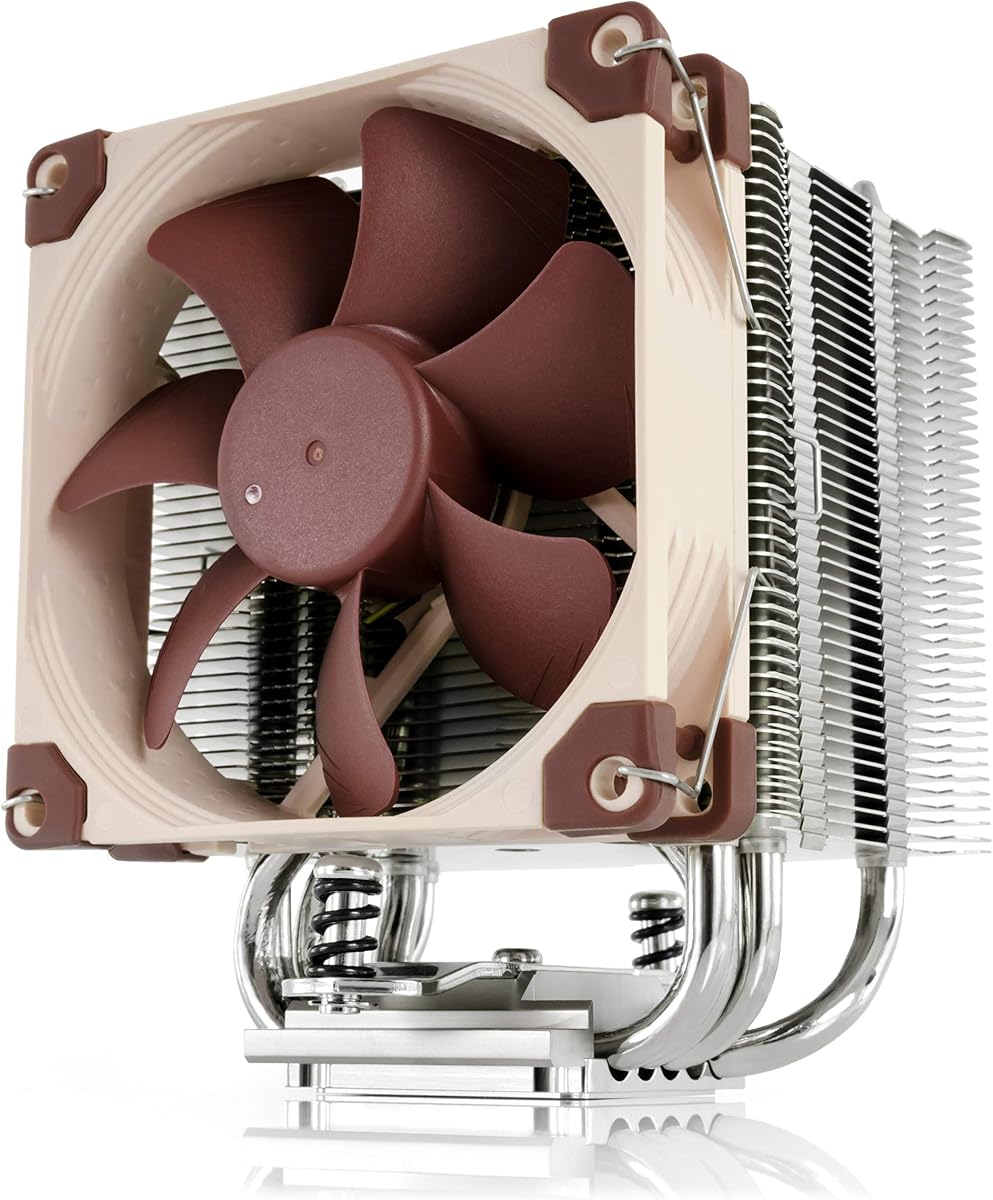
7. Noctua NH-U9S - Best Compact Premium Air

Noctua NH-U9S

Noctua NH-U9S

9.6/10★★★★★

Noctua’s NH-U9S is the premium compact air cooler in this pack for builders who need 125 mm of height clearance, clean RAM and PCIe compatibility, and quieter operation than bargain slim towers. It will not dethrone a Peerless Assassin or Dark Rock Pro 5 in raw 14700K multi-core cooling, but it often wins in small form-factor PCs where a 155 mm dual tower simply will not fit and a 360 mm AIO is impossible.

  • Compact single-tower design at only 125 mm height
  • NF-A9 92 mm PWM fan with Low-Noise Adaptor
  • SecuFirm2 mounting for LGA 1851/1700/1200/115x and AM5/AM4
Check Price →
✓ Pros
  • Excellent case, RAM, and PCIe clearance for ITX and SFF builds
  • NF-A9 fan and Low-Noise Adaptor deliver refined acoustics
  • SecuFirm2 mounting and NT-H1 paste make installs predictable
  • Six-year manufacturer’s warranty reflects Noctua’s longevity focus
  • Strong reputation for quality materials and consistent contact pressure
✕ Cons
  • 92 mm single tower cannot match 120 mm dual towers on fully unlocked 14700K loads
  • Distinctive brown colorway is polarizing in all-black or RGB builds
  • Premium pricing tier versus Thermalright value dual towers

Detailed review

The NF-A9 92 mm PWM fan is highly optimized for this heatsink, and the included Low-Noise Adaptor lets you bias the system toward silence. On a 14700K, that means you should plan a complementary strategy: quality case airflow, optional undervolt, and power limits that match the cooler’s compact mass. Do that, and the NH-U9S becomes a surprisingly calm companion for gaming and productivity in an ITX chassis. Skip the tuning, and you will hear the fan work harder than Noctua’s reputation might lead you to expect.

SecuFirm2 mounting covers Intel LGA1851, LGA1700, LGA1200, LGA115x, and AMD AM5/AM4, including offset mounting options on AMD for hotspot alignment. For the 14700K, follow the LGA 1700 SecuFirm2 steps carefully—Noctua’s hardware is precise, and rushing the standoffs is the usual DIY mistake. NT-H1 paste is included; apply a modest amount and trust the even pressure of the mount rather than drowning the IHS.

Compatibility is the NH-U9S’s superpower. It avoids overhanging RAM on most boards and stays clear of many PCIe slots, which matters in short ITX layouts where a dual-slot GPU already crowds the interior. HTPC and small living-room 14700K builds—yes, people build them for high-refresh gaming in tiny boxes—are the natural habitat for this cooler.

Thermally, rank the NH-U9S above the i70C and Gravity i2 for seriousness, and below the Peerless Assassin, SK700V-MACH, Dark Rock Pro 5, and Nautilus 360 for maximum headroom. That middle ground is valuable. You are paying for acoustic engineering, mounting confidence, and a six-year warranty more than for absolute Cinebench supremacy.

If the brown-and-beige Noctua look bothers you, chromax kits exist in the broader Noctua ecosystem, but this specific Amazon listing is the classic brown NF-A9 package. Functionally it remains one of the most trustworthy compact coolers you can put on LGA 1700 when height is the binding constraint.

Ideal 14700K scenarios

ITX gaming PCs, HTPCs, and any mid-tower with weird clearance limits where dual towers fail and you still want premium acoustics.

Setup for lower noise

Use the Low-Noise Adaptor if temps allow, set a gentle PWM curve, and consider a light undervolt. Keep intake filters clean so the 92 mm fan is not fighting dust.

Versus Assassin X120 Refined SE

The Assassin X120 offers a 120 mm fan and strong value in a slim tower. The NH-U9S offers shorter height, elite mounting, and quieter tuning for builders who prioritize polish and SFF fit.

Check Price on Amazon →

We may earn a commission at no additional cost to you.

8. SK700V-MACH - Best Feature-Rich Tower

SK700V-MACH CPU Air Cooler: 7 Heatpipes Digital CPU Cooler with 120mm MACH PWM Q

SK700V-MACH CPU Air Cooler: 7 Heatpipes Digital CPU Cooler with 120mm MACH PWM Q

9.8/10★★★★★

The SK700V-MACH takes a seven-heatpipe single-tower design and pairs it with a high-airflow MACH120 PWM fan plus a top-mounted digital display. For 14700K owners who want live temperature, usage, power, and frequency readouts without alt-tabbing into monitoring software, that screen is a genuine differentiator. Color-coded thermal alerts make it obvious when a stress test or summer ambient spike is pushing the package hard.

  • Seven-heatpipe single-tower SK700V architecture
  • MACH120 PWM fan with 500–3000 RPM ±10% range
  • Top digital display for temp, usage, power, and frequency
Check Price →
✓ Pros
  • Seven heat pipes give stronger single-tower capacity for 14700K boost loads
  • MACH120 fan offers a wide PWM range for quiet idle and high-pressure load
  • On-cooler digital display shows live CPU telemetry without opening software
  • All-metal mounting with AM5-optimized offset; Intel LGA 1700/1851 supported
  • Five-year limited warranty signals confidence in the fan and cooler design
✕ Cons
  • Display needs an open USB 2.0 header via MasterCraft control path
  • Memory slot one may need adjustments with tall RAM kits
  • Single tower still trails the best dual towers and 360 mm AIOs in extreme sustained loads

Detailed review

Cooling performance centers on the enclosed single-tower heatsink and seven heat pipes, upgraded in the MACH edition with a fan that uses a 3-phase, 10-pole, 12-slot motor and a customizable hybrid hydraulic bearing. PWM spans roughly 500–3000 RPM ±10%, which is a wider envelope than the ~1550 RPM Thermalright fans in this pack. That means you can idle quietly and still shove air when the 14700K’s E-cores join a compile. The transparent motor window and LCP-with-glass-fiber blade construction are quality flexes that also help the cooler look intentional in a black build.

The digital panel uses a pogo-pin contact and is controlled through MasterCraft with a USB 2.0 header requirement. Plan cable routing before you close the side panel—SFF boards with few USB headers may need a hub or header splitter. Once connected, the display becomes a glanceable HUD for overclockers and gamers who tweak fans mid-session.

Mounting uses an L-Rail Lock concept with durable all-metal hardware and an AM5-optimized offset for hotspot pressure; Intel LGA 1851/1700/1200/115X support covers the 14700K. The product notes that motherboard layout and memory height can require minor adjustments, especially around the first DIMM slot. Dry-fit RAM and the cooler shroud before applying paste if you use tall RGB kits.

For 14700K thermals, treat the SK700V-MACH as a high-performing single tower that can challenge lighter dual towers in gaming and mid-length productivity, especially with the aggressive top of its fan curve. Ultra-long encodes with open power limits may still favor the Dark Rock Pro 5’s dual towers or the Nautilus 360’s radiator area. Noise depends entirely on how you program that 3000 RPM ceiling—use motherboard software wisely.

Aesthetics are black-on-black with a modern shroud, which fits gaming cases better than Noctua brown for many builders. Combined with the display, the cooler becomes a focal point rather than a hidden utility part. If you want that presence plus serious heat-pipe count in a single tower, the SK700V-MACH is the pack’s feature leader.

Who should buy it

Enthusiasts who want onboard telemetry, strong seven-pipe cooling, and a wide-range PWM fan for a mid-tower 14700K gaming PC.

Installation notes

Reserve a USB 2.0 header for the display, check DIMM slot one clearance, and connect the fan to CPU_FAN for proper failsafe monitoring. Confirm LGA 1700 bracket orientation before final torque.

Versus Peerless Assassin 120 SE

Peerless Assassin offers dual-tower surface area and twin fans at a value focus. SK700V-MACH offers seven pipes, a wilder fan RPM range, and a digital HUD. Pick dual-tower simplicity or feature-rich single-tower flair based on case clearance and whether you care about the screen.

Check Price on Amazon →

We may earn a commission at no additional cost to you.

9. CORSAIR Nautilus 360 RS ARGB - Best Overall for

CORSAIR Nautilus 360 RS ARGB Liquid CPU Cooler – 360mm AIO – Low-Noise – Direct

CORSAIR Nautilus 360 RS ARGB Liquid CPU Cooler – 360mm AIO – Low-Noise – Direct

9.4/10★★★★★

The CORSAIR Nautilus 360 RS ARGB is the strongest overall cooler in this pack for an unlocked i7-14700K that you intend to run hard. A 360 mm radiator with three RS120 ARGB fans simply has more heat-exchange area than the air coolers here, which shows up in sustained all-core workloads, summer ambients, and gaming-plus-streaming sessions where package power stays elevated. CORSAIR’s pitch is simple high-performance AIO cooling with low noise—and for this CPU, that combination is what most builders actually need.

  • 360 mm all-in-one liquid cooler with three RS120 ARGB fans
  • Low-noise pump around 20 dBA; convex cold plate with pre-applied paste
  • Daisy-chain PWM and ARGB; LGA 1851/1700 and AM5/AM4
Check Price →
✓ Pros
  • 360 mm radiator area suits sustained 14700K multi-core power better than slim air
  • Quiet pump and RS120 fans keep noise competitive for liquid cooling
  • Pre-applied paste and convex cold plate speed up a clean first mount
  • Daisy-chain wiring reduces header clutter on busy motherboards
  • White RS ARGB aesthetic fits modern glass-panel builds
✕ Cons
  • Requires a case with real 360 mm radiator clearance and mounting points
  • AIO longevity and leak anxiety still deter some air-cooler purists
  • ARGB and tubing add install complexity versus a simple dual tower

Detailed review

The pump is specified around a whisper-quiet 20 dBA while maintaining high coolant flow. That matters because AIOs that cool well but whine under the desk feel like a bad trade. RS120 ARGB fans use AirGuide-style focus and Magnetic Dome bearings for static pressure against the radiator fins. Daisy-chain connections let you merge fan PWM and +5V ARGB into fewer motherboard headers, which is a quality-of-life win on boards already crowded with RGB strips and case fans.

The convex cold plate with pre-applied thermal paste is designed for strong contact on the CPU IHS and faster installs. Still clean the IHS with isopropyl if there is any residue, align the Intel LGA 1700 bracket squarely, and tighten gradually. Pre-applied paste fails most often from remounts and sideways sliding—commit to the mount once you are aligned. Tube routing should avoid sharp kinks and keep the pump orientation within CORSAIR’s guidance for your case layout.

Case compatibility is the gatekeeper. You need a chassis that officially supports a 360 mm radiator in the top or front without blocking the motherboard I/O or GPU. Front-mounted radiators can heat the CPU loop with GPU-warmed air in some layouts; top exhaust mounts are often cleaner for CPU-focused thermals if clearance above the motherboard allows. Measure thickness: fans plus radiator plus dust filters can collide with tall RAM or VRM sinks.

Versus air coolers in this pack, the Nautilus 360 wins sustained thermal headroom and usually wins aesthetics in white ARGB builds. The Dark Rock Pro 5 can challenge it on noise-normalized gaming thermals with zero leak surface area. The Peerless Assassin wins if you want almost-AIO gaming temps without radiator mounting. Choose liquid when your case is ready and your workloads are heavy; choose dual-tower air when you want simplicity.

Maintenance is mostly preventive: keep radiator fans dusted, ensure fittings stay undisturbed during GPU swaps, and listen for pump changes over years. For a 2026 14700K gaming or creator PC with a 360-ready case, the Nautilus 360 RS ARGB is the pack’s most future-proof thermal choice.

Who should pick the Nautilus 360

Builders with confirmed 360 mm clearance who run unlocked 14700K power limits, creators who encode often, and anyone who wants white ARGB liquid cooling without a maze of fan cables.

Install priorities

Mount the radiator and fans first, fill tube paths before seating the block, connect daisy-chained PWM/ARGB correctly, and verify pump header assignment in BIOS so the pump never runs in a wrong DC mode.

Versus Dark Rock Pro 5

Pick Nautilus for maximum sustained headroom and radiator aesthetics. Pick Dark Rock Pro 5 for premium air simplicity, zero coolant, and excellent acoustics in cases that cannot fit a 360 mm radiator.

Check Price on Amazon →

We may earn a commission at no additional cost to you.

10. be quiet! Dark Rock Pro 5 - Best Premium Air

be quiet! Dark Rock Pro 5 CPU Cooler

be quiet! Dark Rock Pro 5 CPU Cooler

9.4/10★★★★★

The be quiet! Dark Rock Pro 5 is the premium air-cooling answer for an i7-14700K when you want overclocking-capable thermals without an AIO. Seven copper heat pipes, a dual-tower stack with ceramic-particle black coating, and two Silent Wings PWM fans with fluid-dynamic bearings are aimed at peak CPU periods in heavily overclocked systems. That mission statement matches unlocked 14th Gen chips better than any 95W low-profile cooler in this pack.

  • Seven high-performance copper heat pipes, dual-tower design
  • Two Silent Wings FDB PWM fans with Quiet/Performance switch
  • Black ceramic-particle coating; includes thermal grease
Check Price →
✓ Pros
  • Seven heat pipes and dual Silent Wings fans excel on overclocked 14700K systems
  • Hardware Quiet/Performance switch makes thermal-acoustic tradeoffs tangible
  • Decoupled fan mounts and funnel inlet design reduce turbulence noise
  • Iconic Dark Rock look with black mounting kit for a cohesive build
  • Strong alternative to AIOs for builders who refuse liquid cooling
✕ Cons
  • Large dual-tower package needs careful case and RAM clearance checks
  • Heavier and more imposing than value dual towers like Peerless Assassin
  • Performance mode fan speeds up to ~2000 RPM can become audible under torture tests

Detailed review

Silent Wings fans use 6-pole motors and airflow-optimized blades; the front fan’s funnel-shaped inlet boosts pressure through the first tower, while decoupled mounts cut vibration. The speed switch chooses Quiet mode up to about 1500 RPM or Performance mode up to about 2000 RPM. For a living-room 14700K gaming PC, Quiet mode plus a good case is often enough. For summer rendering marathons or mild overclocks, flip to Performance and accept more airflow noise in exchange for cooler boost behavior.

Installation is thoughtfully staged: a black mounting kit with a pre-installed bridge, and a detachable mesh top cover with the middle fan that inserts from above. That design makes cable management and final seating less awkward than older dual towers where the center fan fights you. Still measure height and RAM clearance—Dark Rock coolers are substantial. Thick DIMMs may need fan adjustment or a staggered memory layout.

On the 14700K, expect excellent noise-normalized results in games and strong sustained performance for an air cooler. You may still lose a few degrees to a clean 360 mm Nautilus in the worst all-core runs, but you gain a coolant-free system with be quiet!’s acoustic tuning. Many enthusiasts prefer that trade permanently.

The visual language is unmistakable Dark Rock: matte black, mesh top, minimal RGB dependency. It suits professional workstations and stealth gaming builds alike. Included thermal grease gets you started; apply carefully and remount if contact looks uneven. Because the cooler is heavy, support the board when flipping the chassis and ensure standoffs are fully engaged.

Choose the Dark Rock Pro 5 if your case clears it and you value silence and air-cooler longevity. Choose the Peerless Assassin if you want similar dual-tower ideas for less money and do not need the Silent Wings polish. Choose the Nautilus 360 if your case is radiator-ready and you want maximum thermal margin for aggressive power limits.

Who it is for

Overclockers, quiet-PC enthusiasts, and 14700K builders who want dual-tower excellence with a hardware speed switch and premium fan engineering.

Quiet vs Performance mode

Use Quiet for daily gaming and office work. Use Performance when benchmarking, rendering, or when ambient temperatures climb. The switch is a feature—actually use it instead of leaving Performance on forever.

Versus SK700V-MACH

Dark Rock Pro 5 emphasizes dual-tower silence and brand acoustic tuning. SK700V-MACH emphasizes seven-pipe single-tower capacity plus a digital display. Pick based on whether you want classic premium air or a telemetry showpiece.

Check Price on Amazon →

We may earn a commission at no additional cost to you.

Best CPU Coolers for i7-14700K in 2026

How to Choose a CPU Cooler for the i7-14700K

Respect the chip’s real power behavior

The 14700K’s hybrid layout can draw far more than casual TDP shorthand implies when all cores boost. Size your cooler for the workloads you actually run. Gaming-only builds can thrive on strong dual-tower air. Creators who encode for hours should favor the Nautilus 360 or Dark Rock Pro 5. Low-profile 95W coolers belong only in height-limited boxes with deliberate power limits.

Confirm LGA 1700 hardware before you buy

Socket mistakes are expensive. The Gravity i2 in this pack does not support LGA 1700. The i70C does support LGA 1700 but is thermally limited. Prefer coolers that explicitly list LGA 1700 or 1851. After install, update BIOS for 14th Gen stability and set fan headers to PWM mode for 4-pin coolers and AIOs.

Measure case clearance and RAM height

Dual towers around 155 mm and large Dark Rock-class coolers need verified clearance. Slim towers like the Assassin X120 help with tall RAM. AIOs need official 360 mm mounting locations and thickness budgets. Dry-fit fans and memory before applying thermal paste whenever the build looks tight.

Air versus 360 mm liquid

Air coolers win on simplicity, fewer failure modes, and often lower idle complexity. A quality 360 mm AIO wins on sustained heat rejection and looks in glass cases. For the 14700K, both approaches work if the parts are sized correctly—the wrong choice is a tiny low-profile cooler with open power limits.

Tune before you replace

If temperatures look high, check paste mount, case intake, and motherboard power limits before assuming the cooler is defective. A mild undervolt frequently improves sustained clocks and noise more than swapping between two similar dual towers. Use stress tests and real workloads, not only a 10-second spike, to judge results.

Frequently Asked Questions

01

What is the best CPU cooler for an i7-14700K in this pack?

For most builders with a 360 mm-capable case who want maximum sustained headroom, the CORSAIR Nautilus 360 RS ARGB is the best overall pick. If you prefer premium air cooling without liquid, choose the be quiet! Dark Rock Pro 5. If you want the strongest value dual-tower air cooler, choose the Thermalright Peerless Assassin 120 SE. All three are far more appropriate than 95W low-profile options for an unlocked 14700K.

02

Can a low-profile cooler handle the i7-14700K?

Only with compromises. The Cooler Master i70C ARGB is rated around a 95W TDP class—useful in slim LGA 1700 chassis if you set strict power limits and accept reduced all-core performance. It is not a good match for fully unlocked multi-core workloads. The Thermaltake Gravity i2 is likewise a 95W-class design and, critically, does not support LGA 1700 at all, so it should not be used on a 14700K motherboard.

03

Is a 360 mm AIO necessary for the 14700K?

Not strictly. Strong dual-tower air coolers like the Peerless Assassin 120 SE and Dark Rock Pro 5 cool gaming and many creator workloads very well when case airflow is decent. A 360 mm AIO such as the Nautilus 360 becomes more compelling when you leave power limits high, encode for long sessions, live in a warm room, or simply want extra thermal margin and radiator aesthetics.

04

Will the Cooler Master Hyper 212 Black cool a 14700K?

It can for gaming-focused builds with good intake and sensible BIOS limits, thanks to four heat pipes, a copper base, and a wide-range SickleFlow PWM fan. It is not the best choice in this pack for sustained all-core work compared with dual-tower air or a 360 mm AIO. If your case clears 155 mm, the Peerless Assassin 120 SE is usually the smarter air upgrade.

05

Do I need LGA 1700 specific mounting hardware?

Yes. The 14700K uses LGA 1700 (boards may also list 1851 paths on newer coolers). Use the Intel 1700 brackets included with modern coolers such as the Hyper 212 Black, Peerless Assassin, Assassin X120, Noctua NH-U9S, SK700V-MACH, Dark Rock Pro 5, and Nautilus 360. Avoid coolers that only list older 115x/1200 sockets.

06

How important is case airflow compared with the cooler brand?

Extremely important. A dual-tower cooler in a sealed glass-front case with weak intake can lose to a simpler cooler in a mesh case with strong front-to-back flow. Dust filters, fan direction, and GPU heat placement all change 14700K package temperatures. Fix case airflow before endlessly swapping coolers of the same class.

07

Should I undervolt the 14700K instead of buying a bigger cooler?

Undervolting and setting reasonable power limits are complementary to a good cooler, not a full replacement for one. A mild undervolt can lower temperatures and fan noise on the Hyper 212, Assassin X120, or NH-U9S enough to make those coolers more enjoyable. It will not turn a 95W low-profile unit into a Dark Rock Pro 5. Ideal setups combine adequate cooling hardware with sane BIOS tuning.

08

Is the SK700V-MACH’s digital display worth it?

If you enjoy live hardware telemetry and have a free USB 2.0 header, yes—it shows temperature, usage, power, and frequency with thermal color cues without opening overlay software. If you never look inside the case and already use monitoring apps, prioritize dual-tower capacity or AIO radiator size first and treat the display as a bonus rather than the deciding feature.

09

Why is the Intel i7-14700K listed among coolers?

The product pack includes the processor as the reference CPU for this keyword. It is not a cooler. We review it to define core count, boost behavior, socket, and platform needs so the cooler recommendations stay grounded. Buy a cooler from the other entries to actually reject heat from this chip.

10

Air cooler or AIO for long-term reliability on a 14700K?

Quality air coolers like the Dark Rock Pro 5, Peerless Assassin, and Noctua NH-U9S avoid pumps and coolant. Modern AIOs such as the Nautilus 360 are widely used and convenient, but they add pump wear and installation complexity. Pick air if you want the simplest long-term mechanical story; pick a 360 mm AIO if you need the thermal margin and your case supports it well.

Conclusion

Cooling an i7-14700K well in 2026 means matching radiator or heatsink capacity to real boost behavior—not grabbing the shortest cooler that happens to list Intel in the marketing blurbs. In this pack, the CORSAIR Nautilus 360 RS ARGB is the best overall choice for sustained headroom, the be quiet! Dark Rock Pro 5 is the premium air path for quiet overclocked systems, and the Thermalright Peerless Assassin 120 SE is the value dual-tower that will satisfy most gaming builds.

Use the Hyper 212 Black, Assassin X120 Refined SE, SK700V-MACH, or Noctua NH-U9S when clearance, features, or SFF constraints demand it—and treat the Cooler Master i70C and Thermaltake Gravity i2 as specialized or legacy options that are easy to misuse on this CPU. Remember that the 14700K listing itself is the workload definition, not a cooling solution.

Measure your case, confirm LGA 1700 hardware, install with even pressure, and validate with sustained tests plus everyday gaming. A correctly sized cooler plus basic BIOS tuning will keep the 14700K boosting longer and sounding calmer than any last-minute fan swap on an undersized heatsink.