Expert Review & Guide

Best CPU Coolers for AM5 in 2026 Quiet Builds

AMD’s AM5 socket puts serious heat on the table in 2026, whether you are running a Ryzen 5 7600 for quiet gaming, a 7800X3D that spikes under heavy loads, or a 16-core chip that wants every watt pulled away from the IHS. Stock coolers and thin aftermarket sinks often leave you thermal-throttling or listening to fans scream. The right cooler for AM5 is less about brand loyalty and more about case height, RAM clearance, whether you prefer sealed liquid or dual-tower air, and how much noise you will tolerate when the CPU is fully loaded.

This roundup sticks to one product pack of ten coolers that all list AM5 support (or AM5-only hardware where noted). You will find value dual towers from Thermalright, the familiar Cooler Master Hyper 212 Black, a Corsair Nautilus 360 RS all-in-one, an AM5-exclusive single tower with a digital display, a Wraith Prism–style RGB cooler, and Noctua’s low-profile NH-L9a-AM5 plus the flagship NH-D15 G2 chromax.Black. Ratings reflect Amazon scores at research time. We do not print dollar prices because cooler pricing moves constantly by region and promotion.

Use the three top picks if you already know you want premium dual-tower silence, maximum cooling for the money, or a clean 360 mm AIO. Then scan the comparison table for height and heat-pipe or radiator size, and read each review for who should buy it, who should skip it, and the AM5-specific mount quirks that trip up first-time builders.

Top AM5 CPU Cooler Picks for Thermals, Silence, and Value

Best Value Dual Tower

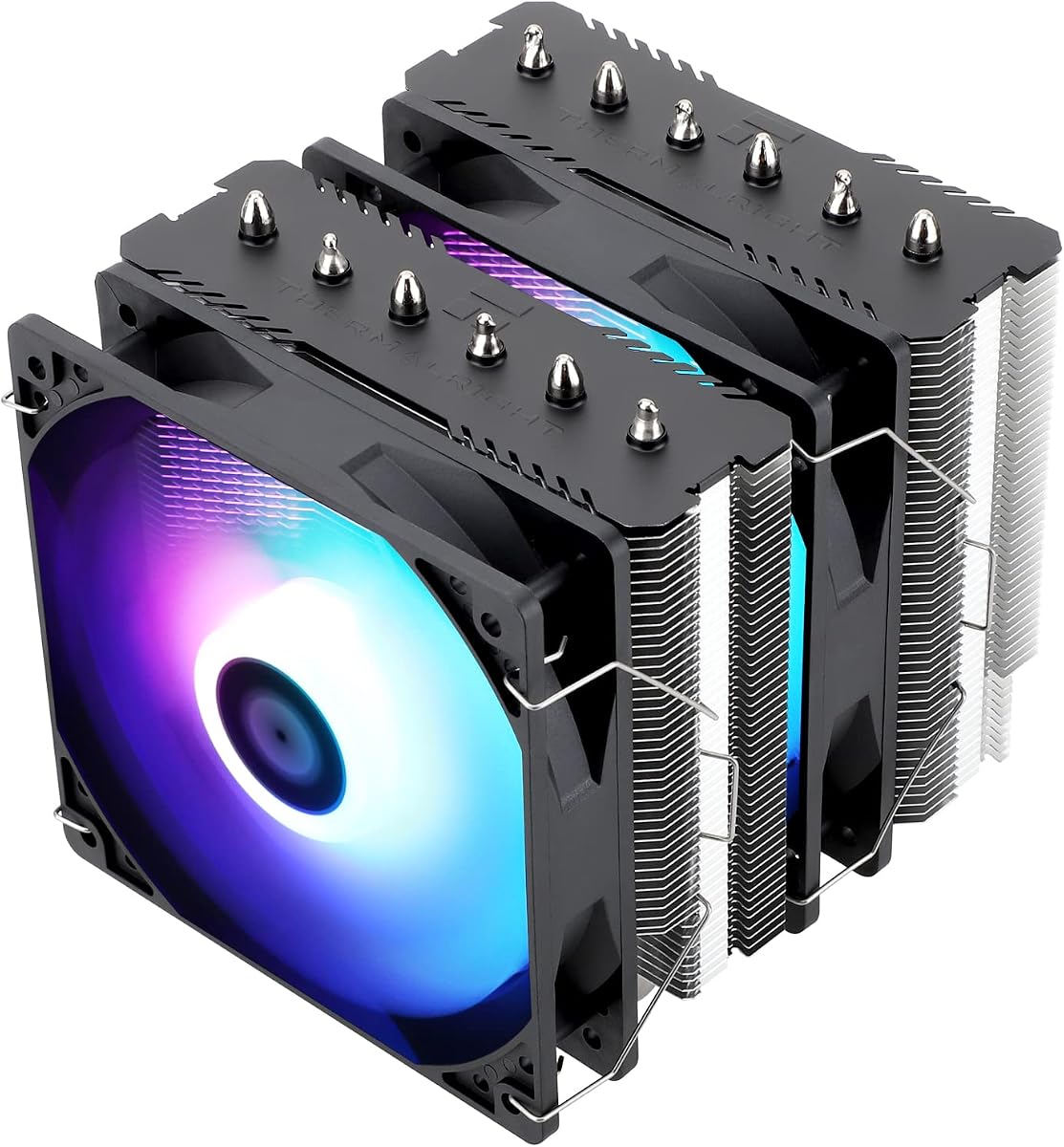
Thermalright Peerless Assassin 120 SE CPU Cooler

★★★★★9.4/10
Thermalright Peerless Assassin 120 SE CPU Cooler
  • Six AGHP heat pipes and twin TL-C12C 120 mm PWM fans for Ryzen 5 and Ryzen 7 AM5 builds
  • 155 mm dual-tower footprint that fits most mid-towers while leaving room for many tall RAM kits
  • Broad AM4/AM5 and Intel LGA support with metal fasteners and a copper base for strong heat transfer
Check Price →

As an Amazon Associate we earn from qualifying purchases. We may earn a commission at no additional cost to you.

AM5 CPU Cooler Comparison: Height, Heat Pipes, and Radiators

Compare cooler height or radiator size first against your case clearance, then heat-pipe or fan count, then lighting and special features. Specs omit prices so you can judge cooling hardware before you open a listing.

#ProductSpecificationsScore
1
  • Dual tower, 6×6 mm AGHP heat pipes
  • Twin TL-C12C 120 mm PWM, ≤25.6 dB(A)
  • 125×135×155 mm; AM4/AM5, LGA 1700/1851
9.4
2
  • Single tower, 4 heat pipes, copper base
  • SickleFlow 120 Edge PWM, 690–2500 RPM
  • 152 mm tall; AM5 and LGA 1851/1700 kits
9.4
3
  • Slim single tower, 4×6 mm AGHP pipes
  • One TL-C12C 120 mm PWM, ≤25.6 dB(A)
  • 125×71×148 mm; AM4/AM5 and modern Intel
9.4
4
  • 360 mm AIO with three RS120 fans
  • Quiet pump ~20 dBA; convex cold plate
  • AM5/AM4 and Intel LGA 1851/1700 support
9.2
5
  • Dual tower PA120 SE with ARGB fans
  • Twin TL-C12C-S PWM, ~66 CFM each
  • 155 mm height; 120–245 W TDP class claim
9.4
6
  • AM5-only single tower, 7 heat pipes
  • 120 mm FDB PWM with digital CPU display
  • Full RAM clearance; 5-year warranty claim
8.4
7
  • Wraith Prism–style copper base, 4 heat pipes
  • 95 mm RGB fan with L/H speed switch
  • AM5/AM4 and older AMD sockets via stock bracket
9.2
8
  • 37 mm low-profile AM5 cooler
  • NF-A9x14 92 mm PWM with LNA
  • 100% RAM/PCIe clearance; 6-year warranty
8.8
9
  • Dual tower, 8 heat pipes, +20% fin area
  • Twin NF-A14x25r G2 140 mm PWM fans
  • Black chromax; AM5/AM4 and Intel LGA kits
9.6
10
  • Black 37 mm low-profile AM5 cooler
  • Same NF-A9x14 slim fan and SecuFirm2
  • Ideal for SFF HTPC and quiet mini builds
8.8

1. Thermalright Peerless Assassin 120 SE - Best Value Dual

Thermalright Peerless Assassin 120 SE CPU Cooler

Thermalright Peerless Assassin 120 SE CPU Cooler

9.4/10★★★★★

The Thermalright Peerless Assassin 120 SE has become the default answer when someone asks how to cool an AM5 Ryzen without spending flagship money. Its dual aluminum towers, six 6 mm AGHP heat pipes, and pair of TL-C12C 120 mm PWM fans deliver cooling that regularly challenges older premium towers on mid-range and upper mid-range chips. For a Ryzen 5 7600, 7700, or even many 7800X3D gaming sessions, this cooler keeps boost clocks alive while the fans stay in a comfort zone that does not drown out headphones.

  • Dual tower, 6×6 mm AGHP heat pipes
  • Twin TL-C12C 120 mm PWM, ≤25.6 dB(A)
  • 125×135×155 mm; AM4/AM5, LGA 1700/1851
Check Price →
✓ Pros
  • Excellent dual-tower cooling for typical AM5 gaming chips at a value position
  • Twin PWM fans stay quiet while still moving meaningful airflow
  • Metal AMD and Intel mounting hardware in the box for AM5 installs
  • Offset-friendly tower layout leaves usable space for many RAM kits
  • Copper base and AGHP heat pipes handle sustained gaming and light creative loads
✕ Cons
  • 155 mm height needs a mid-tower or larger case with real cooler clearance
  • AMD install relies on the motherboard’s stock backplate, which is not included
  • Finish and accessories feel more utilitarian than premium Noctua kits

Detailed review

Dimensions of roughly 125 × 135 × 155 mm matter more than marketing TDP numbers. Measure from your motherboard tray to the side panel and confirm at least a few millimeters of spare height after you account for cable routing and any side-panel glass thickness. Most popular ATX mid-towers clear 155 mm without drama; compact micro-ATX boxes and some mesh cubes do not. Thermalright also notes that you should verify motherboard and case fit before you buy, which is honest advice for any dual tower.

On AM5, installation uses the board’s built-in backplate rather than a separate Thermalright plate. That is normal for many AMD air coolers, but it means you should not toss the stock AMD mounting hardware if you are upgrading from a Wraith cooler. Seat the copper base with an even pea or X of paste, tighten the metal fasteners in a cross pattern, and clip both fans so one pushes through the front tower and one pulls through the rear. The TL-C12C fans are rated around 1550 RPM with about 66 CFM and a claimed noise ceiling near 25.6 dB(A), which is quiet enough for living-room gaming PCs when case airflow is sane.

Memory clearance is better than many dual towers of the last decade, but it is not magic. Very tall RGB DIMMs in the first two slots can still kiss a fan or fin edge. If you run flamboyant heat spreaders, check slot order or plan to run the front fan slightly higher. For most mid-height DDR5 kits the Peerless Assassin 120 SE installs cleanly and leaves room to reseat modules later without removing the entire cooler.

Who should skip it? Anyone in a sub-150 mm cooler case, SFF builders who need a low-profile sink, or users chasing a fully black aesthetic with rubber-damped 140 mm fans. Those buyers should look at the Noctua NH-L9a-AM5 or NH-D15 G2 elsewhere in this guide. Everyone else building a mainstream AM5 gaming or productivity desktop will find the Peerless Assassin 120 SE hard to beat for thermal headroom per dollar of cooler spend.

In long gaming sessions and mixed Cinebench-style workloads, expect the fans to ramp smoothly under PWM motherboard control rather than slamming to full speed. Pair the cooler with a front-intake mesh case and a rear exhaust fan so the dual towers are not recirculating warm GPU air. That case-level tuning matters as much as heat-pipe count once you leave stock-cooler territory.

Who should buy the Peerless Assassin 120 SE

Choose this cooler if you are building or upgrading an AM5 system in a standard mid-tower and want dual-tower thermals without stepping up to a 360 mm AIO. It is especially strong for Ryzen 5 and Ryzen 7 gaming chips, quiet office PCs that still need headroom, and builders who want metal mounting parts without paying for chromax cosmetics.

AM5 install notes

Keep the motherboard’s AMD backplate in place, use the included metal fasteners for AM5, and confirm fan cable reach to a CPU_FAN or CPU_OPT header. If your board has only one header, use a splitter and set a sane BIOS fan curve so both fans ramp together under load.

Versus the Assassin X120 Refined SE

The slim Assassin X120 Refined SE in this same pack is quieter in tiny cases and easier on RAM, but it cannot match the Peerless Assassin’s dual-tower heat capacity on hotter AM5 chips. Pick the X120 for compact builds; pick the Peerless Assassin when your case clears 155 mm and you want the stronger cooler.

Check Price on Amazon →

We may earn a commission at no additional cost to you.

2. Cooler Master Hyper 212 Black - Best Familiar Single

Cooler Master Hyper 212 Black CPU Air Cooler

Cooler Master Hyper 212 Black CPU Air Cooler

9.4/10★★★★★

Cooler Master’s Hyper 212 family is the cooler many PC builders learned on, and the Hyper 212 Black update keeps that accessibility while adding clearer AM5 and LGA 1851/1700 bracket support. Four heat pipes and a copper base target AMD R7 and Intel i7 class chips for everyday gaming and productivity. It will not out-cool a Peerless Assassin dual tower or a Noctua NH-D15 G2 on a fully loaded Ryzen 9, but it remains a sensible step up from stock for mid-range AM5 parts in cases that prefer a slimmer single tower.

  • Single tower, 4 heat pipes, copper base
  • SickleFlow 120 Edge PWM, 690–2500 RPM
  • 152 mm tall; AM5 and LGA 1851/1700 kits
Check Price →
✓ Pros
  • Redesigned brackets simplify AM5 and modern Intel mounting
  • 152 mm height fits a wide range of mid-towers and some smaller cases
  • SickleFlow 120 Edge fan covers a broad 690–2500 RPM PWM range
  • Thermal paste included for a straightforward first install
  • Proven Hyper 212 lineage that many builders already understand
✕ Cons
  • Four heat pipes trail dual-tower six- and eight-pipe coolers on hot Ryzen chips
  • Single-fan design has less headroom for sustained multi-core loads
  • Black look is clean but not as stealth-finished as chromax Noctua towers

Detailed review

At about 152 mm tall, the Hyper 212 Black clears more chassis than 155–165 mm dual towers. That small difference matters in budget cases with optimistic cooler clearance charts. The SickleFlow 120 Edge fan uses dynamic PWM from roughly 690 to 2500 RPM, so you can set a quiet idle curve in the BIOS and still have airflow when a game or compile spikes CPU power. Noise at the top of the RPM range is more audible than Thermalright’s capped ~1550 RPM fans, so take the time to tune the curve instead of leaving a default aggressive profile.

Installation is one of the Hyper 212 Black’s real selling points. Cooler Master redesigned the brackets specifically to simplify AM5 and current Intel platforms, and the kit includes thermal paste. Mount the backplate hardware as instructed, apply paste to the IHS, seat the tower so the fan exhausts toward the rear case fan, and verify that tall DIMMs do not collide with the fan frame. Compared with older Hyper 212 kits that frustrated first-timers, this revision is less fiddly.

Cooling performance lands in the “good enough for most 65–105 W class gaming” zone when case airflow is decent. Pair it with a mesh front panel and avoid stuffing the case with warm stagnant air from a choked GPU intake path. If you plan heavy all-core rendering on a 12- or 16-core AM5 chip, skip ahead to the Peerless Assassin, Phantom-class dual towers, Corsair 360 AIO, or NH-D15 G2. The Hyper 212 Black is for builders who want a known name, easy brackets, and modest height more than absolute thermal leadership.

Aesthetics are straightforward matte black with a modern SickleFlow fan. There is no ARGB light show, which many office and living-room builds will appreciate. If you want RGB on a similar budget dual-tower platform, the Peerless Assassin 120 SE ARGB in this pack is the closer match. If you want RGB on a stock-like AMD look, the Wraith Prism–style cooler listed later covers that niche instead.

Longevity depends on dust maintenance like any air cooler. Every few months, power down and blow dust out of the fin stack and fan blades so the Hyper 212 Black keeps its original delta-T. The wide RPM fan can mask a dusty sink for a while by spinning faster, which is exactly when noise creeps up and people wrongly blame the cooler design.

Best fit for the Hyper 212 Black

Buy this when you want a simple single-tower upgrade for a Ryzen 5 or modest Ryzen 7 AM5 chip, value a familiar Cooler Master mount, and need roughly 152 mm of clearance rather than a full dual-tower footprint.

Noise tuning tip

Cap the SickleFlow fan near mid RPM in the BIOS for daily use, then allow a steeper ramp only above your typical gaming temperature. That preserves the Hyper 212’s reputation for quiet cooling without leaving performance on the table during short spikes.

Check Price on Amazon →

We may earn a commission at no additional cost to you.

3. Thermalright Assassin X120 Refined SE - Best Slim Single

Thermalright Assassin X120 Refined SE CPU Air Cooler

Thermalright Assassin X120 Refined SE CPU Air Cooler

9.4/10★★★★★

The Thermalright Assassin X120 Refined SE is the slim sibling in Thermalright’s Assassin lineup, built for builders who need AM5 compatibility without a 135 mm-deep dual tower. At roughly 125 × 71 × 148 mm and about 0.645 kg, it clears space around DDR5 modules and stays under the height limit of many mid-size cases. Four 6 mm AGHP heat pipes and a single TL-C12C PWM fan handle moderate Ryzen heat loads with the same quiet fan tuning Thermalright uses on its larger SE coolers.

  • Slim single tower, 4×6 mm AGHP pipes
  • One TL-C12C 120 mm PWM, ≤25.6 dB(A)
  • 125×71×148 mm; AM4/AM5 and modern Intel
Check Price →
✓ Pros
  • Narrow 71 mm width plays nicely with tall RAM and dense VRM heatsinks
  • 148 mm height fits many mid-size cases that reject thicker dual towers
  • Same quiet TL-C12C PWM fan family as larger Thermalright coolers
  • AGHP heat pipes help orientation flexibility on AM5 boards
  • Light package weight is easier on smaller motherboards during transport
✕ Cons
  • One tower and four pipes cannot match Peerless Assassin dual-tower headroom
  • Not ideal for heavily overclocked or high-core-count AM5 CPUs
  • Aluminum cover look is plain if you want a showpiece cooler

Detailed review

AM5 and AM4 mounts are included alongside a long list of Intel sockets through LGA 1700 and 1851. That makes the X120 Refined SE a practical spare cooler if you jump between platforms, though this guide focuses on AM5. Installation is typical Thermalright metal-hardware fare: secure the bracket, apply paste, seat the base evenly, and clip the 120 mm fan so it exhausts toward the rear of the case. The fan’s ~1550 RPM and ≤25.6 dB(A) claim keep living-room PCs pleasant when you are not hammering all cores.

Thermally, treat this as a strong stock-cooler replacement and a good match for 65 W to mid-power gaming chips, not as a dual-tower substitute. A Ryzen 5 7600 or similar parts that spend most of their time in games will be comfortable. A 9950X-class chip in a sustained all-core render will push the single tower harder and may need a more aggressive fan curve. If your workload looks like that, step up to the Peerless Assassin 120 SE or the NH-D15 G2.

The slim width is the feature that sells the cooler. Tall RGB RAM, chunky M.2 armor, and wide VRM sinks on gaming AM5 boards often collide with dual-tower front fans. The Assassin X120’s 71 mm depth largely sidesteps that fight. You also get better access for cable routing near the CPU socket, which matters in cramped micro-ATX layouts.

Build quality is in line with other Thermalright SE products: functional aluminum fins, a cover on top, and industrial-minded fan bearings rated for long service life. It will not win a beauty contest against chromax Noctua or ARGB Peerless Assassin models, but it will win on fitment in awkward boards. Dust the fins periodically; a slim tower clogs less volume than a dual tower but still loses efficiency when the intake side mats over.

Consider the X120 Refined SE as the “default quiet slim tower” in this AM5 pack. It sits between the Hyper 212 Black’s classic single-tower role and the Peerless Assassin’s dual-tower muscle, with a narrower profile than both when RAM clearance is the bottleneck.

When the slim tower wins

Pick the Assassin X120 Refined SE for micro-ATX and mid-tower builds with tall DDR5 kits, for HTPC-like quiet boxes that still use a full ATX board, and for AM5 chips that do not need dual-tower capacity.

Case height checklist

Confirm at least 150 mm of CPU cooler clearance so the 148 mm tower plus any manufacturing tolerance fits. If your case only lists 140 mm, look at the Noctua NH-L9a-AM5 instead of forcing a 148 mm cooler.

Check Price on Amazon →

We may earn a commission at no additional cost to you.

4. CORSAIR Nautilus 360 RS - Best 360mm AIO

CORSAIR Nautilus 360 RS Liquid CPU Cooler – 360mm AIO – Low-Noise – Direct Mothe

CORSAIR Nautilus 360 RS Liquid CPU Cooler – 360mm AIO – Low-Noise – Direct Mothe

9.2/10★★★★★

The CORSAIR Nautilus 360 RS is the liquid option in this AM5 pack for builders who want radiator area instead of dual aluminum towers. A 360 mm AIO with three RS120 fans can hold lower temperatures on high-power Ryzen chips during long encodes, while the pump is engineered to stay near 20 dBA so the loop does not hum through a quiet room. If your case already supports a top or front 360 mm mount, this cooler is the cleanest path in the pack to AIO-class headroom.

  • 360 mm AIO with three RS120 fans
  • Quiet pump ~20 dBA; convex cold plate
  • AM5/AM4 and Intel LGA 1851/1700 support
Check Price →
✓ Pros
  • 360 mm radiator gives high-core-count AM5 chips real thermal headroom
  • Pump noise targeted around a whisper-quiet 20 dBA
  • RS120 fans with AirGuide and Magnetic Dome bearings for radiator static pressure
  • Daisy-chain PWM wiring reduces cable clutter on busy AM5 boards
  • Pre-applied paste and convex cold plate speed up a clean first mount
✕ Cons
  • Requires a case with true 360 mm radiator mounts and good exhaust paths
  • AIO maintenance mindset differs from set-and-forget air coolers
  • Heavier pump block needs careful AM5 mounting torque to avoid uneven contact

Detailed review

Corsair’s cold plate is slightly convex with thermal paste pre-applied in an optimized pattern. That helps the plate mate with the AM5 IHS and removes one messy step for first-time AIO installs. Still wipe the CPU clean, check paste coverage after a test mount if you are meticulous, and follow the included AM5 bracket sequence so the block sits flat. Uneven mounting is the most common reason a new AIO looks worse than a mid-tier air cooler on paper.

The RS120 fans are the other half of the story. Radiators need static pressure more than open-air CFM, and Corsair pairs AirGuide styling with Magnetic Dome bearings aimed at durable, low-noise spinning. Daisy-chain the fans to a single motherboard PWM header to keep the cable kit tidy—especially welcome on AM5 boards already crowded with RGB hubs, USB headers, and dual M.2 lines. Set a shared fan curve that ramps with coolant or CPU temperature rather than pinning all three fans at 100 percent.

Case compatibility is non-negotiable. A 360 mm radiator plus thick fans needs documented mount space; many mid-towers advertise 360 mm support only in one orientation, and GPU length can conflict with front-mounted radiators. Prefer a top mount exhausting heat out of the case when your chassis allows it, and keep tubing routes from kinking or resting on sharp shroud edges. Tube management is part of cooling performance because restricted flow shows up as higher delta-T under load.

Compared with the Peerless Assassin 120 SE, the Nautilus trades mechanical simplicity for radiator capacity and a cleaner look around tall RAM. There is no dual-tower fin mass beside your DIMMs, which showbuilders love. Compared with the NH-D15 G2, the AIO can win on peak thermals in well-ventilated cases but introduces pump longevity and eventual replacement considerations that air coolers largely avoid. Pick liquid when your case is AIO-ready and your CPU runs hot sustained loads; pick the NH-D15 G2 when you want decade-minded air cooling with premium fans.

AM5 and AM4 brackets are covered alongside Intel LGA 1851 and 1700, so the cooler can move with you if you dual-boot platforms or upgrade later. For this guide’s focus, confirm the AM5 standoffs and backplate orientation against Corsair’s current diagram before you tighten anything. After install, watch idle and load temperatures for the first week; a rising idle floor can indicate a mount issue rather than a defective pump.

Who should choose the Nautilus 360 RS

Ideal for high-core AM5 workstations and gaming PCs in cases with proven 360 mm mounts, builders who want RAM clearance without dual towers, and anyone prioritizing a low-noise pump with daisy-chained RS fans.

Air versus this AIO

Stay on air with the Peerless Assassin or NH-D15 G2 if your case lacks radiator space, you prefer zero pump parts, or you want maximum reliability with minimal tubing. Choose the Nautilus when radiator real estate is available and sustained multi-core heat is the priority.

Setup checklist

Mount radiator and fans first, then the AM5 block; fill no reservoirs because this is a sealed AIO; connect pump to a powered header that will not sleep at idle; daisy-chain fans; verify BIOS sees pump and fan RPM before you close the side panel.

Check Price on Amazon →

We may earn a commission at no additional cost to you.

5. Thermalright Peerless Assassin 120 SE ARGB - Best ARGB Dual

Thermalright Peerless Assassin 120 SE ARGB CPU Air Cooler

Thermalright Peerless Assassin 120 SE ARGB CPU Air Cooler

9.4/10★★★★★

The Peerless Assassin 120 SE ARGB is the light-up twin of the value dual tower that opens this list. You still get six AGHP heat pipes, a dual-tower aluminum stack about 155 mm tall, and twin 120 mm PWM fans in the TL-C12C-S ARGB flavor. Thermalright positions the cooler in a roughly 120–245 W TDP performance class, which covers the AM5 gaming chips most people actually buy. If you want Peerless Assassin thermals and a tempered-glass light show, this is the pack’s direct answer.

  • Dual tower PA120 SE with ARGB fans
  • Twin TL-C12C-S PWM, ~66 CFM each
  • 155 mm height; 120–245 W TDP class claim
Check Price →
✓ Pros
  • Same dual-tower Peerless Assassin cooling recipe with ARGB lighting
  • TL-C12C-S fans keep airflow near 66 CFM with addressable lighting
  • AGHP six-pipe stack suits mainstream and upper mid-range AM5 chips
  • Aluminum cover and black tower fit most tempered-glass gaming cases
  • AM4/AM5 and wide Intel socket coverage in one kit
✕ Cons
  • ARGB cables add another header or hub dependency on the motherboard
  • Lighting fans can show dust more readily in glass showcases
  • Still a 155 mm cooler that needs mid-tower clearance like the non-RGB SE

Detailed review

Fan specs stay familiar: about 1500 RPM ±10%, roughly 66 CFM, and a claimed noise level at or under 25.6 dB(A). The ARGB version is not meant to be a screaming RGB toy; it is meant to cool first and glow second. Sync the lighting to your ASUS, MSI, Gigabyte, or ASRock ARGB header with the correct 5 V connector orientation, or use a small ARGB hub if your board is short on headers. Keep PWM fan power on CPU_FAN/CPU_OPT so lighting failures never stop the fans from spinning.

Mounting on AM5 mirrors the non-RGB Peerless Assassin: use the motherboard backplate, install the metal fasteners, and mind RAM height under the front fan. The dual-tower layout still leaves intentional room for many memory kits, but the tallest showpiece DIMMs can interfere. If lighting is mandatory and clearance is tight, consider whether a 360 AIO with RAM-open space around the socket is easier than shrinking RGB DIMMs.

Performance expectations should match the standard SE: excellent for Ryzen 5/7 gaming, capable on many Ryzen 9 loads with good case airflow, and quieter than stock Wraith coolers by a wide margin when fans are curve-tuned. The ARGB fans do not magically cool more than the non-RGB TL-C12C set; buy ARGB for aesthetics, not for a thermal leap. If you prefer a matte black no-light build, save yourself the extra cables and take the original Peerless Assassin 120 SE.

At roughly 0.97 kg for the ARGB package, the cooler is still manageable on ATX and sturdy micro-ATX boards. During shipping of a finished PC, support the cooler or remove the fans if you are paranoid about socket stress—good practice for any heavy dual tower. After a few months, clean the lit fan blades; dust on translucent blades is more visible than on opaque black fans and can unbalance a blade if left thick.

In short, the Peerless Assassin 120 SE ARGB is the showbuilder’s value dual tower for AM5. It keeps the series’ cooling reputation and adds addressable lighting without forcing you into an AIO. Pair it with a mesh case, a sensible fan curve, and motherboard lighting software you already use.

ARGB versus plain SE

Choose ARGB when the PC is visible and you already sync strips and fans to a 5 V header. Choose the plain SE when you want identical cooling with fewer cables and a subtler look.

Lighting setup tip

Connect both ARGB fans to the same controlled header or hub channel so colors match, and label PWM versus ARGB plugs during cable routing so you never plug a 5 V LED cable into a 12 V fan header.

Check Price on Amazon →

We may earn a commission at no additional cost to you.

6. SK700V AM5 CPU Cooler - Best AM5-Only Display Cooler

SK700V AM5 CPU Cooler

SK700V AM5 CPU Cooler

8.4/10★★★★☆

The SK700V is the niche specialist of this roundup: an AM5-only single-tower air cooler with seven heat pipes, a digital status display, and a mounting approach built around AMD’s current socket. If you know you are staying on AM5 and you want live CPU metrics on the cooler itself, this model tries to combine utility and uniqueness that generic dual towers do not offer. The tradeoff is platform lock-in and a shorter track record than Thermalright Peerless Assassin or Noctua hardware.

  • AM5-only single tower, 7 heat pipes
  • 120 mm FDB PWM with digital CPU display
  • Full RAM clearance; 5-year warranty claim
Check Price →
✓ Pros
  • Seven heat pipes in a single-tower layout aimed at AM5 heat loads
  • Digital display shows temperature, load, and frequency via software
  • Full RAM clearance keeps tall DDR5 kits and RGB modules unobstructed
  • 120 mm FDB PWM fan with wide 500–2200 RPM range and near-zero RPM mode
  • Anti-bend bracket support and a lengthy five-year warranty claim
✕ Cons
  • AM5 exclusive—cannot move to Intel or older AMD sockets
  • Listed as mechanically incompatible with MSI MAG B850M Mortar WiFi
  • Lower aggregate rating than the big Thermalright and Noctua names in this pack

Detailed review

Compatibility notes are unusually specific and important. Socket support is AMD AM5 only, and the listing calls out mechanical incompatibility with the MSI MAG B850M Mortar (WIFI). Read that twice before you buy if that board is in your build plan. The cooler’s bracket is also described as helping support radiator weight and reduce CPU bend risk—install with the motherboard horizontal, not vertical in a case, during the mount process so the socket is not stressed oddly.

The digital display is the headline feature. Through Sudokoo Control Center MasterCraft on Windows 10 or 11, the screen can show real-time temperature in °C or ℉, load, and frequency. That is genuinely useful for overclockers and enthusiasts who glance at the case instead of a monitoring overlay. It is less useful if you run Linux exclusively or refuse vendor utilities; confirm software expectations before you choose this cooler purely for the screen.

Cooling hardware underneath the gimmick is more serious than a toy: seven heat pipes, a 120 mm FDB PWM fan from about 500 to 2200 RPM ±10%, and a 0 RPM mode under very low PWM loads for near-silent idle. Full RAM freedom is explicitly marketed, which addresses the number-one dual-tower complaint on AM5 gaming boards with tall heat spreaders. Tool-free slide-in fan mounting aims to make cleaning and reinstalls less annoying than wire clips that fight you.

Thermally, a seven-pipe single tower can outperform older four-pipe Hyper 212–class coolers on AM5, especially with the fan’s higher RPM ceiling, but it still is not an eight-pipe dual-tower NH-D15 G2. Use it for visible gaming PCs and enthusiast mid-range to upper mid-range chips where the display matters. For silent maximum cooling without software, the Noctua NH-D15 G2 or Peerless Assassin remain safer mainstream picks.

The five-year warranty claim is a confidence signal unusual at this niche of the market. Keep proof of purchase and understand that AM5 exclusivity means the cooler’s second life on a future Intel build is zero. Rating sits at 4.2 in the pack data—respectable but lower than the 4.7–4.8 leaders—so read recent owner feedback about your exact motherboard family before you commit.

Buy only if AM5-locked is fine

The SK700V makes sense when you will stay on AM5 for years, want on-cooler telemetry, need zero RAM interference, and have verified your motherboard is not on the incompatibility note.

Software and OS note

Plan on Windows 10/11 for full display control via MasterCraft. If you need the cooler to be fully useful without vendor apps, prioritize Noctua or Thermalright models that do not depend on a screen.

Install orientation reminder

Mount the cooler while the motherboard is flat on a bench. Vertical case installs during the fastening stage are discouraged by the manufacturer guidance summarized in the listing.

Check Price on Amazon →

We may earn a commission at no additional cost to you.

7. Wraith Prism-Style Cooler - Best Stock-Style RGB Cooler

CPU Wraith Cooler Prism Aluminum Heat Sink Copper Core Base 4-Pin PWM 95mm Fan P

CPU Wraith Cooler Prism Aluminum Heat Sink Copper Core Base 4-Pin PWM 95mm Fan P

9.2/10★★★★★

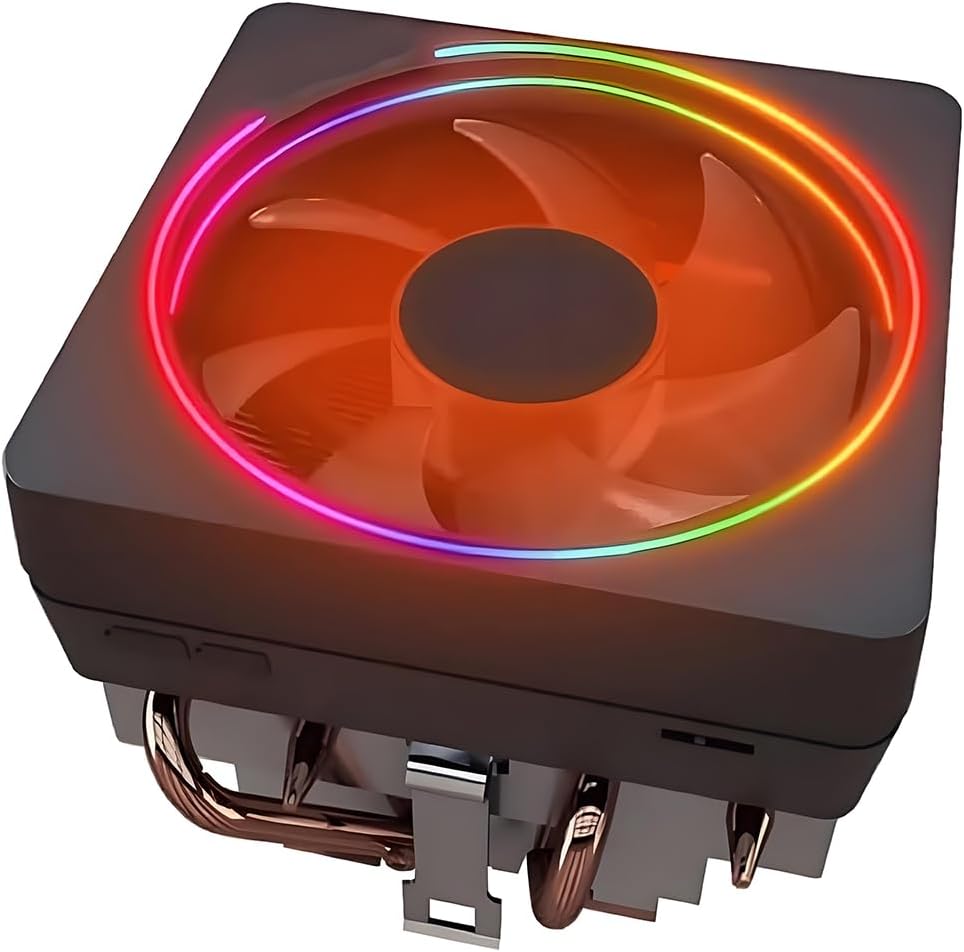
This Wraith Prism–style cooler targets builders who want the classic AMD RGB ring aesthetic on AM5 without hunting for used stock coolers. It combines an aluminum heatsink, pure copper base, and four direct-contact 6 mm copper heat pipes with a 95 mm RGB fan. Pre-applied silicone paste means you can mount straight to the CPU after peeling protection, using the AMD bracket already present on most AM5 boards. That workflow feels closer to installing a boxed Ryzen cooler than assembling a dual-tower kit.

  • Wraith Prism–style copper base, 4 heat pipes
  • 95 mm RGB fan with L/H speed switch
  • AM5/AM4 and older AMD sockets via stock bracket
Check Price →
✓ Pros
  • Familiar Wraith Prism look with copper base and four 6 mm heat pipes
  • Pre-applied thermal paste for fast AM5 drop-in mounting
  • RGB fan and logo control via USB header cable and software options
  • L/H switch balances quiet low-speed mode and high-airflow mode
  • Uses the standard AMD bracket already on most AM5 motherboards
✕ Cons
  • 95 mm fan and stock-like stack trail 120 mm dual towers on hot chips
  • Not the right tool for high-TDP all-core AM5 workloads
  • RGB and USB control add cables compared with simple PWM-only coolers

Detailed review

Compatibility spans AM5 and AM4 plus a long list of older AMD sockets, which is handy if you keep spare coolers across upgrades. The listing calls out fitment for many Ryzen chips including popular 5000- and 7000-era parts. Always confirm your exact CPU’s heat load: a cooler in this form factor is ideal for moderate chips and disappointing for top-bin all-core monsters that want a Peerless Assassin or 360 mm AIO.

The fan’s L/H switch is a practical touch. Low-speed mode targets roughly 1000–2000 RPM with a quiet ~22 dBA claim for everyday use, while high-speed mode reaches up to about 2800 RPM and around 45 CFM when you need more airflow. Use low for office and light gaming; flip to high only when temperatures climb. PWM still governs speeds within the selected band via the 4-pin connector, so motherboard curves remain useful.

RGB is the reason many people buy a Prism-style unit. Transparent blades and a logo ring can sync through motherboard software or Wraith Prism–oriented utilities when you connect the included USB header cable. That enables independent control of logo and fan ring effects. If you hate RGB, this is the wrong cooler—buy the Hyper 212 Black or a Noctua chromax model instead and skip the light plumbing.

Expect thermals in the stock-upgrade class: clearly better than a bare IHS, competitive with AMD’s better boxed coolers, and well behind the dual-tower and 360 AIO options ranked above for sustained loads. Case airflow still matters; a sealed panel case will make any 95 mm cooler sound busier. Keep the heatsink dust-free so the copper heat pipes can do their job.

Service messaging on the listing emphasizes inspection before shipping and responsive support. As with any marketplace cooler that clones a famous silhouette, buy from a reputable seller fulfillment path and inspect the base flatness on arrival. For AM5 builders who specifically want that Prism look in a new sealed box, this pack entry fills the niche the big dual towers ignore.

Right chip, right cooler

Pair this cooler with moderate AM5 CPUs and RGB-forward cases. Step up to Thermalright dual towers or Corsair’s 360 AIO when your processor’s all-core power or noise targets outgrow a 95 mm stock-style fan.

Cable plan

Budget motherboard headers for a 4-pin PWM fan cable plus a USB header for full programmable lighting. Without the USB link you may be limited to simpler lighting behavior depending on how the unit is wired.

Check Price on Amazon →

We may earn a commission at no additional cost to you.

8. Noctua NH-L9a-AM5 - Best Low-Profile AM5 Cooler

Noctua NH-L9a-AM5

Noctua NH-L9a-AM5

8.8/10★★★★☆

The Noctua NH-L9a-AM5 exists because small form factor AM5 builds cannot swallow a 155 mm Peerless Assassin. At 37 mm total height, this premium low-profile cooler fits HTPC shells and SFF cases where a normal tower would hit the side panel. Noctua revised the L9a specifically for AMD’s AM5 (LGA1718) platform and kept the tailored footprint that clears RAM and PCIe slots on ITX, Micro-ATX, and ATX AM5 boards—something generic low-profile coolers often fail.

  • 37 mm low-profile AM5 cooler
  • NF-A9x14 92 mm PWM with LNA
  • 100% RAM/PCIe clearance; 6-year warranty
Check Price →
✓ Pros
  • Only 37 mm tall for SFF and HTPC AM5 builds
  • Tailored footprint promises full RAM and PCIe clearance on AM5 boards
  • NF-A9x14 slim fan with Low-Noise Adaptor and PWM control
  • NT-H1 paste and SecuFirm2 mounting included
  • Six-year Noctua warranty and long award history behind the L9 lineage
✕ Cons
  • Designed for moderate heat loads, not high-TDP Ryzen flagships under sustained load
  • Classic brown Noctua colors clash with all-black theme builds
  • Smaller fan cannot match dual-tower or 360 AIO noise-normalized thermals on hot chips

Detailed review

Cooling comes from a dense low heatsink and the award-winning NF-A9x14 slim 92 mm fan. PWM automatic control plus a Low-Noise Adaptor let you prioritize silence at idle and still have headroom when a game loads the CPU. Noctua is frank that this is a deluxe choice for Ryzen processors with moderate heat load—examples in the listing include chips in the 7900, 7700, and 7600 class. A heavily overclocked or power-hungry 16-core part belongs on a larger cooler.

In the box you get NT-H1 thermal paste and the SecuFirm2 mounting system aimed at straightforward AM5 installs. That kit quality is a big part of why people pay Noctua money even when the heatsink is tiny: the mount feels precise, the fan is refined, and the six-year warranty backs the package. Installation in an ITX sandwich case still requires patience with cable paths, but the cooler itself will not fight DIMM slots.

Noise character is classic Noctua: smooth bearing sound rather than harsh blade turbulence when the fan is kept in a sane RPM band. In a living-room HTPC, that refinement matters more than shaving two degrees off a gaming desktop that already has a dual tower. Combine the NH-L9a-AM5 with strong case intake and avoid placing the mini PC in a closed cabinet if you want the best temperatures from a 37 mm cooler.

The brown-and-beige Noctua palette is polarizing. If your build is all black, jump to the chromax.Black twin later in this guide. If you like the trademark Noctua look or the cooler will be hidden in an opaque SFF shell, the standard NH-L9a-AM5 is the reference low-profile pick. Ratings around 4.4 reflect that buyers who ignore the moderate-TDP guidance can be disappointed, while SFF users who match chip to cooler tend to be loyal.

Versus the Hyper 212 Black or Assassin X120, the L9a wins on height and guaranteed AM5 SFF fitment, not on absolute cooling. Versus the NH-D15 G2, it is a different product category entirely. Buy the L9a when the case dictionary says “low profile only,” and buy the G2 when you have a mid-tower and a hot chip.

Ideal AM5 partners

Best with efficient Ryzen 5 and many Ryzen 7 non-X or lower-TDP parts in SFF cases. Check Noctua’s compatibility guidance for your exact CPU before expecting quiet full-load behavior on higher-power SKUs.

SFF airflow reminder

A low-profile cooler needs help from the case. Keep intake filters clean and ensure the GPU or sandwich layout is not blanketing the NH-L9a with exhaust air.

Check Price on Amazon →

We may earn a commission at no additional cost to you.

9. Noctua NH-D15 G2 chromax.Black - Best Premium Dual Tower

Noctua NH-D15 G2 chromax.Black Premium Dual Tower CPU Cooler for AMD AM5/AM4 and

Noctua NH-D15 G2 chromax.Black Premium Dual Tower CPU Cooler for AMD AM5/AM4 and

9.6/10★★★★★

The Noctua NH-D15 G2 chromax.Black is the premium air-cooling centerpiece of this AM5 roundup. It improves on the iconic NH-D15 with eight heat pipes, roughly 20% more surface area, and new NF-A14x25r G2 140 mm fans. Noctua markets it for demanding Ryzen parts such as 9800X3D, 9950X3D, 9900X3D, 9950X, 7950X, and 7800X3D class chips, as well as hot Intel flagships. If you want AIO-rivaling quiet thermals without a pump, this is the pack’s top air cooler.

  • Dual tower, 8 heat pipes, +20% fin area
  • Twin NF-A14x25r G2 140 mm PWM fans
  • Black chromax; AM5/AM4 and Intel LGA kits
Check Price →
✓ Pros
  • Second-generation NH-D15 with eight heat pipes and more fin surface for elite quiet cooling
  • NF-A14x25r G2 140 mm fans with speed-offset, LNAs, and PWM finesse
  • All-black chromax finish suits modern AM5 gaming aesthetics
  • NT-H2 paste and Torx SecuFirm2+ kit with screwdriver included
  • Explicitly called out for high-end Ryzen X3D and multi-core chips
✕ Cons
  • Large dual-tower footprint needs careful RAM and case clearance planning
  • Premium positioning costs more than Thermalright value dual towers
  • Two 140 mm fans can still compete with tall memory when both are installed

Detailed review

The chromax.Black treatment replaces classic brown Noctua colors with a stealth finish that matches black AM5 motherboards, dark GPUs, and minimalist cases. Performance focus remains first: dual G2 fans use speed-offset for acoustic fine-tuning, Low-Noise Adaptors for quieter operation, and PWM for automatic control that stays near silent at idle while delivering maximum efficiency under load. That fan stack is a large part of why NH-D15 generations keep winning enthusiast recommendations.

Clearance is the practical constraint. The offset design with recessed lower fins helps clear the top PCIe x16 slot on most current motherboards. RAM clearance is about 59 mm in single-fan mode and about 32 mm with both fans installed—check Noctua’s Compatibility Centre for your board and DIMM kit. Many builders run a single fan temporarily while seating tall RAM, then reinstall the second fan, or choose lower-profile memory from the start.

SecuFirm2+ mounting with a Torx NM-SD1 screwdriver and NT-H2 paste makes the install feel premium. AM5 and AM4 are covered alongside Intel LGA 1851, 1700, 1200, and 115x, so the cooler is a long-term tool across platforms. Tighten carefully in a cross pattern; Noctua mounts are secure when done right and unforgiving of rushed uneven pressure. After mounting, attach fans, route PWM cables cleanly, and set a fan curve that uses the G2 fans’ efficiency instead of pinning them at full RPM.

Against the Peerless Assassin 120 SE, the NH-D15 G2 typically wins on noise-normalized performance, fan quality, mount experience, and warranty peace of mind, while the Thermalright wins on pure value. Against the Corsair Nautilus 360 RS, the Noctua avoids pump noise and AIO longevity questions, while the AIO can look cleaner around RAM and may win peak cooling in radiator-optimized cases. Enthusiast AM5 builds that prioritize silence often land on the G2 and never look back.

Dust maintenance still applies: pull the fans every few months and clean the dense fin arrays so the extra surface area keeps working. With care, a Noctua dual tower is the kind of component that outlives multiple GPU upgrades. For AM5 owners who want the best air cooler in this pack and have the case space, the NH-D15 G2 chromax.Black is the clear premium recommendation.

Who should spend up for the G2

Choose the NH-D15 G2 chromax.Black for high-end AM5 gaming and creator PCs, silent living-room towers, and anyone who wants flagship air cooling with a black aesthetic and long warranty backing.

RAM strategy

Prefer mid-height DDR5 kits, consult Noctua’s clearance figures, and remember single-fan mode unlocks more memory height when you need RGB showpiece DIMMs.

Versus value dual towers

If your chip is a mainstream Ryzen 5/7 and budget matters more than absolute silence, the Peerless Assassin 120 SE delivers most of the daily experience. Step to the G2 when noise, finish, and headroom for hotter SKUs justify the premium.

Check Price on Amazon →

We may earn a commission at no additional cost to you.

10. Noctua NH-L9a-AM5 chromax.Black - Best Black SFF Cooler

Noctua NH-L9a-AM5 chromax.Black

Noctua NH-L9a-AM5 chromax.Black

8.8/10★★★★☆

The NH-L9a-AM5 chromax.Black is the stealth twin of the brown low-profile Noctua reviewed above. Thermally and mechanically it follows the same 37 mm AM5 playbook: slim NF-A9x14 fan, SecuFirm2 mounting, NT-H1 paste, full RAM and PCIe clearance claims, and a six-year warranty. The difference is cosmetic—an all-black design that blends with dark ITX boards, black cables, and minimal RGB themes. If you loved the L9a’s fit but hated beige, this is the SKU to open.

  • Black 37 mm low-profile AM5 cooler
  • Same NF-A9x14 slim fan and SecuFirm2
  • Ideal for SFF HTPC and quiet mini builds
Check Price →
✓ Pros
  • All-black chromax design matches modern AM5 theme builds
  • Same 37 mm SFF-friendly height as the standard NH-L9a-AM5
  • NF-A9x14 PWM fan with Low-Noise Adaptor for refined acoustics
  • SecuFirm2 mount and NT-H1 paste included for AM5
  • Six-year manufacturer warranty and proven L9a platform
✕ Cons
  • Still limited to moderate AM5 heat loads despite the premium finish
  • Chromax version may cost more than brown Noctua for the same thermals
  • Small cooler cannot replace a dual tower in a mid-tower high-TDP build

Detailed review

Noctua’s guidance on moderate heat loads still applies. The chromax paint does not add heat pipes. Use it for efficient Ryzen chips in SFF and HTPC chassis, not as a fashion cover for a power-hungry flagship in a tiny box. When CPU and cooler are matched, the L9a chromax delivers the polished quiet behavior Noctua is known for, with PWM speed control and a Low-Noise Adaptor for further acoustic tuning.

Installation mirrors the brown model. Work on a bench, follow the AM5 SecuFirm2 steps, apply the included paste cleanly, and verify fan header connection before you sandwich the case closed. In many SFF layouts the cooler sits close to a side panel or GPU; confirm your case’s CPU cooler height limit is truly above 37 mm including any fan hub thickness and cable clearance.

Why buy chromax instead of brown? Show builds, content-creation desks with the side panel on, and brand-matched black builds where a brown cooler would look like a spare part. Why buy brown instead? If the cooler is invisible inside an opaque shell, the standard NH-L9a-AM5 saves money for identical cooling. This pack includes both so you can choose on aesthetics without leaving the Noctua low-profile ecosystem.

Compared with the SK700V’s display tower, the L9a chromax is shorter, quieter in spirit, more portable across careful AM5 board choices, and free of Windows-only screen software—but it will not show on-cooler metrics. Compared with the Wraith Prism–style unit, it is far more SFF-appropriate and acoustically refined, while giving up the big RGB ring personality. Pick based on whether your priority is inches of height or lighting flair.

Long-term ownership is classic Noctua: keep the fan clean, retain the mounting spare parts, and rely on the warranty if a fan ever fails years later. For black AM5 mini PCs that need a trustworthy low-profile cooler, the NH-L9a-AM5 chromax.Black closes this roundup as the aesthetic SFF specialist.

Chromax versus brown L9a

Same cooling class and AM5 mount. Choose chromax for visible black builds; choose brown when the cooler is hidden or you want the classic Noctua look.

When to upsize instead

If your case can take a 148–155 mm tower and your CPU runs hot, the Assassin X120, Peerless Assassin, or NH-D15 G2 will run cooler and quieter under heavy load than any 37 mm cooler.

Check Price on Amazon →

We may earn a commission at no additional cost to you.

Best CPU Coolers for AM5 in 2026 Quiet Builds

How to Choose a CPU Cooler for AM5 in 2026

Start with case clearance and cooler height

AM5 cooler shopping fails most often on fitment, not on brand. Measure the maximum CPU cooler height in your case manual and compare it to the cooler’s published height: 37 mm for NH-L9a models, about 148–152 mm for slim and Hyper 212 towers, about 155 mm for Peerless Assassin dual towers, and full radiator length for the Corsair 360 AIO. Add a margin for cable bulges and glass panel thickness. If the numbers are tight, believe the numbers—compressed fans and scraped fins are not a successful install.

Match cooler class to Ryzen heat and workload

A quiet office Ryzen 5 does not need an eight-pipe dual tower, and a 16-core render chip will thank you for a 360 mm AIO or NH-D15 G2. Use dual-tower air or 360 mm liquid for high sustained loads; use slim single towers for mid-power chips in crowded boards; use low-profile Noctua units only when the case forces it and the CPU’s power target is moderate. Games that spike CPU power briefly are easier on coolers than long Blender or HandBrake runs.

Air versus AIO on AM5

Air coolers like the Peerless Assassin and NH-D15 G2 win on simplicity, longevity mindset, and zero pump noise. AIOs like the Nautilus 360 RS win on RAM clearance around the socket, potential peak thermals with a large radiator, and a cleaner look in glass cases. Neither is universally best: choose based on case radiator support, how long you want to keep the cooler, and whether you accept sealed-loop eventual replacement.

RAM clearance, VRM covers, and board quirks

DDR5 heat spreaders are taller than many older DDR4 kits. Dual towers with front fans can block the first DIMM slots; single towers and AIOs usually do not. AM5-only coolers such as the SK700V can also carry motherboard-specific incompatibilities—always read those notes. Keep the stock AMD backplate when a cooler requires it, and never force a mount that does not seat flat on the IHS.

Noise, fans, and BIOS curves

PWM fans are only quiet if you configure them. Set a custom curve in the BIOS or vendor software so idle stays near minimum RPM and load ramps smoothly. Low-Noise Adaptors on Noctua coolers are free acoustic insurance. Dust filters and occasional fin cleaning prevent the “my cooler got louder” syndrome that is usually just airflow starvation. Lighting fans and digital displays add cables—plan headers before the build day.

Frequently Asked Questions

01

Do I need an AIO for AM5, or is air cooling enough?

Most AM5 gaming builds are well served by dual-tower air coolers such as the Thermalright Peerless Assassin 120 SE or the Noctua NH-D15 G2. Choose a 360 mm AIO like the Corsair Nautilus 360 RS when your case supports it and you run high sustained multi-core loads, want maximum RAM clearance around the socket, or prefer the AIO aesthetic. Air remains the lower-maintenance default for quiet mid-towers.

02

Will the Peerless Assassin 120 SE fit my mid-tower case?

It fits the majority of ATX mid-towers that advertise at least 160 mm of CPU cooler clearance, because the cooler is about 155 mm tall. Always compare your case’s official cooler height limit to 155 mm and check for side-panel cable or glass intrusion. Compact cases, some micro-ATX cubes, and SFF chassis often need the Assassin X120 or NH-L9a-AM5 instead.

03

Can I use the Noctua NH-L9a-AM5 on a Ryzen 9?

You can physically mount it on AM5, but Noctua positions the L9a for moderate heat loads such as many Ryzen 5 and Ryzen 7 chips. A power-hungry Ryzen 9 under sustained all-core work will run hotter and louder than it would on a dual tower or 360 AIO. If you must use an SFF case with a hot chip, undervolt, limit power targets, and improve case airflow—or pick a larger case that accepts a bigger cooler.

04

Is the SK700V compatible with every AM5 motherboard?

No. It is AM5-exclusive and the product information specifically warns that it is mechanically incompatible with the MSI MAG B850M Mortar (WIFI). Other boards may work as intended, but you should verify clearance and mount notes for your exact model before purchasing any AM5-only cooler with a unique bracket design.

05

How important is RAM clearance on AM5 coolers?

Very important if you bought tall RGB DDR5. Dual towers with front fans—Peerless Assassin, NH-D15 G2 with both fans—can interfere with the first memory slots. Slim towers, AIOs, the SK700V’s full-RAM-freedom design, and Noctua L9a coolers avoid most of those fights. When in doubt, check official clearance figures or plan lower-profile DIMMs.

06

Does ARGB on the Peerless Assassin 120 SE ARGB reduce cooling?

Not in any meaningful way for typical use. The ARGB TL-C12C-S fans are still PWM cooling fans with airflow on par with the non-RGB TL-C12C set. You add lighting cables and a dependency on a 5 V ARGB header or hub, not a large thermal penalty. Buy ARGB for looks; buy the plain SE if you want fewer wires.

07

What thermal paste should I use on AM5?

The paste included with Noctua (NT-H1 or NT-H2), Cooler Master, Corsair’s pre-applied pad, or Thermalright kits is sufficient for excellent results when the mount is even. Fancy paste rarely outperforms a correct mount. If you remount later, clean the IHS and cooler base with isopropyl alcohol and reapply a fresh pea or X pattern.

08

Should I keep AMD’s stock backplate when installing aftermarket air coolers?

Yes for many coolers in this guide, including Thermalright models that explicitly say AMD installs use the motherboard’s built-in backplate. Do not discard stock AMD mounting hardware until you confirm your aftermarket kit includes a full replacement. The Wraith Prism–style cooler likewise expects the standard AMD bracket already on the board.

09

Which cooler in this list is best for a silent living-room AM5 PC?

For mid-towers, the Noctua NH-D15 G2 chromax.Black is the premium silence-oriented air pick, with the Peerless Assassin 120 SE as the value quiet dual tower when well curve-tuned. For SFF living-room boxes with moderate CPUs, the NH-L9a-AM5 or chromax.Black version is the specialist. AIOs can also be quiet if the pump and radiator fans are tuned, but air avoids pump tone entirely.

10

Can these coolers be reused if I upgrade within AM5?

Yes in most cases. AM5 stays on the same socket across current Ryzen generations, so a Peerless Assassin, Hyper 212 Black, Corsair Nautilus, or NH-D15 G2 can move to a new AM5 CPU with a fresh paste application. The SK700V remains AM5-only by design. Always clean both surfaces and check that the new chip’s power level still matches the cooler’s class.

Conclusion

For most AM5 desktops in 2026, a dual-tower air cooler remains the sweet spot: the Thermalright Peerless Assassin 120 SE delivers outstanding value thermals, while the Noctua NH-D15 G2 chromax.Black is the premium quiet upgrade when your case and RAM kit can accept it. The Corsair Nautilus 360 RS is the pack’s go-to sealed liquid option for radiator-ready chassis and hotter sustained workloads. Slim and low-profile picks—Assassin X120 Refined SE, Hyper 212 Black, NH-L9a-AM5, and the Wraith Prism–style unit—cover crowded boards and small cases without forcing a 155 mm tower.

Specialist hardware like the SK700V AM5 display cooler rewards enthusiasts who want on-heatsink telemetry and full RAM freedom, provided their motherboard is compatible and they accept AM5 exclusivity. ARGB Peerless Assassin fans serve glass show builds that still want dual-tower muscle. Match clearance first, CPU heat second, and aesthetics last, then verify temperatures with a short stress test and a custom PWM curve.

Use the comparison table to shortlist by height and features, then jump to the review that matches your case size. Whether you prioritize silence, value, RGB, or SFF fit, this pack covers the main AM5 cooler paths without inventing products outside the listings above.