Detailed review
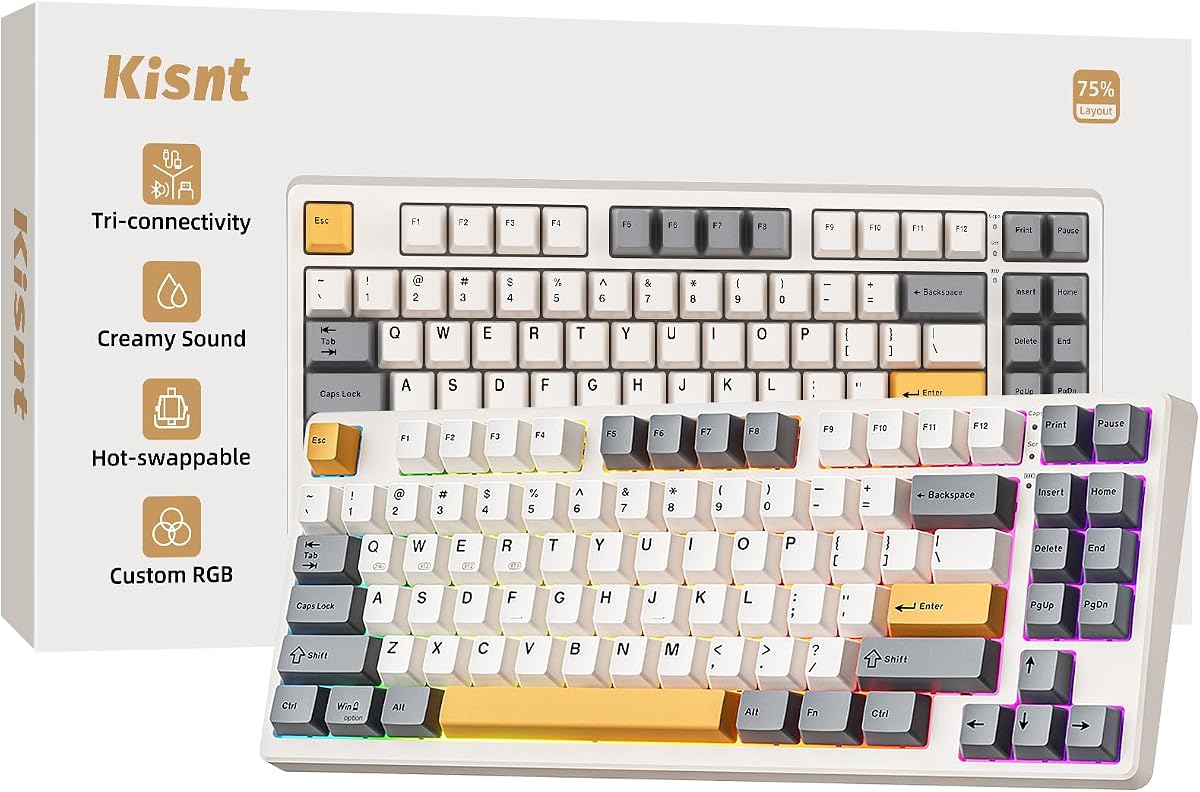
The 85-key layout is the right compromise for a lot of modern desks. You keep the function row, arrows, and common editing shortcuts, yet you reclaim roughly a quarter of the footprint that a full-size board wastes with a number pad. Gamers and laptop users benefit immediately because the mouse gets more room to travel. Spreadsheet specialists should note the missing numpad, but Kisnt even points to a companion number pad if you later decide you need one without abandoning the compact main board.
Connectivity is where this board justifies itself for hybrid work. USB-C wired mode is available when you want maximum responsiveness or need to type while charging. The 2.4GHz dongle targets low-latency desktop use, while Bluetooth 5.0 with multiple channels makes it easy to hop between a PC, Mac laptop, tablet, or phone. Latency figures published for the lineup favor wired and 2.4GHz for gaming, with Bluetooth better suited to writing and general productivity.
Typing feel is the surprise. Pre-lubed Bsun linear switches in a light actuation range give a smooth press without the scratchy inconsistency that plagues many cheap mechanicals. The foam stack and silicone padding push the acoustics toward a deeper, muted thock rather than hollow clack. That matters in apartments, dorms, and shared offices where a loud board gets old fast. Hot-swap compatibility also means you are not stuck with the stock linears forever if you later prefer tactility.
RGB lighting includes a wide set of presets plus brightness and effect controls, and Windows software unlocks remapping and macros when connected appropriately. The retro beige option in this listing also gives the board a warmer aesthetic than the usual all-black gaming rectangle. Battery capacity is generous for wireless mechanicals in this class, so daily writers and casual gamers should not live on a charger.
Tradeoffs remain honest. This is not a silent membrane office board, and it is not a full-size data-entry machine. Mac users get solid Bluetooth convenience, but deep remapping workflows are still more polished on Windows. If those caveats do not describe you, the KN85 is the budget wireless keyboard we would actually keep on the desk after comparing the rest of the field.
Who should buy the Kisnt KN85
Choose the KN85 if you want mechanical feel without abandoning wireless freedom, especially on a compact desk, dorm setup, or laptop-centered workstation. Writers, programmers, students, and casual gamers who value switch quality and sound more than a built-in number pad will get the most from it.
Skip it only if your workflow lives inside the number pad all day or if you need absolute silence in a library-like shared office. In those cases, a quiet full-size membrane combo from this list will frustrate you less.
Setup tips for tri-mode use
Start in 2.4GHz for your main desktop so you can evaluate latency and battery life with the included receiver. Add Bluetooth channels for a laptop and tablet only after the primary pairing feels stable. Keep USB-C handy as a fallback when a meeting starts and the battery indicator is low.
If you plan to remap keys, install the Windows driver and do that work in wired or 2.4GHz mode first, then rely on the stored layout during normal wireless use.
How it compares in this roundup
Against the Tri-Mode membrane board and AULA S99, the KN85 wins on switch quality and long-term customization. Against full-size combos, it loses convenience for number entry but wins desk space and typing satisfaction. It is the only pack product that truly bridges budget shopping and enthusiast mechanical habits.