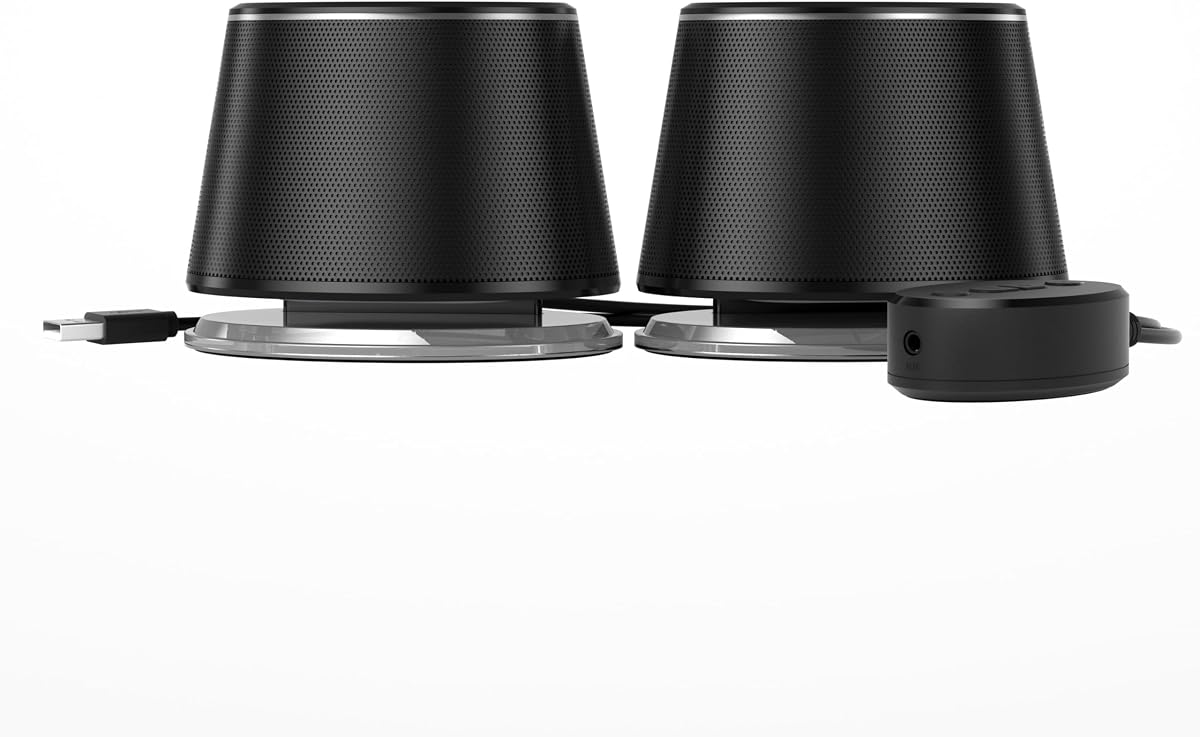
H1 Computer Speakers for Desktop PC
- 60W powered 2.0 stereo with carbon-fiber woofers and silk-dome tweeters
- 24-bit USB-C DAC plus optical, AUX, and Bluetooth for mixed desks
- Front bass, treble, and volume controls for quick near-field tuning
Expert Review & Guide
Built-in laptop and monitor speakers get you through a quick call, then fall apart when music, games, or long video sessions need real clarity and stereo width. The best budget computer speakers fix that gap without pushing you into a living-room home theater purchase. In 2026, affordable desktop audio still splits into a few clear camps: tiny USB-powered pairs that disappear beside a keyboard, under-monitor soundbars for shallow desks, Bluetooth-ready multimedia sets, and compact powered bookshelf speakers that finally sound like a small stereo.
This roundup sticks to value-focused options that make sense for dorms, home offices, and secondary PCs. We compared Creative’s Pebble designs, Amazon Basics wired and Bluetooth models, lit compact gaming sets, a slim Bluedee bar, and stronger powered pairs like the H1 and Sanyun SW208. Ratings and feature claims come from the product listings, then we weigh the tradeoffs that show up after a week on a real desk: cable clutter, outlet needs, light bleed on camera, bass that booms against a wall, and whether Bluetooth is convenience or a daily requirement.
If you want the short version first: choose the H1 when you can stretch for a true powered upgrade with modern inputs; pick Creative Pebble V2 for the best compact USB-C daily driver; and keep the original Creative Pebble in mind when you want the smallest minimalist win. Everything below expands those picks with full comparisons, buying guidance, and FAQs so you can match a pair to your ports, desk depth, and listening habits—without dollar figures getting in the way of the decision.
As an Amazon Associate we earn from qualifying purchases. We may earn a commission at no additional cost to you.
Use this table to shortlist by power style and connectivity before reading the deeper reviews. Specs focus on form factor, inputs, and what each option does best at a desk. Ratings reflect listed customer scores at the time of research.
H1 Computer Speakers for Desktop PC
If you want the best budget computer speakers that still feel like a real desktop audio system, the H1 is the clearest starting point in this pack. It is a powered 2.0 stereo pair rated around 60W with dual 3-inch carbon-fiber woofers, dual 1-inch silk-dome tweeters, and a rear bass reflex port. That architecture is a different category from the tiny USB pebbles and under-monitor bars that dominate bargain search results. You get clearer vocals, more usable detail, and fuller everyday sound for work, streaming, and gaming without jumping into a living-room home theater stack.
Connectivity is where the H1 earns Best Overall for budget shoppers who still want future-proof inputs. A 24-bit USB-C DAC path lets a PC send cleaner digital audio instead of relying only on a noisy motherboard headphone jack. Optical covers monitors, consoles, or streaming boxes that can output digital audio. The 3.5 mm AUX jack remains the universal fallback, while Bluetooth handles phones and tablets when you do not want another cable. One pair can stay parked at the desk and serve multiple devices through the week.
Front-panel bass, treble, and master volume controls matter more than feature sheets admit. Budget desks often sit against walls, inside alcoves, or under bright monitors that reflect sound oddly. Being able to nudge bass down when a ported cabinet booms, or lift treble for dialogue-heavy streams, keeps you from opening EQ software every time the room feels off. Shared offices benefit even more because different people can retune quickly.
The listed 40Hz–20kHz coverage and high signal-to-noise claim point toward quieter backgrounds and more usable low end than ultra-compact USB speakers usually manage. That does not magically create home-theater slam, and it should not be confused with a true 2.1 kit. What it does mean in practice is music with more body, games with more impact, and speech that stays intelligible when you raise volume for a busy afternoon. For most people upgrading from built-in laptop or monitor speakers, that is exactly the jump they are shopping for.
Placement still decides whether the H1 sounds controlled or muddy. Leave breathing room behind the rear ports, keep the speakers roughly at ear height or angled toward you, and avoid stuffing both cabinets into a hard corner. Because this is a powered pair, plan for an outlet and a tidy cable run under the desk. Once set up, the value is less about one flashy trick and more about how few compromises it asks for: enough power, enough inputs, enough tone control, and enough refinement for daily listening.
Compared with Creative Pebble and Pebble V2, the H1 is the step-up system when USB pebbles no longer feel loud or full enough. Compared with Sanyun SW208, it is a closer peer on power and tone controls, with a more modern digital input mix. Compared with Amazon Basics and Bluedee options, it asks for more desk seriousness and rewards you with clearer, more tunable sound. If your budget can stretch to one proper powered pair, choose the H1 first.
Buy the H1 if your computer lives on a desk all day and you want one upgrade that handles USB-C digital audio, optical, AUX, and Bluetooth without a pile of adapters. It is especially strong for people who tried tiny USB speakers and still wanted more body for music and games.
Skip it if you need an ultra-tiny footprint, USB-bus power only, or a dedicated subwoofer for movie slam. Those jobs are better served by Pebble-style speakers or a true 2.1 system outside this pack.
Start with the USB-C DAC path if your PC supports it, then A/B against AUX from the headphone jack. Use optical when a monitor can pass console or streamer audio. Keep Bluetooth as a convenience lane rather than your only critical-listening path.
Dial bass conservatively first. A rear-ported pair near a wall can sound thicker than expected; reducing bass a notch often improves clarity more than raising volume.
Against Creative Pebble V2 and the Amazon Basics USB pairs, the H1 is a clear leap in power and control. Against Sanyun SW208, it trades wooden bookshelf styling for a more modern input set and front-panel convenience. Against Bluedee and LENRUE, it prioritizes sound quality over lights and ultra-slim form factors.
We may earn a commission at no additional cost to you.
Creative Pebble V2 is the budget compact upgrade that makes the most sense when you want better desk audio without a wall wart or a bookshelf footprint. It keeps the famous Pebble silhouette—small spheres, 45-degree elevated drivers, front volume knob—but moves to USB-C power and adds a gain switch that can take advantage of stronger USB ports. For laptop desks, dorm setups, and tidy offices, that combination remains one of the smartest values in affordable computer speakers.
The USB-C change is not just about future ports. Creative says V2 can draw more power than the original Pebble, improving loudness and reducing distortion when you push volume. The included USB-C to USB-A converter keeps older towers usable. If you plug into a higher-power USB-C or USB-A port, the built-in gain switch can activate a higher-output mode that Creative rates around twice the original Pebble’s power class. That matters when a thin laptop speaker no longer cuts it for video calls and background music.
Driver design stays focused on near-field practicality. Custom-tuned far-field-style drivers face you at an angle, while rear passive radiators help bass feel less paper-thin than many no-name USB sets. You will not get the H1’s powered authority or Sanyun’s bookshelf presence, but for speakers that disappear beside a keyboard, V2 punches above its silhouette. Music and dialogue stay clearer at conversational volumes, which is where most budget buyers actually listen.
Living with Pebble V2 is mostly about cable honesty. Audio still comes through a 3.5 mm AUX connection while USB-C handles power. That means two plugs, not one magical wireless brick. There is no Bluetooth and no fancy EQ app. The upside is reliability: plug in, set the front knob, and stop thinking about drivers or pairing menus. Longer left-to-right cabling versus some older designs also makes wider monitor placements easier.
Aesthetically, the black minimal shells are a quiet win for people who dislike gaming light shows. The pair looks intentional on a white oak desk or a black battlestation without shouting for attention. Front volume access remains excellent when your PC volume keys are awkward or shared with system sounds. For apartment nights, that physical control is often more useful than another software slider.
Choose Pebble V2 over original Pebble when your computer already has USB-C or you want the gain path for louder sessions. Choose it over Amazon Basics USB models when design and driver tuning matter as much as raw simplicity. Choose H1 or Sanyun instead when you are ready for wall power and a fuller, more tunable system. As a compact USB pick, V2 is the best balance of size, power, and polish in this list.
Pebble V2 fits shallow desks, standing desks with limited depth, and laptop-only setups where an AC adapter would be annoying. It is also a strong second pair for a travel monitor station that still wants stereo width.
If your desk already has spare outlets and you want richer bass and tone knobs, step up to the H1 or Sanyun SW208 instead of forcing USB speakers to do bookshelf work.
Use normal gain on low-power laptop ports if you hear strain or if the host device complains about USB current. Switch to high gain when connected to a stronger USB-C charger port or a desktop rear I/O port that can supply more power.
Keep operating-system volume high and use the speaker knob for fine control so the tiny amplifiers are not amplifying a weak, noisy source signal.
Original Pebble remains charming and often simpler in white, with the same angled listening idea. V2 is the better long-term compact buy when USB-C, higher potential output, and the gain switch matter. If those features are irrelevant and you love the white look, the original still belongs on a shortlist.
We may earn a commission at no additional cost to you.
The original Creative Pebble remains the minimalist budget icon for a reason: it turns a dull laptop into a pleasant personal stereo without asking for desk real estate or a power brick. The white spheres, front volume knob, and 45-degree elevated drivers create a clean near-field triangle that feels more designed than most bargain PC speakers. If your goal is clearer calls, podcasts, and light music at a laptop desk, Pebble still delivers one of the most likable cheap upgrades available.
Setup is intentionally boring in the best way. USB provides power from the computer, while a 3.5 mm AUX cable carries audio. There are no drivers to install and no wireless menus to fail during a meeting. That simplicity is exactly why Pebble shows up in so many dorm rooms and home offices. You plug both cables in, set a comfortable volume, and the speakers disappear into the workflow.
Creative’s far-field driver approach and rear passive radiators are the technical explanation for why these tiny cabinets do not sound completely hollow. Bass is still size-limited, but the radiators add a bit of weight that many equally small competitors lack. The elevated angle matters too: instead of firing straight into a keyboard deck, the drivers aim closer to ear height for a seated listener. That geometry improves presence without needing more wattage.
Where the original Pebble shows its age is power and ports. USB-A bus power caps how loud and dynamic the pair can get compared with Pebble V2’s USB-C path and gain switch, or with wall-powered options like H1 and Sanyun. If you regularly host group watch sessions or want gaming impact, step up. If you mostly sit alone at conversational volumes, the original’s limits are easy to live with.
Design-wise, white Pebbles are still a favorite for bright desks, Scandinavian setups, and anyone who rejects gaming aesthetics. The look is playful without being childish, and the compact shells tuck under monitor edges more gracefully than boxy rectangles. Just keep the rear radiators from being jammed against a wall if you want the little bit of bass they can offer.
In this roundup, original Pebble is Best Minimalist Budget Pair because it nails the small-desk brief with charm and competence. Pick V2 when you want more output headroom. Pick Amazon Basics USB models when you want a more conventional black rectangle and inline or front controls. Pick H1 when budget can stretch to a true powered system. For many first upgrades, though, these little white spheres are still enough.
Choose original Pebble for laptop-first desks, student rooms, and secondary workstations where speakers must stay tiny and cute. It is also a good gift pick for people who will never adjust EQ knobs.
Avoid it if Bluetooth, USB-C power, or louder gaming sessions are non-negotiable. Those needs point to Pebble V2, Amazon Basics Bluetooth, or the H1.
Put the pair roughly shoulder-width apart with the angled faces aimed at your head, not at the ceiling. Keep rear radiators clear by an inch or two so they can move air.
If one channel sounds dull, check that AUX is fully seated and that OS spatial sound features are not collapsing the stereo image.
We may earn a commission at no additional cost to you.
Sanyun SW208 3" Active Bluetooth 5.0 Bookshelf Speakers
Sanyun’s SW208 is the budget bookshelf route for people who want their computer speakers to look and behave like small hi-fi monitors rather than accessories. The white wood-style cabinets, 3-inch carbon-fiber drivers, and side-mounted tone controls create a more intentional desk presence than USB pebbles. If your budget search keeps landing on toy-like plastics and you want something that can also play music for a small room, SW208 is the value bookshelf pick in this pack.
Connectivity covers the modern mixed-source desk. Bluetooth 5.0 handles phones and tablets without hunting for a dongle. USB connection with a built-in 24-bit DAC can pull digital audio from a computer for a cleaner path than a cheap headphone jack. A 3.5 mm AUX input remains ready for laptops, consoles, and older devices. That trio makes SW208 more flexible than purely AUX Amazon Basics models while staying approachable for non-audiophiles.
Tone shaping is a major reason to choose these over simpler USB speakers. Side knobs for total volume, treble, and bass let you adapt to bright rooms, bass-heavy corners, or dialogue-first streaming nights. Budget buyers often underestimate how much placement changes sound; physical EQ is the fastest correction. Sanyun also emphasizes a quiet standby and noise-filtering approach, which matters if the speakers stay powered all day beside a silent office.
Sonic expectations should stay honest. Carbon-fiber driver marketing and a 60W-class rating suggest warmer mids and more assertive lows than Creative Pebble, and in near-field use that usually holds. Still, these are compact active bookshelves, not a subwoofer system. Kick drums and movie effects gain weight, but apartment walls and desk reflections still define the ceiling. Aim the pair in a triangle toward your seat and give the cabinets a little wall clearance.
Versus the H1, SW208 is the more classic bookshelf aesthetic with similar ambitions around power and tuning. The H1 may feel more current if USB-C, optical, and front-panel convenience are priorities. Versus Amazon Basics Bluetooth speakers, SW208 should sound fuller and more hi-fi oriented, at the cost of size. Versus Bluedee’s soundbar, SW208 trades under-monitor stealth for a wider stereo image and traditional speaker staging.
Buy SW208 when you want Bluetooth convenience and bookshelf manners without leaving the budget lane. It is especially good for music-first desks that also game or stream. If absolute minimalism or USB-only power is required, stay with Pebble V2. If you want the most polished modern input pack in this list, take the H1.
SW208 likes a desk with room on both sides of the monitor or a nearby shelf at roughly ear height. A bedroom office or small studio corner is a natural fit.
Avoid burying the cabinets behind monitors or pressing them flush into corners if you want the bass knobs to remain useful rather than compensatory.
Use USB DAC or AUX for the PC when you are gaming, editing, or watching long videos. Reserve Bluetooth for phone playlists and quick wireless listening from the couch side of a studio apartment.
If you hear compression or dropouts on Bluetooth, move closer and reduce 2.4 GHz clutter from crowded dongles before blaming the speakers.
Begin with treble and bass centered, play a familiar vocal track, then adjust one control at a time. Small bass cuts often clean up desk boom more effectively than sweeping treble changes.
We may earn a commission at no additional cost to you.
Amazon Basics Bluetooth Computer Speakers with USB 3.0
Amazon Basics Bluetooth Computer Speakers with USB 3.0 are the straightforward wireless-capable pick when you want phone pairing without leaving the budget aisle. The set of two speakers uses USB for power, offers Bluetooth 5.3, USB audio, and a 3.5 mm AUX path, and includes a control pod for source, volume, and LED on/off. For desks that bounce between a laptop and a phone, that feature mix is more useful than yet another AUX-only rectangle.
Audio hardware stays in the practical Amazon Basics lane: larger custom-tuned 1.75-inch full-range drivers with a passive radiator for a bit more low-end support. You should expect clear-enough music, intelligible calls, and better stereo than a laptop lid, not Sanyun or H1 levels of authority. Within that expectation, the pair is a sensible everyday upgrade, especially if blue LED ambiance fits your setup and can be disabled when it does not.
The control pod is the usability highlight. Instead of hunting around the cabinets for tiny buttons, you get a dedicated point for volume and input changes. That matters on cluttered desks where speaker backs face a wall. LED control is equally practical for dark rooms and late work sessions. Budget Bluetooth speakers that force permanent glow get old quickly in shared offices.
Compatibility notes deserve attention. These speakers are USB powered with no built-in battery, so they are not portable boomboxes. Unplug USB and they power off. Amazon also correctly warns that many TV USB ports do not support audio transmission even if they provide power. For TVs, verify whether you need AUX or another audio output. Computers, laptops, and phones are the happier use case.
Against Creative Pebble V2, this Amazon Basics set wins on Bluetooth and loses some of the Pebble design magic and angled-driver focus. Against Sanyun SW208, it is smaller, simpler, and less hi-fi, but easier if you refuse to free an AC outlet. Against Bluedee, you get a traditional left/right pair instead of a single soundbar silhouette. Choose based on whether wireless convenience or form factor matters more.
As Best Budget Bluetooth Pair, these speakers fill a clear gap in the pack: USB-powered wireless without jumping to bookshelf size. They are ideal for mixed phone-and-PC days, secondary desks, and buyers who trust Amazon Basics simplicity. Critical listeners and music-first shops should still prioritize H1 or SW208 when possible.
Pick this pair if your phone is a daily music source and you still want a wired PC option for work. The control pod and LED toggle make it more livable than bare-bones Bluetooth no-names.
Skip it if you need optical input, serious tone controls, or a louder bookshelf presence for a whole room.
Power via USB from a computer or known-good adapter. Use Bluetooth for mobile devices, USB audio when your PC supports it cleanly, and AUX as the universal fallback.
If USB audio is silent, confirm the correct playback device in your operating system before assuming hardware failure.
We may earn a commission at no additional cost to you.
Amazon Basics AC-Powered Computer Speakers
Amazon Basics AC-Powered Computer Speakers are the no-drama pick when you want a little more juice than USB-only pebbles and refuse to think about Bluetooth menus. They plug into a wall outlet, take a 3.5 mm AUX signal from a PC or laptop, and put volume plus on/standby on a front control. For parents setting up a homework desk, offices standardizing accessories, or anyone who just wants louder clear-enough sound, that formula still works.
Wall power is the functional reason to choose this model over the USB Amazon Basics options in this same pack. Bus-powered speakers are convenient, but they are limited by what a USB port will share. An AC-powered pair can feel more confident at higher listening levels for videos and casual games. The listed frequency range and modest RMS figures still place it firmly in the budget multimedia class, so keep expectations aligned with the class rather than studio monitors.
The front headphone jack is a sleeper feature. Many cheap speaker sets omit it, forcing you to unplug AUX from the computer when you want privacy. Having a jack on the speaker means you can leave the PC connection alone and divert to headphones at the desk. That is useful in dorms, family rooms, and late-night sessions when speaker volume would travel through walls.
Design and controls stay intentionally plain: black cabinets, simple front knob, plug-and-play setup. There is no RGB story, no companion app, and no wireless stack to troubleshoot. In a business or classroom context, that dullness is a virtue. The tradeoff is modernity—if you want Bluetooth for a phone or a USB DAC path, look at Amazon Basics Bluetooth, Sanyun, or H1 instead.
Size is compact enough for most desks, measuring roughly in the small cube class rather than full bookshelves. Place them to the left and right of the monitor with the active controls reachable. Because they are AC powered, map the outlet and cable route before you commit to a final layout so you are not draping a power cord across a keyboard tray.
In this roundup, the AC-powered Amazon Basics pair sits as Best Wall-Powered Basics: more headroom than USB-only Basics, fewer features than Bluetooth or bookshelf rivals, and maximum simplicity. Choose it when AUX and an outlet are all you need. Choose Pebble V2 when you want USB power and better compact tuning. Choose H1 when you want a true step-up system.
These speakers suit family computers, office hot desks, and anyone who wants a front headphone jack without shopping the pro-audio aisle. Setup instructions basically end at plug in power and AUX.
Enthusiasts chasing imaging, Bluetooth, or tone knobs will outgrow them quickly and should start higher in this list.
Use the speaker standby when the desk is idle for the day. Keep OS volume moderately high and fine-tune on the front knob so you are not maxing a weak digital signal into harshness.
If you hear hum, try a different outlet arrangement on the PC side, and confirm the AUX cable is fully seated.
Pick AC-powered for potential output and the headphone jack. Pick USB stereo or compact USB when outlet access is poor. Pick Bluetooth Basics when phones need to join the desk without cables.
We may earn a commission at no additional cost to you.
Bluedee Computer Speakers for Desktop PC
Bluedee’s computer soundbar is the budget answer when your desk has no room for flanking speakers. The slim bar is designed to sit under a monitor, roughly 16.4 inches wide and only a couple of inches deep, reclaiming the zones where pebble speakers or bookshelf cabinets would fight with a keyboard. If surface area is the real constraint, this form factor matters more than another modest wattage claim.
Sound comes from dual drivers and dual diaphragms with a pitch toward balanced highs and deeper bass than laptop speakers, plus anti-magnetic claims aimed at reducing interference. In real desks, the result is a cleaner, more present bar experience for videos, calls, and games. It will not match the stage width of Sanyun or H1 placed on either side of a display, because physics still favors separated channels. What it offers instead is respectable under-monitor audio without clutter.
Connectivity is practical: 3.5 mm AUX for the PC and Bluetooth 5.0 for phones or tablets. USB power wakes the bar from a laptop, PC, power bank, or adapter with no driver install. The nylon-braided Y-cable that combines power and audio is a thoughtful touch for tidier routing. That matters on standing desks and cable-managed battlestations where every extra split cable becomes a snag.
Ambiance lighting is intentionally gentle rather than esports aggressive. Light strips can make a dark desk feel finished, especially for evening gaming or streaming overlays in the background of a camera. If you prefer a dead-quiet visual field for work, confirm you are comfortable with the lighting behavior or choose a no-light Amazon Basics or Pebble pair instead.
Bluedee also leans on eco-minded materials messaging and lifetime after-sales support language. Those points do not change frequency response, but they can matter to buyers comparing otherwise similar soundbars. More important for decision-making is honesty about limits: no pro tone controls, no optical input, and no true left/right speaker placement flexibility beyond the fixed bar width.
Pick Bluedee when the desk is the bottleneck and a soundbar silhouette solves it. Pick LENRUE if you want a compact dual-speaker set with touch lights under a monitor. Pick H1 or SW208 when you can spare the width for better stereo and tuning. As Best Under-Monitor Soundbar in this budget list, Bluedee is the space-first recommendation.
Confirm monitor stand clearance and desk depth. A soundbar only helps if it slides under the display without blocking ventilation or wobbling the screen.
If your monitor uses a thick center stand, check that the bar can sit in front or that the stand leaves a channel underneath.
Use Bluedee for dialogue, video sites, and general PC audio in tight spaces. For music enjoyment where left-right imaging matters, a spaced pair such as Pebble V2, SW208, or H1 will usually satisfy more.
Keep AUX connected for the main PC and use Bluetooth when you wander with a phone. If Bluetooth audio feels laggy in games, switch back to AUX for the competitive sessions.
We may earn a commission at no additional cost to you.
LENRUE G11 Computer Speakers for Desktop
LENRUE G11 targets the budget gamer or RGB-friendly desk that still needs a tiny stereo pair. The speakers are built to sit under a monitor, use USB-C or USB power, take AUX audio, and add angular touch lights for atmosphere. If you want a compact dual-speaker look with a bit of show, G11 is more expressive than Amazon Basics and more traditional than a single Bluedee bar.
LENRUE emphasizes surge-clear stereo claims and multiple amplifier IC horns for louder, cleaner multimedia sound. In the budget class, that usually translates to energetic volume for games and videos rather than neutral studio accuracy. For lively game nights, anime binge sessions, and long video queues, that presentation can be more fun than a polite pebble. Critical music listeners should still look higher to H1 or Sanyun.
The touch light system is the personality feature. One touch turns the angular game lights on or off, which is nicer than burying a micro switch on the rear panel. Lights are optional theater; if you work early and game late, being able to kill them instantly keeps the pair office-tolerable. Just know this is still a styling choice—some workplaces will prefer matte black silence from Amazon Basics or Creative.
Connectivity is intentionally basic and clearly documented: plug USB for power, 3.5 mm for audio, adjust the top volume knob, and go. A Type-C adapter improves compatibility with newer machines. LENRUE is also upfront about what is missing—no Bluetooth, no headphone port, no mic, and no TV focus. That honesty helps. Buyers who need wireless should choose Amazon Basics Bluetooth, Bluedee, Sanyun, or H1 instead of discovering the gap after unboxing.
Cable management is part of the pitch, with cables arranged to reduce spaghetti under the display. On small desks, that practical detail matters as much as driver diameter. Keep AUX and USB routed together down one leg of the desk so the under-monitor zone stays clean. Because the speakers are compact, stereo separation is limited by how far apart you can place the left and right units beneath a screen.
G11 earns Best Lit Compact Desktop Set for buyers who want under-monitor speakers with atmosphere controls and simple wired operation. It is not the most refined audio engine in the pack, and it is not the most feature-rich. It is a coherent product for compact gaming desks that value lights, easy volume access, and USB power. If lighting is irrelevant, Pebble V2 is usually the cleaner compact alternative.
Pick G11 for compact gaming desks, streaming setups that want a little light in the camera frame, and users who refuse Bluetooth complexity.
Skip it for professional offices that ban glow, for phone-first Bluetooth listening, or for anyone who needs a headphone jack on the speaker.
Center the pair under the display with enough height clearance so vents and lights are not smothered. If the monitor stand is wide, split the speakers to the outer edges of the stand footprint for a slightly wider image.
We may earn a commission at no additional cost to you.
Amazon Basics Stereo 2.0 Speakers
Amazon Basics Stereo 2.0 Speakers are the classic black USB pair you buy when the brief is simple: make the computer louder and clearer with almost no setup. Power comes from USB, audio from a 3.5 mm AUX connection, and volume from an in-line control. That recipe has populated countless offices because it works with virtually any laptop or desktop that still has a headphone jack.
The listing highlights a metal-finish aesthetic, scratch-free padded bases, blue LED accents, and a bottom radiator for springier bass. Those details place it a step above the most anonymous no-name USB speakers in feel and finish. Bass remains compact-speaker bass, but the radiator helps voices and music feel less pinched than sealed ultra-budget units with no radiator strategy at all.
In-line volume deserves a practical shout-out. Some budget pairs put the knobs on cabinets that end up behind a plant or under a shelf lip. A control on the cable is easy to reach even when the speakers are tucked beside a monitor stand. For shared computers, that accessibility reduces the odds someone maxes the OS volume and blasts the next user.
Where this model loses to others in the pack is modernity and ambition. There is no Bluetooth for phones, no USB-C power story like Pebble V2, no AC boost like the wall-powered Amazon Basics, and no tone knobs like Sanyun or H1. If those features are on your must list, keep walking. If you want a known-brand USB stereo pair that just works, this remains an easy shortlist item.
Place the speakers with the bottom radiators free to breathe—do not bury them in foam that blocks the radiator path unless that accessory is designed for it. A slight toe-in toward the listening seat helps the small drivers focus. Keep USB power on a stable port; flaky hubs can cause dropouts that look like speaker defects.
Choose these as Best Simple USB Stereo Pair when procurement simplicity matters and features would only create support tickets. Choose the compact Amazon Basics USB model when you need an even smaller portable shell with a headphone jack. Choose Creative when design and angled listening are worth a bit more attention. Choose H1 when you are done with USB limitations entirely.
Good fits include offices, classrooms, and secondary PCs that need dependable AUX speakers. Poor fits include Bluetooth-first mobile listeners and music fans ready for bookshelf dynamics.
Blue LEDs can look fine in a media den and distracting on camera during video calls. If your setup is on webcam often and you want zero glow, prefer Creative Pebble or verify whether the LEDs are acceptable in your lighting.
This USB stereo pair is the middle path: simpler than Bluetooth Basics, less outlet-dependent than AC-powered Basics, and a bit more conventional than the compact portable Basics set with a headphone jack.
We may earn a commission at no additional cost to you.
Amazon Basics USB-Powered Compact Speakers
Amazon Basics USB-Powered Compact Speakers close the pack as the portable plug-and-play option for people who need better-than-laptop sound without committing desk permanence. They draw 5V USB power, use a simple front volume control with on/standby, and include a headphone jack for private listening. Frequency response and wattage figures are modest by design. This is the spare-bedroom, dorm-carry, temporary-desk solution.
Portability is the real feature. The cabinets are small, light enough to toss into a backpack sleeve, and free of wall adapters. If you bounce between a living-room table and a bedroom desk, or you support multiple PCs and want a known-good loaner pair, that convenience beats richer speakers you will never move. Plug USB for power, AUX for audio, and you are done.
The headphone jack mirrors the useful idea on the AC-powered Amazon Basics model, which is welcome at this size. Students in shared rooms can switch to headphones instantly. The sound through the speakers themselves is adequate for tutorials, calls, and light media—clearer than most laptop cans, with limited low end and limited maximum clean volume. Pushing them too hard for parties is how budget drivers get harsh.
Compared with Creative Pebble, these are more conventional rectangles than design objects, and they usually sound less charming at the same tiny scale. Compared with Amazon Basics USB stereo B07DDK3W5D, they prioritize compactness and the headphone jack over the metal-finish stereo pair presentation. Compared with everything powered or Bluetooth above them, they are the compromise you accept for portability.
Still, there is honor in a product that knows its job. Not every search for the best budget computer speakers needs a sixty-watt bookshelf fantasy. Sometimes you need a cheap, replaceable, USB-powered pair that makes speech intelligible and keeps cables few. Used that way, this Amazon Basics compact set is honest and useful.
Buy it for travel desks, kids’ homework PCs, and backup inventory. Upgrade to Pebble V2 for a better compact primary pair, to Bluetooth Basics for wireless phones, or to H1 when the desk is permanent and sound quality is finally the priority. As Best Portable Plug-and-Play, it earns a place by being easy—not by pretending to be hi-fi.
Coil USB and AUX separately so connectors are not stressed in a bag. Power from the host laptop when possible; cheap hubs can introduce noise or disconnects.
Use standby on the front control when you toss the laptop to sleep so you are not leaving the speakers live unnecessarily.
If music enjoyment is the reason you are shopping, do not stop here—Pebble V2, SW208, or H1 will feel like the real upgrade. Keep this compact pair for utility roles where portability outranks fidelity.
We may earn a commission at no additional cost to you.

Budget speaker shopping goes wrong when buyers chase peak watt labels and ignore the surface they actually own. Measure the zones beside your monitor, the clearance under the display for a soundbar, and whether rear ports or passive radiators would be smothered against a wall. A well-placed compact pair often sounds clearer than a larger set jammed into a corner.
If your desk is shallow, prioritize Creative Pebble, Pebble V2, LENRUE G11, or Bluedee. If you have room to flank a monitor and can spare an outlet, H1 and Sanyun SW208 become the more satisfying long-term upgrades. Architecture should follow furniture, not the other way around.
USB-powered speakers are ideal when outlets are scarce and you want true plug-and-play. They are also limited by bus power, which is why Pebble V2’s higher-draw USB-C path and the AC-powered Amazon Basics model exist as different answers to the same budget problem. Wall-powered and dedicated powered speakers usually play louder and cleaner when pushed.
List your must-have connections before you buy. AUX 3.5 mm remains the universal analog fallback. USB audio or a USB DAC path can sound cleaner than a noisy headphone jack. Bluetooth helps phones and tablets, but wired remains better for stable desktop duty and lower game latency. Optical on the H1 is a bonus when a monitor can pass digital audio from a console or streamer.
Near-field listening at arm’s length does not always need a subwoofer. Passive radiators on Pebble speakers and bottom radiators on some Amazon Basics models add a bit of weight for podcasts and pop music. If you want stronger low end and the ability to tame it, prioritize pairs with bass and treble knobs such as H1 and Sanyun SW208.
Tone controls are not audiophile snobbery on a budget desk. Walls, desk reflections, and monitor stands color sound aggressively. A small bass cut often improves clarity more than buying a supposedly louder speaker and leaving every control at default.
RGB and soft LED strips can make a battlestation feel finished, which is why LENRUE, Bluedee, and some Amazon Basics models include lighting. Make sure those lights can turn off if you take video calls or share an office. Features you cannot disable become permanent clutter.
Likewise, skip guilt over missing studio apps on budget speakers. Physical volume access, a reachable mute or standby control, and honest input labels matter more day to day than a companion app you will open once. Headphone jacks on the AC-powered and compact Amazon Basics models are the kind of quiet extras that improve real life.
Most people searching for budget computer speakers have one primary job: clearer speech, better videos, lighter gaming, or a nicer music background while working. Pick the simplest product that nails that job. A portable Amazon Basics pair can be perfect for a temporary desk even if it would be wrong as a forever music system.
If you already know music enjoyment is the main goal and the desk is permanent, skip straight to H1 or Sanyun rather than cycling through three USB toys. The cheapest purchase is not always the lowest total spend when dissatisfaction sends you back to the product page a month later.
For most permanent desks, the H1 is the best overall budget-to-performance jump because it offers powered output, useful tone controls, and modern inputs including a USB-C DAC path, optical, AUX, and Bluetooth. If you need something much smaller and USB-powered, Creative Pebble V2 is the better everyday compact pick, while the original Creative Pebble remains the minimalist option when desk space is tiny and volumes stay moderate.
USB-powered speakers are good enough for calls, tutorials, and light music at arm’s length, especially stronger compact designs like Creative Pebble V2. Wall-powered or dedicated powered speakers usually stay cleaner when you raise volume for movies and games because they are not limited by USB bus current. If your desk has an outlet and you care about fuller sound, powered options such as the H1, Sanyun SW208, or Amazon Basics AC-powered speakers are the more satisfying lane.
Only if a phone or tablet is a regular music source at the same desk. Bluetooth is convenient on Amazon Basics Bluetooth speakers, Bluedee, Sanyun SW208, and the H1, but it is not required for pure PC duty over AUX or USB audio. Wired connections are still preferable for lower latency in games and for avoiding another wireless device in an already crowded 2.4 GHz desk environment.
Desks create early reflections, and walls reinforce bass unevenly. Tiny speakers with no radiator can sound thin, while ported or radiator-equipped cabinets pushed into corners can sound boomy. Placement fixes half of those problems: form a triangle with your ears, keep radiators and ports clear, and use bass controls on H1 or Sanyun when the room exaggerates low end. Raising volume is not always the right cure.
A soundbar such as the Bluedee is better when under-monitor space is the only space you have. A left/right pair is usually better for music and stereo gaming because the channels can sit farther apart and create a wider image. If your monitor stand allows flanking speakers, Pebble V2, Amazon Basics pairs, Sanyun, or H1 will generally feel more open than a single bar of similar budget.
They can replace a headset for single-player games, streams, and casual multiplayer when you do not need a microphone or directional footsteps precision. Competitive players who rely on subtle audio cues often still prefer a headset. Also remember several budget desktop speakers in this guide have no headphone jack or mic features—LENRUE G11 is explicit about that—so chat gear may remain separate.
Both use compact angled drivers and a minimalist spherical design with front volume control. Pebble V2 upgrades to USB-C power, includes a USB-C to USB-A adapter, and adds a gain switch that can take advantage of higher-power USB ports for louder output. The original Pebble remains appealing for simple USB-A desks and the white aesthetic, while V2 is the better compact pick when output headroom and newer ports matter.
Most USB-powered and AUX models work with Mac and Windows without drivers, and many also work with Chromebooks that provide a headphone jack and USB power. Consoles vary: if the console or display offers a 3.5 mm audio output, AUX speakers can work; Bluetooth models can pair to some devices; optical on the H1 helps when a display can pass digital audio. Always confirm the specific output on your display or console rather than assuming a TV USB port carries audio.
A reliable approach on budget speakers is to set the computer volume relatively high, keep any Windows spatial enhancements off unless you know you want them, and use the speaker knob for fine control. That keeps the speaker amplifier from boosting a tiny, noisy source signal. If you hear hiss at idle, lower the speaker gain a bit and raise the source quality path—USB DAC on H1 or Sanyun, for example—before blaming the drivers.
Skip the ultra-budget tier if music is a primary hobby, if you need accurate monitoring for creative work, or if you want room-filling movie bass. In those cases, a stronger powered pair—still represented here by the H1 or Sanyun SW208—or a dedicated 2.1 system outside this pack will frustrate you less. Budget speakers shine for clarity upgrades over built-in audio, not for replacing a full hi-fi setup.
Budget computer speakers are less about chasing a mythical perfect wattage number and more about matching form factor, power style, and inputs to the desk you use every day. In this pack, the H1 stands out as the best overall upgrade when you want powered sound, front-panel tuning, and modern connectivity that can grow with mixed devices. Creative Pebble V2 remains the smartest compact USB-C choice, while the original Creative Pebble still wins on minimalist charm for small, quiet desks.
From there, the right runner-up depends on constraints. Sanyun SW208 brings Bluetooth bookshelf manners and tone knobs. Amazon Basics covers simple USB, AC-powered, Bluetooth, and portable plug-and-play needs with predictable controls. Bluedee and LENRUE solve shallow under-monitor layouts with different attitudes toward lighting and stereo layout. None of these require home-theater spending to make a PC dramatically more listenable.
Pick the pair that fits your ports and surface area, place it with a little care, and use tone controls when you have them. Do that, and even a budget desk can sound clear, wider, and far less fatiguing than the speakers built into a laptop lid.