Expert Review & Guide

Best Black CPU Coolers 2026 for Stealth Dark Builds

A black CPU cooler is more than a paint job—it is how a dark PC stays visually coherent when the side panel is open. Silver heat pipes, brown fan frames, and glossy white accents break stealth and black-RGB themes instantly, which is why matte dual towers, chromax finishes, and all-black 360 mm AIOs have become default upgrades in 2026. Whether you are cooling a Ryzen chip on AM5 or an Intel Core Ultra on LGA 1851 or 1700, the right black cooler still has to clear your RAM, fit your case height, and move heat quietly under real loads.

This roundup sticks to one product pack of ten coolers: Cooler Master’s Hyper 212 Black for slim value, Thermalright’s Peerless Assassin and Phantom Spirit black dual towers for performance-per-dollar air, Assassin X and Vision MAX models when you want digital screens, Noctua’s NH-D15 chromax.Black for premium quiet air, and CORSAIR Nautilus plus Thermalright Frozen Notte 360 mm kits when liquid makes more sense. Ratings reflect Amazon data captured with the pack. We omit dollar prices because cooler promotions shift constantly by region and week.

Start with the three top picks if you already know you want premium quiet air, a value black dual tower, or a seven-pipe high-TDP stack. Use the comparison table to filter by height, heat pipes, and AIO versus air, then read each review for fitment traps, fan noise character, and who should skip that model.

Top Black CPU Cooler Picks for Stealth, Thermals, and Value

Best Premium Black Dual Tower

Noctua NH-D15 chromax.Black

★★★★★9.6/10
Noctua NH-D15 chromax.Black
  • Dual 140 mm NF-A15 fans with Low-Noise Adaptors for AIO-class quiet cooling
  • SecuFirm2 mounts for LGA 1851/1700/1200/115x and AMD AM5/AM4 with offset option
  • Six-year warranty, NT-H1 paste included, and full chromax black finish for dark builds
Check Price →

As an Amazon Associate we earn from qualifying purchases. We may earn a commission at no additional cost to you.

Black CPU Cooler Comparison: Height, Heat Pipes, and Fans

Compare cooler height and heat-pipe count before lighting features. Specs intentionally exclude prices so you can judge black air towers and 360 mm AIOs on clearance and cooling hardware alone.

#ProductSpecificationsScore
1
  • Single tower, 4 heat pipes, copper base
  • SickleFlow 120 Edge PWM, 690–2500 RPM
  • 152 mm tall; AM5 and LGA 1851/1700 kits
9.4
2
  • Dual tower, 6 heat pipes, black nano coating
  • Twin TL-C12C reverse PWM fans, ≤25.6 dB(A)
  • 125×135×155 mm; AM4/AM5, LGA 115x/1700/1851
9.6
3
  • Single tower, 4×6 mm AGHP heat pipes
  • 2000 RPM ARGB PWM fan + digital top screen
  • 151 mm height; AM4/AM5, LGA 1700/1851/115x
9.4
4
  • Single tower + LCD top, TL-P12-S PWM fan
  • 2000 RPM, ~70.84 CFM, ≤29.8 dB(A)
  • 120×71×151 mm; AM4/AM5 and Intel kits
9.6
5
  • 360 mm black AIO, convex cold plate
  • Three RS120 fans, daisy-chain PWM wiring
  • Pump ~20 dBA; LGA 1851/1700, AM5/AM4
9.2
6
  • Dual 140 mm tower, 6 heat pipes
  • Twin NF-A15 fans with Low-Noise Adaptors
  • SecuFirm2; LGA 1851/1700/1200/115x, AM5/AM4
9.6
7
  • Dual tower, 6 pipes, nickel copper base
  • 5-inch IPS LCD top + dual 2150 RPM ARGB
  • 125×135×164 mm; TRCC software via USB header
9
8
  • Dual tower, 6×6 mm AGHP, ~9600 cm² area
  • Twin TL-C12B 1500 RPM PWM, ≤25.6 dB(A)
  • 125×135×157 mm; includes LGA 2011/2066 kits
9.6
9
  • Dual tower, 7×6 mm AGHP 4.0 heat pipes
  • Dual TL-C12B V2 1500 RPM PWM fans
  • 125×135×154 mm black frosted finish
9.4
10
  • 360 mm AIO, copper mirror cold plate
  • Three TL-E12B-S V2 ARGB fans to 2000 RPM
  • 397×120×27 mm radiator; pump 5300 RPM class
9

1. Hyper 212 Black - Best Slim Black Value Tower

Cooler Master Hyper 212 Black CPU Air Cooler

Cooler Master Hyper 212 Black CPU Air Cooler

9.4/10★★★★★

The Cooler Master Hyper 212 Black remains the gateway black cooler for builders who want a uniform dark interior without jumping straight into a dual-tower stack. Four heat pipes terminate in a copper base that Cooler Master positions for AMD Ryzen 7 and Intel Core i7 class processors, which covers a huge slice of gaming and creator desktops that are not running sustained all-core overclocks. The matte black fin stack and fan frame disappear into black cases, so the cooler reads as intentional hardware rather than a leftover silver tower from a stock bundle.

  • Single tower, 4 heat pipes, copper base
  • SickleFlow 120 Edge PWM, 690–2500 RPM
  • 152 mm tall; AM5 and LGA 1851/1700 kits
Check Price →
✓ Pros
  • Four heat pipes and copper base suited to Ryzen 7 and Intel i7 class chips
  • SickleFlow 120 Edge PWM spans a wide 690–2500 RPM range for quiet idle and load boost
  • 152 mm height fits many mid-towers without the bulk of a dual tower
  • Redesigned brackets ease installs on AM5 and LGA 1851/1700
  • Thermal paste included for a straightforward first mount
✕ Cons
  • Single tower and four pipes trail dual-tower options on high-TDP overclocks
  • One fan means less airflow reserve than twin-fan black dual towers
  • No digital screen or ARGB if you want a showpiece top cover

Detailed review

Quiet operation hinges on the SickleFlow 120 Edge fan with dynamic PWM from roughly 690 to 2500 RPM. At the low end the fan can sit nearly unnoticeable during browsing and light office work; under gaming or compile loads the controller can spin it up for more airflow through the single tower. That wide band is useful if your motherboard fan curve is aggressive, because you can still carve a quiet idle without swapping to a third-party fan on day one.

At 152 mm tall, the Hyper 212 Black clears most mid-tower roofs while staying friendlier to short cases than 155–164 mm dual towers. RAM clearance is typically easier than with a thick dual-tower front fan, which matters if you bought tall RGB DIMMs for a black-and-RGB theme. Cooler Master also redesigned the brackets specifically to simplify AM5 and Intel LGA 1851/1700 installs, so newer platforms are not an afterthought bolted onto an old kit.

Installation is intentionally approachable: metal brackets, a clear orientation for the tower, and included thermal paste mean you can finish a mount in one sitting even on a first build. Clean the CPU heatspreader, apply a small amount of paste, seat the cooler evenly, and tighten in a cross pattern so the copper base contacts the chip without rocking. Confirm the PWM cable reaches a CPU_FAN header before you close the side panel.

Thermally, expect a clear upgrade over many boxed stock coolers on 65–105 W class chips and competent results on hotter parts if case airflow is decent. It will not outrun a seven-pipe Phantom Spirit or a 360 mm AIO on a fully loaded high-core desktop CPU, and that honesty is part of why it still belongs in a black-cooler roundup—plenty of builds simply do not need that ceiling. Pair it with a front intake and a rear exhaust so the single tower is not recycling hot GPU air.

Choose the Hyper 212 Black when the priority is a stealth look, simple mounting, and enough cooling for mainstream Ryzen and Intel gaming CPUs. Skip it if you already know you will push a high-TDP chip hard for hours, or if you specifically want a digital top display. For many black mid-towers, this is still the least dramatic way to make the CPU area look finished.

Who should buy the Hyper 212 Black

Mainstream Ryzen 5/7 and Intel Core i5/i7 gaming builds in black mid-towers are the sweet spot. It is also a smart refresh for older PCs still on noisy stock coolers when you want a uniform dark interior without dual-tower bulk.

Clearance and airflow tips

Keep at least the case’s rated CPU cooler height plus a few millimeters for cable ridges. Use a rear exhaust fan so the single tower has a path out of the chassis, and avoid stuffing the front intake with dense dust filters you never clean.

When to step up

Move to a Peerless Assassin, Phantom Spirit, or 360 mm AIO if you run heavy all-core workloads, sustained overclocks, or a compact case that traps heat around a single tower.

Check Price on Amazon →

We may earn a commission at no additional cost to you.

2. Peerless Assassin 120 SE Black - Best Value Black

Thermalright Peerless Assassin 120 SE Black CPU Cooler

Thermalright Peerless Assassin 120 SE Black CPU Cooler

9.6/10★★★★★

Thermalright’s Peerless Assassin 120 SE Black is the dual-tower workhorse most black builds should shortlist first. Six heat pipes, a micro-carved copper base, and a fully black electroplated finish give you serious surface area without the chrome pipes that break a stealth theme. The dual-tower layout moves more heat than a slim four-pipe single tower while the reverse-blade TL-C12C fans keep the visual mass compact between the towers.

  • Dual tower, 6 heat pipes, black nano coating
  • Twin TL-C12C reverse PWM fans, ≤25.6 dB(A)
  • 125×135×155 mm; AM4/AM5, LGA 115x/1700/1851
Check Price →
✓ Pros
  • Six heat pipes with black electroplated finish and micro-carved copper base
  • Dual TL-C12C reverse PWM fans keep claimed noise at or under 25.6 dB(A)
  • Memory cut-corner layout helps clear many tall DIMM kits
  • Y-splitter cable joins both fans when motherboard headers are scarce
  • Broad AM4/AM5 and Intel 115x through 1851 mounting hardware in the box
✕ Cons
  • AM4 installs still rely on the motherboard’s original backplate
  • 155 mm dual-tower height can conflict with very short ITX cases
  • Matte black finish shows fingerprints more than bare aluminum towers

Detailed review

Cooling performance is the reason this model sits near the top of value charts: dual PWM fans push air through dense fins with a claimed noise ceiling around 25.6 dB(A) and roughly 66 CFM per fan. That combination is excellent for Ryzen 7/9 and Intel Core Ultra or 14th-gen chips that spike hard in games yet spend long stretches near idle. Memory cut-corner shaping on the fin stacks reduces the classic dual-tower fight with tall DIMMs, though you should still measure heat-spreader height before you buy the tallest RGB kit on the shelf.

At 125×135×155 mm the cooler fits typical ATX mid-towers and many Micro-ATX cases with standard CPU cutouts. It will not suit every ITX sandwich or sub-150 mm cooler clearance chassis, so check your case’s CPU cooler height spec before assuming any dual tower will slide in. Shock-absorbing silicone feet and an anti-touch blade design are small touches that matter once the fans are spinning next to a glass side panel.

Wiring is pragmatic. Thermalright includes a Y-type adapter so both fans can share a header when your board is short on fan connectors, which is common on budget B-series boards. Socket support covers AMD AM4/AM5 and Intel LGA 1150 through 1851 with metal fasteners; for AM4 you still use the motherboard’s original backplate, so do not throw that plate away during a cooler swap.

In a black-theme build the SE Black finish is the point: nano coating and plated pipes keep the entire stack dark under white or RGB case lighting. There is no LCD vanity cover here, which keeps cables minimal and reliability focused on heat pipes and bearings. If you later want more flair, you can swap the stock fans for ARGB units without abandoning the dual-tower core.

Pick the Peerless Assassin 120 SE Black when you want dual-tower thermals, quiet PWM fans, and a fully black aesthetic without paying Noctua money. It is less ideal if your case is shorter than about 160 mm of cooler clearance or if you insist on an integrated telemetry screen. For most dark gaming PCs in 2026, this is the default black dual tower we would mount first.

Who it is for

Black-theme gamers and creators who want dual-tower thermals and quiet PWM fans without LCD cables. Excellent default upgrade from stock coolers on AM5 and LGA 1700/1851 boards.

RAM and case checklist

Verify ~160 mm of CPU cooler clearance and measure tall DIMM kits against the front fan. Leave the AMD stock backplate installed for AM4 mounting as Thermalright specifies.

Versus other black twins

Choose SE Black for reverse-fan value; Phantom Spirit SE Black for seven pipes; Noctua chromax when silence and warranty matter more than pipe count.

Check Price on Amazon →

We may earn a commission at no additional cost to you.

3. Assassin X 120R Digital ARGB - Best Digital Screen

Thermalright Assassin X 120R Digital ARGB Black CPU Air Cooler

Thermalright Assassin X 120R Digital ARGB Black CPU Air Cooler

9.4/10★★★★★

The Thermalright Assassin X 120R Digital ARGB Black splits the difference between a practical single tower and a showpiece. Four 6 mm AGHP heat pipes and a direct-touch style base handle everyday Ryzen and Intel loads, while the digital top cover turns the cooler into a live status display for temperature and utilization once TRCC is running. That combination is aimed at builders who want a black tower that still feels modern under a tempered-glass panel.

  • Single tower, 4×6 mm AGHP heat pipes
  • 2000 RPM ARGB PWM fan + digital top screen
  • 151 mm height; AM4/AM5, LGA 1700/1851/115x
Check Price →
✓ Pros
  • Digital top screen shows live system stats with Thermalright TRCC software
  • 2000 RPM PWM fan with S-FDB bearing and silicone corner pads for less vibration
  • 151 mm height suits most ATX cases while staying a single-tower footprint
  • ARGB fan syncs to motherboard 5V 3-pin headers for coordinated lighting
  • AGHP fourth-generation heat pipes aim to reduce orientation-related gravity effects
✕ Cons
  • Screen needs a free motherboard 9-pin USB header and TRCC software setup
  • Single tower with four pipes is not the strongest pick for extreme multi-core loads
  • Digital top and ARGB add cable clutter versus a plain black cooler

Detailed review

The 2000 RPM PWM fan is the performance lever. It can idle down with motherboard curves, then climb when the CPU heats up, with S-FDB bearing behavior meant to reduce the shaking some hanging-fan mounts exhibit. Silicone corner pads further damp vibration transfer into the heatsink. Claimed airflow is strong for a single 120 mm fan, so the cooler punches above older low-RPM Hyper-style towers when the curve allows it to spin up.

Height stays at 151 mm, which is friendlier than 160-plus mm LCD dual towers and works in a wide range of mid-towers. Because it is a single tower rather than a twin stack, side clearance for tall RAM is usually better, and first-slot GPUs are less likely to kiss a second fan. The tradeoff is thermal headroom: four pipes and one fan will not match a Peerless Assassin or Phantom Spirit when a high-core chip sits at all-core load for hours.

ARGB synchronization uses a standard 5V 3-pin header so the fan can follow motherboard lighting ecosystems. The digital screen is a separate path: power and data ride a motherboard 9-pin USB connection, and Thermalright expects you to install TRCC from its site after the wiring is complete. Plan USB header usage early if you also run a controller hub, wireless adapter, or front-panel USB expansion that already consumes ports.

Setup quality matters. Seat the cooler flat, confirm the USB cable is fully locked, and only then install software so the screen is not blank because of a loose connector. Keep TRCC set to start with Windows if you want the display to come up after every reboot; exiting the background process will leave you staring at a dark or stuck panel. None of that complexity exists on a plain black Peerless Assassin, so buy this variant only if you will actually use the screen.

This Assassin X 120R Digital ARGB Black listing is ideal for mid-range CPUs in black RGB cases where a live readout is part of the aesthetic. Skip it for silent office machines that never open the side panel, or for extreme overclocking where a seven-pipe dual tower or 360 mm AIO is the smarter thermal tool. Used as intended, it is a stylish single-tower upgrade that still respects case clearance.

Ideal buyer

Builders who want a black single tower with a live digital readout and ARGB fan sync for mid-range CPUs. Great under glass when thermals are secondary to presentation.

Software and USB setup

Connect the 9-pin USB cable before installing TRCC, confirm the screen initializes, then set the app to start with Windows. Keep a USB header free during motherboard planning.

Thermal expectations

Treat it as a strong mainstream cooler, not a seven-pipe dual tower. Pair with decent case airflow and a sensible PWM curve for the 2000 RPM fan.

Check Price on Amazon →

We may earn a commission at no additional cost to you.

4. Assassin X 120R TL-P12-S - Best Compact LCD Black

Thermalright Assassin X 120R Digital ARGB Black CPU Cooler

Thermalright Assassin X 120R Digital ARGB Black CPU Cooler

9.6/10★★★★★

This Assassin X 120R Digital ARGB Black configuration pairs the same LCD-forward idea with Thermalright’s TL-P12-S PWM fan and a compact 120×71×151 mm footprint. The aluminum fin stack remains a four-pipe single tower, but the fan’s claimed ~70.84 CFM and roughly 2.63 mmH2O static pressure give the heatsink a more assertive airflow profile than many quiet 1500 RPM kits. For black builds that want telemetry without the width of a dual tower, that trade is attractive.

  • Single tower + LCD top, TL-P12-S PWM fan
  • 2000 RPM, ~70.84 CFM, ≤29.8 dB(A)
  • 120×71×151 mm; AM4/AM5 and Intel kits
Check Price →
✓ Pros
  • LCD top cover can show CPU and GPU temperatures plus usage via TRCC
  • TL-P12-S fan targets ~70.84 CFM with PWM control up to about 2000 RPM
  • Compact 120×71×151 mm stack leaves more room for tall RAM than many dual towers
  • ARGB lighting syncs through a standard 5V 3-pin motherboard connector
  • Dual-platform kits cover modern AM5 and Intel LGA 1851/1700 builds
✕ Cons
  • LCD and ARGB wiring are more involved than a no-screen value dual tower
  • Noise ceiling near 29.8 dB(A) is higher than quieter 1500 RPM dual-fan kits
  • Single-tower cooling still trails seven-pipe dual towers on hot desktop chips

Detailed review

The digital top cover is again the personality piece. Through TRCC you can watch CPU temperature, CPU usage, GPU temperature, and GPU occupancy without launching a separate OSD. That is genuinely useful during stress tests or long exports when you would rather glance at the cooler than alt-tab into monitoring software. It also means you must budget a USB 9-pin header and accept another cable route across the motherboard tray or around the VRM heatsinks.

Noise is the honest compromise. Thermalright lists operating noise at or under 29.8 dB(A), which is still living-room friendly for many people but louder on paper than the Peerless Assassin SE Black’s ~25.6 dB(A) dual-fan claim. A good motherboard fan curve keeps the TL-P12-S calm at idle; if you leave it pinned near 2000 RPM, you will hear it. Treat PWM as a feature you configure, not a set-and-forget guarantee of silence.

Compatibility covers AMD AM4/AM5 and Intel LGA 1851/1700/115x/1200 with the included hardware. AMD installs continue to expect the original motherboard backplate, which is normal for Thermalright’s air lineup. The 151 mm height clears most ATX cases; the slim depth is what helps when your RAM kits wear tall black heat spreaders that would collide with a second front fan on a dual tower.

Visually, the black fin stack, ARGB fan, and lit screen create a layered centerpiece that still reads darker than silver-pipe coolers. Sync the fan to your board’s 5V ARGB header if you want the cooler to match case strips and GPU side lighting. If you prefer a fully matte stealth PC with zero glow, you can usually disable lighting in software while keeping the LCD for numbers only.

Choose this TL-P12-S Assassin X 120R when you want an LCD single tower with stronger fan airflow numbers and a compact black silhouette. Look elsewhere if you need dual-tower headroom for a hot 16-core chip, or if you refuse any USB wiring for aesthetics accessories. Between the two Assassin X Digital listings in this pack, compare fan model and exact bundle notes on the product page before you click buy, since both share the same visual language.

Who should choose this bundle

Anyone comparing Assassin X Digital listings who specifically wants the TL-P12-S fan’s higher airflow figures in a compact LCD black cooler for AM5 or Intel 1700/1851.

Noise tuning advice

Create a motherboard fan curve that stays low below your typical gaming temperatures, then ramps toward 2000 RPM only under sustained load so the ~29.8 dB(A) ceiling is rarely reached.

Cable management notes

Route USB, PWM, and 5V ARGB lines behind the tray where possible so the black theme stays clean around the socket.

Check Price on Amazon →

We may earn a commission at no additional cost to you.

5. Nautilus 360 RS - Best Low-Noise Black 360 AIO

CORSAIR Nautilus 360 RS Liquid CPU Cooler

CORSAIR Nautilus 360 RS Liquid CPU Cooler

9.2/10★★★★★

CORSAIR’s Nautilus 360 RS is the clean black liquid option in this roundup for builders who need more radiator area than air can offer in the same thermal budget. The 360 mm AIO format spreads heat across three RS120 fans instead of packing everything into a dual-tower footprint above the socket. That helps high-TDP desktop CPUs sustain boost longer, especially in cases with strong front or top exhaust paths that can feed the radiator cool air.

  • 360 mm black AIO, convex cold plate
  • Three RS120 fans, daisy-chain PWM wiring
  • Pump ~20 dBA; LGA 1851/1700, AM5/AM4
Check Price →
✓ Pros
  • 360 mm radiator and three RS120 fans deliver serious headroom for hot CPUs
  • Low-noise pump claim around 20 dBA keeps the loop quieter than many AIOs
  • Convex cold plate with pre-applied paste speeds a clean first install
  • Daisy-chain fan wiring reduces clutter to a single motherboard PWM header
  • Clean all-black look with Intel LGA 1851/1700 and AMD AM5/AM4 support
✕ Cons
  • 360 mm radiator needs a case with proper top or front mount clearance
  • AIO loops add pump longevity and leak risk considerations versus pure air
  • Daisy-chain RS fans are motherboard-centric rather than a proprietary hub ecosystem

Detailed review

Noise control is a headline feature. CORSAIR calls out a low-noise pump around 20 dBA and pairs it with RS120 fans that use AirGuide styling and Magnetic Dome bearings to push static pressure through the radiator without sounding like a jet. Daisy-chain connections let the three fans share a single 4-pin PWM header, which is a real quality-of-life win on motherboards that only expose one or two usable fan headers near the top edge.

The cold plate is slightly convex with pre-applied thermal paste in an optimized pattern. That speeds installation and improves contact against the CPU’s integrated heat spreader when the mounting pressure is even. Still wipe and inspect the paste pattern if the cooler sat in storage oddly, and never reuse a dried pad if you remount later—apply fresh paste on a second install. Socket support includes Intel LGA 1851 and 1700 plus AMD AM5 and AM4, covering current mainstream platforms.

Case fit is the gating item. You need a chassis that officially supports a 360 mm radiator at the top or front, with clearance for thick radiators plus fan height if you mount as a push or pull configuration. Tube routing should avoid pinching against GPU backplates or PSU shrouds. Compared with a Peerless Assassin, the Nautilus asks for more planning, but it frees the socket area from a massive dual tower that might block tall RAM.

Aesthetically the Nautilus 360 RS stays in the black-cooler brief: dark radiator, black fans, and a subdued block rather than a carnival of unused RGB zones. That makes it a strong match for stealth gaming rigs and creator workstations that still want liquid thermals. If you prefer glowing pump logos, look at the Frozen Notte ARGB instead; if you want zero liquid components, stay with Noctua or Thermalright air.

Buy the Nautilus 360 RS when your CPU runs hot under sustained loads and your case has a proven 360 mm mount. Skip it for compact cases, for users who dislike AIO maintenance considerations, or for builds where a quiet dual-tower air cooler already keeps temperatures in a safe band. Installed in the right chassis, it is the most straightforward premium black 360 mm path in this pack.

Best-fit systems

High-TDP gaming and workstation CPUs in mid-towers or full towers with official 360 mm top or front mounts. Ideal when you want black liquid cooling with minimal RGB distraction.

Mounting orientation

Prefer radiator placements that keep tubes from creating a high point above the pump when possible, and confirm daisy-chained RS fans are detected as a single PWM channel in BIOS.

Air versus this AIO

Stay on Noctua or Phantom Spirit air if your case lacks 360 mm support or you want zero pump maintenance considerations.

Check Price on Amazon →

We may earn a commission at no additional cost to you.

6. NH-D15 chromax.Black - Best Premium Black Dual Tower

Noctua NH-D15 chromax.Black

Noctua NH-D15 chromax.Black

9.6/10★★★★★

Noctua’s NH-D15 chromax.Black is still the reference-class black dual-tower air cooler for people who prioritize silence, longevity, and proven mounting over flashy screens. The extra-wide 140 mm dual-tower design with six heat pipes and twin NF-A15 fans has years of enthusiast validation, and the chromax treatment finally makes that performance stack disappear into black cases instead of wearing Noctua’s classic brown. If your theme is matte stealth, this is the cooler that looks intentional rather than compromised.

  • Dual 140 mm tower, 6 heat pipes
  • Twin NF-A15 fans with Low-Noise Adaptors
  • SecuFirm2; LGA 1851/1700/1200/115x, AM5/AM4
Check Price →
✓ Pros
  • Dual 140 mm NF-A15 fans and six heat pipes rival many AIOs for quiet thermals
  • Low-Noise Adaptors and PWM keep idle nearly silent while retaining load punch
  • SecuFirm2 mounting covers LGA 1851/1700/1200/115x plus AM5/AM4 with offset option
  • NT-H1 paste included and a six-year manufacturer warranty back the premium build
  • Full chromax black finish matches dark cases without rainbow fan frames
✕ Cons
  • Extra-wide 140 mm dual tower can block tall RAM or first-slot GPUs in tight layouts
  • Heavier and bulkier than slim single-tower black coolers
  • Premium positioning means you are paying for silence and longevity over bare specs

Detailed review

Cooling efficiency sits in AIO territory for many workloads while avoiding pumps and tubes. The dual NF-A15 fans include Low-Noise Adaptors and full PWM control, so you can run whisper-quiet idle curves and still open the taps under rendering or gaming spikes. That flexibility is why silent-PC builders keep returning to the NH-D15 even as cheaper dual towers close the raw Celsius gap on paper benchmarks.

Compatibility is handled by Noctua’s SecuFirm2 system for Intel LGA 1851, 1700, 1200, and 115x plus AMD AM5 and AM4, including an offset mounting option aimed at better efficiency on modern Ryzen chips. NT-H1 thermal paste ships in the box, and the six-year manufacturer warranty is a meaningful differentiator against value coolers with shorter coverage. Those extras matter when the cooler is meant to survive multiple CPU upgrades.

The physical downside is bulk. An extra-wide 140 mm dual tower can interfere with tall RAM in the first DIMM slots and may crowd large dual-slot or triple-slot graphics cards depending on motherboard layout. Measure RAM height and the distance from the socket to the top PCIe slot before you commit. Some builders run a single fan configuration temporarily to clear memory, then add the second fan after confirming fit.

In a black-only build the chromax finish is the entire aesthetic pitch: black fans, black fins, black hardware, no brown accents. It will not give you an LCD dashboard or ARGB sync, and that is correct for a silence-first product. If you want telemetry on the cooler itself, look at Thermalright’s Vision MAX or Assassin X Digital models; if you want maximum Celsius per dollar, a Phantom Spirit SE Black will usually feel more economical.

Choose the NH-D15 chromax.Black when acoustic quality, mounting polish, and long warranty define success more than accessory screens. Pass if your case or RAM kit cannot accept a wide 140 mm dual tower, or if you are building on a strict value budget where Thermalright already meets your thermal target. For premium black air cooling in 2026, this remains the safe long-term pick.

Who benefits most

Silent-PC enthusiasts, overclockers who still prefer air, and black-build owners who want a premium chromax finish with a long warranty.

Fitment warnings

Check first-slot GPU clearance and tall RAM height against the wide 140 mm dual-tower footprint. Offset AM5 mounting can improve thermals—follow Noctua’s diagram.

Longevity angle

Six-year coverage, replaceable standard fans, and mature SecuFirm2 kits make this a cooler you can carry across multiple CPU generations.

Check Price on Amazon →

We may earn a commission at no additional cost to you.

7. PA120 Vision MAX ARGB Black - Best LCD Showpiece

Thermalright Peerless Assassin 120 Vision MAX ARGB Black CPU Air Cooler

Thermalright Peerless Assassin 120 Vision MAX ARGB Black CPU Air Cooler

9/10★★★★★

The Peerless Assassin 120 Vision MAX ARGB Black is Thermalright’s dual-tower showpiece for black glass builds that want a real display, not a tiny seven-segment gadget. A magnetically attached top cover houses a 5-inch IPS panel at 480×854, driven through TRCC with support for custom themes, dynamic backgrounds, and even video playback. Combined with dual ARGB fans and a matte black twin-tower stack, it becomes the visual anchor of a dark PC.

  • Dual tower, 6 pipes, nickel copper base
  • 5-inch IPS LCD top + dual 2150 RPM ARGB
  • 125×135×164 mm; TRCC software via USB header
Check Price →
✓ Pros
  • Magnetic 5-inch IPS top at 480×854 for custom themes and live telemetry
  • Six copper heat pipes, nickel base, and dual 2150 RPM fans for strong dual-tower cooling
  • ARGB fans plus matte black towers suit RGB-forward black builds
  • Offset dual-tower layout helps with tall RAM and first-slot GPU clearance
  • TRCC software supports static, dynamic, and video backgrounds on the screen
✕ Cons
  • 164 mm height needs a roomy ATX case; skip ultra-short chassis
  • USB header and TRCC setup add complexity versus set-and-forget air coolers
  • Higher RPM fans can be louder than Noctua-style quiet profiles if left at stock curves

Detailed review

Cooling hardware underneath the screen is still serious: six pure copper heat pipes, a nickel-plated micro-engraved copper base, and dual 120 mm fans spinning up to about 2150 RPM with roughly 69 CFM and noise claimed at or under 27 dB(A). AGHP Gen 5.0 piping targets orientation-related gravity issues, and the offset layout helps preserve clearance for tall RAM and GPUs in the first slot. You are not sacrificing the Peerless Assassin thermal recipe just to get a panel.

Size is the constraint. At 125×135×164 mm the Vision MAX is taller than the SE Black and Phantom Spirit SE Black entries, so short cases and some fishbowl chassis with shallow roof clearance are poor matches. Confirm CPU cooler height limits and whether your side panel will clear the magnetic display cover. The screen also needs a motherboard 9-pin USB connection for power and data—map that cable before the motherboard goes into the case.

Software expectations are higher than on a dumb dual tower. Install TRCC only after wiring is complete, keep the process running if you want continuous updates, and treat custom media tastefully so the panel does not become a distracting loop. ARGB fans connect to a 5V 3-pin header for board sync. Builders who hate RGB can often disable lighting while still using the IPS panel for temperatures and clocks.

Compared with the Assassin X Digital single towers, the Vision MAX offers more heatsink mass and a much larger canvas. Compared with the Noctua NH-D15, it trades some acoustic refinement and warranty length for spectacle and a lower typical street positioning. Rating sits at 4.5 in the pack data, which is still solid but suggests a bit more variance—often normal for accessory-heavy coolers where software and USB wiring affect the experience.

Buy the Vision MAX when your black build is meant to be seen and you want dual-tower thermals plus a five-inch telemetry surface. Avoid it in compact cases, in silent office PCs, or if you refuse USB headers for non-storage devices. For streamers and showcase rigs, it is the most dramatic black air cooler in this set.

Showcase build advice

Use the 5-inch IPS panel for clean telemetry skins rather than chaotic video loops, and sync ARGB fans to the rest of the black-RGB theme for a cohesive look.

Case height requirements

Require roughly 164 mm of cooler clearance plus room for the magnetic cover. Fishbowl and short ITX cases are usually the wrong homes.

TRCC essentials

Wire USB first, install TRCC second, and leave the service running if you expect live stats after every boot.

Check Price on Amazon →

We may earn a commission at no additional cost to you.

8. Peerless Assassin 120 Black - Best Classic Black Dual

Thermalright Peerless Assassin 120 Black CPU Air Cooler

Thermalright Peerless Assassin 120 Black CPU Air Cooler

9.6/10★★★★★

The Peerless Assassin 120 Black is the classic dual-tower formula in a full nano-black coat, aimed at builders who want maximum fin area without SE branding or LCD extras. Thermalright cites roughly 9600 cm² of effective dissipation area and an offset asymmetric layout that improves odds of clearing a graphics card in the primary slot. Six 6 mm AGHP heat pipes and a pure copper base underpin a claimed cooling capability in the 245 W TDP class when paired with the dual fans.

  • Dual tower, 6×6 mm AGHP, ~9600 cm² area
  • Twin TL-C12B 1500 RPM PWM, ≤25.6 dB(A)
  • 125×135×157 mm; includes LGA 2011/2066 kits
Check Price →
✓ Pros
  • Full black dual-tower with roughly 9600 cm² claimed fin area for strong heat shedding
  • Twin TL-C12B fans at ~1500 RPM stay quiet while moving about 66 CFM each
  • Offset asymmetric towers improve clearance for graphics cards in the first slot
  • AGHP six-pipe stack claims roughly 245 W TDP class cooling capability
  • Mount kits extend to older Intel LGA 2011/2066 as well as modern AM5 and LGA 1851
✕ Cons
  • 157 mm dual tower still needs careful RAM and side-panel clearance checks
  • No LCD or ARGB if your black build wants a lit centerpiece
  • Stock 1500 RPM fans are quieter but less aggressive than 2000+ RPM kits

Detailed review

Fans are TL-C12B units at about 1500 RPM, 66.17 CFM, and noise at or under 25.6 dB(A). That quieter speed band is excellent for living-room gaming PCs and night workstations where you can hear coil whine before you hear the cooler. If you later need more airflow, aftermarket 120 mm fans can drop in, but many users will never bother because the stock pair already keeps mainstream high-TDP chips in a comfortable band with decent case flow.

Dimensions of 125×135×157 mm put it in the standard dual-tower envelope—taller than the Hyper 212 Black, shorter than the Vision MAX. Weighing about 1.02 kg, it is a dense chunk of aluminum and copper, so support the motherboard during mounting and do not rely on a flimsy test bench. The aluminum heatsink cover and black spray finish keep the silhouette consistent under bright case LEDs.

Socket coverage is notably broad. Beyond AM4/AM5 and modern Intel LGA 1700/1851/1200/115x, this listing also calls out LGA 2011 and 2066 hardware, which matters if you are refreshing an older high-end desktop platform into a black theme rather than buying a brand-new board. As always with Thermalright air coolers on AMD, keep the original backplate available for AM4-style installs.

Versus the Peerless Assassin 120 SE Black in this same pack, think of the PA120 Black as the established twin with slightly different fan tuning and a taller 157 mm stack, while the SE Black emphasizes reverse fans and a 155 mm profile. Both are dual six-pipe black towers; read current listing photos and fan model codes if you are choosing between them on the same shopping tab. Neither includes an LCD, which keeps the cable kit simple.

Pick the Peerless Assassin 120 Black for a no-nonsense stealth dual tower with strong claimed surface area and quiet 1500 RPM fans. Skip it only if you need a 360 mm AIO for extreme sustained loads, or if a 157 mm cooler exceeds your case limit. It remains one of the most sensible black performance air coolers you can mount without entering accessory-feature sprawl.

Who should mount it

Stealth dual-tower shoppers who want quiet 1500 RPM fans, broad socket support including older Intel HEDT boards, and no screen wiring.

Clearance realities

Plan for 157 mm of height and an offset tower that still needs a quick RAM and GPU clearance check on compact micro-ATX boards.

Upgrade path

Stock fans are already quiet; only swap them if you specifically want ARGB or a different acoustic signature.

Check Price on Amazon →

We may earn a commission at no additional cost to you.

9. Phantom Spirit 120 SE Black - Best High-TDP Black

Thermalright Phantom Spirit 120 SE Black CPU Cooler

Thermalright Phantom Spirit 120 SE Black CPU Cooler

9.4/10★★★★★

Thermalright’s Phantom Spirit 120 SE Black is the heat-pipe count champion of the air side of this pack. Seven 6 mm AGHP fourth-generation pipes feed a dual-tower aluminum fin array with a finely carved pure copper base and black frosted top pieces. On paper and in community testing culture, that seventh pipe is why Phantom Spirit models often edge Peerless Assassin twins on hot CPUs when fan curves are equalized.

  • Dual tower, 7×6 mm AGHP 4.0 heat pipes
  • Dual TL-C12B V2 1500 RPM PWM fans
  • 125×135×154 mm black frosted finish
Check Price →
✓ Pros
  • Seven 6 mm AGHP heat pipes give more conduction paths than typical six-pipe twins
  • Dual TL-C12B V2 PWM fans keep noise claims at or under 25.6 dB(A)
  • 154 mm height fits most mid-towers while remaining shorter than many LCD showpieces
  • Black frosted top pieces and carved copper base match stealth builds
  • Memory cut-corner design helps avoid clashes with tall heat-spreader RAM
✕ Cons
  • Dual-tower width can still crowd first PCIe slots on compact motherboards
  • No onboard screen for builders chasing LCD telemetry coolers
  • AMD installs expect the stock motherboard backplate to remain in place

Detailed review

Dual TL-C12B V2 PWM fans run about 1500 RPM with 66.17 CFM and noise at or under 25.6 dB(A), matching the quiet-leaning personality of Thermalright’s better value towers. S-FDB bearings and industrial-leaning PBT/PC fan materials are called out for longevity. You get strong airflow without needing a 2000 RPM scream, which suits black gaming PCs that sit on a desk rather than in a closed cabinet.

The cooler measures 125×135×154 mm, a sweet spot that fits most ATX mid-towers while staying shorter than LCD Vision models. Memory cut-corner avoidance is part of the fin design, but extremely tall RGB DIMMs can still interfere with the front fan—check your kit’s height and consider moving the front fan slightly upward if the mounting allows. AMD installs again rely on the motherboard’s original backplate.

Finish-wise, the SE Black treatment keeps pipes and fins dark so the cooler supports a stealth or black-RGB theme instead of flashing raw copper. There is no ARGB on the stock fans and no top screen, which is exactly why some builders prefer it: fewer cables, fewer software dependencies, more focus on Celsius. If you want lighting later, fan swaps are straightforward on standard 120 mm mounts.

Compared with the Noctua NH-D15 chromax.Black, the Phantom Spirit SE Black usually offers more pipes and a lower typical purchase tier while giving up some of Noctua’s acoustic polish, mounting theater, and warranty length. Compared with the Peerless Assassin 120 SE Black, you are mainly shopping heat-pipe count and minor dimensional differences. Either Thermalright twin will transform a black build that still uses a stock cooler.

Choose the Phantom Spirit 120 SE Black when you want maximum dual-tower air performance in a black coat for gaming and creator CPUs. Look at a 360 mm AIO if your case is already planned around a top radiator and your chip is a known furnace under all-core load. For most dark mid-towers, this is the high-TDP air pick that still respects noise.

Best use cases

Hot gaming CPUs and creator chips in black mid-towers where seven heat pipes and dual quiet fans outperform stock and many single towers.

Installation reminders

Use the original AMD backplate when required, apply fresh paste, and verify both V2 fans spin in BIOS after the Y-cable or separate headers are connected.

Compared with PA120 SE Black

Take Phantom Spirit for the extra heat pipe; take PA120 SE Black if you prefer that listing’s reverse-fan kit and current availability.

Check Price on Amazon →

We may earn a commission at no additional cost to you.

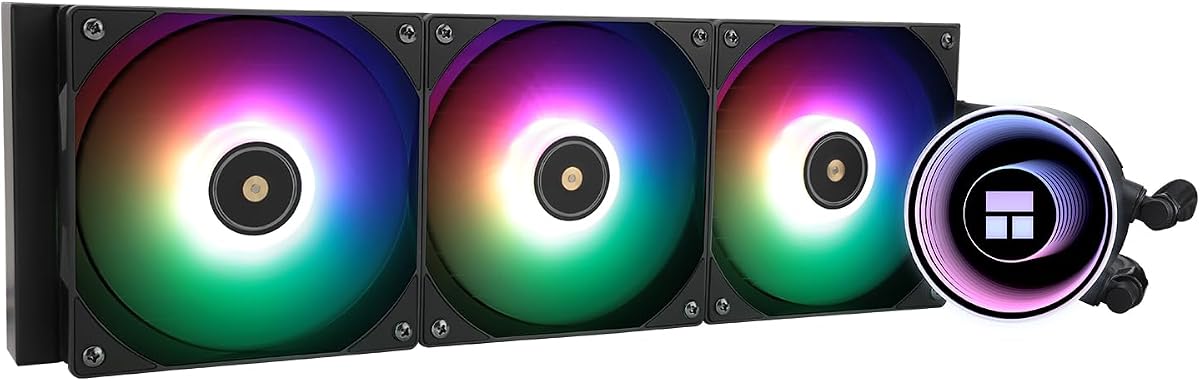
10. Frozen Notte 360 Black ARGB V2 - Best ARGB Black

Thermalright Frozen Notte 360 Black ARGB V2 Water Cooling CPU Cooler

Thermalright Frozen Notte 360 Black ARGB V2 Water Cooling CPU Cooler

9/10★★★★★

The Thermalright Frozen Notte 360 Black ARGB V2 is the illuminated liquid counterpart to the Nautilus: a 360 mm black AIO with a copper mirror cold plate, aluminum radiator, and three TL-E12B-S V2 PWM ARGB fans. Pump speed is listed around 5300 RPM, tubing around 450 mm, and the radiator around 397×120×27 mm. Together they target builders who want liquid headroom and synchronized lighting inside a dark chassis.

  • 360 mm AIO, copper mirror cold plate
  • Three TL-E12B-S V2 ARGB fans to 2000 RPM
  • 397×120×27 mm radiator; pump 5300 RPM class
Check Price →
✓ Pros
  • Full 360 mm black radiator with copper mirror cold plate for high thermal capacity
  • Three TL-E12B-S V2 PWM ARGB fans reach about 2000 RPM and ~72 CFM each
  • ARGB pump and fans sync to motherboard 5V 3-pin for unified lighting
  • 450 mm tubing and dual-platform metal brackets cover AM4/AM5 and many Intel sockets
  • S-FDB bearings and PWM control balance airflow against noise under load
✕ Cons
  • Case width ideally above 250 mm for comfortable 360 mm radiator mounting
  • ARGB AIO cable count is higher than a simple dual-tower air cooler
  • Pump and radiator service life is a longer-term consideration versus sealed air coolers

Detailed review

Fan performance is aggressive for an included kit. Each 120 mm fan can reach about 2000 RPM with roughly 72.37 CFM and 2.87 mmH2O of static pressure, while noise stays claimed at or under 27.7 dB(A). S-FDB bearings address vibration when fans are mounted in pull configurations. PWM lets the radiator breathe with CPU temperature instead of staying pinned, which is essential if the AIO sits next to your ears on a desk.

ARGB synchronization covers both the fans and the water block via 5V 3-pin headers, with series connection support when motherboard light headers are limited. That makes the Frozen Notte a better fit than the Nautilus for black-RGB themed cases where the pump is a visible centerpiece. If you want zero glow, you can often turn effects off in software, but the product’s identity is clearly the lit black loop.

Compatibility is extensive on paper—AMD AM4/AM5 and a long Intel list including LGA 1700/1851/1200/115x/2011/2066—using dual-platform metal black brackets. Thermalright recommends a case width greater than 250 mm for comfortable 360 mm installs. Plan separate headers for fan PWM, fan ARGB, pump power (12V 3-pin), and pump ARGB so you do not overload a single uncontrolled molex tap.

Liquid coolers always add considerations air coolers skip: tube routing, radiator dust management, and long-term pump life. The Frozen Notte offsets those with strong cooling capacity and a cohesive black ARGB look. Rating at 4.5 suggests solid acceptance with the usual variance that follows AIO installs where case airflow and mounting quality differ widely between users.

Pick the Frozen Notte 360 Black ARGB V2 when you have 360 mm radiator clearance and want a lit black liquid cooler with high fan airflow. Choose the CORSAIR Nautilus instead if you prefer a quieter, simpler daisy-chain RS fan story with less lighting emphasis, or stay on a Phantom Spirit/Noctua air cooler if you want to avoid AIO complexity entirely. In the right case, this is the pack’s ARGB black 360 mm statement piece.

Who will love the Frozen Notte

Black-RGB builders with wide cases and 360 mm radiator mounts who want pump and fan lighting synced to the motherboard.

Header planning

Budget PWM, pump power, and multiple 5V ARGB connections—or use series ARGB links carefully so you do not exceed header current limits.

Maintenance mindset

Dust the radiator regularly and treat the AIO as a sealed unit; if you prefer zero liquid variables, choose a dual-tower black air cooler instead.

Check Price on Amazon →

We may earn a commission at no additional cost to you.

Best Black CPU Coolers 2026 for Stealth Dark Builds

How to Choose a Black CPU Cooler in 2026

Match cooler height to your case before you fall for a finish

Black coatings do not shrink dual towers. A 152 mm Hyper 212 Black and a 164 mm Vision MAX live in different chassis. Read your case’s maximum CPU cooler height, then subtract a little margin for roof fans, cable covers, and manufacturing tolerance. Fishbowl cases with glass on three sides often look like they have space while the actual socket-to-panel distance is tight.

If you are near the limit, prefer single-tower black coolers or lower dual towers like the Phantom Spirit SE Black at 154 mm. Save taller LCD models for roomy ATX mid-towers that publish clear clearance charts.

Air dual tower versus 360 mm black AIO

Modern six- and seven-pipe dual towers cool most gaming CPUs without pumps. Choose air when you want lower complexity, easy fan swaps, and no radiator dust sandwich. Choose a black 360 mm AIO such as the Nautilus RS or Frozen Notte when your case already supports a top or front triple radiator and your CPU sustains high all-core power for long renders or heavy overclocks.

Also consider socket-area clutter: AIOs free tall RAM trays from dual-tower fans, while air coolers free you from tube routing around oversized GPUs.

Stealth black versus black RGB and LCD

Decide whether the cooler should disappear or perform. Noctua chromax, Peerless Assassin Black, and Phantom Spirit SE Black support true stealth themes. Assassin X Digital and Vision MAX models add screens and ARGB for showcase builds. Mixing a blazing rainbow pump into an otherwise matte black interior often looks worse than committing fully to lighting or fully to stealth.

Socket kits, backplates, and paste

Confirm AM5, AM4, LGA 1700, and LGA 1851 hardware in the box for your board generation. Thermalright air coolers frequently reuse the AMD motherboard backplate—do not discard it. Fresh thermal paste beats reusing a smeared factory application on remounts. Seat coolers evenly and tighten in a cross pattern so black base plates contact the heatspreader fully.

Fan curves matter as much as heat-pipe counts

A 2000 RPM fan on a poor curve can sound worse than a 1500 RPM dual-fan kit on a good curve. After installation, set a motherboard or software fan profile that stays gentle through typical gaming temperatures and only ramps under sustained load. Low-Noise Adaptors on the NH-D15 and PWM Y-cables on Thermalright kits are tools—use them rather than leaving BIOS on an all-out default.

Frequently Asked Questions

01

Do black CPU coolers cool worse than silver ones?

No. Paint and chromax-style coatings mainly change appearance and sometimes fin emissivity in trivial ways compared with heat-pipe count, base contact, fan airflow, and case ventilation. A black Peerless Assassin or Phantom Spirit cools like its non-black sibling when the fin density and fans match. Buy black for theme coherence, then judge the cooler on pipes, fans, and clearance—not on color alone.

02

Is a dual-tower black air cooler enough for Ryzen 7 and Intel Core Ultra chips?

In most mid-tower PCs with decent intake and exhaust, yes. Six- and seven-pipe dual towers such as the Peerless Assassin 120 SE Black and Phantom Spirit 120 SE Black are specifically popular for those CPU classes. Extremely hot overclocked parts or tiny high-restriction cases may still prefer a 360 mm AIO. Always validate against your case height and your workload’s sustained power, not just the marketing TDP number on a retail box.

03

When should I pick the Noctua NH-D15 chromax.Black over Thermalright?

Pick Noctua when acoustic refinement, mounting polish, included NT-H1 paste, and a six-year warranty matter more than squeezing every pipe onto a budget. Thermalright black dual towers usually win on heat-pipe count and purchase accessibility. If your RAM or GPU clearance cannot accept a wide 140 mm dual tower, a narrower Thermalright 120 mm twin is often the more practical black cooler even if Noctua is quieter in ideal mounts.

04

Are LCD top coolers worth the USB cable hassle?

They are worth it if you will actually look at temperatures, clocks, or custom art through a glass panel. Assassin X Digital and Vision MAX models need a free 9-pin USB header and TRCC software, which adds failure points if cables loosen. For a closet PC or a fully closed stealth case, spend attention on a quieter dual tower instead. For a desk showcase build, the screen can replace a chunk of monitoring overlays.

05

What clearance should I leave for tall RGB RAM with black dual towers?

Measure from the motherboard PCB to the top of the DIMM heat spreader, then compare that to the cooler’s front-fan position and any memory cut-corner claims. Many Peerless Assassin and Phantom Spirit black models improve RAM odds with cut corners, but 50–60 mm+ pageant DIMMs can still collide. Sometimes sliding the front fan up a few millimeters or running a single rear fan temporarily solves it without abandoning the cooler.

06

Is a 360 mm black AIO quieter than a dual-tower air cooler?

Not automatically. A good NH-D15 or a gently curved Peerless Assassin can be quieter than an AIO whose three radiator fans are on a steep curve. CORSAIR’s Nautilus emphasizes a low-noise pump near 20 dBA, which helps the loop’s baseline, but radiator fans still dominate what you hear. Optimize fan curves either way, and remember AIOs add pump hum that air coolers never introduce.

07

Can I mix a black CPU cooler with non-black case fans?

Yes, but the CPU cooler sits in the visual center of most glass builds, so a silver tower with black case fans looks more inconsistent than a black tower with slightly mismatched fan brands. If your budget forces a choice, blacken the cooler first, then unify case fans later. ARGB black coolers can sync to existing lighting even when fan frames differ slightly in texture.

08

Do I need to replace thermal paste when swapping to a new black cooler?

Yes. Clean the CPU heatspreader and the old cooler base with isopropyl alcohol, let both dry, and apply a fresh rice-grain or simple-spread amount of quality paste. Do not sandwich a new cooler onto dried paste from a previous mount. Several coolers in this pack include paste for the first install; keep a tube for remounts after cable changes or GPU clearance experiments.

09

Which black cooler is best for a small or short case?

Start with the Cooler Master Hyper 212 Black at 152 mm or the Assassin X 120R Digital models at 151 mm before considering 155–164 mm dual towers or any 360 mm AIO. Always trust the case manufacturer’s cooler height and radiator support list over assumptions from photos. If your case only supports low-profile coolers below these heights, none of the dual towers or 360 mm units in this pack are appropriate.

10

Should AM5 builders worry about Thermalright’s motherboard backplate note?

You should read the install leaflet for your exact kit, because Thermalright commonly instructs AM4 users to retain the original motherboard backplate, and AM5 kits can differ by bundle. The practical takeaway is never discard motherboard brackets until the new cooler is mounted and posting temperatures. If a standoff feels wrong, stop and verify the diagram rather than forcing black metal hardware into the wrong holes.

Conclusion

The best black CPU cooler for your PC is the one that clears your case and RAM while matching how visible the build will be. Noctua’s NH-D15 chromax.Black remains the premium quiet dual-tower for stealth systems that value warranty and acoustics. Thermalright’s Peerless Assassin 120 SE Black and Phantom Spirit 120 SE Black cover most gaming and creator needs with matte dual-tower performance that does not break a dark theme.

Choose Assassin X Digital or Peerless Assassin Vision MAX when a screen and ARGB are part of the design brief, and move to the CORSAIR Nautilus 360 RS or Thermalright Frozen Notte 360 when your chassis is built around a triple radiator. The Hyper 212 Black still makes sense as a slim, affordable way to black out a mainstream socket without dual-tower bulk.

Measure twice, mount evenly, set a sane PWM curve, and your black cooler will do the unglamorous work of keeping boost clocks alive while the rest of the PC stays visually consistent. Use the comparison table above to shortlist by height and features, then open the product that fits those constraints rather than the one that merely photographs well.