Skip to content

Best B760 Motherboards in 2026

By Priya NairUpdated July 5, 2026

We may earn a commission from links on this page, at no extra cost to you. Learn more.

The B760 chipset is Intel's value sweet spot on the LGA 1700 socket, giving 12th, 13th and 14th Gen Core builds a modern feature set without the enthusiast price of Z790. B760 boards skip CPU overclocking but keep the things most people actually use: fast M.2 storage, PCIe support, capable VRMs and current networking. The big decision is DDR4 versus DDR5, since B760 comes in both flavours and each board takes only one. This guide ranks nine of the best B760 motherboards in 2026 from MSI, ASUS and GIGABYTE, spanning tiny mATX boards to full ATX designs, so there is a right pick for every budget mainstream Intel build.

Top 9 Best B760 Motherboards

Best Budget mATX4.5
Best DDR5 Gaming4.5
Best Premium B7604.5
Best Compact DDR54.4
Best Ultra-Budget DDR44.4
Best Mini-ITX4.3
Best Renewed Value4.2
Best DDR4 Expansion4.2

Our top 9 picks, reviewed

1Best Overall

MSI PRO B760-P WiFi DDR4

The MSI PRO B760-P WiFi DDR4 is the best all-round B760 board, pairing a capable 12+1 Duet Rail VRM with modern Wi-Fi 6E, 2.5Gbps LAN and a thick 6-layer copper PCB, all while letting you reuse or buy cheaper DDR4 memory. M.2 Shield Frozr keeps your NVMe drive cool, and the ATX layout leaves room to grow. It is the smart, dependable choice for a mainstream 13th or 14th Gen Core build.

Socket
LGA 1700 / B760
Memory
DDR4 5333+ OC
Power
12+1 Duet Rail
Connectivity
PCIe 4.0, M.2, Wi-Fi 6E, 2.5Gbps

What we liked

  • Affordable DDR4 keeps build costs down
  • Solid 12+1 Duet Rail power design
  • Wi-Fi 6E, Bluetooth 5.3 and 2.5Gbps LAN
  • 6-layer 2oz copper PCB with M.2 Shield Frozr

Worth noting

  • DDR4 caps peak memory bandwidth
  • No CPU overclocking on B760
2Best Budget mATX

MSI PRO B760M-P DDR4

The MSI PRO B760M-P DDR4 is the value floor for a compact Intel build, delivering LGA 1700 support, DDR4 memory and a Lightning Gen4 x4 M.2 slot at one of the lowest prices here. The micro-ATX form factor suits smaller cases, and HDMI plus DisplayPort cover integrated graphics. It skips Wi-Fi, so plan on wired networking or a USB adapter, but for a cheap, no-frills office or budget gaming rig it delivers the essentials.

Socket
LGA 1700 / B760
Memory
DDR4 4800+ OC
Power
Digital power design
Connectivity
PCIe 4.0, M.2, HDMI/DP, mATX

What we liked

  • Very low price for a micro-ATX board
  • Affordable DDR4 memory support
  • Lightning Gen4 x4 M.2 with Shield Frozr
  • Compact mATX fits smaller cases

Worth noting

  • No onboard Wi-Fi
  • Basic feature set overall
3Best DDR5 Gaming

MSI B760 Gaming Plus WiFi

The MSI B760 Gaming Plus WiFi is the pick for a modern DDR5 build, supporting fast dual-channel DDR5 up to 6800+ MHz alongside a Lightning Gen4 x4 M.2 slot and current Wi-Fi 6E networking. Extended VRM heatsinks help it handle a Core i5 or i7 gaming CPU, and the full ATX layout keeps expansion open. If you want to build on DDR5 without paying Z790 prices, this is the sensible gaming-focused choice.

Socket
LGA 1700 / B760
Memory
DDR5 6800+ OC
Power
Extended VRM heatsink
Connectivity
PCIe 4.0, M.2, Wi-Fi 6E, 2.5Gbps

What we liked

  • DDR5 support up to 6800+ MHz
  • Lightning Gen4 x4 M.2 storage
  • Wi-Fi 6E, Bluetooth 5.3 and 2.5Gbps LAN
  • Extended heatsink cooling

Worth noting

  • DDR5 memory adds to build cost
  • No CPU overclocking on the chipset
4Best Premium B760

ASUS TUF Gaming B760-Plus WiFi

The ASUS TUF Gaming B760-Plus WiFi is the premium B760 board, bringing features usually reserved for higher chipsets: a PCIe 5.0 slot, three M.2 slots, a 12+1+1 DrMOS VRM and even Thunderbolt 4 header support. Military-grade TUF components and enlarged heatsinks make it a durable, future-friendly base. It costs the most here, so it best suits a stronger Core i7 build where its power and connectivity truly earn their keep.

Socket
LGA 1700 / B760
Memory
DDR5
Power
12+1+1 DrMOS
Connectivity
PCIe 5.0, 3x M.2, Wi-Fi 6, TB4/USB4

What we liked

  • PCIe 5.0 and three M.2 slots
  • 12+1+1 DrMOS with military-grade TUF parts
  • Thunderbolt 4 / USB4 header support
  • Enlarged VRM and M.2 heatsinks

Worth noting

  • Priciest board in this roundup
  • Overkill for a modest Core i5
5Best Compact DDR5

ASUS Prime B760M-A AX

The ASUS Prime B760M-A AX is a tidy micro-ATX board that keeps DDR5, Wi-Fi 6 and 2.5Gb LAN in a small footprint. ASUS OptiMem II helps with memory overclocking stability, and two M.2 slots plus front USB-C cover storage and modern peripherals. With well-cooled VRM, M.2 and PCH heatsinks, it is a clean, reliable base for a compact 12th or 13th Gen Core system where space is at a premium.

Socket
LGA 1700 / B760
Memory
DDR5
Power
VRM heatsink cooled
Connectivity
PCIe 4.0, 2x M.2, Wi-Fi 6, 2.5Gb

What we liked

  • Compact micro-ATX with DDR5 support
  • Wi-Fi 6 and Realtek 2.5Gb LAN
  • OptiMem II for better memory tuning
  • Two M.2 slots and front USB-C

Worth noting

  • Only two M.2 slots
  • PCIe 4.0 rather than 5.0 graphics slot
6Best Ultra-Budget DDR4

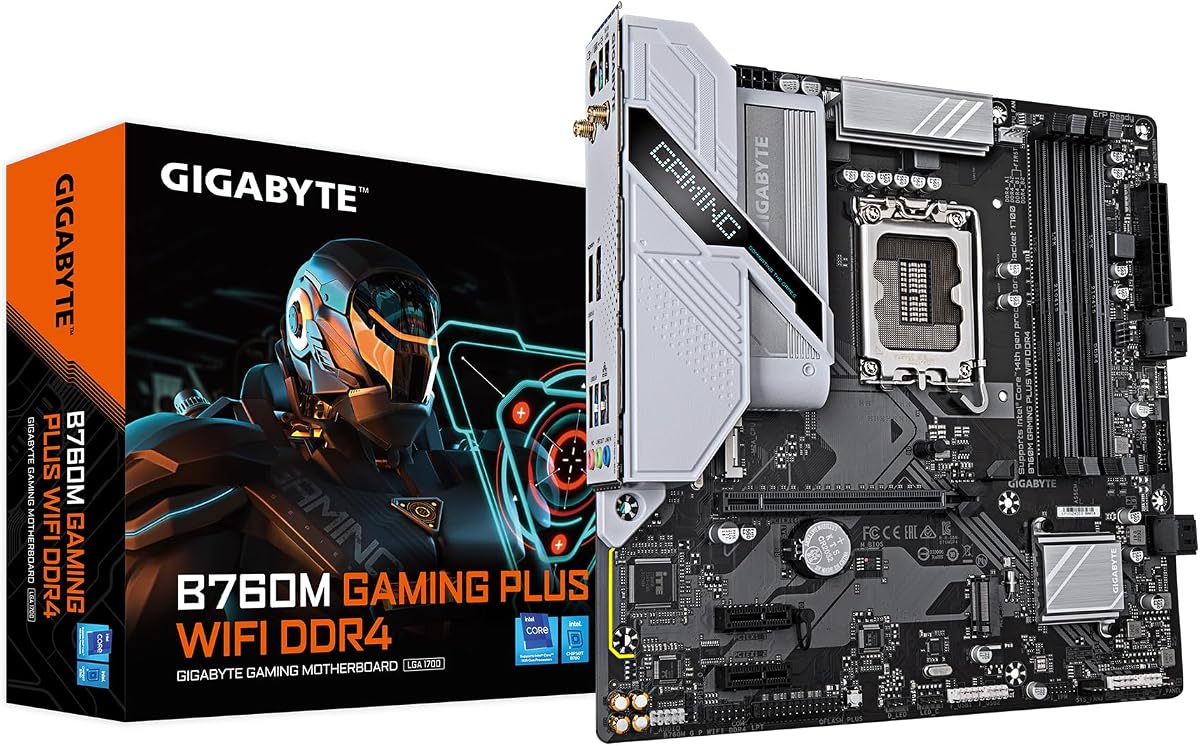
GIGABYTE B760M Gaming Plus WiFi DDR4

The GIGABYTE B760M Gaming Plus WiFi DDR4 is the cheapest way onto the LGA 1700 platform, offering DDR4 with XMP, four DIMM slots, two PCIe 4.0 M.2 slots and handy Q-Flash Plus and EZ-Latch features. Its 4+1+1 hybrid digital power suits a Core i3 or i5 rather than a hungry i7, and networking is 1GbE, but for a genuinely low-cost office or entry gaming build it covers the basics well.

Socket
LGA 1700 / B760
Memory
DDR4, XMP, 4x DIMM
Power
4+1+1 Hybrid Digital
Connectivity
PCIe 4.0, 2x M.2, GbE, USB-C

What we liked

  • Lowest price of the whole list
  • Cheap DDR4 with XMP and 4 DIMM slots
  • Two PCIe 4.0 M.2 slots and front USB-C
  • Q-Flash Plus and EZ-Latch DIY features

Worth noting

  • Modest 4+1+1 power design
  • 1GbE rather than 2.5GbE networking
7Best Mini-ITX

GIGABYTE B760I AORUS PRO

The GIGABYTE B760I AORUS PRO is the mini-ITX standout, packing a genuinely strong 8+1+1 digital VRM on a 10-layer PCB, DDR5 support, Wi-Fi 6E and 2.5GbE into a tiny footprint. Dual M.2 slots and USB 3.2 Gen 2x2 Type-C keep it capable despite the size, and the integrated I/O shield speeds assembly. For a compact, high-quality small-form-factor Intel build, it is the board to beat here.

Socket
LGA 1700 / B760
Memory
DDR5, XMP, 4 DIMM
Power
8+1+1 Digital VRM
Connectivity
PCIe 4.0, 2x M.2, Wi-Fi 6E, 2.5GbE

What we liked

  • True mini-ITX for small-form-factor builds
  • Strong 8+1+1 VRM on a 10-layer PCB
  • DDR5, Wi-Fi 6E and 2.5GbE onboard
  • USB 3.2 Gen 2x2 Type-C connectivity

Worth noting

  • Two M.2 slots limited by ITX size
  • Premium price for the tiny form factor
8Best Renewed Value

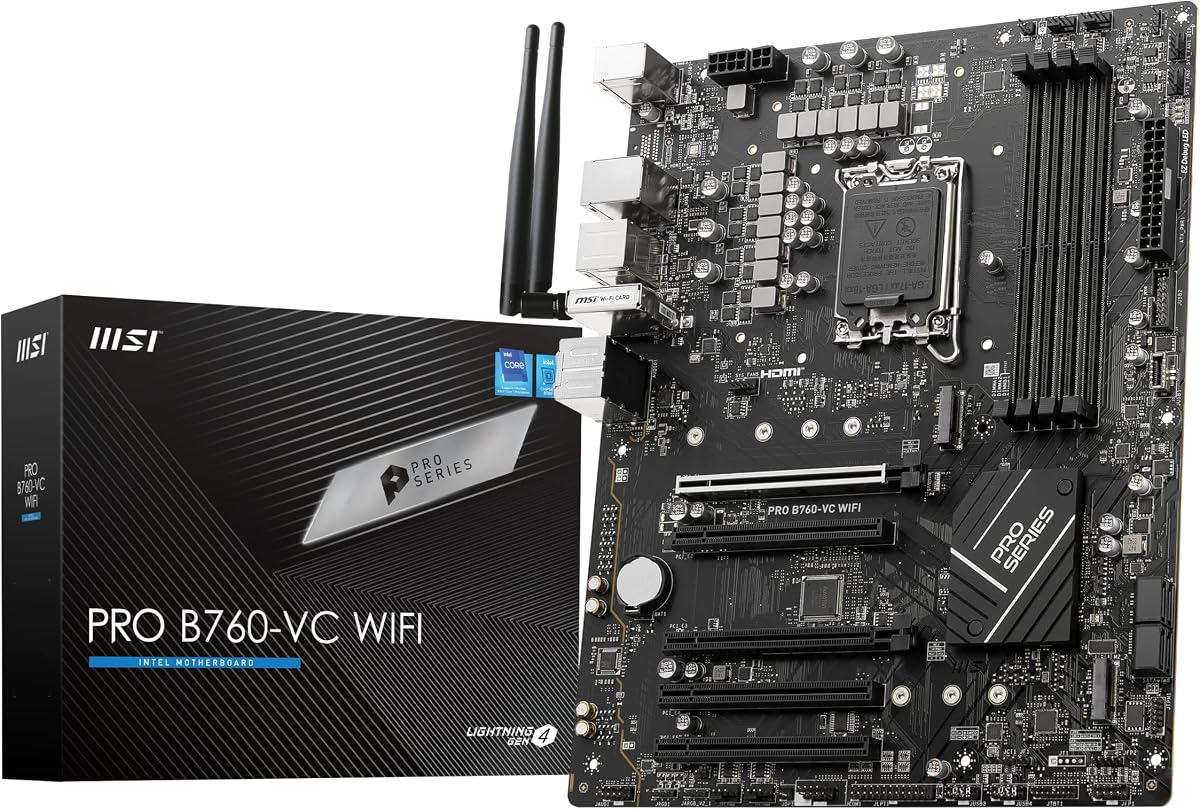
MSI PRO B760-VC WiFi (Renewed)

The MSI PRO B760-VC WiFi is a renewed ProSeries board that delivers DDR5, PCIe 4.0, M.2 and 2.5Gbps LAN in a full ATX layout at a notably low price. It uses older Wi-Fi 5 rather than Wi-Fi 6E, and being a renewed unit it suits value-focused buyers comfortable with refurbished hardware. For a budget DDR5 Intel build where every dollar counts, it is a sensible way to save.

Socket
LGA 1700 / B760
Memory
DDR5
Power
ProSeries design
Connectivity
PCIe 4.0, M.2, Wi-Fi 5, 2.5Gbps

What we liked

  • Low renewed price with DDR5 support
  • 2.5Gbps LAN and USB 3.2 Gen2
  • ATX layout with PCIe 4.0 and M.2
  • MSI ProSeries build quality

Worth noting

  • Older Wi-Fi 5 wireless
  • Renewed unit rather than brand-new
9Best DDR4 Expansion

ASUS Prime B760-Plus D4

The ASUS Prime B760-Plus D4 is the pick if you want DDR4 economy with room to expand, offering a PCIe 5.0 graphics slot, three PCIe 4.0 M.2 slots and even Thunderbolt/USB4 header support. It pairs cheaper DDR4 memory with high-end connectivity, though it omits onboard Wi-Fi, so plan for wired or an add-in card. For a storage-heavy DDR4 build, its three M.2 slots and expansion options stand out.

Socket
LGA 1700 / B760
Memory
DDR4
Power
VRM heatsink cooled
Connectivity
PCIe 5.0, 3x M.2, 2.5Gb, USB4

What we liked

  • PCIe 5.0 slot on a DDR4 board
  • Three PCIe 4.0 M.2 slots for storage
  • Thunderbolt / USB4 header support
  • 2.5Gb LAN and USB 3.2 Gen 2x2 Type-C

Worth noting

  • No onboard Wi-Fi
  • Higher price for a DDR4 board

How We Chose the Best B760 Motherboards

Best B760 Motherboards in 2026

B760 is Intel's mainstream value chipset for the LGA 1700 socket, and buying one is an exercise in getting the features you actually use without paying the Z790 premium for overclocking you may never touch. Because value is the whole point of B760, we weighted cost and real-world usefulness heavily. We started by separating the two fundamental memory choices at this level: cheaper DDR4 boards that keep total build cost down, and DDR5 boards that offer more bandwidth and better future-proofing. Each is the right answer for a different budget.

From there we assessed the specifications that shape a mainstream build. VRM strength came next, since even without CPU overclocking a board still needs to feed a Core i5 or i7 cleanly under load. We looked at M.2 and PCIe provision for storage and graphics, then networking, weighing Wi-Fi 6E and 2.5GbE against older or absent wireless. Form factor mattered too, so we included everything from mini-ITX to full ATX. Finally we balanced all of it against price, keeping the list varied across sizes, memory types and budgets so there is a sensible pick for any value-focused Intel build.

What the B760 Chipset Offers

B760 sits below Z790 in Intel's 700-series stack and is designed to deliver the core of the LGA 1700 experience at a lower price. Every board here supports 12th, 13th and 14th Gen Core processors, giving you a wide choice of CPUs and a solid upgrade path within the family. The headline difference from Z790 is that B760 does not allow CPU overclocking, so it is built around non-K chips like the Core i5-13400 or i5-14600, which represent the value heart of Intel's lineup.

What B760 keeps is what most people actually use. You still get a full-speed PCIe slot for your graphics card, fast Gen4 M.2 storage, modern USB and, on most boards, current networking. Some B760 boards even reach up to features usually found higher in the stack, such as the PCIe 5.0 slot and Thunderbolt 4 header on the ASUS TUF Gaming B760-Plus. The trade-off is simply the loss of CPU overclocking and, on some boards, fewer PCIe lanes and M.2 slots than Z790. For the vast majority of builders, that is a trade worth making.

DDR4 vs DDR5: The Key B760 Decision

The single biggest choice when buying a B760 board is memory type, because B760 exists in both DDR4 and DDR5 versions and each board physically accepts only one. DDR4 boards like the MSI PRO B760-P WiFi DDR4, GIGABYTE B760M Gaming Plus DDR4 and ASUS Prime B760-Plus D4 let you use cheaper, mature DDR4 memory, or reuse kits from an older build, meaningfully reducing total system cost. That saving is often the main reason people choose B760 over Z790 in the first place.

DDR5 boards such as the MSI B760 Gaming Plus WiFi, ASUS Prime B760M-A AX and GIGABYTE B760I AORUS PRO offer higher memory bandwidth and better future-proofing, at the cost of pricier RAM. For pure gaming the real-world difference between DDR4 and DDR5 is modest, but for memory-heavy productivity work DDR5's extra bandwidth can help. The right call comes down to budget and whether you already own compatible memory. Decide this first, because it dictates which boards on this list are even options for you.

VRM and Power for Mainstream Intel Chips

Even though B760 blocks CPU overclocking, VRM quality still matters because the board must supply a Core i5 or i7 at its full boost clocks without overheating. The good news is that most B760 boards are well suited to the non-K chips they target. The ASUS TUF Gaming B760-Plus leads here with a 12+1+1 DrMOS design and military-grade TUF components, giving it enough headroom for a stronger Core i7. The MSI PRO B760-P WiFi DDR4 follows with a solid 12+1 Duet Rail power system on a thick 6-layer copper PCB.

At the value end, boards like the GIGABYTE B760M Gaming Plus DDR4 run a more modest 4+1+1 hybrid digital VRM, which is perfectly adequate for a Core i3 or i5 but less suited to a power-hungry i7 under sustained load. The mini-ITX GIGABYTE B760I AORUS PRO deserves special mention for cramming a strong 8+1+1 digital VRM onto a 10-layer PCB in a tiny footprint. Match the board's power delivery to your intended CPU, and any of these will run their target chips reliably.

Storage and Expansion on B760

Storage flexibility varies across these boards, so plan your drives before buying. If you want multiple NVMe SSDs, the three-M.2 boards stand out: the ASUS TUF Gaming B760-Plus and ASUS Prime B760-Plus D4 both offer three M.2 slots, giving room for a generous storage array. Most other boards here provide two M.2 slots, which is plenty for a typical build with a boot drive and a games or data drive. The M.2 slots on B760 run at PCIe 4.0 speeds, which comfortably saturates the vast majority of NVMe drives.

For the graphics slot, a couple of boards reach beyond the norm with PCIe 5.0: the ASUS TUF Gaming B760-Plus and the ASUS Prime B760-Plus D4 both include a PCIe 5.0 x16 slot, future-proofing your GPU path even on the value chipset. The rest use a PCIe 4.0 x16 slot, which is more than fast enough for any current graphics card. Thermal solutions like MSI's M.2 Shield Frozr and GIGABYTE's enlarged M.2 heatsinks help keep fast drives from throttling during heavy transfers.

Connectivity and Form Factor

Networking is a meaningful differentiator across these B760 boards. Most include Wi-Fi 6E and 2.5Gbps LAN, a strong modern pairing found on the MSI PRO B760-P WiFi DDR4, MSI B760 Gaming Plus and GIGABYTE B760I AORUS PRO, and that combination covers low-latency wired gaming and fast, congestion-resistant wireless in equal measure. A few boards step back: the MSI PRO B760-VC uses older Wi-Fi 5, while the GIGABYTE B760M Gaming Plus DDR4 pairs Wi-Fi with 1GbE wired networking. Two boards, the MSI PRO B760M-P and ASUS Prime B760-Plus D4, omit onboard Wi-Fi entirely, so plan for wired networking or a USB adapter with those. USB provision matters too: the ASUS TUF Gaming B760-Plus and ASUS Prime B760-Plus D4 both offer Thunderbolt or USB4 header support alongside fast Type-C, which is genuinely useful if you connect external SSDs or docks.

Form factor rounds out the decision. Full ATX boards like the MSI PRO B760-P WiFi give the most expansion slots and cooling room, while micro-ATX options such as the MSI PRO B760M-P and ASUS Prime B760M-A AX suit smaller, cheaper cases. For a compact small-form-factor build, the mini-ITX GIGABYTE B760I AORUS PRO is the clear pick. Because a case only accepts certain board sizes, confirm your form factor early so the board fits your chosen chassis.

A Closer Look at the Top Picks

The MSI PRO B760-P WiFi DDR4 earns the top spot because it captures the whole point of B760: a capable, modern platform at a genuinely affordable price. Its 12+1 Duet Rail VRM cleanly runs mainstream Core chips, the DDR4 support lets you save on memory, and Wi-Fi 6E with 2.5Gbps LAN keeps it current. A thick 6-layer copper PCB and M.2 Shield Frozr add durability and cooling, making it the board we would recommend to most value-focused Intel builders.

Behind it, the MSI PRO B760M-P DDR4 and GIGABYTE B760M Gaming Plus DDR4 prove how little you can spend and still get a solid LGA 1700 base, while the MSI B760 Gaming Plus WiFi is the go-to for a modern DDR5 gaming rig. The ASUS TUF Gaming B760-Plus is the premium choice with PCIe 5.0 and Thunderbolt 4, the ASUS Prime B760M-A AX and GIGABYTE B760I AORUS PRO cover compact builds, and the ASUS Prime B760-Plus D4 stands out for DDR4 buyers who want expansion. The renewed MSI PRO B760-VC rounds out the list for the tightest budgets.

Final Recommendation

For most builders, the MSI PRO B760-P WiFi DDR4 is the best B760 motherboard in 2026, delivering a capable VRM, modern networking and money-saving DDR4 support in a well-built ATX package. If you want to go even cheaper, the MSI PRO B760M-P DDR4 and GIGABYTE B760M Gaming Plus DDR4 are excellent value, while the MSI B760 Gaming Plus WiFi is the pick for a future-facing DDR5 build. Choose the ASUS TUF Gaming B760-Plus for premium features like PCIe 5.0 and Thunderbolt, or the GIGABYTE B760I AORUS PRO for a compact mini-ITX system. Decide DDR4 versus DDR5 and your form factor first, and any board here will anchor a smart, cost-effective Intel build.

How we picked

We judged each B760 board on DDR4 versus DDR5 support and value, VRM design for the mainstream Core chips people pair with it, M.2 and PCIe storage provision, networking such as Wi-Fi 6E and 2.5GbE, form factor from mini-ITX to ATX, and price. Because B760 is the value chipset, we weighted real-world usefulness and cost heavily, and kept the list varied across sizes and memory types so every budget Intel build is covered.

Frequently asked questions

What CPUs are compatible with a B760 motherboard?

B760 boards use the Intel LGA 1700 socket and support 12th, 13th and 14th Gen Intel Core processors, plus compatible Pentium Gold and Celeron chips. B760 does not allow CPU overclocking, so it pairs best with non-K chips like a Core i5-13400 or i5-14600, though it will run K-series parts at their stock and boost clocks perfectly well.

Should I choose a DDR4 or DDR5 B760 motherboard?

It depends on budget and memory you already own. DDR4 boards like the MSI PRO B760-P WiFi DDR4 and GIGABYTE B760M Gaming Plus DDR4 let you use cheaper memory and lower total build cost. DDR5 boards like the MSI B760 Gaming Plus offer more bandwidth for the future. Each board takes only one memory type, so decide before buying and pair the matching RAM.

Is B760 good enough for gaming?

Yes. B760 is an excellent value gaming platform. It provides a full-speed PCIe slot for your graphics card and fast Gen4 M.2 storage, and boards like the MSI B760 Gaming Plus WiFi and ASUS TUF Gaming B760-Plus have VRMs that comfortably run a Core i5 or i7 gaming CPU. You only lose CPU overclocking, which most gamers on non-K chips never use anyway.

What is the difference between B760 and Z790?

Both use the LGA 1700 socket and support the same Core generations, but Z790 unlocks CPU overclocking, offers more PCIe lanes and typically has stronger VRMs and more M.2 slots. B760 drops CPU overclocking to hit a lower price while keeping the features most mainstream builders use, which makes it the better value for a non-K Core build.

Which B760 form factor should I pick?

Choose full ATX like the MSI PRO B760-P WiFi for maximum expansion and cooling, micro-ATX like the MSI PRO B760M-P or ASUS Prime B760M-A AX for a smaller, cheaper build, or mini-ITX like the GIGABYTE B760I AORUS PRO for a compact small-form-factor system. Match the board size to your case, since a case only fits certain form factors.