Best Ambidextrous Gaming Mouse in 2026
We may earn a commission from links on this page, at no extra cost to you. Learn more.
An ambidextrous gaming mouse uses a symmetrical shell, so it fits either hand and suits players who want a neutral, no-fuss shape. Left-handers finally get a mouse built for them, right-handers get a clean form that works with claw, fingertip or palm grip, and everyone benefits from the low weights these designs tend to favour. The catch is that not all symmetrical mice are equal: side-button placement, sensor quality and build all vary widely. This guide ranks nine of the best ambidextrous gaming mice you can buy in 2026, from featherweight esports tools to feature-packed wireless models, so there is a right pick whether you chase tournament speed or all-round value.
Top 9 Best Ambidextrous Gaming Mouse
Our top 9 picks, reviewed
Razer Viper Ultralight Wired Gaming Mouse
The Razer Viper Ultralight is the best all-round ambidextrous mouse because it nails the fundamentals. Its perfectly symmetrical shell carries programmable buttons on both flanks, so left- and right-handers alike get a usable layout, and at 71g it stays fast and nimble. Second-generation optical switches fire almost instantly, and the Speedflex cable feels close to wireless. For most players wanting a neutral competitive shape, this is the pick.
- Weight
- 71g
- Sensor
- 5G optical
- Switches
- 2nd-gen optical
- Buttons
- Dual-side programmable
What we liked
- Truly symmetrical with buttons on both sides
- Light 71g esports shell
- Fast 2nd-gen optical switches
- Flexible Speedflex cable
Worth noting
- Wired only
- Low-profile shape suits claw and fingertip best
Glorious Model O Wired Gaming Mouse
The Glorious Model O helped popularise the ultralight honeycomb craze, and it still holds up. At 67g its symmetrical shell is one of the lightest here, the Pixart 3360 sensor tracks cleanly, and the Ascended paracord cable drags so little it feels wireless. Omron switches keep clicks crisp for years. The perforated shell is not for everyone, but for a featherweight ambidextrous mouse at a fair price it is superb.
- Weight
- 67g
- Sensor
- Pixart 3360
- Switches
- Omron
- Design
- Honeycomb RGB
What we liked
- Very light 67g honeycomb body
- Reliable Pixart 3360 sensor
- Durable Omron switches
- Flexible Ascended paracord
Worth noting
- Honeycomb holes collect dust
- Wired connection only
Logitech G903 Lightspeed Wireless
The Logitech G903 Lightspeed is a proven ambidextrous wireless workhorse with side buttons on both flanks, making it a true both-hands mouse. Its HERO 25K sensor is flawless, Lightspeed wireless is lag-free, and POWERPLAY compatibility means it can charge on a compatible mat as you play. At 107g it is heavier than today's ultralights, but the optional weight tuning and 140-hour battery add real versatility.
- Sensor
- HERO 25K
- Connectivity
- Lightspeed wireless
- Battery
- 140hr+
- Weight
- 107g +10g optional
What we liked
- Symmetrical with buttons on both sides
- Excellent HERO 25K sensor
- POWERPLAY charging compatible
- Adjustable weight system
Worth noting
- Heavier than modern ultralights
- Premium price
Logitech G PRO 2 Lightspeed Wireless
The Logitech G PRO 2 Lightspeed is a tournament-grade ambidextrous mouse whose swappable magnetic side buttons let you configure the layout for either hand. The HERO 2 sensor is the most advanced Logitech makes, LIGHTFORCE switches blend optical speed with a mechanical click, and 8kHz polling is available with the right receiver. It is expensive and needs an accessory for peak polling, but as a pro tool it is outstanding.
- Sensor
- HERO 2 44K DPI
- Buttons
- Switchable magnetic side
- Battery
- 95hr
- Connectivity
- Lightspeed USB-C
What we liked
- Right- or left-handed magnetic side buttons
- Elite HERO 2 44K sensor
- LIGHTFORCE hybrid switches
- 8kHz polling capable
Worth noting
- Extra receiver needed for 8kHz
- Premium price
Razer Viper 8K Hz Gaming Mouse
The Razer Viper 8K Hz takes the acclaimed Viper shape and adds a true 8000Hz polling rate, communicating position and clicks up to eight times more often than a standard mouse for near-instant response. The 71g symmetrical body suits either hand, the Focus+ 20K sensor is pixel-precise, and onboard profiles travel with you. The high polling rate asks a lot of your system, but for latency chasers it is thrilling.
- Weight
- 71g
- Sensor
- Focus+ 20K DPI
- Polling
- 8000Hz HyperPolling
- Switches
- 2nd-gen optical
What we liked
- True 8000Hz polling for near-zero latency
- Light 71g symmetrical body
- Focus+ 20K sensor tracks flawlessly
- 5 onboard profiles
Worth noting
- 8kHz polling is demanding on your PC
- Wired only
Lenovo Legion M600 RGB Wireless
The Lenovo Legion M600 is the endurance champion here, delivering up to 200 hours of wireless play on a short charge and a five-minute top-up worth ten hours. It weighs under 69g, carries nine programmable buttons and a capable 16K sensor, and its ambidextrous shape works for palm or claw in either hand. The sensor trails the elite pointers and side buttons sit on one flank, but the battery and value are excellent.
- Sensor
- 16000 DPI
- Battery
- 200hr
- Buttons
- 9 programmable
- Weight
- Under 69g
What we liked
- Huge 200-hour battery life
- Light sub-69g body
- 9 programmable buttons
- Suits palm or claw, either hand
Worth noting
- 16K sensor below flagship rivals
- Side buttons on one side only
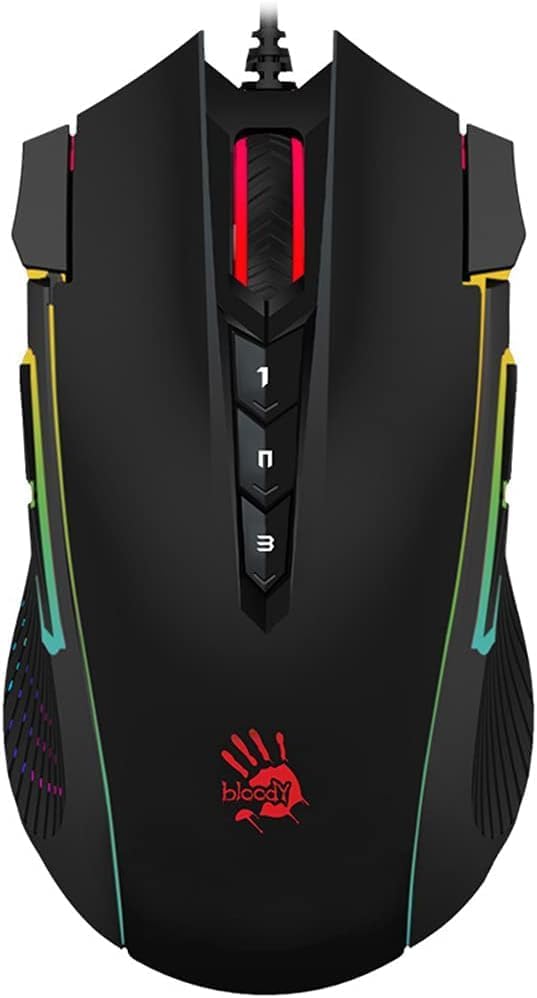
Bloody J90s RGB Gaming Mouse
The Bloody J90s is the value entry point into ambidextrous gaming, packing a surprising number of features for the money. Twelve customizable buttons, six sniper modes and a 2000Hz report rate give it flexibility rare at this price, and 15-zone RGB keeps it looking the part. The 8000 CPI sensor is modest next to flagship rivals and the build is basic, but as a first ambidextrous mouse it delivers plenty.
- Sensor
- 8000 CPI
- Polling
- 2000Hz
- Buttons
- 12 customizable
- Feature
- 6 sniper modes
What we liked
- Very affordable entry price
- 12 customizable buttons
- 2000Hz report rate
- 15-zone RGB lighting
Worth noting
- 8000 CPI trails modern sensors
- Wired budget build
Corsair M75 Wireless RGB (Black)
The Corsair M75 in black is a true ambidextrous mouse thanks to swappable side buttons, letting left- and right-handers set up the layout that suits them. Its symmetrical FPS shape is clean and comfortable, the 26K MARKSMAN sensor is highly precise, and QUICKSTRIKE optical switches register clicks instantly. At 89g it is on the heavier side for a modern lightweight, but the flexibility and tracking make it a strong all-rounder.
- Weight
- 89g
- Sensor
- 26000 DPI
- Buttons
- Swappable side
- Software
- iCUE compatible
What we liked
- Swappable side buttons for either hand
- Precise 26K MARKSMAN sensor
- QUICKSTRIKE optical switches
- Clean symmetrical FPS shape
Worth noting
- Heavier 89g body
- Side buttons must be reconfigured to swap hands
Corsair M75 Wireless RGB (White)
Identical to its black sibling but finished in crisp white, the Corsair M75 white is the choice if your setup leans light. It brings the same swappable side buttons for genuine both-hands use, the same precise 26K MARKSMAN sensor and the same fast QUICKSTRIKE optical switches. The symmetrical FPS shape is comfortable and the iCUE software is deep. It is a touch heavy at 89g, but a versatile ambidextrous option.
- Weight
- 89g
- Sensor
- 26000 DPI
- Buttons
- Swappable side
- Software
- iCUE compatible
What we liked
- Same swappable both-hands layout
- Clean white symmetrical shell
- Precise 26K MARKSMAN sensor
- Instant QUICKSTRIKE switches
Worth noting
- 89g weight is not ultralight
- White shell shows wear over time
How We Chose the Best Ambidextrous Gaming Mice

Symmetry is the whole premise of an ambidextrous mouse, but symmetry alone is not enough. A mouse can have a perfectly mirrored shell and still fail left-handers if all its side buttons sit on the right flank, useless under a left thumb. So our first test was not just whether the body is symmetrical, but whether the button layout genuinely serves both hands. Mice like the Razer Viper Ultralight, with programmable buttons on both sides, and the Corsair M75, with swappable side buttons, pass this test convincingly. Others are symmetrical in shape but keep buttons on one side, which is fine for right-handers and southpaws who do not need side inputs, but worth knowing before you buy.
With that foundation set, we weighed the specifications that decide competitive feel: sensor accuracy, weight, switch quality, polling rate and connectivity. Because ambidextrous shapes are beloved by esports players, we leaned toward low weight and flawless tracking, favouring models like the 67g Glorious Model O and the 8000Hz Razer Viper 8K Hz. But we also kept the list broad, including a budget entry, long-battery wireless options and premium flagships, so there is a sensible pick whether you are buying your first gaming mouse or chasing tournament-grade performance.
What Makes a Mouse Truly Ambidextrous
There is a meaningful difference between a symmetrical shell and a truly ambidextrous mouse. The shell is the easy part: a mirrored body that fits either hand comfortably, which almost every mouse here provides. The harder part is the controls. A left-handed player needs side buttons their thumb can actually reach, which means either buttons on both flanks, as on the Razer Viper Ultralight and Logitech G903, or a swappable system like the Corsair M75 and Logitech G PRO 2, where you physically move or reconfigure the buttons for your dominant hand.
This distinction is why we separate the two groups clearly. If you are right-handed and simply prefer a neutral shape, any symmetrical mouse here works beautifully, including the Lenovo Legion M600 and Bloody J90s that keep buttons on one side. If you are left-handed and rely on side buttons for functions like reload, ping or push-to-talk, you should focus on the both-sides and swappable models, because a symmetrical shell with right-only buttons offers you nothing extra. Knowing which camp you fall into is the single most useful thing to settle before you shop.
Matching the Mouse to Your Needs
For Competitive Esports
If you play to win and want a light, fast, neutral shape, the Razer Viper Ultralight is the pick, with dual-side buttons, a 71g body and quick optical switches. The Glorious Model O undercuts it slightly on weight and price if you like the honeycomb look, and the Razer Viper 8K Hz adds a true 8000Hz polling rate for latency purists. All three suit claw and fingertip grips and reward precise, twitchy play.
For Wireless Freedom
Cable-free players have strong options. The Logitech G903 pairs a flawless HERO 25K sensor with both-sides buttons and POWERPLAY charging, while the Logitech G PRO 2 brings elite HERO 2 internals and swappable magnetic buttons for either hand. If battery life matters most, the Lenovo Legion M600 lasts up to 200 hours and stays light. Each removes cable drag without sacrificing competitive tracking.
For Left-Handed Players
Southpaws should focus on layouts built for both hands. The Corsair M75, in black or white, lets you swap the side buttons to the left, the Logitech G PRO 2 uses magnetic swappable buttons, and the Razer Viper Ultralight and Logitech G903 carry buttons on both flanks from the factory. Any of these gives a left-hander a genuinely usable competitive setup rather than a merely symmetrical body.
For a Tight Budget
If you are buying your first gaming mouse or spending carefully, the Bloody J90s delivers remarkable feature density for the money, with 12 buttons, sniper modes and RGB. The Corsair M75 is the step up, adding a far better 26K sensor and swappable buttons for a mid-range price. Both make sensible starting points before you decide whether to invest in a flagship.
Specifications That Matter Most
For a gaming mouse, the sensor and weight lead the list. Sensor quality determines how accurately your movements translate on screen, and the picks here span from the modest 8000 CPI Bloody J90s to elite units like the HERO 2 in the Logitech G PRO 2 and the Focus+ 20K in the Razer Viper 8K Hz. For most players, any sensor above 16K, such as the 26K MARKSMAN in the Corsair M75, is more precise than human aim can exploit, so do not overpay for headline DPI numbers alone. Weight matters just as much for fast play: the 67g Glorious Model O and 71g Vipers feel effortless to flick, while the 89g Corsair M75 is comfortable but slower to whip around.
Switch type and polling rate refine the feel. Optical switches, found on the Vipers, Corsair M75 and Logitech G PRO 2's LIGHTFORCE hybrids, actuate faster and resist double-click faults better than older mechanical switches. Polling rate governs how often the mouse reports to your PC; standard 1000Hz is smooth for almost everyone, while the 8000Hz Razer Viper 8K Hz and 2000Hz Bloody J90s push latency lower for those who chase it. Finally, weigh connectivity and battery: wired models remove any doubt about lag and cost less, while wireless picks like the Lenovo Legion M600 trade a little money for freedom and long runtimes.
A Closer Look at the Top Picks
The Razer Viper Ultralight takes the top spot because it is the most complete ambidextrous package for the widest range of players. Its symmetrical shell carries programmable buttons on both sides, so left- and right-handers are equally at home, and its light 71g body with fast optical switches makes it a serious competitive tool. The flexible Speedflex cable nearly erases the downside of being wired, and the whole thing costs less than the flagship wireless models.
Behind it, the Glorious Model O is the featherweight value favourite for players who love a light honeycomb shell, and the Logitech G903 is the versatile wireless workhorse with both-sides buttons and adjustable weight. The Logitech G PRO 2 and Razer Viper 8K Hz are the flagship performers, one leaning on swappable magnetic buttons and elite internals, the other on a true 8000Hz polling rate. The Lenovo Legion M600 wins on battery, the Bloody J90s on budget features, and the Corsair M75, in black or white, rounds out the list with genuinely swappable buttons for confident both-hands use.
Tips for Getting the Most From Your Ambidextrous Mouse
Set the mouse up for your hand before your first match. If you own a swappable model like the Corsair M75 or Logitech G PRO 2, move or reconfigure the side buttons for your dominant thumb straightaway, and use the accompanying software, iCUE or G HUB, to bind them to the actions you use most. Left-handers especially should confirm the layout works before diving into a competitive session, since a mis-set button costs you at the worst possible moment.
Tune sensitivity and polling to your play style and hardware. Lower DPI rewards the broad, controlled arm movements many FPS players prefer, while higher DPI suits smaller, faster wrist flicks; experiment to find your sweet spot rather than defaulting to the maximum. If you own the Razer Viper 8K Hz, remember that 8000Hz polling demands a capable PC, so drop to 1000 or 2000Hz if you notice stutter. Finally, keep the sensor lens and mouse feet clean, and pair a light mouse like the Glorious Model O with a smooth, large mousepad to get the frictionless glide these designs are built for.
Final Recommendation
For most players, the Razer Viper Ultralight is the best ambidextrous gaming mouse in 2026, combining a genuinely both-hands button layout, a light 71g shell and fast optical switches at a sensible price. Featherweight fans should look at the Glorious Model O, while wireless players are well served by the Logitech G903 or the flagship Logitech G PRO 2. Latency chasers will love the 8000Hz Razer Viper 8K Hz, left-handers the swappable Corsair M75 in black or white, battery hunters the Lenovo Legion M600, and newcomers the value-packed Bloody J90s. Decide whether you need both-hands side buttons, then match weight and sensor to your play, and any of these will serve you well.
How we picked
We judged each mouse on the symmetry of its shell and how well it serves both hands, then weighed sensor precision, weight, switch quality, connectivity, side-button layout and value. Because ambidextrous shapes attract competitive players, we prioritised low weight and accurate tracking, but we also flagged which models offer swappable or dual-side buttons so left-handers get a genuinely usable layout rather than a merely symmetrical body.
Frequently asked questions
What is an ambidextrous gaming mouse?
An ambidextrous gaming mouse has a symmetrical shell, meaning the left and right sides mirror each other so it fits either hand. Models like the Razer Viper Ultralight go further with buttons on both flanks, while others such as the Corsair M75 use swappable side buttons so left-handers get a properly usable layout, not just a symmetrical shape.
Are ambidextrous mice good for right-handed players too?
Absolutely. Many right-handers prefer the neutral symmetrical shape because it suits claw and fingertip grips well and tends to be lighter than ergonomic mice. The Glorious Model O and Razer Viper 8K Hz are hugely popular with right-handed esports players precisely because their symmetrical shells are fast and comfortable.
Do ambidextrous gaming mice have side buttons for both hands?
It varies. The Razer Viper Ultralight and Logitech G903 place programmable buttons on both sides, while the Corsair M75 and Logitech G PRO 2 use swappable buttons you can move to suit your hand. Some, like the Lenovo Legion M600, keep side buttons on one flank, so check the layout before buying if you are left-handed.
Should I choose a wired or wireless ambidextrous mouse?
Wired mice like the Razer Viper Ultralight and Glorious Model O offer zero-lag response and lower prices, while wireless models such as the Logitech G903 and Lenovo Legion M600 remove cable drag and add battery life of 140 to 200 hours. Modern wireless is fast enough for competition, so choose based on budget and cable preference.
How much should I spend on an ambidextrous gaming mouse?
You can get a capable ambidextrous mouse like the Bloody J90s for a budget price, while mid-range picks such as the Corsair M75 add better sensors and swappable buttons. Flagship wireless models like the Logitech G PRO 2 cost the most but deliver elite sensors and switches. Match the spend to how competitively you play.