Expert Review & Guide

Best AM5 Motherboards for Ryzen Builds in 2026

AMD’s AM5 socket is the long-game platform for Ryzen 7000, 8000, and 9000 series desktops, and the motherboard you choose decides how painless that longevity feels. Chipset letters—B650, B850, X870, X870E—are not vanity codes. They change USB4 availability, PCIe generation on storage and graphics, wireless standards from WiFi 6E to WiFi 7, and how many M.2 drives you can run before the board becomes a SATA museum. A thoughtful midrange B850 can outlive a poorly cooled bargain board even if both claim the same CPU support on the box.

This roundup ranks ten AM5 ATX motherboards from our best-am5-motherboards pack only. We weighed VRM design and heatsink coverage for Ryzen boost behavior, DDR5 EXPO practicality, M.2 count and PCIe 5.0 readiness, wired and wireless networking, and builder quality-of-life features such as BIOS FlashBack, EZ-Latch, and PCIe quick-release. Flagship ROG and MPG boards win on ports and overclocking tools; Eagle and Gaming Plus options win when the GPU budget matters more than rear-I/O theater. White Strix and TUF colorways matter too—people build themes on purpose.

We do not list dollar prices because motherboard street deals swing hard week to week. Ratings reflect Amazon listing averages at writing time. Start with the three top picks if you want a clear overall B850, a connectivity flagship, or a board-plus-memory bundle. Use the comparison table to separate WiFi 7 B850/X870 options from still-excellent B650 workhorses. Then read each review for who should buy, who should skip, and how to avoid the classic AM5 first-boot BIOS trap.

Our Top AM5 Motherboard Picks for 2026

Best Overall AM5 Board

GIGABYTE B850 AORUS Elite WIFI7

★★★★★9.2/10
GIGABYTE B850 AORUS Elite WIFI7
  • B850 ATX with 14+2+2 VRM, DDR5, and Ryzen 9000/8000/7000 support for long AM5 upgrades
  • WiFi 7, 2.5GbE, PCIe 5.0, and three M.2 slots covering modern gaming storage needs
  • EZ-Latch conveniences plus VRM/M.2 thermal guards and a five-year warranty pitch
Check Price →
Best Flagship Connectivity

ASUS ROG Strix X870E-E Gaming WiFi

★★★★☆8.8/10
ASUS ROG Strix X870E-E Gaming WiFi
  • 18+2+2 110A stages and dual ProCool II connectors for high-core Ryzen workloads
  • Five M.2 slots including three PCIe 5.0 paths, dual USB4, and WiFi 7 with 5Gb Ethernet
  • ROG DIY toolkit with Q-Release Slim, Q-Latch, Q-Code, and AI overclocking helpers
Check Price →
Best Board-Plus-RAM Bundle

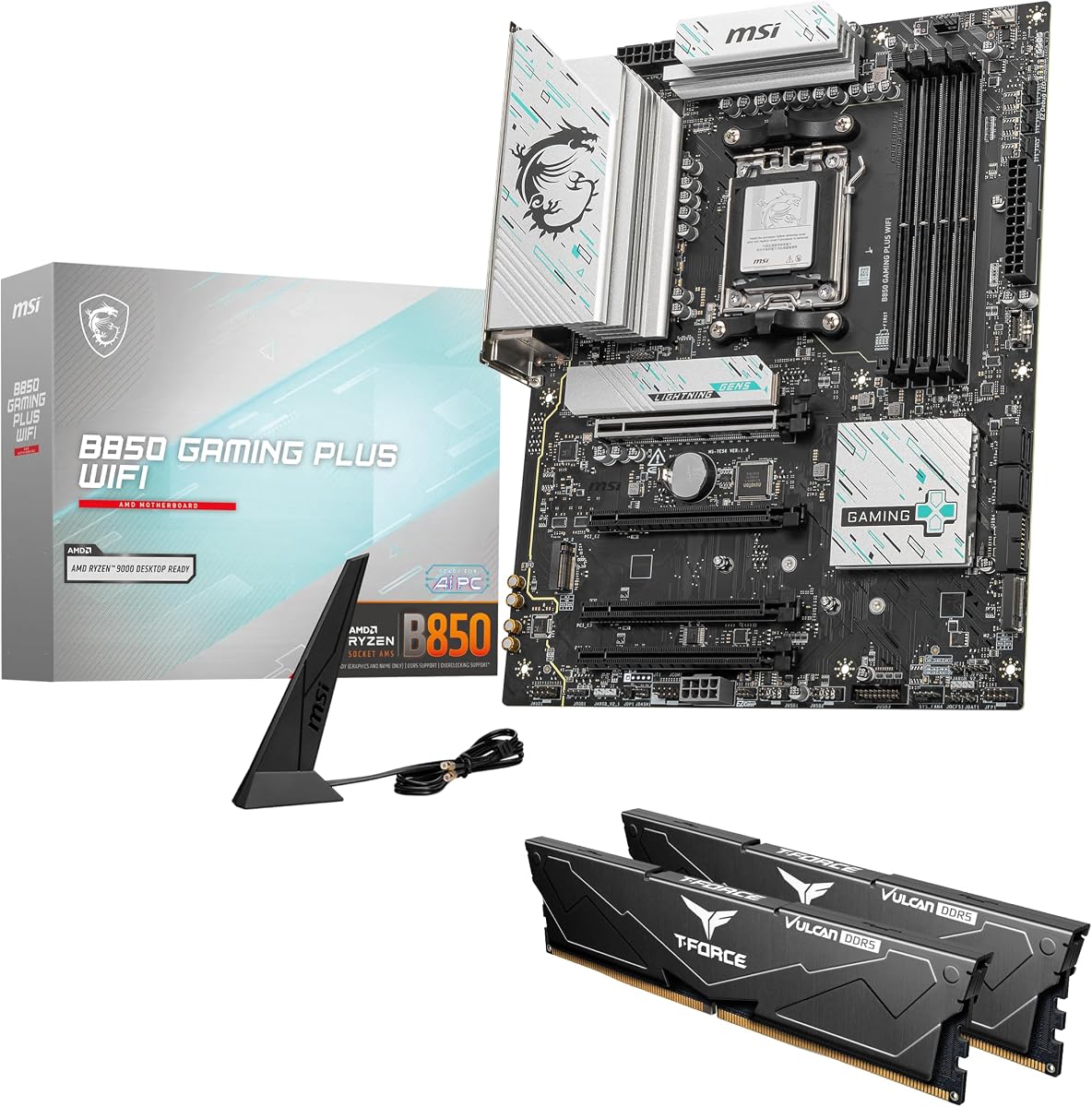
MSI B850 GAMING PLUS WIFI + 32GB DDR5 Bundle

★★★★★9.2/10
MSI B850 GAMING PLUS WIFI + 32GB DDR5 Bundle
  • MSI B850 GAMING PLUS WIFI paired with 32GB TEAMGROUP T-Force Delta DDR5
  • 6000MHz CL38 kit ready for one-click AMD EXPO on Ryzen desktops
  • WiFi 7, 5G LAN, PCIe 5.0 x16, and Gen5 M.2 for a complete first-build basket
Check Price →

As an Amazon Associate we earn from qualifying purchases. We may earn a commission at no additional cost to you.

AM5 Motherboard Comparison: Chipset, Power, and I/O

Use this table to separate B650 workhorses from B850 refresh boards and X870/X870E connectivity flagships. Specs focus on chipset class and CPU readiness, VRM or storage highlights, and the networking trait that defines daily use. No prices—check the live Amazon listing for the current offer.

#ProductSpecificationsScore
1
  • AM5 B850 ATX, Ryzen 9000/8000/7000 ready
  • 14+2+2 VRM, DDR5 4-DIMM, 3x M.2
  • PCIe 5.0, WiFi 7, 2.5GbE, USB-C
9.2
2
  • AM5 B650 ATX, EXPO/XMP DDR5 support
  • 14+2+1 70A digital VRM, 8-layer PCB
  • PCIe 5.0 M.2, WiFi 6E, 2.5GbE, USB-C
8.8
3
  • AM5 X870E ATX, 18+2+2 110A stages
  • 5x M.2 (3x PCIe 5.0), dual USB4
  • WiFi 7, 5Gb Ethernet, AI OC tools
8.8
4
  • AM5 B650 ATX value board, 12+2+2 VRM
  • 1x PCIe 5.0 + 2x PCIe 4.0 M.2
  • WiFi 6E, GbE LAN, USB-C Gen2x2
9.2
5
  • AM5 X870E ATX, PCIe 5.0 + Gen5 M.2
  • Heavy MOSFET heatsinks, EZ PCIe Release
  • WiFi 7, Bluetooth 5.4, 5Gbps LAN
9
6
  • AM5 B650 ATX, 12+2 power stages
  • 1x PCIe 5.0 + 2x PCIe 4.0 M.2
  • WiFi 6E, 2.5G LAN, Aura Sync RGB
9
7
  • AM5 B850 ATX + 32GB DDR5 kit included
  • PCIe 5.0 x16, Gen5 M.2, WiFi 7, 5G LAN
  • TEAMGROUP T-Force Delta 6000MHz EXPO kit
9.2
8
  • AM5 X870 ATX, 14+2+2 power design
  • Multiple M.2, PCIe 5.0, dual USB4
  • WiFi 7, 2.5GbE, EZ-Latch, 5-year warranty
8.8
9
  • AM5 B850 ATX, 14+2+1 80A DrMOS stages
  • 1x PCIe 5.0 + 2x PCIe 4.0 M.2 heatsinks
  • WiFi 7, 2.5Gb LAN, USB 20Gbps Type-C
9
10
  • AM5 X870 ATX, 16+2+2 90A stages
  • 4x M.2, PCIe 5.0, dual USB4
  • WiFi 7, Dynamic OC Switcher, AI tools
9

1. GIGABYTE B850 AORUS Elite WIFI7 - Best Overall AM5

GIGABYTE B850 AORUS Elite WIFI7

GIGABYTE B850 AORUS Elite WIFI7

9.2/10★★★★★

The GIGABYTE B850 AORUS Elite WIFI7 is the board we would hand most Ryzen builders in 2026 when they want current-generation I/O without sliding into flagship X870E pricing. Socket AM5 support for Ryzen 9000, 8000, and 7000 series means you can start on a 7600 or 7700 and move to a 9700X or 9950X later without swapping the motherboard. The B850 chipset generation refreshes storage and wireless expectations: PCIe 5.0 pathways, three M.2 slots, USB-C, WiFi 7, and 2.5GbE LAN sit in a familiar ATX footprint that fits mid-tower cases builders already own.

  • AM5 B850 ATX, Ryzen 9000/8000/7000 ready
  • 14+2+2 VRM, DDR5 4-DIMM, 3x M.2
  • PCIe 5.0, WiFi 7, 2.5GbE, USB-C
Check Price →
✓ Pros
  • Modern B850 feature set with WiFi 7 and PCIe 5.0 without jumping to flagship pricing tiers
  • 14+2+2 VRM and thermal guards that keep Ryzen 9000 gaming and light overclocking stable
  • Three M.2 slots plus EZ-Latch convenience for clean first builds and upgrades
  • Strong Amazon rating and a five-year warranty pitch that reduces long-term risk
  • 2.5GbE wired networking for homes that outgrew gigabit switches
✕ Cons
  • Three M.2 slots may feel limiting versus five-slot X870E flagships for media servers
  • AORUS RGB and software stack is more than minimalists want to install
  • Top PCIe layout still needs cable planning around large dual-slot coolers

Detailed review

Power delivery is a 14+2+2 phase design with VRM and M.2 thermal guards that matter more than marketing phase counts alone. Under a closed gaming loop—CPU boost, GPU heat soak, and a pair of NVMe drives writing simultaneously—heatsink coverage keeps voltage regulation from throttling quietly. That stability shows up as cleaner boost behavior on Ryzen chips that already run warm when Precision Boost leans into available thermal headroom. Pair this board with a decent tower cooler or 240mm AIO and you have a platform that behaves like a finished product rather than a BIOS science project.

Connectivity is where B850 earns its keep versus aging B650 stock. WiFi 7 improves multi-device congestion handling when your router supports it, and 2.5GbE wired networking remains the practical upgrade for NAS backups and low-latency competitive play. Sensor Panel Link and EZ-Latch touches reduce the fiddly moments that make first builds feel hostile. You still need to plan GPU clearance and front-panel USB-C cable length, but the board does not punish you with obscure jumpers or missing rear I/O essentials.

Storage layout with three M.2 slots covers an OS drive, a game library, and a scratch or capture disk for most creators. It will not replace an X870E board if you archive footage across five NVMe drives, yet it matches how the majority of gaming and hybrid work PCs actually fill out. PCIe 5.0 support on the graphics and primary storage paths keeps the board honest for future GPU and SSD generations even if today’s drives do not saturate the bus.

Tradeoffs are honest. The AORUS aesthetic and RGB Fusion ecosystem are louder than a plain TUF or Eagle board if you want a muted workstation look. Software extras are optional—you can ignore them after BIOS setup—but first-time users sometimes install everything and then wonder why overlays appear. If you need dual USB4 docks or five M.2 slots day one, look at the Strix X870E-E or MSI X870E Carbon instead. For a single high-refresh gaming PC with room to grow, this Elite WIFI7 lands in the practical sweet spot.

We also like the five-year warranty messaging as a psychological safety net on a platform intended to last through multiple CPU drops. AM5’s value proposition is longevity; pairing that with a board vendor that markets extended coverage makes sense for buyers who hate swapping platforms every two years. Check the live listing for the exact warranty terms in your region, then build with DDR5 kits that publish AMD EXPO profiles near the 6000 MT/s class Ryzen prefers for 1:1 Infinity Fabric behavior.

Who should buy the B850 AORUS Elite WIFI7

Choose this board if you want a 2026-current AM5 gaming foundation with WiFi 7, 2.5GbE, PCIe 5.0, and three M.2 slots without funding flagship USB4 sprawl. It fits Ryzen 5/7 gaming PCs and many Ryzen 9 machines that use good air or AIO cooling. Skip it if you already know you need five NVMe drives or dual USB4 docks on day one.

Setup notes for first boot

Update BIOS before installing the newest Ryzen steppings if your firmware revision is older. Seat EXPO DDR5 in the recommended DIMM slots, usually second and fourth from the CPU. Confirm the primary SSD is under its thermal guard, connect both CPU power plugs if present, and load optimized defaults before enabling PBO experiments.

How it compares in this pack

It beats older B650 Elites on wireless generation and chipset freshness, trails X870E Strix/Carbon on raw port count, and feels more premium than Eagle or bare Gaming Plus boards. For most readers it is the default recommendation when the question is simply “best AM5 motherboard” without a special aesthetic or bundle constraint.

Check Price on Amazon →

We may earn a commission at no additional cost to you.

2. GIGABYTE B650 AORUS Elite AX - Best Proven B650

GIGABYTE B650 AORUS Elite AX

GIGABYTE B650 AORUS Elite AX

8.8/10★★★★☆

The GIGABYTE B650 AORUS Elite AX remains one of the most proven AM5 midrange boards still worth buying in 2026, especially when deals undercut newer B850 SKUs. It supports Ryzen 9000, 8000, and 7000 series processors on socket AM5 and brings a commanding 14+2+1 phase design with 70A power stages on an 8-layer 2X copper PCB. That electrical recipe is why many builders still trust this board under all-core loads from content exports and long gaming sessions rather than chasing every new chipset letter.

  • AM5 B650 ATX, EXPO/XMP DDR5 support
  • 14+2+1 70A digital VRM, 8-layer PCB
  • PCIe 5.0 M.2, WiFi 6E, 2.5GbE, USB-C
Check Price →
✓ Pros
  • Mature B650 platform with broad Ryzen 7000 through 9000 support after BIOS updates
  • Twin 14+2+1 phase design with 70A stages and an 8-layer copper PCB for sustained loads
  • PCIe 5.0 NVMe primary slot plus WiFi 6E still feels current for most gaming PCs
  • VRM heatpipe coverage and M.2 thermal guards help quiet air-cooled mid-towers
  • Front and rear USB-C options cover modern peripherals without a hub tax
✕ Cons
  • WiFi 6E trails WiFi 7 boards if your router already supports the newer standard
  • Older B650 SKU may need a BIOS flash for the newest Ryzen 9000 steppings
  • Fewer USB4 options than current X870/X870E boards

Detailed review

Thermals are a highlight: a 6mm heatpipe, fully covered MOSFET heatsinks, M.2 thermal guards, and PCIe armor create a board that looks and feels finished. In cramped airflow cases those heatsinks matter more than another USB port you will never use. The primary PCIe 5.0 NVMe slot plus additional M.2 capacity covers modern storage without forcing SATA cable spaghetti. Front and rear USB-C options keep phones, DACs, and portable SSDs on native ports.

Networking is WiFi 6E and 2.5GbE—still excellent if your router is not WiFi 7 yet. Many households will not notice the difference versus WiFi 7 until they upgrade access points, so buying B650 Elite AX on a discount can be smarter than paying a WiFi 7 premium you cannot use. DDR5 support with AMD EXPO and Intel XMP profiles makes memory setup approachable; stick to kits validated near Ryzen’s comfortable frequency window unless you enjoy manual tuning.

Compared with the newer B850 AORUS Elite WIFI7, this board trades the latest wireless and chipset polish for a longer market track record and often better street value. Compared with the B650 Eagle AX, you gain thicker VRM cooling, stronger phase design, and a more enthusiast-facing AORUS feature set. That middle lane is why Elite AX shows up in so many recommended builds from the early AM5 era through Ryzen 9000 refreshes.

Caveats are predictable. You may need a BIOS update for the newest CPU steppings—use Q-Flash with a USB stick if your processor will not POST on the factory image. You will not get USB4 or WiFi 7 without adapters or a board swap later. RGB Fusion will light everything if you let it; disable what you do not want in software or via headers. None of those issues are dealbreakers for a gaming or creator desktop that prioritizes VRM confidence over bleeding-edge I/O.

If your build already includes a strong cooler, a midrange GPU, and a single fast Gen4 or Gen5 SSD, the B650 AORUS Elite AX still feels like a complete answer. It is the board we recommend when someone says they want AORUS durability without paying X870E tax. Keep firmware current, enable EXPO, set a sensible fan curve in Smart Fan controls, and the platform stays out of your way for years of Ryzen upgrades.

Who still benefits from B650 Elite AX

Buyers who find it discounted relative to B850, already own WiFi 6E routers, and want a thick VRM cooling solution with a long AM5 track record. It remains excellent for Ryzen 7000 upgrades and Ryzen 9000 CPUs once BIOS is current. Jump to B850/X870 if WiFi 7 or USB4 is non-negotiable.

BIOS and memory tips

Use Q-Flash when CPU compatibility demands it. Prefer EXPO kits near the 6000 MT/s class for predictable Infinity Fabric behavior. Give the heatpipe heatsinks intake airflow; a GPU that fills the entire case front can still cook any midrange VRM if the chassis has no fan plan.

Check Price on Amazon →

We may earn a commission at no additional cost to you.

3. ASUS ROG Strix X870E-E - Best Flagship Connectivity

ASUS ROG Strix X870E-E Gaming WiFi

ASUS ROG Strix X870E-E Gaming WiFi

8.8/10★★★★☆

The ASUS ROG Strix X870E-E Gaming WiFi is the connectivity flagship in this pack—the board you choose when ports, storage lanes, and overclocking headroom matter as much as the CPU itself. It targets AMD Ryzen 9000, 8000, and 7000 series on AM5 with an 18+2+2 power solution rated for 110A per stage, dual ProCool II connectors, alloy chokes, and durable capacitors. That is the kind of electrical overkill that keeps a 16-core Ryzen stable when you combine PBO, heavy AVX exports, and a hot GPU in the same chassis.

  • AM5 X870E ATX, 18+2+2 110A stages
  • 5x M.2 (3x PCIe 5.0), dual USB4
  • WiFi 7, 5Gb Ethernet, AI OC tools
Check Price →
✓ Pros
  • 18+2+2 110A power stages with dual ProCool II connectors for high-core Ryzen builds
  • Five M.2 slots including three PCIe 5.0 paths for storage-heavy creators
  • Dual USB4 plus dense USB 10/20Gbps ports for docks, capture, and external SSDs
  • WiFi 7 with Realtek 5Gb Ethernet suits multi-gig wired and wireless upgrades
  • ROG DIY helpers—Q-Release Slim, Q-Latch, Q-Code—make installs and GPU swaps less stressful
✕ Cons
  • Feature density and board size demand a roomy ATX case and careful cable routing
  • Overkill VRM and port count for simple 6-core gaming builds
  • Premium positioning means you pay for tools many users never open

Detailed review

Storage and expansion are extreme in a good way: three onboard PCIe 5.0 M.2 slots and two PCIe 4.0 M.2 slots, all with substantial cooling. Creators who juggle project, cache, and archive drives stop fighting SATA breakpoints. Dual USB4 Type-C ports, a USB 20Gbps front-panel connector, PD-capable USB, and a pile of additional 10Gbps ports turn the rear I/O into a dock. Add WiFi 7 and Realtek 5Gb Ethernet and the board stops being a bottleneck for multi-gig home labs.

ROG’s software and firmware stack is part of the product. AI Overclocking, AI Cooling II, AI Networking, and AEMP aim to simplify setup, while Dynamic OC Switcher, Core Flex, Asynchronous Clock, and PBO Enhancement give enthusiasts manual levers. You do not have to use every tool. Many owners enable EXPO, set a fan profile, and ignore the rest. The value is that the tools exist when you want them, with Q-Code and Q-LED diagnostics when something fails to POST.

DIY-friendly hardware features reduce real friction: PCIe Slot Q-Release Slim, M.2 Q-Latch, Q-Release, Q-Slide, Q-Antenna, Start and Clear CMOS buttons, BIOS FlashBack, and a pre-mounted I/O shield. Swapping a thick triple-slot GPU in a tight case is less of a knuckle-scraper. That matters more after the third upgrade cycle than on unboxing day. Massive heatsinks with an integrated I/O cover and L-shaped heat-pipe keep the board looking like a product rather than a bare PCB with stickers.

Who should skip it? Anyone building a quiet office PC around a six-core Ryzen and a single SSD will fund features they never touch. The board is large, visually busy, and priced like a flagship. If you want most of the modern I/O without five M.2 slots, the Strix X870-A or Gigabyte X870 Eagle WIFI7 are more proportionate. If you want durability aesthetics over ROG flair, consider the TUF B850-PLUS instead.

For AI-local workloads, multi-drive editors, LAN-party showpieces, and builders who refresh GPUs often, the X870E-E remains the pack’s ceiling. Pair it with strong case airflow because those heatsinks only work if air moves. Use quality DDR5 with published EXPO profiles, keep BIOS current for new Ryzen steppings, and treat the AI networking and OC suites as optional accelerators rather than mandatory rituals.

In short, this is the AM5 board you buy when the motherboard is part of the flex and the workflow—not merely a socket adapter. It earns its badge as Best Flagship Connectivity by stacking USB4, multi-gig Ethernet, WiFi 7, and a five-drive M.2 map on top of a VRM that will not blink at high-core Ryzen silicon.

Who it is for

High-core Ryzen users, editors with multi-disk projects, AI PC experimenters who want USB4 and 5Gb Ethernet, and builders who swap GPUs often enough to appreciate Q-Release Slim. It is overkill for a quiet office 8600G-style build.

Versus other flagships in this guide

Compared with MSI X870E Carbon, Strix X870E-E pushes harder on M.2 count and ROG OC tool depth. Compared with Strix X870-A, it is the fuller port and power monster. Pick E-E when you want the ceiling; pick A when you want balance.

Practical OC and cooling notes

Dynamic OC Switcher and Core Flex are optional. Start with EXPO and stock PBO limits, validate stability, then explore ASUS tools. Keep the massive heatsink stack in moving air; static RGB showcases still need exhaust.

Check Price on Amazon →

We may earn a commission at no additional cost to you.

4. GIGABYTE B650 Eagle AX - Best Budget AM5 Starter

GIGABYTE B650 Eagle AX

GIGABYTE B650 Eagle AX

9.2/10★★★★★

The GIGABYTE B650 Eagle AX is the pack’s budget-minded AM5 on-ramp: enough board to run Ryzen 7000 through 9000 series CPUs without pretending to be a workstation flagship. Its 12+2+2 phase digital VRM solution targets mainstream gaming chips rather than extreme overclocking. For a 7600, 7700, 9600X, or similar, that is usually plenty when cooling and case airflow are competent. The ATX form factor keeps full-size GPU compatibility and standard case mounting.

  • AM5 B650 ATX value board, 12+2+2 VRM
  • 1x PCIe 5.0 + 2x PCIe 4.0 M.2
  • WiFi 6E, GbE LAN, USB-C Gen2x2
Check Price →
✓ Pros
  • Approachable AM5 entry that still unlocks Ryzen 9000 after a current BIOS
  • Triple M.2 layout with one PCIe 5.0 slot covers OS plus game library drives
  • WiFi 6E and USB 3.2 Gen2x2 Type-C punch above budget expectations
  • 12+2+2 digital VRM is enough for non-extreme 8-core and many 12-core gaming CPUs
  • High user rating suggests fewer first-boot surprises for new builders
✕ Cons
  • Gigabit LAN instead of 2.5GbE on many competing AORUS and TUF boards
  • Leaner VRM cooling aesthetics versus Elite and ROG heatsink coverage
  • Fewer luxury DIY buttons than midrange and flagship Strix models

Detailed review

Storage is surprisingly complete for the tier—one PCIe 5.0 M.2 plus two PCIe 4.0 M.2 slots with thermal guard coverage on the design brief. That means you can install a fast OS drive and still add game and media volumes without SATA adapters. USB 3.2 Gen2x2 Type-C brings a high-speed rear port that many cheap boards omit. WiFi 6E covers modern wireless bands even if wired networking stays at Realtek gigabit rather than 2.5GbE.

That gigabit LAN is the clearest compromise versus AORUS Elite and TUF B850 options. If your NAS or office switch already runs multi-gig, you will feel the ceiling during large file copies. For pure online gaming and general browsing, gigabit remains fine. Builders who care about transfer speed should budget for a 2.5GbE board or a PCIe network card later. Smart Fan 6 and Q-Flash remain the practical Gigabyte utilities that make Eagle boards easier to live with than no-name alternatives.

Aesthetically the Eagle line is quieter than AORUS or ROG—fewer showpiece heatsink sculptures, less aggressive RGB identity. That is a feature for office desks and rental setups where a glowing dragon logo is unwelcome. Thermals are adequate when you respect CPU cooler clearance and avoid stuffing the case with zero intake. Do not expect the same VRM armor presence as the B650 AORUS Elite AX under sustained all-core stress tests.

Who should buy it? First AM5 builders, students, and 1080p/1440p gamers who want DDR5, modern M.2 count, and WiFi without funding USB4 docks they do not own. Who should skip it? Anyone already committed to multi-gig wired networking, five-drive NVMe arrays, or heavy PBO on top-bin 16-core chips. Those buyers are happier on B850 Elite, TUF B850, or X870/X870E boards.

As a value pick it still scores highly with users, which usually means BIOS behavior and accessory completeness are less chaotic than ultra-cheap unknowns. Update firmware before installing the newest Ryzen 9000 CPU if your box ships with an older microcode revision. Enable EXPO, confirm your primary SSD is in the PCIe 5.0-capable slot if you paid for a Gen5 drive, and you have a sensible AM5 foundation that can accept a CPU upgrade years later.

Best use cases

Student gaming PCs, first AM5 builds, and budget 1440p towers where DDR5 and triple M.2 matter more than multi-gig LAN. Excellent when the savings go toward a better GPU or CPU cooler instead of board chrome.

What to watch

Gigabit Ethernet is the main ceiling. Plan a NIC upgrade later if you join a multi-gig NAS household. Confirm BIOS support for your exact Ryzen model before you recycle an older AM4 cooler mount assumption—AM5 uses a different socket retention kit.

Check Price on Amazon →

We may earn a commission at no additional cost to you.

5. MSI MPG X870E Carbon WiFi - Best MSI Premium

MSI MPG X870E Carbon WiFi

MSI MPG X870E Carbon WiFi

9/10★★★★★

MSI’s MPG X870E Carbon WiFi brings the X870E platform into a premium gaming aesthetic with practical builder touches. It supports Ryzen 9000, 8000, and 7000 series processors and emphasizes Lightning Gen 5 PCIe bandwidth—up to the headline 128GB/s class pathway marketing—for GPUs and storage that can use it. If you are planning a long-lived AM5 tower that may see a next-generation graphics card and a Gen5 boot drive, this chipset tier keeps lanes from becoming the first obsolescence point.

  • AM5 X870E ATX, PCIe 5.0 + Gen5 M.2
  • Heavy MOSFET heatsinks, EZ PCIe Release
  • WiFi 7, Bluetooth 5.4, 5Gbps LAN
Check Price →
✓ Pros
  • X870E platform with Lightning Gen 5 PCIe bandwidth for next-gen GPUs and SSDs
  • Premium MOSFET heatsinks, heat-pipe, and 7W/mK pads target long gaming sessions
  • EZ PCIe Release button simplifies thick GPU removals in tight cases
  • WiFi 7, Bluetooth 5.4, and 5Gbps LAN cover wireless and multi-gig wired needs
  • USB 40Gbps support keeps high-speed external storage on the table
✕ Cons
  • Premium MSI styling and features cost more than B850 daily-driver boards
  • Dual-LAN marketing can confuse buyers who only need one multi-gig jack
  • Busy MPG software suite may feel heavy if you prefer bare BIOS control

Detailed review

Cooling hardware is a clear MSI talking point: heavy plated MOSFET heatsinks with a heat-pipe, high-quality 7W/mK MOSFET thermal pads, extra choke pads, and onboard M.2 Shield Frozr coverage. Those parts exist because X870E boards often sit under powerful CPUs that boost hard. In a mid-tower with front intake, the Carbon’s thermal kit helps sustain clocks without VRM panic. EZ PCIe Release is the quality-of-life feature you appreciate the first time a heavy GPU refuses to leave a conventional latch cleanly.

Networking is ambitious: WiFi 7, Bluetooth 5.4, and 5Gbps LAN, with dual-LAN style positioning for separating intranet and internet traffic in MSI’s messaging. Creators and home-lab users who trunk to a multi-gig switch get a wired path that outruns older 2.5GbE boards. USB 40Gbps support extends that high-speed philosophy to external enclosures. HDMI remains available for iGPU troubleshooting even when your discrete GPU is the daily display path.

Versus the ROG Strix X870E-E, Carbon WiFi trades some of ASUS’s sprawling DIY button theater and five-M.2 maximalism for MSI’s MPG look and EZ release focus. Versus Gigabyte’s X870 Eagle, you are clearly paying for more premium thermal hardware and multi-gig networking. Pick Carbon when you like MSI Center ecosystems, already own MSI cases or coolers, or specifically want that 5Gbps LAN jack without adding a NIC.

Tradeoffs include cost versus B850 boards that already satisfy most gamers, and software suite weight if you prefer minimal installs. RGB and Carbon styling lean performance-gaming rather than invisible workstation. If your case window is frosted and you never open networking tools, a TUF B850 or B850 AORUS Elite may be the calmer spend. If you do live in multi-gig transfers and frequent GPU swaps, Carbon’s feature set feels intentional rather than decorative.

Setup advice is standard for premium AM5: flash a current BIOS for new CPUs, mount EXPO memory in the recommended slots, and give the VRM heatsinks real airflow. Use the EZ PCIe Release as designed instead of prying on a GPU latch. With those basics handled, the MPG X870E Carbon WiFi is a strong MSI flagship alternative in this roundup for builders who want Gen5 readiness and multi-gig networking under one ATX umbrella.

Who should choose Carbon WiFi

MSI fans, multi-gig home-lab users, and builders who value EZ PCIe Release and heavy VRM heatsinks on X870E. Ideal when 5Gbps LAN and WiFi 7 are both on the must-have list.

Build tips

Use the PCIe release button instead of forcing GPU latches. Install M.2 drives under Shield Frozr covers carefully so pads contact evenly. Segment network roles if you actually use dual-LAN style setups; otherwise a single 5Gbps run to your switch is enough.

Check Price on Amazon →

We may earn a commission at no additional cost to you.

6. ASUS ROG Strix B650-A - Best White-Build Strix Pick

ASUS ROG Strix B650-A Gaming WiFi

ASUS ROG Strix B650-A Gaming WiFi

9/10★★★★★

The ASUS ROG Strix B650-A Gaming WiFi is the white-and-silver AM5 board that shows up in snow builds, white NZXT-style towers, and ROG-themed desks that refuse a black slab. Beyond cosmetics, it is a credible B650 ATX platform for Ryzen 9000, 8000, and 7000 series CPUs with a 12+2 power stage design, 8+4 pin ProCool connectors, alloy chokes, and durable capacitors. That VRM class matches mainstream gaming chips and many creator workloads when paired with adequate cooling.

  • AM5 B650 ATX, 12+2 power stages
  • 1x PCIe 5.0 + 2x PCIe 4.0 M.2
  • WiFi 6E, 2.5G LAN, Aura Sync RGB
Check Price →
✓ Pros
  • Silver/white aesthetic that matches popular ROG and snow-theme cases
  • 12+2 power stages with ProCool connectors handle mainstream Ryzen 7000/9000 gaming CPUs
  • One PCIe 5.0 M.2 plus two PCIe 4.0 M.2 slots with heatsinks for tidy cable-free storage
  • WiFi 6E and 2.5G LAN remain solid for apartments and fiber gateways
  • Aura Sync integration for builders who already own ROG peripherals
✕ Cons
  • BIOS update may be required for Ryzen 9000/8000 out of the box
  • 12+2 stages are less aggressive than newer 14+ and 16+ midrange designs
  • WiFi 6E rather than WiFi 7 on newer B850/X870 competitors

Detailed review

Important practical note from the listing: a BIOS update may be required for Ryzen 9000 and 8000 series processors. Plan for BIOS FlashBack with a USB stick and a compatible older CPU only if needed—or buy from a seller that ships updated firmware. Ignoring that step is the most common reason new AM5 boards look “dead” on first power-on. Once current, the board behaves like the rest of ASUS’s Strix midrange: EXPO memory support, sensible defaults, and Aura Sync lighting control.

Storage includes one PCIe 5.0 M.2 and two PCIe 4.0 M.2 slots, all with heatsinks. That is the right count for OS, games, and a media drive. Networking is WiFi 6E plus 2.5G LAN—still a strong combo for apartments and fiber gateways that have not moved to WiFi 7. USB 3.2 Gen 2x2 Type-C covers fast external SSDs. Massive VRM heatsinks with airflow channels help the board keep voltage stages in check under gaming plus stream encode loads.

Compared with the newer TUF B850-PLUS and B850 AORUS Elite WIFI7, the B650-A Strix is the style pick and often the deal pick rather than the newest-spec pick. You give up WiFi 7 and some newer chipset conveniences. You keep ROG’s look, Aura ecosystem, and a layout many cable-management guides already document. If your theme is black/yellow TUF or stealth dark, choose those instead; if your theme is white Strix, this board remains the obvious match.

Limitations track the older B650 midrange brief: power stages are not the 16+ or 18+ monsters on X870 Strix boards, and USB4 is not part of the package. Enthusiasts running aggressive PBO on top CPUs may prefer X870-A or X870E-E headroom. Casual 1440p gamers will not notice. Aura Sync can be disabled if you want a dark boot; do not assume RGB is mandatory just because the board supports it.

Buy the B650-A when the case photo matters and the CPU plan is mainstream Ryzen. Verify BIOS readiness, seat DDR5 in the QVL-friendly slots, and use the 2.5G LAN when your router allows it. As a white-build Strix pick it still deserves a place in 2026 roundups because aesthetics are a real purchase driver—and this board does not force you to sacrifice basic AM5 competence to get them.

White-build pairing ideas

Match with white GPUs, white air coolers, and cable extensions if you care about theme. Disable Aura lighting channels you do not need so the board does not rainbow-default after every driver reinstall.

CPU compatibility reminder

Budget time for a BIOS update when installing Ryzen 9000/8000. FlashBack with a FAT32 USB stick named per ASUS instructions if the board will not boot your CPU on shipped firmware.

Check Price on Amazon →

We may earn a commission at no additional cost to you.

7. MSI B850 GAMING PLUS WIFI Bundle - Best Board-Plus-RAM Bundle

MSI B850 GAMING PLUS WIFI + 32GB DDR5 Bundle

MSI B850 GAMING PLUS WIFI + 32GB DDR5 Bundle

9.2/10★★★★★

The MSI B850 GAMING PLUS WIFI bundle is the most practical SKU in this pack for builders who hate shopping for memory QVL charts. It pairs an ATX B850 motherboard—AM5 support for Ryzen 9000 through 7000 processors, DDR5 with high OC headroom claims, PCIe 5.0 x16, Gen5 M.2, WiFi 7, and 5G LAN—with a TEAMGROUP T-Force Delta DDR5 32GB (2x16GB) kit. Arriving with matched memory removes an entire failure mode: DIMMs that POST but never train to rated speed.

  • AM5 B850 ATX + 32GB DDR5 kit included
  • PCIe 5.0 x16, Gen5 M.2, WiFi 7, 5G LAN
  • TEAMGROUP T-Force Delta 6000MHz EXPO kit
Check Price →
✓ Pros
  • Motherboard plus matched 32GB TEAMGROUP T-Force Delta DDR5 kit simplifies shopping
  • 6000MHz CL38 kit is a sweet spot for Ryzen EXPO tuning out of the box
  • B850 brings WiFi 7, 5G LAN, PCIe 5.0 x16, and Gen5 M.2 to a midrange board
  • One-click EXPO/XMP path reduces memory troubleshooting for first-time AM5 builders
  • Strong combined rating for shoppers who want fewer SKUs and fewer compatibility guesses
✕ Cons
  • Bundled RAM RGB theme may not match every case aesthetic
  • You cannot freely pick a different DIMM kit without buying memory twice
  • Bundle listings sometimes obscure whether stock fluctuates as motherboard-only

Detailed review

The included kit runs at 6000MHz (PC5-48000) with CL38 timings, which sits in the widely recommended band for Ryzen’s Infinity Fabric behavior. Enabling AMD EXPO or XMP 3.0 in BIOS is the intended path—no manual primary timing work required for typical gaming desktops. That one-click overclocking story is why bundles convert well for first-time DDR5 builders who have heard horror stories about unstable memory on AM5’s early days.

On the board side, B850 GAMING PLUS WIFI brings modern networking that older B650 budget boards lack. WiFi 7 helps if your access point is current, and 5G LAN is a serious wired upgrade for NAS and large project copies. PCIe 5.0 graphics and Gen5 M.2 support keep the platform aligned with current GPU and SSD roadmaps. You are not buying MSI’s Carbon-level heatsink sculpture, but you are buying the chipset features most people actually use.

Bundle caveats deserve daylight. The T-Force Delta sticks include RGB that may clash with a monochrome theme; plan to disable lighting in software if needed. You also lose flexibility—if you wanted 64GB or a non-RGB kit, a motherboard-only purchase plus separate memory may still be better. Listing pages for bundles sometimes vary in packaging photos; confirm the ASIN contents include both board and RAM before checkout.

Versus buying the Gigabyte B850 AORUS Elite WIFI7 alone, this MSI bundle wins when you do not already own DDR5 and want fewer boxes at the door. Versus the B650 Eagle AX, you gain newer wireless, multi-gig LAN, and a ready 32GB kit at the cost of a higher total basket. It is not the right choice for someone who already harvested DDR5 from a previous AM5 build.

Our advice: treat the bundle as a time saver with a performance-reasonable memory profile, not as a rare collector kit. Update BIOS, enable EXPO, install your CPU cooler carefully around ATX socket retention, and verify the Gen5 M.2 slot if you bought a flagship SSD. For dorm builds, gift PCs, and first Ryzen 9000 towers, the convenience factor is the feature—and it is a legitimate one.

Why the bundle helps

You avoid mismatched DIMM kits and get a 6000MHz CL38 EXPO-friendly starting point. That is worth real troubleshooting hours for first-time DDR5 builders even if enthusiasts prefer picking memory separately.

When to buy board-only instead

Skip the bundle if you already own 32GB or 64GB DDR5, want non-RGB sticks, or found a better standalone memory kit on sale. The motherboard’s B850 features remain attractive either way—just do not pay twice for RAM.

EXPO checklist

After first POST, enter BIOS, enable EXPO/XMP, save, and run a memory stress utility before storing irreplaceable files. If training fails, reseat DIMMs and try the other validated slots before RMA assumptions.

Check Price on Amazon →

We may earn a commission at no additional cost to you.

8. GIGABYTE X870 Eagle WIFI7 - Best USB4 Value X870

GIGABYTE X870 Eagle WIFI7

GIGABYTE X870 Eagle WIFI7

8.8/10★★★★☆

The GIGABYTE X870 Eagle WIFI7 brings USB4 and WiFi 7 to a more approachable X870 ATX board than ROG’s Strix stack. Socket AM5 support covers Ryzen 9000, 8000, and 7000 series, with DDR5 across four DIMM slots and EXPO support called out in the feature set. A 14+2+2 power design plus VRM and M.2 thermal guards targets everyday high-refresh gaming and creator PCs rather than record-chasing overclock benches.

  • AM5 X870 ATX, 14+2+2 power design
  • Multiple M.2, PCIe 5.0, dual USB4
  • WiFi 7, 2.5GbE, EZ-Latch, 5-year warranty
Check Price →
✓ Pros
  • X870 chipset features—USB4 and modern I/O—without the heaviest ROG or Carbon markup
  • 14+2+2 power design and VRM/M.2 thermal guards for everyday Ryzen 9000 builds
  • Dual USB4 ports future-proof docks and high-speed external drives
  • WiFi 7 plus 2.5GbE covers wireless upgrades and multi-device wired desks
  • Five-year warranty messaging and EZ-Latch ease first-time AM5 installs
✕ Cons
  • Eagle branding sits below AORUS Elite for heatsink drama and RGB flair
  • Power design is solid but not aimed at extreme multi-rail overclocking
  • M.2 count and layout still trail five-slot X870E boards for NAS-style builds

Detailed review

Dual USB4 is the headline reason to choose X870 Eagle over lingering B650 stock. Thunderbolt-class docks, high-speed external SSDs, and single-cable monitor hubs become realistic without a separate add-in card. PCIe 5.0 support and a multi-M.2 layout (listing notes four M.2 in the title with connectivity callouts for modern storage) keep internal expansion current. 2.5GbE LAN and WiFi 7 cover the mixed wired/wireless homes most readers have.

EZ-Latch and Gigabyte’s DIY conveniences reduce install friction, and the five-year warranty messaging mirrors other Gigabyte boards in this guide. The Eagle visual language stays calmer than AORUS Elite or ROG Strix, which helps in understated cases. You still get a board that looks finished—heatsinks where they matter—without a full RGB billboard. That balance is why Eagle SKUs keep appearing in value-focused AM5 recommendations.

Compared with the Strix X870-A, you typically trade some ROG overclocking theater and DIY button density for a lower step on the brand ladder. Compared with the X870E-E, you give up the most extreme M.2 count and 18-stage power story. Most gamers will not miss those extras. People running local AI accelerators, multi-disk scratch arrays, or heavy manual OC will feel the difference and should look up-stack.

Weaknesses are relative: Eagle is not the prettiest showpiece, and its power design, while solid, is not marketed like 110A flagship stages. Ensure your case supports ATX cleanly and that your PSU cables reach dual CPU power connectors if your exact board revision expects them. Keep BIOS updated for new Ryzen steppings. None of that is unique to Eagle; it is standard AM5 hygiene.

Choose X870 Eagle WIFI7 when USB4 and WiFi 7 are must-haves but five M.2 slots are not. It is one of the cleaner “future I/O without flagship tax” options in the pack. Pair it with a 6000-class EXPO kit, a cooler that clears the VRM heatsinks, and a GPU that does not smother the primary M.2 slot without the supplied guard—and you have a modern AM5 machine ready for docks and upgrades.

USB4 workflows

Use dual USB4 for a dock plus an external SSD, or for a capture/display hub that would otherwise eat multiple ports. Verify device bandwidth claims; not every cable labeled USB-C is USB4.

Who should look elsewhere

ROG aesthetics seekers should prefer Strix X870-A. Extreme storage builders should prefer X870E-E. Pure bargain hunters who do not need USB4 can stay on B850 and spend the difference on a GPU.

Check Price on Amazon →

We may earn a commission at no additional cost to you.

9. ASUS TUF Gaming B850-PLUS WiFi - Best Durable Midrange

ASUS TUF Gaming B850-PLUS WiFi

ASUS TUF Gaming B850-PLUS WiFi

9/10★★★★★

ASUS TUF Gaming B850-PLUS WiFi is the midrange board for builders who want B850 features with a durability-first personality. It supports Ryzen 9000, 8000, and 7000 series CPUs on AM5 and leads with a 14+2+1 80A DrMOS power stage design, an 8-layer PCB, 8+8 pin ProCool connectors, alloy chokes, and durable capacitors. That is a serious electrical foundation for gaming PCs that also stream, compile, or run local inference without chasing ROG logos.

  • AM5 B850 ATX, 14+2+1 80A DrMOS stages
  • 1x PCIe 5.0 + 2x PCIe 4.0 M.2 heatsinks
  • WiFi 7, 2.5Gb LAN, USB 20Gbps Type-C
Check Price →
✓ Pros
  • 14+2+1 80A DrMOS stages and 8-layer PCB emphasize durability over flash
  • WiFi 7 and 2.5Gb Ethernet keep networking current on a midrange board
  • PCIe 5.0 x16 plus three M.2 slots with heatsinks fit gaming and creator storage
  • BIOS Flashback and TUF Military-style branding appeal to set-and-forget builders
  • USB 20Gbps rear Type-C and front 10Gbps header cover modern phones and docks
✕ Cons
  • TUF yellow accents clash with pure white or all-black stealth themes
  • Fewer M.2 slots than X870E boards packing four or five drives
  • AI-ready marketing is more future framing than a distinct everyday feature

Detailed review

Storage includes one PCIe 5.0 M.2 and two PCIe 4.0 M.2 slots, each with heatsinks—enough for a tidy three-drive setup. The PCIe 5.0 x16 slot covers current and next graphics cards. Networking lands on WiFi 7 and Realtek 2.5Gb Ethernet, which is exactly what most households should prioritize in 2026. Rear USB 20Gbps Type-C, a front USB 10Gbps Type-C connector, and Thunderbolt (USB4) header support extend connectivity without forcing you onto a full X870E board.

TUF’s brand promise is toughness and simpler aesthetics than Strix. Yellow accents are polarizing—great in a TUF-matched case, noisy in a pure white build. BIOS Flashback remains one of those features you are glad exists when a CPU requires a firmware bump before first boot. AI-ready marketing language reflects USB and bandwidth headroom for future accelerators more than a magic toggle; judge the board on power, ports, and thermals instead of slogans.

Against the B850 AORUS Elite WIFI7, TUF is the ASUS-ecosystem and durability-styled alternative with similar chipset ambitions. Against the Strix B650-A, TUF wins on newer B850 networking and power stage current ratings while losing the white aesthetic. Against X870 Strix boards, you save money and still gain WiFi 7, accepting fewer USB4 native ports unless you use the header path with a compatible add-on.

Cons to respect: three M.2 slots will not satisfy heavy media archivists, and the TUF colorway is a commitment. Some builders also prefer Gigabyte’s warranty messaging or MSI’s bundle convenience. If those matter more than ASUS Armoury Crate ecosystems and TUF styling, choose accordingly. For a long-lived 1440p or 4K gaming PC with a Ryzen 7/9 and a single high-end GPU, B850-PLUS WiFi is difficult to argue against.

Install with the usual AM5 care: standoffs aligned for ATX, CPU power cables fully seated, EXPO enabled after a stable first boot, and fan curves set before you judge thermals. Use BIOS Flashback when upgrading into a newer Ryzen than the box firmware expects. Do that, and the TUF B850-PLUS WiFi earns its badge as the durable midrange pick—modern wireless, strong VRM current, and fewer gimmicks than the boards above it.

Durability-minded builds

TUF B850-PLUS WiFi fits LAN-party travelers, dusty apartment floors with pets, and builders who want 80A-class stages without Strix styling. The yellow accents are the personality—embrace or avoid deliberately.

Header and Flashback tips

If you need Thunderbolt/USB4 expansion, confirm compatible headers and add-in hardware rather than assuming rear USB4 ports exist. Use BIOS Flashback whenever CPU packaging outpaces box firmware.

Check Price on Amazon →

We may earn a commission at no additional cost to you.

10. ASUS ROG Strix X870-A - Best Balanced X870 Strix

ASUS ROG Strix X870-A Gaming WiFi

ASUS ROG Strix X870-A Gaming WiFi

9/10★★★★★

The ASUS ROG Strix X870-A Gaming WiFi sits in the sensible flagship lane: more power and I/O than B850, less maximalism than the X870E-E. Its 16+2+2 power solution rated for 90A per stage with dual ProCool II connectors is aimed at multi-core Ryzen 7000, 8000, and 9000 processors that actually use sustained boost. Alloy chokes and durable capacitors round out a VRM story that enthusiasts can trust without paying for 18-stage extremes they will never saturate.

  • AM5 X870 ATX, 16+2+2 90A stages
  • 4x M.2, PCIe 5.0, dual USB4
  • WiFi 7, Dynamic OC Switcher, AI tools
Check Price →
✓ Pros
  • 16+2+2 90A stages land between midrange B850 and extreme X870E power budgets
  • Four M.2 slots with USB4 and WiFi 7 for creators who skip the five-drive flagship
  • Dynamic OC Switcher, Core Flex, and AI suite tools reward enthusiasts who tune
  • Q-Release Slim and related DIY features reduce GPU and SSD install friction
  • Balanced ROG aesthetic without the densest X870E-E port sprawl
✕ Cons
  • Still more expensive than capable B850 boards for 1080p/1440p gaming only
  • Four M.2 slots leave creators wanting the fifth slot on X870E-E
  • ROG software and lighting defaults need tuning if you prefer a quiet boot

Detailed review

You get four M.2 slots, PCIe 5.0 support, USB4, and WiFi 7—essentially the modern checklist—plus ROG’s Dynamic OC Switcher, Core Flex, Asynchronous Clock, and PBO Enhancement tools. AI Overclocking, AI Cooling II, AI Networking, and AEMP remain available if you want assisted tuning. Q-Release Slim and the wider Q-featured DIY set reduce GPU and SSD service time. It is a board designed for people who upgrade parts annually rather than once per decade.

Versus X870E-E, the X870-A typically means one fewer M.2 slot and a slightly lighter power configuration in exchange for a more proportionate purchase. Versus X870 Eagle, you gain Strix overclocking features, ROG aesthetics, and ASUS’s DIY latch ecosystem. Versus TUF B850, you are paying for USB4 native integration and stronger enthusiast firmware hooks. That triangulation is why X870-A often lands in “best balanced” recommendations.

Creators who need four fast drives but not five, and gamers who want USB4 docks without Carbon or Extreme branding, are the core audience. The board still asks for a spacious ATX case and thoughtful cable routing around its heatsinks. RGB and ROG software are optional layers; you can run a dark, quiet configuration after setup. Memory should still be an EXPO kit in the validated frequency band for fewest training issues.

Skip it if a B850 board already meets your port map, or if you know you need the X870E-E’s five-drive sprawl and 110A-class stages. Also skip if you dislike ROG styling—TUF and Eagle exist for a reason. Otherwise the X870-A is the pack’s clean enthusiast default: enough headroom to grow, enough I/O to avoid hubs, and enough DIY features to make maintenance less annoying.

Final setup notes mirror other Strix AM5 boards: update BIOS for new CPUs, mount the GPU using Q-Release as designed, keep M.2 heatsinks snug, and verify USB4 devices on the native ports before blaming cables. With those boxes checked, the Strix X870-A Gaming WiFi justifies its balanced badge for 2026 Ryzen builds that want flagship energy without the absolute top SKU.

Balanced flagship buyer profile

Pick X870-A when you want USB4, WiFi 7, four M.2 slots, and strong 90A-class stages without the X870E-E’s full maximalism. It is the enthusiast daily driver of the ASUS trio in this pack.

Tuning path that will not waste a weekend

Enable EXPO, set a sane PBO limit if thermals allow, and only then experiment with Dynamic OC Switcher or Core Flex. Validate with Cinebench loops and a gaming soak before calling the tune done.

Check Price on Amazon →

We may earn a commission at no additional cost to you.

Best AM5 Motherboards for Ryzen Builds in 2026

How to Choose an AM5 Motherboard in 2026

Match chipset to the ports you will actually use

B650 remains capable for gaming PCs that already have WiFi 6E routers and do not need USB4. B850 refreshes power, storage, and wireless expectations for new builds that want WiFi 7 without jumping to enthusiast pricing. X870 and X870E add USB4, denser M.2 maps, and stronger networking options for docks, creators, and multi-gig homes. Buy the chipset that removes a hub from your desk—not the one that merely wins a spec spreadsheet.

Read VRM and cooling as a system, not a phase slogan

Phase count marketing is incomplete without stage current, PCB layers, and heatsink coverage. A 14+2 design with real MOSFET heatsinks and airflow can beat a flashier sticker on a bare board. Ryzen’s boost algorithms use thermal and electrical headroom; boards that keep VRM temperatures sane help CPUs hold clocks in gaming-plus-stream scenarios. If you run high-core chips with PBO, prioritize boards in this guide with heavier armor—Strix X870E-E, X870-A, Carbon, AORUS Elite—over the leanest Eagle layouts.

Plan DDR5 the Ryzen way

EXPO profiles around the 6000 MT/s class remain the practical sweet spot for many Ryzen configurations because they balance bandwidth and Infinity Fabric behavior. Faster kits can work but increase training time and instability risk on some boards. Dual-rank versus single-rank, slot population, and BIOS revision all matter. The MSI bundle exists specifically to reduce that shopping anxiety with a known 32GB 6000MHz kit.

Count M.2 slots against your next three years

Two or three M.2 slots cover OS, games, and a media drive for most people. Four or five slots matter for footage caches, virtual machine stores, and scratch disks. Also check whether primary slots are PCIe 5.0 and whether a long GPU shadows the first M.2 without a supplied heatsink or relocation option. Future you will thank present you for not epoxy-gluing a SATA-only expansion plan into an AM5 build meant to last.

Networking and USB are daily-driver features

WiFi 7 is valuable when your access point supports it; otherwise WiFi 6E still streams and downloads fine. 2.5GbE is the wired upgrade most households feel; 5Gb Ethernet matters when your switch and NAS keep up. USB4 on X870-class boards can replace a dock tax. Front USB-C headers matter as much as rear ports if your case supports them—confirm cable inclusion before you assume Type-C on the front panel will light up.

Frequently Asked Questions

01

What is the difference between B650, B850, X870, and X870E on AM5?

All four support Ryzen 7000/8000/9000 series CPUs on socket AM5, but they diverge on I/O and platform polish. B650 is the mature midrange generation with strong gaming boards still widely sold. B850 refreshes that midrange with newer wireless and storage expectations for 2025–2026 builds. X870 and especially X870E push USB4, denser M.2 configurations, stronger networking options, and enthusiast firmware features. Buy based on ports and upgrade plans, not the assumption that a higher letter automatically frames higher.

02

Do I need an X870E motherboard for Ryzen 9000 gaming?

No. Ryzen 9000 gaming PCs run excellently on quality B650 and B850 boards in this guide, including the B850 AORUS Elite WIFI7, TUF B850-PLUS, and even value options like the B650 Eagle AX after BIOS updates. X870E makes sense when you want flagship VRM headroom, five M.2 slots, dual USB4, multi-gig Ethernet, or advanced ROG/MSI tuning tools. If your build is a single GPU, one or two SSDs, and WiFi, midrange is the rational spend.

03

What DDR5 speed should I buy for AM5?

For most Ryzen desktops, a dual-channel EXPO kit around 6000 MT/s with sane timings—such as the 6000MHz CL38 kit in the MSI B850 bundle—is the practical target. Faster memory can help some workloads but may require more BIOS patience and better board IMC luck. Fill two matched sticks before populating four. Always enable EXPO after a stable stock boot rather than on the very first power-on if you are troubleshooting.

04

Is WiFi 7 worth it on a motherboard in 2026?

It is worth it if your router or mesh system already supports WiFi 7 and you care about congested multi-device apartments or high wireless throughput. If your access point is still WiFi 6 or 6E, a WiFi 6E board like the B650 AORUS Elite AX or Strix B650-A will not feel obsolete overnight. Wired 2.5GbE or 5GbE often improves large file transfers more than a wireless generation bump alone.

05

Can I upgrade from Ryzen 7000 to Ryzen 9000 on the same AM5 board?

Yes—that is AM5’s core promise—provided your motherboard receives a BIOS that supports the newer CPU. Boards with BIOS FlashBack or Q-Flash Plus let you update firmware with a USB stick even without a bootable older processor, which is a feature worth prioritizing. After the flash, clear CMOS if instructed, install the new CPU with fresh thermal paste, and re-enable EXPO.

06

How many M.2 slots do I actually need?

Two slots cover OS and games for many gamers. Three slots, common on B850 AORUS Elite, TUF B850, and several B650 boards here, add a media or capture drive. Four or five slots on X870/X870E boards serve editors and power users who keep project libraries local. Also budget for heatsinks and airflow; stacked Gen5 drives can thermally throttle in still air even on expensive boards.

07

Should I buy a motherboard and RAM bundle?

Bundles like the MSI B850 GAMING PLUS WIFI with TEAMGROUP T-Force Delta 32GB help first-time AM5 builders avoid incompatible kits and reduce SKUs at checkout. They are less ideal if you already own DDR5, want 64GB, or need a specific non-RGB aesthetic. When the kit matches Ryzen’s preferred frequency band and the board itself fits your port needs, bundles are a legitimate convenience feature—not a gimmick.

08

What board is best for a white aesthetic AM5 build?

In this pack, the ASUS ROG Strix B650-A Gaming WiFi is the clearest white/silver-oriented choice, with Aura Sync to match other ROG gear. If you prioritize newer B850/X870 features over colorway, you may need white cable extensions and a tolerant GPU shroud rather than a perfectly color-matched PCB. TUF yellow and dense Carbon/ROG dark themes pull the opposite direction on purpose.

09

Do these boards support PCIe 5.0 graphics cards?

The modern B850, X870, and X870E boards in this roundup advertise PCIe 5.0 pathways for graphics and/or storage depending on the SKU. Current GPUs often run fine in PCIe 4.0 mode, so older B650 layouts remain relevant for gaming fps. PCIe 5.0 is more about platform longevity and SSD peak bandwidth than an instant frame-rate miracle. Check each review’s specs line for whether the x16 slot and primary M.2 are Gen5.

10

Which AM5 board in this list is the best overall pick?

For most new Ryzen gaming and hybrid creator builds, the GIGABYTE B850 AORUS Elite WIFI7 is the best overall balance of VRM confidence, WiFi 7, 2.5GbE, PCIe 5.0, three M.2 slots, and builder conveniences without flagship excess. Choose the ROG Strix X870E-E when connectivity is the product. Choose the MSI B850 bundle when you still need DDR5 in the cart. Value seekers can step to the B650 Eagle AX; durability-minded ASUS fans can step to the TUF B850-PLUS WiFi.

Conclusion

AM5 motherboard shopping in 2026 is less about whether a board will “run Ryzen” and more about which inconveniences you refuse to live with. WiFi generation, multi-gig Ethernet, USB4 docks, M.2 capacity, and VRM cooling separate a pleasant four-year platform from a box you resent every time you plug in a drive. The ten boards in this pack span that range honestly—from the B650 Eagle AX starter to the Strix X870E-E ceiling—without inventing products outside the listing set.

If you want a single default, take the GIGABYTE B850 AORUS Elite WIFI7. If your desk is a dock-and-storage hub, take the ASUS ROG Strix X870E-E. If you still need memory, take the MSI B850 GAMING PLUS WIFI bundle and enable EXPO. Everyone else can map aesthetics and budgets onto TUF, Strix B650-A, Carbon, X870 Eagle, or X870-A without leaving the AM5 family.

Flash BIOS when needed, mount a sensible DDR5 kit, give VRM heatsinks airflow, and spend the leftover budget on the CPU cooler and GPU that actually paint frames. Do that, and any of these motherboards can disappear into the job they should do: stay stable while Ryzen does the interesting work.