Skip to content

Best 500GB SSDs in 2026

By Priya NairUpdated July 5, 2026

We may earn a commission from links on this page, at no extra cost to you. Learn more.

Five hundred gigabytes is the smart-money capacity. It is enough to hold Windows, your core apps and a sensible amount of games or media, yet it costs a fraction of a terabyte, which makes it the natural choice for a budget build, a tired laptop that needs new life, or a lightweight portable drive. The trick is knowing where 500GB drives differ, because this bracket spans everything from cheap SATA drives that revive old machines to fast Gen4 NVMe upgrades and rugged pocket SSDs. This guide ranks nine of the best 500GB SSDs you can buy in 2026, so there is a right pick whether you want the lowest price, the fastest boot times or storage you can carry.

Top 9 Best 500GB SSDs

Best Overall4.8
Best NVMe Performance4.8
Best for Gaming4.7
Best Gen4 Alternative4.7
Best SATA Reliability4.7
Best Rugged Portable4.6
Best Budget Portable4.5
Best Budget SATA4.5

Our top 9 picks, reviewed

1Best Overall

Western Digital WD Green SN3000 500GB

The WD Green SN3000 is the best-balanced 500GB drive here, offering genuine Gen4 NVMe speeds of 5,000 MB/s at a budget-friendly price. Its slim, single-sided M.2 body fits thin laptops and compact PCs, while nCache 4.0 keeps everyday tasks feeling brisk. Bundled Acronis migration software makes moving your Windows install painless. For most people upgrading a machine on a budget, it delivers the sweet spot of speed, capacity and cost.

Capacity
500GB
Interface
PCIe Gen4 NVMe
Form Factor
M.2 2280
Speed
Up to 5,000 MB/s

What we liked

  • Fast 5,000 MB/s Gen4 speeds
  • Slim single-sided M.2 design
  • nCache 4.0 for responsiveness
  • Free Acronis migration software

Worth noting

  • Green line targets value not peak speed
  • Lower endurance than premium NAND
2Best NVMe Performance

Crucial P310 500GB NVMe SSD

The Crucial P310 is the fastest internal pick in this group, hitting 6,600 MB/s reads that outrun most budget NVMe drives while staying affordable. It works across laptops, desktops and handhelds like the ROG Ally X, and it stays backward compatible with older Gen3 boards for flexible upgrades. Micron's NAND and bundled Acronis software round out a drive that gives you flagship-adjacent speed at a 500GB price, ideal for a snappy boot drive.

Capacity
500GB
Interface
PCIe Gen4 NVMe
Form Factor
M.2 2280
Speed
Up to 6,600 MB/s

What we liked

  • Quick 6,600 MB/s Gen4 read speeds
  • Works with handhelds and consoles
  • Backward compatible with Gen3
  • Acronis data recovery included

Worth noting

  • Costs more than value NVMe drives
  • Smaller cache than 1TB version
3Best Value

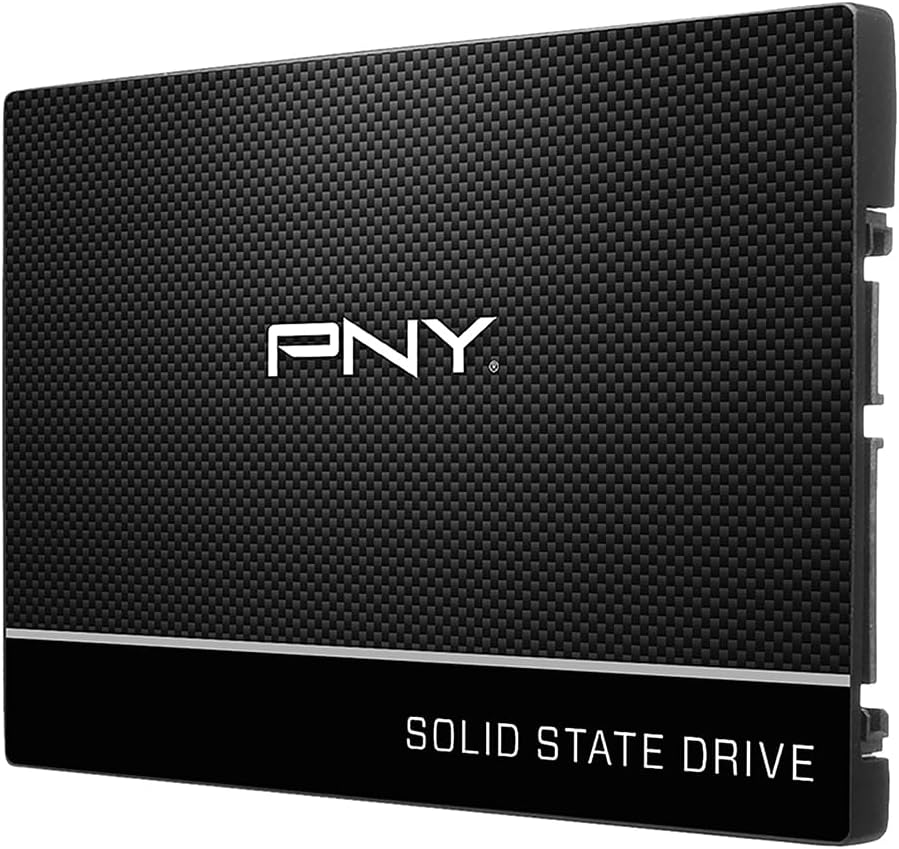
PNY CS900 500GB SATA SSD

The PNY CS900 is the classic revival kit for an ageing laptop or desktop that still uses a 2.5-inch drive bay. At up to 550 MB/s it will not trouble NVMe drives, but swapping a mechanical hard drive for one transforms boot and load times dramatically. 3D NAND keeps it reliable, power draw is low, and it drops into any SATA machine without an M.2 slot. For breathing new life into old hardware, it is a proven choice.

Capacity
500GB
Interface
SATA III
Form Factor
2.5in
Speed
Up to 550 MB/s

What we liked

  • Simple 2.5in drop-in upgrade
  • 3D NAND for solid reliability
  • Ultra-low power consumption
  • Works in any SATA laptop or PC

Worth noting

  • SATA speeds far below NVMe
  • No M.2 slot needed but bulkier
4Best for Gaming

SanDisk Optimus GX 7100 500GB

The SanDisk Optimus GX 7100 brings flagship-class 7,250 MB/s speeds down to the 500GB tier, making it the gaming pick for a fast, compact boot or game drive. It supports Microsoft DirectStorage for quicker level loads, uses efficient BiCS TLC NAND, and pairs with a Dashboard that adds a Game Mode. It is more drive than a budget build strictly needs, but for gamers who want NVMe speed without a big spend, it is a compelling option.

Capacity
500GB
Interface
PCIe Gen4 NVMe
Form Factor
M.2 2280
Speed
Up to 7,250 MB/s

What we liked

  • Blistering 7,250 MB/s read speeds
  • Supports Microsoft DirectStorage
  • Power-efficient BiCS TLC NAND
  • SanDisk Dashboard with Game Mode

Worth noting

  • Top speeds shine at larger capacities
  • Windows-only dashboard tool
5Best Gen4 Alternative

Kingston NV3 500GB NVMe SSD

The Kingston NV3 is the value NVMe choice, delivering dependable Gen4 speeds of 5,000 MB/s at a price that suits a lean budget. It draws little power and fits slim laptops and small-form-factor PCs, making it an easy upgrade over a slow hard drive or an ageing SATA SSD. It will not top the benchmark charts, but for booting Windows and everyday work at 500GB, the price-to-performance ratio is excellent.

Capacity
500GB
Interface
PCIe 4.0 Gen4x4
Form Factor
M.2 2280
Speed
Up to 5,000 MB/s

What we liked

  • Affordable Gen4 NVMe pricing
  • Solid 5,000 MB/s read speeds
  • Low power draw for laptops
  • Slim M.2 fits compact builds

Worth noting

  • Slower than premium Gen4 drives
  • Limited published endurance data
6Best SATA Reliability

Crucial BX500 500GB SATA SSD

The Crucial BX500 is a dependable 2.5-inch SATA drive from a name built on reliability, and it remains one of the easiest ways to modernise an older machine. With 550 MB/s reads and 500 MB/s writes it is worlds faster than any hard drive, its power-efficient design keeps things cool, and installation is a simple bay swap. For a no-fuss, trustworthy revival of a laptop or desktop, the BX500 does exactly what you need.

Capacity
500GB
Interface
SATA III
Form Factor
2.5in
Speed
Up to 550 MB/s

What we liked

  • Trusted Crucial reliability
  • Easy 2.5in drop-in install
  • Energy-efficient, cool-running design
  • Great for reviving old laptops

Worth noting

  • SATA speeds capped at 550 MB/s
  • No M.2 form factor option
7Best Rugged Portable

SanDisk Extreme Portable SSD 500GB

The SanDisk Extreme Portable is the rugged pocket option, pairing 1,050 MB/s transfers with IP65 water and dust resistance and up to 3-metre drop protection. Add 256-bit AES encryption and a handy carabiner loop, and it becomes a dependable field drive for photographers and travellers who need storage that survives the journey. It commands a premium at 500GB, but the durability and security features are worth it for anyone working away from a desk.

Capacity
500GB
Interface
USB 3.2 Gen 2
Form Factor
Portable external
Speed
Up to 1,050 MB/s

What we liked

  • IP65 water and dust resistance
  • Up to 3-metre drop protection
  • 256-bit AES hardware encryption
  • Carabiner loop for easy carrying

Worth noting

  • Priciest 500GB drive here
  • Older model in the range
8Best Budget Portable

SSK Portable SSD 500GB

The SSK Portable SSD punches above its price, hitting 1,050 MB/s transfers and shipping with both USB-C and USB-A cables for wide compatibility across iPhones, Macs, Android devices and PCs. S.M.A.R.T. monitoring and TRIM support keep it healthy over time. Its SLC cache can slow on very large transfers and the brand is less familiar, but for an affordable, fast pocket drive with genuine cross-platform reach, it delivers strong value.

Capacity
500GB
Interface
USB 3.2 Gen2
Form Factor
Portable external
Speed
Up to 1,050 MB/s

What we liked

  • Fast 1,050 MB/s for the price
  • USB-C and USB-A cables included
  • Works with iPhone, Mac and Android
  • S.M.A.R.T. health monitoring

Worth noting

  • Lesser-known brand name
  • SLC cache slows on huge transfers
9Best Budget SATA

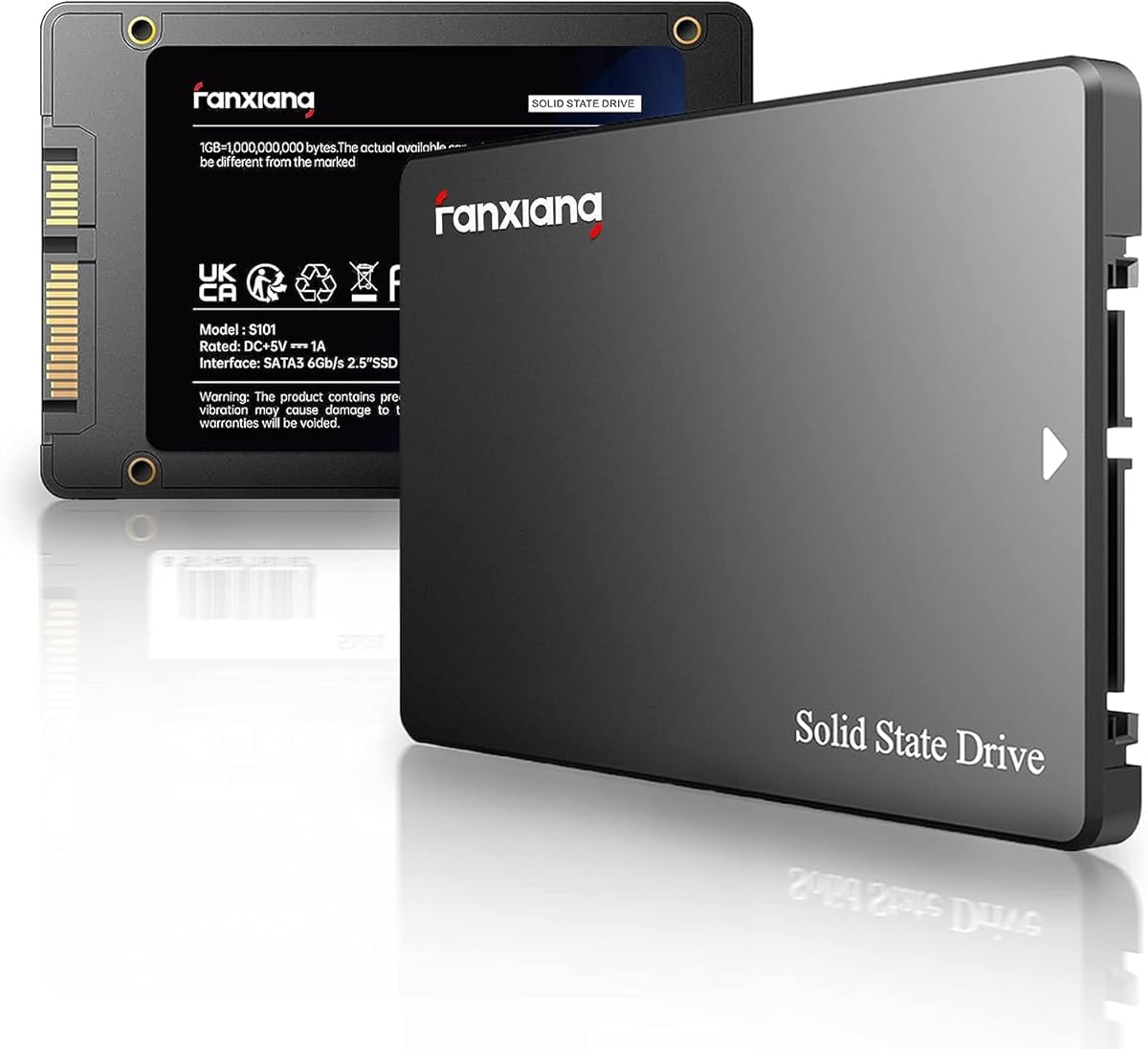
fanxiang S101 500GB SATA SSD

The fanxiang S101 is the value floor of this list, a 2.5-inch SATA drive that costs the least while still swapping out a slow hard drive for a huge speed jump. It uses 3D NAND TLC rather than cheaper QLC for better endurance, supports Windows, Linux and macOS, and carries a three-year warranty. The brand is unfamiliar and SATA speeds are modest, but for reviving an old machine on the smallest budget, it does the job cheaply.

Capacity
500GB
Interface
SATA III 6Gb/s
Form Factor
2.5in
Speed
Up to 500 MB/s

What we liked

  • Lowest price on this list
  • 3D NAND TLC for longer life
  • Broad OS and device support
  • 3-year quality assurance

Worth noting

  • SATA speeds and lesser-known brand
  • Basic performance versus NVMe

How We Chose the Best 500GB SSDs

Best 500GB SSDs in 2026

At 500GB, value is the headline, so our ranking started from a simple question: what does each drive give you for the money, judged against others of its type? A budget SATA drive and a fast Gen4 NVMe drive are not really competitors, they solve different problems, so we assessed them within their own categories rather than punishing a cheap SATA drive for not matching an NVMe flagship it was never meant to rival.

For internal drives we looked at read and write speed, the interface and form factor that decide whether a drive even fits your machine, and endurance and reliability, favouring TLC NAND over cheaper QLC where the data was available. For portable drives we weighed real transfer speed, durability ratings, bundled cables and cross-platform compatibility. Trusted brands like Crucial, Western Digital, Kingston, PNY and SanDisk earned some benefit of the doubt on reliability and support, but we still included strong value picks from smaller names such as fanxiang and SSK where the specifications and warranties justified it. Throughout, we kept price front of mind, because the reason most people buy 500GB rather than 1TB is to spend less.

SATA vs NVMe: Why the Interface Changes Everything

The single biggest decision when buying a 500GB SSD is not the brand, it is the interface, because SATA and NVMe live in different speed worlds. SATA drives like the Crucial BX500 and PNY CS900 use the same 2.5-inch form factor and connection that hard drives have used for years, and they top out around 550 MB/s. That sounds slow next to NVMe, but it is still five to ten times faster than a mechanical hard drive, which is why a SATA SSD utterly transforms an older laptop.

NVMe drives connect through the PCIe bus instead and reach far higher speeds, from around 5,000 MB/s on value drives like the Kingston NV3 to 7,250 MB/s on the SanDisk Optimus GX 7100. They use the small M.2 2280 stick form factor rather than a 2.5-inch drive. The practical upshot is this: your choice is dictated by your hardware. If your machine only has a 2.5-inch bay, you need a SATA drive, and the good news is even the cheapest one is a huge upgrade. If it has an M.2 NVMe slot, spend a little more for the vastly higher speeds of an NVMe drive. Checking which slot your device has, before you buy, is the most important step in this whole process.

Matching the Drive to Your Needs

For Reviving an Older Laptop or Desktop

If your goal is to make a slow, hard-drive machine usable again, a SATA SSD is the answer, and the choice comes down to budget and brand trust. The Crucial BX500 offers proven Crucial reliability for a painless drop-in swap, while the PNY CS900 is another dependable pick with solid 3D NAND. For the absolute lowest outlay, the fanxiang S101 does the same transformative job for the least money, backed by a three-year warranty.

For a Fast Budget Boot Drive

If your machine has an M.2 slot and you want quick boots and app launches without overspending, the WD Green SN3000 is our overall pick, delivering real Gen4 speed at a friendly price. The Kingston NV3 is the value alternative for buyers who want NVMe performance for even less. Both slot neatly into thin laptops and compact PCs.

For Gaming on a Budget

Gamers who want NVMe speed at 500GB should look at the SanDisk Optimus GX 7100 for its 7,250 MB/s reads and DirectStorage support, or the Crucial P310 for a strong balance of 6,600 MB/s speed and broad handheld compatibility. Either makes a fast, compact game or boot drive without stretching to a 1TB flagship.

For Portable, On-the-Go Storage

When you need to carry files, the SanDisk Extreme Portable is the rugged choice with IP65 protection and encryption, while the SSK Portable SSD offers similar 1,050 MB/s speed with bundled USB-C and USB-A cables at a lower price. Both suit backups, photo offloads and moving data between a phone, laptop and PC.

Specifications That Matter Most

For a 500GB drive, the specifications worth scrutinising are interface, form factor and NAND type. The interface, SATA or NVMe, sets the speed ceiling and must match your machine, as covered above. Form factor follows from that: SATA drives are 2.5-inch units for a drive bay, while NVMe drives are M.2 2280 sticks for a dedicated slot. Get this wrong and the drive will not physically fit, so it is the first thing to confirm.

NAND type is the quiet reliability factor. Drives that use 3D NAND TLC, like the fanxiang S101, generally endure more write cycles than budget QLC, which matters more the longer you keep a drive and the more data you write to it over time. Sequential speed still counts, but at 500GB the everyday feel is shaped as much by the controller and random performance, which is why a good value NVMe drive can feel just as responsive as a pricier one in normal use. Finally, do not overlook the extras that ease ownership: bundled migration software like the Acronis tool included with the WD Green SN3000 and Crucial P310 saves you reinstalling Windows, and a clear warranty, three years on the fanxiang, adds peace of mind at this budget-focused capacity.

A Closer Look at the Top Picks

The WD Green SN3000 takes the top spot by nailing the brief for this capacity: it delivers genuine Gen4 NVMe speed at a budget price, in a slim form factor that fits almost any modern machine, from a name with a long track record. For the most people upgrading on a budget, it is the drive that gives the best blend of speed, capacity and cost without any asterisks.

Close behind, the Crucial P310 is the performance-minded internal pick with the highest NVMe speeds and wide handheld support, while the SanDisk Optimus GX 7100 pushes even further for gamers. The Kingston NV3 undercuts them on price for value-focused NVMe buyers. On the SATA side, the Crucial BX500 and PNY CS900 are the trusted revival drives, and the fanxiang S101 is the rock-bottom option that still transforms an old machine. For portable storage, the rugged SanDisk Extreme and the affordable, well-connected SSK round out a list with a clear answer for every budget and every kind of 500GB buyer.

Practical Tips for Buying and Installing a 500GB SSD

The most important step happens before you buy: identify what your machine can take. Open your laptop's or PC's specifications, or the manual, and confirm whether it has a 2.5-inch drive bay, an M.2 SATA slot, or an M.2 NVMe slot, since these are not interchangeable. Buying an NVMe drive for a machine that only has a 2.5-inch bay is a common and frustrating mistake. Once you know your slot, pick the drive type to match and you cannot go far wrong.

For installation, cloning your existing drive is usually easier than a fresh Windows install, and drives like the WD Green SN3000 and Crucial P310 bundle Acronis software to copy everything across. On a desktop this is straightforward; on a laptop, a cheap USB-to-SATA or USB-to-M.2 adapter lets you clone before swapping. After the swap, use the maker's tool where available to enable TRIM and check firmware, and leave some free space, ideally ten percent or more, to keep the drive fast and healthy. For portable drives, eject before unplugging and consider enabling the SanDisk Extreme's encryption if you carry sensitive files. These small habits keep a budget SSD performing well for years.

Final Recommendation

For most buyers, the WD Green SN3000 is the best 500GB SSD in 2026, delivering true Gen4 NVMe speed and a slim, compatible design at a genuinely budget price. If you want the fastest internal drive, the Crucial P310 or the gaming-focused SanDisk Optimus GX 7100 lead on speed, while the Kingston NV3 wins on NVMe value. For older machines with a 2.5-inch bay, the Crucial BX500 and PNY CS900 are the trusted SATA revival drives, and the fanxiang S101 is the cheapest way to modernise a slow system. If your storage needs to travel, the rugged SanDisk Extreme and the affordable SSK Portable have you covered. Whatever your priority, there is a well-judged pick here, so identify your slot, decide whether speed or savings matters more, and buy with confidence. Match the drive type to your machine, and 500GB stretches your budget a long way.

How we picked

We ranked each 500GB SSD on real-world speed, reliability and endurance, interface and form factor, and above all value, since this capacity is chosen mainly to save money. We judged budget SATA drives against their own peers rather than against NVMe flagships, and we mixed internal drives with portable USB-C models so the list serves both in-machine upgrades and grab-and-go storage on a tight budget.

Frequently asked questions

Is a 500GB SSD big enough?

For many users, yes. Five hundred gigabytes comfortably holds Windows, your everyday apps and a reasonable selection of games, photos or media. It is the value sweet spot: enough for daily use without paying for terabytes you may not fill. Heavy gamers or video creators will want more, but for a budget build or laptop upgrade, 500GB is plenty.

Should I choose a SATA or NVMe 500GB SSD?

It depends on your machine. Older laptops and desktops with a 2.5-inch bay take SATA drives like the Crucial BX500, which still transform a hard-drive system. Machines with an M.2 slot can use much faster NVMe drives such as the WD Green SN3000 or Crucial P310. Check whether your device has an M.2 NVMe slot before buying.

Will a 500GB SSD speed up my old laptop?

Dramatically, if it currently runs a mechanical hard drive. Swapping to any SSD, even a SATA model like the PNY CS900 or fanxiang S101, slashes boot times and app launches. It is the single most cost-effective upgrade for an ageing laptop, often making a five-year-old machine feel usable again for everyday tasks.

Can I use a 500GB portable SSD with my phone or console?

Many can. Portable drives like the SSK Portable SSD ship with USB-C and USB-A cables and work with iPhones, Android devices, Macs and PCs, while rugged options like the SanDisk Extreme suit cameras and consoles. Check your device's port and file-system requirements, and reformat if needed for the platform you use most.

How reliable are budget 500GB SSDs?

Modern budget drives are generally reliable, especially those using 3D NAND TLC like the fanxiang S101, which endures more writes than cheaper QLC. Trusted brands such as Crucial, Western Digital and Kingston add proven controllers and warranties. Use the maker's software where available to monitor health, and keep backups, as you should with any drive.