Best 240Hz Monitors in 2026
We may earn a commission from links on this page, at no extra cost to you. Learn more.
A 240Hz monitor is the sweet spot for competitive gaming in 2026, delivering four times the motion clarity of a standard 60Hz screen without the steep price of the very fastest panels. At this refresh rate, fast-flick aiming feels effortless, camera pans stay sharp, and the difference is genuinely visible the moment you move a mouse. The tricky part is that 240Hz screens now span everything from sub-100-dollar Full HD panels to premium QD-OLED displays that cost several hundred more. This guide ranks nine of the best 240Hz monitors you can buy right now, spanning budget FHD esports screens, sharper QHD IPS panels and a standout OLED, so there is a right pick whether you chase frames or want speed and image quality together.
Top 9 Best 240Hz Monitors
Our top 9 picks, reviewed
MSI MAG 274CF X24 27in FHD
The MSI MAG 274CF X24 earns the top spot by pairing a genuinely quick 0.5ms Rapid VA panel with a 240Hz refresh rate on a roomy 27-inch screen, all at the lowest price here. FreeSync Premium keeps tearing away, AI Vision lifts detail in dark corners, and owners rate it higher than anything else on this list. Full HD on 27 inches is the only real compromise.
- Size
- 27in
- Resolution
- 1920x1080 FHD
- Refresh
- 240Hz
- Response
- 0.5ms GtG
What we liked
- Rapid 0.5ms VA response time
- 240Hz on a large 27in panel
- AMD FreeSync Premium included
- Highest owner rating on this list
Worth noting
- Only Full HD on a 27in screen
- VA panel over faster IPS
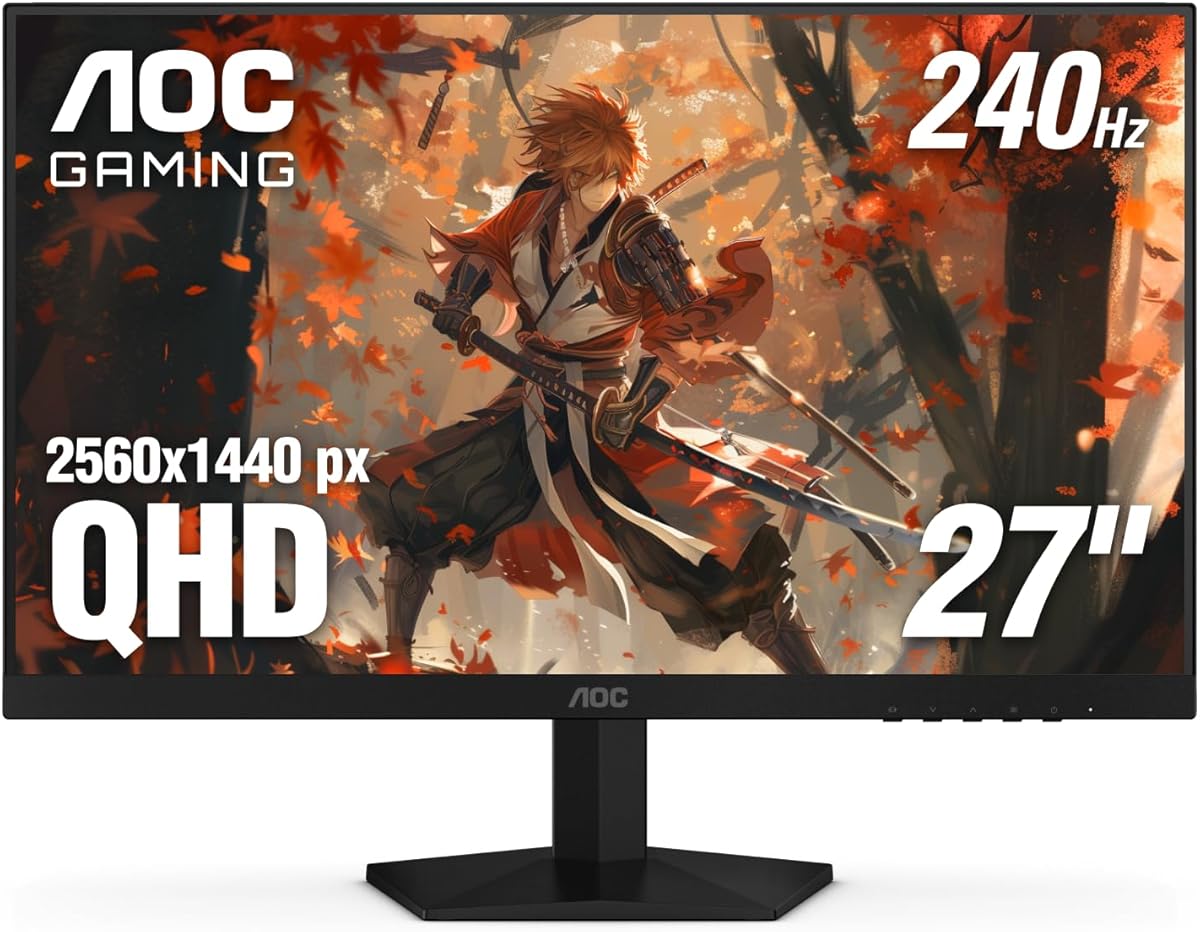
AOC Q27G41ZE 27in QHD
The AOC Q27G41ZE is the smart QHD buy, delivering a crisp 2560x1440 IPS panel at 240Hz with a 260Hz overclock and a rapid 0.3ms MPRT response. G-Sync compatibility and HDR readiness cover both GPU camps, and AOC's three-year zero-bright-dot warranty is reassuring. The stand only tilts, but for sharper detail than a 1080p panel without a premium price, it is hard to beat.
- Size
- 27in
- Resolution
- 2560x1440 QHD
- Refresh
- 240Hz (OC 260Hz)
- Response
- 0.3ms MPRT
What we liked
- Sharp QHD IPS at 240Hz
- Overclocks to 260Hz
- G-Sync compatible and HDR ready
- 3-year zero-bright-dot guarantee
Worth noting
- HDMI limited to lower refresh
- Basic tilt-only stand
Dell SE2426HG 24in FHD
The Dell SE2426HG is the safest budget pick, bringing a mainstream brand and real support to the 240Hz bracket for very little money. Its 23.8-inch Fast IPS panel covers 99% sRGB with a 0.5ms response, FreeSync Premium and HDMI VRR smooth out both PC and console play, and TUV 3-star certification eases the eyes. A tilt-only stand is the main limitation at this price.
- Size
- 23.8in
- Resolution
- 1920x1080 FHD
- Refresh
- 240Hz
- Response
- 0.5ms
What we liked
- Trusted Dell brand and support
- Fast IPS with 99% sRGB
- FreeSync Premium and HDMI VRR
- TUV 3-star eye comfort certified
Worth noting
- Tilt-only adjustment
- No DisplayHDR certification
Acer Predator X27U 26.5in QD-OLED
For those who want speed and image quality without compromise, the Acer Predator X27U is the pick. Its 26.5-inch QD-OLED panel delivers cinematic contrast, 99% DCI-P3 colour and an almost instant 0.03ms response alongside 240Hz. A fully adjustable stand and ZeroFrame design round it out. It costs the most here and demands the usual OLED care, but the picture is in another league.
- Size
- 26.5in
- Resolution
- 2560x1440 QD-OLED
- Refresh
- 240Hz
- Response
- 0.03ms GtG
What we liked
- Stunning QD-OLED contrast and colour
- Blazing 0.03ms response time
- 99% DCI-P3 with HDR10
- Full tilt, height, pivot and swivel
Worth noting
- Highest price on this list
- OLED carries burn-in caution
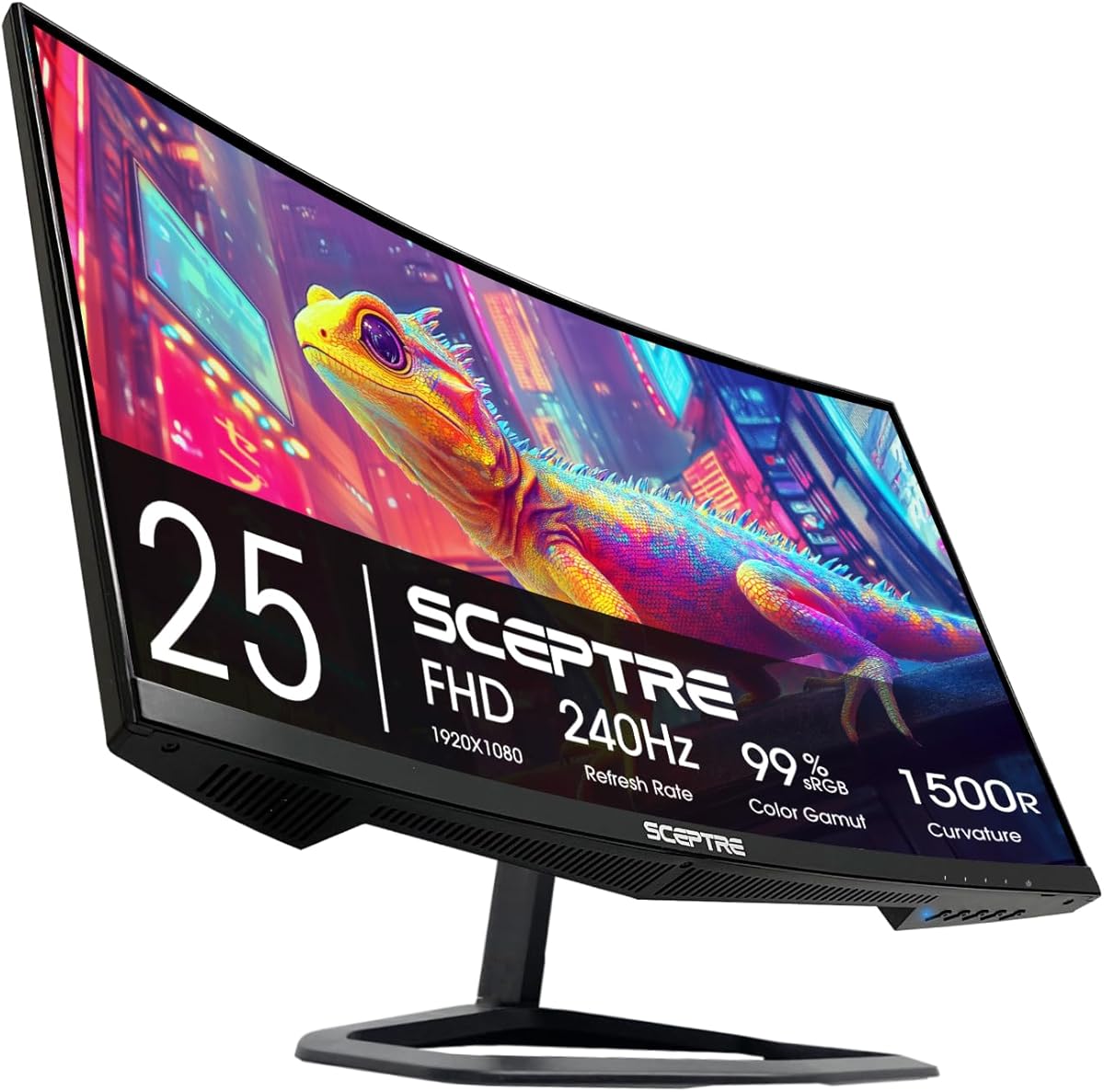
Sceptre C255B-FWT240 24.5in Curved
The Sceptre C255B wraps 240Hz gaming in an immersive 1500R curve that draws you into the action from any seat. A 1ms response keeps fast scenes clean, FreeSync Premium prevents tearing, and generous connectivity with two DisplayPorts and two HDMIs plus built-in speakers keeps the desk tidy. Full HD and a tilt-only stand are the trade-offs, but the curved immersion is the real draw here.
- Size
- 24.5in
- Resolution
- 1920x1080 FHD
- Refresh
- 240Hz
- Curvature
- 1500R
What we liked
- Immersive 1500R curved panel
- Fast 1ms response time
- Dual DisplayPort and dual HDMI
- Built-in speakers save desk space
Worth noting
- Full HD resolution only
- No height adjustment
Sceptre E255B-FWD240 24.5in FHD
The flat sibling to Sceptre's curved model, the E255B-FWD240 leans on a 100% sRGB gamut that makes it a tidy choice if you edit or create alongside gaming. It runs 240Hz with a 1ms blur-reduction mode, FreeSync Premium and the same plentiful dual-DisplayPort, dual-HDMI connectivity plus speakers. It is a well-rounded 24.5-inch panel, held back only by a flat FHD screen and a basic stand.
- Size
- 24.5in
- Resolution
- 1920x1080 FHD
- Refresh
- 240Hz
- Response
- 1ms BR
What we liked
- Full 100% sRGB colour gamut
- Dual DisplayPort and dual HDMI
- 1ms blur reduction mode
- Built-in speakers included
Worth noting
- Flat FHD panel
- 1ms uses blur-reduction mode
LG 27GR83Q-B 27in UltraGear QHD
The LG 27GR83Q-B pairs a polished 27-inch QHD IPS panel with the kind of ergonomics budget screens skip, offering full tilt, height and pivot adjustment. HDMI 2.1 lets both current consoles hit high refresh, DisplayHDR 400 and 95% DCI-P3 give it real colour depth, and G-Sync plus FreeSync cover any GPU. It sits in the premium tier, but it is a genuinely well-built all-rounder.
- Size
- 27in
- Resolution
- 2560x1440 QHD
- Refresh
- 240Hz
- Response
- 1ms GtG
What we liked
- Sharp QHD IPS at 240Hz
- HDMI 2.1 and DisplayPort 1.4
- DisplayHDR 400 with 95% DCI-P3
- Full tilt, height and pivot stand
Worth noting
- Priced in the top tier
- 1ms GtG rather than sub-1ms
ArcticPro 24in FHD IPS
The ArcticPro 24-inch is the value floor here, delivering a 240Hz IPS panel with a wide 120% sRGB gamut and a 1ms MPRT response for less than most rivals. Adaptive sync keeps play tear-free, the three-sided frameless design suits multi-monitor setups, and it covers the fundamentals of fast Full HD gaming cheaply. The unfamiliar brand and basic stand mean leaning on return protection.
- Size
- 24in
- Resolution
- 1920x1080 FHD
- Refresh
- 240Hz
- Gamut
- 120% sRGB
What we liked
- Very low price for 240Hz
- IPS panel with 120% sRGB
- 1ms MPRT response time
- Three-sided frameless design
Worth noting
- Lesser-known brand
- Tilt-only, no height adjust
Acer Nitro XV272U 27in WQHD
The Acer Nitro XV272U rounds out the list with a well-specified 27-inch WQHD IPS panel that hits 240Hz over DisplayPort and up to 0.5ms response. DisplayHDR 400, 99% sRGB and a fully adjustable stand with pivot make it flexible, and both cables come in the box. The catch is that 240Hz needs DisplayPort, with HDMI limited to 144Hz, so plan your connection accordingly.
- Size
- 27in
- Resolution
- 2560x1440 WQHD
- Refresh
- 240Hz (DP)
- Response
- 0.5ms GtG
What we liked
- Sharp WQHD IPS at 240Hz
- DisplayHDR 400 and 99% sRGB
- Full ergonomic stand with pivot
- DisplayPort and HDMI cables included
Worth noting
- 240Hz only over DisplayPort
- HDMI caps at 144Hz
How We Chose the Best 240Hz Monitors

Shopping for a 240Hz monitor in 2026 means navigating a category that has quietly split into two camps. At one end sit affordable Full HD panels built purely for frame rate, where the goal is the smoothest possible motion in competitive shooters. At the other sit sharper QHD screens and premium OLEDs that ask you to pay more for a better image alongside the speed. Neither is objectively correct; the right answer depends entirely on the games you play and the graphics card driving them.
We began by confirming that every screen genuinely delivers its headline 240Hz, then looked closely at response time, since a high refresh rate is wasted if pixels smear behind fast-moving objects. From there we weighed panel type and resolution, colour accuracy and HDR, adaptive-sync support for tear-free play, ergonomics, and the connectivity that decides whether consoles can join in. Finally, we kept the list varied on purpose, from the sub-100-dollar Dell SE2426HG to the premium Acer Predator X27U, so there is a sensible pick at every budget and for every kind of player.
What 240Hz Actually Gets You
The core benefit of 240Hz is motion clarity. At 60Hz, anything moving quickly across the screen blurs; at 240Hz, the display redraws four times as often, so fast camera pans, strafing enemies and flick shots stay far sharper and easier to track. In practice this translates to smoother aiming and a subtle but real sense that the game responds the instant you move the mouse. The effect is most obvious in fast titles like first-person shooters and racing games, and least obvious in slow, cinematic single-player experiences.
Crucially, a 240Hz panel only shines when your system can feed it enough frames. Pushing close to 240fps at 1080p is achievable on mid-range hardware, which is why budget panels like the MSI MAG 274CF X24 and Dell SE2426HG make so much sense for pure esports. Climbing to QHD on screens such as the AOC Q27G41ZE or LG 27GR83Q-B raises the bar for your graphics card considerably. When your frame rate falls short of the refresh rate, adaptive sync, which every monitor here supports in some form, keeps the picture tear-free at whatever pace you actually reach.
Full HD Speed Versus QHD Sharpness
The single biggest decision at 240Hz is resolution. Full HD panels are the traditional esports choice for good reason: they are the easiest to drive at very high frame rates, they cost the least, and on a 24 to 25-inch screen the pixel density is perfectly acceptable. The MSI MAG 274CF X24, Dell SE2426HG, ArcticPro 24-inch and both Sceptre models all take this route, prioritising frames and value over outright sharpness. The main caveat is stretching 1080p across a 27-inch panel, as the MSI does, which softens the image slightly at close range.
QHD, or 2560x1440, is the sharper alternative and has become far more common at 240Hz. The AOC Q27G41ZE, LG 27GR83Q-B and Acer Nitro XV272U all deliver noticeably crisper text and more desktop real estate, which makes them better all-rounders for people who work as well as game. The trade-off is a heavier demand on your GPU to approach 240fps and a higher price. If your rig is powerful and you value versatility, QHD is the smarter long-term buy; if you live for competitive frames on modest hardware, Full HD stays the pragmatic pick.
Panel Types and Response Time
Beyond resolution, the panel technology shapes both image and motion. Most screens here use Fast IPS, prized for wide viewing angles and accurate colour, seen in the Dell SE2426HG, AOC Q27G41ZE, Acer Nitro XV272U and ArcticPro. The MSI MAG 274CF X24 instead uses a Rapid VA panel, which delivers deeper contrast and, in this case, a very quick 0.5ms response, though VA can show slightly more smearing in dark transitions. At the top sits the QD-OLED in the Acer Predator X27U, combining perfect blacks, the richest colour and an almost instantaneous 0.03ms response.
Response time is what stops a fast refresh rate from being undermined by ghosting, the faint trail left behind moving objects. The figures here range from the OLED's 0.03ms through the AOC's 0.3ms MPRT and the MSI and Dell's 0.5ms up to the 1ms modes on the Sceptre pair. In real use, anything at or below 1ms feels clean at 240Hz, so response time is rarely a dealbreaker among these picks, but the OLED's near-instant pixels are genuinely a cut above for the most demanding players.
Adaptive Sync, HDR and Connectivity
Every monitor on this list includes adaptive sync to eliminate tearing, though the branding varies. Several, including the AOC Q27G41ZE and LG 27GR83Q-B, are validated as both G-Sync compatible and FreeSync capable, so they work seamlessly with NVIDIA and AMD graphics cards alike. Others, like the Dell SE2426HG and Sceptre models, carry FreeSync Premium, which still functions well on NVIDIA hardware in most cases. Whichever camp your GPU falls into, tear-free play is covered across the board.
HDR support is more of a mixed bag. The LG 27GR83Q-B and Acer Predator X27U carry proper DisplayHDR 400 certification with wide DCI-P3 colour, so their HDR is worth using, while cheaper panels are often merely HDR-ready with limited brightness. Connectivity is worth checking too: the Acer Nitro XV272U reaches 240Hz only over DisplayPort, capping HDMI at 144Hz, whereas the LG offers HDMI 2.1 for high-refresh console play. If you plan to connect a PlayStation or Xbox, favour a screen with the right ports rather than assuming every input matches the panel's top speed.
A Closer Look at the Top Picks
The MSI MAG 274CF X24 takes the overall win because it nails the fundamentals that matter most for competitive gaming at the lowest price on this list. A quick 0.5ms Rapid VA panel, a full 240Hz on a large 27-inch screen, FreeSync Premium and the highest owner rating here make it the screen we would recommend to most frame-focused players without hesitation. Full HD on 27 inches is its only meaningful compromise, and one many buyers will happily accept for the value.
Behind it, the AOC Q27G41ZE is the standout QHD value, adding sharpness and a 260Hz overclock for a modest step up in price, while the Dell SE2426HG brings a trusted brand and real support to the budget end. For buyers chasing the best possible image, the Acer Predator X27U's QD-OLED panel is in a class of its own, and the LG 27GR83Q-B is the pick for anyone who wants premium ergonomics and console-ready HDMI 2.1. The curved Sceptre C255B, flat Sceptre E255B, ArcticPro and Acer Nitro XV272U fill out the range for immersion seekers, colour-minded creators and bargain hunters.
Tips for Getting the Most From a 240Hz Monitor
A 240Hz panel only performs if it is set up correctly. After plugging in, open your operating system's display settings and manually select the 240Hz refresh rate, as many systems default to a lower figure out of the box. On several screens here the top refresh rate is only available through DisplayPort, so use that cable rather than HDMI where possible, and enable adaptive sync in both the monitor's menu and your graphics driver to keep play tear-free.
Match your ambitions to your hardware. If your graphics card cannot approach 240fps in a demanding game, lowering a few settings will get you closer to the panel's ceiling and let you feel the benefit of the high refresh rate. For OLED owners like those choosing the Acer Predator X27U, enable the built-in panel-care features and vary your content to minimise any burn-in risk over time. Finally, buy from listings with clear return protection, especially for the lesser-known ArcticPro, so a faulty unit is easy to swap. With the right pick and a few minutes of setup, a 240Hz monitor transforms how fast games feel.
Final Recommendation
For most competitive players, the MSI MAG 274CF X24 is the best 240Hz monitor in 2026, combining a fast VA panel, a large 27-inch screen and the lowest price here into an easy recommendation. If you want sharper QHD detail, the AOC Q27G41ZE is the value choice, while the Dell SE2426HG is the safest budget buy from a mainstream brand. Buyers who refuse to compromise on image quality should stretch for the Acer Predator X27U's superb QD-OLED, and those who want premium ergonomics and console support will love the LG 27GR83Q-B. Whichever you choose, match the resolution to your graphics card and this refresh rate will genuinely change how your games feel.
How we picked
We judged each 240Hz monitor on refresh rate delivery, response time and motion clarity, panel type and resolution, colour accuracy and HDR, adaptive-sync support, ergonomics and connectivity, and value at its price. Because 240Hz spans budget FHD panels and premium OLEDs, we prioritised screens that pair their headline speed with a genuinely usable image, and we mixed resolutions and price tiers so the list suits both frame-chasers and all-rounders.
Frequently asked questions
Is a 240Hz monitor worth it over 144Hz?
For competitive shooters and fast esports titles, yes. The jump from 144Hz to 240Hz noticeably sharpens moving detail and smooths flick aiming once your GPU can push the frames. For slower or single-player games the benefit is smaller. If you play fast games and have the hardware, a screen like the MSI MAG 274CF X24 or AOC Q27G41ZE is a clear upgrade.
Do I need a powerful GPU to use 240Hz?
To fully exploit 240Hz you need a graphics card that can sustain high frame rates in your games, which is easiest at 1080p on panels like the Dell SE2426HG. At QHD, screens such as the LG 27GR83Q-B demand more GPU power to approach 240fps. Below that, adaptive sync still keeps play smooth at whatever frame rate you reach.
Should I choose 1080p or 1440p at 240Hz?
1080p panels like the MSI MAG 274CF X24 are easier to drive at high frame rates and cost less, ideal for pure esports. 1440p models such as the AOC Q27G41ZE and Acer Nitro XV272U give sharper detail and more desktop space, better for mixed gaming and work, but need a stronger GPU to hit 240fps.
What response time matters for a 240Hz monitor?
Lower is better for reducing ghosting behind fast objects. The QD-OLED Acer Predator X27U leads at 0.03ms, while fast IPS and VA panels like the AOC Q27G41ZE at 0.3ms and MSI MAG 274CF X24 at 0.5ms are excellent. Anything at or below 1ms will feel clean at 240Hz for the vast majority of players.
Is an OLED 240Hz monitor better than IPS?
An OLED such as the Acer Predator X27U offers the fastest response, perfect blacks and the richest colour, so its motion and image quality are superb. The trade-offs are higher cost and a small burn-in risk over years of static content. A quality IPS like the LG 27GR83Q-B is brighter for desks and cheaper, with no burn-in worry.