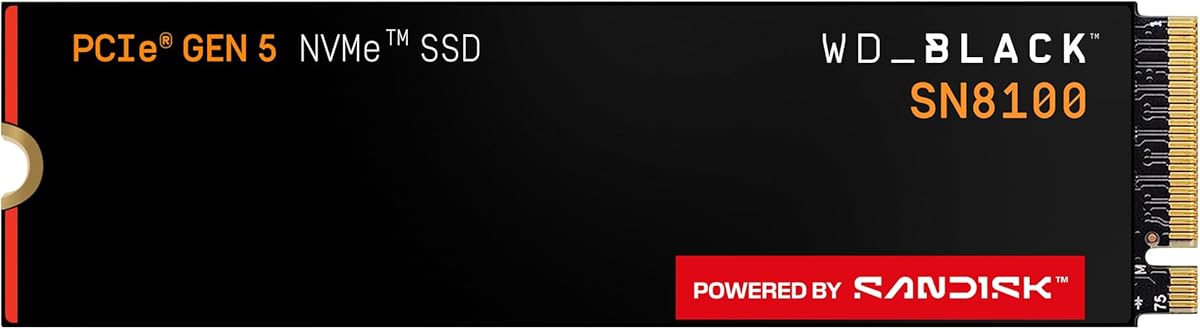
Eight terabytes in a single M.2 2280 stick changes how a workstation feels day to day. The WD_Black SN8100 8TB (WDS800T1X0M) is Sandisk’s high-capacity pitch for PCIe 5.0x4 systems that refuse to keep shipping raw footage and local AI weights to external disks.
This review is aimed at editors, game librarians, and AI tinkerers who already own a Gen5 motherboard or laptop slot and want one primary vault instead of a drawer of spare drives.
We cover capacity strategy, speed claims, endurance, cooling, migration, and honest reasons to stay at 4TB instead.
The headline capacity is the product. With up to 8TB on one module, you can keep Windows, creative apps, a deep Steam library, local LLMs, and multi-client media trees mounted without weekly uninstall rituals. Sandisk frames the series for AI applications, gaming, and video editing—the workloads that expand sideways while you are busy elsewhere.
Performance messaging leads with sequential reads up to 14,900MB/s on the Gen5 interface. Family materials also highlight write speeds up to 14,000MB/s and over 2.3 million IOPS on 2TB–4TB models, while the 8TB page emphasizes endurance and room. Treat peak figures as host- and firmware-dependent ceilings; the lived benefit is fewer stalls when you ingest camera cards or shuffle multi-gigabyte project packs on the same disk that boots the OS.
Endurance is where the 8TB SKU stands out on paper: up to 4,800 TBW. That rating matters if you rewrite timelines, scratch caches, and model checkpoints for years. TLC 3D CBA NAND underpins the reliability story, but no endurance number replaces a 3-2-1 backup plan when eight terabytes of client work lives in one place.
Power efficiency notes in the SN8100 family—over 100% better efficiency than Sandisk’s cited Gen4 comparison on 1TB–4TB models, with average operating power at or under 7.5W—speak to dense high-end builds. An 8TB drive still needs thermal attention; Gen5 speeds can throttle without a competent motherboard heatsink and airflow across the M.2 zone.
Software support includes Sandisk Dashboard on Windows for health, updates, and performance visibility, plus Acronis True Image for Sandisk for migrations. Cloning from a smaller boot drive is the low-drama upgrade path; expanding partitions afterward unlocks the free space you paid for.
Thermals decide whether those read peaks ever show up outside a synthetic demo. Prefer the CPU-attached Gen5 slot, seat the heatsink firmly, and avoid parking the drive under a GPU that blankets the primary M.2. After the first large transfer, check Dashboard temperatures and adjust case fans if the module runs hotter than your comfort zone.
Risk management scales with capacity. Consolidating everything onto 8TB is convenient until a controller failure or accidental format happens. Mirror critical folders to NAS or cold storage, and keep an offsite copy of irreplaceable work. Speed is not a substitute for redundancy.
Buy the SN8100 8TB when local AI corpora, multi-cam archives, or massive game-plus-capture libraries must stay internal and always mounted. Choose 4TB if you already offload finished projects. Stay smaller if your platform is Gen4-only—the interface will leave headroom on the table regardless of sticker capacity.
Who it's for
Pick the 8TB SN8100 if you run a Gen5-capable PC and need one internal vault for AI models, large game catalogs, and active video projects without constant pruning.
Who should skip it
Skip if you only need a fast boot drive, lack Gen5 lanes or cooling, or will not maintain backups for a consolidated archive. A 2TB or 4TB SN8100 plus bulk secondary storage may be saner.
Vault-scale performance notes
Keep free space available for writes, schedule integrity-aware backups, and use Dashboard after marathon transfers. Large capacities feel fastest when installs, caches, and working media coexist without filling the drive to the brim.
Setup tips & verdict
Install in the primary Gen5 slot, clamp a heatsink, migrate with Acronis or clean-install, then expand volumes. Verdict: the SN8100 8TB is the library-scale Gen5 pick—buy it when capacity anxiety, not just peak benchmarks, is the problem you are solving.
- Huge 8TB capacity keeps OS, AI models, game libraries, and active media on one module
- PCIe 5.0x4 design targets top-tier sequential throughput for modern creative workflows
- Strong 4,800 TBW endurance rating fits write-heavy editing and model iteration
- Dashboard monitoring helps track health on Windows workstations over years
- Consolidates what used to require multiple mid-capacity NVMe drives
- Only worthwhile if your board exposes a cooled Gen5-capable M.2 slot you will actually use
- A single 8TB volume concentrates failure risk—backups are mandatory, not optional
- Peak write/IOPS callouts in family materials focus on 2TB–4TB; validate 8TB expectations for your host
FAQs
Is 8TB excessive for gaming alone?
For players who keep dozens of AAA titles, shader caches, and recording folders, 8TB removes constant uninstall churn. If you only keep a handful of games installed, 2TB or 4TB usually feels more proportionate.
Does the 8TB model hit the same write peaks as 2TB–4TB?
Sandisk’s breakneck write and IOPS callouts specifically highlight 2TB–4TB models in the family materials. The 8TB SKU still rides PCIe 5.0x4 with up to 14,900MB/s reads advertised—validate sustained writes on your board if absolute peaks are critical.
What does 4,800 TBW mean in practice?
It is the rated terabytes written endurance for the 8TB model. Heavy editors and AI users benefit from that headroom, but you should still monitor health in Dashboard and maintain backups regardless of the TBW number.
Can I migrate my old Windows install?
Yes. Acronis True Image for Sandisk is called out for effortless migration. After cloning, extend the partition in Disk Management or your preferred tool so the full 8TB is usable.
Does Sandisk Dashboard work on macOS?
Dashboard is listed for Windows only. macOS users can still use the drive for storage and boot scenarios the host supports, but should rely on other tools for SMART-style monitoring.
Will it work in a Gen4 motherboard slot?
The SSD will typically enumerate at the host’s maximum PCIe generation, so a Gen4 board caps throughput below Gen5 peaks. Capacity and endurance remain, but you leave speed on the table.
How should I cool an 8TB Gen5 drive?
Use the motherboard’s substantial M.2 heatsink, ensure airflow across the slot, and avoid covering the drive with a sagging GPU. Check temperatures after large sequential writes before locking your final fan curve.
Is one 8TB drive safer than two 4TB drives?
Not inherently. One module is simpler but a single failure domain. Two drives enable simpler redundancy strategies. Choose based on whether convenience or fault isolation matters more for your data.