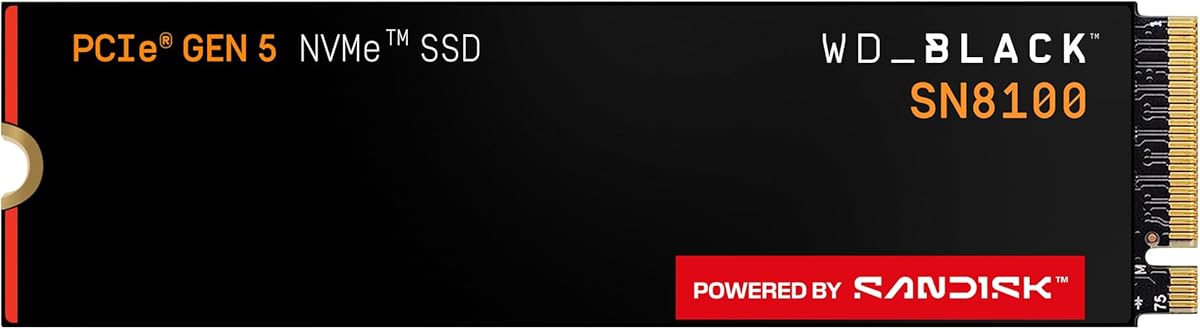
Four terabytes on a single M.2 module changes how you organize a PC. The WD_Black SN8100 4TB pairs that breathing room with PCIe 5.0x4 aspirations—reads up to 14,900MB/s—aimed at AI application files, sprawling game catalogs, and video projects that refuse to stay small.
This review speaks to power users who want one primary NVMe to rule the working set: streamers with recording folders, editors with multiple active clients, and gamers who keep an entire seasonal library installed.
We cover capacity strategy, the 2TB–4TB performance callouts in Sandisk’s materials, cooling, migration, and when 8TB becomes the more rational leap.
At 4TB, the SN8100 stops feeling like a sporty boot drive and starts feeling like a workstation volume you actually live on. Sandisk’s marketing repeatedly ties the series to AI applications, gaming, and video editing—workloads that expand in parallel. One module can hold Windows, creative suites, a deep game library, and a folder of local models without weekly pruning.
Performance messaging aligns the 4TB SKU with the stronger 2TB–4TB write and IOPS figures—up to 14,000MB/s writes and over 2.3 million IOPS—alongside the family’s up-to-14,900MB/s reads. Those peaks are aspirational host-limited numbers; the practical win is consistency when you copy multi-gigabyte packs or scrub high-bitrate timelines from the same disk that runs your OS.
Consolidation has a psychological benefit and a risk. Benefit: fewer drive letters, simpler folder maps, faster searches across one volume. Risk: a single failure domain. If 4TB becomes your only copy of client media or irreplaceable recordings, add external or NAS backup immediately. Speed does not replace redundancy.
Thermals scale with how hard you push sustained writes. A 4TB drive inviting large overnight transfers should sit under a substantial motherboard heatsink with airflow across the M.2 area. Vertical GPU mounts that blanketed SSD slots deserve a second look; relocate the drive to a rear M.2 with better airflow if temperatures climb.
Power efficiency claims covering 1TB–4TB SN8100 models matter in small high-end cases running CPU, GPU, and multiple SSDs. Average operating power at or under 7.5W in Sandisk’s comparison framing suggests Gen5 speed without the worst historical inefficiency. Still measure in your chassis—case intake design varies wildly.
Creators should partition thoughtfully even on one disk: OS and apps on a modest volume, working media on another, or at least strict folders with backup jobs pointed at the media tree. Gamers can keep shaders and recording clips on the same 4TB SN8100, then offload Let’s Play archives monthly.
Migration from a smaller NVMe is straightforward with Acronis True Image for Sandisk, then expand the partition into the new free space. Fresh installs are cleaner if your old drive is cluttered. Either way, confirm the board enumerates the drive at Gen5 widths after the first boot.
Buy 4TB when you are tired of juggling 1–2TB drives and your platform can feed PCIe 5.0. Consider 8TB if your local AI corpus or raw camera archive must stay internal and always mounted. Stay at 2TB if budget prefers a Gen5 boot disk plus a cheap bulk secondary.
Who it's for
Choose the 4TB SN8100 if you want one primary Gen5 drive for a large game catalog, streaming recordings, and active creative projects. Excellent for single-drive high-end towers and Gen5 laptops with proven cooling.
Who should skip it
Skip if you already have a fast 2TB Gen5 boot drive and a separate media vault, or if your motherboard cannot expose Gen5 lanes. Also skip if you will not maintain backups for a consolidated 4TB dataset.
Library-scale performance notes
Large capacities shine when installs, pagefile-adjacent caches, and project files coexist. Keep free space available, schedule backups, and use Dashboard temperature readouts after marathon transfers to validate your heatsink choice.
Setup tips & verdict
Prioritize the CPU-attached Gen5 slot, clamp a heatsink firmly, migrate or clean-install, then expand partitions. Verdict: the SN8100 4TB is the consolidation pick—fast enough for modern workloads and roomy enough that uninstall anxiety mostly disappears.
- 4TB capacity consolidates OS, games, recordings, and active media on one Gen5 drive
- High sequential and IOPS targets keep large libraries feeling responsive
- Efficiency claims for 1TB–4TB models help multi-drive high-end boards
- Simplifies builds that previously needed two mid-size NVMe drives
- Dashboard tooling aids long-term health visibility on Windows
- Higher investment only pays off if your Gen5 slot and workloads use it
- A single large drive concentrates risk—backups become non-negotiable
- Some laptops lack thermal headroom for sustained Gen5 at this performance class
FAQs
Is 4TB overkill for gaming alone?
For players who keep many AAA titles, capture video, and store mod packs, 4TB is comfort rather than excess. If you only keep three games installed, 2TB may be enough and leave budget for other parts.
How do SN8100 4TB speeds compare within the family?
Read peaks are marketed up to 14,900MB/s across the series, with especially strong write and IOPS callouts for 2TB–4TB models. Your motherboard and cooling determine how much of that you observe.
Should I split the 4TB into multiple partitions?
Optional but helpful. Many users isolate OS/apps from media libraries for cleaner backups and imaging. Others prefer one volume and disciplined folders—either works if backup jobs are solid.
Can I use this as a secondary drive beside a smaller boot SSD?
Yes. A 4TB SN8100 makes an excellent games-and-media secondary while a smaller drive runs the OS. Just confirm slot speeds so the secondary is not stuck on a slower chipset lane if you care about peak transfers.
Does Sandisk Dashboard work offline?
Dashboard is a Windows utility for monitoring and maintenance; you install it on the PC that contains the drive. Keep it updated when you want firmware and feature improvements, and do not interrupt power during updates.
What about endurance on a 4TB drive?
Family materials highlight high TBW figures that scale with larger capacities in the lineup. 4TB gives more NAND to spread writes than 1TB, which helps heavy creators, but you should still monitor health if you write constantly.
When should I choose the 8TB SN8100 instead?
Move to 8TB when local datasets—AI models, raw video, sample libraries—already pressure 4TB or you want years of growth without another teardown. If 4TB still looks half-empty in your planner, stay here.