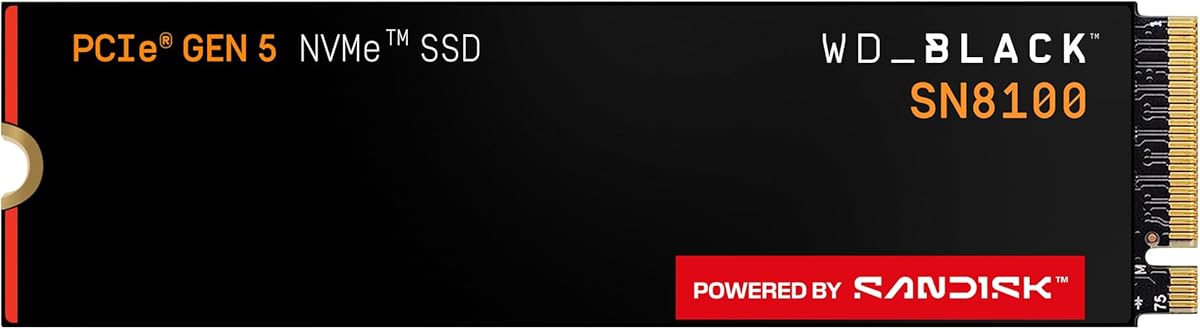
PCIe 5.0 storage stopped being a niche slide when game installs and local AI models started chewing through both bandwidth and space. The WD_Black SN8100 1TB is the entry capacity in Sandisk’s high-speed Gen5 M.2 lineup, advertising sequential reads up to 14,900MB/s in a 2280 form factor.
This review focuses on builders who want a blazing OS or scratch drive without buying a multi-terabyte flagship yet—laptop upgraders with a Gen5 slot, desktop gamers refreshing a boot drive, and creators who keep working libraries on a secondary disk.
We cover real platform requirements, efficiency claims, software tools, thermal habits, and whether 1TB still makes sense in 2026 libraries.
The SN8100 1TB is best understood as a performance tier first and a capacity tier second. Sandisk positions the WD_Black family for gaming, video editing, and AI-related workloads where sequential and random speed change how long you wait on level loads, cache hydration, and model file access. At 1TB, that speed is concentrated on what you actively use—not a decade of archives.
Advertised reads near 14,900MB/s put the drive in the current Gen5 conversation. The 1TB write figure lands at up to 11,000MB/s on this model’s listing, while higher capacities quote even stronger write and IOPS peaks in the shared marketing copy. In daily life, you feel Gen5 most during large transfers, game installs to a fast secondary, and workflows that stream big textures or intermediate render files.
Platform reality check: a PCIe 4.0 motherboard will not unlock Gen5 ceilings. Confirm your CPU/motherboard M.2 lane mapping, enable the correct slot, and update BIOS before benchmarking. Laptops need a Gen5-capable SSD bay and often a vendor-approved thermal solution; stuffing a hot drive under a thin shield without airflow invites throttling.
Efficiency is part of the SN8100 story—Sandisk claims over 100% better power efficiency than their PCIe Gen4 drive on 1TB–4TB models, with average operating power at 7.5W or under. That matters in small desktops and high-density boards where multiple M.2 slots already warm the VRM neighborhood. Still pair the drive with the motherboard heatsink or a quality aftermarket spreader for sustained writes.
Software support includes Sandisk Dashboard on Windows for health monitoring, performance helpers, and updates, plus Acronis True Image for Sandisk for migration. Clone your old boot drive carefully: verify Secure Boot/BITLOCKER situations, keep a recovery USB, and confirm the new drive is the boot priority after cloning.
For gamers, 1TB works as a primary OS drive with a curated active library—rotate titles rather than hoarding. For creators, use 1TB as a scratch/OS volume and park media on a larger secondary. For AI experimentation, 1TB can hold a lean tool chain and a few models, but multi-model collections push you toward 2TB+ quickly.
Endurance messaging in the family scales with capacity, with the higher TBW figures attached to larger SKUs in the lineup copy. At 1TB you still get TLC 3D CBA NAND designed for mainstream enthusiast duty; avoid treating any consumer SSD as an infinite write log for constant scratch thrash without monitoring SMART data.
Buy the SN8100 1TB when your board is Gen5-ready and you want maximum responsiveness in a compact capacity. Step up in the same family when game libraries, 4K timelines, or local models outgrow a terabyte—the firmware and performance philosophy stay consistent while the free space anxiety disappears.
Who it's for
Best for Gen5 desktop or laptop builders who want a fast boot/game drive and can keep bulk archives elsewhere. Ideal if you reinstall titles often, value short load times, and prefer WD_Black tooling on Windows.
Who should skip it
Skip if your motherboard tops out at PCIe 3.0/4.0 and you will never notice Gen5 peaks, or if you need 4TB+ of local libraries today. Budget Gen4 drives remain smarter when the slot cannot feed Gen5.
Performance in games, AI & editing
Expect snappy installs and shorter waits on large asset reads when the platform cooperates. AI and editing benefit most when working sets live on the SN8100; long-term media vaults can stay on higher-capacity storage. Watch temperatures during long writes.
Setup tips & verdict
Install under a heatsink, clone with Acronis or a fresh OS install, and confirm Gen5 link speed in system tools. Verdict: a sharp 1TB Gen5 pick for speed-focused boot drives—just plan capacity honestly before your library expands.
- Flagship-class PCIe 5.0 throughput for boots, installs, and large asset loads
- 1TB capacity keeps costs focused on speed for OS-plus-active-games setups
- Efficiency messaging aims to ease thermal and power strain versus hotter Gen5 peers
- Sandisk Dashboard helps monitor health and firmware on Windows
- M.2 2280 fits mainstream desktops and many Gen5-capable laptops
- 1TB fills quickly with modern AAA titles and local AI model files
- Requires a true PCIe 5.0-capable slot to approach advertised peaks
- Heatsinking and motherboard SSD cooling still matter under sustained writes
FAQs
Do I need a PCIe 5.0 motherboard for the SN8100 1TB?
To approach the advertised speeds, yes—you need a PCIe 5.0x4-capable M.2 slot and a CPU that feeds it. The drive may work in slower slots at reduced throughput, but then you are paying for headroom you cannot use.
Is 1TB enough for gaming in 2026?
It can be enough for Windows plus a rotating set of active games, especially if you uninstall titles after finishing them. Multiplayer libraries, shader caches, and creative apps fill a terabyte faster than older generations did.
How fast are the write speeds on the 1TB model?
This listing highlights sequential writes up to 11,000MB/s for the 1TB SKU, while some higher-capacity SN8100 materials quote higher write peaks. Real results vary with queue depth, thermal state, and host platform.
Does the SN8100 include cloning software?
Sandisk points users to Acronis True Image for Sandisk for migration, alongside Sandisk Dashboard on Windows for health and updates. Always keep backups before cloning a system drive.
Will this SSD overheat without a heatsink?
Gen5 drives can get warm under sustained load. Use your motherboard’s M.2 shield or a compatible heatsink, ensure case airflow across the board, and avoid stacking hot GPUs that bake the SSD slot with no exhaust path.
Is WD_Black still made by Sandisk?
The listing notes WD_Black flash products are manufactured by Sandisk Technologies or affiliates and distributed under license from Western Digital Corporation. Dashboard branding follows the Sandisk software path.
Should I buy 1TB or jump to 2TB in this series?
Choose 1TB if the drive is a fast OS/scratch volume with overflow storage elsewhere. Choose 2TB if games, recordings, and local models must live on one primary NVMe without constant juggling.