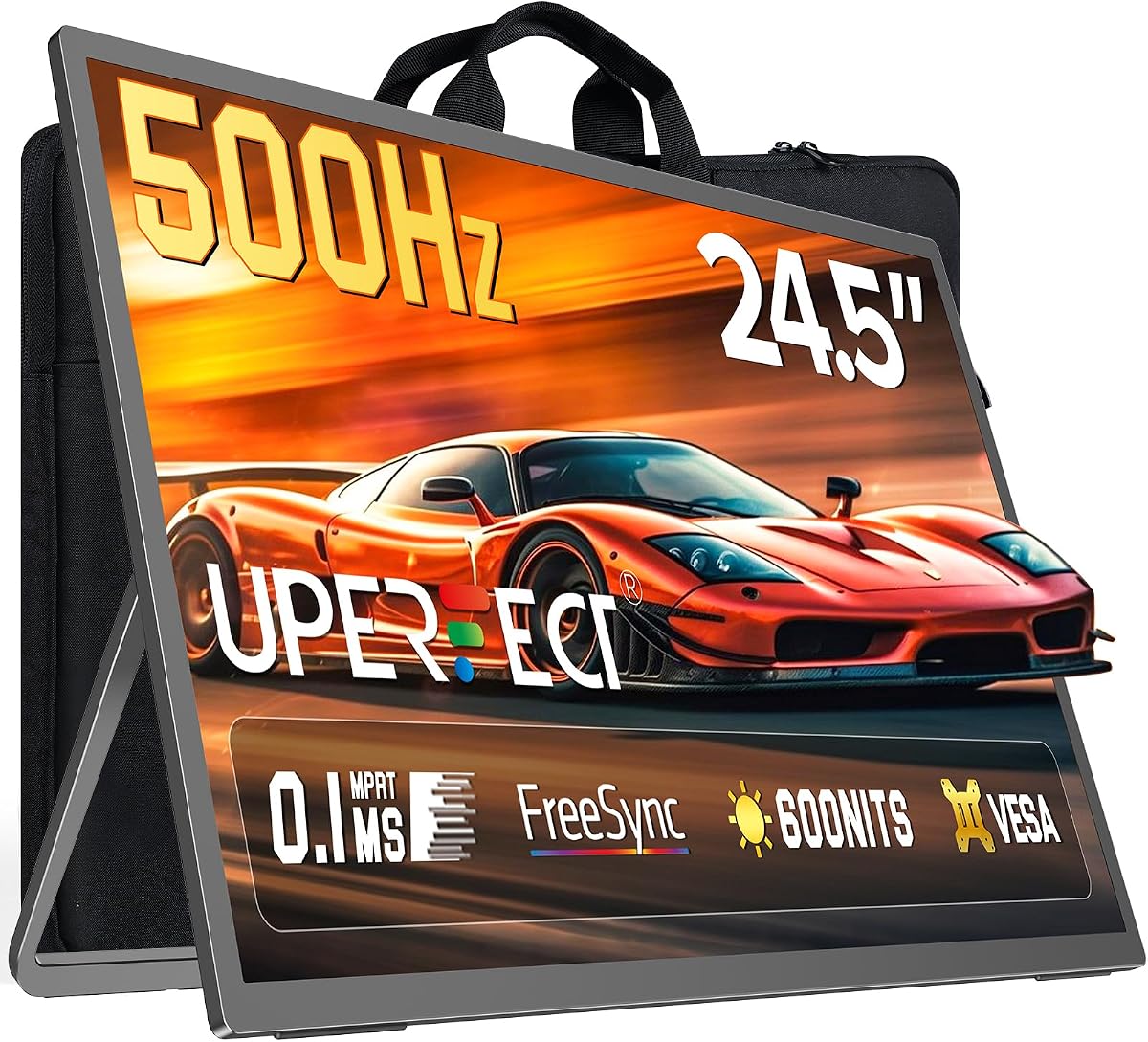
Portable monitors used to mean thin 1080p panels for spreadsheets. The UPERFECT QLED 24.5-inch model aims at competitive players instead, advertising a 500Hz refresh rate, FreeSync support, and a 0.1ms response claim in a backpack-friendly chassis.
This review is for gamers who haul a second screen to friends’ houses, dorms, or LAN setups—and for laptop players who want a bigger aim surface than a 14- or 16-inch notebook panel without parking a full desktop monitor on a desk forever.
We cover motion clarity expectations, color and brightness claims, connectivity, the built-in stand and VESA options, and the practical limits of calling a 24.5-inch display “portable.”
The headline number is 500Hz, and that is the reason this UPERFECT exists. High refresh rates reduce perceived blur in tracking shots and make micro-adjustments in aim trainers feel more continuous—provided your PC or console can feed frames and your cable/port combination supports the mode. Treat the refresh claim as a capability of the panel pathway, then verify what your laptop GPU and chosen input can sustain in the OSD.
FreeSync and a 0.1ms response marketing figure target tear-free, snappy feel in FPS, RTS, and racing titles. Genre presets are useful when you bounce between competitive shooters and story games: they give you a faster starting point than a generic “Standard” picture mode. Competitive players should still disable unnecessary processing and lock a stable frame rate near the refresh ceiling their hardware can hold.
Visually, UPERFECT lists 125% sRGB, 2000:1 contrast, and 600 nits. That combination suggests a brighter, punchier portable than dim office panels that wash out under room lights. It is still a gaming-first portable rather than a color-critical photo reference display, so creators who grade for print should bring their own calibration expectations. For games, streaming, and mixed laptop work, the brightness headroom is a practical win.
Portability at 24.5 inches is relative. You will not slip this into a slim sleeve the way you would a 15.6-inch USB-C panel. You will, however, get a near-desktop field of view that feels serious for tournaments in living rooms. The included protective case is part of the product story—use it. Corner dings are how portable monitors die between car trunks and couch setups.
Connectivity includes DisplayPort, USB-C, and HDMI, which covers most modern laptops, desktops, and many consoles and handheld docks. Plug-and-play behavior helps when you are not the person who owns the host PC. Bring the right cable for the refresh mode you want; not every USB-C laptop negotiates the same bandwidth for external high-Hz displays.
Ergonomics matter more than marketing photos show. The 180° adjustable stand lets you tilt for couch height or desk height and flip between landscape and portrait when a vertical layout helps chat, code, or mobile streaming tools. VESA compatibility means you can leave the kickstand lifestyle behind and park the panel on an arm in a dorm or apartment battle station.
Built-in speakers keep setup minimal for quick co-op nights, but serious FPS players will stay on a headset for directional audio. Use the monitor as the visual upgrade and let headphones handle competitive sound. RGB-free simplicity here is fine—the attraction is motion, size, and travel readiness.
Who gets the most value? Laptop gamers stuck on 60–144Hz internal panels, console players who want a bigger temporary screen, and anyone building a portable duo-screen kit for travel work plus after-hours ranked queues. Who should hesitate? Buyers who need a featherweight 14–16" creator panel, or desktop owners who never leave home and would rather buy a conventional high-Hz monitor with a full stand ecosystem.
Who it's for
Choose this UPERFECT if you want a large second screen that travels to LAN nights and still feels competitive. It fits FPS players with strong laptops, console gamers needing a bigger temporary display, and hybrid workers who game hard after closing the laptop lid on productivity apps.
Who should skip it
Skip it if your bag budget only fits ultra-slim 15–16" portables, if you need factory-calibrated color for client photo work, or if your devices cannot output high refresh over the available ports. Desktop-only buyers may prefer a traditional 24–27" esports monitor that never needs a carry case.
Motion clarity & daily gaming
High refresh shines in tracking and peeking scenarios when frame delivery is stable. Use FreeSync where supported, pick the FPS mode for shooters, and keep the panel bright enough that dark corners remain readable without crushing shadow detail. Pair with a low-latency USB or HDMI path from the host device.
Setup tips & verdict
Test each input on your primary laptop before travel day, pack the case and spare cable, and decide stand versus VESA based on where you play most. Verdict: a bold portable for players who prioritize refresh rate and screen real estate over featherweight carry—excellent when your source can feed it.
- Ultra-high refresh positioning for esports-style motion clarity on a large portable screen
- Multiple video inputs make laptop and console hookups flexible
- Built-in stand plus VESA support covers desk and wall/arm scenarios
- Carry case inclusion matches the LAN-party and travel use case
- Genre game modes help tune the panel without deep OSD hunting
- A 24.5-inch portable is still a large bag item compared with 15–16" travel screens
- You need a source and cable path that can actually drive high refresh rates
- Built-in speakers are convenience features, not a substitute for a headset
FAQs
Can every laptop actually run this monitor at 500Hz?
No. The panel may support very high refresh, but your GPU, OS display mode, and cable/port combination must cooperate. Check which input reaches the highest Hz on your machine, update GPU drivers, and confirm the OSD is set to the desired refresh before assuming you are in a 500Hz mode.
Is FreeSync important on a portable gaming monitor?
Yes when your frames fluctuate under the refresh ceiling. FreeSync helps reduce tearing and stutter during busy fights. If you can hard-cap a stable frame rate near the refresh rate, you may notice less need for adaptive sync, but it remains useful for variable GPU loads.
What devices can connect to the UPERFECT 24.5-inch monitor?
Listed connectivity includes DisplayPort, USB-C, and HDMI for laptops, desktops, and many game consoles or handheld docks. Compatibility still depends on each device’s output standards. Bring the correct cable and, for some USB-C hosts, verify DisplayPort Alt Mode support.
How portable is a 24.5-inch monitor in real life?
It is portable compared with a desk-bound gaming monitor, not compared with a tablet-thin 15-inch panel. Expect a backpack or carry-case footprint. The included protective case is important for transport between apartments, campuses, and LAN venues.
Does the built-in stand replace a monitor arm?
For travel and temporary desks, the 180° stand is enough to get a usable angle in landscape or portrait. At a permanent battle station, VESA mounting on an arm can feel more stable and free desk space. Many owners will use both approaches depending on the week.
Is 600 nits bright enough for daytime rooms?
600 nits is comparatively strong for a portable gaming screen and helps under bright indoor lighting. Direct sunlight on a glossy desk can still challenge any panel. Angle the stand to cut glare and use game modes that preserve visibility in dark scenes.
Are the built-in speakers good for competitive play?
They are fine for casual sound and quick setup, but competitive FPS players should use a headset for directional cues and voice chat. Treat onboard speakers as a backup when you forgot headphones, not as your ranked-audio plan.