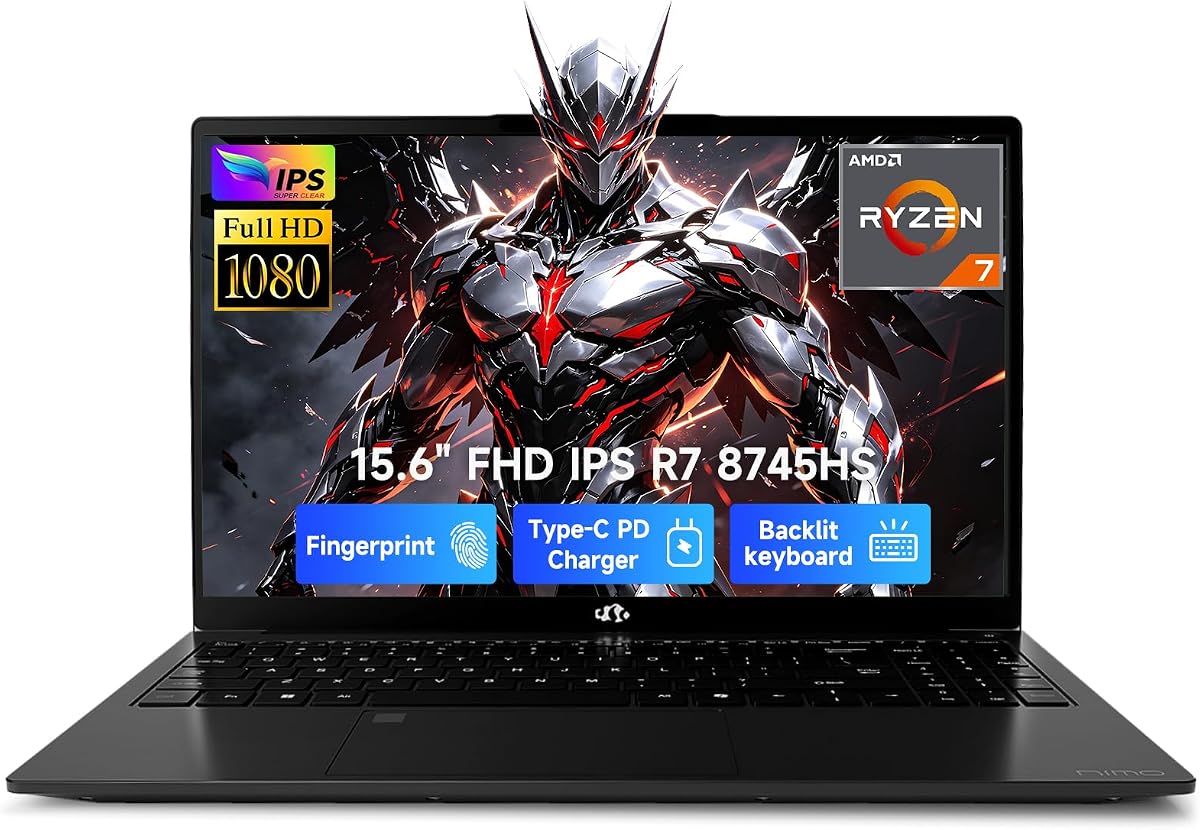
Streamers and remote creators need a laptop that can game lightly, encode a 1080p broadcast, and still survive a commute. This NIMO 15.6 Gaming-Creator Laptop (ASIN B0H1QTGLKX) packages the Ryzen 7 8745HS, Radeon 780M, 32GB DDR5, and 1TB SSD story with USB4, HDMI 2.1, and sub-1.7kg metal portability—merchandised toward streaming more than its near-twin engineering-focused sibling.
On paper the hardware mirrors B0H1QKKL3W closely; the buying decision often comes down to listing images, seller terms, and which narrative matches your workflow.
Here we evaluate the streaming-centric use case: 780M gameplay plus encode headroom, dock and camera setups via modern ports, and where a discrete GPU laptop still wins.
For streaming-focused buyers, the important question is not whether Radeon 780M beats a desktop RTX card—it will not—but whether it can keep a lighter game smooth while the Ryzen 7 8745HS handles OBS, chat overlays, and browser sources. NIMO’s own language about crushing Valorant-class play and 1080p live streaming maps cleanly to that scenario. Pair sensible in-game settings with hardware or efficient software encoding and this chassis becomes a credible starter stream laptop.
Thirty-two gigabytes of DDR5 is doing quiet hero work here. Streaming stacks are RAM hungry even when GPU load looks modest: game client, Chrome with dashboards, Discord, OBS, and maybe a preview window. The upgrade path to 64GB and dual SSDs means your VOD archive and highlight projects can grow without swapping machines after one busy semester of content.
Ports are where this NIMO behaves like a mini studio hub. USB4 supports high-speed docks and the marketed external GPU path if your channel grows into heavier titles. HDMI 2.1 with 4K/120Hz output helps when you sit at a desk monitor. Micro SD and USB 3.2 cover cameras and recorders. The 3.5mm combo jack handles headsets until you move to an interface. None of that replaces a proper mic or webcam, but the laptop will not be the bottleneck for connecting them.
The 15.6-inch FHD panel and 180° hinge are collaboration tools as much as entertainment features—useful when co-working on overlays with a friend or showing a sponsor deck flat on a table. For actual streaming visuals, most creators will still prefer an external monitor at the desk and treat the laptop panel as the portable display.
Thermals and power matter once the stream goes live. The 45W-class 8745HS wants airflow and, for long sessions, the 100W PD adapter. NIMO’s roughly 50%-in-30-minutes charging claim is more relevant between sessions than during a four-hour broadcast. Keep vents clear; backpack lint is the enemy of sustained encode quality.
Portability remains a defining trait: under 1.7kg and about 17.95mm in metal is unusually carryable for a 15.6-inch performance APU machine. That helps creators who stream from different rooms, travel to LAN cafés, or attend classes between uploads. Fingerprint login speeds the cold-start before going live in shared spaces.
Because B0H1QTGLKX and B0H1QKKL3W share nearly the same about copy, do not overthink micro-differences in marketing tone. Confirm identical RAM/SSD, compare images (this ASIN uses a different product photo), and pick the cleaner offer. The streaming keyword context simply means we evaluate overlays, docks, and encode realities more explicitly in this review.
Verdict for streamers: excellent portable foundation for esports-style or lighter game streaming and creator multitasking, with USB4 as a growth path. If your brand identity is maxed-out AAA at 1440p with dozens of scenes, step up to discrete GPU hardware instead of asking 780M to be something it is not.
Who it's for
Aspiring streamers, campus creators, and remote multitaskers who want a light Ryzen 7 laptop that can play popular lighter titles while running OBS and browser tools.
Who should skip it
Skip if your stream slate is GPU-heavy AAA at high settings, or if you already know you need a factory discrete GPU. Also skip if you only write documents and do not need this performance tier.
Streaming performance & desk setups
Use 780M-friendly titles or lowered presets, allocate RAM carefully across OBS and browsers, and lean on HDMI 2.1 or USB4 docks for a proper desk monitor and Ethernet adapter when possible.
Setup, tips & verdict
Add a real microphone and webcam, update AMD drivers, and stress-test a full stream session before going public. Verdict: a smart portable streaming starter when you match ASIN B0H1QTGLKX and respect iGPU limits.
- 780M + Ryzen 7 combo aligns with 1080p play-and-stream ambitions for lighter titles
- 32GB RAM helps OBS, browser source pages, chat, and game clients coexist
- USB4 and HDMI 2.1 simplify capture cards, docks, and high-refresh external monitors
- Light metal chassis makes mobile streaming setups and campus-to-desk moves easier
- 2-year warranty and 90-day returns reduce risk on a streaming starter kit
- Demanding AAA titles plus high-bitrate streaming will still push an iGPU laptop hard
- Built-in laptop speakers and webcam are unlikely to satisfy serious stream production alone
- Near-duplicate sibling listings can confuse buyers—match ASIN carefully
FAQs
How is B0H1QTGLKX different from B0H1QKKL3W?
Both list the same core Ryzen 7 8745HS, Radeon 780M, 32GB/1TB class configuration and similar about text. Differences are mainly listing presentation, imagery, and merchandising focus—streaming versus engineering—so verify the ASIN and seller details at checkout.
Can this NIMO laptop stream and play at the same time?
For lighter and esports-style titles, yes, that is the intended use case. Demanding AAA games plus high-bitrate streams may require lower game settings or a move to discrete GPU hardware.
Does it support external monitors for a stream desk?
Yes. HDMI 2.1 with 4K/120Hz support and USB4/DisplayPort-capable connectivity make external monitor setups straightforward for a two-display streaming desk.
Is the built-in microphone enough for streaming?
It can work for casual calls, but serious streamers should budget for a dedicated microphone. Treat the laptop as the compute hub, not the entire production kit.
What about storage for VODs and recordings?
The 1TB SSD is a strong start, and dual-SSD support helps you add an archive drive. High-volume creators should still plan external or cloud backup for long-term VOD libraries.
How portable is it for streaming from multiple locations?
At under 1.7kg and roughly 17.95mm thin in a metal chassis, it is much easier to move between rooms or campuses than traditional bulky gaming laptops.
Does USB4 help streamers specifically?
USB4 helps with high-speed docks, capture-related accessories, storage, and the optional external GPU path NIMO advertises if your content outgrows integrated graphics.