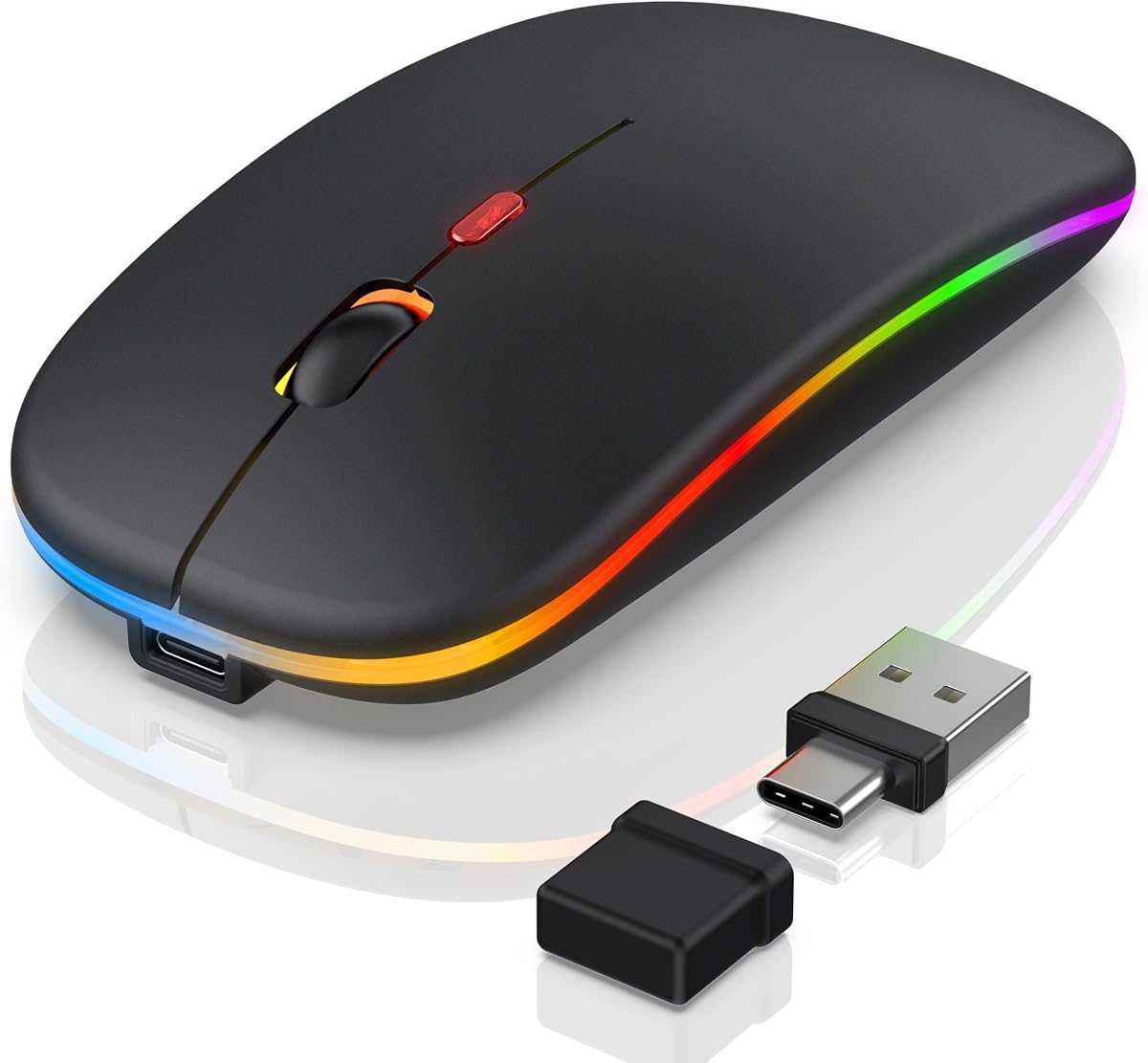

Apple’s own Magic Mouse polarizes people: elegant for some, awkward for long workdays for others. The FYBC Bluetooth LED wireless mouse aims at MacBook Air, iPad, and mixed PC desks with a slim RGB shell, silent clicks, and a dual USB-A/USB-C 2.4GHz receiver when Bluetooth is not ideal.
This review is for students, remote workers, and travelers who want a lightweight silent mouse with multi-device flexibility—and who are curious about the built-in jiggler mode that can keep a session from locking during short steps away from the desk.
We cover compatibility, DPI practicality, RGB manners in an office, and whether the slim shape works for your hand size before you retire a touch-surface mouse.
FYBC’s pitch is universal convenience rather than esports pedigree. Bluetooth pairing to MacBook Air, MacBook Pro, iMac, and many iPad generations covers the Apple-heavy bag, while the dual-mode receiver bridges older USB-A ports and newer USB-C-only laptops without carrying two dongles. That practical detail matters more in 2026 backpacks than another unused 20,000 DPI marketing number.
The LED story is intentionally soft: seven auto-cycling breathing colors meant to add desk personality without strobing like a tournament mouse. In a dark home office the glow is pleasant; in a conservative workplace you may wish for a dedicated lights-off hardware switch. Treat RGB as optional atmosphere, not the reason to buy, and the mouse makes more sense.
Tracking uses a straightforward three-step DPI ladder—800, 1200, and 1600—cycled with a short DPI-button press. That range is honest for documents, spreadsheets, browsing, and light creative work on Retina laptops. It is not a substitute for a high-polling competitive sensor. If your weekends are aim-trained shooters, keep a proper gaming mouse; if your weekdays are Slack and Notion, this DPI ceiling is enough.
Silent clicks are the quality-of-life feature most people notice by day two. FYBC claims a large reduction in click noise, which changes shared-room etiquette. The slim shell targets small and medium palms and keeps weight near 65 grams, so it feels more like a travel companion than a weighted claw-grip weapon. Large-handed palm users should try the shape mentally against a taller ergonomic mouse before committing.
Jiggler mode is the polarizing extra. Hold the DPI button for several seconds and the mouse can act as a presence wiggler so brief kitchen runs do not trigger lock screens. That is convenient for certain remote workflows and IT scenarios; it can also conflict with workplace security policies. Use it thoughtfully and never as a way to bypass rules you are supposed to follow.
Battery and charging details vary by unit documentation in this category, so plan for ordinary wireless mouse habits: power off in the bag, reconnect Bluetooth after deep sleep on macOS, and keep the receiver in a sleeve pocket so it does not vanish in laundry. Multi-device life works best when you decide which machine owns Bluetooth and which owns the dongle instead of thrashing pairings daily.
As a Magic Mouse alternative, the win is physical click buttons, portable weight, and cross-platform dongle backup. You give up Apple’s multi-touch gestures and the seamless first-party stack. Many Mac users happily make that trade after wrist fatigue sets in. PC-only buyers still benefit from the silent slim format, though they should compare against cheaper non-RGB office mice if lighting is irrelevant.
Verdict framing: buy for quiet portability and Apple-friendly wireless flexibility; pause if you need vertical ergonomics, high DPI gaming, or gesture-heavy macOS navigation. Within those boundaries, the FYBC LED wireless mouse is a coherent travel and desk companion rather than a gimmick with a light show glued on.
Who it's for
Ideal for MacBook and iPad users who dislike the Magic Mouse surface, plus hybrid workers hopping between USB-C laptops and older docks. Silent clicks and low weight help students, travelers, and apartment offices. RGB fans get a soft aesthetic bonus without needing a full gaming stack.
Who should skip it
Skip it for large hands that need a tall ergonomic shell, for competitive FPS play, or for workplaces that ban novelty features like jigglers and colorful LEDs. Also skip if multi-touch gestures are central to your macOS workflow—Apple’s first-party mouse or trackpad still wins there.
Mac, iPad & daily productivity feel
Bluetooth is the clean Mac path; keep the dual receiver for Windows PCs or finicky tablets. DPI 1200 is a sensible all-day default on HiDPI screens. Use silent clicks as your social advantage in libraries and open offices, and treat jiggler mode as an optional tool rather than a default.
Setup tips & verdict
Pair Bluetooth fresh after a reboot if macOS sleeps aggressively, store the USB-C/A receiver in the same pouch as your charger, and disable RGB mentally for client-facing meetings if needed. Verdict: a slim, quiet, multi-connection mouse that makes the most sense as a portable Mac-friendly daily driver—not as an esports peripheral.
- Dual-path wireless covers Mac Bluetooth and PC dongle needs cleanly
- USB-C receiver tip helps newer laptops that dropped USB-A ports
- Silent clicks suit libraries, offices, and late-night apartments
- Light 65g body disappears into a backpack pocket
- Optional jiggler mode adds a niche productivity trick without extra hardware
- DPI tops out at 1600—fine for office work, limited for high-sens competitive play
- Slim shape favors small-to-medium hands more than large palm grippers
- RGB and jiggler features may be unwanted distractions in locked-down workplaces
FAQs
Does this mouse work with MacBook Air and iPad?
Yes. Bluetooth connectivity is aimed at Apple laptops and many iPad models, while the dual USB receiver covers 2.4GHz use on PCs and machines where Bluetooth is flaky. After pairing, give macOS a moment on first wake; re-select the device in Bluetooth settings if the cursor does not appear immediately.
What is jiggler mode and how do I enable it?
Jiggler mode uses tiny cursor activity to help prevent an idle lock during short absences. FYBC describes holding the DPI button for about three to five seconds to toggle it. Check your employer’s security policy before relying on any keep-awake behavior, and turn it off when you leave for longer breaks.
How quiet are the clicks?
The mouse is marketed around silent click switches that substantially cut the sharp noise of classic office mice. It is not perfectly silent in a dead-quiet room, but it is dramatically more polite for shared desks, libraries, and late nights than a loud gaming mouse.
Is 1600 DPI enough?
For browsing, documents, and general creative work on MacBooks, yes. Competitive gaming or wide multi-monitor flicks may want a higher ceiling and a different sensor class. The three-step DPI button keeps adjustments simple without software hunting.
Can I turn off the RGB lights?
Lighting behavior is part of the product’s identity with seven breathing colors. If you need a permanently dark mouse for a formal office, confirm the current unit’s light-off method in the included guide or consider a non-RGB sibling. Many buyers leave the soft glow on at home and power the mouse off in the bag.
Does it support USB-C laptops without Bluetooth?
The included dual receiver provides a USB-C connection path for 2.4GHz mode, which is exactly what many modern thin laptops need. Keep the receiver on a short hub if your ports are physically crowded by a charger brick.
Is this a good Magic Mouse alternative?
For users who want distinct buttons, lighter travel weight, and quieter clicks, it is a strong alternative. You lose Apple’s gesture surface and some ecosystem polish. Try living without gestures for a week in your head—if that feels fine, this style of mouse is often more comfortable for long days.