Best Flagship
ASUS ROG Maximus Z890 Hero

- 22+2+1+2 stages with ProCool II power delivery
- Thunderbolt 4 plus triple PCIe 5.0 M.2
- AI OC/Cooling/Networking and advanced memory tools
Expert Review & Guide
Z890 is Intel’s LGA 1851 chipset generation for Core Ultra Series 2 desktop CPUs, bringing Wi-Fi 7 era boards, stout VRMs, and—on higher SKUs—Thunderbolt 4 and dense M.2 layouts. In 2026 that means choosing between ROG Maximus Hero halo boards, Strix storage monsters, AORUS Elite rating leaders, MSI Tomahawk/Gaming Plus value, and Prime mATX compactness.
This guide reviews every motherboard in the Z890 pack. We rank for power delivery, storage/Thunderbolt needs, Wi-Fi generation, and whether dual LAN or mATX fit matters more than RGB. Ratings reflect Amazon listing scores at research time. Socket note: these are not AM5 boards—pair only with LGA 1851 Ultra CPUs.
Shortlist: ASUS ROG Maximus Z890 Hero for flagship Thunderbolt and VRM, Gigabyte Z890 AORUS Elite WIFI7 for the pack’s strongest rating with 80A SPS design, and MSI Z890 Gaming Plus WIFI6E for high-value everyday Ultra builds. Full reviews cover all ten.


As an Amazon Associate we earn from qualifying purchases. We may earn a commission at no additional cost to you.
All boards target LGA 1851 Core Ultra Series 2. Compare Thunderbolt, M.2 count, Wi-Fi 6E versus 7, and form factor before spending on Hero cosmetics. Ratings reflect listed customer scores at research time.
Maximus Z890 Hero is the pack’s statement Intel board: LGA 1851 for Core Ultra Series 2, a 22+2+1+2 stage power solution, Wi-Fi 7, Thunderbolt 4, and three PCIe 5.0 M.2 slots. If your workstation ambitions include multi-TB Gen5 arrays and TB4 docks, Hero stops looking frivolous.
ASUS stacks AI Advisor, AI Overclocking, AI Cooling II, AI Networking II, plus NitroPath DRAM tech, NPU Boost, DIMM Fit/Flex, and AEMP III. The point is to make a complicated platform approachable—or deeply tunable if you ignore wizards.
Choose Hero when money and thermals exist to feed a top Ultra CPU. Choose Strix Z890-E when you want most ROG energy with a slightly calmer stage story. Choose Prime or Gaming Plus when the CPU is mainstream and Thunderbolt is unused.
Give the board a clean BIOS baseline before judging stability: update firmware, load optimized defaults, then enable memory profiles only after a boringly successful Windows install. Platforms this new reward patience more than they reward day-one overclock screenshots.
Give the board a clean BIOS baseline before judging stability: update firmware, load optimized defaults, then enable memory profiles only after a boringly successful Windows install. Platforms this new reward patience more than they reward day-one overclock screenshots.
Give the board a clean BIOS baseline before judging stability: update firmware, load optimized defaults, then enable memory profiles only after a boringly successful Windows install. Platforms this new reward patience more than they reward day-one overclock screenshots.
Editors, developers, and OC hobbyists on flagship Ultra chips—not every esports 6-core build.
Budget certified TB4 cables and docks; flaky cables waste the header.
Hero is the halo. Strix-E is the dense gaming ROG ATX many enthusiasts actually finish.
We may earn a commission at no additional cost to you.

Strix Z890-E is the storage hoarder’s Intel board: marketing around seven M.2 slots, 18+2+1+2 stages, Thunderbolt 4, and Wi-Fi 7 on LGA 1851. Creative machines that ingest camera cards daily finally have a place to land multiple Gen4/Gen5 drives.
Read the manual’s bifurcation and slot priority charts—populating everything can reassign lanes from the GPU or other M.2s. Power users love the flexibility; casual builders can ignore empty slots.
Choose Z890-E for Thunderbolt plus storage sprawl. Choose Z890-F or TUF when fewer M.2 suffice. Choose AORUS Elite for Gigabyte’s 16+1+2 80A approach and strong rating.
Give the board a clean BIOS baseline before judging stability: update firmware, load optimized defaults, then enable memory profiles only after a boringly successful Windows install. Platforms this new reward patience more than they reward day-one overclock screenshots.
Give the board a clean BIOS baseline before judging stability: update firmware, load optimized defaults, then enable memory profiles only after a boringly successful Windows install. Platforms this new reward patience more than they reward day-one overclock screenshots.
Give the board a clean BIOS baseline before judging stability: update firmware, load optimized defaults, then enable memory profiles only after a boringly successful Windows install. Platforms this new reward patience more than they reward day-one overclock screenshots.
Before buying seven drives, highlight which slots stay Gen5 when a fat GPU is installed.
E wins practical M.2 count focus for many; Hero wins absolute power-stage halo status.
We may earn a commission at no additional cost to you.

This Strix Z890 ATX sits between Hero excess and Prime austerity—AI PC messaging, LGA 1851 Ultra Series 2 support, and ROG tuning conveniences for gamers who want Armoury Crate ecosystems without seven drives.
It is the emotional ROG purchase for mid-high Intel builds: flashy enough, powered enough, not automatically the invoice-max board.
Verify Thunderbolt and M.2 specifics on the exact ASIN before assuming E-tier ports. Naming within Strix stacks is easy to mix up in tabs.
Choose mid Strix when you want ROG culture on a sensible Ultra CPU. Choose TUF for durability cosmetics. Choose MSI Gaming Plus when Wi-Fi 6E value matters more than ROG lighting.
Give the board a clean BIOS baseline before judging stability: update firmware, load optimized defaults, then enable memory profiles only after a boringly successful Windows install. Platforms this new reward patience more than they reward day-one overclock screenshots.
Give the board a clean BIOS baseline before judging stability: update firmware, load optimized defaults, then enable memory profiles only after a boringly successful Windows install. Platforms this new reward patience more than they reward day-one overclock screenshots.
Match the Amazon title’s exact letter suffix to the manual PDF before celebrating Thunderbolt.
Strix is gamer-show. TUF is reinforced practical. Same socket, different wardrobe.
We may earn a commission at no additional cost to you.
GIGABYTE Z890 AORUS Elite WIFI7
AORUS Elite WIFI7 leads the pack’s ratings with a 16+1+2 80A Smart Power Stage design, XMP-ready DDR5, and VRM/M.2 thermal armor for Core Ultra Series 2 on Z890. It is the Gigabyte answer to “I want strong power without Maximus money.”
Wi-Fi 7 and modern PCIe 5.0 paths keep the board current for GPUs and SSDs. EZ-style service niceties (where equipped on the SKU) continue Gigabyte’s DIY theme.
Choose AORUS Elite for rated confidence and SPS power. Choose Hero for Thunderbolt halo. Choose Tomahawk WiFi II for MSI’s 16-rail Core Boost story.
Give the board a clean BIOS baseline before judging stability: update firmware, load optimized defaults, then enable memory profiles only after a boringly successful Windows install. Platforms this new reward patience more than they reward day-one overclock screenshots.
Give the board a clean BIOS baseline before judging stability: update firmware, load optimized defaults, then enable memory profiles only after a boringly successful Windows install. Platforms this new reward patience more than they reward day-one overclock screenshots.
Give the board a clean BIOS baseline before judging stability: update firmware, load optimized defaults, then enable memory profiles only after a boringly successful Windows install. Platforms this new reward patience more than they reward day-one overclock screenshots.
Enable XMP after BIOS update and stable stock boot; push secondary timings only once daily use is boringly stable.
Elite wins rating and Gigabyte armor narrative. Carbon answers with Wi-Fi 7 speed claims and dual LAN.
We may earn a commission at no additional cost to you.

Prime Z890 is the grown-up Intel board: AI PC messaging, LGA 1851 support, AI Cooling II and AI Networking II, and a robust DrMOS power story without forcing dragon logos onto a workstation desk.
For Core Ultra chips that will run near stock with good coolers, Prime is often the rational ATX buy. Spend the difference on RAM capacity or a better GPU.
Choose Prime for clean builds. Choose Strix when RGB and OC theater are part of the fun. Choose mATX Prime Z890M when the case is smaller.
Prime’s quieter look helps when the PC is visible on video calls.
Prime is ASUS-clean; MSI Gaming Plus is value-gamer with Wi-Fi 6E depending on SKU.
We may earn a commission at no additional cost to you.

TUF Gaming Z890 carries ASUS’s durability pitch onto Intel’s Ultra Series 2 platform. It is the board for LAN-party veterans and always-on home servers that still game at night.
Expect fewer crown jewels than Hero, more screw-you-to-dust vibes than Prime’s office calm. That is a compliment if you drop GPUs into slots often.
Choose TUF for reinforced daily drivers. Choose AORUS Elite for rating-leading SPS power. Choose Tomahawk II for MSI’s refreshed MAG take.
TUF’s attitude matches dusty rooms—still clean filters; branding is not a force field.
TUF = toughness narrative. Strix = features and aesthetics narrative.
We may earn a commission at no additional cost to you.

MAG Z890 Tomahawk WiFi II updates MSI’s workhorse MAG line for LGA 1851 with a 16 Duet Rail VRM, Core Boost language, FROZR GUARD pads, and ambitious DDR5 OC claims. It aims at the same buyer as AMD’s Tomahawk: most of the features, less of the halo tax.
The 4.0 rating is a caution to verify BIOS maturity for your exact Ultra CPU stepping. MSI boards often improve via updates—plan a USB flash BIOS workflow.
Choose Tomahawk II for MSI-comfortable Intel builds. Choose Gaming Plus WIFI6E when saving toward Wi-Fi 6E value. Choose Carbon for dual LAN thermals.
Keep a FAT32 USB and MSI’s flash tool instructions printed before the CPU lands in the socket.
9200+ OC is a ceiling for lucky kits/cooling—not a promise for every retail EXPO/XMP stick.
We may earn a commission at no additional cost to you.
Gaming Plus WIFI6E is the pack’s high-rating value Intel pick: 14 Duet Rail VRM, FROZR GUARD thermals, Wi-Fi 6E, and DDR5 OC headroom claims for Core Ultra Series 2. If your access point is still 6E, you are not missing Wi-Fi 7 miracles.
It is an honest board for 1440p/4K gaming PCs that will not host seven NVMe archives. Spend savings on the GPU.
Choose Gaming Plus for value. Choose Tomahawk II for MAG refresh features. Choose Prime for quieter aesthetics.
Wi-Fi 7 boards need Wi-Fi 7 APs to shine; otherwise Gaming Plus 6E is rational.
Gaming Plus wins MSI value vibes; Elite wins 80A SPS rating leadership in this pack.
We may earn a commission at no additional cost to you.

MPG Z890 Carbon WiFi brings MSI’s Carbon thermal recipe to Intel: heat-pipe heatsinks, 7W/mK pads, M.2 Shield Frozr, Wi-Fi 7 with 320MHz channel claims, and dual LAN for split networks—plus dual-channel DDR5 capacity up to 256GB for memory-hungry Ultra workflows.
Creators who upload on one NIC while pulling assets on another will understand immediately. Pure gamers might overpay versus Gaming Plus.
Choose Carbon for dual LAN and thermals. Choose Hero for Thunderbolt halo. Choose AORUS Elite for rating-best SPS simplicity.
Label cables; future you will not remember which port hits the NAS.
Same MSI philosophy, different CPU socket—do not cross-shop AM5 vs LGA 1851 by shroud alone.
We may earn a commission at no additional cost to you.
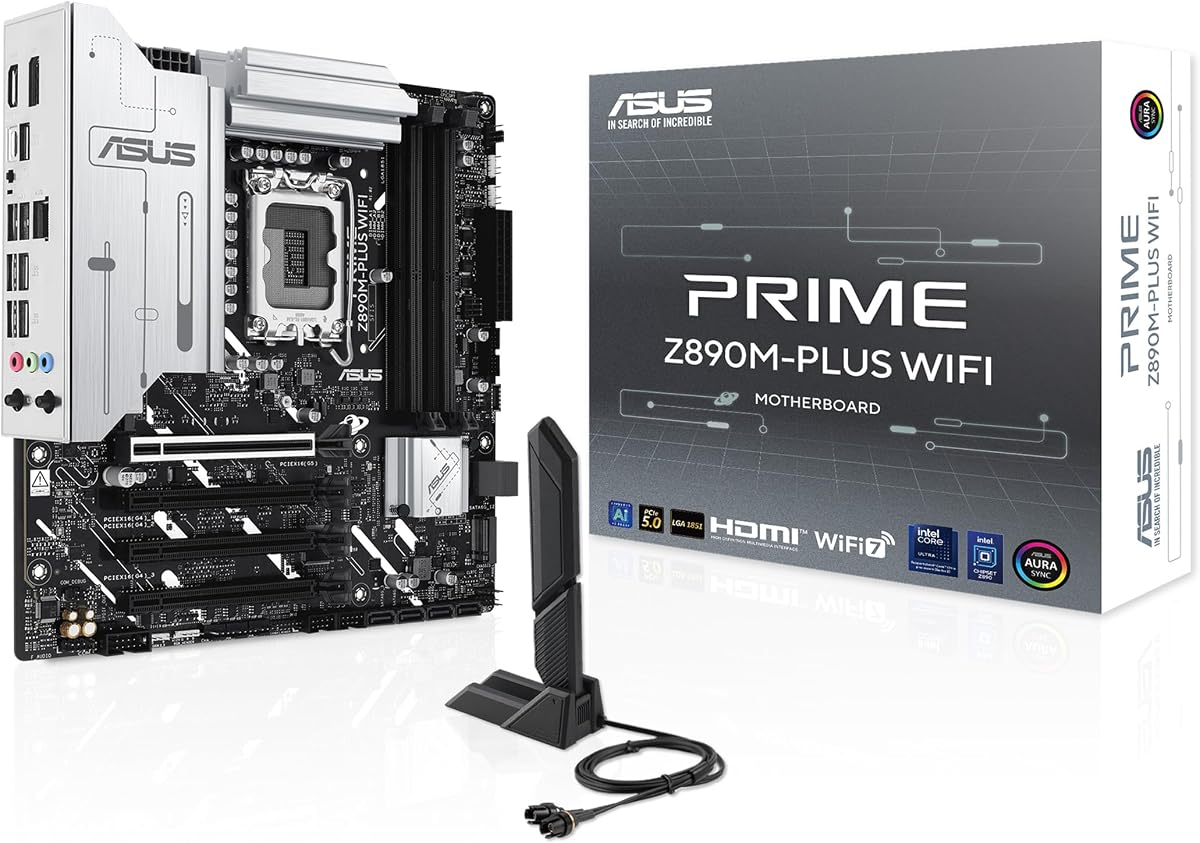
Prime Z890M-PLUS WiFi proves Z890 is not ATX-only: 10+1+2+1 80A DrMOS stages, Wi-Fi 7, 2.5Gb LAN, and three M.2 slots (one Gen5, two Gen4) on mATX for Core Ultra Series 2. Compact Intel gaming/creator boxes finally get a current chipset without a full tower.
AI Cooling II and Fan Xpert-style control help dense cases. Still, mATX air is less forgiving—buy the cooler the case allows, not the one YouTube used in an open bench.
Choose Z890M for micro cases. Choose ATX Prime or Gaming Plus when slots and radiators sprawl. Choose Hero only if Thunderbolt and halo power justify ATX spend.
Pick the mATX case first, then confirm GPU length and cooler height before the board.
Put the OS on the Gen5 slot; park bulk games on Gen4 to keep the fast lane honest.
Same Prime philosophy, fewer PCIe slots—do not plan a capture-card empire without counting.
We may earn a commission at no additional cost to you.
Z890 does not take AMD Ryzen or older Intel LGA 1700 CPUs. Buy the Ultra Series 2 chip and board as a pair.
Hero/Strix-E style boards reward dock-heavy creators. If you only need one NVMe, Gaming Plus or Prime save money.
Match the AP you own. A Wi-Fi 7 board on a 6E router is mostly future insurance.
mATX Prime Z890M unlocks smaller cases; ATX unlocks slots and radiators.
New platforms improve quickly—budget time for a flash before blaming hardware.
Confirm every NVMe link speed in the OS, run a mild CPU stress for twenty minutes while watching VRM area temps with the side panel on, and verify Wi-Fi antennas are finger-tight. Most 'bad board' returns are seating, BIOS, or airflow issues caught late.
Confirm every NVMe link speed in the OS, run a mild CPU stress for twenty minutes while watching VRM area temps with the side panel on, and verify Wi-Fi antennas are finger-tight. Most 'bad board' returns are seating, BIOS, or airflow issues caught late.
Confirm every NVMe link speed in the OS, run a mild CPU stress for twenty minutes while watching VRM area temps with the side panel on, and verify Wi-Fi antennas are finger-tight. Most 'bad board' returns are seating, BIOS, or airflow issues caught late.
Confirm every NVMe link speed in the OS, run a mild CPU stress for twenty minutes while watching VRM area temps with the side panel on, and verify Wi-Fi antennas are finger-tight. Most 'bad board' returns are seating, BIOS, or airflow issues caught late.
Confirm every NVMe link speed in the OS, run a mild CPU stress for twenty minutes while watching VRM area temps with the side panel on, and verify Wi-Fi antennas are finger-tight. Most 'bad board' returns are seating, BIOS, or airflow issues caught late.
Confirm every NVMe link speed in the OS, run a mild CPU stress for twenty minutes while watching VRM area temps with the side panel on, and verify Wi-Fi antennas are finger-tight. Most 'bad board' returns are seating, BIOS, or airflow issues caught late.
Confirm every NVMe link speed in the OS, run a mild CPU stress for twenty minutes while watching VRM area temps with the side panel on, and verify Wi-Fi antennas are finger-tight. Most 'bad board' returns are seating, BIOS, or airflow issues caught late.
Confirm every NVMe link speed in the OS, run a mild CPU stress for twenty minutes while watching VRM area temps with the side panel on, and verify Wi-Fi antennas are finger-tight. Most 'bad board' returns are seating, BIOS, or airflow issues caught late.
Confirm every NVMe link speed in the OS, run a mild CPU stress for twenty minutes while watching VRM area temps with the side panel on, and verify Wi-Fi antennas are finger-tight. Most 'bad board' returns are seating, BIOS, or airflow issues caught late.
Confirm every NVMe link speed in the OS, run a mild CPU stress for twenty minutes while watching VRM area temps with the side panel on, and verify Wi-Fi antennas are finger-tight. Most 'bad board' returns are seating, BIOS, or airflow issues caught late.
Many coolers support LGA 1851 with an updated bracket—check the cooler maker’s compatibility list rather than assuming LGA 1700 mounts match.
Only for TB docks, certain displays, and pro peripherals. Gamers with USB-C docks may not need it.
Z890 unlocks richer feature sets and overclocking-oriented enthusiast boards in Intel’s stack. Mid-range chipsets can suffice for locked mainstream builds—this pack focuses on Z890 options.
Halo boards attract tougher critics and complex setups. Judge features you need; stars alone mislead on premium SKUs.
No—these Z890 boards are DDR5 platforms as listed.
It indicates stout power stages for sustained CPU load. Pair with case airflow; stages are not magic under a sealed panel.
ASUS Prime Z890M-PLUS WiFi in this pack.
ROG Strix Z890-E’s multi-M.2 design is the storage specialist.
Nice for laptops nearby and failover; not required for a desk next to a switch.
Any supported Core Ultra Series 2 desktop CPU—match VRM class to the chip’s power profile and your cooling.
The best Z890 motherboards in 2026 range from Maximus Hero Thunderbolt flagships to Gaming Plus value and Prime mATX compactness. AORUS Elite’s rating strength makes it a default mainstream pick for many Ultra Series 2 builds.
Stay honest about ports: Thunderbolt, seven M.2 slots, and dual LAN are superpowers only when used. Otherwise a calmer Prime or Gaming Plus board lets you spend on the CPU and GPU that actually frame your games.