Best Overall
ASRock X670E Taichi Carrara

- Dual PCIe 5.0 x16 slots for multi-GPU or capture setups
- 128 GB DDR5 support across four DIMM slots
- 4.5-star rating with enthusiast-grade Taichi pedigree
Expert Review & Guide
The X670E chipset sits at the top of AMD's AM5 stack for builders who refuse to compromise on PCIe 5.0 lane allocation, multi-drive storage layouts, and VRM headroom for Ryzen 9 processors under sustained all-core loads. Unlike the non-E X670 variant, X670E guarantees a full PCIe 5.0 x16 slot for next-generation GPUs and typically pairs that with at least one Gen5 M.2 slot—critical when you are assembling a workstation that must stay relevant through multiple GPU and SSD generations. The boards in this guide span ASUS ROG Strix and TUF lines, MSI's Carbon aesthetic, and ASRock's Taichi Carrara flagship, plus several X870 and X870E options that represent the natural upgrade path if you are buying fresh silicon in 2026.
Platform longevity is the hidden value proposition. AM5 launched with Ryzen 7000, expanded to 8000-series APUs, and now hosts Ryzen 9000 CPUs with improved efficiency and higher core counts. A strong X670E board purchased today should survive BIOS updates for future AM5 parts, carry your DDR5 kit forward via EXPO profiles, and absorb storage expansion without SATA port juggling. WiFi 6E remains the wireless baseline on most X670E listings here, while newer X870 entries add WiFi 7 and USB4—worth considering if your router already supports 802.11be and you transfer large files wirelessly to a NAS.
Ten products appear below in pack order. We cover every listing with comparison specs, detailed reviews, and a buying guide focused on VRM phase counts, M.2 lane sharing, renewed versus new inventory, and when stepping up to X870E makes sense over staying on X670E. We omitted dollar prices as always; affiliate URLs retain tag=reviewconsens-20. Expect honest notes on BIOS requirements for Ryzen 9000 compatibility, the renewed TUF listing's warranty tradeoffs, and why two nearly identical TUF SKUs exist at different ratings.


As an Amazon Associate we earn from qualifying purchases. We may earn a commission at no additional cost to you.
Every product in this pack appears below in listing order. Specs highlight socket generation, power delivery, and one connectivity differentiator. X870 and X870E rows note the chipset upgrade for buyers cross-shopping next-gen AM5 boards alongside classic X670E options.
ASUS ROG STRIX X670E-A GAMING WIFI
The ROG Strix X670E-A occupies the sweet spot in ASUS's enthusiast stack—above TUF durability pricing but below the F-series step-up that adds two extra power stages and an L-shaped heatpipe. Sixteen plus two teamed stages with alloy chokes and durable capacitors deliver clean power to Ryzen 9 7900X and 7950X processors during extended Cinebench runs, and the board's official Ryzen 9000 readiness means you can drop in a 9900X or 9950X after a BIOS flash without hunting third-party VRM mod lists.
Storage flexibility defines modern X670E value, and the Strix A does not disappoint. Four M.2 slots include heatsinks on each connector plus a backplate for the primary PCIe 5.0 M.2_1 slot—a detail that matters when Gen5 NVMe controllers run hot under sustained sequential writes during video ingest. PCIe 5.0 on the primary x16 slot future-proofs GPU upgrades even if your current card is still Gen4; lane negotiation is automatic and transparent in BIOS.
Connectivity covers WiFi 6E, USB 3.2 Gen 2x2 Type-C at twenty gigabits per second, and the usual complement of USB 10 Gbps ports for fast external SSDs. AI Cooling II monitors fan curves against thermal telemetry and adjusts profiles without manual fan tuning spreadsheets—particularly useful in compact mid-tower cases where airflow around the VRM heatsink matters as much as GPU clearance.
Overclocking features distinguish ROG from TUF beyond aesthetics. Dynamic OC Switcher lets you flip between all-core and single-thread boost profiles depending on workload, while Core Flex and PBO Enhancement expose AMD's precision boost parameters in human-readable Armoury Crate menus rather than raw hex registers. You do not need to be a competitive overclocker to benefit; simply enabling PBO Enhancement often extracts free performance from Ryzen 7000 and 9000 chips within safe thermal envelopes.
The integrated aluminum I/O cover and massive VRM heatsinks are not cosmetic. High-conductivity thermal pads transfer heat from MOSFETs into the fin array efficiently enough that VRM throttling rarely appears in stock configurations. Pair with a quality AIO or dual-tower air cooler on the CPU itself and the board becomes a stable foundation for five-year ownership cycles.
Compared to the Strix X670E-F elsewhere in this guide, the A model trades two power stages and the L-shaped heatpipe for a lower tier in ASUS's lineup and a higher customer rating at 4.4 stars. Most gamers and creators running Ryzen 7 or non-X Ryzen 9 chips will never saturate the F model's extra headroom. Choose the A when budget matters; choose the F when you want maximum VRM margin for custom loop adjacent builds or heavy PBO limits.
Ideal for builders who want ROG firmware, Aura sync, and AI tuning without paying for the top-tier Strix F or jumping to X870E. Pairs naturally with Ryzen 7 7800X3D or 9800X3D gaming rigs and mid-range content workstations with two to three NVMe drives.
Flash the latest BIOS via USB Flashback before installing a Ryzen 9000 CPU if upgrading from an empty board. Enable EXPO for your DDR5 kit after first boot, then run a memory stability test before enabling PBO Enhancement. ASUS notes that 8000-series APUs may also require an update—check the support page for your exact CPU model.
We may earn a commission at no additional cost to you.
ASUS TUF Gaming X670E-PLUS WiFi 6E (Renewed)
Amazon Renewed listings exist because returned and refurbished hardware circulates back into inventory at lower cost. This ASUS TUF Gaming X670E-PLUS WiFi 6E renewed SKU carries the same headline specifications as the new unit—sixteen power stages, PCIe 5.0, four M.2 connectors, 2.5 Gb Ethernet, WiFi 6E, and USB 4 support—but ships through Amazon's renewed program rather than factory-sealed retail channels. The 4.1 average rating reflects both satisfied budget builders and buyers who received boards with cosmetic scuffs, missing accessories, or prior owner BIOS configurations that required clearing CMOS.
Functionally, a healthy renewed TUF X670E-PLUS is indistinguishable from new hardware once you flash current BIOS and verify all M.2 latches, USB ports, and DIMM slots. TUF boards emphasize durable capacitors, ProCool power connectors, and LANGuard surge protection on the Ethernet port—components that age well and rarely fail unless subjected to liquid damage or overtightened standoffs during a sloppy rebuild.
The renewed path makes sense when you are building a secondary PC, a family gaming rig with defined upgrade horizons, or a LAN party machine where absolute pristine packaging does not matter. It makes less sense for primary workstations where downtime costs money, or when you need guaranteed multi-year manufacturer RMA without navigating renewed seller policies. Read the renewed guarantee terms at checkout and photograph the board on arrival for dispute documentation.
Spec parity with the new TUF X670E-PLUS listing in this pack is high, though ASUS marketing sometimes rounds phase counts differently between renewed and current product pages. Both boards target the same buyer: someone who wants X670E lane allocation without ROG pricing. The renewed unit simply accepts uncertainty on cosmetic condition and accessory completeness in exchange for savings.
Before committing, compare the renewed ASIN against the new B0BDTJFHKJ listing in our comparison table. If the gap is narrow, new inventory with full ASUS warranty and a 4.3 rating is often the rational choice. If the gap is substantial and you are comfortable testing VRM thermals and all M.2 slots within the return window, renewed TUF hardware delivers genuine X670E capability without pretending to be a B650 board with borrowed marketing.
Setup on renewed boards should always start with BIOS Flashback to latest stable firmware, a visual inspection for bent socket pins, and stress testing with OCCT or Cinebench before trusting the system with irreplaceable data. Treat the first week as a burn-in period; most latent refurb issues surface quickly under combined CPU, storage, and network load.
The new listing at rank six in this guide posts a 4.3 rating and ships with standard manufacturer warranty. Renewed saves money but adds risk on aesthetics and support escalation. Choose renewed only when savings justify the extra validation work on your bench.
Skip renewed if you need WiFi 7, if this is your only production machine, or if seller feedback mentions recurring missing I/O shield or M.2 screw kits. Also skip if you are uncomfortable clearing TPM and Secure Boot state left by a prior Windows installation on the same board serial.
We may earn a commission at no additional cost to you.
ASUS TUF Gaming X670E-PLUS WiFi 6E
ASUS positions TUF Gaming as the durability line, and the X670E-PLUS WiFi 6E delivers that promise with an eight-layer PCB, 14+2 teamed power stages, 8+8 ProCool sockets, and military-grade component validation without the ROG tax on heatsink aesthetics and bundled stickers. For most AM5 builders running Ryzen 7 7700X through 9700X, this VRM is more than adequate—thermal images from community reviewers consistently show cool MOSFET temperatures even when PBO is enabled with reasonable limits.
Four M.2 slots on an X670E board at this tier is the headline storage story. Populate a Gen5 drive in the primary slot for OS and applications, add Gen4 drives for games and scratch media, and you still have headroom before touching SATA devices that clutter cable management. PCIe 5.0 on the graphics slot ensures your GPU path stays unconstrained when you eventually upgrade from a current-generation card.
Networking splits between Realtek 2.5 Gb Ethernet with TUF LANGuard protection and integrated WiFi 6E for wireless setups. LANGuard is easy to dismiss until a summer thunderstorm sends a spike through your router and the Ethernet port survives while a cheaper board would need RMA. WiFi 6E adds six-gigahertz band support when your router and Windows drivers align—adequate for Steam downloads and Discord voice even if it is not the WiFi 7 future-proofing on X870 successors.
The Thunderbolt USB4 header support distinguishes this TUF from many B650 alternatives that omit high-speed front-panel connectivity. Pair with a compatible case USB4 port and you gain forty-gigabit paths to docks, high-resolution webcams, and fast external NVMe enclosures without occupying rear I/O Type-C ports needed for displays or audio interfaces.
BIOS maturity on the TUF X670E-PLUS is a strength after two years on market. ASUS releases regular AGESA updates for Ryzen 9000 compatibility, EXPO memory tuning, and USB4 stability fixes. Enable EXPO, update chipset drivers from AMD's site, and the board behaves predictably in both Windows and Linux for developers who dual-boot.
At 4.3 stars this is the new-in-box TUF pick we recommend over the renewed listing unless budget forces otherwise. It undercuts ROG Strix boards while retaining the X670E chipset's full PCIe 5.0 lane budget—a combination that defines value in the AM5 ecosystem when you refuse to downgrade to B650 and lose multi-M.2 flexibility.
Pair with Ryzen 7 7800X3D or 9800X3D for gaming-focused builds, or Ryzen 9 7900 for lightweight content creation. Add 32 GB DDR5 EXPO kit and a Gen4 or Gen5 NVMe primary drive—the board will not bottleneck either for years.
ROG adds AI Cooling II, Dynamic OC Switcher, and slightly higher phase count marketing. TUF matches M.2 count and core connectivity. Choose TUF when you want TUF aesthetics and durability; choose Strix when firmware tuning tools matter more than saving a tier.
We may earn a commission at no additional cost to you.

ASUS ROG STRIX X670E-F GAMING WIFI
The Strix X670E-F is ASUS's step-up Strix model within the X670E generation, adding two power stages versus the A variant and integrating an L-shaped heatpipe that thermally links the VRM heatsink assembly to M.2 cooling infrastructure. Eighteen plus two teamed stages with ProCool II connectors target buyers running Ryzen 9 7950X or 9950X processors with aggressive PBO, custom curve optimizers, and long Blender renders where VRM temperature margins separate stable systems from throttling ones.
Thermal design is the F model's tangible advantage. The M.2 Combo-sink, dedicated backplate for the PCIe 5.0 M.2_1 slot, three onboard M.2 heatsinks, and an additional massive accessory heatsink acknowledge that Gen5 SSDs and high-core-count CPUs generate simultaneous heat plumes in the same ATX zone. The heatpipe transfers energy away from clustered components more effectively than isolated fin stacks, which shows up as lower fan speeds during mixed storage and CPU workloads.
Overclocking tools expand beyond the A model with Asynchronous Clock support alongside Dynamic OC Switcher, Core Flex, and PBO Enhancement. Asynchronous Clock lets advanced tuners decouple fabric and memory clocks in ways that benefit specific Ryzen silicon lottery outcomes—niche, but valued by enthusiasts who document results on forums. Casual builders can ignore these menus entirely and still enjoy a rock-solid stock experience.
The 4.0 customer rating is worth addressing honestly. Some owners report early BIOS quirks around USB4 and EXPO profiles that ASUS subsequently patched—common on launch-window Strix boards. Others compare the F premium against the A model and conclude the extra phases did not translate to measurable fps gains in gaming. Both perspectives are valid: the F is a power-delivery and thermals play, not a guaranteed performance multiplier in titles that hit GPU limits first.
Connectivity mirrors the Strix A: WiFi 6E, USB 3.2 Gen 2x2, four M.2 slots, PCIe 5.0 x16. You are paying for VRM and cooling headroom, not radically different I/O. If your build centers on Ryzen 7 9800X3D with a single Gen4 SSD, the F model's advantages remain theoretical until you stress all-core loads or populate multiple hot NVMe drives concurrently.
Cross-shop against the X870 TUF and X870E Strix entries in this pack before finalizing. Newer chipsets add WiFi 7 and USB4 on rear I/O at price points that overlap depending on sales. Choose the X670E-F when you specifically want X670E lane behavior with maximum Strix VRM within that generation; choose X870 when wireless and I/O future-proofing outweigh phase-count bragging rights.
Content creators rendering overnight, engineers running local LLM inference on CPU, and overclockers pushing PBO limits on Ryzen 9 chips benefit most. Gamers with Ryzen X3D processors rarely saturate this VRM—save money on the Strix A or TUF X670E-PLUS instead.
The L-shaped heatpipe and taller VRM fin array can encroach on air cooler compatibility. Verify cooler height and offset against ASUS QVL notes before ordering a massive dual-tower heatsink. AIO liquid coolers avoid the conflict entirely.
We may earn a commission at no additional cost to you.

ASUS ROG Strix X870E-E Gaming WiFi
Although this guide targets X670E buyers, ignoring the ROG Strix X870E-E would mislead anyone shopping AM5 in 2026. X870E is the successor platform with additional chipset lanes, native USB4 on rear I/O, WiFi 7 radios, and five M.2 slots—three of them PCIe 5.0 with substantial cooling solutions. If you are building fresh and plan to keep the system five or more years, the X870E-E represents the current ASUS flagship for Ryzen 9000 desktops rather than a lateral X670E alternative.
Power delivery rates 18+2+2 phases at 110 amperes per stage with dual ProCool II connectors—a specification that reads like marketing until you load every M.2 slot, enable PBO on a Ryzen 9 9950X, and still see controlled VRM temperatures. AI Overclocking, AI Cooling II, AI Networking, and AEMP memory training simplify setup for buyers who want performance without manual tuning marathons.
Storage topology is the practical reason to cross-shop X870E against X670E. Three onboard PCIe 5.0 M.2 slots plus two PCIe 4.0 M.2 connectors let you segregate OS, games, scratch media, and archive drives without SATA cables or PCIe bifurcation hacks. Each Gen5 slot includes meaningful heatsinking—critical when direct storage API titles and video editing timelines hammer sequential throughput.
Networking jumps to WiFi 7 with Realtek 5 Gb Ethernet on the wired side. Competitive gamers will still prefer wired connections, but WiFi 7 multi-link operation and 320 MHz channels can approach gigabit-class throughput for NAS sync when antenna placement is good. AI Networking monitors traffic patterns and adjusts QoS priorities—a subtle quality-of-life improvement for streamers uploading while gaming.
DIY-friendly design touches accumulate: PCIe Slot Q-Release Slim, M.2 Q-Latch, M.2 Q-Release, M.2 Q-Slide, Q-Antenna, Q-Dashboard, Q-Code debug display, Q-LED indicators, Start and BIOS FlashBack buttons, Clear CMOS button, and a pre-mounted I/O shield. These are not gimmicks when you are rebuilding at midnight with sore thumbs from M.2 screws—toolless mechanisms reduce friction and damage risk.
Include this board in an X670E guide because many shoppers search generically for high-end AM5 motherboards and need clarity on generational differences. X670E remains valid if you find a deal on remaining inventory or buy used. X870E-E is the forward-looking pick when connectivity and lane headroom justify the chipset premium over even the best X670E Taichi or Strix F models.
Choose X870E when you need five M.2 slots, dual USB4, WiFi 7, and 5 Gb LAN together. Stay on X670E when your build uses two NVMe drives, WiFi 6E suffices, and you want to capture savings on prior-generation boards that still receive BIOS updates for Ryzen 9000.
ASUS markets AI Overclocking and AI Cooling for local inference and creator workloads. Realistically, GPU horsepower dominates AI training; the board's value is stable power and fast storage for dataset staging rather than on-board NPU features Intel platforms emphasize.
We may earn a commission at no additional cost to you.

GIGABYTE X870 AORUS Elite WIFI7
Gigabyte's X870 AORUS Elite WIFI7 posts the highest customer satisfaction in this pack alongside the ASRock Taichi Carrara and ASUS TUF X870-PLUS, and it does so by packing WiFi 7, dual USB4 ports, four M.2 slots, and a 16+2+2 VRM with Thermal Guard into an X870 rather than pricier X870E tier. For builders who want modern wireless and wired I/O without paying for lane overhead they will never use, this is the balanced 2026 AM5 motherboard.
AMD EXPO support on four DDR5 DIMM slots simplifies memory tuning for Ryzen 9000 and 7000 processors. Gigabyte's BIOS has matured quickly on X870, with regular AGESA drops that address boot times, EXPO stability, and USB4 dock compatibility—historically Gigabyte's pain points on early AM5 are largely resolved on this generation according to community feedback tied to the 4.5 rating.
Storage layout provides four M.2 connectors with PCIe 5.0 on the primary slot and Thermal Guard heatsinks on VRM and M.2 zones. EZ-Latch Plus on the PCIe x16 slot and M.2 retention means GPU swaps and drive upgrades do not require hunting the screwdriver you last used three years ago. Sensor Panel Link support targets chassis LCD modders—a niche feature that signals Gigabyte expects showcase builds in this price band.
Dual USB4 Type-C ports on rear I/O plus front and rear USB-C connectivity cover docks, high-bitrate capture devices, and fast external SSD enclosures. WiFi 7 integration future-proofs wireless when paired with a compatible router and Windows 11 builds that expose 320 MHz channels. Until then, the radio remains backward compatible with WiFi 6E and 6 networks without adapter dongles.
The five-year warranty Gigabyte advertises on recent AM5 boards matters when you amortize platform cost over a long ownership window. Register the board promptly after purchase and retain invoice copies—warranty claims on motherboards are rare but catastrophic when they occur mid-project.
Compared to pure X670E options, you trade the E suffix lane guarantee for modern I/O at similar total build cost depending on promotions. Compared to the X870 Eagle in this pack, the AORUS Elite adds an M.2 slot and higher phase count—worth stepping up if you run more than three NVMe drives. This is our top pick for new AM5 builds that prioritize ratings, warranty, and connectivity over chipset letter semantics.
The Eagle X870 board in this guide uses 14+2+2 power and three M.2 slots. Elite adds a fourth M.2 and stronger VRM marketing. Choose Elite for multi-drive workstations; Eagle for cleaner budget builds with WiFi 7 still intact.
Update BIOS before CPU install if box seal indicates older stock. Enable EXPO, install Gigabyte Control Center for fan curves, and verify WiFi 7 driver version from Gigabyte support rather than Windows Update alone for fastest six-gigahertz band stability.
We may earn a commission at no additional cost to you.
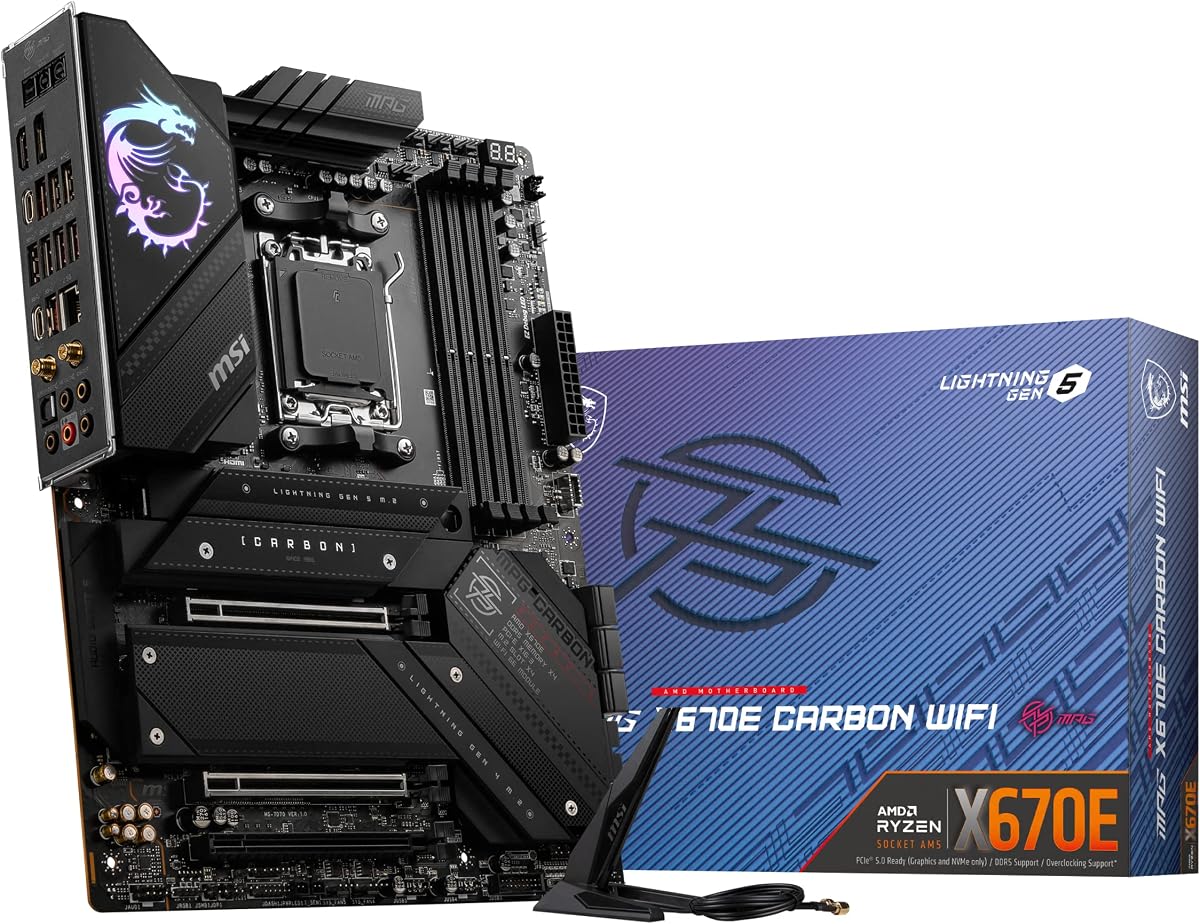
MSI's MPG X670E Carbon WiFi targets builders who want a cohesive blacked-out aesthetic with genuine X670E chipset credentials rather than a repainted B650 board. Carbon fiber texture accents, subdued Mystic Light defaults, and an aluminum cover heat-pipe VRM design photograph well in tempered glass cases where RGB rainbows are intentionally disabled.
Performance hardware is serious beneath the styling. PCIe 5.0 on graphics and Lightning Gen 5 x4 M.2 deliver the bandwidth high-refresh gaming and fast storage demand. MOSFET thermal pads rated at 7W/mK plus additional choke thermal pads and M.2 Shield Frozr heatsinks address hotspots that cheaper boards ignore—thermal throttling on VRM or SSD controllers mid-session is rare when airflow is reasonable.
Memory support advertises DDR5-5600 and beyond with overclocking headroom on four DIMM slots. Dual-channel kits at 6000 MT/s with tight timings remain the AM5 sweet spot; the Carbon handles EXPO profiles when BIOS and CPU memory controller cooperate. Ryzen 9000 support is listed explicitly, though as always verify minimum BIOS version on MSI's support portal before unboxing a new CPU generation.
Connectivity includes WiFi 6E, Bluetooth 5.3, 2.5G LAN, USB 3.2 Gen 2, HDMI and DisplayPort for integrated graphics troubleshooting, and SATA 6 Gb/s for legacy bulk storage. The omission of USB4 on rear I/O hurts dock enthusiasts compared to TUF X670E-PLUS or any X870 board here, but many gaming rigs never plug a USB4 device into the motherboard directly—front-panel high-speed ports on the case matter more, and the Carbon includes solid USB 10 Gbps options.
Mystic Light controls 16.8 million colors across onboard LEDs and supported RGB or RAINBOW LED strips via Mystic Light Extension headers. One-click profiles simplify synchronization with MSI GPUs and peripherals if you are already in the ecosystem; otherwise, OpenRGB and motherboard vendor agnostic strips work with modest effort.
The 4.1 rating suggests MSI's AM5 early BIOS era left some owners frustrated, while later AGESA updates improved stability. Buy today with current firmware expectations rather than 2022 launch memories. Competes directly with ASUS TUF and Strix X670E boards—choose Carbon when MSI aesthetics and Mystic Light integration align with your GPU brand loyalty; choose ASUS when USB4 headers and AI tuning tools rank higher.
MSI's Tomahawk naming lives on X870 in other guides; the Carbon X670E is the premium black MPG line. Expect similar VRM philosophy with stronger emphasis on appearance and Mystic Light than on LAN gaming optimizations Tomahawk sometimes emphasizes.
HDMI and DisplayPort onboard help troubleshoot boot failures without a discrete GPU installed— invaluable when diagnosing DOA CPUs or testing RAM outside the OS. Disable integrated graphics routing in BIOS once your GPU is stable to avoid Windows multi-display confusion.
We may earn a commission at no additional cost to you.
ASRock's Taichi line has long served enthusiasts who want board features that ignore mainstream cost cutting, and the X670E Taichi Carrara continues that tradition with dual PCIe 5.0 x16 slots—a configuration rare even among X670E boards focused on single-GPU gaming. The second full-length slot enables bifurcation scenarios, high-bandwidth capture cards alongside a flagship GPU, or workstation layouts that ASUS and MSI often reserve for higher price brackets.
Memory support spans four DDR5 DIMM slots with a 128 GB maximum, which matters for local virtualization, RAM disk editing workflows, and developers running multiple containerized services simultaneously. AM5 officially supports high-capacity kits when CPU memory controllers and BIOS QVL lists align; Taichi boards historically push compatibility validation further than budget SKUs.
The vertical M.2 slot is a Taichi signature that doubles as thermal and aesthetic strategy. Mounting an NVMe drive vertically near the chipset can improve airflow visibility in showcase builds and simplifies drive swaps during bench testing. Combined with standard M.2 placements, the Carrara treats storage as a first-class design element rather than an afterthought hidden under GPU heat.
Integrated AMD RDNA 2 graphics depend on CPU support—Ryzen 7000 and 8000 APUs with graphics enabled output through motherboard ports for troubleshooting, headless server staging, or temporary builds while waiting on GPU delivery. Actual support varies by exact CPU model; the listing's conservative Ryzen 7000 emphasis reflects ASRock's marketing caution rather than absence of 9000 compatibility after BIOS update.
The 4.5 customer rating tied for best in this pack signals long-term owner satisfaction on build quality, VRM stability, and BIOS progression through AGESA updates. ASRock sometimes undersells specifications in Amazon bullet points compared to ASUS; rely on the official spec page for WiFi generation, USB port counts, and exact M.2 lane sharing maps before purchase.
Choose Taichi Carrara when you want the purest X670E enthusiast story in this guide: dual Gen5 x16 slots, 128 GB RAM path, vertical M.2 showcase option, and Taichi reliability without jumping to X870E pricing. It is our top overall pick specifically for buyers who searched X670E and intend to stay on that chipset rather than cross-grading to X870.
Content creators running a full-size GPU plus a PCIe 4.0 capture card benefit from true x16 and x8 bifurcation layouts without dongle adapters. Scientific workloads with FPGA accelerators and multi-GPU compute—not gaming SLI—are the realistic scenarios in 2026.
Because the Amazon listing emphasizes Ryzen 7000, visit ASRock support and confirm latest BIOS includes Ryzen 9000 AGESA before installing new silicon. Taichi boards receive updates but require proactive checking unlike ASUS boxes that print 9000 readiness on the front.
We may earn a commission at no additional cost to you.

Gigabyte splits X870 into Eagle and AORUS tiers much like ASUS separates TUF from ROG. The X870 Eagle WIFI7 delivers the wireless and USB standards that define 2026 builds—WiFi 7, dual USB4, PCIe 5.0 graphics, DDR5 EXPO—while trimming M.2 count and VRM phase marketing relative to the AORUS Elite in this pack. For gamers with one or two NVMe drives, those trims are invisible in daily use.
Power design at 14+2+2 with VRM Thermal Guard handles Ryzen 7 9700X and 9800X3D comfortably and supports Ryzen 9 when PBO limits stay reasonable. Extreme overclockers chasing every watt should step up to Elite or Strix classes; typical builders will never encounter VRM bottlenecks before CPU or GPU limits.
Three M.2 slots still exceed many B650 boards and matches what most gaming rigs populate: OS drive, game library, optional bulk SATA SSD via port if needed. PCIe 5.0 on the primary slot and Thermal Guard on M.2 and VRM zones keep thermals predictable when you add a Gen5 OS disk during a future upgrade cycle.
Dual USB4 Type-C ports plus front and rear USB-C connectivity align the Eagle with modern case I/O panels. WiFi 7 positions the board well for apartments where Ethernet routing is impractical—pair with a WiFi 7 router and updated Windows wireless stack to access six-gigahertz bandwidth without PCIe WiFi cards.
EZ-Latch on PCIe and M.2 retention continues Gigabyte's toolless philosophy from the Elite model. The five-year warranty registration process is identical—do not skip it because Eagle pricing feels budget-oriented; the board still carries AM5 platform value worth protecting.
At 4.4 stars the Eagle sits one tenth behind the Elite's 4.5 in this pack, a gap that often reflects feature envy rather than failure rates. Choose Eagle when three M.2 slots suffice and you want WiFi 7 X870 without Elite premiums; choose X670E TUF when you prefer proven X670E lane maps and can accept WiFi 6E for similar total platform cost depending on sales.
Eagle boards use simpler heatsink styling and fewer marketing features than AORUS Elite, but core chipset capabilities remain X870. Think of Eagle as the sensible Gigabyte entry point and Elite as the creator and multi-drive upgrade.
Map drives before purchase: primary Gen5 for OS, secondary Gen4 for games, tertiary for cold storage. If you need a fourth M.2 without SATA, step to AORUS Elite or ASUS X870 TUF in this guide.
We may earn a commission at no additional cost to you.

ASUS TUF Gaming X870-PLUS WiFi
The TUF Gaming X870-PLUS WiFi is the natural successor to the TUF X670E-PLUS documented earlier in this guide, and it earns equal consideration at 4.5 stars by preserving four M.2 slots while upgrading wireless to WiFi 7, adding USB4 at forty gigabits per second, and implementing 16+2+1 power stages rated at 80 amperes each via SPS technology. Buyers who liked TUF durability on X670E but want current I/O without ROG pricing land here.
ASUS positions the board for AI PC workloads alongside gaming—a narrative that translates practically into stable power delivery for sustained CPU loads, fast storage for dataset staging, and quality networking for cloud sync when local inference jobs finish. The CPU still does the compute; the motherboard's job is not to throttle or disconnect under pressure.
Four M.2 connectors maintain parity with X670E TUF and Strix storage flexibility. PCIe 5.0 readiness on the graphics slot and primary storage path future-proofs against GPU and SSD generational shifts. SATA 6 Gb/s ports remain for bulk hard drives or optical archives without sacrificing M.2 population.
USB4 40 Gbps and a USB 20 Gbps Type-C front-panel header cover high-speed peripheral scenarios from docks to VR link boxes depending on your ecosystem. HDMI onboard assists troubleshooting like MSI Carbon's display outputs. WiFi 7 with 2.5Gb Ethernet covers wireless-first apartments and wired gaming desks alike.
AI Overclocking, AI Cooling II, and AEMP simplify tuning for buyers intimidated by BIOS spreadsheets. Dynamic OC Switcher, Core Flex, and PBO Enhancement carry over from ROG DNA into TUF firmware at this generation— tangible benefits when you want one profile for gaming nights and another for morning renders without manual profile swaps.
Compare against Gigabyte X870 AORUS Elite: both rate 4.5 stars with WiFi 7 and four M.2 slots. ASUS wins on AI firmware integration and TUF brand loyalty; Gigabyte wins on five-year warranty marketing clarity and dual USB4 emphasis on Elite spec sheets. Either is a stronger 2026 default than legacy X670E unless you find exceptional X670E pricing or require Taichi dual x16 layouts.
Owners of X670E-PLUS boards can reuse DDR5, AM5 coolers, and cases when jumping to X870-PLUS. Swap board, flash BIOS, enable EXPO, reinstall WiFi 7 drivers—no platform migration tax beyond the motherboard itself.
Smart Power Stage integration reduces heat per phase versus legacy MOSFET arrangements. Sixteen phases at 80A each is substantial headroom for Ryzen 9 9950X with PBO—more relevant to creators than gaming-only 9800X3D builds that could save on X670E TUF instead.
We may earn a commission at no additional cost to you.
AMD's AM5 chipset stack spans B650, X670, and X670E, with newer X870 and X870E successors adding incremental lane and I/O improvements. The E suffix on X670E guarantees PCIe 5.0 on the primary x16 graphics slot and typically at least one M.2 slot wired for Gen5 storage. Non-E X670 boards sometimes downgrade the GPU slot to PCIe 4.0 while still offering multiple M.2 connectors—fine for current GPUs but a compromise if you keep boards five or more years.
B650 shaves lane count and often M.2 slots to hit lower price tiers. A quality B650 board serves Ryzen 7 gaming builds admirably. X670E earns its place when you want confirmed Gen5 GPU paths, three or four M.2 slots without SATA clutter, and VRM headroom for Ryzen 9 processors under sustained loads. If your build uses one SSD and one GPU, B650 remains rational; if you are assembling a workstation or high-end gaming rig with expansion in mind, X670E or X870 justifies the step up.
Manufacturer phase numbers—14+2, 16+2, 18+2—describe teamed power stages feeding the CPU socket. More phases generally mean lower per-phase current and cooler MOSFETs under load, but implementation quality matters as much as marketing totals. ProCool dual 8-pin EPS connectors, thick PCB layers, and heatsink mass determine whether phases actually stay cool when PBO is enabled.
Ryzen 7 chips tolerate a wider VRM range than Ryzen 9 7950X or 9950X. If you chose a 9800X3D for gaming, TUF 14+2 boards are sufficient. If you compile code, render 3D, or stream with x264 encoding on CPU, favor 16+ phases with documented thermal testing. Renewed boards can deliver identical VRM hardware if the underlying PCB is the same SKU—verify model numbers match before assuming savings.
Four M.2 slots on paper does not always mean four simultaneous PCIe 4.0 x4 or Gen5 connections without tradeoffs. Chipset and CPU lane bifurcation maps determine whether populating the fourth M.2 disables SATA ports or reduces GPU lanes to x8. Consult the manufacturer manual for your exact board before buying four NVMe drives.
Practical hierarchy: Gen5 or fast Gen4 NVMe for OS and applications, Gen4 for games, SATA SSD or HDD for bulk storage. X670E Taichi and Strix boards excel when you need multiple high-speed drives active concurrently. Three-M.2 X870 Eagle boards suffice for most gamers if you plan storage tiers deliberately.
Most X670E boards in this pack ship WiFi 6E, which adds six-gigahertz band support alongside 2.4 and 5 GHz. WiFi 7 on X870 and X870E boards introduces 320 MHz channels, multi-link operation, and higher QAM rates that can approach wired gigabit throughput in ideal conditions. Both require compatible routers and updated Windows builds to realize full features.
If your desktop sits near the router or you run Ethernet for gaming, wireless generation is secondary. If you rely on WiFi for large file transfers in a dense apartment, WiFi 7 X870 boards future-proof better than upgrading radios later—though external antenna placement still dominates real-world throughput more than chipset badges.
Shopping in 2026 often means cross-shopping X670E closeouts against current X870 inventory. X870E adds maximum lane flexibility—five M.2 slots on ROG Strix X870E-E, dual USB4, WiFi 7, and multi-gig Ethernet on flagship models. X870 non-E hits a sweet spot with four M.2 and WiFi 7 at lower cost, represented by Gigabyte AORUS Elite and ASUS TUF X870-PLUS in this pack.
Stay on X670E when you find competitive pricing on Taichi, TUF, or Strix boards and your storage or I/O needs fit within WiFi 6E and USB 3.2 Gen 2x2 limits. Move to X870 when building new and wireless or USB4 requirements align with components you already own or plan to buy this year.
The renewed TUF X670E-PLUS in this pack illustrates Amazon Renewed economics: same PCB, reduced cost, variable cosmetic condition, and warranty terms that differ from new ASUS retail boxes. Renewed can work for experienced builders who bench-test immediately; new inventory suits primary machines and buyers who want straightforward RMA.
Always photograph arrival condition, flash latest BIOS before trusting data, and stress-test VRM and memory within the return window. Compare renewed pricing against new TUF listings—small gaps favor new at 4.3 stars over renewed at 4.1.
X670E mandates PCIe 5.0 on the primary x16 graphics slot and typically provides at least one PCIe 5.0 M.2 connection. Standard X670 may wire the GPU slot at PCIe 4.0 while still offering multiple M.2 connectors at mixed generations. For builders keeping a motherboard through multiple GPU upgrades, X670E removes the Gen4 ceiling on the graphics path. Storage and chipset lane counts also favor X670E for multi-NVMe workstations, though exact maps vary by manufacturer and require manual review before buying four drives.
Yes, the ASUS, MSI, and Gigabyte boards in this pack explicitly list Ryzen 9000 compatibility, often with a note that BIOS update may be required when installing 9000 or 8000 series CPUs on boards shipped with older firmware. ASRock Taichi Carrara listings emphasize Ryzen 7000 in Amazon copy but receive AGESA updates on ASRock support for newer chips—check minimum BIOS before install. Use USB BIOS Flashback where available so you can update without a compatible older CPU installed.
WiFi 6E remains adequate for gaming, streaming, and general desktop use when paired with a six-gigahertz capable router and sensible antenna placement. WiFi 7 on X870 boards adds higher theoretical throughput, multi-link operation, and better behavior in congested RF environments with compatible routers and Windows 11 builds. Choose WiFi 7 when you already own or plan to buy a WiFi 7 router and transfer large files wirelessly; stick with WiFi 6E on X670E when Ethernet handles gaming and wireless is occasional.
The new ASUS TUF X670E-PLUS posts a 4.3 rating with standard manufacturer warranty and factory-fresh accessories. The renewed listing saves money but carries a 4.1 rating, possible cosmetic wear, and Amazon Renewed guarantee terms instead of full ASUS retail RMA paths. Buy renewed only when savings are meaningful and you will immediately stress-test all M.2 slots, USB ports, and memory slots within the return period. For primary workstations, the new SKU is the safer default.
Lane bifurcation rules differ per board. Many X670E ATX boards run the GPU at x16 until you populate specific M.2 slots that borrow CPU lanes, sometimes dropping the GPU to x8—which does not materially hurt most gaming GPUs. Consult the manual for ASUS TUF, Strix, MSI Carbon, or ASRock Taichi before assuming four populated M.2 slots leave GPU bandwidth untouched. ASRock Taichi dual x16 layouts target users who need serious PCIe expansion beyond typical gaming.
The Taichi Carrara provides two PCIe 5.0 x16 physical slots suitable for bifurcation workflows, capture cards, or compute accelerators—not traditional gaming SLI, which modern titles no longer support. Dual full-length slots benefit streamers mounting a GPU plus a dedicated capture or encoding card without USB bottlenecks. Verify your exact use case against ASRock lane maps because running two hot GPUs still demands case airflow and PSU headroom independent of motherboard capability.
Shoppers searching for best X670E motherboards in 2026 often evaluate adjacent AM5 platforms simultaneously. X870 and X870E boards like Gigabyte AORUS Elite, Eagle, ASUS TUF X870-PLUS, and ROG Strix X870E-E offer WiFi 7, USB4, and continued Ryzen 9000 support at price points overlapping X670E flagships. Including them clarifies when stepping up a chipset generation makes sense versus buying discounted X670E inventory for Gen5 GPU and storage needs only.
AMD's sweet spot on AM5 remains DDR5-6000 CL30 or nearby EXPO profiles for Ryzen 7000 and 9000 non-X3D chips, with some Ryzen 9000 parts benefiting from slightly higher speeds when stable. Enable EXPO in BIOS after first boot and run MemTest or OCCT memory tests before heavy production use. Four-DIMM configurations stress memory controllers harder than two-DIMM kits—consult QVL lists if you need four modules at high speed.
ROG Strix boards add AI Cooling II, Dynamic OC Switcher, richer BIOS tuning, and often higher marketed phase counts. The X670E-A at 4.4 stars suits enthusiasts who want ROG features without the F model price; the X670E-F adds 18+2 phases and L-shaped heatpipe cooling for heavy Ryzen 9 PBO but rates 4.0 stars. TUF X670E-PLUS delivers four M.2 slots and USB4 header support at better value for builders who skip RGB ecosystem integration. Premium is justified when firmware tools save you time or VRM margin matches your CPU choice.
AMD committed to AM5 socket longevity through at least 2025 and extended support with Ryzen 9000 on existing boards via BIOS updates. X670E boards with strong VRMs and Gen5 paths should remain viable for multiple CPU upgrades within AM5 before any future socket migration. WiFi 6E and USB 3.2 Gen 2x2 may feel dated before PCIe 5.0 GPU or storage paths do—factor wireless and dock needs when deciding between X670E closeouts and X870 new inventory for a five-year horizon.
X670E remains a credible AM5 choice in 2026 when you prioritize confirmed PCIe 5.0 on the graphics slot, multi-M.2 storage without immediate WiFi 7 requirements, and VRM headroom for Ryzen 9 workloads. The ASRock X670E Taichi Carrara leads pure X670E picks with dual Gen5 x16 slots and a 4.5 rating; ASUS TUF X670E-PLUS delivers the best value new-in-box feature set; and ROG STRIX X670E-A balances enthusiast tuning with practical four-drive layouts.
Cross-shopping X870 and X870E is not distraction—it reflects how AMD platform buyers actually shop. Gigabyte X870 AORUS Elite WIFI7 and ASUS TUF Gaming X870-PLUS WiFi tie at 4.5 stars with WiFi 7 and USB4 that X670E boards largely lack, while ROG Strix X870E-E pushes maximum expansion for builders who refuse compromise. Choose X670E on value and proven lane maps; choose X870 when wireless and I/O modernity align with your router and peripheral investments.
Avoid the renewed TUF listing unless savings justify validation work; flash BIOS before Ryzen 9000 installs; map M.2 lane sharing before buying four NVMe drives; and register warranties on day one. Match board tier to CPU class—Ryzen 7 gaming builds need not pay for 18-phase Strix F VRM—and your X670E or X870 foundation should carry AM5 upgrades cleanly for years.