Expert Review & Guide

Best White CPU Coolers for Snow Builds in 2026

White CPU coolers stopped being a niche paint job when snow-themed builds became the default aesthetic for glass-side gaming PCs, clean creator workstations, and compact MATX rigs that photograph well for streams and social posts. Matching the cooler to white case fans, motherboards, and GPU shrouds matters because the tower or AIO pump block sits dead center in every side-panel photo— a black fin stack or gray radiator hoses break the illusion faster than a mismatched cable extension. In 2026 the category spans CORSAIR and NZXT 360mm white AIOs, Thermalright dual-tower legends with optional IPS or digital tops, and single-tower Assassin and Hyper 212 options for tighter clearance.

This guide covers only the ten white CPU coolers in our best-white-cpu-coolers product pack: one CORSAIR Nautilus 360 RS ARGB white, one NZXT Kraken Plus 360 RGB white, one Cooler Master Hyper 212 Halo ARGB white, and seven Thermalright air coolers ranging from budget four-pipe singles to six-pipe dual-tower display flagships. Ratings reflect Amazon scores at research time. We omit dollar amounts because promotions shift weekly—compare radiator size, tower height, pipe count, ARGB headers, and display software instead before opening a listing.

Start with our three top picks if you want a fast shortlist for flagship white AIO cooling, dual-tower air value, or a large IPS display tower. Use the comparison table to filter by AIO versus air and cooler height, then read every review for honest tradeoffs around case fit, RAM clearance, USB headers for screens, and when a plain white single-tower beats forcing a 360mm mount.

Top White CPU Cooler Picks for 2026

As an Amazon Associate we earn from qualifying purchases. We may earn a commission at no additional cost to you.

White CPU Cooler Comparison: Type, Height, and Cooling Specs

Every white cooler in the pack appears below with three specs that matter before you buy: air versus AIO format, thermal hardware summary, and socket or wiring notes. Ratings reflect the pack snapshot. There are no prices here—confirm case radiator or tower height support first, then compare ARGB headers and display software requirements on the live listing.

#ProductSpecificationsScore
1
  • 360mm white radiator; RS120 ARGB fans with AirGuide blades
  • Daisy-chain to one PWM plus one 5V ARGB header
  • Whisper-quiet ~20 dBA pump; pre-applied thermal paste
9.4
3
  • 5-inch 480×854 IPS magnetic top cover via TRCC software
  • Six copper heat pipes; dual fans to 2150 RPM, 69 CFM
  • 164mm tall; AM4/AM5 and LGA 1851/1700/115x
9.6
4
  • Single tower; four 6mm AGHP heat pipes; 148mm height
  • TL-C12CW PWM fan to 1550 RPM, ≤25.6 dBA rated
  • Intel 115x–1851 and AMD AM4/AM5 mounting kits
9.6
5
  • Magnetic digital top cover; CPU and GPU stats via TRCC
  • Dual-tower; six AGHP Gen 5 heat pipes; 162mm height
  • Dual 120mm fans to 1850 RPM, 88.89 CFM combined
9.4
6
  • Single tower white ARGB; four AGHP heat pipes; 148mm
  • TL-C12CW-S PWM ARGB fan to 1550 RPM, 66 CFM
  • 125–225W TDP class; AM4/AM5 and Intel 115x–1851
9.4
7
  • 151mm single tower; digital screen top cover via TRCC
  • TL-P12W-S fan to 2000 RPM, 70.84 CFM, 2.63 mm H2O
  • Four heat pipes; ARGB sync on 5V 3-pin header
9.2
8
  • 360mm white AIO; 1.54-inch customizable LCD on pump cap
  • F360 RGB Core fans; single-cable Turbine pump breakout
  • CAM software; AM5 and LGA 1851 tool-free brackets
9
10
  • 154mm white Hyper 212; four heat pipes, copper base
  • MF120 Halo² PWM fan 690–1800 RPM with dual-loop ARGB
  • Simplified AM5 and LGA 1851/1700 brackets
9.4

1. CORSAIR Nautilus 360 RS ARGB - Best Overall White

CORSAIR Nautilus 360 RS ARGB

CORSAIR Nautilus 360 RS ARGB

9.4/10★★★★★

White all-in-one liquid coolers are the fastest way to unify a snow-themed build without spray-painting heat pipes or hunting mismatched fan frames. The CORSAIR Nautilus 360 RS ARGB in white delivers a full 360mm radiator, three matching RS120 ARGB fans, and the same daisy-chain wiring philosophy that made the black Nautilus family popular among header-starved motherboard owners. You get flagship thermal surface area while keeping the visible stack—tubing, pump cap, fan shrouds—in a consistent white palette that photographs cleanly through tempered glass.

  • 360mm white radiator; RS120 ARGB fans with AirGuide blades
  • Daisy-chain to one PWM plus one 5V ARGB header
  • Whisper-quiet ~20 dBA pump; pre-applied thermal paste
Check Price →
✓ Pros
  • Full 360mm white finish matches snow builds without aftermarket paint
  • Daisy-chained RS120 ARGB fans reduce header clutter on compact boards
  • Convex cold plate with factory paste removes first-build paste mistakes
  • Low-noise pump keeps block area calm during desktop idle
  • LGA 1851 and AM5 brackets included for current Intel and AMD platforms
✕ Cons
  • Requires verified 360mm radiator clearance front or top
  • ARGB sync needs a free 5V 3-pin motherboard header
  • White tubing and cables show dust faster than black variants

Detailed review

Cooling hardware is not cosmetic-only here. CORSAIR rates the pump around 20 dBA and pairs it with a convex cold plate plus pre-applied thermal paste in an optimized pattern. That convex profile matters on modern CPUs with slightly domed integrated heat spreaders: maximum contact area reduces hotspot behavior when one CCD carries more load than another. RS120 ARGB fans bring AirGuide blade technology and Magnetic Dome bearings tuned for radiator static pressure, not unrestricted case exhaust duty.

Daisy-chaining is the quiet quality-of-life win. All three fans connect in sequence and terminate on a single 4-pin PWM header, while ARGB lighting uses one 5V 3-pin lead when your motherboard supports sync. On boards where sys_fan headers are already consumed by case intakes and a GPU hybrid loop, that wiring simplicity prevents awkward Y-splitters or hunting for fan hub SATA power behind the tray.

Installation follows standard 360mm AIO practice: verify front or top radiator support in your case manual, dry-fit tube routing so bends are gentle, mount the block on AM5 or LGA 1700/1851 with the included hardware, then secure the radiator with fans pushing or pulling according to your airflow plan. White nylon-sleeved tubes look sharp but show dust—budget occasional compressed air if the PC lives on carpet.

Thermally, a 360mm Nautilus competes with other full-size AIOs when paired with mesh intake and sensible PWM curves. Ryzen 7 and Core i7 chips under gaming loads typically sit with comfortable headroom; sustained all-core rendering still prefers aggressive fan ramps. The white ARGB variant is the pick when you want CORSAIR daisy-chain simplicity plus synchronized lighting without stepping up to iCUE LINK hub hardware.

Compared with air coolers in this pack, the Nautilus frees socket clearance for tall RAM and thick GPU backplates while moving heat to the case perimeter. Compared with the NZXT Kraken Plus 360 RGB white later in this guide, Nautilus trades LCD showcase features for cleaner header math and a slightly higher buyer rating. Choose Nautilus when radiator fit is confirmed and you want white AIO performance without mandatory desktop software.

Who should buy the Nautilus 360 RS ARGB White

Choose it for high-core white gaming and creator rigs with verified 360mm radiator mounts who want daisy-chained ARGB fans, quiet pump acoustics, and LGA 1851 readiness without NZXT CAM or iCUE LINK hubs.

Mounting tips for white AIO builds

Front intake through the radiator usually minimizes CPU temps in mesh cases. Keep white tubing routes smooth without sharp bends, and blow dust from white fan frames monthly if the PC sits on carpet.

Check Price on Amazon →

We may earn a commission at no additional cost to you.

2. Thermalright Peerless Assassin 120 SE ARGB - Best Dual-Tower Air

Thermalright Peerless Assassin 120 SE ARGB White

Thermalright Peerless Assassin 120 SE ARGB White

9.4/10★★★★★

Thermalright Peerless Assassin 120 SE ARGB White is the dual-tower air cooler that reshaped value expectations—and the white ARGB variant finally lets budget snow builds get the same thermal class without a black fin stack clashing against white motherboards and case interiors. Two TL-C12CW-S PWM fans sandwich six 6mm heat pipes spread across offset dual towers, a layout that routinely matches or beats 240mm AIO results on mid-range and high-core CPUs when case airflow is not fighting a sealed front panel.

  • Dual-tower; six 6mm AGHP heat pipes; 155mm height
  • Dual TL-C12CW-S ARGB PWM fans to 1550 RPM
  • Intel 115x/1700/1851 and AMD AM4/AM5
Check Price →
✓ Pros
  • Dual-tower layout rivals premium AIO thermals on mid-range and high-core CPUs
  • Six heat pipes with AGHP tech handle vertical and horizontal case orientations
  • White ARGB fans sync via standard 5V motherboard software
  • Offset fin design leaves room for tall RAM on many boards
  • Strong community track record for price-to-performance in white builds
✕ Cons
  • 155mm height blocks some compact MATX cases and low-profile side panels
  • Dual-fan RAM clearance still demands measurement on thick heat spreaders
  • Bulkier than single-tower options when GPU clearance is already tight

Detailed review

AGHP—Anti-Gravity Heat Pipe—is Thermalright marketing language for a real problem: heat pipes lose efficiency when the condenser sits below the evaporator in vertical tower cases or when the PC lies horizontal in a living-room layout. Version applied here keeps performance more consistent across orientations than older budget towers with plain sintered pipes. Published TDP guidance spans roughly 120W to 265W class depending on fan curve and case quality; treat that as directional, not a guarantee on unlimited PBO.

The white ARGB fans sync through a standard 5V 3-pin header on compatible motherboards—ASUS Aura, MSI Mystic Light, Gigabyte RGB Fusion, and similar—without mandatory Thermalright desktop software. PWM control to about 1550 RPM with airflow near 66 CFM class and noise rated at or below 25.6 dBA in manufacturer testing gives you tuning room: keep fans slow at desktop idle, allow ramp under Cinebench or gaming combined loads.

Physical fit is the honest conversation. At 155mm tall and roughly 135mm wide with dual 120mm fans, PA120 SE demands case CPU cooler height clearance and RAM compatibility checks. Thermalright offsets the fin stack to preserve memory clearance on many boards, but thick RGB RAM heat spreaders still deserve a dry fit before peeling mounting adhesive. GPU length and the cooler's front fan can interact in narrow cases—measure, do not assume.

Versus the Vision MAX and Digital variants ranked later, PA120 SE is the no-display thermal maximum for builders who refuse LCD software and USB headers on a CPU cooler. Versus single-tower Assassin X and King models, it buys measurable headroom on Ryzen 9 and Core i7/i9 sustained loads at the cost of bulk. For white builds where 360mm AIO mounting is impossible or undesirable, PA120 SE ARGB White remains the default recommendation in this pack.

Installation uses metal fasteners for Intel and AMD platforms with bracket kits in the box. AMD AM5 installs may use the motherboard backplate—confirm your board still exposes it. Torque screws in a star pattern, plug both fans into PWM splitters or headers, route ARGB once, and tune curves in BIOS before chasing temps in third-party utilities.

Who should buy PA120 SE ARGB White

Pick it when 360mm AIO mounting fails, you need PA120-class air thermals, and white ARGB fans must match the rest of the build without a display or USB header tax.

RAM and case clearance

Measure from CPU socket center to side panel and RAM height before ordering. Offset fin design helps, but 42mm-plus RAM modules may require front fan raised or low-profile kits.

Check Price on Amazon →

We may earn a commission at no additional cost to you.

3. Thermalright Peerless Assassin 120 Vision MAX - Best Display Dual-Tower

Thermalright Peerless Assassin 120 Vision MAX ARGB White

Thermalright Peerless Assassin 120 Vision MAX ARGB White

9.6/10★★★★★

Thermalright Peerless Assassin 120 Vision MAX ARGB White combines the PA120 thermal class with a 5-inch 480×854 IPS magnetic top cover—a portrait display large enough to read CPU temperature, usage, or custom wallpaper from across the desk without opening HWiNFO. TRCC control software handles dynamic and static backgrounds plus video playback over a motherboard 9-pin USB connection, turning the cooler into both a heatsink and a status panel for glass-side showcase builds.

  • 5-inch 480×854 IPS magnetic top cover via TRCC software
  • Six copper heat pipes; dual fans to 2150 RPM, 69 CFM
  • 164mm tall; AM4/AM5 and LGA 1851/1700/115x
Check Price →
✓ Pros
  • Large portrait IPS screen shows temps, usage, or custom themes without second monitor
  • 2150 RPM fans and six heat pipes deliver flagship air-cooling headroom
  • Magnetic top cover simplifies cable routing during tower install
  • S-FDB V2 bearings target long fan life under sustained loads
  • Highest pack rating reflects strong buyer satisfaction on white showcase rigs
✕ Cons
  • 164mm height and dual-tower width demand careful case and RAM planning
  • TRCC software and 9-pin USB header required for full screen features
  • Display adds cost versus plain PA120 SE without measurable extra cooling

Detailed review

Cooling hardware underneath the screen is serious dual-tower air: six pure copper heat pipes, nickel-plated copper base, dual 120mm PWM fans spinning up to 2150 RPM with about 69 CFM airflow and noise rated at or below 27 dBA. S-FDB V2 bearings target longevity under sustained loads. The 164mm height is one millimeter taller than some competing display towers but still fits mainstream ATX cases when manuals list 165mm-plus CPU cooler support.

The magnetic top cover simplifies service. Remove the display module to access fan screws or reseat the cooler without disconnecting the entire USB harness in some layouts. Matte black coating on the fin towers contrasts the white fan frames and outer shroud—a deliberate two-tone look that pops in white cases even when the fin stack itself is not painted white.

Software expectations matter. TRCC must install cleanly on Windows builds where you want full screen customization; Linux users may be limited to basic cooling without vendor utilities. Allocate an internal USB 2.0 header and cable-route before the side panel goes on—nothing kills showcase aesthetics faster than a visible USB pigtail draped over the GPU.

At 4.8 stars this Vision MAX white variant ties for the highest rating in the pack, reflecting buyers who wanted PA120-class cooling plus a large IPS without jumping to custom loop hardware. Honest tradeoff: the screen adds cost and complexity versus plain PA120 SE with no measurable extra fin surface. Buy Vision MAX when the display is part of the build story, not when you only need minimum CPU temperature.

Versus the Peerless Assassin 120 Digital white model, Vision MAX offers full IPS customization where Digital shows segmented numeric readouts with less wallpaper flexibility. Versus the NZXT Kraken Plus 360 white AIO, Vision MAX keeps maintenance air-based—no pump, no radiator fit anxiety—at the cost of 164mm tower bulk around the socket.

Who should buy Vision MAX White

Ideal for showcase ATX towers with 165mm cooler clearance, internal USB headers, and builders who will actually configure TRCC backgrounds—not for minimalists who want zero software.

TRCC setup expectations

Download TRCC from Thermalright, connect the 9-pin USB cable before final panel install, and verify screen wake after sleep—display coolers occasionally need CAM/TRCC updates after major Windows builds.

Check Price on Amazon →

We may earn a commission at no additional cost to you.

4. Thermalright Assassin X 120 SE White - Best Single-Tower Budget

Thermalright Assassin X 120 SE White

Thermalright Assassin X 120 SE White

9.6/10★★★★★

Not every white build needs a dual-tower landmark or a 360mm radiator. Thermalright Assassin X 120 SE White is the restrained single-tower answer: four 6mm AGHP heat pipes, one TL-C12CW PWM fan, 148mm height, and a clean white stack that clears more cases and RAM configurations than Peerless Assassin while still covering mainstream Ryzen 5, Ryzen 7, and Core i5/i7 chips in sensible power limits.

  • Single tower; four 6mm AGHP heat pipes; 148mm height
  • TL-C12CW PWM fan to 1550 RPM, ≤25.6 dBA rated
  • Intel 115x–1851 and AMD AM4/AM5 mounting kits
Check Price →
✓ Pros
  • 148mm height fits more mid-towers than 155mm dual-tower giants
  • Four heat pipes and AGHP still cover mainstream 125–200W class CPUs well
  • Clean white single-tower aesthetic without blocking the top PCIe slot
  • S-FDB bearing and PWM fan keep noise reasonable under gaming curves
  • Highest rating in pack ties with AK120 for budget white air builds
✕ Cons
  • No ARGB on this base white model—lighting purists may want the ARGB variant
  • Less absolute headroom than PA120 SE on sustained all-core AVX loads
  • Single fan means less margin when case intake airflow is weak

Detailed review

Thermalright publishes industrial service life figures around 20,000 hours for the S-FDB fan bearing and uses UL Class A insulation on PBT and PC fan materials—spec sheet language that signals intent beyond disposable stock coolers. AGHP on four pipes addresses inverse-gravity concerns when the case stands vertically, which matters in tower layouts where the socket sits mid-board.

At 148mm tall and roughly 71mm wide, AX120 SE fits mid-towers that reject 155mm dual-tower coolers and many MATX layouts where PA120 would foul the side panel. Single-fan airflow near 66 CFM at 1550 RPM class with noise at or below 25.6 dBA gives reasonable acoustic behavior when BIOS curves are not pinned at 100 percent during desktop idle.

This is the non-RGB base white model—no 5V ARGB header required, which suits minimal white workstations and builds where lighting stays off. If you want ARGB in the same thermal footprint, the AssassinX120 SE ARGB white variant appears later in this guide with the same four-pipe layout plus a sync-capable fan.

Honest ceiling talk: sustained all-core AVX on Ryzen 9 or Core i9 at unlimited PPT will push a single-tower four-pipe cooler harder than PA120 SE or a 360mm Nautilus. For gaming, compiling, and typical creator workloads on 65W–125W class CPUs, AX120 SE White delivers strong value with the pack's tied-highest 4.8 rating—buyers clearly agree the balance works.

Installation uses metal Intel and AMD fasteners with platform-specific plates in the box. Mount the fan after securing the tower if your case provides top access; otherwise follow Thermalright illustrated order. Pair with at least one front intake case fan—single-tower air is case-airflow dependent in ways AIO radiators at the chassis perimeter are not.

Best use cases for AX120 SE White

Ryzen 5, Core i5, and undervolted Ryzen 7 builds in cases capped at 150mm CPU cooler height where ARGB is optional and silence matters more than display features.

Versus AX120 SE ARGB

Step to the ARGB variant in this pack if motherboard sync lighting is part of the white theme; stay on non-RGB AX120 SE for one fewer header and simpler wiring.

Check Price on Amazon →

We may earn a commission at no additional cost to you.

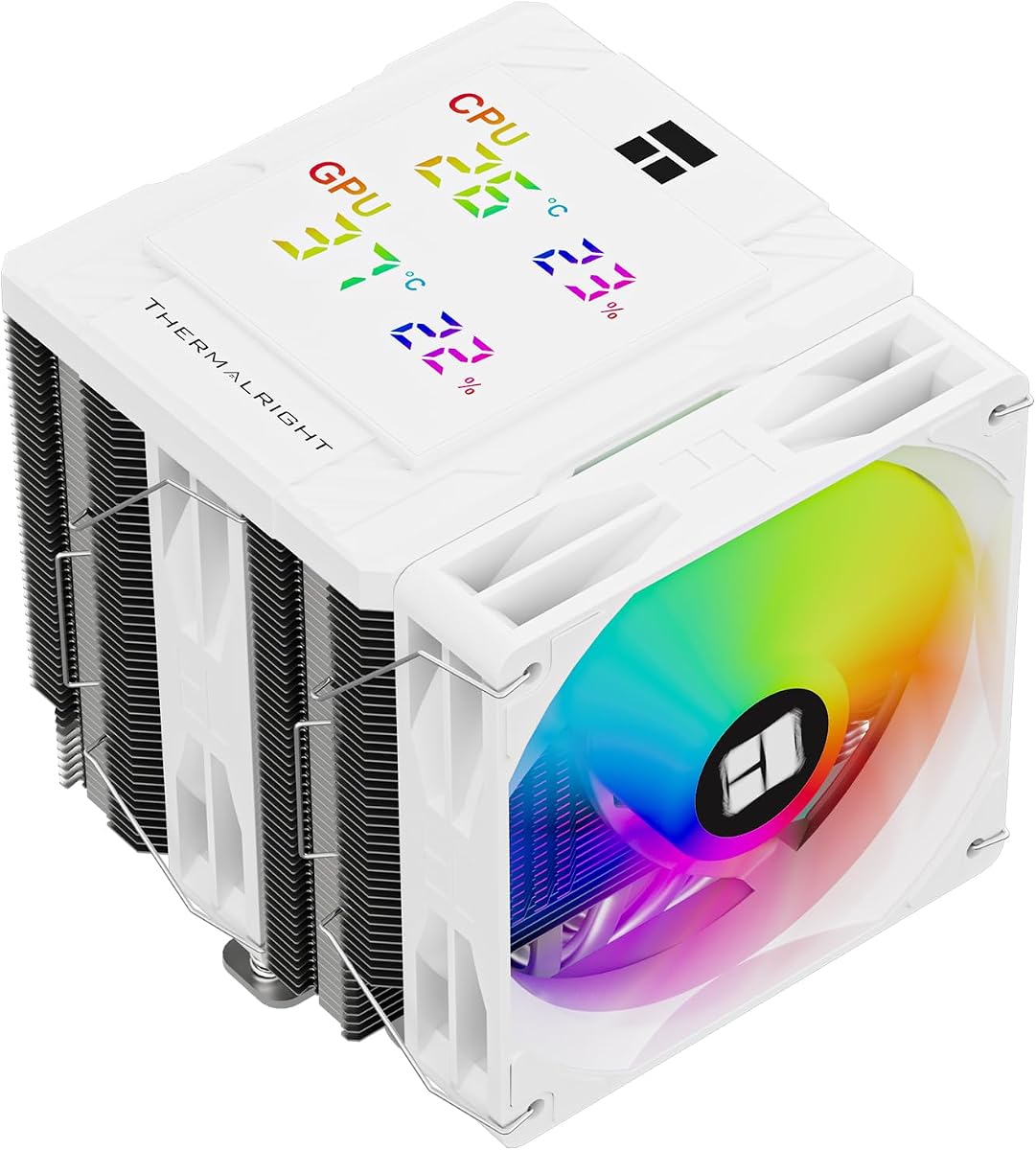
5. Thermalright Peerless Assassin 120 Digital ARGB - Best Digital Readout

Thermalright Peerless Assassin 120 Digital ARGB White

Thermalright Peerless Assassin 120 Digital ARGB White

9.4/10★★★★★

Thermalright Peerless Assassin 120 Digital ARGB White sits between plain PA120 SE and the Vision MAX IPS flagship: same dual-tower six-pipe thermal engine, but a magnetic top cover with a digital segment display showing CPU and GPU temperature and usage rather than a full portrait panel. TRCC software adds color thresholds on numeric readouts so warning states stand out without opening monitoring apps.

  • Magnetic digital top cover; CPU and GPU stats via TRCC
  • Dual-tower; six AGHP Gen 5 heat pipes; 162mm height
  • Dual 120mm fans to 1850 RPM, 88.89 CFM combined
Check Price →
✓ Pros
  • Compact digital display shows live temps without a full IPS panel
  • Six heat pipes and dual high-airflow fans match PA120 thermal class
  • White ARGB fans integrate with motherboard lighting ecosystems
  • TRCC color thresholds help spot thermal issues at a glance
  • 162mm height is slightly lower than Vision MAX for some cases
✕ Cons
  • Digital segment display is less customizable than Vision MAX IPS
  • AMD installs may require the motherboard OEM backplate
  • Dual-tower bulk still challenges narrow cases and thick RAM kits

Detailed review

Six 6mm heat pipes use AGHP Gen 5.0, paired with a precision reflow-soldered copper base targeting dual-platform hot spots on modern Intel and AMD chips. Dual 120mm fans reach about 1850 RPM with combined airflow near 89 CFM class and noise rated at or below 25.6 dBA—higher airflow spec than PA120 SE fans, which helps when one fan sits partially behind tall RAM.

Overall dimensions land around 138mm wide, 125mm deep, and 162mm tall—slightly different footprint than Vision MAX but still firmly in dual-tower territory. White ARGB fans maintain the snow-build aesthetic while syncing over 5V 3-pin motherboard headers. S-FDB bearings on both fans target long service life under compile and render sessions.

The digital display is the selling point for builders who want live stats without allocating a 9-pin USB header and TRCC wallpaper workflow for a five-inch IPS. Setup is simpler in spirit—mount the tower, connect PWM and ARGB, install TRCC for color rules—but AMD platform installs still note use of the motherboard OEM backplate, which is not bundled with the cooler.

Choose Digital over Vision MAX when desk viewing distance makes large IPS overkill and you prefer segmented numbers that read like appliance displays. Choose Digital over plain PA120 SE when a few dollars of display hardware saves buying a separate USB screen bay accessory. Skip Digital entirely if you want minimum cable count and will monitor in-game overlays only.

Thermal performance should track other PA120-family dual towers when fan curves match. The 162mm height fits many ATX cases with 165mm cooler ratings—verify before ordering for compact MATX. RAM and GPU clearance follow the same rules as PA120 SE: offset helps, but measure thick kits.

Digital versus Vision MAX

Digital white trades IPS wallpaper flexibility for segmented numeric stats and slightly lower height. Buy Digital if numbers are enough; buy Vision MAX if the screen is a design centerpiece.

AMD backplate reminder

Confirm your AM4/AM5 board still exposes the factory backplate before install—Thermalright notes it is required and not included in the box.

Check Price on Amazon →

We may earn a commission at no additional cost to you.

6. Thermalright AssassinX120 SE ARGB White - Best ARGB Single-Tower

Thermalright AssassinX120 SE ARGB White

Thermalright AssassinX120 SE ARGB White

9.4/10★★★★★

Thermalright AssassinX120 SE ARGB White is the lighting-enabled sibling of Assassin X 120 SE White—same four AGHP heat pipes, same 148mm single-tower footprint, but a TL-C12CW-S PWM fan with ARGB effects synchronized through your motherboard 5V header. For white builds that already run white ARGB case fans, this is the coherent upgrade from stock AMD or Intel coolers without jumping to 155mm dual-tower bulk.

  • Single tower white ARGB; four AGHP heat pipes; 148mm
  • TL-C12CW-S PWM ARGB fan to 1550 RPM, 66 CFM
  • 125–225W TDP class; AM4/AM5 and Intel 115x–1851
Check Price →
✓ Pros
  • Adds ARGB to the proven AX120 SE thermal layout without dual-tower bulk
  • 148mm height preserves GPU and side-panel clearance on tighter cases
  • AGHP heat pipes maintain performance in vertical or horizontal orientation
  • Lightweight around 0.65 kg simplifies install on flimsy backplates
  • Strong pick for white micro-ATX builds that reject 155mm towers
✕ Cons
  • ARGB wiring adds a 5V header requirement over the non-RGB AX120 SE
  • Single-tower ceiling below dual-tower PA120 on heavy compile workloads
  • White fan blades can look dingy over years without occasional cleaning

Detailed review

Published TDP guidance spans roughly 125W to 225W class depending on case airflow and curve tuning—directionally above four-pipe non-RGB budget towers because AGHP maintains pipe efficiency across orientations. Fan speed peaks near 1550 RPM with airflow around 66 CFM and noise at or below 25.6 dBA in manufacturer specs. Real acoustics depend on case dampening; configure PWM so idle stays quiet.

Weight around 0.65 kg makes installation less awkward on boards where the backplate flexes during tower mounting. Intel 115x through 1851 and AMD AM4/AM5 kits ship in box—confirm LGA 1851 standoff parts before starting Arrow Lake builds. The white fan frame and ARGB ring photograph well through mesh and glass, but white plastic shows dust; occasional cleaning keeps the aesthetic crisp.

Versus Assassin King 120 SE white with five pipes, AX120 SE ARGB trades one heat pipe for a slightly lower price tier and nearly identical height. On Ryzen 5 and Core i5 chips the difference is often noise at equal temp rather than catastrophic thermal separation. On hotter Ryzen 7/9 configs, AK120 SE five-pipe model may buy a few degrees under sustained load.

Versus PA120 SE dual-tower, AX120 SE ARGB wins on case compatibility and RAM clearance, loses on absolute headroom for long AVX sessions. Pick AX120 SE ARGB when 148mm clearance is confirmed and ARGB sync matters; pick PA120 when thermals trump everything and the case accepts 155mm dual-tower width.

Installation follows standard tower cooler steps: apply paste if not pre-applied, mount backplate, torque spring screws evenly, connect PWM and 5V ARGB, verify fan direction blows through fin stack toward rear exhaust. Set a BIOS fan curve before stress testing—ARGB models tempt max brightness setups that do not correlate with cooling performance.

Compact white ARGB builds

Excellent for white micro-ATX cases, HTPC towers with 148mm clearance, and upgrades from Wraith coolers where dual-tower PA120 will not fit.

Versus AK120 SE five-pipe

Move to AK120 SE when CPU package power regularly exceeds mainstream 105W gaming loads; stay on AX120 SE ARGB when budget and header count matter more.

Check Price on Amazon →

We may earn a commission at no additional cost to you.

7. Thermalright Assassin X 120R Digital ARGB - Best Compact Display

Thermalright Assassin X 120R Digital ARGB White

Thermalright Assassin X 120R Digital ARGB White

9.2/10★★★★★

Thermalright Assassin X 120R Digital ARGB White packs a digital display top cover onto a single-tower four-pipe layout at 151mm height—between the 148mm AX120 SE and the 162mm dual-tower Digital PA120. TRCC software surfaces CPU temperature, CPU usage, GPU temperature, and GPU occupancy on the compact screen while the TL-P12W-S PWM fan spins up to 2000 RPM with about 71 CFM and 2.63 mm H2O static pressure.

  • 151mm single tower; digital screen top cover via TRCC
  • TL-P12W-S fan to 2000 RPM, 70.84 CFM, 2.63 mm H2O
  • Four heat pipes; ARGB sync on 5V 3-pin header
Check Price →
✓ Pros
  • Digital stats on a single-tower footprint suits compact white builds
  • 2000 RPM fan and four pipes punch above typical 120mm tower limits
  • 151mm height splits difference between AX120 SE and PA120 bulk
  • ARGB ring on PWM fan matches white case fan ecosystems
  • Lower pack rating still reflects capable hardware for Ryzen 5 and Core i5 class
✕ Cons
  • Lowest rating in pack—verify recent reviews for your socket generation
  • 2000 RPM peak can get audible without a tuned PWM curve
  • Listing title mentions BLACK in specs block—confirm white finish on order page

Detailed review

The higher RPM ceiling versus AX120 SE fans buys airflow headroom on hotter single-tower workloads, but also demands curve tuning to avoid audible ramp during light tasks. Silicone corner pads on the fan reduce vibration-induced noise—a small detail that matters when the cooler sits arm's length on a desk PC. ARGB sync uses 5V 3-pin motherboard headers alongside the 4-pin PWM power lead.

Four AGHP heat pipes and an aluminum fin stack follow the Assassin X family formula. UL Class A PBT and PC materials and S-FDB bearings target stable long-term operation. Compatibility spans Intel LGA 1851/1700/115x and AMD AM4/AM5 with installation accessories in box; AMD notes again reference the motherboard original backplate.

At 4.6 stars this is the lowest-rated product in the pack— not a disqualifier, but a reminder to read recent buyer feedback for your socket and case combo. Some listings cross-reference black SKU text in specification blocks while photos show white—confirm finish on the live product page before checkout.

Ideal buyer: white MATX or ATX builder who wants live stats on the cooler itself, rejects dual-tower size, and accepts single-fan limits on Ryzen 7/9 sustained loads. Not ideal for silent HTPC builds unless PWM curves cap RPM aggressively, or for users who refuse TRCC installation.

Versus PA120 Digital dual-tower, 120R Digital saves height and width at the cost of thermal margin. Versus Vision MAX IPS, the segment-style display is simpler and the tower is shorter. Versus non-display AX120 SE ARGB, you pay for screen hardware and USB/software dependency—skip display if overlays suffice.

Who should buy 120R Digital

Builders who want on-cooler stats in a single-tower white package and accept TRCC plus a 2000 RPM fan ceiling—skip if you need PA120 thermals or hate vendor utilities.

Confirm SKU color

Specification text in some listings references black model names—verify white finish photos and buyer photos on the live listing before purchase.

Check Price on Amazon →

We may earn a commission at no additional cost to you.

8. NZXT Kraken Plus 360 RGB White - Best NZXT Ecosystem

NZXT Kraken Plus 360 RGB White

NZXT Kraken Plus 360 RGB White

9/10★★★★★

NZXT Kraken Plus 360 RGB White is the ecosystem flagship for builders already planning CAM-controlled fans, RGB strips, and matching NZXT cases. The 360mm white radiator, F360 RGB Core fans, and Turbine pump share a visual language distinct from CORSAIR Nautilus white—more rounded pump cap, integrated LCD, and single breakout cable philosophy aimed at cable-management showcase photos.

  • 360mm white AIO; 1.54-inch customizable LCD on pump cap
  • F360 RGB Core fans; single-cable Turbine pump breakout
  • CAM software; AM5 and LGA 1851 tool-free brackets
Check Price →
✓ Pros
  • Bright LCD supports GIFs, temps, and integrations via NZXT CAM
  • RGB Core fans combine lighting and airflow with simplified wiring
  • Pre-applied paste and breakout cable speed clean white showcase installs
  • Turbine pump targets high flow with low noise under gaming loads
  • Recognizable NZXT aesthetic for Kraken-themed snow builds
✕ Cons
  • Lowest rating in pack—CAM dependency frustrates minimal-software users
  • Premium positioning versus CORSAIR Nautilus white without ecosystem overlap
  • 360mm footprint and LCD USB still demand case and header planning

Detailed review

The 1.54-inch square LCD on the pump block displays real-time system temperatures, animated GIFs, custom images, or integrations like Spotify and YouTube through NZXT CAM. That screen is smaller than Thermalright five-inch IPS tower covers but sits at the socket centerline where glass-side viewers look first. Brightness and readability beat many first-generation AIO LCDs.

F360 RGB Core fans combine lighting and airflow in a single-frame design NZXT mounts with four screws and one cable per fan—reducing the spaghetti typical of separate RGB and PWM leads on budget AIOs. Turbine pump engineering targets high flow and head pressure with low noise under gaming loads. Pre-applied thermal paste and tool-free AM5/LGA 1851 brackets speed first installs.

Honest friction: CAM software is part of the value and part of the annoyance. Minimalists who close all utilities at startup may prefer CORSAIR Nautilus daisy-chain white with motherboard PWM only. At 4.5 stars Kraken Plus trails CORSAIR and several Thermalright air options in this pack— weigh LCD and NZXT aesthetic against rating and software dependency.

Thermally, 360mm white Kraken belongs in the same conversation as Nautilus 360 RS ARGB when case radiator fit is equal. Choose Kraken for NZXT ecosystem integration and GIF-capable LCD; choose Nautilus for higher buyer rating, daisy-chain header simplicity, and less mandatory desktop software.

Verify 360mm front or top support, internal USB for LCD if required by CAM device chain, and tube routing without kinks. White radiators show coolant dust and fin discoloration over years—acceptable tradeoff for cohesive snow builds, but plan maintenance access.

NZXT ecosystem builders

Pair with NZXT cases and CAM fans when unified lighting scenes and LCD GIFs justify software overhead—skip if you run a minimal Linux or no-utility Windows desktop.

Versus CORSAIR Nautilus white

Kraken wins on LCD integrations and NZXT aesthetic; Nautilus wins on rating, daisy-chain headers, and less mandatory CAM dependency.

Check Price on Amazon →

We may earn a commission at no additional cost to you.

9. Thermalright Assassin King 120 SE White - Best Five-Pipe Single-Tower

Thermalright Assassin King 120 SE White ARGB

Thermalright Assassin King 120 SE White ARGB

9.6/10★★★★★

Thermalright Assassin King 120 SE White ARGB adds a fifth 6mm heat pipe to the single-tower formula AK120 branding suggests—one pipe more than AX120 SE ARGB with the same 148mm height, white ARGB fan, and AGHP III inverse-gravity treatment. For builders who want more margin than four pipes without PA120 dual-tower bulk, AK120 SE is the sweet spot this pack's 4.8 rating reinforces.

  • Single tower; five 6mm AGHP III heat pipes; 148mm height
  • TL-C12CW-S ARGB PWM fan to 1550 RPM
  • Intel 115x–1851 and AMD AM4/AM5
Check Price →
✓ Pros
  • Fifth heat pipe adds margin over four-pipe AX120 SE on hotter chips
  • AGHP III targets inverse-gravity performance in tower and horizontal cases
  • White ARGB fan matches PA120 family lighting without dual-tower size
  • 148mm height keeps compatibility with many ATX mid-towers
  • 4.8 rating signals consistent satisfaction on mainstream white builds
✕ Cons
  • Still single-fan—dual-tower PA120 wins on sustained high-wattage loads
  • RAM clearance on some boards tighter than offset dual-tower designs
  • Five pipes add weight versus AX120 SE without ARGB alternative at same tier

Detailed review

AGHP III is Thermalright's iterative pipe technology for vertical tower and horizontal case layouts. Five pipes spread heat across aluminum fins with a TL-C12CW-S PWM ARGB fan peaking near 1550 RPM, 66 CFM class airflow, and noise at or below 25.6 dBA rated. White PBT and PC fan materials match other Thermalright white SKUs for visual consistency when mixed in one build.

Compatibility covers Intel 115x through 1851 and AMD AM4/AM5 with metal mounting hardware. Weight around 0.64 kg keeps board flex manageable during install. ARGB sync uses standard 5V motherboard headers—no mandatory Thermalright app for lighting, though monitoring still belongs in BIOS or HWiNFO.

Realistic expectations: AK120 SE will not match PA120 SE on hour-long all-core AVX at unlimited power limits—the dual-tower has more fin area and a second fan. For gaming, streaming, and typical productivity on Ryzen 7 and Core i7 chips with sane PBO, AK120 SE often lands within a few degrees while saving 7mm height and significant socket width.

Versus AX120 SE ARGB four-pipe, AK120 buys one extra pipe for hotter chips. Versus Assassin X 120 SE non-RGB white, AK120 adds ARGB and an extra pipe at a higher tier. Versus Cooler Master Hyper 212 Halo white, AK120 typically wins on pipe count and community thermal benchmarks while Cooler Master wins on brand familiarity and bracket documentation for first-time builders.

Mount with even screw torque, connect PWM and ARGB, set curves before stress testing. Pair with positive pressure intake—single-tower performance collapses in starved cases with sealed fronts and no exhaust plan.

Sweet spot single-tower pick

AK120 SE white ARGB is the default single-tower recommendation when four pipes feel tight but PA120 dual-tower will not fit—especially on Ryzen 7 and Core i7 gaming rigs.

Fan curve guidance

Start around 30 percent PWM at 40°C and ramp to 100 percent by 80°C package temp—five pipes buy headroom but cannot overcome zero case intake.

Check Price on Amazon →

We may earn a commission at no additional cost to you.

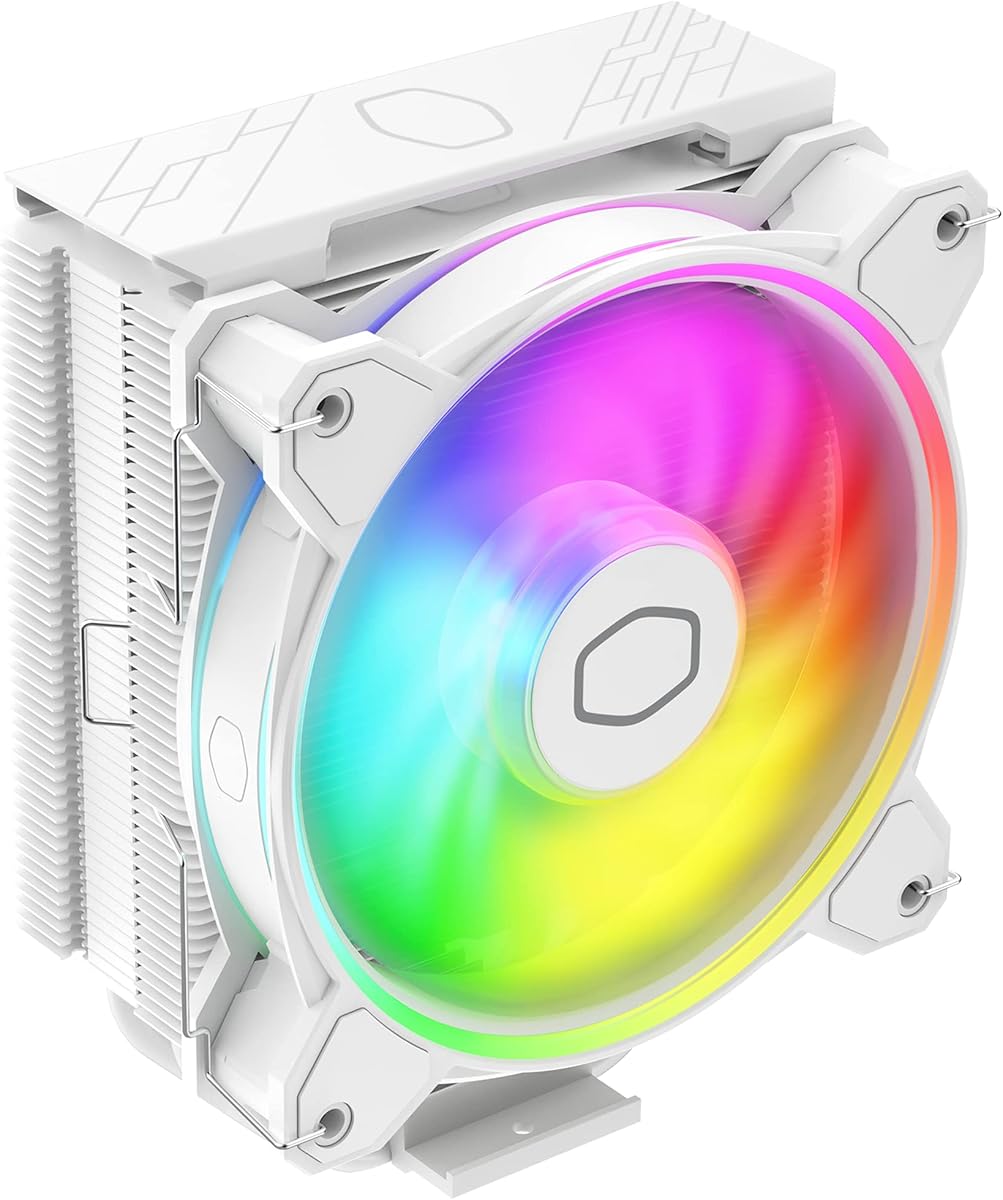
10. Cooler Master Hyper 212 Halo ARGB - Best Mainstream Brand

Cooler Master Hyper 212 Halo ARGB White

Cooler Master Hyper 212 Halo ARGB White

9.4/10★★★★★

Cooler Master Hyper 212 Halo ARGB White refreshes the most recognized budget cooler name with a white minimalistic shell, dual-loop ARGB rings enlarged fifty percent versus prior Halo fans, and simplified brackets for AM5 and LGA 1851/1700. For builders who trust Cooler Master documentation and support channels over lesser-known brands, Hyper 212 Halo white is the familiar entry into snow-themed air cooling.

  • 154mm white Hyper 212; four heat pipes, copper base
  • MF120 Halo² PWM fan 690–1800 RPM with dual-loop ARGB
  • Simplified AM5 and LGA 1851/1700 brackets
Check Price →
✓ Pros
  • Refreshed white aesthetic modernizes the legendary Hyper 212 formula
  • Dual-loop ARGB rings are brighter than prior Halo generations
  • Redesigned brackets simplify AM5 and LGA 1851 first-time installs
  • 154mm height and single-tower layout fit mainstream ATX cases
  • Cooler Master support ecosystem familiar to upgrade builders
✕ Cons
  • Thermal ceiling below Thermalright dual-tower options on heavy workloads
  • 154mm still exceeds 148mm coolers—verify case CPU cooler height spec
  • Single MF120 fan lacks the static pressure headroom of dual-fan PA120

Detailed review

Four heat pipes and a copper base target AMD Ryzen 7 and Intel Core i7 class chips in Cooler Master marketing— realistic for gaming and moderate workloads, optimistic for unlimited PBO on Ryzen 9 without aggressive curves. MF120 Halo² PWM fan spans roughly 690 to 1800 RPM, balancing idle quiet against load recovery. Dual-loop ARGB creates vibrant rings visible through mesh front panels.

At 154mm tall the Hyper 212 sits between 148mm Thermalright single towers and 155mm PA120 dual-tower— verify case CPU cooler height ratings, especially on older spec sheets listing 155mm maximum. Single-tower layout preserves PCIe clearance better than dual-tower PA120 but blocks less RAM than offset dual-fan designs only modestly.

Thermalright PA120 SE and AK120 SE generally offer more raw performance per dollar in community testing, but Cooler Master wins on install guide clarity, global support familiarity, and aesthetic cohesion with Cooler Master white cases and power supplies. Hyper 212 Halo white is the pick when brand trust and bracket simplicity outweigh last-degree thermal chasing.

Redesigned AM5 and LGA 1851 brackets reduce the torment older Hyper 212 mounts inflicted on first-time builders— still read the manual, but expect fewer ambiguous backplate puzzles. ARGB requires a 5V header; PWM uses standard 4-pin.

Choose Hyper 212 Halo white for mainstream upgrades from stock coolers on Ryzen 5/7 and Core i5/i7 builds with confirmed 154mm clearance. Step up to PA120 SE when case height allows dual-tower and thermals matter more than Cooler Master badge recognition. Step down to AX120 SE when 148mm clearance is the hard limit.

First-time builder friendly

Hyper 212 Halo white suits upgraders coming from stock coolers who want Cooler Master instructions and AM5/LGA 1851 brackets without dual-tower intimidation.

When to step up to Thermalright

If Cinebench or Blender runs daily on Ryzen 9 or Core i9, PA120 SE white in this pack delivers more fin area—Hyper 212 remains a mainstream gaming and office pick.

Check Price on Amazon →

We may earn a commission at no additional cost to you.

Best White CPU Coolers for Snow Builds in 2026

How to Choose the Right White CPU Cooler

Decide air versus AIO before color matching

White paint does not change thermodynamics. A 360mm AIO like CORSAIR Nautilus 360 RS ARGB white moves heat to the case perimeter and frees socket clearance for tall RAM—ideal when your case manual lists 360mm front or top radiator support. Dual-tower air like Thermalright PA120 SE ARGB white competes thermally without pump noise or radiator fit anxiety but demands roughly 155mm CPU cooler height and RAM measurements. Single-tower Assassin X, Assassin King, and Hyper 212 options fit tighter cases at lower thermal ceilings.

Choose AIO when radiator mounts are verified and you want centered white tubing aesthetics. Choose dual-tower air when you refuse pump failure anxiety and have height clearance. Choose single-tower when 148–154mm is the hard limit.

Measure case clearance and RAM interference

Open your case spec sheet and find maximum CPU cooler height. PA120 SE and Vision MAX need 155–164mm; Hyper 212 Halo lists 154mm; AX120 SE and AK120 SE sit at 148mm. Width matters too—dual-tower coolers extend over RAM slots. Thermalright offsets fins on PA120 family models, but thick RGB heat spreaders still deserve a dry fit.

For AIO builds, confirm 360mm radiator length plus fan thickness on front or top panels and ensure long GPUs will not collide with front-mounted rads. White tubing shows routing mistakes—plan bends before tightening.

Plan ARGB, USB, and fan headers

ARGB white fans need 5V 3-pin headers—count them before buying three ARGB case fans plus an ARGB CPU cooler. CORSAIR Nautilus daisy-chains three radiator fans to one PWM header plus one ARGB lead, which is header-friendly. Display coolers—Vision MAX, PA120 Digital, Assassin X 120R Digital—need TRCC software and often a 9-pin USB 2.0 internal header. NZXT Kraken Plus expects CAM and USB for LCD features.

Non-RGB Assassin X 120 SE white saves one header for builders running plain white case fans without sync.

Match cooler class to CPU power limits

Ryzen 5 and Core i5 chips with stock or modest PBO limits run happily on AX120 SE, AK120 SE, or Hyper 212 Halo white. Ryzen 7, Core i7, and gaming-focused Ryzen 9 builds benefit from PA120 SE dual-tower or 360mm Nautilus/Kraken headroom. Sustained all-core AVX on unlocked flagships still prefers 360mm liquid or dual-tower six-pipe air with aggressive case intake—single-tower four-pipe coolers will throttle sooner in poorly ventilated cases regardless of color.

Display hardware does not add cooling capacity—pay for IPS or digital tops only when the screen is part of your build story.

Maintain white finishes realistically

White plastic fan frames, white radiator shrouds, and white nylon tubing look stunning new and show dust, pet hair, and smoke faster than black hardware. Budget compressed air or soft-brush cleaning quarterly for showcase rigs. ARGB rings on Hyper 212 Halo and Thermalright fans hide less dust than plain blades—another reason minimalists pick non-RGB AX120 SE white.

Thermal paste color is irrelevant under the block; focus on contact quality and torque pattern during install rather than chasing white compound gimmicks.

Frequently Asked Questions

01

Are white CPU coolers worse at cooling than black ones?

No—the fin material, heat pipe count, radiator size, and fan airflow determine thermals, not fan shroud color. A white Thermalright PA120 SE uses the same six-pipe dual-tower layout as its darker siblings. White surfaces may radiate heat slightly differently, but the effect is negligible compared with case airflow and fan curves. Buy white for aesthetics; buy pipe count and radiator size for performance.

02

What is the best white CPU cooler overall in this pack?

For cases that fit 360mm radiators, CORSAIR Nautilus 360 RS ARGB white leads on daisy-chain simplicity, quiet pump ratings, and strong buyer scores. For air-only builds with 155mm clearance, Thermalright Peerless Assassin 120 SE ARGB white delivers dual-tower thermals without a pump. For showcase display builds, Peerless Assassin 120 Vision MAX ARGB white adds a five-inch IPS with the highest rating in the pack. Match the winner to your case constraints first.

03

Will PA120 SE white block my RAM?

Thermalright offsets the PA120 fin stack to improve clearance, and many builds with standard-height RAM fit without issue. Tall RGB heat spreaders above roughly 42mm may require raising the front fan or choosing low-profile memory. Single-tower AK120 SE or AX120 SE white options reduce RAM conflict at slightly lower thermal headroom. Always measure socket-to-panel distance and RAM height before ordering dual-tower coolers.

04

Do I need NZXT CAM for the Kraken Plus 360 white?

The Kraken Plus 360 RGB white will cool the CPU with motherboard PWM fan control out of the box, but LCD customization, GIF display, integrations, and full RGB scenes expect NZXT CAM installed on Windows. Builders who refuse desktop utilities should consider CORSAIR Nautilus 360 RS ARGB white instead—similar 360mm white aesthetics with daisy-chain fans and no mandatory CAM dependency.

05

What height clearance do white air coolers need?

Assassin X 120 SE and Assassin King 120 SE white need about 148mm. Cooler Master Hyper 212 Halo white lists 154mm. Peerless Assassin 120 SE white needs 155mm. Vision MAX and PA120 Digital white need 162–164mm. Check your case manual maximum CPU cooler height and subtract a few millimeters for safety if the spec is tight.

06

Is a display CPU cooler worth it for white builds?

Worth it if the screen replaces a separate monitor gadget or completes a showcase glass build—you will use TRCC or CAM to customize backgrounds. Thermalright Vision MAX white offers the largest IPS in this pack; PA120 Digital and Assassin X 120R Digital show numeric stats with less wallpaper flexibility. Skip display models if you monitor in-game overlays only and want minimum USB headers consumed.

07

Can I use a white 360mm AIO in a mid-tower case?

Many modern mid-towers support 360mm front or top radiators, but GPU length, PSU shrouds, and radiator plus fan thickness vary by model. Open the case manual before assuming fit. If 360mm fails, PA120 SE ARGB white or AK120 SE white deliver strong air cooling without radiator mounting. Never force a radiator that blocks intake airflow or kinks tubes.

08

How many fan headers does a white AIO need?

CORSAIR Nautilus 360 RS ARGB white daisy-chains three RS120 fans to one PWM header plus one 5V ARGB header—efficient for header-starved boards. NZXT Kraken Plus 360 uses F360 RGB Core fans with simplified per-fan cabling but still needs PWM control and CAM USB for LCD features. Plan headers before adding three white ARGB case fans on the same motherboard.

09

Thermalright or Cooler Master for a first white build?

Thermalright PA120 SE, AK120 SE, and AX120 SE white options generally lead community thermal benchmarks per dollar. Cooler Master Hyper 212 Halo ARGB white wins on familiar documentation, AM5/LGA 1851 bracket redesign, and support familiarity for first-time installers. Choose Thermalright for maximum performance; choose Hyper 212 for brand comfort and moderate gaming loads.

10

Does white thermal paste or white cooler compound matter?

Thermal interface material performance depends on conductivity and application quality, not color. CORSAIR Nautilus ships pre-applied paste on the convex cold plate; NZXT Kraken Plus includes pre-applied compound as well. Air coolers require your own paste unless bundled—use a reputable compound and focus on even mounting pressure rather than chasing white paste for aesthetics under the block.

Conclusion

White CPU coolers in 2026 are about coordinating the centerpiece visible through tempered glass while still respecting case height, radiator mounts, and CPU power limits. CORSAIR Nautilus 360 RS ARGB white leads the pack for verified 360mm snow builds with daisy-chained ARGB fans; Thermalright Peerless Assassin 120 SE ARGB white is the air-cooling default when dual-tower clearance exists; and Peerless Assassin 120 Vision MAX ARGB white adds the largest IPS display for showcase rigs willing to run TRCC.

Single-tower Assassin X, Assassin King, and AssassinX120 SE white models fill 148mm clearance gaps; PA120 Digital and Assassin X 120R Digital trim display features for different footprints; NZXT Kraken Plus 360 white serves NZXT ecosystem builders; and Cooler Master Hyper 212 Halo ARGB white keeps the mainstream upgrade path familiar. None of these choices magically cools better because the shroud is white—pipe count, radiator area, and case airflow still decide results.

Measure your case, count headers, pair cooler class to CPU power, and tune PWM curves after install. The comparison table and reviews above cover every product in the pack with honest tradeoffs and no price noise—check live listings for current availability, then buy the white cooler that fits your chassis first and your aesthetic second.