Best Everyday Metal Stick
SANDISK 128GB Ultra Flair

- USB 3.0 reads up to 150MB/s with sleek metal casing
- 128GB covers decks, photo sets, and full-length movie drops
- Up to 15× faster transfers than typical USB 2.0 sticks (SanDisk claim)
Expert Review & Guide
USB flash drives still solve problems cloud links make awkward: handing a deck to a client on a guest Wi-Fi, cloning a classroom set of handouts, or parking a video cut on something you can pocket through airport security. In 2026 the floor for a non-frustrating stick is USB 3.0-class performance—roughly an order of magnitude quicker on reads than the USB 2.0 thumb drives people still find in junk drawers.
This guide covers ten real pack options: SanDisk Ultra Flair metal sticks with up to 150MB/s claims, SanDisk Ultra cylinders with encryption software angles, PNY Turbo Attaché multipacks for offices and schools, and a JOIOT dual-ended USB-C + USB-A drive for phones and tablets. Capacities stretch from a humble 32GB Ultra up to a 512GB Ultra for people who still move project folders the physical way.
You will not see dollar prices—just which form factor survives a keychain, which packs make sense when you lose drives for sport, and when dual USB-C matters more than another 20MB/s on the spec sheet.


As an Amazon Associate we earn from qualifying purchases. We may earn a commission at no additional cost to you.
Match capacity, peak read claim, and whether you need a single durable stick or a multipack before you standardize a whole team.
The 128GB Ultra Flair is the stick I still recommend when someone asks for “a normal fast flash drive” without a lecture on USB4 docks. SanDisk rates high-speed USB 3.0 performance up to 150MB/s and leans on the familiar claim that transfers can be up to 15× faster than standard USB 2.0 drives, with a full-length movie example under thirty seconds on a USB 3.0 host for a ~1.2GB MPEG-4 file. Those numbers assume you are not stuck on a dusty USB 2.0 rear port behind a hotel display PC.
Form factor matters more than people admit. The Flair’s sleek metal casing is thin enough to leave in a laptop during a coffee-shop edit session without the lever-arm breakage plastic sticks invite. It is still USB-A, which means modern MacBook and phone users need a bridge—but corporate desktops remain stubbornly A-shaped, and that is where Flair shines.
One hundred twenty-eight gigabytes covers a keynote with embedded video, a wedding preview folder, or a semester of design exports. It is not a substitute for a portable SSD when you shuttle multi-hundred-gigabyte timelines daily, yet for the jobs flash drives still own, 128GB prevents the humiliating “drive full” moment mid-handoff.
Expect asymmetry: marketing highlights read throughput; writes are usually slower. Copying off the stick onto a workstation feels snappy; filling the stick with a burst of RAW photos takes longer. Plan accordingly when a client is watching the progress bar.
I treat Ultra Flair as a personal daily driver, not a dozen-loaner pool. Engrave it or use a bright lanyard. Fast metal sticks disappear into the same black-hole couch cushions as slow ones.
If your world is still USB-A PCs and you want one trustworthy 128GB stick, Flair remains the everyday pick in this pack.
Fewer moving parts than sliding-collar designs, and better torsional strength when someone bumps a laptop with the drive inserted.
Front-panel USB 2.0 hubs, unpowered suitcase docks, and ancient projectors will make a 150MB/s stick feel like 2008. Always aim for a USB 3.0/3.1/3.2 labeled blue port or a known-good powered hub.
We may earn a commission at no additional cost to you.

PNY 128GB Turbo Attaché 3 (2-Pack)
PNY’s Turbo Attaché 3 two-pack is less about winning a speed benchmark and more about social logistics. You keep one 128GB stick; you hand the other to a contractor. Both share the durable, light-weight Attaché design with a convenient sliding collar and cap-less protection so you are not hunting for a tiny plastic lid on a train tray table.
PNY rates transfers up to ten times faster than standard USB 2.0 flash drives and calls out large file types—movies, videos, photos, music, documents. On a true USB 3 host that feels night-and-day versus the freebie sticks from trade shows. On USB 2.0, everything collapses to the old ceiling, pack branding aside.
The sliding collar is polarizing. Fans like the protected connector; critics eventually meet a collar that sticks if pocket lint wins. A quick blast of air and not using the drive as a fidget toy keeps them alive longer than you expect.
Two times 128GB is also a backup pattern: identical folders on both sticks before you travel. It is not RAID; it is “I made two copies with my hands,” which still saves vacations.
I buy this pack for small teams and freelance pairs. I do not buy it expecting SanDisk Flair’s 150MB/s halo—if raw read speed is the only metric, Flair wins. If not losing your only drive to a client wins, PNY’s twin set is smarter.
Label both sticks with a paint pen the day they arrive. Future you will not remember which silver rectangle holds the unpaid invoice folder.
Keep a ‘loaner’ stick with only sanitized files. Never lend the drive that also holds tax PDFs—even briefly.
Choose two-pack when you need spare capacity per stick (128GB). Choose 64GB five-packs when you are provisioning many people with lighter loads.
We may earn a commission at no additional cost to you.
Phones quietly killed the pure USB-A flash drive for a lot of people—until they try to plug Flair into USB-C and remember adapters live in another bag. JOIOT’s 128GB dual flash drive puts a Type-C plug on one end and USB-A on the other, explicitly aiming at smartphones, tablets, and PCs without juggling dongles.
The company pitches USB 3.0 optimization for fast transfers and backups of high-res photos and videos, plus compatibility spanning Windows, Android, Linux, and macOS with USB 2.0 backward compatibility. Real-world Android behavior still depends on the phone supporting file-level USB storage access—some manufacturers are friendlier than others—so test with your exact device before a trip.
Mechanically, dual-ended drives ask for gentler habits. Support the phone when the stick is inserted; do not let a dangling drive become a lever on a glass sandwich. On laptops, use the end that matches the port and keep the unused end from pressing into the palm rest awkwardly.
Capacity at 128GB is right for clearing a clogged camera roll or moving a short film project between an Android camera app workflow and an edit PC. It is not meant to replace a bus-powered SSD for continuous 4K editing off the stick.
Durability copy mentions reliable memory chips and dual USB 3.0 construction. Still, buy dual-ended drives for convenience, then keep master archives on bigger disks. Flash is for transport.
If your daily loop is phone → café laptop → office desktop, this JOIOT dual stick is the specialty pick that SanDisk’s A-only Ultras cannot match without accessories.
Enable the file-transfer/USB mode your phone requires, format only if you understand it may wipe the stick, and copy—then verify—before deleting phone originals.
If you only ever plug into USB-A PCs and want maximum brand comfort plus higher 150MB/s Flair claims, stay with Ultra Flair.
We may earn a commission at no additional cost to you.
When a flash drive stops being a ‘few PDFs’ tool and becomes a ‘whole job folder’ tool, the 512GB SanDisk Ultra is the pack’s answer. It advertises transfer speeds up to 10× faster than standard USB 2.0 baselines, reads up to 130MB/s with a USB 3.0 port, USB 2.0 backward compatibility, and secure file encryption with password protection via SanDisk’s software path.
That encryption mention is not optional reading if you carry client data. Enable it, use a password manager for the passphrase, and understand that software-based protection is only as good as your habits. For regulated industries, confirm whether a consumer flash tool meets policy—or whether you need hardware-encrypted enterprise sticks outside this pack.
Performance expectations: 130MB/s reads are healthy for USB flash, yet sustained writes while dumping hundreds of gigabytes will not feel like a USB-C NVMe enclosure. If your weekly ritual is moving 200GB timelines, step up to a portable SSD. If your ritual is occasional archive handoffs, 512GB Ultra still earns a pocket.
Physically, the Ultra line is the classic retractable/capsule SanDisk shape rather than Flair’s metal blade. It is pocketable and familiar. Keep it on a bright ring; high-capacity sticks are expensive lessons when they vanish.
I use 512GB Ultras as cold courier media: copy, verify, hand over, wipe with a secure erase mindset before reuse. I do not use them as the only backup of anything irreplaceable.
Buy this when capacity is the constraint you keep hitting on 128GB sticks. Skip it if a portable SSD would better match your file sizes and frequency.
After copying critical folders, reopen a sample of files on a second machine before wiping the source. Progress bars lie less often if you spot-check.
SanDisk’s password tools may be platform-limited. Test the unlock workflow on the receiving computer before you fly across the country with an unreadable brick.
We may earn a commission at no additional cost to you.
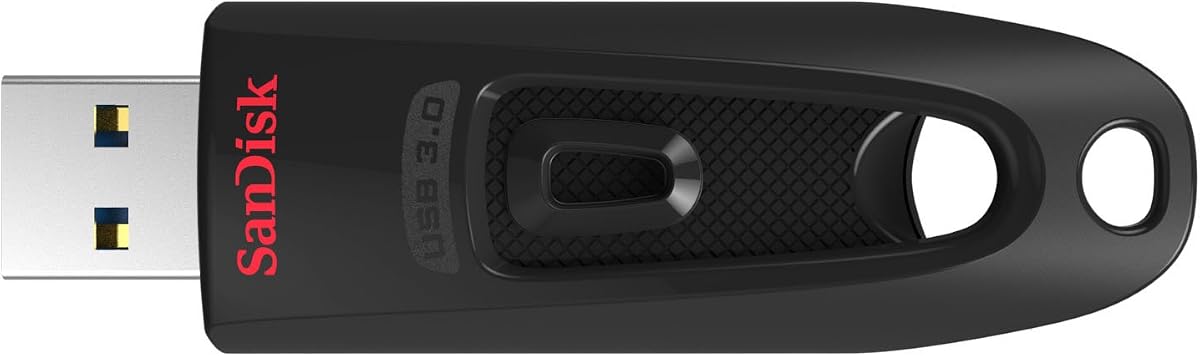
The 256GB Ultra is the compromise capacity: bigger than the Flair 128GB for sprawling Lightroom exports, smaller than the 512GB when you know you will never fill half a terabyte on a stick. Spec messaging mirrors its larger sibling—up to 10× versus USB 2.0 baselines, up to 130MB/s reads on USB 3.0, backward compatibility, and password protection support.
For university media students and freelance photographers, 256GB is often the Goldilocks number. A weekend shoot’s selects plus a few proof videos fit; you still feel the stick fill if you never cull. Culling remains cheaper than buying infinite flash.
Software encryption is again the differentiator versus PNY Attaché packs. If you carry HR spreadsheets or unpublished manuscripts, that feature earns its mention—provided you rehearse recovery on a second PC.
Speed-wise, living on USB 3.0 keeps the Ultra family relevant in 2026 even as USB4 laptops proliferate, because flash drives rarely saturate those newer pipes anyway. Bottlenecks are NAND and controller design, not the logo on the port—until you move to SSD enclosures.
I recommend 256GB Ultra as the default ‘serious USB-A courier’ when Flair’s 128GB feels tight but 512GB feels like carrying unnecessary eggs in one basket.
Mark the casing with ‘256’ in enamel pen. Black SanDisk Ultras are visually identical across capacities until you plug them in and wait.
If you currently juggle multiple tiny sticks per project, consolidating onto one 256GB Ultra reduces lost-drive chaos—then keep a second backup elsewhere.
For shared lab machines, scan sticks on arrival and avoid auto-run habits. Capacity does not equal safety.
We may earn a commission at no additional cost to you.

PNY 128GB Turbo Attaché 3 (5-Pack)
IT closets and media teachers think in packs, not hero sticks. This grey five-pack of 128GB Turbo Attaché 3 drives delivers matched USB 3.0 flash with read speeds up to 100MB/s and the usual Attaché story: light-weight durability, sliding collar, cap-less protection, and suitability for movies, videos, photos, music, and documents at up to 10× USB 2.0-class transfers.
One hundred megabytes per second is honest mainstream USB flash territory. Students dumping project folders onto lab PCs will feel fine; color graders moving giant camera originals will want SSDs. Match the tool to the syllabus.
Operationally, five identical drives demand a numbering scheme from day one—etch 01–05, keep a checkout sheet, and wipe between terms. Otherwise you will rediscover someone’s unfinished documentary when the next cohort mounts the stick.
Compared with the 64GB five-pack later in this guide, these 128GB units cut ‘disk full’ tickets dramatically for video-heavy classes. If your courses are syllabus PDFs and Office files, 64GB multipacks may be enough.
I deploy this pack for workshops where each participant needs meaningful space without borrowing the instructor’s personal Flair. I do not pretend PNY is a hardware-encrypted corporate vault.
Buy the grey 128GB five-pack when provisioning beats peak benchmarks. Add a single SanDisk Flair for the instructor’s master materials.
Keep a master ‘clean’ image folder and clone it to each stick at term start so everyone begins with the same sample media and directory layout.
Assume sticks will vanish. Budget replacements into the program rather than locking the cabinet so tightly nobody learns.
We may earn a commission at no additional cost to you.
If the 128GB Flair is the daily driver, the 64GB Flair is the glovebox spare with the same soul: USB 3.0 performance up to 150MB/s, metal casing, and SanDisk’s fast-versus-USB-2.0 transfer narrative including the quick movie-copy example on USB 3.0 hosts. You give up capacity, not the feel of the product line.
Sixty-four gigabytes remains plenty for consultants who live in PDF, Keynote/PowerPoint, and compressed H.264 clips. It is tight for smartphone filmmakers who never hit delete. Know which creature you are.
I like 64GB Flair sticks as role-specific tools: one labeled ‘presentations only,’ kept clean, never used for random downloads. Discipline beats capacity.
Metal construction again helps when the drive stays mounted during short work sessions. Remove it before tossing a backpack into an overhead bin sideways—ports are not designed for luggage torsion.
Speed parity with the 128GB Flair means you are not punished for buying smaller; you are only capacity-constrained. That makes this a rational second stick beside a larger Ultra.
Choose 64GB Flair when you value the metal form and 150MB/s class speed for lighter payloads. Step to 128GB the moment video handoffs become routine.
Carry 64GB Flair for decks and a dual USB-C JOIOT for phone photo offloads—different jobs, different sticks.
exFAT remains the usual cross-platform choice for larger files; confirm the receiving kiosk is not locked to ancient FAT32 limits before showtime.
We may earn a commission at no additional cost to you.

SanDisk’s 64GB Ultra two-pack is the redundancy kit for people who have lost a single stick the day before a board meeting. Each drive offers up to 130MB/s reads on USB 3.0, up to 10× versus basic USB 2.0 transfer stories, backward compatibility, and password protection support.
The workflow writes itself: copy critical files to stick A and stick B, carry them in different pockets or bags, and survive a single loss. It is old-school and still effective when hotel Wi-Fi cannot push a large encrypted archive to cloud storage overnight.
Compared with PNY’s two-pack of 128GB Attachés, you get less capacity per stick but SanDisk’s Ultra software story and the Ultra body you may already know. Choose based on whether capacity or brand/encryption familiarity matters more.
Performance sits in the Ultra lane rather than Flair’s 150MB/s marketing. For documents and modest media, you will not mourn the difference. For constant large video dumps, consider larger Ultras or SSDs.
I keep twin 64GB Ultras in a go-bag specifically for ‘cannot fail’ PDF/set of slides scenarios. They are not my photo-shoot couriers—that role belongs to 256/512GB Ultras.
Label ‘ALPHA’ and ‘BRAVO’ and update both whenever the deck changes. A stale twin is false comfort.
Password-protect both twins if the content is sensitive. Losing an unlocked stick doubles the exposure surface if both carry the same open files.
If you constantly overflow 64GB, stop buying twins of the wrong size—move to 256GB Ultra and keep cloud/offline disk backups instead.
We may earn a commission at no additional cost to you.

Thirty-two gigabytes feels nostalgic until you remember how many people still only need to move Office files, static portfolios, and short demos. This Ultra lists fast transfers up to 100MB/s, USB 3.0 with USB 2.0 compatibility, SanDisk SecureAccess for private files, and a five-year limited warranty note—plus a strong 4.7 rating that reflects years of mainstream use.
As a wallet or badge-reel drive, 32GB Ultra remains charming. As a video class requirement, it becomes a queue at the help desk. Be honest about file types before stocking a whole department with 32GB media.
SecureAccess is the adult feature: park sensitive PDFs behind a password on a stick you can physically control. Remember the passphrase; support pages are poor company during a keynote countdown.
Speed at 100MB/s is slower than Flair’s 150MB/s story yet entirely fine for documents. The bottleneck in resume-handout scenarios is usually the receptionist’s ancient USB 2.0 port anyway.
I still keep a 32GB Ultra for ‘clean’ files I am willing to plug into untrusted PCs—never my primary archive stick. Segregation of duties applies to flash drives too.
Buy 32GB when small and trustworthy beats spacious. Everyone else should start at 64–128GB in this same guide.
One 32GB Ultra with PDF resume, portfolio PDF, and a short intro video, plus cloud links as fallback when IT blocks USB ports.
Register if SanDisk offers registration in your region, and keep the order email. Warranty does not recover unbacked data.
We may earn a commission at no additional cost to you.

PNY 64GB Turbo Attaché 3 (5-Pack)
The silver 64GB Turbo Attaché 3 five-pack is how orientation week and sales kickoffs still move files when corporate cloud sharing is locked behind SSO nobody remembered to provision. PNY repeats the Attaché formula: durable light-weight bodies, capless sliding collars, USB 3.0 transfers up to about 10× USB 2.0-class sticks, and suitability for movies, photos, music, and documents—within 64GB reality.
At 4.7 rating, these packs clearly satisfy mainstream buyers. They will not replace encrypted enterprise tokens for regulated data drops. Know your compliance lane.
Event ops tip: preload identical content, then apply colored tape dots by breakout room. Hardware sameness becomes a feature when your content matrix is controlled.
Versus the grey 128GB five-pack, choose 64GB when the payload is slides and PDFs; choose 128GB when demo video is mandatory. Paying for unused flash across hundreds of attendees is how budgets vanish.
Sliding collars again need lint discipline in backpack bulk bins. A quick monthly check for sticky collars beats discovering failures mid-session.
Stock this pack for breadth. Keep a few SanDisk Ultras for staff who need password features and higher individual trust.
Image one master stick, verify checksums on a sample of files, then clone to the remaining four. Spot-check the last stick—cloning tools sometimes fail silently if someone trips a cable.
Collect, wipe, and restock. Do not let five sticks of stale pricing sheets reappear at next year’s kickoff.
We may earn a commission at no additional cost to you.
A USB 3.0 drive in a USB 2.0 port becomes a USB 2.0 drive. Look for blue ports or USB 3.x labeling, and beware unpowered hubs. Headline numbers like 150MB/s or 130MB/s only show up on capable hosts.
Larger sticks tempt you to carry your life on one rectangle. Smaller sticks limit blast radius. Many professionals keep a 64–128GB daily stick and park bulk archives on SSDs or cloud—not on a single 512GB Ultra bouncing in a gym bag.
USB-A SanDisk and PNY drives still win on conference PCs. Dual-ended JOIOT-style sticks win when phones and tablets are first-class citizens. Adapters work until you lose them; dual-ended bodies reduce that failure mode.
Schools and teams should buy matched packs, number them, and preload. Random single sticks donated from drawers create malware and support nightmares.
SanDisk Ultra listings mention password protection and SecureAccess. Use them for sensitive files, test restore paths, and remember that physical possession of an unlocked stick bypasses cleverness. Highly regulated data may need purpose-built encrypted drives beyond consumer flash.
If you regularly move more than ~50–100GB or edit media directly from external storage, a portable SSD is the calmer tool. Flash drives excel at portability and ubiquity, not at being tiny NAS units.
Yes—either use a quality USB-C to USB-A adapter/hub with USB 3.x throughput, or buy a dual-ended drive like the JOIOT 128GB in this guide. The flash drive’s USB 3.0 controller still matters; a USB 2.0-only stick will crawl even on a fancy hub.
Common causes: plugged into a USB 2.0 port, writing large numbers of tiny files, or expecting write speed to match the advertised read speed. Test with a single large video file on a known USB 3.0 port. Also close tools that scan every new USB device on insertion if they choke the transfer.
Document-heavy courses can live on 32–64GB. Media, nursing skills videos, or design classes usually want 128GB or more. When in doubt, buy one 128GB Flair or Ultra for yourself and leave 32GB sticks for syllabus PDFs only.
For general file transport and classroom provisioning, yes—especially in matched packs with inventory control. For confidential legal/medical data, prefer encrypted workflows and policies that may require different hardware. Consumer flash is a courier, not a compliance program.
exFAT is the usual cross-platform choice for large files between Windows and macOS. NTFS is fine for Windows-only environments. Avoid ancient FAT32 if you move files larger than 4GB. Always confirm the presenting PC’s requirements before reformatting.
You can try; you will probably regret it. Flash drives are optimized for bulk copy, not sustained random I/O for timelines. Copy to an internal SSD or fast portable SSD for editing, then use flash for delivery.
SanDisk’s SecureAccess/password tools have historically been platform-specific and version-specific. Before you encrypt a trip-critical folder, verify that the destination computer can unlock the software vault. When in doubt, use a cross-platform encrypted container you already trust.
A purpose-built USB stick is usually sturdier and simpler than microSD-in-adapter chains with extra failure points. Adapters have their place in cameras; for pocket courier duty, buy a real USB 3 drive.
Longer if you do not yank them during writes, avoid extreme heat, and retire sticks that start throwing errors. They still fail without warning—never store the only copy of irreplaceable data solely on flash.
Buy five-packs when you are distributing identical content or provisioning many people. Buy one premium Flair/Ultra when the drive lives with you, carries mixed personal files, and needs maximum everyday durability and speed.
The best USB 3 flash drive in 2026 depends on which hole you are plugging into and how many people you are provisioning. SanDisk’s 128GB Ultra Flair remains the everyday metal USB-A champion with 150MB/s-class reads; the 512GB Ultra covers oversized handoffs with password features; and JOIOT’s dual USB-C/USB-A stick solves the phone-and-laptop shuffle the A-only world ignores.
PNY Turbo Attaché multipacks keep classrooms and teams honest when inventory matters more than peak benchmarks. Start from real folder sizes, label everything, verify copies, and graduate to a portable SSD the moment flash becomes a bottleneck instead of a convenience.
Carry less nostalgia USB 2.0 junk, carry one stick that matches your ports, and keep a second copy of anything that would ruin your week if the first stick never comes home.