Expert Review & Guide

Best RGB Keyboards in 2026: Expert Reviews and Buying Guide

RGB keyboards stopped being a novelty years ago—they are now the default aesthetic for gaming desks, stream setups, and even hybrid home offices where a little color beats sterile beige peripherals. But best rgb keyboards in 2026 is not a single product category. It spans whisper-quiet membrane boards with zone lighting for shared apartments, aluminum mechanical decks with 20 preset esports glows, tri-mode wireless customs pulsing to music, and keyboard-mouse combos that synchronize lighting across your entire input surface. The right pick depends on whether you prioritize silence, switch modding, wireless freedom, or one-box convenience—not whichever listing shows the brightest marketing render.

This ReviewConsensus guide uses exclusively our best-rgb-keyboards product pack: ten Amazon listings spanning SteelSeries brand reliability, TECKNET office-friendly spill resistance, Redragon mechanical and combo value lines, AULA creamy wireless membranes and enthusiast gasket-style wireless mechanicals, and CORSAIR ecosystem integration. Ratings reflect listing scores at research time. We omit dollar amounts because Amazon promotions fluctuate weekly; follow each affiliate link for current pricing. Editorial rankings weigh practical desk fit—acoustic volume in shared rooms, hot-swap upgrade paths, zone versus per-key RGB granularity, tri-mode connectivity for hybrid workflows, and honest combo tradeoffs—not spec-sheet bragging alone.

Start with our three top picks if you want the highest-rated quiet RGB overall, aluminum hot-swap mechanical value, or tri-mode wireless enthusiast customization. Otherwise scan the comparison table for switch type, layout footprint, and connection mode, then read every review below for candid notes about software dependencies, Mac multimedia gaps, battery realism on wireless RGB, and when a keyboard-mouse combo beats buying standalone boards.

Our Top RGB Keyboard Picks for 2026

As an Amazon Associate we earn from qualifying purchases. We may earn a commission at no additional cost to you.

Best RGB Keyboards Compared Side by Side

Every keyboard here emphasizes RGB lighting, but they diverge sharply on switch type, wireless capability, and customization depth. Use this table to filter by mechanical versus membrane, full-size versus compact 75%, wired versus tri-mode wireless, and standout traits like spill ratings or hot-swap sockets before reading full reviews. Specs focus on daily-use factors—not retail pricing, which changes frequently on Amazon.

#ProductSpecificationsScore
1
  • Whisper-quiet gaming switches rated for 20 million keystrokes
  • IP32 water resistance with 10-zone RGB illumination
  • Magnetic premium wrist rest and dedicated multimedia controls
9.2
2
  • 104-key aluminum chassis with hot-swappable 3/5-pin switch sockets
  • 20 preset RGB lighting modes with adjustable brightness and flow
  • Stock tactile Brown switches with full anti-ghosting wired connection
9.2
3
  • Tri-mode BT 5.0, 2.4GHz wireless, and USB-C wired connectivity
  • 75% hot-swap layout with 16.8M RGB and music-reactive effects
  • Pre-lubed Reaper switches, PBT side-print keycaps, 4000mAh battery
9.2
4
  • Full-size RGB membrane keyboard plus 800–7200 DPI gaming mouse
  • Six keyboard lighting modes, five dedicated macro record keys
  • Plug-and-play Windows with onboard lighting and DPI memory
9
5
  • Tri-mode keyboard: wired USB-C, Bluetooth 5.0, and 2.4GHz receiver
  • Eight RGB patterns with 300-hour keyboard battery (backlight off)
  • 4800 DPI mouse with programmable polling up to 1000Hz via software
9
6
  • 25-key anti-ghosting membrane keyboard with six RGB lighting modes
  • Mouse adjustable to 10000 DPI and 1000Hz polling via Redragon software
  • 12 multimedia keys, foldable stand, plug-and-play without drivers
9
7
  • 15-zone RGB with seven illumination modes and four brightness levels
  • IP32 spill resistance with metal panel and integrated wrist rests
  • 25 anti-ghosting keys, 50-million-keystroke whisper-quiet switches
8.8
8
  • Hot-swappable linear Red switches with four spare switches included
  • 11 programmable backlit modes with macro editing via software
  • Full-key anti-ghosting and 12 multimedia shortcut keys
8.6
9
  • 96% layout with 16.8M RGB and 16 preset lighting effects
  • Tri-mode wireless: Bluetooth 5.0, 2.4GHz, and USB-C wired
  • Multi-function media knob and 2000mAh rechargeable battery
8.6
10
  • Pre-lubed CORSAIR MLX Red linear switches with dual-layer dampening
  • Aluminum top plate, magnetic soft-touch palm rest included
  • Multi-function rotary dial and iCUE software customization
8

1. SteelSeries Apex 3 - Best Overall RGB Keyboard

SteelSeries Apex 3

SteelSeries Apex 3

9.2/10★★★★★

The SteelSeries Apex 3 sits at the top of our RGB keyboard roundup because it solves a problem most gaming boards ignore: how to look spectacular on a desk without sounding like a typewriter factory. Its whisper-quiet gaming switches deliver nearly silent keystrokes rated for 20 million presses, which makes it one of the few RGB keyboards you can use during a Zoom call without muting yourself every time you reply in chat. That quiet profile does not come at the cost of responsiveness—key registration feels crisp enough for competitive titles, and the low-friction membrane design keeps finger fatigue manageable during longer spreadsheet sessions.

  • Whisper-quiet gaming switches rated for 20 million keystrokes
  • IP32 water resistance with 10-zone RGB illumination
  • Magnetic premium wrist rest and dedicated multimedia controls
Check Price →
✓ Pros
  • Whisper-quiet switches ideal for shared rooms and late-night gaming
  • IP32 water resistance protects against accidental drink spills
  • Magnetic wrist rest attaches cleanly and supports long typing sessions
  • 10-zone RGB delivers reactive effects without overwhelming software
  • Dedicated multimedia controls for instant volume and settings access
✕ Cons
  • Membrane feel lacks the tactile satisfaction of mechanical switches
  • 10-zone lighting is less granular than per-key RGB boards
  • No hot-swap or deep software customization compared to enthusiast decks

Detailed review

RGB implementation here uses a 10-zone illumination system rather than per-key addressable LEDs. Purists may scoff, but zone lighting often produces cleaner color gradients across the frame and avoids the rainbow vomit effect that cheap per-key boards sometimes deliver out of the box. You still get reactive effects that respond to keystrokes and game events through SteelSeries Engine, and the zones are thoughtfully placed so WASD, the function row, and the numpad each carry distinct color identity. For streamers who want desk ambiance without configuring 104 individual key colors, this is a pragmatic sweet spot.

Build quality exceeds what the quiet switch type might suggest. IP32 water resistance means the Apex 3 can survive the coffee spill that would brick a bare-bones budget board. The chassis feels stable during aggressive gaming, and the premium magnetic wrist rest is genuinely useful—not the floppy afterthought wrist pad bundled with many combos. Magnets hold it firmly in place, yet removal for cleaning or transport takes seconds. If you type with your palms low, this rest alone can justify choosing the Apex 3 over flashier mechanical alternatives.

Dedicated multimedia controls along the top edge deserve more attention than spec sheets usually give them. Volume adjustment via a physical dial or dedicated keys sounds minor until you alt-tab out of a fullscreen game to change audio. SteelSeries places these controls where muscle memory finds them quickly, and they work consistently across Windows, Mac, Xbox, and PlayStation connections. Console compatibility matters because many buyers want one RGB keyboard that travels between a gaming PC and a living-room setup without re-pairing or reconfiguring.

Where the Apex 3 shows its age relative to newer Chinese-market boards is customization depth. You will not hot-swap switches, and per-key RGB fanatics will want a different class of product entirely. SteelSeries Engine remains functional but feels less ambitious than the gasket-mounted mod culture dominating Reddit keyboard threads. Still, for buyers who prioritize reliability, brand support, spill protection, and silence over modding, the Apex 3 earns its 4.6 rating honestly.

In daily use, the Apex 3 behaves like a keyboard designed by people who actually sit at desks all day. Lighting transitions are smooth, the whisper switches keep household peace, and the wrist rest transforms an otherwise standard full-size layout into something you can use for eight-hour workdays followed by evening raids. It is not the most spec-heavy RGB board in this guide, but it is the one we would recommend to a friend who asks for one keyboard that does everything competently without drama.

Who Should Buy the SteelSeries Apex 3

Choose the Apex 3 if you share a room with others, drink coffee near your desk, or split time between PC gaming and console sessions. It fits users who want RGB atmosphere without mechanical click volume and who value a included wrist rest over chasing hot-swap sockets they will never use.

RGB Zones vs Per-Key Lighting

Ten-zone lighting means colors shift in regions rather than on individual keys. The tradeoff is simpler setup and often smoother gradients. If your goal is a cohesive desk glow rather than custom key-by-key game profiles, zone RGB is a feature, not a limitation.

Check Price on Amazon →

We may earn a commission at no additional cost to you.

2. Redragon K556 - Best Mechanical RGB Value

Redragon K556

Redragon K556

9.2/10★★★★★

The Redragon K556 has been a budget mechanical staple for years, and its continued 4.6 rating reflects how well it balances real metal construction with approachable RGB lighting. The brushed aluminum board feels rock-solid under fast WASD spam—there is no deck flex when you bottom out keys during a team fight, which separates it immediately from plastic-frame competitors at similar price tiers. That stability matters for both typing confidence and the way RGB light reflects off a flat, rigid surface rather than wobbling through a flexible shell.

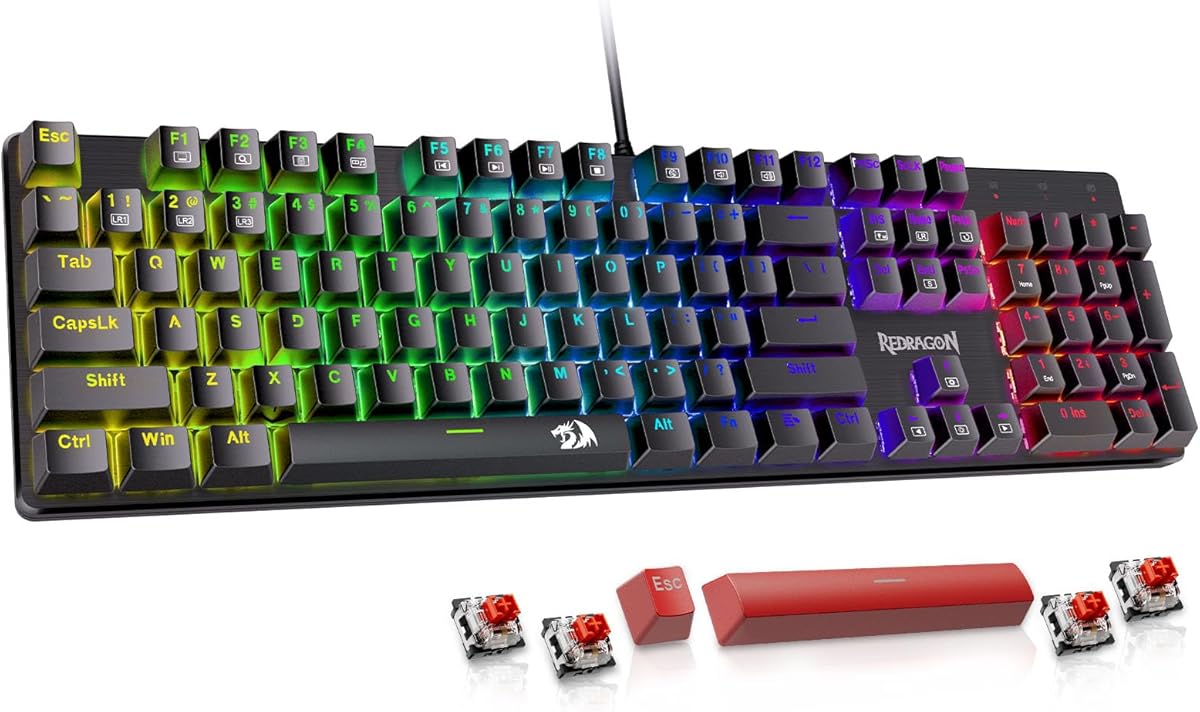
  • 104-key aluminum chassis with hot-swappable 3/5-pin switch sockets
  • 20 preset RGB lighting modes with adjustable brightness and flow
  • Stock tactile Brown switches with full anti-ghosting wired connection
Check Price →
✓ Pros
  • Brushed aluminum top plate eliminates the flex common on plastic boards
  • Hot-swappable sockets accept most 3-pin and 5-pin mechanical switches
  • 20 preset RGB modes create genuine esports desk presence
  • Stock Brown switches offer tactile feedback without harsh click noise
  • Companion software unlocks deeper macro and lighting customization
✕ Cons
  • ABS keycaps will shine faster than PBT alternatives on enthusiast boards
  • Full-size 104-key footprint demands substantial desk real estate
  • Software is optional but needed to get the most from RGB programming

Detailed review

Hot-swap capability on the K556 is the feature that keeps it relevant in 2026. The upgraded socket accepts nearly any 3-pin or 5-pin switch, so you can start with the included tactile Brown switches and later swap to linear Reds or clicky Blues without soldering. For newcomers curious about mechanical feel but unsure which switch type fits their hands, this is an inexpensive laboratory. Browns deliver a gentle tactile bump suited to mixed gaming and typing without the acoustic aggression of Blue switches in shared spaces.

RGB on the K556 leans into the esports aesthetic with 20 preset lighting modes controlling brightness and flow speed. Effects range from breathing waves across the board to reactive ripples triggered by keystrokes. Per-key customization through software goes deeper than the onboard shortcuts, letting you assign game-specific profiles if you invest time in Redragon's companion app. Even without software, cycling presets via function keys produces a desk presence that reads as gaming gear rather than office equipment.

Full anti-ghosting across all 104 keys ensures complex MOBA or fighting-game inputs register accurately. Wired plug-and-play connectivity works on Windows and Mac without driver hassles for basic function, though Mac users should verify multimedia shortcuts against their workflow. The K556 is unapologetically full-size, so compact-desk owners should measure available depth before ordering—this board wants room for its numpad and generous frame.

Long-term ownership considerations include keycap wear and switch experimentation. Double-shot ABS legends stay readable, but oily shine develops on frequently used keys faster than PBT would. That is a cosmetic issue, not a functional one, and hot-swap sockets mean switch failures or preference changes never require desoldering. Redragon backs the board with community-scale support typical of the brand—responsive enough for budget gear, though not SteelSeries-tier enterprise service.

If you want mechanical switches, real aluminum, hot-swap flexibility, and vivid RGB without entering the tri-mode wireless enthusiast tier, the K556 remains one of the strongest value anchors in this entire pack. It looks like a gaming keyboard, feels like a mechanical keyboard, and lights up like you expect an RGB board to—all while staying accessible to first-time mechanical buyers.

Switch Swapping on the K556

Pull the stock Brown switches with a standard switch puller, seat compatible 3-pin or 5-pin replacements, and test each key before reassembly. No soldering required. Keep the originals as backups in case you prefer tactile feedback after experimenting with linear switches.

K556 vs Membrane RGB Boards

Membrane keyboards like the SteelSeries Apex 3 win on silence and spill ratings. The K556 trades some quiet for genuine mechanical tactility and hot-swap freedom. Pick based on whether your priority is household noise levels or switch customization.

Check Price on Amazon →

We may earn a commission at no additional cost to you.

3. AULA F75 Pro - Best Enthusiast RGB Custom

AULA F75 Pro

AULA F75 Pro

9.2/10★★★★★

The AULA F75 Pro represents how far budget enthusiast keyboards have pushed RGB customization in 2026. This is not a board that merely toggles between rainbow presets—it offers 16.8 million addressable colors, 16 onboard lighting effects, and ten music-reactive modes that pulse with audio playing through your PC. The multi-function knob adjusts brightness, speed, and effect selection without diving into menus, which keeps lighting changes tactile during live streams or late-night sessions when you do not want to alt-tab into a settings panel.

  • Tri-mode BT 5.0, 2.4GHz wireless, and USB-C wired connectivity
  • 75% hot-swap layout with 16.8M RGB and music-reactive effects
  • Pre-lubed Reaper switches, PBT side-print keycaps, 4000mAh battery
Check Price →
✓ Pros
  • 16.8 million colors with music-reactive lighting through driver software
  • Tri-mode connectivity supports five paired devices simultaneously
  • Gasket-style internal damping delivers premium creamy acoustics
  • Hot-swappable PCB with pre-lubed stabilizers and Reaper switches
  • 75% layout saves desk space while retaining arrow keys and a knob
✕ Cons
  • Compact layout omits dedicated numpad for spreadsheet-heavy workflows
  • Full RGB and wireless features drain battery faster than backlight-off use
  • Software needed for advanced per-key RGB and macro programming

Detailed review

Tri-mode wireless connectivity separates the F75 Pro from wired-only RGB competitors. Bluetooth 5.0 handles multi-device hopping between a desktop, laptop, tablet, and phone; 2.4GHz wireless delivers gaming-grade latency when you need responsiveness; USB-C wired mode charges the 4000mAh battery while you play. Switching between three saved Bluetooth pairings plus the 2.4GHz dongle covers most hybrid work setups, though competitive esports players should stay on wired or 2.4GHz during ranked matches to eliminate any latency variance.

Internal construction justifies the enthusiast badge beyond lighting alone. Pre-lubed stabilizers, extended silicone padding, PCB single-key slotting, and five layers of silencer fill combine to produce the creamy, thocky sound profile keyboard communities now expect from gasket-adjacent builds. LEOBOG Reaper switches arrive pre-lubed with smooth linear action suited to fast gaming inputs. Hot-swap sockets support 3-pin and 5-pin replacements, so the F75 Pro grows with your preferences rather than locking you into factory switches forever.

The 75% layout trims unnecessary keys while keeping a dedicated arrow cluster and the multifunction knob—critical for gamers who refuse to learn FN-layer arrow access but still want a smaller footprint than full-size boards. Side-printed PBT keycaps resist shine and keep legends visible under aggressive RGB angles. WIN-key lock prevents accidental Windows menu activations during fullscreen gaming, and N-key rollover ensures every simultaneous press registers in rhythm games and MMO ability rotations.

Battery life varies dramatically with RGB intensity. AULA claims extended use with backlight off, but full RGB wireless sessions will need charging more frequently—plan to keep the USB-C cable nearby for marathon weekends. The 4000mAh capacity is generous for the category, yet addressable LEDs remain power-hungry by physics, not marketing. Treat wireless RGB as a convenience feature with wired fallback rather than a cord-free forever promise.

For buyers who want their desk to look like a custom modded build without soldering foam or sourcing switch packs, the F75 Pro delivers. It competes directly with Redragon's wired K671 and K556 on price-adjacent tiers while offering wireless tri-mode flexibility those boards lack. The learning curve is slightly steeper—compact layout, software dependency for music sync—but the payoff is the most visually and acoustically impressive RGB experience in this roundup.

Setting Up Music-Reactive RGB

Install the AULA driver, enable music rhythm mode, and select from ten reactive patterns. Audio must route through the PC running the software—Bluetooth speakers fed from a phone will not trigger effects. Start with lower brightness to avoid distraction during work playlists.

75% Layout Adjustment Period

Expect one to two weeks to internalize the compact key map if you are coming from full-size boards. Arrow keys remain physical, but the numpad is gone. Spreadsheet users may want a separate numpad; gamers and coders often prefer the reclaimed mouse space.

Check Price on Amazon →

We may earn a commission at no additional cost to you.

4. Redragon S101-3 PRO - Best RGB Keyboard-Mouse Combo

Redragon S101-3 PRO

Redragon S101-3 PRO

9/10★★★★★

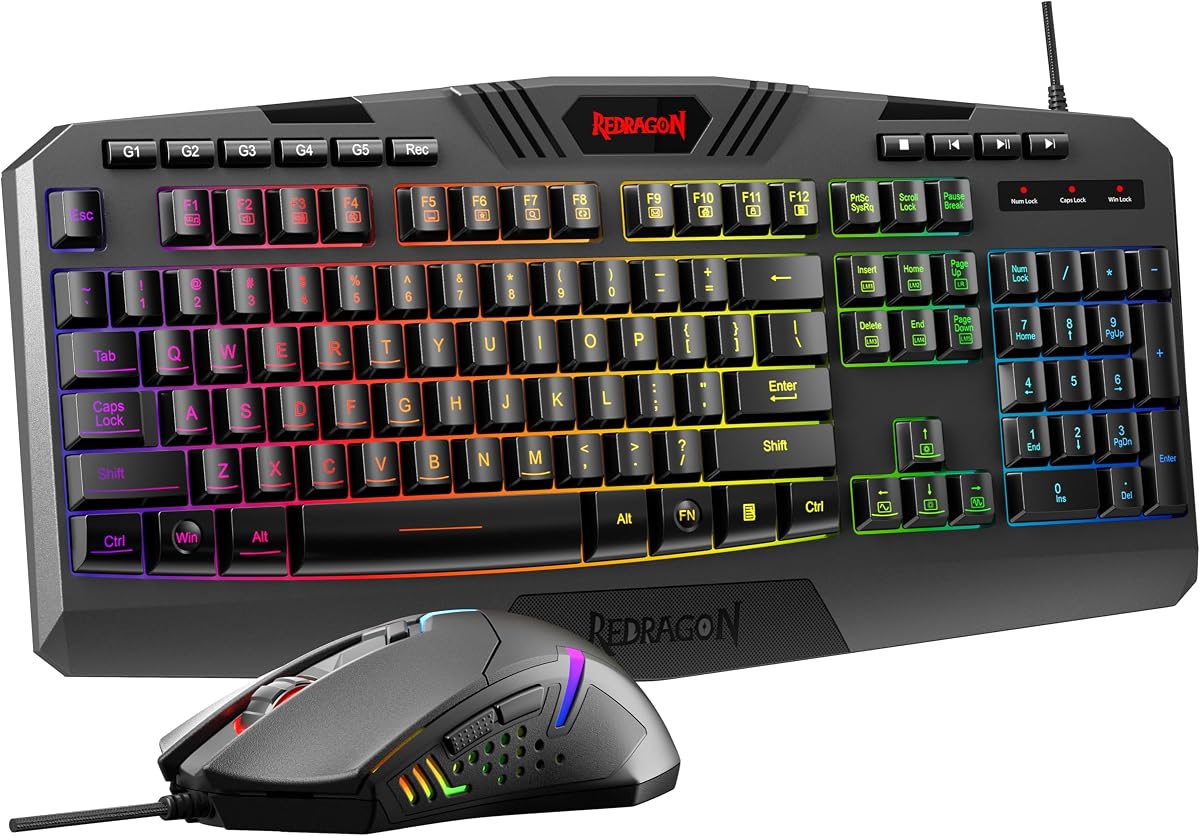
The Redragon S101-3 PRO combo answers a straightforward question: what if you need both an RGB keyboard and a gaming mouse today without researching two separate purchases? This updated bundle pairs a full-size backlit membrane keyboard with a wired mouse adjustable from 800 to 7200 DPI, delivering a coordinated desk setup that looks intentional rather than assembled from mismatched clearance finds. For students, first-time PC builders, and parents outfitting a teenager's battlestation, that completeness matters as much as any individual spec.

  • Full-size RGB membrane keyboard plus 800–7200 DPI gaming mouse
  • Six keyboard lighting modes, five dedicated macro record keys
  • Plug-and-play Windows with onboard lighting and DPI memory
Check Price →
✓ Pros
  • Complete keyboard-and-mouse bundle eliminates separate peripheral shopping
  • Six RGB keyboard modes plus ten mouse lighting effects via software
  • Five dedicated macro keys speed repetitive commands in MMOs and productivity
  • Quiet membrane keys suit shared spaces and dorm rooms
  • Onboard memory preserves lighting and DPI settings after reboot
✕ Cons
  • Membrane keyboard cannot match mechanical typing feel or longevity hype
  • Software download required for full macro and RGB customization
  • Included mouse is capable but not enthusiast-grade for low-sensitivity FPS

Detailed review

RGB on the keyboard side offers six vibrant backlight modes accessible through function keys, while the mouse adds ten independent lighting effects. Redragon's software—downloadable from their website—unifies color, brightness, and pattern control across both devices. Settings save to onboard memory, so your preferred crimson wave or static blue profile survives PC restarts without reopening the app. That persistence is easy to overlook until you use a combo that resets to factory rainbow every boot.

Five dedicated macro record keys sit along the keyboard's left edge, a rarity at this bundle tier. Recording complex ability rotations in World of Warcraft, paste sequences for video editors, or chat macros for streamers takes minutes rather than requiring AutoHotkey scripting. Anti-ghosting on the keyboard ensures simultaneous key presses register during frantic gameplay, and the included ergonomic wrist rest reduces fatigue during homework-to-raid transitions that define student gaming schedules.

The mouse included here is genuinely usable—not a hollow plastic placeholder. On-the-fly DPI switching via a dedicated button lets you drop sensitivity for sniping and raise it for menu navigation without opening software mid-match. Polling and acceleration settings go deeper for users who install the driver, but plug-and-play defaults satisfy casual Fortnite or Valorant sessions. Competitive FPS players may eventually outgrow the sensor, yet the keyboard-mouse synergy keeps the combo cohesive until that upgrade moment arrives.

Quiet membrane switches remain the acoustic tradeoff. You gain roommate-friendly volume at the expense of the crisp mechanical feedback enthusiasts prefer. The keyboard's soft-touch keys still feel responsive for gaming, and the silence pairs well with the RGB spectacle—your desk glows aggressively while your microphone stays clean. Build quality across both peripherals reflects Redragon's iterative S101 revisions: not premium aluminum, but durable enough for daily student abuse.

If you already own a favorite mouse or demand hot-swap mechanical switches, skip this bundle and buy standalone boards from elsewhere in our list. If you need everything at once with synchronized RGB and macro capability, the S101-3 PRO remains one of the highest-rated combo paths into lighted gaming peripherals.

First-Time Setup Tips

Plug both USB connectors into direct motherboard ports rather than unpowered hubs for stable polling. Download Redragon software once to set lighting and DPI, verify settings stick after a reboot, then game without leaving background apps running.

When the Combo Makes Sense

Ideal for new PC owners, dorm setups, and gift buyers who want one box to solve input devices. Less ideal if you already invested in a high-end mouse—buy the K556 or F75 Pro keyboard separately instead.

Check Price on Amazon →

We may earn a commission at no additional cost to you.

5. Redragon S101M-KS - Best Wireless RGB Combo

Redragon S101M-KS

Redragon S101M-KS

9/10★★★★★

Cable management frustration ends quickly with the Redragon S101M-KS, a wireless evolution of the brand's popular combo formula. Both keyboard and mouse connect via a shared 2.4GHz receiver—one USB dongle, two devices—which preserves laptop port budget better than separate wireless peripherals each demanding their own slot. Bluetooth mode adds phone and tablet pairing for casual typing, while USB-C wired mode charges the keyboard during heavy RGB sessions.

  • Tri-mode keyboard: wired USB-C, Bluetooth 5.0, and 2.4GHz receiver
  • Eight RGB patterns with 300-hour keyboard battery (backlight off)
  • 4800 DPI mouse with programmable polling up to 1000Hz via software
Check Price →
✓ Pros
  • Tri-mode wireless frees your desk from keyboard and mouse cable clutter
  • Single 2.4GHz receiver controls both keyboard and mouse simultaneously
  • 300-hour keyboard battery life with RGB disabled for travel weeks
  • Ten independent multimedia keys plus twelve FN multimedia combinations
  • Programmable polling up to 1000Hz on mouse through Redragon software
✕ Cons
  • Wireless RGB active use drains battery far faster than backlight-off claims
  • Software required for advanced remapping and DPI fine-tuning
  • Membrane keyboard feel won't satisfy mechanical switch enthusiasts

Detailed review

RGB implementation spans eight backlight patterns on the keyboard with adjustable speed and brightness, coordinated visually with the mouse's own lighting effects. True RGB here means colors shift dynamically rather than locking to single-color zones, producing desk cohesion when you match hues across both devices through software. Gamers who stream or record benefit from the cleaner frame without cable spaghetti crossing the mouse pad.

Battery indicators and realistic expectations matter. Redragon cites up to 300 hours with keyboard backlight off—a credible figure for travel or office weeks where lighting is unnecessary. Enable full RGB wirelessly and plan to charge between long sessions; the rechargeable keyboard includes a six-foot detachable USB-C cable for wired fallback. Treat the battery claim as a ceiling for conservative use, not a guarantee during rainbow wave marathons.

The mouse reaches 4800 DPI with five preset levels toggled via a physical button, and software unlocks finer adjustment plus polling rates from 125 to 1000Hz. That range covers casual MOBA players through moderate FPS enthusiasts. Ten independent multimedia keys on the keyboard flank the main cluster for volume, playback, and macro-adjacent shortcuts, supplemented by twelve FN-layer combinations for deeper control during fullscreen applications.

Splash resistance, WIN-lock, and ergonomic typing angles address practical daily friction. The membrane keyboard will not deliver thocky mechanical acoustics, but keystrokes feel consistent and quiet enough for apartment gaming. Redragon's 36-month warranty and software support through redragon.com give budget wireless buyers more safety net than no-name Amazon listings typically provide.

Choose the S101M-KS when wireless freedom matters more than switch enthusiast cred. It pairs naturally with the wired S107 upgrade path if you later want higher DPI on the mouse side, but as a cord-free starter kit with legitimate RGB coordination, it earns its 4.5 rating through convenience rather than spec sheet bragging.

2.4GHz vs Bluetooth for Gaming

Use the 2.4GHz dongle for ranked gaming and the shared receiver convenience. Switch to Bluetooth for typing on a secondary device. Latency on 2.4GHz remains tighter for reflex-heavy titles where Bluetooth can introduce perceptible delay.

Charging and Battery Habits

Charge overnight with RGB off to maximize cycle longevity. During desk use, USB-C wired mode keeps the keyboard powered while maintaining connectivity—ideal for weekend gaming without mid-match battery anxiety.

Check Price on Amazon →

We may earn a commission at no additional cost to you.

6. Redragon S107 - Best High-DPI RGB Combo

Redragon S107

Redragon S107

9/10★★★★★

Redragon's updated S107 combo targets players who outgrew basic 3200 DPI mice but still want an affordable RGB keyboard paired in one purchase. The headline upgrade is mouse performance: hardware DPI button adjustment covers everyday needs, while Redragon's driver unlocks up to 10000 DPI and 1000Hz polling for low-sensitivity arm-aimers in Counter-Strike or Apex Legends. That headroom separates the S107 from the S101-3 PRO combo for FPS-focused buyers willing to install software once.

  • 25-key anti-ghosting membrane keyboard with six RGB lighting modes
  • Mouse adjustable to 10000 DPI and 1000Hz polling via Redragon software
  • 12 multimedia keys, foldable stand, plug-and-play without drivers
Check Price →
✓ Pros
  • Mouse scales to 10000 DPI and 1000Hz polling via Redragon software
  • 25-key anti-ghosting exceeds standard six-key rollover budget boards
  • Six keyboard RGB modes with synchronized mouse lighting effects
  • Plug-and-play works immediately; software optional for deep tuning
  • Foldable stand and skin-friendly coating improve long-session comfort
✕ Cons
  • Membrane keyboard limits typing feel compared to mechanical picks
  • Maximum DPI requires software—onboard button stops at lower preset
  • RGB customization depth lags enthusiast per-key boards in this guide

Detailed review

Keyboard-side RGB offers six lighting modes with speed and brightness tuning shared visually with the mouse's eight effects. Anti-ghosting extends to 25 simultaneous keys—a meaningful upgrade over generic budget boards advertising vague gaming key rollover without specifying counts. MMO and battle royale players pressing sprint, crouch, ability, and weapon keys together will notice fewer missed inputs during chaotic fights.

Comfort features accumulate quietly: foldable rear feet set typing angle, skin-friendly coating on keycaps reduces slippery shine during sweaty sessions, and floating keycap design adds visual depth under RGB glow. Twelve multimedia function keys streamline music control and browser shortcuts without leaving games entirely. These are not revolutionary innovations, but together they explain why the S107 rates 4.5 while costing less than buying mid-tier keyboard and mouse separately.

Plug-and-play compatibility means Windows recognizes both devices instantly without mandatory driver installs. Software remains available for macro programming, RGB sync fine-tuning, and unlocking the mouse's full DPI range—treat the driver as optional for casual users and essential for competitive tuning. Settings persist across reboots once saved, matching the behavior of the S101-3 PRO combo.

The membrane keyboard remains the honest limitation. You get excellent mouse headroom and respectable RGB, but switch feel stays soft and quiet rather than crisp and mechanical. Pair the S107 with a large cloth mousepad to exploit the high DPI range, and consider a mechanical upgrade path from our K556 or K671 reviews once keyboard feel becomes the bottleneck.

For gamers prioritizing mouse precision and anti-ghosting depth while accepting membrane keyboard compromise, the S107 combo delivers a focused upgrade over entry bundles. It sits between the value-oriented S101-3 PRO and standalone mechanical RGB boards, carving a niche for FPS players who care more about tracking accuracy than thocky acoustics.

Dialing In 10000 DPI

Install Redragon software, open mouse settings, and set DPI steps matching your cm/360 sensitivity preference. Test in a aim trainer before ranked play—extreme DPI values suit large pad arm movements, not tiny desk spaces.

S107 vs S101-3 PRO

Choose S107 for higher DPI ceiling and 25-key anti-ghosting. Choose S101-3 PRO for dedicated macro keys and slightly simpler plug-and-play focus. Both share membrane keyboards—mechanical seekers should look elsewhere in this guide.

Check Price on Amazon →

We may earn a commission at no additional cost to you.

7. TECKNET Wired Gaming - Best Quiet RGB for Office

TECKNET Wired Gaming

TECKNET Wired Gaming

8.8/10★★★★☆

TECKNET's wired gaming keyboard targets the overlap between office professionalism and gaming desk flair—a narrower Venn diagram than marketing teams admit. Fifteen-zone rainbow backlighting offers seven illumination modes and four brightness levels, enough variety for evening gaming without turning your cubicle into a nightclub during daylight hours. Press Fn combinations or use the dedicated wake shortcut after the 30-minute auto-sleep shuts backlighting to conserve power on idle machines.

  • 15-zone RGB with seven illumination modes and four brightness levels
  • IP32 spill resistance with metal panel and integrated wrist rests
  • 25 anti-ghosting keys, 50-million-keystroke whisper-quiet switches
Check Price →
✓ Pros
  • 15-zone RGB with seven modes and four brightness levels for desk ambiance
  • IP32 spill resistance with drainage holes in integrated wrist rests
  • Whisper-quiet switches rated 50 million keystrokes for office compatibility
  • Metal panel base adds rigidity rare among quiet membrane RGB boards
  • Lifetime support registration backs long-term ownership confidence
✕ Cons
  • Multimedia keys lack Mac compatibility per manufacturer note
  • Auto sleep after 30 minutes may interrupt long reading sessions
  • Zone RGB cannot match per-key customization on mechanical enthusiast boards

Detailed review

Whisper-quiet volcano-structure switches promise 50 million keystrokes with near-silent operation, aligning acoustically with the SteelSeries Apex 3 while undercutting brand premium. IP32 spill resistance adds drainage holes through the integrated wrist rest—a thoughtful engineering detail that routes liquid away from circuitry instead of merely claiming splash proofing without pathways. For teachers, accountants, and remote workers who game after hours, that dual-use resilience matters.

Ergonomic shaping shows deliberate design rather than generic OEM rebadging. A seven-degree input angle and stepped key layout encourage neutral wrist posture, while integrated wrist rests maintain hand height without a separate accessory cluttering the desk. ABS keycaps on a metal panel base produce stable typing with minimal deck flex, and 25-key anti-ghosting covers simultaneous inputs beyond what casual games demand.

Twelve multimedia keys control playback and volume directly, though TECKNET explicitly notes Mac incompatibility for those dedicated functions—Mac buyers should plan on standard key remapping tools if media shortcuts are essential. Windows and Linux users receive the full shortcut set without caveats. Anti-ghosting and quiet switches combine to make this a strong second-monitor keyboard for streamers running OBS on one machine while gaming on another.

Lifetime support with product registration is a bold claim for budget peripherals. TECKNET's reputation hinges on honoring that promise when keys degrade or backlighting fails—verify registration steps in the box and keep proof of purchase. Even skeptics benefit from a company stating long-term accountability rather than anonymous drop-ship listings with no support path.

The TECKNET board will not satisfy modders chasing hot-swap Creamy builds, but it competes seriously for quiet RGB users who need spill protection, metal stability, and office-appropriate acoustics. It fills the gap between generic rainbow membranes and premium SteelSeries pricing while delivering comparable zone lighting and quieter switches on paper.

Managing Auto Sleep

After 30 minutes idle, backlighting turns off until any key press or Fn+PgDn wakes the board. Disable sleep by keeping slight input activity during long downloads, or accept the feature as energy savings on office PCs left powered overnight.

Office-to-Gaming Daily Driver

Lower brightness to two during work video calls, raise to four for evening gaming. Metal base weight keeps the keyboard planted when switching between typing posture and aggressive game lean.

Check Price on Amazon →

We may earn a commission at no additional cost to you.

8. Redragon K671 - Best Budget Hot-Swap RGB

Redragon K671

Redragon K671

8.6/10★★★★☆

The Redragon K671 mechanical keyboard democratizes hot-swap RGB for buyers intimidated by wireless tri-mode complexity. Out of the box, linear Red switches glide with minimal actuation force—ideal for rapid double-taps in MOBAs and MMO rotations where speed beats tactile confirmation. Four spare switches and replacement keycaps ship inside for DIY repairs if a switch debounces poorly after heavy use, a practical inclusion rarely seen at entry mechanical tiers.

  • Hot-swappable linear Red switches with four spare switches included
  • 11 programmable backlit modes with macro editing via software
  • Full-key anti-ghosting and 12 multimedia shortcut keys
Check Price →
✓ Pros
  • Hot-swappable Red switches with four spares included in the box
  • Eleven programmable backlit modes plus macro editing through software
  • Full-key anti-ghosting supports unlimited simultaneous presses
  • Double-shot keycaps maintain legible legends under bright RGB
  • 24-month warranty with responsive Redragon support channels
✕ Cons
  • Software controls lighting presets but cannot change individual LED colors
  • Linear Red switches may feel too light for heavy typists preferring tactility
  • Plastic frame flexes slightly compared to aluminum K556 construction

Detailed review

Eleven unique backlit modes cycle through brightness and speed tiers using onboard controls, while Redragon software unlocks macro editing and effect tuning. Be aware of an honest limitation noted in product materials: software adjusts LED patterns and speeds but cannot remap individual LED colors across the spectrum. You choose among preset palettes rather than painting each key a custom hex value—acceptable at this price, but per-key RGB purists should step up to the AULA F75 Pro.

Macro editing transforms repetitive workflows. Remap keys, combine multiple functions into single presses, and store game-specific profiles for RPG ability bars or video editing timelines. Full-key anti-ghosting means every simultaneous input registers—a baseline expectation on mechanical boards but still worth confirming on budget listings where marketing language obscures actual rollover behavior.

Double-shot ABS keycaps transmit backlight clearly through legends, and the overall board remains wired USB plug-and-play for Windows and Mac basic functions. Twelve multimedia shortcuts accelerate calculator, email, and volume tasks. Build quality is plastic-forward compared to the K556's aluminum plate, producing slight flex if you mash keys aggressively, though daily gaming and typing rarely expose that limitation.

Hot-swap sockets accept standard replacements when you outgrow linear Reds—pop in tactile Browns for typing-heavy weeks or experiment with community favorites without buying a new board. Redragon's 24-month warranty provides recourse if LEDs fail or sockets loosen, aligning with the brand's consistent post-purchase support reputation across this product pack.

The K671 occupies the budget mechanical RGB sweet spot: real switches, swap flexibility, vivid lighting, and macro depth without wireless battery compromises. Pair it with a desk mat and consider aftermarket PBT caps if shine bothers you long-term. It is the wired mechanical gateway drug before graduating to gasket-mounted tri-mode boards like the F75 Pro.

Linear Red Switch Behavior

Red switches actuate smoothly without tactile bumps or audible clicks. Light actuation favors quick gaming but may cause accidental presses if you rest fingers heavily on keys. Give yourself several days to adapt from membrane or tactile boards.

Software Lighting Limits

Expect preset color schemes and animation control, not full per-key color painting. If custom purple WASD with blue modifiers matters aesthetically, choose the F75 Pro or invest time modding a board with open-source RGB firmware.

Check Price on Amazon →

We may earn a commission at no additional cost to you.

9. AULA S99 - Best Creamy RGB Membrane

AULA S99

AULA S99

8.6/10★★★★☆

AULA's S99 gaming keyboard proves membrane boards can participate in the creamy acoustic trend dominating mechanical social media without costing gasket-mount money. Top-mount construction and noise-reducing internal design produce a thocky, satisfying bottom-out sound that reads closer to modded linear builds than traditional mushy membranes. Combined with 16.8 million RGB colors and sixteen preset effects, the S99 delivers spectacle and sound personality usually associated with boards double its tier.

  • 96% layout with 16.8M RGB and 16 preset lighting effects
  • Tri-mode wireless: Bluetooth 5.0, 2.4GHz, and USB-C wired
  • Multi-function media knob and 2000mAh rechargeable battery
Check Price →
✓ Pros
  • Creamy thocky acoustics from top-mount membrane design surprise at this tier
  • Tri-mode wireless with five-device pairing and multifunction media knob
  • 16 preset RGB effects across 16.8 million color addressable backlight
  • 96% layout retains numpad while trimming frame versus full 104-key boards
  • 2000mAh battery supports extended wireless use with brightness management
✕ Cons
  • Membrane switches lack hot-swap mechanical customization path
  • Wireless RGB at max brightness reduces battery runtime noticeably
  • Top-mount creamy sound is subjective—some users prefer true mechanical thock

Detailed review

Tri-mode connectivity mirrors enthusiast wireless features: Bluetooth 5.0 pairs up to five devices, 2.4GHz wireless handles low-latency desktop use, and USB-C wired mode charges the 2000mAh battery during play. A multifunction knob consolidates volume, connection mode, backlight brightness, speed, and RGB mode selection into one tactile control—far more elegant than memorizing triple-layer FN shortcuts. Foldable two-stage kickstands set typing angles for long work sessions before evening gaming transitions.

The 96% layout keeps a dedicated numpad while shaving horizontal desk footprint compared to traditional full-size boards. Spreadsheet users and MMORPG players who rely on number columns retain physical keys without sacrificing mouse pad space as aggressively as 75% layouts demand. Creamy-colored keycap accents add cosmetic flair under RGB glow, though aesthetic taste varies—some buyers love the pastel vibe, others swap caps immediately.

RGB control splits between knob twists and FN combinations, letting you dim lighting for office calls or accelerate rainbow cycles for stream backgrounds. Sixteen presets include static, breathing, and wave patterns sufficient for most desk themes without installing companion software—appealing for users who refuse background apps. Wireless RGB at maximum brightness will drain the 2000mAh cell faster than conservative settings; keep USB-C nearby for weekend marathons.

Honest limitations remain membrane-centric: no hot-swap switches, no aluminum plate rigidity, and acoustic creaminess that mimics but does not duplicate true mechanical feel. Enthusiasts chasing authentic switch customization should read our K671 and F75 Pro reviews instead. Buyers wanting wireless RGB, numpad retention, knob convenience, and pleasant acoustics without mechanical complexity will find the S99 a compelling middle ground.

The S99 competes directly with TECKNET and SteelSeries for dual-use office-gaming roles while adding wireless flexibility those wired boards lack. Its 4.3 rating reflects satisfied buyers who prioritize desk aesthetics and sound character over switch mod culture— a growing audience as RGB content drives purchase decisions as much as actuation force charts.

Knob Controls at a Glance

Rotate to adjust volume or backlight parameters depending on mode; click to cycle connection type or RGB presets. Spend ten minutes learning mode indicators to avoid accidental Bluetooth hops mid-game.

Who Will Love the Creamy Membrane Sound

Streamers and desk-setup photographers often prefer consistent thocky acoustics on camera without mechanical ping. Typists who find clicky switches fatiguing but want more character than silent office boards will appreciate the S99's acoustic tuning.

Check Price on Amazon →

We may earn a commission at no additional cost to you.

10. CORSAIR K70 CORE - Best Premium Brand RGB

CORSAIR K70 CORE

CORSAIR K70 CORE

8/10★★★★☆

CORSAIR's K70 CORE brings brand-name mechanical RGB to buyers who trust ecosystem integration over anonymous Amazon bestsellers. Pre-lubed MLX Red linear switches arrive smooth from the factory, enhanced by two layers of internal sound dampening that reduce ping and case resonance compared to early budget mechanical boards. The typing experience lands between buttery linear customs and stock scratchy Reds—a meaningful improvement for users who notice acoustic details without building their own foam-stuffed chassis.

  • Pre-lubed CORSAIR MLX Red linear switches with dual-layer dampening
  • Aluminum top plate, magnetic soft-touch palm rest included
  • Multi-function rotary dial and iCUE software customization
Check Price →
✓ Pros
  • Pre-lubed CORSAIR MLX Red switches with dual-layer sound dampening
  • Aluminum top plate and magnetic soft-touch palm rest included
  • Multi-function rotary dial controls volume and iCUE-assignable functions
  • SOCD cleaning benefits fighting-game players using simultaneous inputs
  • CORSAIR iCUE ecosystem integrates lighting with other CORSAIR gear
✕ Cons
  • 4.0 rating trails pack leaders—buyers report occasional QC variance
  • ABS double-shot keycaps shine faster than premium PBT alternatives
  • iCUE software required for fullest RGB and dial customization experience

Detailed review

Build materials justify the premium positioning within this pack: an aluminum top plate adds rigidity and weight, double-shot ABS keycaps survive aggressive gaming, and a magnetic soft-touch palm rest attaches without wobble. The multi-function rotary dial adjusts volume by default but accepts iCUE remapping to brightness, profile switching, or application-specific macros. Physical dial control remains satisfying in an era where too many products bury basic adjustments inside touch menus.

RGB through CORSAIR iCUE opens ecosystem synchronization—match keyboard lighting to CORSAIR mice, headsets, fans, and RAM if you already invested in the brand. Per-key customization, complex lighting layers, and game integrations exceed what budget Redragon software offers, though iCUE's footprint and update frequency frustrate users who prefer lightweight drivers. Plan to install iCUE once, configure profiles, then minimize background resource use if PC performance headroom is tight.

SOCD cleaning—simultaneous opposite cardinal direction input handling—benefits fighting-game players executing precise motion inputs on lever-less or keyboard setups. Full-size QWERTY layout retains numpad and standard spacing for spreadsheet work, distinguishing the K70 CORE from compact enthusiast layouts elsewhere in our guide. Wired USB connection eliminates wireless latency concerns entirely for competitive scenarios.

The honest elephant is the 4.0 rating, lowest in our pack. CORSAIR quality control and iCUE dependency generate more mixed reviews than SteelSeries or top Redragon listings. Some units arrive flawless; others exhibit key chatter or LED inconsistencies requiring support tickets. Buy from sellers with solid return policies and inspect on arrival. When the K70 CORE works as intended, it feels like a simplified flagship minus optical switches and aircraft-grade aluminum of older K70 variants.

Choose the K70 CORE if you value CORSAIR ecosystem ties, factory-lubed linear switches, included palm rest, and rotary dial convenience over hot-swap experimentation. Choose the K556 or F75 Pro if customization and rating-weighted value matter more than brand integration. The K70 CORE is the premium wired anchor in an RGB roundup otherwise dominated by value innovators.

iCUE Setup Recommendations

Install iCUE, create one lighting profile matching your desk theme, assign dial functions, then disable unnecessary background monitoring features. Export profiles locally in case updates reset configurations.

Inspect on Arrival

Test every key and LED zone within the return window. CORSAIR support is generally responsive for genuine defects, but catching issues early saves frustration versus discovering a sticky switch months later.

Check Price on Amazon →

We may earn a commission at no additional cost to you.

Best RGB Keyboards in 2026: Expert Reviews and Buying Guide

How to Choose the Best RGB Keyboard for Your Setup

Zone RGB vs Per-Key Addressable Lighting

Zone RGB divides the keyboard into regions—often six to fifteen areas—each displaying colors and effects independently. Setup stays simple, gradients look smooth, and firmware remains lightweight. Per-key RGB assigns each switch its own LED, enabling game-specific highlights (WASD one color, ability keys another) and complex custom patterns through software. Enthusiast boards like the AULA F75 Pro and CORSAIR K70 CORE support per-key control; budget membranes like the SteelSeries Apex 3 and TECKNET use zones intentionally.

Choose zone lighting if you want desk ambiance without configuring 104 keys. Choose per-key if you integrate lighting with game events, stream overlays, or meticulous desk color coordination. Neither is objectively superior—zone boards often produce cleaner overall glow, while per-key boards win customization depth.

Membrane, Mechanical, and Creamy Membrane Hybrids

Traditional membrane RGB keyboards—SteelSeries Apex 3, TECKNET, Redragon combos—use rubber dome switches beneath printed circuits. They tend toward quieter operation, lower profile, and lower cost. Mechanical RGB boards—Redragon K556, K671, CORSAIR K70 CORE, AULA F75 Pro—use individual switches with longer travel and clearer actuation feedback. Hot-swap mechanicals add upgrade paths without soldering.

AULA's S99 represents a third path: membrane construction tuned for creamy, thocky acoustics that mimic modded mechanical sound on camera and stream. Decide based on noise tolerance, typing feel preference, and whether you plan to swap switches later.

Wired Reliability vs Tri-Mode Wireless Freedom

Wired keyboards—K556, K671, K70 CORE, TECKNET, Apex 3—eliminate battery anxiety and latency variables entirely. Tri-mode wireless boards—F75 Pro, S99, S101M-KS—add Bluetooth multi-device pairing and 2.4GHz dongles for desktop gaming. Competitive ranked play should stay on wired or 2.4GHz; Bluetooth suits secondary devices and casual typing.

Wireless RGB drains batteries faster than backlight-off use. Manufacturer hour claims assume conservative brightness—budget charging habits accordingly and keep USB-C cables accessible for marathon sessions.

Layout Size and Desk Real Estate

Full-size 104-key boards retain numpads for data entry and MMORPG macros—K556, Apex 3, TECKNET, K70 CORE, combos. 96% layouts like the AULA S99 shrink width while keeping numpads. 75% layouts like the F75 Pro drop numpads but keep arrow keys and knobs, reclaiming mouse pad space critical for low-DPI FPS players.

Measure desk depth before ordering full-size RGB boards with wrist rests attached. Compact layouts require one to two weeks of muscle memory adjustment if you rely on numpad muscle memory.

Software Ecosystem Expectations

Budget Redragon software handles macros, DPI, and lighting presets adequately but lacks polish. CORSAIR iCUE offers deep ecosystem integration at the cost of heavier background footprint. SteelSeries Engine splits the difference for zone-lit boards. AULA F75 Pro software unlocks music-reactive modes unavailable through onboard shortcuts alone.

If you refuse installing drivers, prioritize boards with strong onboard FN controls—K556 preset cycling, S99 knob management, Apex 3 zone toggles. Macro and per-key color addicts should embrace software upfront.

Keyboard-Mouse Combos vs Standalone Boards

Redragon S101-3 PRO, S101M-KS, and S107 combos deliver synchronized RGB and matched DPI tuning for buyers starting from zero peripherals. Standalone mechanical boards—K556, K671, F75 Pro—offer superior typing feel but require separate mouse purchases.

Combos make sense for students, gift buyers, and first PC builds. Enthusiasts who already own a favorite mouse should invest keyboard budget into hot-swap mechanical RGB instead.

Frequently Asked Questions

01

Are RGB keyboards bad for your eyes during late-night use?

RGB backlighting itself does not harm eyes when brightness is reasonable—excessive brightness in dark rooms causes strain similar to any bright screen. Most keyboards in this guide offer four or more brightness steps; dim to the lowest comfortable level after sunset. Warm color presets reduce harsh blue tones if sensitivity matters. Turn backlight off entirely for movie watching while keeping the keyboard plugged in.

02

Do I need per-key RGB or is zone lighting enough?

Zone lighting satisfies most buyers who want desk atmosphere without configuration time. SteelSeries Apex 3 and TECKNET demonstrate that six to fifteen zones produce attractive gradients and reactive effects. Per-key RGB matters when you assign game-specific colors, sync intricate patterns with stream software, or enjoy spending hours in customization menus. The AULA F75 Pro and CORSAIR K70 CORE justify per-key investment; budget combo buyers rarely miss it.

03

Will a loud RGB mechanical keyboard bother roommates?

Clicky and un-dampened mechanical switches carry sound through walls more than RGB glow suggests. Linear Red switches on the K671 and K70 CORE remain quieter than clicky Blues. For maximum household peace, choose whisper-quiet membranes—the SteelSeries Apex 3 and TECKNET prioritize acoustic discretion. Creamy membranes like the AULA S99 land between: thocky character without sharp clicks.

04

Can I use these RGB keyboards on Mac, PlayStation, and Xbox?

SteelSeries Apex 3 explicitly supports Windows, Mac, Xbox Series X|S, and PlayStation. Most USB wired boards function for basic typing on consoles even when RGB software is Windows-centric. Mac users should verify multimedia key compatibility—TECKNET notes Mac limitations on dedicated media keys. Wireless combos may restrict advanced features on non-Windows hosts while maintaining basic input.

05

How long do wireless RGB keyboards last on battery?

Manufacturer claims assume backlight off or minimum brightness. Redragon S101M-KS cites up to 300 hours with RGB disabled; active rainbow wireless play drains cells in hours to days depending on effect intensity. AULA F75 Pro's 4000mAh and S99's 2000mAh capacities help but do not defeat LED physics. Treat wireless RGB as convenience with USB-C wired fallback for long sessions.

06

What is hot-swap and why does it matter for RGB boards?

Hot-swap sockets let you pull switches without soldering and insert compatible replacements. Redragon K556, K671, and AULA F75 Pro support this—experiment with linear, tactile, or community switches until feel matches preference. RGB LEDs sit beneath switches, so swapping switches does not disable lighting unless you damage the socket. Beginners should watch tutorial videos before first swap attempts.

07

Are keyboard and mouse RGB combos worth it over separate purchases?

Combos excel when you need both peripherals immediately with matched aesthetics—students, first builds, gifts. Redragon S101-3 PRO adds macro keys; S107 pushes mouse DPI higher; S101M-KS cuts cables. Separate purchases win when you already own a precision mouse and want mechanical keyboard feel from K556 or F75 Pro. Combos use membrane keyboards—accept that tradeoff honestly.

08

Does CORSAIR iCUE slow down my PC?

iCUE runs background services for lighting sync and dial remapping on the K70 CORE. Modern gaming PCs handle it fine; low-spec or streaming-heavy rigs should disable unused iCUE modules after configuring profiles. Save settings, then limit startup components to essential lighting control. Budget Redragon software is lighter but less feature-rich—pick your poison based on ecosystem investment.

09

How do I clean RGB keyboards without damaging LEDs?

Unplug the keyboard, remove keycaps with a puller if hot-swappable or gently wipe fixed caps with microfiber lightly dampened with isopropyl alcohol. Avoid soaking membrane boards—IP32 ratings resist spills but not submersion. Compressed air clears debris between switches. Reattach wrist rests and palm rests after surfaces dry completely before reconnecting USB.

10

Which RGB keyboard from this list is best for streaming setups?

Streamers balancing camera aesthetics and microphone noise should consider SteelSeries Apex 3 for silent zone RGB, AULA S99 for creamy acoustic character on camera, or AULA F75 Pro for music-reactive lighting synced to desktop audio. Avoid clicky mechanical switches if you use condenser mics without noise gates. Dial and knob controls reduce alt-tab interruptions during live broadcasts.

Conclusion

The best rgb keyboards in 2026 are not defined by maximum LED count alone—they are the boards that match your noise environment, layout habits, and willingness to tinker with software. The SteelSeries Apex 3 remains our top overall pick for quiet zone-lit reliability with spill protection and an included wrist rest. The Redragon K556 delivers aluminum mechanical RGB with hot-swap freedom at a value tier that still feels like real gaming gear. The AULA F75 Pro pushes wireless enthusiast customization with music-reactive per-key lighting for buyers ready to embrace compact layouts and driver setup.

If you are outfitting a first desk from scratch, Redragon's S101-3 PRO, S101M-KS, and S107 combos coordinate keyboard and mouse RGB without separate research rabbit holes. Office-to-gaming hybrid users should examine TECKNET and Apex 3 for whisper switches and IP32 peace of mind. CORSAIR K70 CORE rewards existing iCUE ecosystem owners with factory-lubed linears and a premium dial—even if its rating trails pack leaders, integration value can outweigh spreadsheet scores.

Scan the comparison table, work through the buying checklist, and read every review before clicking buy. RGB is the hook, but switch feel, wireless reliability, and honest acoustic tradeoffs determine whether your new keyboard stays on the desk for years or lands in a return box. Follow the links above for current Amazon availability—we earn a commission at no extra cost to you, and you get peripherals we would actually recommend to friends building lighted setups in 2026.