Best Wired RGB Flagship
Razer Basilisk V3

- Eleven Chroma RGB zones with dynamic game integration
- Focus+ 26K optical sensor and optical switches Gen-2
- HyperScroll tilt wheel plus 11 programmable buttons
Expert Review & Guide
RGB on a gaming mouse is not just vanity lighting—it is how many players sync a desk theme, read DPI stages at a glance, and feel immersed when Chroma or LIGHTSYNC reacts to in-game events. The best RGB gaming mouse in 2026 still has to aim straight first: a trustworthy sensor, switches that survive millions of clicks, and a shape that matches your grip. Lighting is the layer on top that turns a good mouse into a setup centerpiece.
This guide covers the ten RGB-capable gaming mice in the pack, from Razer Basilisk V3 wired and Basilisk V3 X HyperSpeed wireless to Logitech’s G502 Hero, G203, and flagship G502 X Plus, plus Corsair NIGHTSWORD, three Redragon options at different budgets, and the entry BENGOO wired RGB shell. We care about lighting zones and software ecosystems as much as DPI ceilings, button counts, weight tuning, and whether wireless battery life survives a weekend tournament with lights on.
You will get three top picks for different RGB lifestyles, a comparison table, deep reviews that separate near-twin Redragon models, and a buying guide for sensor, shape, and software decisions that matter more than rainbow marketing screenshots.


As an Amazon Associate we earn from qualifying purchases. We may earn a commission at no additional cost to you.
Compare lighting ecosystems, wired versus wireless, sensor ceilings, and button counts. Redragon appears multiple times with different connection stories—read the names carefully before you assume they are identical.
Basilisk V3 is what many people picture when they say best RGB gaming mouse without hedging: a thumb-rest ergonomic shell, eleven Chroma zones you can paint independently, and a Focus+ 26K sensor that tracks without the smoothing crutches older office sensors needed. Wired power means the lighting can stay bright without a battery anxiety subplot.
Eleven programmable buttons turn the mouse into a macro deck for pings, push-to-talk, ability casts, and DPI shifts. Optical mouse switches Gen-2 advertise 0.2ms actuation and up to seventy million clicks with fewer unintended misclicks—exactly the reliability story gamers want after a double-clicking old mouse ruined a ranked night.
HyperScroll is the everyday delight. Free-spin rockets through inventories and web pages; tactile mode clicks weapon-by-weapon with satisfying feedback. Tilt inputs add still more binds. RGB is not a single underglow stripe—eleven zones let you match a keyboard wave or isolate the scroll wheel in a contrasting color.
Synapse is the gatekeeper. Disable Windows enhance pointer precision, then tune DPI stages and Chroma profiles the way Razer intends. If you refuse software, you still get a strong wired mouse, but you leave the best RGB gaming mouse argument half-finished.
Buy Basilisk V3 when you want maximum wired RGB immersion and a proven ergonomic FPS/MOBA shape. Move to Basilisk V3 X HyperSpeed when wireless battery life matters more than eleven lighting zones, or to G502 X Plus when you live in Logitech’s LIGHTSPEED and POWERPLAY ecosystem.
Keep bright reactive effects for menus and lobbies; use a dimmer static accent during competitive matches so peripheral vision stays on the crosshair.
Left-handed players and anyone who needs a cable-free desk. Also skip if you hate installing Synapse on a shared family PC.
We may earn a commission at no additional cost to you.
G502 Hero remains the value definition of an RGB gaming mouse for a reason: the shape is already muscle memory for millions, the HERO sensor tracks to 25,600 DPI without smoothing or acceleration claims, and LIGHTSYNC gives you customizable RGB that can sync with the rest of a Logitech desk. Eleven programmable buttons and a dual-mode hyper-fast scroll wheel cover both MMO thumb clusters and FPS utility binds.
Adjustable weights—up to five 3.6 gram pieces—are the feature wireless ultra-lights usually omit. If you like a planted feel for tracking heavy weapons, load the rear. If you want snappier flicks, run it lighter. That physical customization still matters in 2026 even as the industry chases 50-gram shells.
Mechanical switch tensioning with metal springs and pivot hinges aims for a clean click. Sub-micron tracking language in the marketing is the sensor flex; in practice, disable enhance pointer precision and set a DPI you can consistently aim with rather than maxing the slider for bragging rights.
Compared with G502 X Plus, Hero is the wired, more affordable sibling without LIGHTFORCE switches or POWERPLAY dreams. Compared with Basilisk V3, you trade eleven Chroma zones and optical switches for weight tuning and the G502 silhouette.
Start here if you want the best RGB gaming mouse value in a familiar shape. Upgrade to X Plus for wireless RGB prestige, or sideways to Corsair NIGHTSWORD if smart center-of-gravity tuning is your obsession.
Begin with two weights installed, play a week of your main FPS, then add or remove one piece at a time. Sudden full-weight stacks confuse muscle memory.
Save a profile to onboard memory before you travel so you are not dependent on installing G HUB on a tournament machine.
We may earn a commission at no additional cost to you.

Redragon M602 Griffin RGB (Wireless)
Griffin RGB is the wireless budget answer when you want lights and cable freedom without flagship pricing. Tri-mode switching between USB-C wired, Bluetooth, and 2.4GHz covers dorm desks, living-room TVs, and serious PC sessions within about ten meters. RGB spectrum effects—up to nine light modes in the marketing—are the desk candy, adjustable through drivers with a huge color count.
DPI from 250 to 8000 plus polling rate options at 125/250/500/1000Hz give you more tuning than most office mice and enough for casual competitive play. It will not dethrone a Focus+ 26K sensor in a Kovač’s aim trainer leaderboard fight, but it is honest value for RGB seekers on a budget.
Battery claims of about thirty-five hours with RGB on and seventy with RGB off match the usual lighting tax. Auto-sleep after a minute of idle helps. Playing while charging removes the hard stop that kills cheaper wireless mice mid-raid.
Distinguish this ASIN from the wired M602 classic and the other Redragon wireless fire-button model. Same family language, different connection and feature mixes. Download software from Redragon’s official site rather than random mirrors.
Buy Griffin when tri-mode RGB wireless is the brief and flagship sensors are optional. Buy Basilisk or G502 lines when tournament-grade tracking and ecosystem polish matter more.
Use 2.4G for games, Bluetooth for media PCs, and wired when the battery icon blinks during a ranked queue.
A static dim effect often looks cleaner than rainbow chaos and lasts longer between charges.
We may earn a commission at no additional cost to you.
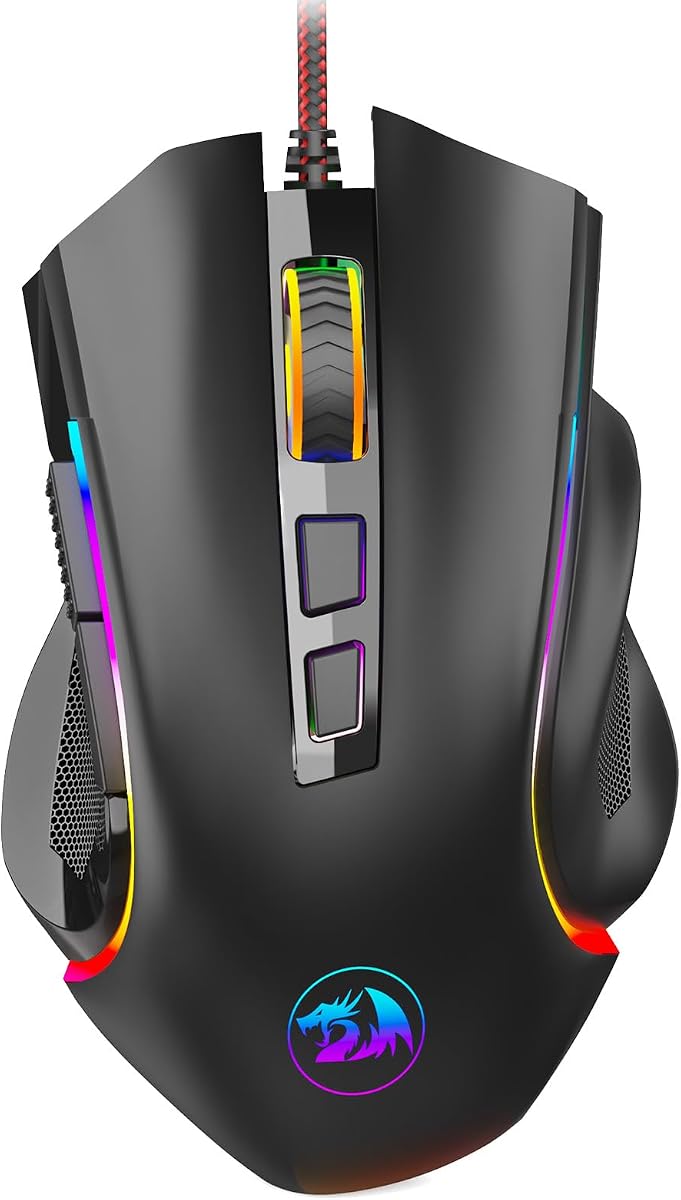
Redragon M602 Gaming Mouse (Wired)
The wired M602 is Redragon’s long-lived classic: launched years ago, still selling because the ergonomic shell, nine programmable buttons, and seven RGB modes deliver a complete starter RGB gaming mouse without wireless complexity. Up to 7200 DPI with a high-precision sensor story is enough for 1080p and 1440p gaming when your sensitivity discipline is solid.
Software from Redragon.com is where lighting, button remaps, speed tweaks, and macros live. Treat driver install as part of ownership if you care about the best RGB look—button toggling alone only scratches the surface of effects.
Comfort language focuses on finger placement and general ergonomic shaping rather than ultra-light holes or magnesium shells. That makes it friendly for palm and claw users who find skeleton mice too alien.
Compared with Griffin wireless, you lose tri-mode freedom and gain cable certainty. Compared with BENGOO, you gain deeper programmability and a higher DPI ceiling. Compared with Logitech G203, you get more buttons at a similar “first RGB mouse” life stage.
Choose wired M602 for a no-drama RGB desk on a budget. Choose Griffin if you specifically need wireless. Choose G502 Hero if you want a more modern sensor and weight tuning inside a famous shape.
Set a single favorite static color for a week before enabling reactive rainbow modes. Learn the shape first; decorate second.
Nine buttons help browser back/forward and editor shortcuts too—RGB mice are not only for games.
We may earn a commission at no additional cost to you.

NIGHTSWORD RGB exists for players who treat mouse weight like a racing seat adjustment. Corsair’s smart tunable weight system detects center of gravity in real time while you move between roughly 119 and 141 grams across many mounting combinations. Two weight sets and six locations create a huge configuration space—far beyond G502’s simpler tray approach.
The custom Pixart PMW3391 sensor reaches 18,000 DPI with one-DPI resolution steps in software. That granularity is delightful for aim nerds who change sens by tiny increments after each patch. Ten programmable buttons support the FPS/MOBA pitch in the title without requiring an MMO side panel.
Rubber grips and a contoured shell chase comfort during long sessions. RGB through iCUE ties into Corsair desks already running memory, fans, and keyboards on the same lighting brain. If your PC is already an iCUE cathedral, NIGHTSWORD fits the religion.
It is not the mouse for the 55-gram fingertip meta. It is the mouse for palm and claw players who want planted tracking and literal balance control. Take the weight system seriously or you are paying for a feature you will never touch.
Buy NIGHTSWORD when tunable balance and iCUE RGB are the brief. Buy Basilisk V3 for denser lighting zones and optical switches. Buy G502 X Plus for wireless flagship convenience.
Change one weight position per evening and play the same aim routine. Changing everything at once teaches you nothing.
Best inside a Corsair-heavy PC. Mixed-brand RGB users may prefer Synapse or G HUB cohesion instead.
We may earn a commission at no additional cost to you.

Redragon Gaming Mouse (Wireless Fire Button)
This Redragon wireless model leans into a controversial but popular feature: a fire button that turns one physical click into three. In some FPS contexts that feels like a cheat code for interaction spam; in others it is a convenience bind you could build with macros anyway. Know your game’s rules before you rely on it in ranked.
Otherwise the story matches Redragon’s wireless RGB formula—programmable buttons, 250–8000 DPI, multi-rate polling, nine light effects, and a rechargeable cell that roughly doubles runtime when you kill the rainbow. Auto-sleep after a minute and charging-while-playing are the practical battery habits.
Ergonomics and soft-touch materials target long sessions rather than ultra-light fingertip flicks. Pair it with a cloth pad and a sane DPI. Use software from Redragon’s site to remap everything if the fire button is not your main reason for buying.
Versus Griffin tri-mode, check the listing details for connection options on your specific unit—this ASIN emphasizes wireless rechargeable gaming with the fire key as the differentiator. Versus BENGOO, you gain wireless freedom and a higher DPI ladder.
Pick it when wireless RGB plus a burst-click key matches how you play. Pick Basilisk or G502 lines when you want cleaner competitive credibility and stronger sensors.
Some competitive communities consider hardware multi-click buttons unsporting. Remap the key to a normal bind if you play in those circles.
Create a bright RGB “lobby” profile and a dim “ranked” profile so you are not choosing between immersion and battery every night.
We may earn a commission at no additional cost to you.

BENGOO is the honest on-ramp: plug into USB, enjoy multi-color RGB, click the DPI button through four speeds up to 3600, and use six buttons without installing a corporate software suite. For a first gaming PC, a LAN party spare, or a teenager’s starter battlestation, that simplicity is a feature.
It will not win a sensor shootout against HERO 25K or Focus+ 26K. It will not offer eleven Chroma zones or POWERPLAY charging. It will put colored light on a desk and a better shape than a random office mouse under a palm that wants to learn aim.
Ergonomic language and skin-friendly materials are aimed at reducing fatigue for new gamers who suddenly play four-hour sessions. Compatibility notes stretch back across older Windows versions and Linux, which helps dusty family PCs.
If you already know you love gaming mice, skip straight to G502 Hero or Basilisk V3. If you are testing whether RGB gaming peripherals are “worth it” before spending flagship money, BENGOO is a low-regret experiment.
Treat it as a gateway, not a forever endgame—and that is a respectable role in a best RGB gaming mouse list.
Upgrade when you can articulate what you hate—cable, sensor feel, missing buttons, or lighting control. Then the flagship purchase has a clear job.
Wired RGB on a laptop works fine; just mind USB port count and cable snag on couch setups.
We may earn a commission at no additional cost to you.

Razer Basilisk V3 X HyperSpeed
Basilisk V3 X HyperSpeed is the wireless endurance take on the Basilisk idea. HyperSpeed handles competitive low-latency play; Bluetooth stretches battery toward the extreme ~535-hour claim for slower days. Multi-device support helps a gaming PC plus laptop lifestyle without owning two mice.
Nine programmable controls sit on the familiar thumb-friendly ergonomic form. The 5G Advanced 18K optical sensor is tuned for pixel-precise aim with zero spinout marketing language—excellent, if a step under the wired V3’s 26K Focus+ headline. Mechanical switches Gen-2 with gold-plated contacts target consistent clicks over a long lifespan.
Chroma RGB still matters here, with millions of colors and reactive game integration, but battery life depends on usage conditions—translate: bright lighting and HyperSpeed polling cost more energy than dim Bluetooth browsing. Synapse remains the optimization cockpit, including the usual advice to disable Windows enhance pointer precision.
Choose X HyperSpeed when wireless freedom and week-spanning batteries define your RGB gaming mouse needs. Choose wired Basilisk V3 when you want the denser eleven-zone light show and higher sensor ceiling without managing cells.
It is the “play the long game” Basilisk—literally what the marketing promises—and that matches weekend LAN travel and living-room PC setups alike.
Park HyperSpeed for ranked FPS. Flip to Bluetooth for movie nights and homework on a second machine.
Treat headline hours as best cases. Recharge when you recharge your headset so wireless gear fails together less often.
We may earn a commission at no additional cost to you.

G203 is Logitech’s compact RGB ambassador. An 8,000 DPI sensor with zero filtering/smoothing claims steps you up from office mice without forcing the bulky G502 silhouette. LIGHTSYNC RGB through G HUB can match other gear, react to on-screen colors, or flash with audio—more personality per square centimeter than many bigger mice show.
Six programmable buttons keep binds manageable for FPS and general play. A middle DPI cycle button hops through up to five sensitivity stages. Mechanical primaries with metal spring tensioning punch above the size class for click feel.
Smaller hands and fingertip/claw players often prefer G203 to palm-filling Basilisk and G502 shapes. Large palm grippers may feel perched rather than supported. Try to compare dimensions if you know you have large hands.
As a best RGB gaming mouse pick, G203 wins on desk minimalism and LIGHTSYNC access, not on button count or wireless luxury. It is also a smart second mouse for a travel bag wired to a gaming laptop.
Buy G203 for compact RGB simplicity. Buy G502 Hero when you need eleven buttons and weights. Buy G502 X Plus when wireless RGB is non-negotiable.
Try screen-reactive lighting for immersive single-player games and a static team color for competitive titles where distraction is costly.
A cheap mouse bungee transforms the long cable from a snag hazard into a non-issue.
We may earn a commission at no additional cost to you.
G502 X Plus is the wireless RGB prestige pick for people who loved classic G502 and want the 2026 edition with LIGHTSPEED, LIGHTFORCE switches, and eight-LED LIGHTSYNC lighting. HERO 25K still headlines precision with zero smoothing/filtering/acceleration claims. Thirteen buttons and a dual-mode scroll wheel with tilt controls keep the maximalist control philosophy alive.
LIGHTFORCE hybrid optical-mechanical switches chase both speed and a crisp mechanical feel—important if you disliked purely optical click sensations in the past. The redesigned DPI-shift control can be reversed or removed depending on grip, a small hardware courtesy that claw and fingertip players notice.
Battery and RGB interact intelligently through active play detection and startup/power-down effects. USB-C charging covers conventional top-ups; POWERPLAY compatibility (mat sold separately) is the endgame for players who never want to plug in again.
Updated LIGHTSPEED protocol marketing claims a much faster response rate than the previous generation—music to wireless skeptics who still fear delay. For most players, the bigger lifestyle win is simply cutting the cable while keeping G502 muscle memory.
Choose X Plus when the best RGB gaming mouse must be wireless, brightly customizable, and unmistakably G502. Choose wired Hero when you want similar DNA for less money. Choose Basilisk V3 when denser Chroma zoning and optical switches Gen-2 are the priority.
Buy the mouse first and live with USB-C charging. Add POWERPLAY only after you confirm the shape is permanently your main.
Free spin for inventories and browsers; ratchet mode for weapon swapping. Tilt left/right become two more silent productivity binds.
We may earn a commission at no additional cost to you.

A beautiful RGB shell with a mushy sensor is still a bad gaming mouse. Prioritize reputable sensors (HERO, Focus+, PMW3391-class) and consistent clickers, then decide how many lighting zones you actually stare at.
Wired mice can run brighter lighting indefinitely. Wireless RGB taxes runtime—often roughly cutting claimed hours when lights stay on. If you want rainbow storms all night, wired Basilisk V3 or G502 Hero are simpler. If you want a clean desk, budget charging habits into wireless picks.
Razer Synapse, Logitech G HUB, Corsair iCUE, and Redragon drivers each unlock deeper RGB and macros. Mixed-brand desks mean multiple apps. Pick an ecosystem you already use when lighting sync matters.
Palm grippers lean Basilisk/G502/NIGHTSWORD. Smaller hands and claw/fingertip users often prefer G203. Max DPI is a ceiling, not a target—most pros play far below marketing maximums.
FPS players may need only six well-placed buttons. MMO/MOBA players benefit from eleven to thirteen. Fire buttons and burst macros are situational—check game rules.
G502 Hero and NIGHTSWORD let you add mass for control. Modern esports trends favor lighter shells. Neither religion is wrong; match your aim style and forearm endurance.
Download Synapse, G HUB, iCUE, or Redragon tools from brand sites. Avoid third-party “RGB booster” downloads.
Turn off enhance pointer precision so your sensor training transfers between games.
Use a bright reactive profile for single-player immersion and a dim static profile for competitive focus and wireless runtime.
Two or three stages beat five forgotten ones. Example: low for sniping, mid for general play, high for desktop.
Matching keyboard and mouse hues looks intentional. Random rainbow on every zone often looks noisier, not better.
Top up after long sessions while RGB is off so the next night starts at full.
RGB lighting itself does not improve aim. On wireless mice it can reduce battery life, which indirectly interrupts play if you forget to charge. On wired mice the performance impact is negligible. Buy RGB for aesthetics and feedback, not for framerate.
Basilisk V3 and G502 Hero/X Plus are the strongest FPS-leaning picks in this pack thanks to sensors, shapes, and button layouts. G203 suits smaller hands. Prioritize a shape you can micro-adjust on, then tune lighting so it does not distract.
Yes for most players. LIGHTSPEED and HyperSpeed class connections have closed the lag gap for everyone outside the most latency-obsessed competitors. Just plan around battery life when lights stay enabled.
One good underglow or logo zone is enough for many desks. Eleven-zone Basilisk lighting is for enthusiasts who enjoy per-zone painting. More zones mean more setup time, not automatically more wins.
Almost every mouse here supports an off mode or dim profile through software or onboard controls. Turning lights off is the simplest way to extend wireless runtime and reduce bedtime glare.
Match the brand: Synapse for Razer, G HUB for Logitech, iCUE for Corsair, Redragon’s site downloads for Redragon. You do not need all of them unless you own mixed brands.
Partly. Higher maximums provide headroom and finer configuration, but most players aim best at moderate DPI with appropriate in-game sens. A clean sensor at 800–1600 DPI often beats a noisy sensor at 20,000.
LIGHTSYNC is Logitech’s RGB system; Chroma is Razer’s. Both support custom colors and reactive effects inside their own ecosystems. Neither is universally “better”—pick based on the mouse shape and sensor you want.
Only if you enjoy tuning feel. Many gamers never open the weight door. If you are curious, G502 Hero and Corsair NIGHTSWORD are the pack’s playgrounds.
Yes as a first RGB wired mouse for casual gaming. Plan to upgrade once you know whether you prefer lightweight shells, more buttons, or wireless freedom.
The best RGB gaming mouse in 2026 pairs a sensor and shape you trust with lighting you will actually configure. Basilisk V3 delivers the densest wired Chroma experience, G502 X Plus modernizes the iconic Logitech silhouette with wireless LIGHTSYNC prestige, and G502 Hero remains the value workhorse when a cable is fine.
Budget builders can live happily on Redragon tri-mode or classic wired M602 lights, while Corsair NIGHTSWORD scratches the itch for obsessive weight tuning inside iCUE. Compact hands should not overlook G203.
Pick your ecosystem, set a dim competitive profile, and spend the hours you saved from rainbow menus on aim practice instead.