PHILIPS Ergonomic Wireless Mouse
- Silent ergonomic right-hand shell with thumb-side horizontal scroll
- Bluetooth multi-device plus USB-A/C 2.4 GHz receiver in the box
- Five DPI steps to 4000 with rechargeable pack and emergency top-up
Expert Review & Guide
The best mouse for office work in 2026 is not the one with the highest DPI on the box—it is the pointer that keeps your hand comfortable through back-to-back meetings, stays quiet on open-mic video calls, and connects to the laptop, dock, and tablet you actually switch among before lunch. Spreadsheet analysts care about horizontal scroll. Hybrid workers care about Bluetooth plus a dongle backup. IT buyers care about batteries that survive a fiscal year. This guide ranks ten wireless mice drawn only from our office mouse product pack.
We evaluate silent versus standard click volume, ergonomic contour versus compact travel size, AA longevity versus USB-C recharge, multi-device switching depth, and honest macOS caveats where side buttons fail. Ratings reflect Amazon listing averages at writing time. We omit dollar prices because promotions shift weekly—use each product link for the current offer. Every URL keeps our standard affiliate tag without changing your checkout cost.
Start with the comparison table to shortlist by connection style and defining traits, then read each review for fit, tradeoffs, and who should skip a model. Our top three badges highlight the best overall ergonomic productivity pick, the strongest full-size desk workhorse, and the top spreadsheet-focused tri-mode mouse.
As an Amazon Associate we earn from qualifying purchases. We may earn a commission at no additional cost to you.
Use this table to match connection type, battery approach, and the trait that defines each pick before you commit to a shell shape. Specs stay price-free so you can focus on workflow fit rather than promo tags.
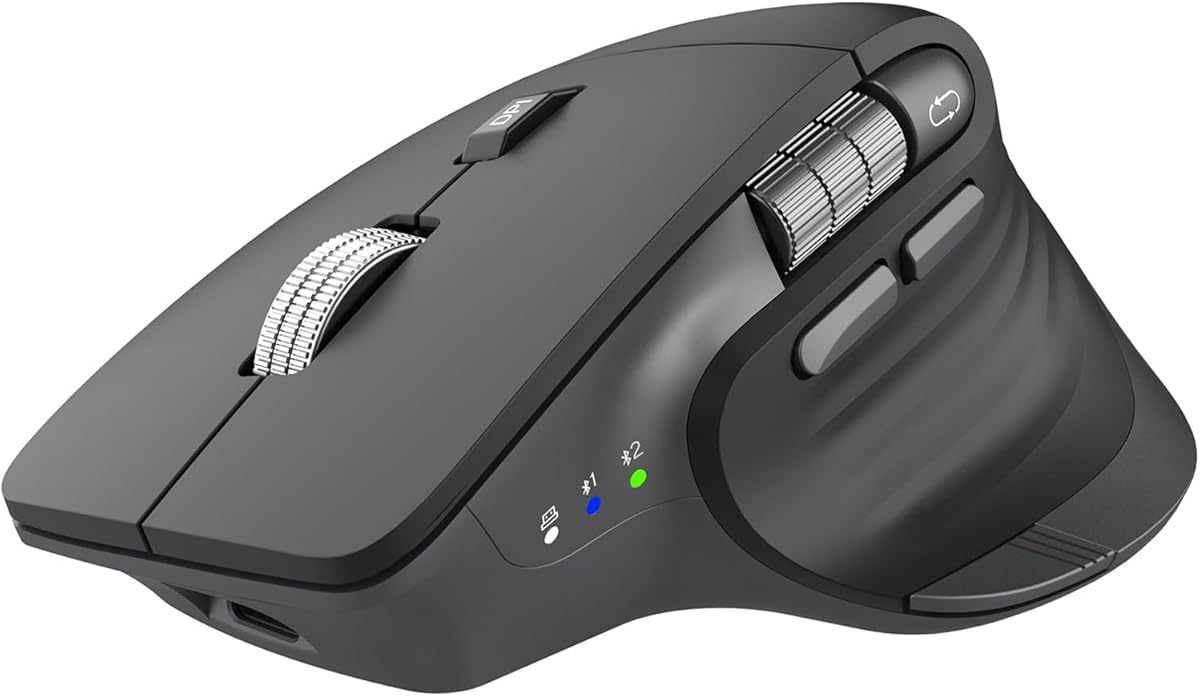
Office work rarely demands gaming-grade polling rates, but it does punish mice that make horizontal navigation awkward. The TECKNET tri-mode silent mouse addresses that gap with a dedicated side scroll wheel that lets you flick across Excel columns, Figma canvases, and wide PDF layouts without holding Shift or dragging scrollbars. Combined with a precision metal main wheel, the pointer feels tuned for analysts, coordinators, and anyone who lives inside documents rather than inside a game lobby.
Connectivity is where this model separates itself from basic two-button travel mice. You can pair two Bluetooth hosts—typically a work laptop and a personal tablet—while keeping a 2.4 GHz USB-A receiver ready for a locked-down desktop that refuses Bluetooth peripherals. A single button cycles among all three connections, which is genuinely useful when you bounce between a docked PC, a MacBook on the couch, and an iPad for note-taking. None of the buttons are programmable, so power users who remap everything in Logi Options+ should look elsewhere, but most office staff only need reliable switching and quiet primary clicks.
Six adjustable DPI steps from 800 to 4800 cover everything from pixel-precise UI work to fast multi-monitor sweeps. An LED blink pattern confirms the active step without opening software, which keeps IT-friendly plug-and-play behavior intact. Tracking handles standard desk surfaces well, though like most optical mice in this class it may struggle on glossy glass unless you add a pad. For typical laminate, fabric, and wood desks, cursor stability feels consistent through long email and spreadsheet sessions.
Silent click switches are not a luxury in 2026 open-plan offices—they are a courtesy. This TECKNET keeps left and right actuation subdued enough for video calls where your mic stays hot, and for late-night work when a partner or roommate sleeps nearby. The tradeoff is slightly softer tactile feedback compared with loud mechanical switches. Most office users prefer that compromise once they hear how much quieter their desk sounds on Teams.
Power comes from an internal rechargeable cell that tops up in roughly ninety minutes to two hours and is rated for about three months at two hours of daily use. That beats buying AA cells every quarter for heavy users, though you should keep a USB cable in your bag if you travel weekly. Auto-sleep after ten minutes of idle time preserves charge, and a low-battery LED blink gives fair warning before a meeting marathon dies mid-click.
Compatibility spans Windows, macOS, Chrome OS, and Linux, with the usual caveat that side buttons may not register on Mac. Forward and back controls that work on Windows can feel like dead plastic on macOS—a pattern repeated across several value mice in this pack. Plan on keyboard shortcuts or trackpad gestures if you are Mac-primary and depend on browser history buttons.
Choose this TECKNET when side horizontal scroll and three-device flexibility define your office day. It is our Best Spreadsheet Productivity pick because the thumb wheel saves real time on wide sheets. Skip it if you need deep software customization, large-hand ergonomics, or guaranteed macOS side-button mapping.
Hybrid workers who split time between a docked PC, a Bluetooth laptop, and a tablet, and who navigate wide spreadsheets or design files daily.
Assign Bluetooth slot one to your primary laptop, Bluetooth slot two to a tablet or secondary machine, and reserve 2.4 GHz for the office desktop that blocks Bluetooth mice. Label the switch positions on a sticky note until muscle memory forms.
M510 wins on palm support and tilt-to-scroll software features on Windows. This TECKNET counters with side horizontal scroll, rechargeable power, and three-device radios instead of one receiver-only connection.
We may earn a commission at no additional cost to you.
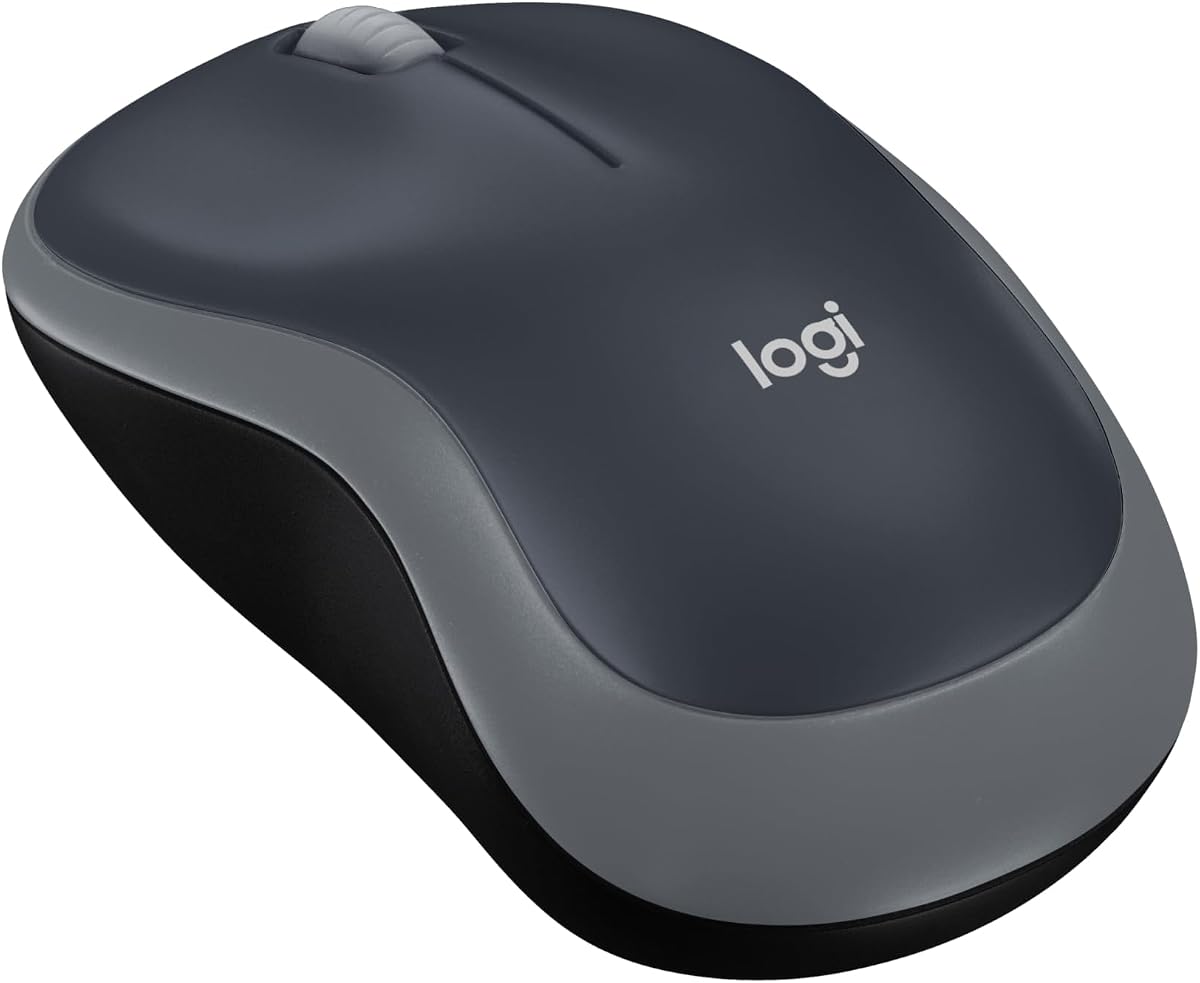
Logitech M185 Compact Wireless
Not every office needs a feature-rich productivity pointer. Sometimes the best mouse for office work is the one that appears on Monday, works instantly, and never asks you to charge a cable before a client call. The Logitech M185 has filled that role for years: a compact ambidextrous shell, a tiny nano receiver, and enough battery endurance that you forget the included AA cell exists until autumn.
The contoured shape feels neutral in either hand, which makes M185 the clearest left-hand-friendly recommendation in this pack. Right-handers also benefit from the symmetrical design when desk space is tight or when IT swaps you between left- and right-side keyboard trays. It is not a vertical ergonomic mouse and it will not fix chronic wrist pain by itself, but it beats most laptop touchpads for precision and speed according to Logitech's productivity studies—and that matches what most cubicle workers report anecdotally.
Connection is strictly 2.4 GHz through the USB-A nano receiver stored inside the mouse when traveling. Range reaches about thirty-three feet in open office conditions, and the link feels stable through typical fluorescent-lit environments. There is no Bluetooth, so MacBook users with only USB-C ports need an adapter or hub. That limitation keeps M185 best for docked desktops, Windows laptops with classic USB-A ports, and hot-desk pools where IT pre-pairs receivers.
Scrolling is line-by-line rather than free-spinning, which suits email, intranet pages, and PDF forms more than massive datasets. You will not get horizontal thumb wheels or tilt-scroll shortcuts here. If your job is ninety percent vertical browsing and document review, that simplicity is fine. Spreadsheet power users should step up to M510 or a TECKNET with side scroll instead.
Battery life is the quiet superpower. Logitech rates up to one year from the included AA battery with smart sleep when idle. Real-world results vary with daily hours and surface type, but even pessimistic estimates beat monthly charging rituals. For organizations that buy mice in bulk, AA economics and fewer dead-lithium surprises simplify fleet management.
Build quality reflects Logitech's mass-market experience: predictable click feel, decent shell flex resistance, and certified recycled plastic content in the Swift Grey finish. It is not exciting hardware, and that is the point. M185 is the mouse you recommend to interns, contractors, and anyone who loses accessories in conference rooms.
Buy M185 when you want the lowest-friction wireless pointer for standard office tasks and you have a free USB-A port. Skip it when you need silence, multi-device switching, ergonomic vertical posture, or horizontal scroll for heavy Excel work.
Hot-desk workers, left-handed staff, and IT buyers who prioritize plug-and-play reliability over customization.
Store receivers taped inside laptop bags or locked in dock drawers. M185's simplicity becomes a liability when the nano dongle walks away—label each receiver if your office shares hardware.
TECKNET adds DPI steps, rubber side grips, and sometimes Bluetooth at similar tiers. M185 wins on brand support history, ambidextrous fit, and AA longevity without recharge discipline.
We may earn a commission at no additional cost to you.
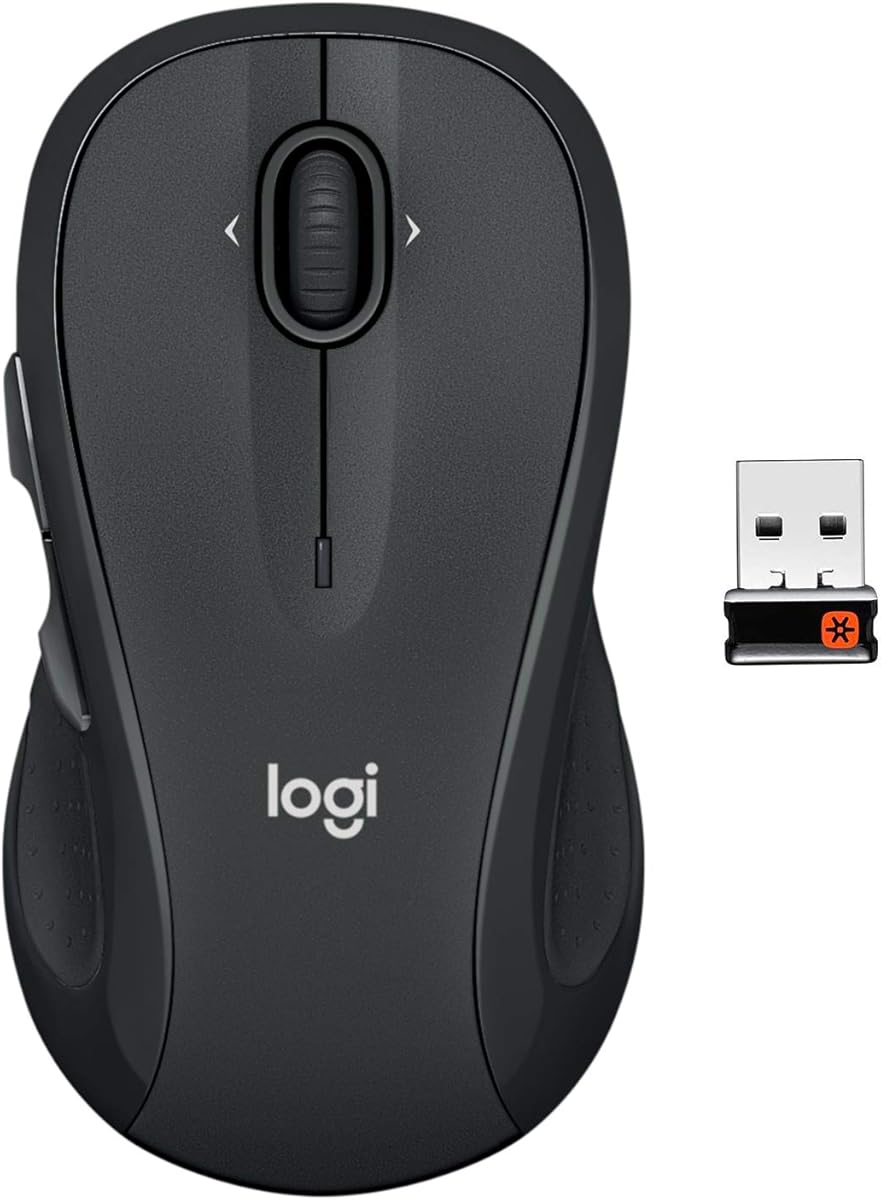
Logitech M510 Full Size Wireless
If M185 is the office mouse for minimalists, the Logitech M510 is the mouse for people who actually live at their desk eight hours a day. The full-size ambidextrous body spreads pressure across your palm with soft rubber grips and gently curved sides that keep your hand relaxed through back-to-back meetings, ticket queues, and quarterly reporting crunches. It feels like Logitech understood that comfort scales with surface area—not just DPI numbers.
Button layout goes beyond basics. Three standard buttons join dedicated back and forward controls that you can remap—with Logitech SetPoint on Windows or Logitech Control Center on macOS—to switch applications, toggle full screen, or trigger other shortcuts. Side-to-side scrolling plus zoom helps photo libraries, maps, social feeds, and wide budget spreadsheets feel less claustrophobic. Those features require software installation, so locked-down corporate images may limit customization even though basic pointing works out of the box.
Wireless connection uses Logitech's 2.4 GHz Unifying receiver, which stays in your laptop when you move between conference rooms. That reduces lost-dongle panic compared with swapping receivers daily. Unifying also lets you add compatible Logitech keyboards to the same receiver, freeing USB ports on ultrabooks—a small but real quality-of-life win on cluttered docking stations.
Battery endurance is rated for two years with an on/off switch, smart sleep, and a low-battery indicator light. AA power again favors set-and-forget office habits over USB-C charging schedules. When the indicator finally blinks, you have time to grab a spare cell from the supply closet rather than canceling a presentation because lithium died overnight.
Tracking is optical and dependable on typical office surfaces. DPI is not marketed in exotic tiers here because M510 targets reliable cursor control rather than esports flick shots. Multi-monitor setups at standard Windows pointer speeds feel natural, and Chrome OS certification adds flexibility for schools and startups on Chromebooks.
Noise is standard Logitech click volume—not silent, not obnoxiously loud. Open offices with sensitive microphones may prefer TECKNET or PHILIPS silent models, but M510 clicks rarely dominate a room the way some gaming mice do. Consider a desk mat if you want to dampen sound further.
M510 is our Best Full-Size Office Workhorse because it balances comfort, programmable extras, and multi-year battery life without jumping to flagship pricing. Choose PHILIPS or TECKNET side-scroll models if horizontal navigation is your bottleneck. Choose M185 if you need compact travel size instead of palm support.
Desk-primary workers with medium-to-large hands who want palm support, back/forward buttons, and Logitech ecosystem reliability.
Install SetPoint or Control Center once to unlock tilt-scroll and button remaps. Even mapping back/forward alone pays off if you review contracts or tickets in browser tabs all day.
Lift rotates your forearm into a vertical handshake grip for ergonomic relief. M510 stays horizontal but offers larger ambidextrous contact area and longer AA stamina without recharge cables.
We may earn a commission at no additional cost to you.
TECKNET Compact Ergonomic Mouse
Purple might not be the default corporate color, but the TECKNET compact ergonomic mouse earns attention for practical reasons: a contoured shell with rubber side grips that punches above its size class for everyday office comfort. At roughly four inches long, it occupies less desk real estate than M510 while still giving your thumb a landing pad during long Outlook sessions.
Ergonomics here target the natural curve of a medium hand rather than maximum palm coverage. That makes it a smart pick for hybrid workers who split time between a fixed desk and a kitchen table, or for people who find full-size mice cumbersome when paired with a compact keyboard. Large-handed users may feel the body is short; small-to-medium grips report less cramping than with flat travel mice.
Tracking uses a five-step DPI ladder from 800 to 2600, enough for dual monitors at moderate sensitivity without entering esports territory. Optical performance is solid on wood, fabric mouse pads, and laminate, but TECKNET explicitly warns that glass surfaces are not supported. If your office went all-in on glass desks, budget for a pad or choose a mouse with stronger surface marketing.
Connection is straightforward 2.4 GHz with a USB-A mini receiver stored under the mouse. Range reaches up to forty-nine feet in open space—more than any reasonable office needs, but proof the radio link is not anemic. Plug-and-play behavior keeps IT tickets low: no drivers, no Bluetooth pairing dance, just insert receiver and move.
Battery strategy mirrors M185 and M510: two AAA cells power the unit for up to twenty-four months with smart sleep and a physical on/off switch for weekends away. Batteries are not included, so order AAA cells with the mouse or raid the supply closet before unboxing. For finance teams watching per-seat hardware cost, AA economics remain attractive versus rechargeable cycles.
Side buttons exist for Windows workflows but are documented as incompatible with Mac. Mac-primary buyers should treat this as a three-button scroll mouse with DPI control, not a navigation shortcut device. Windows users gain an extra input for browser back or custom bindings depending on software.
This TECKNET is our Best Budget Ergonomic Grip when you want side support and DPI flexibility without tri-mode radios or recharge cables. Upgrade to the tri-mode TECKNET models if you need Bluetooth and side scroll. Step up to M510 if palm size and Logitech software matter more than compact portability.
Budget-conscious office workers with small-to-medium hands who want ergonomic side grips and long AA life in a travel-friendly body.
Add two AAA cells to your cart—the listing does not include them. Flip the power switch off before tossing the mouse in a bag to avoid drain from accidental button presses.
The grey B0CP3HTHLZ unit adds Bluetooth, recharge, and six DPI steps. This purple compact model wins on AA simplicity and slightly smaller dimensions for tight bags.
We may earn a commission at no additional cost to you.
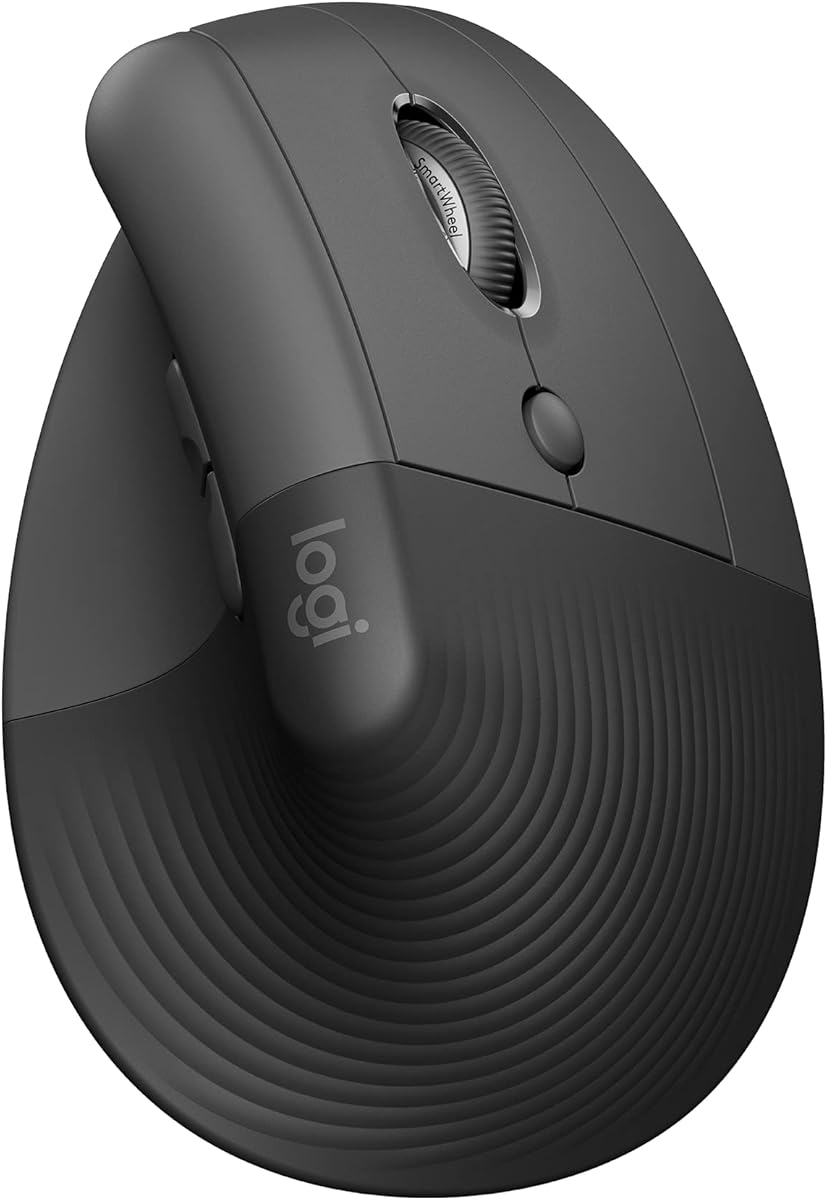
Logitech Lift Vertical Ergonomic
Horizontal mice dominate office desks, yet a growing share of workers report wrist and forearm fatigue that flat pointers never solve. Logitech Lift answers with a vertical handshake posture: your forearm rests closer to neutral, reducing the pronation that compresses tissues during marathon spreadsheet and design sessions. The graphite shell targets small-to-medium right hands with a softly textured grip and snug thumb rest that feels closer to a sculpted tool than a commodity plastic wedge.
Lift is not a gimmick shape—it carries ergonomic certification against criteria set by leading ergonomists. That does not replace medical advice, but it signals Logitech designed the angle, button placement, and scroll behavior for sustained desk work rather than short browsing bursts. Expect a learning curve: your first week may feel awkward while muscles adapt. Most converts report reduced tension after the adjustment window if the hand size match is correct.
Connectivity flexes for modern offices. Pair over Bluetooth Low Energy for MacBooks and iPads, or use the included Logi Bolt USB-A receiver when IT prefers dongle stability. Quiet clicks keep open-floor manners, while the SmartWheel shifts between ratchet lines and free spin depending on how fast you flick—useful for long policy PDFs and Slack history alike. Up to four buttons are customizable when you install Logitech software, though locked-down corporate laptops may limit that.
Battery life reaches up to two years on the advertised cell, with post-consumer recycled plastic in the graphite finish aligning with sustainability procurement checklists. Lift is heavier on ergonomics than on multi-device juggling; it is best as a primary desk mouse rather than a three-machine switcher.
Compared with PHILIPS' horizontal ergonomic shell in this pack, Lift trades traditional palm contact for vertical forearm relief. Compared with M510, Lift sacrifices ambidextrous fit and AA simplicity for posture correction. Gamers and CAD users with large hands may find the body short; Logitech markets Lift explicitly for smaller right-hand grips.
If your office pain centers on wrist extension during mousing, Lift is our Best Vertical Ergonomic pick and worth a deliberate two-week trial. If you need horizontal scroll wheels or three-device switching more than posture change, prioritize TECKNET side-scroll or PHILIPS instead.
Buy Lift when ergonomic intervention is the goal and you are right-handed with small-to-medium hand measurements. Skip it for left-handers, large palms, or teams that standardize on the cheapest AA mouse for everyone.
Right-handed office workers with wrist or forearm discomfort who want a certified vertical mouse with Logitech software support.
Lower pointer speed for the first week while your grip relearns vertical movement. Keep your old mouse nearby for hour-long transitions rather than forcing an all-day switch on day one.
PHILIPS stays horizontal with side scroll and dual USB-A/C receiver. Lift prioritizes vertical forearm angle and SmartWheel feel over thumb-side horizontal scrolling.
We may earn a commission at no additional cost to you.
TECKNET Dual-Mode Rechargeable
Hybrid schedules created a new office mouse requirement: something that wakes on your docked desktop via 2.4 GHz, then follows your laptop to the conference room over Bluetooth without a ten-minute pairing ritual. The TECKNET dual-mode rechargeable grey mouse targets that rhythm with a physical slide switch that jumps between two remembered hosts faster than software device menus.
Silent operation is central to its office pitch. Clicks stay subdued for libraries, patient waiting areas if you do medical admin, and open-plan pods where microphone bleed matters. The shell is explicitly sized for small-to-medium hands—TECKNET acknowledges larger-handed users might still enjoy it, but M510 or PHILIPS are safer if your palm overflows the body.
Six DPI presets mirror the higher-end TECKNET models, topping out at 4800 for fast cursor travel across ultrawide monitors. Recharge time lands between ninety minutes and two hours, with roughly three months of endurance at two hours of daily use. Low-battery instability can affect connection quality, which acts as a built-in reminder to plug in before an important presentation.
Compatibility covers Windows, macOS, Chrome OS, and Linux for primary buttons and scrolling. macOS users should again expect side buttons to be inactive—a recurring theme in this pack that Windows-primary buyers can ignore but Apple shops must plan around.
Against the tri-mode TECKNET with side scroll, this model drops the third device channel and horizontal thumb wheel in exchange for a lower complexity footprint and strong ratings. Against Logitech M185, it adds Bluetooth, recharge, and DPI tiers while keeping a similarly compact silhouette.
Our Best Dual-Device Value badge reflects the sweet spot between price, silence, and dual-radio convenience. It is the mouse to recommend when someone says they use a work PC and a personal laptop daily but do not need tablet triage or Excel side scroll.
Skip this TECKNET if three-device switching or horizontal scroll is non-negotiable—choose the black tri-mode side-scroll model or PHILIPS instead. Skip it if you refuse to manage recharge cycles and prefer AA simplicity from M510.
Two-machine hybrid workers who want silent clicks, dual connectivity, and adjustable DPI without flagship ergonomics pricing.
Plug in every Sunday night if you mouse more than three hours daily. Connection hiccups when battery is low are intentional nudges—do not ignore them before client calls.
The black tri-mode unit adds a third connection and side horizontal scroll. This grey dual-mode model is simpler and often easier to stock for teams that only switch between laptop and dock.
We may earn a commission at no additional cost to you.
hunart H6 Lightweight Wireless
Office work no longer happens at one desk. The hunart H6 wireless mouse chases the mobile professional with a 49-gram body that feels closer to a feather than the full-size anchors in this pack. When you shuttle between headquarters, coworking spaces, and home offices, every ounce in your bag matters—and H6 bets that lightness plus silent clicks beats feature overload.
Dual-mode wireless keeps pairing flexible. Use Bluetooth on a MacBook Air with limited ports, or plug the 2.4 GHz receiver into a desktop dock when you return to base. There is no three-device carousel; you pick a mode and a host like classic travel mice. That simplicity reduces confusion for users who found multi-switch TECKNET models fiddly.
DPI stops at three steps—800, 1200, and 1600—which is enough for email, CRM tools, and slide decks on a single or dual monitor, but less headroom than 4800-capable competitors. Office workers who never touch sensitivity settings may never notice. Designers spanning four monitors might feel constrained.
USB-C charging through a 500 mAh pack fits modern cable drawers. You likely already carry USB-C for phone and laptop; the mouse piggybacks that habit instead of demanding proprietary plugs. Silent buttons protect cafe etiquette and shared apartment desks where click echo travels.
Ergonomics are right-hand biased with a compact 2.64 by 4.29 inch footprint. TECKNET and the listing itself warn large hands away. Small-to-medium grips get a natural right-hand arc without the bulk of M510. Left-handers should look at M185 instead.
hunart is newer to many buyers than Logitech or TECKNET, but the H6 addresses a clear niche: lightweight daily carry with quiet manners. It will not replace PHILIPS for spreadsheet analysts or Lift for wrist therapy. It will replace a heavy mouse that never leaves your backpack because it feels tiring by Thursday.
Choose H6 as our Best Lightweight Travel Pick when portability and silence outrank DPI tiers and side scroll. Stay with M510 or PHILIPS if you are desk-fixed and want maximum palm support.
Consultants, sales reps, and hybrid workers who travel light and mouse on varied surfaces with small-to-medium right hands.
Store the USB receiver in the mouse compartment or a labeled pouch—at 49 g it is easy to misplace the whole unit in a cluttered bag.
M185 is lighter on features but heavier on brand fleet history and AA simplicity. H6 adds recharge, silence, and Bluetooth at the cost of fewer DPI steps.
We may earn a commission at no additional cost to you.
CITLLA packs an unusual scroll duo into an ergonomic shell aimed at laptop-first office staff: a flying metal main wheel for rapid vertical movement and a thumb-side horizontal wheel for spreadsheet columns and wide canvases. If your workday rhythm is jumping between lengthy PDFs, Excel models, and browser research tabs, that hardware pairing can feel faster than shift-scroll gymnastics on a basic three-button mouse.
Multi-device connectivity matches the best tri-mode TECKNET entries: dual Bluetooth plus 2.4 GHz USB receiver, switchable among three hosts with one click. That includes tablets and phones in marketing copy, which helps coordinators who review dashboards on an iPad during standups then return to a Windows desktop for data entry.
Recharge via USB-C yields up to sixty days per charge in manufacturer claims—shorter than some TECKNET three-month figures but still reasonable for office cadence. Near-silent clicks protect shared spaces, and five DPI levels up to 4800 give analysts headroom on multi-monitor setups.
Windows users get a dedicated return-to-desktop button—a niche productivity shortcut that power users either love or ignore. macOS behavior for side features should be verified against your workflow; like many value mice, forward and back buttons may not map cleanly on Apple systems.
Rating at 4.3 is the lowest in this pack, which warrants reading recent buyer feedback for quality-control patterns before a fleet purchase. CITLLA is less familiar than Logitech for corporate rollouts, though individual buyers prioritizing scroll hardware may accept that trade.
Versus TECKNET B0FB9BR23C, both offer side scroll and tri-mode radios. CITLLA emphasizes flying scroll branding and return-to-desktop; TECKNET emphasizes metal wheel aesthetics and slightly higher average rating. Versus PHILIPS, CITLLA chases similar spreadsheet users with different software story and without USB-C on the receiver.
CITLLA earns our Best Flying Scroll Feature badge for workers who live in long documents and want horizontal thumb control without flagship pricing. Enterprise buyers may still prefer Logitech or PHILIPS for vendor familiarity.
Document-heavy roles—finance, legal support, research—who want dual scroll wheels and three-device switching on a rechargeable shell.
Order one unit for a power user week-long trial. Confirm scroll wheel feel and Bluetooth stability on your exact laptop models before standardizing across a team.
Both target spreadsheet productivity with horizontal scroll. PHILIPS brings dual USB-A/C receiver and higher rating; CITLLA counters with flying scroll marketing and return-to-desktop for Windows.
We may earn a commission at no additional cost to you.
TECKNET's tri-mode thumb-rest mouse is the connectivity maximalist of this roundup: Bluetooth 5.0, Bluetooth 3.0 fallback, and 2.4 GHz USB-A in one shell, with seamless switching among three paired devices within a thirty-three-foot range. For office workers whose desk hosts a company laptop, a personal tablet, and a testing VM on a mini PC, that flexibility removes daily re-pairing friction.
Ergonomics focus on a left-side thumb contour that keeps the wrist in a more neutral alignment during extended typing-and-mousing cycles. It is not vertical like Logitech Lift, but the rest pad gives analysts and customer-support reps a place to land the thumb instead of hovering tense above a flat shell. Right-handers benefit most; left-handers should avoid this asymmetry.
Silent clicks hit the ninety-nine-percent quieter marketing TECKNET uses across its office line— believable enough that coworkers stop commenting on your mic during standups. Six DPI steps up to 4800 handle everything from CRM data entry to casual photo cropping. Forward and back side buttons accelerate web research on Windows; Mac users must again plan alternate shortcuts.
The 700 mAh rechargeable pack is larger than some siblings, supporting long stretches between USB-C top-ups. TECKNET claims three months at two hours daily—align recharge with your Friday shutdown ritual if you are heavy user. Registered buyers get a thirty-six-month warranty, unusually long for a value mouse and useful for small businesses without dedicated IT asset teams.
Durability marketing cites six-million-click rated primary buttons, which matters when the same mouse survives three years of ticket queues. With four TECKNET SKUs in this pack, choose this one when tri-mode plus thumb rest beats side horizontal scroll. Choose B0FB9BR23C when Excel columns dominate; choose B0CP3HTHLZ when two devices are enough.
Compatibility spans Windows, Android, macOS, and iOS for core functions, with tablets and iPads supported for travel workflows. Side buttons on Mac remain the predictable weak point.
This model earns Best Tri-Mode Connectivity because it maximizes radios and warranty without assuming everyone needs a side scroll wheel. It is the TECKNET to stock when IT asks for one SKU that covers mixed Windows and mobile device farms.
Right-handed multitaskers who rotate among laptop, tablet, and desktop daily and want thumb-rest ergonomics with silent tri-mode radios.
Complete TECKNET registration to unlock the thirty-six-month coverage—worth five minutes for a mouse that will see heavy daily clicks.
Pick side-scroll B0FB9BR23C for spreadsheet horizontal work. Pick this thumb-rest tri-mode unit when device switching count matters more than column scrolling.
We may earn a commission at no additional cost to you.
PHILIPS Ergonomic Wireless Mouse
PHILIPS enters this office mouse pack as the horizontal ergonomic heavyweight: a contoured right-hand shell, anti-slip thumb rest, and silent switches tuned for the nine-to-five grind rather than after-hours gaming. If your wrist complains after flat compact mice but you are not ready for a vertical Lift experiment, this is the most complete productivity shape here.
Silent left and right buttons are a genuine open-office feature. When your Teams mic stays unmuted, loud clicks become part of the meeting audio. PHILIPS' noise-reduced switches keep typing and clicking from competing with your voice—a quality-of-life upgrade coworkers notice before you do.
Dual scroll hardware separates PHILIPS from basic office mice. The main wheel handles vertical movement; a thumb-side horizontal wheel slices across Excel columns and wide timelines without awkward keyboard modifiers. Analysts, operations staff, and anyone building models in wide sheets should trial horizontal scroll for one afternoon—it often converts skeptics faster than DPI specs.
Multi-device reality is thoughtfully solved. Bluetooth pairs with multiple hosts, while the included 2.4 GHz receiver offers both USB-A and USB-C plugs so modern laptops without classic ports skip fragile adapters. Switch among three devices without rebuilding pairings each morning—a workflow win for consultants who leave a receiver in a dock and Bluetooth on a travel laptop.
The optical sensor exposes five DPI steps from 800 to 4000, enough for multi-monitor desks and pixel work without entering esports marketing territory. Tracking stays stable on typical office surfaces; ultra-gloss glass may still want a pad. Emergency top-up charging—about five minutes for an hour of use—saves meetings when you forget to plug in over the weekend.
PHILIPS software can map macros to forward, back, and middle-click buttons, turning the mouse into a lightweight control surface. It is not as deep as Logitech Options+, but sufficient for browser shortcuts and presentation controls. Right-hand medium-to-large grips fit best; left-handers and small travelers should shop elsewhere in this pack.
PHILIPS is our Best Overall for Office Work because it combines silence, ergonomic contour, horizontal scroll, and dual-port receiver in one coherent productivity story. Choose Lift if vertical posture is mandatory. Choose M510 if you need ambidextrous AA simplicity. Choose TECKNET if budget trims every euro.
Right-handed desk-primary professionals who want silent clicks, side horizontal scroll, and flexible Bluetooth plus USB-A/C connectivity.
Disable trackpad horizontal scroll for one week and rely on the thumb wheel alone. If that feels faster, PHILIPS will earn its keep within a month of reporting season.
M510 offers ambidextrous full-size comfort and Logitech software depth with AA power. PHILIPS counters with silence, horizontal thumb scroll, rechargeable emergency top-up, and dual-port receiver convenience.
We may earn a commission at no additional cost to you.

Open-plan offices, glass meeting rooms, and bedroom WFH setups punish loud clicks. TECKNET silent models, PHILIPS noise-reduced switches, Logitech Lift quiet clicks, and hunart H6 silent buttons reduce social friction on Teams and Zoom. Standard Logitech M185 and M510 clicks are fine in private offices but may annoy sensitive coworkers. If anyone shares acoustic space with you, move silence near the top of your checklist beside ergonomics.
Touchpad refugees often underestimate how much a flat compact mouse contributed to wrist fatigue. Four-plus hours of daily mousing favors contoured shells—PHILIPS horizontal ergonomic, Logitech M510 full palm, or TECKNET side-grip models. Chronic pronation pain may warrant Logitech Lift vertical posture. Travel-heavy roles under three hours daily can prioritize hunart H6 lightness or M185 compact simplicity. Left-handers should shortlist ambidextrous M185 and M510 before forcing right-hand contours.
One machine only: M185 or purple TECKNET compact suffice. Two machines—work laptop plus dock: TECKNET dual-mode grey or PHILIPS with Bluetooth plus receiver. Three hosts including tablet: TECKNET tri-mode models, CITLLA, or PHILIPS multi-device. Buying three-device switching you never use adds switch confusion; buying one-device mice when you daily hop laptops adds pairing fatigue.
Basic vertical wheels handle email and intranet pages. Wide Excel models, legal PDFs, and design timelines benefit from thumb-side horizontal scroll on PHILIPS, TECKNET B0FB9BR23C, and CITLLA, or tilt-scroll on M510 with Logitech software. Evaluate the documents you touch every hour—not hypothetical gaming DPI.
M185, M510, and purple TECKNET favor AA cells with one- to two-year claims—ideal when you hate charge rituals and keep spares in a drawer. Rechargeable TECKNET, PHILIPS, hunart, CITLLA, and Lift fit travelers who already live on USB-C. Assume real-world endurance lands below brochure maxima, especially with heavy daily use or RGB elsewhere on the desk.
Several value mice document that forward and back side buttons do not work on Mac even when Windows mapping succeeds. Plan keyboard shortcuts or choose Logitech software-supported models if browser navigation buttons are mandatory. PHILIPS and Lift offer stronger Mac stories than bare TECKNET side buttons.
For most desk-primary professionals, the PHILIPS ergonomic wireless mouse is the strongest overall pick thanks to silent clicks, right-hand contour, thumb-side horizontal scroll, and Bluetooth plus USB-A/C receiver flexibility. Logitech M510 wins if you want full-size ambidextrous comfort and AA power without recharge. TECKNET B0FB9BR23C is the spreadsheet specialist when side horizontal scroll and three-device switching matter most.
Not always, but silent or quiet switches help whenever you take video calls with an open mic, work in open plans, or share a home with light sleepers. PHILIPS, TECKNET silent models, hunart H6, and Logitech Lift all prioritize reduced click noise. Standard M185 and M510 clicks are acceptable in private offices. Treat silence as a courtesy feature with real meeting-quality benefits rather than a gimmick.
Vertical mice like Logitech Lift can reduce forearm pronation for some users by holding the hand in a handshake posture. They require an adaptation period and fit small-to-medium right hands best. Horizontal ergonomic mice like PHILIPS help through contour and thumb support without rotating the grip. Severe or persistent pain deserves professional assessment—a mouse swap helps many people but is not medical treatment.
Bluetooth frees ports on modern laptops and pairs with tablets. USB receivers often feel more stable on locked-down corporate desktops and older docks. Many strong office picks—including PHILIPS, TECKNET tri-mode models, hunart H6, and Lift—offer both so you are not locked into one strategy. Match the radio to the machine you use most hours, and keep the alternate mode as backup.
Several listings explicitly state forward and back buttons are unsupported on macOS even when Windows mapping works. This is usually firmware and OS compatibility rather than a defective unit. Mac-primary buyers should verify behavior before purchase or plan on keyboard shortcuts. Logitech software-supported models generally offer clearer Mac guidance than bare value TECKNET side buttons.
Most document and browser work feels fine between 800 and 1600 DPI with system pointer speed tuned to taste. Higher ceilings like 4000 or 4800 help on ultrawide or multi-monitor setups. Chasing maximum DPI rarely improves comfort. Prioritize shape, silence, scroll hardware, and connection flexibility first, then adjust sensitivity after a full workday.
Modern rechargeable packs in PHILIPS, TECKNET, hunart, and CITLLA typically cover weeks to months between top-ups at moderate daily hours. PHILIPS adds emergency five-minute charging for about an hour of tracking—a practical meeting saver. If you forget to charge anything ever, AA models like M510 and M185 remain safer. Match the maintenance chore you will actually follow.
Choose models with thumb-side horizontal scroll—PHILIPS, TECKNET B0FB9BR23C, and CITLLA—or Logitech M510 with tilt-scroll software on Windows. Horizontal movement saves wrist strain on wide sheets compared with shift-scroll or scrollbar dragging. Pair scroll hardware with enough DPI headroom for multi-monitor analyst setups.
Yes. Dual-mode and tri-mode mice switch between a docked 2.4 GHz desktop and a Bluetooth laptop—TECKNET grey dual-mode, PHILIPS, and tri-mode TECKNET black are examples. Ultra-light hunart H6 targets travelers who prioritize bag weight. Full-size M510 stays desk-fixed while M185 moves with a nano receiver. Buy for the number of hosts you actually switch among daily.
Standardization simplifies support but ignores hand size and role differences. A practical approach: one fleet SKU for general staff—often M185 or M510—and approved ergonomic alternates like PHILIPS or Lift for request-based wrist accommodations. Document macOS side-button limits in the onboarding wiki to prevent ticket noise.
The best mouse for office work in 2026 depends on whether you optimize for silent ergonomic productivity, full-size desk comfort, or multi-device spreadsheet speed. For most professionals in this pack, the PHILIPS ergonomic wireless mouse is the clearest overall pick thanks to quiet clicks, horizontal thumb scroll, and Bluetooth plus dual-port receiver flexibility. Logitech M510 remains the full-size ambidextrous workhorse with two-year AA life, and TECKNET B0FB9BR23C leads when side scroll and three-device radios define your workflow.
The rest of the pack fills honest niches: Logitech Lift for vertical wrist relief, hunart H6 for lightweight travel, purple TECKNET compact for budget ergonomic grips, dual-mode TECKNET grey for two-machine hybrids, tri-mode TECKNET thumb-rest for connectivity maximalists, CITLLA for flying scroll experimentation, and M185 for plug-and-play fleet simplicity. Match hand size, silence needs, and scroll habits before chasing DPI marketing.
A great office mouse should make the touchpad optional without introducing new friction. Start from the devices you actually switch among, pick the battery or recharge habit you will maintain, and let horizontal scroll and silent switches break ties when two models look similar on paper.