Best Overall Spreadsheet Mouse
Logitech MX Master 3S

- MagSpeed electromagnetic scrolling built for fast sheet travel
- Quiet clicks and 8K DPI tracking even on glass desks
- Logi Options+ app profiles plus FLOW cross-computer control
Expert Review & Guide
Excel rewards hardware that moves sideways as confidently as it moves up and down. The best mouse for Excel in 2026 is less about flashy 30K DPI gaming specs and more about horizontal scroll, quiet clicks during shared offices, ergonomic shapes that survive pivot-table marathons, and buttons you can bind to copy/paste, freeze panes habits, or app switching. A great spreadsheet mouse disappears while your brain stays inside formulas.
This pack blends flagship productivity tools like Logitech MX Master 3S and Lift vertical, side-scroll ergonomic options from Philips and Acer, a dual-mode TECKNET traveler, a button-heavy Redragon wireless for macro addicts, G502 Hero for people who already aim with eleven buttons, and three Excel shortcut desk mats that turn your desk into a cheat-sheet cockpit. We treat mats as workflow multipliers, not pretend they are pointing devices.
Below: three top picks for different spreadsheet lifestyles, a comparison table, detailed reviews, and a buying guide focused on columns, comfort, and multi-monitor finance desks.


As an Amazon Associate we earn from qualifying purchases. We may earn a commission at no additional cost to you.
Separate pointing devices from shortcut mats in the table. For mice, prioritize horizontal navigation, silence, and comfort; for mats, prioritize legibility and desk coverage.
MX Master 3S is the default answer when someone asks for the best mouse for Excel without wanting a debate. MagSpeed scrolling is the spreadsheet feature: race down thousands of rows, then shift into precise ratchet control when you land near the cell that matters. Quiet clicks keep open offices civil during marathon reconciliation days.
The sculpted right-hand shape and thumb cluster are built for all-day posture. App-specific profiles in Logi Options+ let Excel get different binds than your browser. Horizontal navigation and custom buttons reduce how often you drag the scrollbar like it is 2009.
8K DPI tracking that works on glass sounds like flex until you sit at a modern standing desk with a glass top and your old mouse ghost-walks. Multi-device Bluetooth pairing covers laptop and desktop; FLOW can move text and files between Windows and macOS machines when both run the companion app.
Battery life is typically measured in months of workdays, though real results vary. The bigger adoption cost is learning Options+ well enough that the thumb buttons stop being decorative. Spend an evening mapping Paste Special, Undo, and desktop switching if those are your repeats.
Buy MX Master 3S when Excel is a career tool and you want the least friction per hour. Add a Pixiecube mat if you still hunt shortcuts. Choose Philips or Acer when a dedicated side-scroll wheel is the feature you care about most for wide workbooks.
Map one thumb button to Undo, one to Ctrl+Shift+V style paste habits via keyboard macros if available, and keep gesture button for app switching between Excel and Teams.
Fling for long travel, tighten fingers for line-by-line review. The mode shift is the skill; the hardware just enables it.
We may earn a commission at no additional cost to you.
PHILIPS Ergonomic Wireless Mouse
Philips built this mouse for the spreadsheet complaint everyone knows: dragging across columns is miserable. A tactile main wheel handles rows; a thumb-side wheel handles horizontal movement through wide models. That dual-wheel story is why it earns a top-pick badge beside MX Master.
Silent switches and an anti-slip thumb rest target eight-hour analyst shifts without waking the open-floor microphone. Multi-device Bluetooth plus a dual USB-A/C 2.4G receiver means you can jump among PC, Mac, and tablet workflows without packing a hub of adapters.
DPI from 800 to 4000 covers careful cell selection and fast multi-monitor leaps. A 500mAh pack with roughly twenty-five workdays of heavy-use framing and a five-minute emergency top-up narrative matches real consulting panic cycles—dead mouse, Zoom in ten minutes.
Forward, back, and middle-click customization through Philips software can turn the mouse into a mini control deck. Even without deep macros, hardware side scroll alone upgrades Excel navigation.
Choose Philips when horizontal sheet travel is your daily pain. Choose MX Master when MagSpeed + FLOW + glass tracking justify the ecosystem. Choose Acer if you specifically want a vertical handshake angle with side scroll.
Keep left hand on Ctrl/Shift modifiers, right thumb on horizontal scroll, and stop living inside the bottom scrollbar.
Use USB-C side of the dual receiver on modern ultrabooks; save Bluetooth pairing for iPad review sessions.
We may earn a commission at no additional cost to you.
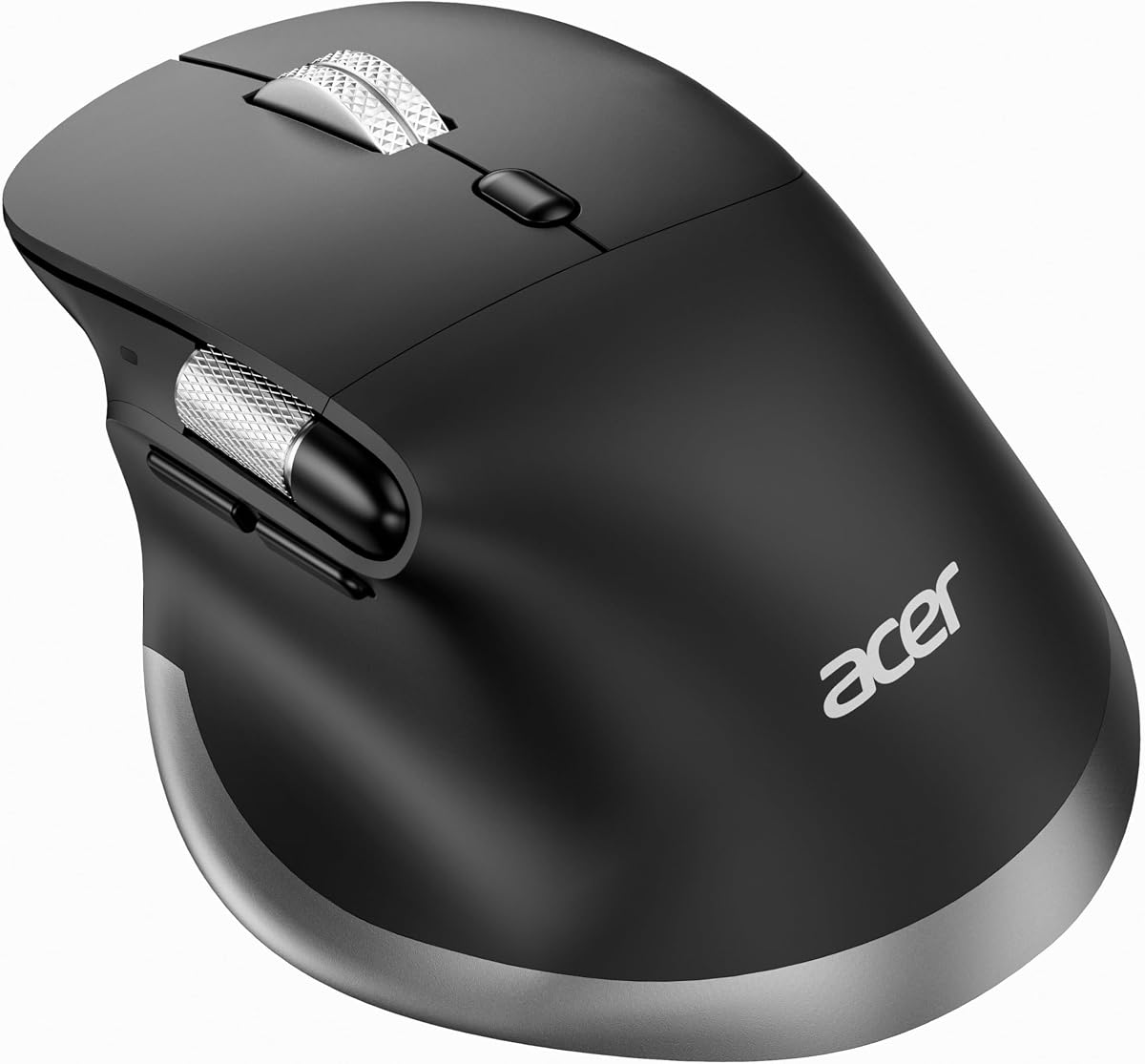
Acer Ergonomic Side Scroll Mouse
Acer’s ergonomic side-scroll mouse tries to solve two spreadsheet injuries at once: wrist pronation and horizontal navigation. The handshake posture aims medium-to-large hands toward a more neutral alignment, while the thumb scroll moves left and right through wide pages, timelines, and sheets.
Important caveats from the listing: remove the bottom film before first use, expect an adaptation window, and understand the side scroll supports left-right movement when content is wider than the screen—but is not customizable. Those constraints are still fine for pure Excel column hopping.
Dual-mode Bluetooth and 2.4G with a mode button cover three devices. DPI steps through 800 to 4800 help multi-monitor finance desks. A 108g-class moderate weight can feel planted for careful cell work. USB-C charging and onboard receiver storage support travel audits and client sites.
If you have never used a vertical mouse, do not judge it after forty-five minutes. The first week can feel wrong even when the second week feels like relief.
Buy Acer when vertical comfort and side scroll must ship together. Buy Lift if you want Logitech’s quieter vertical ecosystem without a dedicated side wheel. Buy Philips if you prefer a more conventional right-hand angle with side scroll.
Alternate vertical mouse blocks with stretch breaks from the Pixiecube exercise cues. Hardware helps; movement still matters.
Tracking issues on day one are often the protective film, not a dead sensor. Check the bottom before troubleshooting Bluetooth.
We may earn a commission at no additional cost to you.

Lift is Logitech’s more compact vertical path for people who liked the MX idea but want handshake posture. The 57-degree angle and soft thumb rest are explicitly pitched at small-to-medium right hands. Quiet clicks and SmartWheel scrolling keep Excel navigation smooth without announcing every cell selection.
You will not get MagSpeed’s electromagnetic drama or a Philips-style side wheel. You will get a calmer forearm posture and enough customizable buttons to matter. Logi Bolt plus Bluetooth cover modern office RF chaos better than bargain dongles sometimes do.
Battery claims stretch to about two years depending on use—excellent for travelers who refuse yet another rechargeable gadget. Recycled plastic content notes may matter for corporate procurement stories.
For Excel, Lift shines when wrist comfort is the crisis and sheets are only moderately wide. For enormous financial models with dozens of columns always offscreen, pair Lift with keyboard horizontal scroll habits or pick a side-scroll mouse instead.
Choose Lift for compact quiet vertical comfort in the Logitech ecosystem. Choose MX Master 3S for scroll supremacy. Choose Acer for vertical plus dedicated side scroll.
If your fingers overhang small mice badly, skip Lift and look at Acer’s medium-to-large guidance or MX Master’s fuller shell.
Whisper-quiet clicks are as important as vertical angle on shared trading or audit floors.
We may earn a commission at no additional cost to you.
Pixiecube Excel Cheat Sheet Desk Pad
Pixiecube will not move your cursor, and it might still be the highest-leverage Excel purchase in the pack. A large desk mat printed with organized shortcuts means fewer tab-outs to search “how to flash fill” during month-end. The best mouse for Excel becomes even better when your left hand stops hunting key combos blindly.
At roughly 31.5 by 11.8 inches, the pad fits keyboard and mouse with room to swipe. Micro-weave fabric supports accurate tracking for whichever mouse you choose—MX Master, Philips, or even G502. Stitched edges and a non-slip rubber base survive real office wear.
Sections for navigation, selection, formatting, data, and functions mirror how analysts actually work. Built-in desk exercise diagrams are a small wellness feature that looks gimmicky until your shoulders remind you why they exist.
Giftability is high for coworkers drowning in sheets. Just know corporate-formal desks may prefer the cleaner multi-app mat without joke lines.
Buy Pixiecube with any strong mouse from this list. It is a multiplier, not a competitor to MX Master.
Pick three new shortcuts per week from the mat. Mastery compounds faster than buying another DPI step.
Measure your desk depth. Ultra-deep mats need space; otherwise choose the compact Kinevolve pad for travel.
We may earn a commission at no additional cost to you.

If your job is “Excel plus the deck plus the memo,” this multi-app shortcut mat is more honest than an Excel-only surface. Word and PowerPoint blocks matter when your workbook ends life as a slide. Windows shortcuts help window management across multi-monitor analyst setups.
At 27.6 by 11.8 inches it is still a full desk mat with smooth tracking fabric and a non-slip base. Fade-resistant printing and stitched edges aim at longevity—important when you glance at the same Ctrl combos for years.
Pair it with Philips or MX Master so hardware scrolling and software shortcuts reinforce each other. The mat teaches; the mouse executes faster navigation.
Compared with Pixiecube, you trade some Excel-specific depth and stretch diagrams for broader Office coverage. Compared with Kinevolve, you gain desk real estate and lose portability.
Buy this mat for hybrid Office professionals. Buy Pixiecube for Excel-first extremists. Buy Kinevolve for laptop-bag life.
Waterproof top layers forgive the occasional spill. Wipe promptly anyway—shortcuts are useless under dried latte film.
A shortcut mat is a kinder onboarding tool than a 40-page PDF PDF nobody opens.
We may earn a commission at no additional cost to you.

TECKNET Bluetooth Dual-Mode Mouse
TECKNET’s dual-mode mouse is the traveling spreadsheet compromise: Bluetooth for MacBooks and locked-down laptops, 2.4G receiver for Windows desktops, slide switching between two devices, and six DPI steps to 4000. It will not match MX Master’s MagSpeed theater, but it survives client-site bag life.
Ergonomics are compact and contoured rather than vertical medical. Large hands should look elsewhere. Auto-sleep extends AA life with a claimed long runtime; batteries are required. Back/forward buttons help Windows browsing between documentation and workbooks.
The listing notes audible clicks, so open-office silence seekers should prefer MX Master, Lift, or Philips. TECKNET wins on portability and dual-mode simplicity instead.
For Excel specifically, raise DPI on multi-monitor hotel setups and lower it for dense sheet editing. Without side scroll, lean on Shift+wheel habits or keyboard navigation for wide columns.
Buy TECKNET as a secondary travel mouse. Buy Philips/Acer/MX as the main desk weapon for sheet-heavy careers.
Mouse, spare AAs, and a compact shortcut pad like Kinevolve cover most emergency analytics trips.
Expect limited side-button joy on macOS. Buy for shape and dual-mode, not browser shortcuts.
We may earn a commission at no additional cost to you.

Kinevolve Compact Shortcut Pad
Kinevolve shrinks the cheat-sheet idea to an actual travel mouse pad. At about 11.8 by 9.8 inches, it slides beside a laptop on airplane trays and tiny hotel desks where a 31-inch mat is fantasy. You get essential Office shortcuts without colonizing an entire work surface.
Tracking fabric and a non-slip base keep TECKNET or Philips travel mice honest. Waterproofing forgives cafe mishaps. Stitched edges resist the fray that kills cheap pads in backpacks.
Use it as a learning scaffold: glance, try, repeat. Over time you will need the printed crutch less—but during busy season, cognitive load is high enough that glancing beats Googling.
Compared with XL mats, you sacrifice immersion and keyboard rest area. Compared with no mat, you gain both tracking consistency and memory cues.
Buy Kinevolve for mobile Excel life. Buy Pixiecube or the larger multi-app mat for permanent desks.
Roll loosely rather than hard-folding to protect printed corners.
Compact pads survive library carrels where XL mats are rude to neighbors.
We may earn a commission at no additional cost to you.

G502 Hero is the gamer-analyst crossover. Eleven programmable buttons and a hyper-fast scroll wheel can absolutely serve Excel if you invest in G HUB bindings for freeze panes toggles, paste special sequences, or row insert macros. It is not marketed as a spreadsheet mouse—and that is why some power users love it.
HERO sensor precision is overkill for cell selection and still pleasant on multi-monitor setups. Adjustable weights help if you like a heavier, more deliberate feel while auditing formulas. Onboard memory means a LAN-party mouse can also be a client-site macro mouse.
Silence seekers should look away; crisp gaming clicks are audible. RGB should be disabled in shared offices. With those caveats managed, G502 becomes a programmable spreadsheet deck.
Compared with Redragon’s 16-button wireless MMO mouse, G502 is the more famous shape with a stronger sensor reputation. Compared with MX Master, it trades quiet ergonomics for raw bind count.
Buy G502 when macros matter more than silence. Buy MX Master when office manners and MagSpeed matter more than eleven buttons.
Bind frequently used ribbon actions, zoom presets, and application switching. Start with four buttons; do not map eleven on day one.
Turn lighting off and use a black pad. Suddenly it looks less “gamer” and more “specialist tool.”
We may earn a commission at no additional cost to you.

Redragon’s M901P-KS is an MMO mouse reinvented as an Excel macro board for people who think in buttons. Twelve side keys plus additional programmable controls mean entire paste-special menus, formatting packs, and navigation chains can live under your thumb. Wireless rechargeable freedom suits standing desks where cables yank coffee cups.
DPI up to 16,000 and adjustable polling are gaming heritage that still helps multi-monitor leapfrogging. Five memory profiles can separate “month-end Excel,” “everyday browser,” and actual games. Roughly seventy hours with RGB off keeps the battery lecture short.
The shape is not MX Master elegance. Accidental side clicks are a real onboarding tax—many users disable outer keys until muscle memory arrives. Silence is not the selling point; programmable density is.
If your Excel pain is “I repeat the same ten command chains,” this mouse can out-leverage a fancy scroll wheel. If your pain is “my wrist hurts and columns are wide,” Philips/Acer/MX are wiser.
Buy Redragon for macro maximalism. Buy G502 for a slightly more conventional programmable shape. Buy shortcut mats so you still learn the keyboard foundations under those macros.
Keep a clean work profile with RGB off and only six active macros. Unused live keys cause expensive mistakes in shared workbooks.
Wireless helps, but keep a charging schedule during lunch so afternoon forecasting does not die mid-model.
We may earn a commission at no additional cost to you.

Wide workbooks punish mice without side scroll, MagSpeed-style fast wheels, or easy tilt binds. If you constantly drag the bottom scrollbar, prioritize Philips, Acer, or MX Master.
Open offices and recorded calls amplify click noise. MX Master, Lift, and Philips lean quiet. Gaming shells need RGB-off and acceptance of louder switches.
Vertical options (Lift, Acer) can reduce pronation pain. Conventional ergo shapes (MX Master, Philips) suit users who dislike handshake mice. Adaptation time is real—plan it outside of close.
Programmable mice execute; mats teach. The strongest setups often include both so you understand the command you just bound.
Work laptop, home desktop, and tablet review are common. Dual- or tri-device mice save daily re-pair friction.
Most Excel work thrives between 800 and 1600 DPI on a single screen, higher on ultrawides. Adjustability matters more than maximum marketing DPI.
Logitech MX Master 3S is the strongest all-around pick in this pack thanks to MagSpeed scrolling, quiet clicks, ergonomics, and software profiles. Philips is the top alternative when a dedicated side-scroll wheel is your main requirement.
Need is strong if you live in wide financial models. Keyboard shortcuts and Shift+wheel help, but a hardware side wheel or MagSpeed workflow reduces friction every hour you spend in sheets.
Yes when you use their programmable buttons for macros. G502 Hero and Redragon M901P-KS can be excellent. They are usually louder and less office- ethereal than MX Master-class tools.
It can. Lift and Acer reduce pronation for many users after an adaptation period. Combine with breaks and better chair/desk height; a mouse alone rarely fixes a full ergonomic problem.
For most learners and busy-season professionals, yes. They reduce search time and reinforce memory. Pick XL mats for permanent desks and compact pads for travel.
Yes. Bluetooth multi-device and macOS support are core to the MX lineup. Check Options+ feature parity for the exact binds you want on Mac versus Windows.
Start near 1000–1600 for precise cell targeting. Increase if you use multiple large monitors and the cursor feels sticky. Decrease for dense auditing work.
MagSpeed is Logitech’s electromagnetic scroll system that can travel extremely quickly through content while still offering precise modes. Tall sheets and long documents benefit immediately.
Buy Philips for a more conventional right-hand comfort angle with silent productivity features. Buy Acer if you specifically want vertical handshake posture plus side scroll and can tolerate the adaptation week.
No. They accelerate learning and recall. You still need practice. Think of them as training wheels that remain useful under stress even after you are skilled.
The best mouse for Excel in 2026 pairs fast, precise navigation with comfort you can sustain through close. MX Master 3S leads with MagSpeed and quiet professionalism; Philips and Acer win when dedicated side scroll—and in Acer’s case, vertical posture—define the brief.
Shortcut mats from Pixiecube, the multi-app XL pad, and Kinevolve multiply whatever mouse you choose by putting commands under your eyes. Programmable gaming mice remain secret weapons for macro-heavy analysts who can live with louder clicks.
Build a desk that moves horizontally without drama, keeps wrists happier past midnight forecasts, and spends less time searching for the shortcut you swear you knew last quarter.