Best Overall Mini-LED Value
AOC Q27G3XMN 180Hz

- 27" QHD VA Mini-LED with 336 dimming zones and DisplayHDR 1000
- 180Hz overclocked refresh via DP 1.4 with 1ms GtG response
- 134% sRGB gamut, Adaptive-Sync, height-adjustable stand, VESA mount
Expert Review & Guide
Mini-LED monitors sit in the sweet spot between conventional edge-lit LCDs and eye-wateringly expensive OLED panels. Instead of a handful of big backlight zones, they pack hundreds—or thousands—of independently controlled dimming zones behind the LCD layer. That means deeper blacks in horror games, punchier HDR highlights in movies, and less of the gray haze that plagues standard IPS gaming monitors when you dim the room.
We evaluated ten listings that surface for the keyword "best mini led monitors," and the pack splits into two very different categories. Eight are genuine Mini-LED backlight gaming and creator panels from AOC, Acer, INNOCN, and KTC with zone counts ranging from 336 to 2304, refresh rates from 160Hz to 320Hz, and HDR certifications up to DisplayHDR 1400. Two others—the 13.3-inch and 7-inch portable displays—use "mini" in the size sense, not the backlight technology sense. They are useful HDMI/VGA/BNC utility screens for Raspberry Pi builds and CCTV setups, but they are keyword noise if you came here hunting local dimming.
For actual Mini-LED backlight performance, the AOC Q27G3XMN leads our value pick with 336 zones and 180Hz on a VA panel at true 2560×1440 QHD—note the listing title incorrectly mentions 3440×1440 while the product details specify 2560×1440. High-refresh purists should look at the white AOC Q27G4SLM/WS at 320Hz or the Acer Nitro XV275U with 1152 zones. Creators who need 4K real estate should start with the INNOCN 32-inch panel and its 2304-zone array. Read on for honest tradeoffs, renewed-listing warnings on the KTC B0FVWMCGVP, and the cable math that unlocks each refresh ceiling.


As an Amazon Associate we earn from qualifying purchases. We may earn a commission at no additional cost to you.
Zone count, panel type, and refresh ceiling are the three columns that separate a marketing "Mini LED" label from a monitor that actually looks different in a dark room. The table covers all ten pack listings in order; scroll to the reviews for renewed-condition notes, portable-monitor caveats, and which port unlocks full Hz.
The AOC Q27G3XMN is the monitor we would put on most desks first when someone asks for Mini-LED without writing a blank check. Its backbone is a 27-inch VA panel at true 2560×1440 QHD resolution—despite a listing title that incorrectly references 3440×1440 ultrawide dimensions. Trust the about section: this is a standard 16:9 QHD screen, not an ultrawide. That matters if you are tiling windows or calculating pixel density for photo editing.
Where the Q27G3XMN earns the Mini-LED label is its 336 individually controlled dimming zones. That is a modest zone count compared with the 1152-zone AOC and KTC models elsewhere in this pack, but it is still a generational leap over a single-zone edge-lit backlight. In a dim room, letterboxed movies gain real depth, and night scenes in RPGs stop looking like gray soup. You may see halos around small bright HUD elements—that is the tradeoff of fewer, larger zones—but most gamers find it acceptable at this tier.
Motion performance is competitive without chasing esports extremes. AOC advertises 180Hz overclocked via DisplayPort 1.4 alongside a 1ms GtG response time and Adaptive-Sync for tear-free frame delivery. One hundred eighty hertz is the refresh rate sweet spot for a 1440p GPU budget: high enough that mouse movement feels crisp, low enough that a mid-tier card can actually sustain it in popular titles. HDMI 2.1 is present for console connections, though always confirm which port unlocks the full refresh on your specific source device.
HDR credentials are serious for the category. VESA DisplayHDR 1000 certification means peak brightness targets that HDR10 content can actually use, paired with the local dimming that keeps shadow regions from blooming. AOC also claims 134% sRGB coverage on a factory-calibrated gamut, which helps saturated game art and streaming content pop without the washed-out look of cheap HDR400 panels that never get bright enough to matter.
Desk practicality rounds out the package. The height-adjustable stand, audio-out jack, USB 3.2 connectivity, and VESA mount compatibility mean you can integrate this into a clean setup without immediately shopping for accessories. The three-sided frameless design is standard AOC gaming aesthetic—fine for multi-monitor ambitions later. If your priority is the best balance of Mini-LED impact, 1440p clarity, and refresh rate sanity, this is the anchor pick in our 2026 pack.
Honest caveat on the spec sheet confusion: if you need ultrawide width for timeline editing or flight sim peripheral vision, this is the wrong aspect ratio entirely regardless of the title typo. If you want 320Hz or 240Hz ceilings, look at the Q27G4SLM/WS or Q27G4ZMN later in this guide. But for a single 27-inch QHD Mini-LED that most people will enjoy out of the box, the Q27G3XMN remains the value north star.
Pick this AOC if you game at 1440p on a GPU that can land between 120 and 180 fps, watch HDR movies at night, and want local dimming without paying for 1152-zone premium tiers. It is also a sensible upgrade from an aging 1080p 144Hz panel when you are ready for sharper text and richer contrast in one step.
Use DisplayPort 1.4 from a capable GPU, enable Adaptive-Sync in both the monitor OSD and your graphics driver, and set Windows to 180Hz explicitly—factory defaults often sit at 60Hz. Turn on HDR in Windows only after you have confirmed stable refresh; some users prefer SDR for desktop work and HDR for full-screen playback.
The Q27G4ZMN and Q27G4SLM/WS offer finer local dimming and higher refresh at a higher tier. Choose them for competitive FPS at 240–320Hz or if halos on bright UI bother you. Choose the Q27G3XMN when budget and balanced performance matter more than maximum zone density.
We may earn a commission at no additional cost to you.

This listing appears in "best mini led monitors" searches because Amazon sellers tag compact displays with "Mini LED Monitor" in the title. Read the about section carefully: it describes a 13.3-inch TFT panel at 1366×768 resolution with wide—but not IPS-class—viewing angles. There is no mention of hundreds of local dimming zones, DisplayHDR certification, or gaming refresh rates. If you expected the contrast revolution of a Q27G3XMN-style backlight, this is a category mismatch.
That said, the product has a legitimate job. As a portable HDMI monitor for Raspberry Pi builds, a Fire Stick in a kitchen, a secondary status display beside a trading tower, or a camera feed monitor with BNC input, it solves problems full-size Mini-LED gaming panels cannot touch. The multi-input flexibility—HDMI, VGA, BNC, AV, USB—reflects industrial and hobbyist use cases more than esports desks.
Image quality is appropriate to the size and price tier. Sixteen-by-nine at 1366×768 is sharper than the 1024×600 alternatives the listing compares against, and the 95-degree horizontal viewing angle supports off-axis glances in a kitchen or workshop. Do not expect color accuracy for photo editing or smooth 144Hz motion. This is a utility screen.
Physical design emphasizes portability. The full plastic housing, included desk stand, 75×75 VESA mounting pattern, built-in dual speakers, and bundled remote control make it easy to wall-mount near a door camera or sit on a shelf next to a mini PC. Thinlerain advertises 24-month customer service, which matters more on niche hardware than on mainstream gaming brands with established RMA pipelines.
We include it in this guide because the pack reflects real search results, and honesty beats pretending every "mini LED" keyword maps to the same technology. Buy this when you need a small HDMI display with legacy inputs. Skip it when you want HDR gaming at 1440p—every other Mini-LED panel in this pack is the actual target.
If you are building a Pi project or need a compact monitor for AV/BNC sources, the 4.1-star rating suggests buyers find it fit for purpose. Just adjust expectations: "mini" here means inches, not backlight architecture.
Pair with a Pi 4 or 5 via HDMI for a compact dev station, retro emulation shelf, or home automation dashboard. The resolution is enough for terminal work and lightweight GUIs; switch to a real QHD monitor when you compile large projects for hours.
True Mini-LED gaming monitors advertise zone counts, peak nits, and HDR certifications. This listing advertises input ports and inch diagonal. Treat it as a category warning when shopping Amazon—read about bullets, not title keywords alone.
We may earn a commission at no additional cost to you.

Acer's Nitro XV275U F3biipprx is the IPS answer to the high-refresh Mini-LED question. Where AOC's Q27G3XMN uses VA with 336 zones, Acer packs 1152 local dimming zones behind a 27-inch WQHD IPS panel. That pairing matters if you share the screen with someone beside you, edit color-sensitive content occasionally, or simply dislike VA's off-angle shift—but still want HDR1000 peaks and dimming that edge-lit monitors fake with software.
The refresh headline is aggressive: 320Hz at 2560×1440. That puts it in the same speed class as the white AOC Q27G4SLM/WS in this pack and ahead of every 180–240Hz option. Acer quotes up to 0.5ms GTG response time and FreeSync Premium to keep frame delivery aligned with your GPU. Competitive Valorant, Apex, and CS2 players who already run 300+ fps at reduced settings will feel the difference; everyone else should benchmark their actual titles before assuming 320Hz is usable daily.
HDR and color specs are creator-adjacent without pretending to be a full reference monitor. VESA DisplayHDR 1000 certification and 99% Adobe RGB coverage support vibrant game worlds and respectable photo editing for social or web output. The 1152 zones help HDR highlights feel localized rather than uniformly brightening the whole panel—a common failure mode on monitors that slap an HDR badge on a bright edge light.
Connectivity is modern: one DisplayPort 1.4 and two HDMI 2.1 ports cover PC and console routing. FreeSync Premium is the AMD-branded adaptive sync tier; NVIDIA users typically still enable G-SYNC Compatible mode in practice. Build and stand details follow mainstream Nitro gaming conventions—functional rather than luxurious, which aligns with the slightly lower 3.9-star community rating compared with the 4.5-star AOC leaders.
Who wins between this Acer and the white AOC Q27G4SLM/WS? Both hit 320Hz with 1152 zones and DisplayHDR 1000. Acer emphasizes Adobe RGB; AOC emphasizes white industrial design and console-ready messaging. Read recent buyer feedback on dead pixels, firmware, and HDR flicker before choosing—at 3.9 stars, the Acer has more reported variance than the top AOC picks.
If your GPU can feed 1440p at extreme frame rates and you want IPS viewing angles with Mini-LED contrast, the XV275U belongs on your shortlist. If you prioritize maximum stars-per-dollar or a lower refresh ceiling with fewer QC question marks, the Q27G3XMN or Q27G4SLM/WS may be safer emotional purchases.
Esports titles on optimized settings can reach these frame rates on upper-mid GPUs; open-world AAA games will not. Cap your expectations per title, use FreeSync, and consider DLSS/FSR if you are chasing frame rate more than native resolution fidelity.
Both are 27-inch QHD 320Hz Mini-LED with 1152 zones. Acer leads on Adobe RGB messaging; AOC leads on rating and white aesthetic. Pick Acer for color gamut claims you will verify; pick AOC for community score and console-ready copy.
We may earn a commission at no additional cost to you.
INNOCN's 32-inch 4K Mini-LED monitor is the creator-forward outlier in a pack dominated by 27-inch 1440p gaming panels. Its headline spec is 2304 local dimming zones—double the 1152-zone count on most competitors here and nearly seven times the AOC Q27G3XMN's 336 zones. More zones generally mean smaller halos around bright objects on dark backgrounds, which is exactly what you want when grading night footage or editing photos with deep shadows.
The panel is 3840×2160 at 160Hz with 1ms advertised response time on an IPS-class Mini-LED backlight. One hundred sixty hertz at 4K is not as extreme as 320Hz at 1440p, but it is still firmly in enthusiast territory—far above the 60Hz office monitors many editors tolerate. HDMI 2.1, DisplayPort 1.4, and USB-C with up to 65W Power Delivery cover desktop GPUs, consoles, and laptop docking in one cable for many ultrabooks.
Color performance is where INNOCN pushes professional credibility. The listing claims 99% DCI-P3 and 99% Adobe RGB coverage with a factory calibration report targeting ΔE<2 accuracy. That is the language of photo and video workflows, not just gaming saturation. FreeSync compatibility keeps gaming smooth when you are not exporting timelines. Built-in 5W stereo speakers are a convenience for quick client reviews, though serious audio work still wants headphones or monitors.
Ergonomics are thorough: height adjustment, ±45° swivel, forward/back tilt, and pivot options support long editing sessions. The 2026 model year tag in the title signals an iterative refresh—common for INNOCN's rapid product cycle. Expect firmware and OSD quirks typical of value-forward pro brands; keep your calibration profile and document return windows.
Gaming at 4K 160Hz is glorious when your hardware cooperates and punishing when it does not. Treat HDR1000 content and local dimming as the primary reason to buy this over a flat 4K 144Hz IPS without Mini-LED. If you only play competitive shooters at low settings, a 27-inch 320Hz QHD panel may feel faster for less GPU stress.
For hybrid creators who game, stream, and edit on one desk, this is our top 4K Mini-LED pick in 2026. The zone density, color claims, and USB-C docking create a single-cable workstation story that 1440p gaming monitors cannot match for timeline pixel real estate.
USB-C 65W PD can charge many MacBook Pro and Windows ultrabook models while pushing 4K signal. Confirm your laptop's wattage needs—heavy load editing may still want the OEM charger alongside display power.
Choose this INNOCN when pixel density for 4K timelines, PDFs, and multi-track NLE layouts outweighs the frame-rate ceiling of 320Hz QHD panels. Choose QHD high-refresh when ranked gaming is the primary nightly activity.
We may earn a commission at no additional cost to you.

KTC's M27T6S is the white-build Mini-LED option for desks that reject generic black gaming plastic. The 27-inch QHD panel uses Fast IPS technology with 1152 Mini-LED local dimming zones—the same zone density as several AOC models in this guide—paired with quantum dot enhancement and VESA DisplayHDR 1000 brightness targets. If you wanted Mini-LED contrast in a Pinterest-clean battlestation, this is the most explicit aesthetic match in the pack.
Refresh performance splits by port. DisplayPort 1.4 delivers 200Hz natively with an advertised overclock to 210Hz, while the dual HDMI 2.0 connections top out at 144Hz per KTC's spec breakdown. That distinction matters for console players versus DisplayPort PC users. One millisecond GTG response and FreeSync/G-Sync compatibility keep motion clean once you enable the appropriate adaptive sync mode for your GPU vendor.
Ergonomics are a strength. Tilt, swivel, pivot, and height adjustment—including vertical portrait orientation—make this one of the most flexible stands among Mini-LED listings here. Developers who want a primary landscape gaming panel that rotates for long code scrolls get that without a separate VESA arm, though 100×100 VESA support remains if you prefer aftermarket mounting.
Image quality claims include DeltaE<2 calibration, 1000:1 contrast ratio, and 1000 cd/m² peak brightness under HDR1000. Real-world HDR always depends on content mastering and OSD tuning, but the hardware baseline is competitive with AOC Q27G4ZMN territory at a similar zone count. The white finish does not change panel performance; it changes how the monitor disappears into bright rooms and minimalist furniture.
KTC earns a 4.5-star rating in this pack—tied with the leading AOC models—suggesting buyers receive what the spec sheet promises more often than the 3.9-star Acer Nitro. For US shoppers unfamiliar with KTC, treat it like any value-forward brand: inspect on arrival, test all ports, and verify overclock stability within the return window.
Choose the M27T6S when you want 1152-zone Mini-LED, a white vertical-friendly stand, and 200–210Hz without paying for 320Hz silicon you may not saturate. Choose the AOC Q27G4SLM/WS when 320Hz and console HDMI 2.1 headroom matter more than pivot-first ergonomics.
Pivot to vertical for Git diffs, documentation, and terminal stacks. At 1440p height in portrait, text sharpness remains strong on 27 inches—pair with a secondary landscape monitor if you also need ultrawide timelines.
Console on HDMI: expect 144Hz max. Gaming PC on DP: enable 200Hz or 210Hz OC in OSD and Windows. Using the wrong cable is the most common reason buyers think overclock failed.
We may earn a commission at no additional cost to you.

The AOC Q27G4ZMN sits between the value-focused Q27G3XMN and the flagship 320Hz Q27G4SLM/WS. It shares the 1152-zone Mini-LED backlight architecture with the higher-refresh sibling and KTC's M27T6S, but targets 240Hz via DisplayPort 1.4 instead of chasing 320Hz. For many competitive players, 240Hz at 1440p is the point of diminishing returns—smooth enough for pro-level flick shots without the GPU torture of triple-digit 4K or 320Hz sustained loads.
Panel resolution is correctly listed as 2560×1440 in the about section, though the title again mentions "Ultra Wide Computer Monitor" despite 16:9 QHD dimensions. This is the same title confusion pattern as the Q27G3XMN; always read the resolution bullets, not the marketing adjectives. You are getting a standard 27-inch QHD monitor, not an ultrawide.
Gaming features are explicit. Shadow Control lifts dark areas without crushing contrast entirely—useful in competitive titles with aggressive gamma. Game Mode presets, flicker-free backlight, and Low Blue Light modes address marathon sessions. One millisecond GtG and Adaptive-Sync round out the esports checklist alongside DisplayHDR 1000 for HDR titles that actually tone-map well on PC.
The 3.9-star rating suggests more buyer variance than the 4.5-star Q27G3XMN. Common monitor complaints—dead pixels, backlight bleed, HDR implementation quirks—show up in value-tier high-refresh Mini-LED more often than in mature office panels. Buy from a seller with painless returns and test 240Hz on DP immediately.
Versus the Q27G3XMN: you gain zone density and refresh; you may pay more and accept slightly lower aggregate reviews. Versus the Q27G4SLM/WS: you lose 80Hz peak refresh and the white industrial design, but save complexity if your GPU never exceeded 240 fps anyway.
If your main titles are Apex, Fortnite, Overwatch 2, or CS2 and your GPU reliably pushes 200–240 fps at 1440p, the Q27G4ZMN is the AOC Mini-LED tuned for you. If you also edit video or share the screen for color review, consider IPS-based 320Hz alternatives or the INNOCN 4K creator panel instead.
Use sparingly—boosting shadows can reveal campers but flatten HDR intent in cinematic titles. Toggle per game profile if AOC's Game Mode stores independent settings.
Human perception gains shrink above 240Hz for many players. Choose Q27G4ZMN when budget and GPU fit 240Hz; choose Q27G4SLM/WS when you already own a card that laughs at 1440p and you want maximum headroom.
We may earn a commission at no additional cost to you.

Like its 13.3-inch cousin earlier in this pack, the 7-inch portable HDMI monitor is search-result noise for shoppers hunting Mini-LED backlight technology. The listing describes a 1024×600 IPS screen with 178-degree viewing angles, 500 nits brightness, and multi-input support for HDMI, VGA, AV, and BNC sources. There are no zone counts, no DisplayHDR tiers, and no high refresh rates—because this is a tiny field monitor for projects, not a desktop gaming centerpiece.
Where this unit differs from the 13.3-inch TFT panel is build and panel type. The aluminum shell is scratch-resistant and lightweight, suitable for workshop abuse, car rearview camera experiments, or live streaming confidence monitors in a studio rack. IPS at 7 inches improves color stability when you tilt the display during handheld use. Power flexibility—12V/1A DC or 5V/2A Micro USB—lets Raspberry Pi and power bank setups stay cable-simple.
Use cases are niche and legitimate. Security installers testing CVBS camera feeds over BNC (with explicit note that AHD/TVI/CVI needs adapters), makers building handheld retro consoles, or streamers who want a tiny status screen beside a main camera. The listing even mentions DVD, DVR, and live streaming studio workflows where a full 27-inch Mini-LED would be absurd overkill.
Audio is limited to built-in speakers with no extra audio output, per the about section. Plan headphones at the source device if you need private monitoring. Brightness is adjustable in OSD for glare control—important at 500 claimed nits when you use it near windows.
We rank it tenth because it does not belong in a Mini-LED gaming comparison on merits—only on keyword honesty. If you landed here from Google expecting 1152-zone HDR1000 gaming, scroll back to the AOC and INNOCN reviews. If you need a 7-inch IPS with BNC and HDMI for a Pi or CCTV bench, the 4.0-star rating reflects fit-for-purpose satisfaction.
Including both portable listings documents a real problem with "mini LED monitor" searches: Amazon conflates size descriptors with backlight engineering. Always verify zone counts and HDR certifications before checkout.
BNC connects directly to CVBS analog cameras; digital AHD/TVI/CVI systems need the correct adapter or you will see a blank screen. Treat this as a field tool, not a security operations center wall panel.
Micro USB at 5V/2A enables short sessions away from wall power. Longevity depends on your bank's capacity and screen brightness—dim the backlight outdoors to stretch runtime.
We may earn a commission at no additional cost to you.

INNOCN's 25M2S targets the shrinking-but-passionate 24.5-inch esports segment. While most Mini-LED momentum lives at 27 inches, this panel keeps 2560×1440 QHD resolution in a shallower footprint that fits cramped LAN desks and shallow IKEA depth measurements. Two hundred forty hertz with up to 0.5ms GTG response and G-SYNC compatibility is the same competitive language as larger AOC Q27G4ZMN territory, just with less horizontal real estate.
Mini-LED precise local dimming and up to 1000 nits peak brightness differentiate it from flat IPS 1440p 240Hz monitors without dimming. INNOCN explicitly pitches FPS and RTS genres, and the 100% sRGB gamut with Mini-LED punch helps ability VFX pop in team fights. It also positions as an OLED alternative for work-from-home users who want deep contrast without OLED burn-in anxiety—reasonable marketing if you calibrate expectations on zone halo behavior.
Connectivity covers HDMI 2.1 and DisplayPort 1.4 with console-ready copy for Switch, Xbox, and PlayStation alongside PC and Mac. Multiple refresh steps—120, 144, 165, 180 Hz support—ease compatibility with weaker sources. The stand offers tilt, pivot, and VESA 100×100 mounting; weight without stand is listed at 11.66 lbs, lighter than many 32-inch creator panels.
Aesthetic extras include ultra-narrow three-sided bezels and atmosphere RGB lighting on the rear—purely cosmetic, but popular in streaming backgrounds. Eye-care flicker-free and low blue light modes support long grinds. Blue light reduction does not replace breaks, but it helps evening sessions.
The tradeoff is size. Spreadsheets, IDE layouts, and 4K timeline editing suffer on 24.5 inches compared with the INNOCN 32-inch 4K in this pack. Buy the 25M2S when competitive gaming dominates and desk depth is fixed. Buy 27-inch Q27G4ZMN or 320Hz AOC when you have space and GPU headroom.
At 4.2 stars, buyer sentiment sits between the top AOC picks and the 3.9-star speed demons—a reasonable risk profile for INNOCN's feature-dense esports offering.
Twenty-four-point-five inches rewards closer seating—typical for FPS players. If you sit farther for ergonomic neck posture, 27-inch QHD may feel more comfortable for mixed work and play.
Modern Macs with HDMI 2.1 or USB-C to DP adapters can drive high refresh, but macOS HDR and variable refresh behavior differs from Windows. Test your exact Mac model's ceiling before assuming 240Hz in all apps.
We may earn a commission at no additional cost to you.
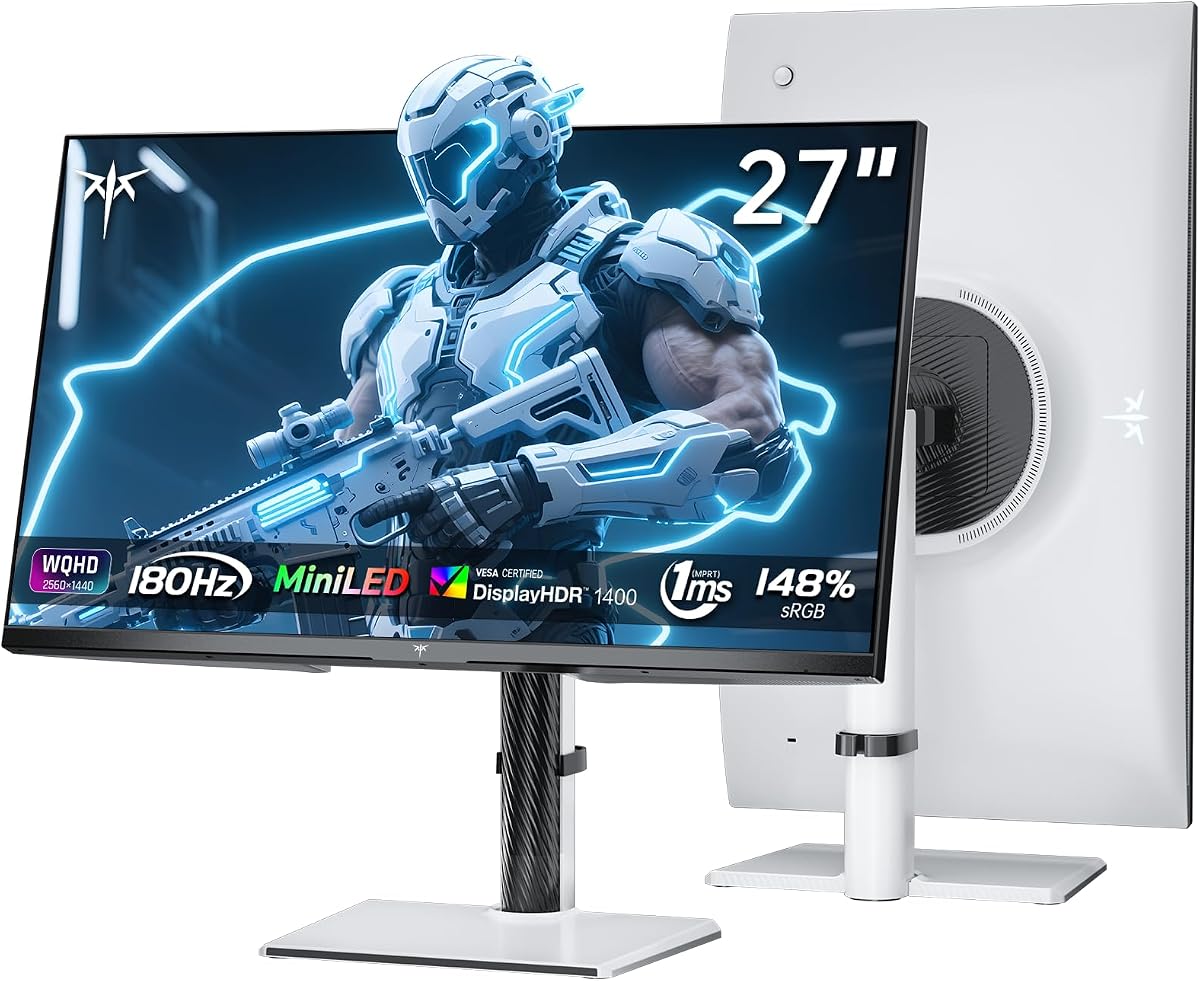
This KTC listing demands upfront honesty: the title ends with "(Renewed)." That means Amazon's renewed program—or a third-party refurbisher—has inspected and repackaged a returned or open-box unit. You may save money versus new-in-box KTC or AOC equivalents, but you should expect possible cosmetic scuffs, fewer accessory guarantees, and warranty terms that differ from factory-new monitors. Photograph the panel on day one and run pixel tests inside the return window.
Ignoring condition semantics, the spec sheet is the brightest HDR story in this pack. VESA DisplayHDR 1400 certification targets 1400 nits peak brightness with 1152 Mini-LED zones mapped to 1152 lamp beads for precise light control. That out-specs the DisplayHDR 1000 crowd on paper—meaning specular highlights in HDR games and films can theoretically clip less and feel more luminous, provided content and OSD settings cooperate.
The panel is HVA—a hybrid VA approach KTC claims merges VA contrast with faster response and reduced IPS-style glow. One millisecond GTG, 180Hz refresh, and simultaneous FreeSync and G-Sync certification build a competitive but not bleeding-edge motion profile. If you wanted 320Hz, look at AOC Q27G4SLM/WS; if you wanted maximum HDR headroom on a budget refurb, this KTC is interesting.
Color coverage is cinema-marketed: quantum dot enhancement, 148% sRGB volume, 118% DCI-P3 volume, with 99% sRGB and 96% P3 accurate coverage and ΔE<2 calibration claims. Duplicate about bullets repeat the cinema-grade gamut paragraph—likely a listing error, not a feature doubling. Verify with your own probe if color income depends on it.
White chassis, vertical and wall mounting support, dual HDMI and single DisplayPort mirror the aesthetic flexibility of other white Mini-LED models. Renewed white plastic may show yellowing or micro-scratches more than black—inspect the bezels under bright light.
Buy renewed KTC when HDR1400 peaks and 1152-zone Mini-LED matter more than factory-fresh peace of mind and when 180Hz satisfies your GPU. Skip renewed entirely if you cannot tolerate cosmetic imperfections or if a few dead pixels would ruin the deal—negotiate returns before you fall in love with HDR demo reels.
Verify seller is Amazon Renewed or rated third party with clear return policy. Test all ports, enable 180Hz on DP, run HDR1400 demo content, and check for pressure marks or uneven backlight within week one.
HDR1400 can render small specular hits brighter without blowing the whole scene. Gains depend on mastering quality—many games still tone-map conservatively. Side-by-side against Q27G3XMN, expect more highlight pop, not OLED perfect blacks.
We may earn a commission at no additional cost to you.
The AOC Q27G4SLM/WS is our high-refresh Mini-LED champion for 2026—a white 27-inch QHD IPS panel with 1152 local dimming zones and a 320Hz refresh ceiling accessible over both HDMI 2.1 and DisplayPort 1.4. That dual-port high-refresh story matters for PlayStation 5 and Xbox Series X owners who cannot use DisplayPort, and for PC builders who want one monitor to swap between a gaming rig and a console without re-cabling.
Mini-LED here is not marketing garnish. Eleven hundred fifty-two zones behind IPS means you keep relatively stable colors off-angle while HDR highlights get localized boost instead of washing the entire frame. DisplayHDR 1000 certification pairs with 700 nits HDR brightness and 1200 nits peak brightness claims—enough headroom that HDR10 games and streaming content look materially different from SDR, especially in dark interior scenes where dimming turns off zones behind black pixels.
Motion credentials are top of pack: 320Hz refresh with 1ms GtG response and Adaptive Sync for tear-free high frame-rate gameplay. One millisecond and three hundred twenty hertz together target the esports player who notices micro-stutter in windowed overlays and drag-smoothness in tracking flicks. Casual story gamers may not perceive 80Hz gains over 240Hz—but competitive players with capable hardware often do.
Industrial design is deliberate. The white chassis, height-adjustable stand with tilt/swivel/pivot, earphone out, and VESA mounting compete aesthetically with KTC's white M27T6S while beating it on refresh and HDMI 2.1 headroom. Flicker-free and eye comfort features acknowledge that 320Hz enthusiasts still log long sessions.
Tradeoffs remain inherent to Mini-LED. Halos around bright cursor icons or health bars in dark RPG scenes will appear—1152 zones reduce but do not eliminate the effect versus OLED self-emissive pixels. White plastic requires more frequent dusting. And a GPU that cannot push high fps at 1440p will leave part of the 320Hz investment unused until you upgrade graphics.
If you want the fastest Mini-LED experience in this pack with IPS viewing angles, console-ready HDMI 2.1, and the highest buyer rating tier, the Q27G4SLM/WS is the pick. If budget or GPU cap you below 240Hz meaningful use, save money with the Q27G3XMN and put the difference toward a better graphics card.
Use HDMI 2.1 on PS5/Xbox Series X titles that support 120Hz+ modes; not every game outputs 320Hz. Enable performance modes in game settings and verify refresh in the monitor OSD info page.
Microfiber dust the bezels weekly and avoid coffee splatter on the chin bar—white shows stains immediately. Cable manage behind the stand to preserve the clean aesthetic you paid for.
Both hit 320Hz with 1152 zones and HDR1000. AOC wins on rating and console-ready copy; Acer emphasizes 99% Adobe RGB. Prefer AOC for aggregate buyer satisfaction; prefer Acer if Adobe gamut verification is your priority.
We may earn a commission at no additional cost to you.
True Mini-LED gaming monitors advertise local dimming zone counts—336, 1152, 2304—and HDR certifications like DisplayHDR 1000 or 1400. Portable 7-inch and 13.3-inch listings often say "Mini LED Monitor" in the title while describing inch diagonals and legacy AV inputs. Before you buy, search the about section for zones and nits. If those words are absent, you are looking at a small utility display, not the contrast technology this guide focuses on.
More zones generally mean finer control and smaller halos around bright objects on dark backgrounds. The AOC Q27G3XMN's 336 zones still beats edge-lit panels but may bloom around small UI elements compared with 1152-zone AOC, KTC, and Acer models. INNOCN's 2304-zone 32-inch panel leads this pack for dimming granularity. No Mini-LED LCD matches OLED pixel-level black, but higher zone counts narrow the gap in real content.
VA (Q27G3XMN) often delivers stronger native contrast; IPS and Fast IPS (AOC Q27G4SLM/WS, Acer Nitro, KTC M27T6S, INNOCN) preserve color and angle stability for shared viewing and light creative work. KTC's renewed HVA panel claims hybrid benefits—contrast closer to VA with improved response. Pick VA for solo dark-room gaming; pick IPS when off-angle color drift would annoy you.
One hundred eighty hertz at 1440p is achievable on mid-tier modern GPUs in many titles. Two hundred forty hertz demands more headroom. Three hundred twenty hertz at QHD is esports territory—verify your average fps before paying flagship refresh. HDMI 2.0 caps on some models (KTC M27T6S at 144Hz on HDMI) mean console and PC port choice affects real-world Hz.
DisplayHDR 1000 and 1400 imply meaningful peak brightness targets versus HDR400 marketing on edge-lit panels. Pair certification with local dimming—bright edge lights without zones still look flat in letterboxed movies. The renewed KTC HDR1400 listing is the peak brightness spec in this pack; validate with HDR test patterns after setup.
The KTC B0FVWMCGVP title explicitly states Renewed. Expect variable cosmetic condition and warranty terms. Renewed can be excellent value for HDR1400 hardware if you inspect aggressively early. Factory-new AOC and INNOCN listings avoid that lottery if peace of mind is worth the premium.
Twenty-seven-inch 2560×1440 remains the gaming value default—sharp text without the GPU hammer of 4K. INNOCN's 32-inch 4K 160Hz panel suits creators who need timeline pixels and accept heavier graphics load. Mixed desks often pair a 1440p high-refresh primary with a color secondary—or buy one 4K Mini-LED if budget allows a single do-all screen.
Mini-LED uses thousands of tiny LEDs grouped into hundreds or thousands of dimming zones behind the LCD panel. Each zone can brighten or dim independently, producing deeper blacks and brighter HDR highlights than single-backlight edge-lit monitors. Regular LED gaming monitors often have one or a few dimming zones, which causes gray blacks and HDR that looks washed out. Mini-LED is still LCD technology—not OLED—so you may see halos around small bright objects, but the contrast improvement is real in dark room viewing.
Amazon sellers use "mini" to describe physical size on portable 7-inch and 13.3-inch HDMI monitors. Those listings focus on AV/BNC inputs and inch diagonals, not zone counts or DisplayHDR certifications. Always read the about bullets for dimming zones and peak nits. This guide separates genuine Mini-LED backlight panels (AOC, Acer, INNOCN, KTC gaming models) from size-only portable displays included because they appear in the same keyword pack.
Worth it if your GPU or console actually delivers high frame rates at 1440p in the titles you play daily and you notice motion clarity differences in competitive shooters. Not worth it if you mostly play 60–120 fps AAA games or edit spreadsheets—the AOC Q27G3XMN at 180Hz with 336 zones may deliver better value. Deminishing returns vary by person; try high refresh in person if possible before paying flagship premiums.
No. Despite the listing title mentioning 3440×1440, the product about section specifies Panel resolution 2560×1440 QHD on a 27-inch 16:9 display. Treat the title as a vendor error and plan for standard QHD, not ultrawide workflow width. For ultrawide, you need a different product category entirely.
Three hundred thirty-six zones (Q27G3XMN) is a meaningful upgrade from edge-lit panels and fine for mixed gaming and media. Eleven hundred fifty-two zones on most 27-inch AOC, KTC, and Acer models reduces halo size around UI elements. Twenty-three hundred four zones on the INNOCN 32-inch 4K panel is the densest array in this pack for HDR finesse. More zones help, but panel type, peak brightness, and content mastering also shape what you see.
Only if you accept renewed condition variability—possible cosmetic wear, shorter warranty, and unit-to-unit QC differences—and you inspect immediately on delivery. The B0FVWMCGVP listing explicitly says Renewed in the title. HDR1400 and 1152-zone Mini-LED at 180Hz is compelling hardware for the risk-tolerant buyer. If you want factory-new peace of mind, choose new AOC or INNOCN listings instead.
Yes, especially the INNOCN 32-inch 4K with 99% DCI-P3, Adobe RGB claims, and factory ΔE<2 report. Mini-LED HDR can help preview contrast-heavy grades, but halos and zone transitions mean serious colorists still validate on reference displays. For hobbyist and prosumer editing plus gaming, INNOCN's 4K and Acer's 99% Adobe RGB 320Hz panel are the strongest color stories in this pack.
On most PC gaming models, DisplayPort 1.4 unlocks top refresh—180Hz OC on Q27G3XMN, 240Hz on Q27G4ZMN, 320Hz on Q27G4SLM/WS and Acer Nitro, 210Hz OC on KTC M27T6S. KTC M27T6S HDMI 2.0 caps at 144Hz. AOC Q27G4SLM/WS advertises 320Hz via HDMI 2.1 or DP 1.4 for console flexibility. Always enable the high refresh mode in both monitor OSD and Windows/macOS display settings.
OLED still wins absolute black levels and pixel-level HDR without halos. Mini-LED LCD wins on brightness peaks, often lower burn-in anxiety, and increasingly aggressive refresh rates at 1440p. This pack's Mini-LED monitors target gamers and creators who want HDR punch and high Hz without OLED pricing. If you obsess over perfect blacks in dark RPGs, test OLED side-by-side; if you want 320Hz with HDR1000, AOC Q27G4SLM/WS is the LCD answer here.
Balanced value: AOC Q27G3XMN (180Hz, 336 zones, 4.5 stars). Maximum refresh: AOC Q27G4SLM/WS (320Hz, 1152 zones, white). Creators needing 4K: INNOCN 32-inch 2304-zone panel. Compact esports desk: INNOCN 25M2S 24.5-inch 240Hz. Skip the 7-inch and 13.3-inch portables unless you need a tiny AV monitor—they are not Mini-LED backlight tech. Read Renewed warnings before choosing KTC B0FVWMCGVP.
Mini-LED monitors finally deliver HDR contrast and high refresh in the same box without OLED price tags—if you buy the right listing. In this 2026 pack, the AOC Q27G3XMN remains the best overall value with 336 zones and 180Hz at true QHD, while the white AOC Q27G4SLM/WS pushes 320Hz and 1152 zones for competitive players with the GPU to match. Creators who need 4K timelines and USB-C docking should gravitate toward INNOCN's 32-inch 2304-zone flagship.
Watch for keyword traps: the 13.3-inch and 7-inch portable monitors are "mini" by size, not Mini-LED backlight engineering. Verify AOC title typos that mention 3440×1440 when the panel is 2560×1440. Treat the KTC B0FVWMCGVP Renewed listing as a conditional bargain—superb HDR1400 specs if your unit arrives pristine.
Match zone count and refresh rate to your real hardware, use DisplayPort or HDMI 2.1 correctly, and test HDR in a dim room on day one. Do that, and a Mini-LED monitor becomes the upgrade edge-lit 1440p panels only pretend to be.