Expert Review & Guide

Best Laptops Under 700 in 2026: Real-World Picks Compared

Finding a capable laptop without drifting into premium territory used to mean accepting fuzzy screens, spinning hard drives, and processors that choked on a video call plus a few browser tabs. In 2026 that tradeoff looks different. Entry and midrange machines routinely ship with full HD panels, solid-state storage, Wi-Fi 6, and enough RAM for schoolwork, remote office suites, and streaming—provided you know which configurations actually deliver and which only look good on a bullet list.

This roundup sticks to ten currently listed options from our product pack and ranks them for how people actually use computers: essays and research tabs, Zoom or Teams days, light photo cleanup, spreadsheets with a numeric keypad, and the occasional movie night. We weigh CPU class, memory headroom, storage honesty, display size and finish, ports, and operating system fit. We also flag limits clearly—fanless ultra-budget chips, eMMC instead of SSD, Chrome OS versus Windows, and S Mode restrictions—so you are not surprised after unboxing.

If you need one machine for classes and a shared household desk, start with our top picks below, then scan the comparison table and full reviews. If you already know you want Windows 11 Pro for business policy, a 17-inch desk laptop, a true Copilot+ AI PC, or a simple Chromebook that boots in seconds, jump straight to those sections. The goal is a confident buy that matches your workload, not a generic “best laptop” slogan.

Our Top Picks for Laptops Under 700

Best Overall

Lenovo V15 Gen 4 Business Laptop

★★★★☆8.8/10
Lenovo V15 Gen 4 Business Laptop
  • Intel Core i5-13420H with strong multitasking headroom for office and study
  • 16GB RAM and 512GB SSD for apps, files, and fewer cloud workarounds
  • Windows 11 Pro plus Ethernet, HDMI, and a full numeric keypad
Check Price →
Best AI Laptop

ASUS Vivobook 16 Laptop

★★★★☆7.8/10
ASUS Vivobook 16 Laptop
  • AMD Ryzen AI 5 340 Copilot+ PC with on-device NPU acceleration
  • 16-inch WUXGA 16:10 display with 16GB RAM and 512GB SSD
  • Backlit keyboard and modern Wi-Fi 6 for longer creative sessions
Check Price →
Best Everyday Multitasker

HP Pavilion 15.6" Laptop

★★★★☆8.6/10
HP Pavilion 15.6" Laptop
  • 16GB RAM on an Intel N100 keeps tabs, calls, and docs fluid
  • 15.6-inch FHD anti-glare screen in a 3.64 lb portable chassis
  • Wi-Fi 6, HDMI, USB-C, and Office for the web ready out of the box
Check Price →

As an Amazon Associate we earn from qualifying purchases. We may earn a commission at no additional cost to you.

Quick Comparison: All Laptops in This Guide

Use this table to shortlist by screen size, memory, storage type, and processor class before reading the deeper reviews. Specs reflect the pack listings; ratings are customer averages at the time of research. No street prices are listed—check the live product page for current offers.

#ProductSpecificationsScore
1
  • Intel N100, 8GB RAM, 256GB SSD
  • 15.6" FHD anti-glare, 3.64 lbs
  • Windows 11, Wi-Fi 6, hub included
8.4
2
  • Intel N100, 8GB DDR5, 256GB SSD
  • 15.6" FHD, 3.33 lbs, Business Black
  • Wi-Fi 6, Ethernet, USB-C PD, TPM 2.0
8.8
3
  • Core i5-13420H, 16GB RAM, 512GB SSD
  • 15.6" FHD, Windows 11 Pro
  • HDMI, RJ45, webcam, numeric keypad
8.8
4
  • AMD Ryzen 3 30, 8GB LPDDR5, 512GB SSD
  • 17.3" FHD IPS, Radeon 610M
  • Long battery claims, Wi-Fi 6, Copilot key
9
5
  • Intel N100, 16GB DDR4, 256GB SSD
  • 15.6" FHD anti-glare, 3.64 lbs
  • Wi-Fi 6, Bluetooth 5.3, Office web
8.6
6
  • Core i3-1315U, 16GB RAM, 512GB SSD
  • 14" FHD IPS, Windows 11 Pro
  • Privacy shutter, USB-C, Quiet Blue
8.8
7
  • Intel N4020, 4GB RAM, 128GB eMMC
  • 15.6" FHD, 3.3 lbs, fanless design
  • 45W USB-C PD, TF expand to 1TB
9
8
  • Ryzen AI 5 340 Copilot+ PC, 16GB RAM
  • 16" WUXGA 1920x1200, 512GB SSD
  • Backlit keyboard, Wi-Fi 6, Quiet Blue
7.8
9
  • Celeron N4500, 4GB RAM, 64GB eMMC
  • 14" FHD Chrome OS, Wi-Fi 5
  • Fast boot, Google apps, Titan security
8.4
10
  • Ryzen 3 7320U, 8GB LPDDR5, 128GB SSD
  • 15.6" FHD IPS, Radeon 610M
  • Wi-Fi 6, dual USB-C, Windows 11 S Mode
8.8

1. Lenovo V15 Gen 4 - Best Overall

Lenovo V15 Gen 4 Business Laptop

Lenovo V15 Gen 4 Business Laptop

8.8/10★★★★☆

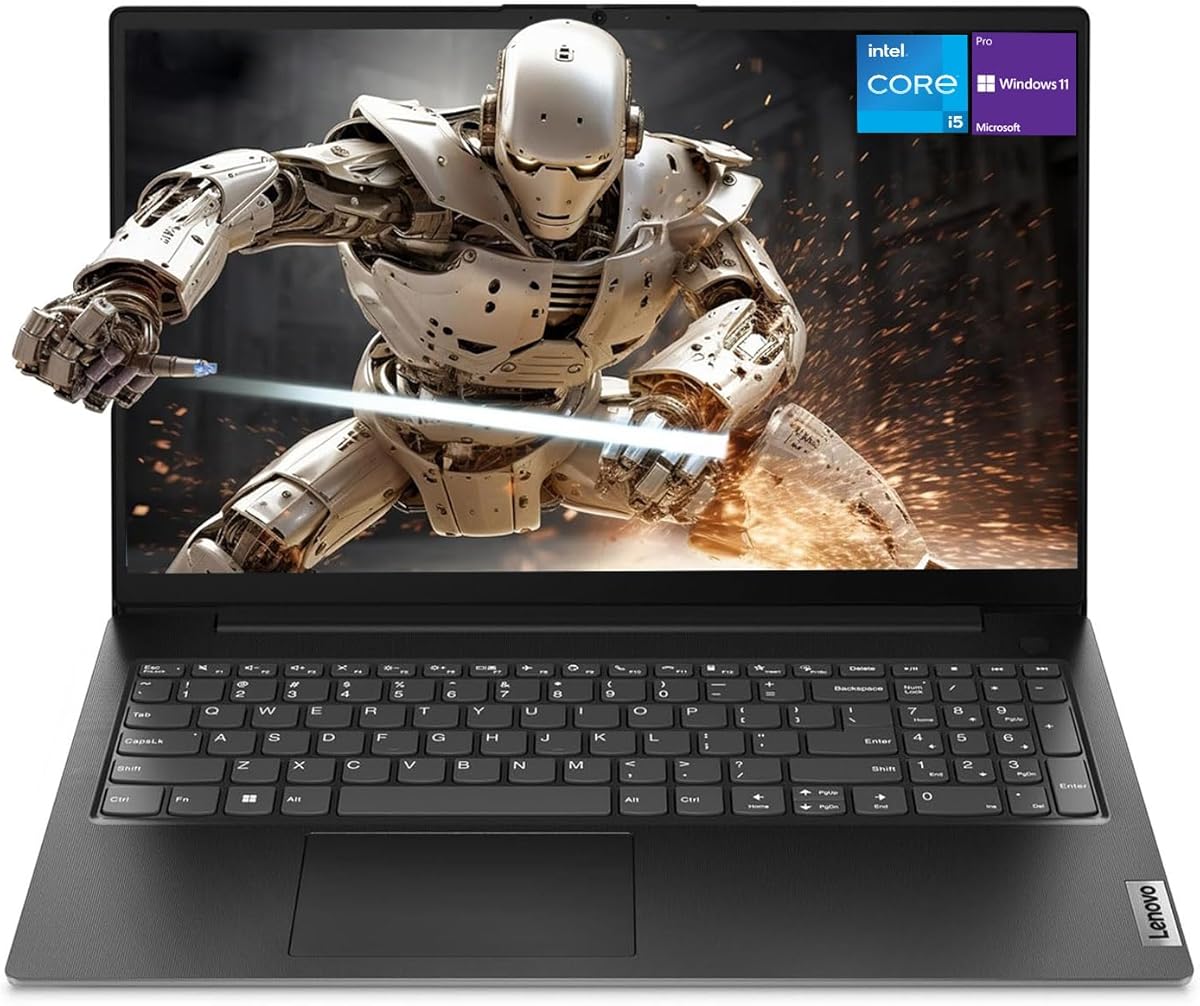
The Lenovo V15 Gen 4 earns Best Overall because it solves the problem most budget shoppers actually have: not “is there a laptop near this budget,” but “will it still feel responsive in year two when my browser has thirty tabs and Teams never closes.” The Intel Core i5-13420H is an eight-core, twelve-thread part with a high turbo ceiling that belongs in a different performance class from the N100 and N4020 machines elsewhere in this guide. Paired with 16GB of RAM and a 512GB SSD as configured in this listing, it handles office suites, research stacks, light creative apps, and background sync without the constant memory pressure you feel on 8GB systems.

  • Intel Core i5-13420H, Intel UHD Graphics
  • 16GB RAM, 512GB SSD, Windows 11 Pro
  • 15.6" FHD, HDMI, RJ45, numeric keypad
Check Price →
✓ Pros
  • H-series Core i5 clearly outperforms N-series chips for real multitasking
  • 16GB memory and 512GB SSD reduce the usual under-700 compromises
  • Windows 11 Pro suits small business, school IT, and remote management
  • Wired Ethernet plus HDMI makes docking and classroom projection simple
  • Numeric keypad speeds spreadsheets, invoices, and data entry
✕ Cons
  • Heavier business chassis than ultralight student clamshells
  • Integrated graphics still limit serious gaming and 4K editing
  • Port mix is practical but not as USB-C-forward as newer OmniBooks

Detailed review

Windows 11 Pro is a meaningful differentiator if you work with clients, join a domain, or simply want BitLocker-friendly workflows and more business-oriented management options. Students who only need Home will still benefit from the snappier CPU and larger drive; professionals who submit invoices from coffee shops and also join company resources will appreciate not having to reimage later. The 15.6-inch full HD panel is the right default size for documents and split-screen study, and Lenovo includes the boring-but-critical ports people forget until they need them: HDMI for a classroom projector or home monitor, RJ45 when Wi-Fi is flaky, USB-A and USB-C for peripherals, and a webcam for calls.

In daily use, the V15 feels like a small-office workhorse rather than a fashion accessory. The numeric keypad matters more than marketing copy admits—anyone doing bookkeeping, grading, or inventory will type faster. Intel UHD Graphics will not replace a discrete GPU for modern AAA games or heavy Premiere timelines, but it is fine for HD streaming, slideshows, and photo organization. Boot times and app launches stay crisp thanks to the NVMe SSD, which also gives you room for a local photo library and offline course materials instead of forcing everything into the cloud on day one.

Compared with the DDR5 N100 Lenovo business model in this same roundup, the V15 costs attention for a reason: the processor gap is large. Compared with the ASUS Vivobook 16 Copilot+ machine, the V15 is less about next-wave AI experiences and more about raw, proven productivity horsepower today. If your priority is Excel, Word, browsers, Zoom, and a drive that will not fill up after installing Chrome and a few creative tools, this is the safest all-around pick in the pack.

Build-wise, expect a practical black business shell rather than a lifestyle colorway. That is a feature for shared family or office use where scuffs and handoff between people are normal. Thermal design on H-series chips will fan under load more than a fanless Amzboy, but that is the trade for sustained performance during long export or compile-adjacent tasks. For most buyers reading this guide, that trade is correct.

One caveat when shopping any V-series listing: confirm the exact RAM and storage on the offer you click. Marketplace variants exist across the Lenovo line. The configuration we evaluated from this pack is the 16GB and 512GB Windows 11 Pro bundle, which is the one that justifies the Best Overall badge. If you land on a thinner memory or storage SKU, reassess against the Pavilion 16GB N100 or the Vivobook 14 i3 instead of assuming every V15 is equal.

Who should buy the Lenovo V15 Gen 4

Choose this laptop if you are a student in a heavy major, a freelancer juggling client apps, or a small-business user who wants Windows 11 Pro without stepping into premium ultrabook pricing. It is also the right call when you regularly plug into Ethernet or an external display and refuse to carry a bag of dongles every day.

Setup tips for the first week

After unboxing, run Windows Update, enable BitLocker if your edition and account support it, and move large media folders to a structured Documents/Pictures layout so the 512GB drive stays organized. Install only the browsers and office tools you need; resist trialware. If you use dual monitors at a desk, test HDMI output early and set scaling so the 15.6-inch panel and external screen match your workflow.

How it compares in this guide

Versus the HP Pavilion 16GB model, the V15 wins on CPU class and storage capacity. Versus the ASUS Vivobook 14 i3, it typically feels stronger in bursty multi-core tasks. Versus the Vivobook 16 AI PC, pick V15 for traditional horsepower and Pro OS; pick Vivobook 16 if Copilot+ features and the taller 16:10 screen matter more.
Check Price on Amazon →

We may earn a commission at no additional cost to you.

2. ASUS Vivobook 16 - Best AI Laptop

ASUS Vivobook 16 Laptop

ASUS Vivobook 16 Laptop

7.8/10★★★★☆

If you want the laptop in this pack that feels most aligned with where Windows is heading—not just where office work has been—the ASUS Vivobook 16 Copilot+ model is the clear AI pick. The AMD Ryzen AI 5 340 brings a dedicated XDNA NPU rated for substantial on-device TOPS, which is the hardware foundation for Copilot+ experiences such as richer creative tools, Live Captions style workflows, and future Recall-class search once your device and region receive the relevant updates. That is a different value proposition from bolting a Copilot key onto an N100 machine.

  • AMD Ryzen AI 5 340 with XDNA NPU
  • 16GB RAM, 512GB SSD, Copilot+ PC
  • 16" WUXGA 1920x1200, backlit keyboard
Check Price →
✓ Pros
  • Genuine Copilot+ class NPU for on-device AI features as they mature
  • Roomy 16-inch 16:10 WUXGA panel is excellent for documents and timelines
  • 16GB RAM and 512GB SSD match serious everyday creative workloads
  • Backlit keyboard with number pad helps night study and spreadsheet work
✕ Cons
  • Customer rating is lower than several simpler office laptops in this list
  • Some Copilot+ experiences depend on Windows updates and region timing
  • Larger chassis is less backpack-friendly than 14-inch Vivobook options

Detailed review

The display choice is equally intentional. Sixteen inches at 1920x1200 in a 16:10 aspect ratio gives you more vertical space for browser chrome, code, or document rulers than a typical 15.6-inch 16:9 panel. Brightness is listed around a sustained 300-nit class, which is comfortable for indoor desks and many classrooms. Combined with AMD Radeon graphics and 16GB of memory, the Vivobook 16 is one of the few under-this-budget options that can talk honestly about light content creation and casual gaming rather than only email and Netflix.

ASUS outfits the machine for longer sessions: a backlit keyboard, numeric keypad, Wi-Fi 6, Bluetooth 5.3, and battery claims that include FastCharge-style recovery for people who live between outlets. The Quiet Blue finish makes it feel less corporate than the Lenovo V15 while still looking professional on a Zoom background. Storage at 512GB is the right floor for an AI-leaning PC because local models, creative caches, and media libraries add up faster than students expect.

We are candid about the rating. At 3.9, this is not the most crowd-pleasing score in the pack, and early Copilot+ ecosystems have had the usual growing pains of feature rollouts and expectation gaps. Buy this because you specifically want Ryzen AI hardware and a modern tall screen—not because you want the safest anonymous office clamshell. If your workload is purely Word and Chrome, the Lenovo V15 or HP Pavilion will feel more straightforward and may leave you happier day to day.

For creators, language learners, and power users who already live inside Microsoft’s AI features, the Vivobook 16 is the most future-facing machine here. Treat marketing claims about Recall and similar tools as roadmap items that improve over update cycles, and evaluate the laptop first on CPU, RAM, display, and SSD—which this configuration gets right.

Thermals and fan noise under AI or creative load will exceed a Chromebook or fanless Amzboy; that is expected. Keep vents clear on soft beds and use a hard surface during exports. If you commute daily with a slim bag, measure the 16-inch footprint against your sleeve before committing—portability is acceptable for a campus tote, less ideal for minimalist ultralight travel.

Who this Copilot+ PC fits

Ideal for students and professionals who want on-device AI acceleration, a spacious 16:10 canvas, and enough RAM for mixed creative and productivity days. Less ideal if you need the absolute lightest carry or the highest crowd rating in the category.

Vivobook 16 vs Lenovo V15

Pick Vivobook 16 for NPU-led Windows experiences and vertical screen real estate. Pick V15 for Windows 11 Pro, H-series i5 punch for classic apps, and a more traditional business port set including RJ45.

Check Price on Amazon →

We may earn a commission at no additional cost to you.

3. HP Pavilion 15.6" - Best Everyday Multitasker

HP Pavilion 15.6" Laptop

HP Pavilion 15.6" Laptop

8.6/10★★★★☆

Memory is the quiet hero of affordable Windows laptops, and the HP Pavilion 15.6-inch 2026 Edition understands that. Intel’s N100 is an efficiency-focused quad-core that looks modest on paper, but with 16GB of DDR4 it can keep a video call, a dozen research tabs, OneDrive sync, and a document open without the thrashing that plagues 8GB twins. That is why this Pavilion earns Best Everyday Multitasker over HP’s own 8GB 2026 Edition in the same pack.

  • Intel 4-core N100 up to 3.4GHz
  • 16GB DDR4, 256GB PCIe NVMe SSD
  • 15.6" FHD anti-glare, Wi-Fi 6, 3.64 lbs
Check Price →
✓ Pros
  • 16GB RAM transforms the N100 into a genuinely usable multitasker
  • Familiar Pavilion design with numeric keypad and light carry weight
  • Wi-Fi 6 and full HD anti-glare panel suit classrooms and apartments
  • Office for the web helps you start coursework immediately
  • Strong balance of price-class practicality without Chromebook lock-in
✕ Cons
  • 256GB SSD fills faster than the 512GB machines above
  • N100 still trails Core i5/i3 U-series chips for heavier workloads
  • Not aimed at gaming or advanced video editing

Detailed review

The 15.6-inch full HD anti-glare display is comfortable for long reading sessions, and the narrow-bezel styling makes the chassis feel more current than older thick-bezel budget units. At about 3.64 pounds it remains backpack-realistic for students who move between lectures. Wi-Fi 6 improves stability in dense dorm networks, while USB-C, dual USB-A, HDMI, and a headphone jack cover the usual accessory map without forcing an immediate hub purchase—though the separate HP 2026 Edition bundle that includes a hub is worth a glance if you live on dongles.

Storage is the main compromise. A 256GB NVMe SSD boots quickly and feels far better than eMMC, yet Windows updates, a browser profile, and a photo library will pressure free space sooner than on the 512GB Lenovo V15 or ASUS machines. Plan on external or cloud storage for large media. For papers, spreadsheets, and streaming caches, 256GB is workable if you stay tidy.

Intel UHD Graphics handles class videos and casual entertainment smoothly. Do not expect Steam libraries full of modern titles. Where the Pavilion shines is the “always on” student and remote-work pattern: wake, connect, type, present, repeat. The platinum white aesthetic also reads more lifestyle than the black business Lenovos, which matters if the laptop lives on a kitchen table as a shared family PC.

Against the Lenovo 15.6-inch business N100 with DDR5 and 8GB, take the Pavilion when RAM headroom matters more than Ethernet and a privacy shutter. Against the Acer Aspire Go with Ryzen 3 and only 128GB SSD, take the Pavilion when you want Windows flexibility and twice the internal storage even if the Acer’s IPS panel and dual USB-C ports look tempting.

First-week advice: disable startup clutter, move Downloads weekly, and consider a cheap USB-C SSD for semester archives. If you outgrow the N100 within two years, you still learned your workflow on a comfortable 15.6-inch layout—and the 16GB RAM decision will have delayed that upgrade.

Best for students and shared households

This Pavilion is a strong default when several people will browse, stream, and homework on one machine. The 16GB buffer absorbs messy real-world use better than leaner 8GB N100 systems.

Storage reality check

Keep installers off the desktop, use cloud photo backups, and leave headroom for Windows updates. If you know you need local video projects, stretch to a 512GB model in this guide instead.

Pavilion vs HP 2026 Edition 8GB

Same general mobility story and screen size class, but the Pavilion’s doubled memory is worth prioritizing for Chrome-heavy users. Choose the 8GB 2026 Edition mainly when the included hub bundle and lower complexity matter more than multitasking stamina.

Check Price on Amazon →

We may earn a commission at no additional cost to you.

4. HP OmniBook 3 17.3 - Best Large Screen

HP OmniBook 3 17.3 inch Laptop PC

HP OmniBook 3 17.3 inch Laptop PC

9/10★★★★★

The HP OmniBook 3 17.3-inch model is for buyers who still believe a laptop can replace a small desktop on the dining table. The full HD IPS panel with wide viewing angles turns movie nights and spreadsheet work into a more comfortable experience than squinting at fourteen-inch class screens. AMD’s Ryzen 3 30 series silicon plus Radeon 610M graphics covers everyday multitasking, casual entertainment, and light photo work with more visual polish than older Celeron-class Chromebooks.

  • AMD Ryzen 3 30, Radeon 610M graphics
  • 8GB LPDDR5, 512GB PCIe NVMe SSD
  • 17.3" FHD IPS, Wi-Fi 6, Copilot key
Check Price →
✓ Pros
  • 17.3-inch FHD IPS panel is immersive for media and spreadsheets
  • 512GB SSD offers generous space versus many peers
  • Strong battery life claims plus HP Fast Charge convenience
  • AI noise reduction and FHD camera improve call quality
  • EPEAT Silver Climate+ and ENERGY STAR credentials
✕ Cons
  • 8GB RAM can bottleneck heavy Chrome multitasking
  • Seventeen-inch size is a desk-first, not commute-first, machine
  • Not a substitute for higher-core H-series creators’ laptops

Detailed review

HP leans into call quality: advanced AI noise reduction modes that focus on your voice, plus an FHD camera with HDR auto-switch for backlight-heavy kitchens and dorm rooms. That matters if your “office” is wherever the Wi-Fi reaches. Wi-Fi 6 and Bluetooth 5.4 keep peripherals current, and the Copilot key offers one-press access to Windows’ assistant features without needing a full Copilot+ NPU story.

Battery messaging is ambitious—HP cites lengthy runtime and Fast Charge recovery from empty to mid-charge in roughly three-quarters of an hour. Real life varies with brightness and streaming, but the intent is clear: this is meant to survive a workday near an outlet schedule that is imperfect. The 512GB SSD is a major practical win; you can keep offline media and school archives locally even with only 8GB of LPDDR5 memory.

That 8GB figure is the honest limiter. LPDDR5 bandwidth helps, yet browsers are greedy. If you routinely drown in tabs, the Pavilion’s 16GB or the Lenovo V15’s 16GB will feel calmer. If you mostly run a handful of apps on a big beautiful screen at home, the OmniBook’s balance is excellent—and its 4.5 customer rating suggests many households agree.

Portability is the other trade. A 17.3-inch laptop can travel, but it wants a larger backpack and a seat-back tray with patience. Think apartment workhorse, hybrid homework station, or senior-friendly larger UI, not ultralight digital nomad kit. Sustainability certifications are a nice bonus for buyers who track EPEAT and ENERGY STAR.

Choose the OmniBook 3 when screen real estate and storage matter more than RAM headroom and featherweight carry. It is one of the most “desktop replacement for normal people” options in this under-700 set.

Ideal placement in the home

Park it on a stable desk with a cooling gap under the rear edge. Pair with a cheap external mouse if you edit long documents. The IPS panel’s viewing angles help when someone sits beside you to watch a show.

When to pick a smaller HP instead

If you walk across campus daily, the Pavilion 15.6 or HP 2026 Edition 15.6 will treat your shoulders more kindly. Keep the OmniBook when the laptop mostly stays put and you crave the larger canvas.

Check Price on Amazon →

We may earn a commission at no additional cost to you.

5. ASUS Vivobook 14" - Best Compact Pro

ASUS Vivobook 14" FHD Business Laptop Computer

ASUS Vivobook 14" FHD Business Laptop Computer

8.8/10★★★★☆

The ASUS Vivobook 14 punches into Best Compact Pro territory by combining a modern Intel Core i3-1315U with 16GB of RAM, a 512GB SSD, and Windows 11 Pro in a bag-friendly size. Six cores and eight threads with a high boost clock give it a livelier feel than N100 machines when you bounce between Slack, browsers, and light creative tools. For travelers and students who refuse a 15.6-inch slab, this is the sweet spot in the pack.

  • Intel Core i3-1315U, Intel UHD Graphics
  • 16GB RAM, 512GB SSD, Windows 11 Pro
  • 14" FHD IPS, privacy shutter, Quiet Blue
Check Price →
✓ Pros
  • Core i3-1315U is a step up from N-series for responsive office work
  • 16GB RAM and 512GB SSD in a truly portable 14-inch footprint
  • Windows 11 Pro for business-minded students and freelancers
  • Camera privacy shutter and useful USB-C/HDMI port set
✕ Cons
  • Fourteen-inch screen is smaller for heavy spreadsheet side-by-side layouts
  • Bundle extras can vary; focus on core laptop specs when comparing
  • Not a Copilot+ NPU flagship like the Vivobook 16

Detailed review

The 14-inch IPS FHD panel is sharp enough for long reading, and the Quiet Blue colorway matches the larger Vivobook 16’s personality while remaining easier to carry. A physical privacy shutter is a small, excellent detail for coffee-shop workers and anyone who shares rooms. Ports include USB-C, multiple USB-A, HDMI, and a combo jack—enough to connect a monitor at a client site without panic.

Windows 11 Pro again matters for BitLocker-oriented workflows and business features some Home users never touch—until their employer asks. The 512GB drive means you can keep offline project folders without immediately buying cloud upgrades. Sixteen gigabytes of memory keeps the i3 honest under tab load that would stall an 8GB twin.

This is not the AI showpiece Vivobook 16, and it is not the multi-core monster Lenovo V15 i5-H. It is the machine you take on trains and into seminars when you still want Pro software credibility. Casual gaming and 4K timelines remain out of scope; HD streaming and Office-class work are firmly in scope.

Listing pages sometimes advertise higher expandable ceilings for Vivobook lines; treat the packed configuration—16GB and 512GB—as your baseline expectation and verify the exact offer. Earphones or accessory bundles are nice if included, but they should not drive the purchase over CPU, RAM, and panel quality.

If your eyes prefer bigger UI chrome or you do dual-pane research all day, step up to the 15.6 or 16-inch options. If your priority is a capable Windows Pro ultraportable under this budget ceiling, the Vivobook 14 is the most coherent compact pick here.

Travel and café workflow

Enable a strong password or Windows Hello if available, use the privacy shutter on public networks, and carry one USB-C hub if you present often. The 14-inch size fits most personal-item bags for flights.

Vivobook 14 vs Lenovo business N100

The Vivobook’s i3-U and 16GB/512GB kit generally feel more future-proof for multitasking. The Lenovo N100 business model counters with Ethernet, lighter weight claims, and security-minded extras like a Kensington slot and TPM emphasis.

Check Price on Amazon →

We may earn a commission at no additional cost to you.

6. Lenovo 15.6" Business - Best Business Portable

Lenovo 15.6" Business Laptop

Lenovo 15.6" Business Laptop

8.8/10★★★★☆

Lenovo’s 15.6-inch 2026 business laptop is what you buy when ports and professionalism matter as much as raw benchmarks. The Intel N100 remains an entry CPU, but pairing it with 8GB of DDR5 and a PCIe 4.0 NVMe SSD is the right way to dress that chip. Boots are quick, Office apps feel immediate, and Wi-Fi 6 keeps meetings stable. At roughly 3.33 pounds and under an inch thick, it is easier to carry than many 15.6-inch classmates.

  • Intel N100, 8GB DDR5, 256GB PCIe 4.0 SSD
  • 15.6" FHD anti-glare, 3.33 lbs slim design
  • Wi-Fi 6, Ethernet, USB-C PD, TPM 2.0
Check Price →
✓ Pros
  • DDR5 memory and PCIe 4.0 SSD make the N100 feel snappier day to day
  • True business port set including Gigabit Ethernet and USB-C with PD
  • Privacy shutter, TPM 2.0, and Kensington slot for cautious users
  • Light 3.33 lb chassis in a professional black finish
✕ Cons
  • 8GB RAM ceiling shows up faster than on 16GB rivals
  • 256GB storage needs disciplined file hygiene
  • N100 still cannot match the V15’s i5-13420H

Detailed review

Connectivity is the headline. Gigabit Ethernet is increasingly rare and deeply useful in hotels, classrooms, and offices with captive portals that punish Wi-Fi. Dual USB-C with Power Delivery and DisplayPort support, dual USB-A, HDMI, and Bluetooth 5.2 mean you can dock to a monitor and charge without a proprietary brick dance in many setups. The HD webcam’s privacy shutter and firmware TPM 2.0 speak to small-business sanity.

The anti-glare 1920x1080 panel at a modest brightness rating is built for documents, not HDR movies. That is fine for the audience. Where you must stay honest is memory: 8GB is workable for disciplined users and disastrous for people who never close anything. If that sounds like you, pay attention to the Pavilion 16GB or V15 16GB instead.

Compared with the HP 2026 Edition N100 8GB, Lenovo’s business model wins on Ethernet, security hardware cues, and weight. Compared with the V15 Gen 4, it loses on CPU and capacity but may win if you need maximum portability and wired networking on a simpler budget configuration.

Copilot branding on the listing reflects Windows’ assistant direction more than a full Copilot+ NPU PC. Use Copilot in Windows as a helper; do not expect Ryzen AI 50-TOPS experiences. For QuickBooks-in-a-browser, Google Meet, and VPN days, this Lenovo remains a clean, serious tool.

We like it for traveling consultants, RA offices, and students in business programs who present often. Keep a USB-C cable in the same pouch as the laptop—you will use PD charging more than you think.

Security-minded defaults

Turn on Windows Hello if supported, keep the privacy shutter closed when idle, and use the Kensington slot in open labs. TPM-backed encryption features are worth enabling for client files.

Who should skip it

Skip this if you already know you need 16GB RAM or a larger SSD. The platform is efficient, not expansive. Heavy multitaskers should look at the Pavilion, Vivobook 14, or V15.

Check Price on Amazon →

We may earn a commission at no additional cost to you.

7. HP 15.6" FHD 2026 Edition - Best Starter Bundle

HP 15.6" FHD Laptop 2026 Edition

HP 15.6" FHD Laptop 2026 Edition

8.4/10★★★★☆

HP’s 15.6-inch FHD 2026 Edition is the friendly on-ramp: Intel N100, 8GB of RAM, 256GB SSD, Windows 11, long-battery messaging, and a 5-in-1 hub in the bundle so new owners are not stuck without ports on day one. At 3.64 pounds it matches the Pavilion’s mobility story and targets students, remote workers on light loads, and families who need a shared homework-and-streaming machine.

  • Intel N100, 8GB RAM, 256GB SSD
  • 15.6" FHD anti-glare, 3.64 lbs
  • Windows 11, Wi-Fi 6, 5-in-1 hub included
Check Price →
✓ Pros
  • Complete starter kit feel with Windows 11 and hub accessories
  • Light enough for daily campus carries
  • Anti-glare FHD screen reduces fatigue in bright rooms
  • Sensible all-rounder for first-time Windows laptop owners
✕ Cons
  • 8GB RAM is the weak link for heavy tab users
  • 256GB SSD fills up with media quickly
  • Outclassed by the Pavilion’s 16GB configuration for multitasking

Detailed review

Performance is classic N100: competent for Office on the web, Zoom, Netflix, and moderate browsing; unhappy if you treat Chrome like an operating system of its own. The full-size keyboard with numeric keypad helps essays and spreadsheets, and Wi-Fi 6 is the right wireless generation for crowded apartments. HDMI and USB ports on the laptop, plus the hub, cover printers, flash drives, and external displays for class presentations.

Why does this sit below the Pavilion in our ranking? Memory. Both can wear an HP badge and a 15.6-inch panel, but 16GB changes the emotional feel of the machine under real student chaos. Buy the 2026 Edition when the bundle value and simpler 8GB kit fit a carefully scoped workload—or when it is the configuration available for a first computer gift.

Microsoft 365 and Office-for-web positioning means you can draft papers immediately without hunting for installers. Still complete Windows Update, create a recovery plan, and teach shared household users not to dump 4K camera rolls onto the C: drive. Cloud photos will save this 256GB SSD.

Against the Amzboy fanless laptop, the HP feels like a much more complete Windows daily driver thanks to better RAM, a real SSD, and a stronger CPU generation. Against the Lenovo business N100, choose HP for hub convenience and a slightly more consumer-family framing; choose Lenovo for Ethernet and security hardware flourishes.

As a starter, it succeeds when expectations stay honest: this is an everyday laptop, not a creator rig. Set that expectation at purchase and satisfaction stays high.

Gift and first-PC checklist

Create a standard user account for kids or shared users, enable Find My Device, and show the recipient how the hub maps to HDMI and USB. Stick a label on the charger; mixed households lose them constantly.

Upgrade path inside this guide

If you can choose freely between HP siblings, prefer the Pavilion 16GB for longevity. Keep this 2026 Edition when the included hub and straightforward kit make the unboxing experience smoother for a brand-new user.

Check Price on Amazon →

We may earn a commission at no additional cost to you.

8. Amzboy 15.6” - Best Budget Expandable

Amzboy 15.6” Windows 11 Laptop

Amzboy 15.6” Windows 11 Laptop

9/10★★★★★

The Amzboy 15.6-inch Windows 11 laptop exists for a narrow but real job: the lightest possible full HD Windows screen for browsing, docs, and Zoom-class basics, with silent fanless operation and a TF slot that can swallow a huge memory card. At about 3.3 pounds with a 180-degree lay-flat hinge and privacy camera hardware, it is easy to like as a secondary household machine or a kid’s homework lid—if everyone understands its limits.

  • Intel N4020, 4GB RAM, 128GB eMMC
  • 15.6" FHD anti-glare, fanless, 3.3 lbs
  • 45W USB-C PD, TF card up to 1TB
Check Price →
✓ Pros
  • Very light and silent fanless design for basic tasks
  • TF card expansion up to 1TB without opening the chassis
  • Modern USB-C PD charging reduces brick clutter
  • Full HD 15.6-inch screen uncommon at the extreme budget tier
✕ Cons
  • 4GB RAM is a hard limit for modern Windows multitasking
  • 128GB eMMC is slower and smaller than NVMe SSD rivals
  • Wi-Fi 5 and N4020 trail 2026 mainstream office laptops

Detailed review

Those limits are not subtle. Four gigabytes of RAM is below what we recommend for primary Windows 11 use in 2026. The Intel N4020 dual-core approach targets efficiency, not chrome-heavy research. Storage is 128GB eMMC, which feels snappier than ancient spinning disks but cannot match the NVMe SSDs on the HP, Lenovo, and ASUS models above. The expansion story—up to a 1TB TF card—helps media storage, not application speed.

Where Amzboy innovates for the tier is charging: a 45W USB-C PD adapter means one cable philosophy alongside many phones. Dual Type-C and USB 3.2 ports reduce hub dependence for mice and flash drives. Wi-Fi 5 is acceptable in quiet homes, less ideal in dense apartment RF soup compared with Wi-Fi 6 peers.

Customer ratings look flattering, often because buyers who wanted a simple, quiet, cheap Windows screen got exactly that. Buyers who expected Pavilion-class multitasking did not. Editorial honesty matters here: treat this as a specialty budget pick, not a peer to the Lenovo V15.

If your needs are Gmail, Docs, light Canvas work, and videos—with patience—Amzboy can work, especially with a fast TF card for files. If you are buying one laptop for college or remote work, spend attention on the 8GB/16GB SSD machines instead.

Setup tip: after Windows welcome, immediately move media to the TF card, keep only essential apps on eMMC, and use a lightweight browser profile. Close background apps ruthlessly. That discipline is what makes 4GB tolerable.

Good secondary-PC use cases

Kitchen recipe machine, travel backup, or a dedicated Netflix-and-homework lid for a younger student with light needs. Not a freelancer’s only computer.

Amzboy vs Gateway Chromebook

Choose Amzboy when you specifically need Windows apps offline. Choose the Acer Gateway Chromebook when you live in Google’s ecosystem and want faster boot, stronger security defaults, and simpler maintenance—even with similarly modest RAM.

Check Price on Amazon →

We may earn a commission at no additional cost to you.

9. acer Gateway Chromebook 314 - Best Chromebook

acer Gateway Chromebook 314 CBO314-1H-C476 Laptop | Intel Celeron N4500 | 14" Fu

acer Gateway Chromebook 314 CBO314-1H-C476 Laptop | Intel Celeron N4500 | 14" Fu

8.4/10★★★★☆

Chromebooks still win a specific argument: if your life already runs on Gmail, Docs, Classroom, YouTube, and Progressive Web Apps, a well-sorted Chrome OS machine can feel faster and safer than a starved Windows laptop at the same budget. The acer Gateway Chromebook 314 pairs an Intel Celeron N4500 with a 14-inch full HD ComfyView display, 4GB of LPDDR4X, and 64GB of eMMC—modest specs elevated by an OS that does not try to be Windows.

  • Intel Celeron N4500, 4GB LPDDR4X, 64GB eMMC
  • 14" FHD Chrome OS, Wi-Fi 5, Bluetooth 5.0
  • USB-C charging/display, long battery claims
Check Price →
✓ Pros
  • Chrome OS boots quickly and stays easy to maintain
  • Built-in Google app ecosystem with strong security story
  • Full HD 14-inch panel in a compact Star Black chassis
  • Solid choice for cloud-first students and light home use
✕ Cons
  • 4GB RAM and 64GB eMMC constrain offline and multitasking use
  • Not suitable when you require full Windows desktop software
  • Wi-Fi 5 rather than Wi-Fi 6

Detailed review

Google’s security model, automatic updates, and Titan C2 hardware messaging are meaningful for families who do not want to babysit antivirus pop-ups. Startup in seconds encourages quick homework sessions. Battery claims around the half-day-plus range fit school periods if brightness stays reasonable. USB-C that carries DisplayPort and charging keeps the accessory story simple.

The caveats are structural. Sixty-four gigabytes fills up if you install many Play Store apps and keep offline files. Four gigabytes of RAM means you should not expect dozens of heavy tabs. Wi-Fi 5 is fine in many homes but trails Wi-Fi 6 Windows peers in congested networks. And if your degree program demands MATLAB, specialized Windows labs, or certain proctoring tools, verify Chrome OS compatibility before you buy—some schools are Chromebook-friendly; others are not.

Promotional trials for Google AI Pro storage tiers can sweeten the cloud story, but the laptop should still make sense after trials end. Use Google Drive as your real hard drive. That mindset is what makes a 64GB Chromebook viable.

In this pack, the Gateway is the Chromebook pick because it is honest about being cloud-native rather than pretending to be a creator Windows notebook. Against Amzboy, pick Gateway for simplicity and security; pick Amzboy for Windows legacy apps. Against the Aspire Go, pick Gateway for Chrome OS ease; pick Aspire Go for a fuller Windows-compatible path after leaving S Mode.

We recommend it for middle and high school workflows, traveling adults who live in the browser, and anyone replacing a dying laptop who already pays for Google storage. We do not recommend it as a one-laptop solution for Windows-centric offices.

School compatibility check

Ask your IT or teacher list whether Secure Exam browsers, VPN clients, or department software require Windows or macOS. Chromebooks excel at web and Android apps, not every niche desktop installer.

Getting more from 64GB

Store school files in Drive, stream music instead of downloading albums, and periodically review installed Play apps. Local storage is a cache, not your archive.

Check Price on Amazon →

We may earn a commission at no additional cost to you.

10. Acer Aspire Go 15 - Best Ryzen Value

Acer Aspire Go 15 AI Ready Laptop | 15.6" FHD IPS Display | AMD Ryzen 3 7320U |

Acer Aspire Go 15 AI Ready Laptop | 15.6" FHD IPS Display | AMD Ryzen 3 7320U |

8.8/10★★★★☆

Acer’s Aspire Go 15 is the Ryzen-value play: an AMD Ryzen 3 7320U with Radeon 610M graphics, 8GB of LPDDR5, a 15.6-inch FHD IPS display, and Wi-Fi 6 in a modern narrow-bezel shell. On CPU responsiveness for everyday apps, it often feels peppier than N100 8GB cousins, especially when browsing mixes with light creative tasks. Dual full-function USB-C ports and HDMI 2.1 make it friendlier to portable monitors and USB-C charging ecosystems.

  • AMD Ryzen 3 7320U, Radeon 610M
  • 8GB LPDDR5, 128GB PCIe SSD
  • 15.6" FHD IPS, Wi-Fi 6, dual USB-C
Check Price →
✓ Pros
  • Ryzen 3 7320U offers stronger compute feel than many N100 kits
  • IPS FHD panel with narrow bezels and blue-light tools
  • Dual full-function USB-C plus HDMI 2.1 is modern and flexible
  • Copilot key and AcerSense extras help everyday control
✕ Cons
  • 128GB SSD is tight for Windows plus files long term
  • Windows 11 Home in S Mode needs switching for full app stores
  • 8GB RAM shares the usual multitasking ceiling

Detailed review

The display is a highlight for the tier—IPS, full HD, and Acer’s BluelightShield for longer reading. AcerSense, PurifiedVoice, and TNR camera tooling aim to make battery, storage awareness, and calls less fiddly. Copilot in Windows via a dedicated key matches the AI-ready marketing without claiming a full Copilot+ NPU stack like the Vivobook 16.

Storage is the sobering line item. A 128GB PCIe SSD is fast but small once Windows, Office, and a browser profile settle in. External SSDs or strict cloud hygiene are basically mandatory. Memory at 8GB LPDDR5 is soldered-class thinking—great bandwidth, no casual upgrade path—so tab discipline matters.

S Mode deserves a plain-English callout. Windows 11 Home in S Mode restricts installs to Microsoft Store apps until you switch out of S Mode. That switch is free but permanent in the usual consumer flow and is something most power users do immediately. Factor five minutes after unboxing if you need Chrome from Google’s site or specialty class software.

Ranked tenth here not because it is a poor laptop, but because this pack includes several machines with more RAM or much more storage for fewer asterisks. The Aspire Go still deserves attention when you find it well configured and want Ryzen + IPS + dual USB-C specifically. For many shoppers it will beat an eMMC Windows ultraportable while asking you to manage capacity carefully.

If you love the Aspire Go’s panel and ports but need space, look first at whether a higher storage variant is available; within this exact pack listing, plan on cloud and USB expansion from day one.

Leaving S Mode without stress

Open the Microsoft Store tip or Settings path to switch out of S Mode, sign in, and confirm. Then install your browser and school tools. Do this before a deadline week so you are not troubleshooting under pressure.

Aspire Go vs HP OmniBook 3

OmniBook wins on screen size and 512GB storage. Aspire Go wins on a more portable 15.6-inch shape and dual USB-C flexibility. Both share 8GB realities—neither replaces a 16GB multitasking champ.

Best use profile

Streaming, notes, light editing, and cloud-heavy coursework on a sharp IPS panel. Keep large video projects elsewhere.

Check Price on Amazon →

We may earn a commission at no additional cost to you.

Best Laptops Under 700 in 2026: Real-World Picks Compared

How to Choose a Laptop Under 700 in 2026

Start with the job, not the brand

Write down the three tasks you do every week. If those tasks are Docs, Canvas, Zoom, and Netflix, an N100 or Ryzen 3 with 8GB can work—and a Chromebook may be even calmer. If those tasks include big research tab sets, Photoshop Elements, coding environments, or lots of Excel, prioritize 16GB RAM and a stronger CPU like the i5-13420H, i3-1315U, or Ryzen AI 5 before you fall for a bigger screen alone.

RAM and storage rules of thumb

Windows vs Chrome OS vs S Mode

Windows 11 Home fits most households and students. Windows 11 Pro on the Lenovo V15 and ASUS Vivobook 14 adds business-oriented features worth having for freelancers and small offices. Chrome OS on the Gateway Chromebook trades software flexibility for speed, simplicity, and security defaults. S Mode on the Aspire Go is a gate, not a forever prison—but you must switch if you need non-Store desktop installers.

Screen size and carry weight

Fourteen-inch class machines (Vivobook 14, Chromebook 314) disappear into bags. Fifteen-point-six remains the versatile default. Sixteen-inch 16:10 (Vivobook 16) and 17.3-inch (OmniBook 3) prioritize comfort at rest over ultralight commuting. Weigh your backpack day, not your wishlist day.

Ports, Wi-Fi, and webcams

HDMI still saves presentations. Ethernet on Lenovo business models saves hotel Wi-Fi meltdowns. USB-C PD on OmniBook-era and Amzboy-style machines reduces charger chaos. Wi-Fi 6 is worth preferring in dorms. Privacy shutters are small joys. None of these replace CPU and RAM—but they determine daily friction.

AI features without the hype hangover

A Copilot key on an N100 PC is not the same as a Copilot+ PC with a high-TOPS NPU like the Vivobook 16’s Ryzen AI 5 340. Buy AI hardware for features you will use; otherwise spend your attention on memory and SSD size, which improve every app you already open.

Frequently Asked Questions

01

Is 8GB of RAM enough for a laptop in 2026?

It can be enough if you work with a handful of apps, avoid enormous browser sessions, and restart occasionally. It is not ideal as a long-term primary machine for research-heavy students or remote workers who live in Meet plus Slack plus docs plus music. In this guide, 16GB configurations such as the Lenovo V15 Gen 4, HP Pavilion, and ASUS Vivobooks feel noticeably calmer. Consider 8GB a workable budget compromise, not the comfort target.

02

Which laptop is best for college students under this budget?

Most students should shortlist the Lenovo V15 Gen 4 for power and storage, the HP Pavilion for 16GB multitasking in a familiar 15.6-inch shape, or the ASUS Vivobook 14 if they need a lighter Pro-ready carry. Chromebook fans who already use Google Classroom heavily can consider the Gateway Chromebook 314, provided their programs do not require Windows-only software. Avoid 4GB Windows machines as a sole college computer.

03

Do I need a Copilot+ PC like the ASUS Vivobook 16?

Only if you care about on-device NPU-accelerated Windows AI features and want a modern 16-inch 16:10 creative canvas. If you mainly write papers and join video calls, a strong non-Copilot+ machine with 16GB RAM will serve you better than chasing AI logos. Copilot keys on ordinary PCs still open helpful assistants, but they are not the same hardware class as Ryzen AI Copilot+ systems.

04

Why is the Lenovo V15 ranked above higher-rated options?

Customer stars measure satisfaction within expectations; they do not automatically measure peak capability. The V15’s i5-13420H, 16GB RAM, 512GB SSD, and Windows 11 Pro combination offers the broadest competence for serious everyday work in this pack. Higher-rated devices like the OmniBook or Amzboy can be perfect for their niches—big screen living-room PC or silent ultra-budget lid—without beating the V15 as an all-around productivity pick.

05

Is a Chromebook a bad idea if I might need Windows later?

It is a risky one-laptop strategy if your future software needs are unclear. Chrome OS is excellent when you are cloud-committed. If you suspect you will need full desktop Windows applications within a year, start with a Windows laptop now. Dual-device life (Chromebook plus a shared Windows lab) works for some students, but it is a lifestyle choice, not a free substitute.

06

How important is an SSD versus eMMC?

Very. NVMe SSDs on machines like the HP Pavilion, Lenovo models, ASUS Vivobooks, OmniBook, and Aspire Go generally open apps and boot faster and hold up better under file churn than eMMC on the Amzboy and the Chromebook’s small internal module. eMMC can be acceptable for light Chrome OS or ultra-budget Windows use, especially with cloud storage, but it is one of the first corners we recommend not cutting for a primary PC.

07

Can these laptops handle gaming?

Light and older titles, browser games, and some esports settings may run on Radeon 610M or UHD graphics, especially on the OmniBook, Aspire Go, and Vivobook 16. Modern AAA gaming at comfortable frame rates is not what this budget tier promises. If gaming is a primary goal, you need a different shopping lane with dedicated GPUs that usually breaks this budget framing.

08

What should I buy if I work from home at a desk most days?

Prioritize screen comfort and ports over featherweight chassis. The HP OmniBook 3 17.3-inch makes sense as a desk-centered media and spreadsheet machine, while the Lenovo V15 Gen 4 makes sense if you want maximum CPU and Pro OS features with HDMI and Ethernet. Add an external keyboard or monitor later if you want true desktop ergonomics—the laptop still wins when you travel occasionally.

09

Are fanless laptops better because they are silent?

Silence is lovely for libraries and bedtime shows, which is why the Amzboy appeals. The trade is thermal and performance headroom: fanless low-power chips throttle sooner under load. For all-day coursework with many tabs, a fan that occasionally spins on a stronger laptop is the healthier compromise.

10

How do I keep a 256GB or 128GB laptop from feeling full?

Move photos and video to cloud or external drives, uninstall unused apps monthly, use Storage Sense in Windows, and avoid downloading installers to the desktop. On Chrome OS, lean on Drive and periodically audit Play Store apps. Storage anxiety is usually a workflow issue as much as a hardware issue—though choosing 512GB when you can still prevents the problem.

Conclusion

Under this budget in 2026, the winning move is to buy competence where it compounds: CPU class, RAM headroom, and honest storage. That is why the Lenovo V15 Gen 4 leads our list, with the ASUS Vivobook 16 as the AI-forward alternative and the HP Pavilion as the practical 16GB everyday champion. Large-screen OmniBook owners, compact Vivobook 14 travelers, and Chrome OS households each have a clear specialist pick without pretending every laptop serves every job.

Skip the trap of chasing only star ratings or screen size. A quiet 4GB Windows machine and a Copilot+ 16-inch creator laptop can both be “good” while being wrong for your week. Match the operating system to your software, measure your bag, and plan storage on the day you order—not the week your drive hits zero bytes free.

Use the comparison table to shortlist two models, read those full reviews, and check the live listings for the exact memory and SSD configuration you expect. When the specs on the page match the workflow on your desk, a laptop under this budget stops feeling like a compromise and starts feeling like a tool you forget to worry about.