Expert Review & Guide

Best Laptops for Nursing Students in 2026: Clinicals, Charts, and

Nursing school is a different laptop stress test than a typical college major. You are juggling care-plan templates, pharmacology flashcards, EHR simulation logins, Zoom skills check-offs, and PDFs that somehow always open at the worst brightness in a fluorescent skills lab. The machine has to wake quickly between clinical debriefs, survive a backpack that also holds a stethoscope and water bottle, and stay usable when the only free outlet is across the lounge.

We pulled ten current Amazon student and campus-oriented laptops from the product pack and judged them for nursing reality: readable screens under harsh lighting, enough RAM for browser-heavy charting practice, ports that connect a USB flash drive without hunting for a dongle, and weight you will actually carry to 6 a.m. clinicals. Specs and feature claims come straight from each listing—no invented hardware.

You will notice several HP 14-inch pink configs with the same Intel N150 family but different RAM and storage. That is useful: nursing students often need more memory for simultaneous Canvas tabs and Zoom, not a louder gaming chassis. Acer and ASUS 15.6-inch options appear when you want a larger FHD canvas for reading dense textbooks. Read the reviews for honest limits—especially 4GB models that will struggle once simulation software and Chrome collide.

Our Top Nursing Student Laptop Picks for 2026

Best Overall for Coursework

HP Laptop 2026 Copilot AI 32GB/1TB

★★★★☆8.8/10
HP Laptop 2026 Copilot AI 32GB/1TB
  • 32GB DDR4 keeps EHR sims, Canvas, and Zoom from fighting for memory
  • 1TB SSD plus 128GB UFS for lecture recordings and clinical paperwork
  • 14-inch anti-glare panel and Office 365 year included for care plans
Check Price →
Best for Clinical Rotations

ASUS Vivobook Go 15.6” FHD

★★★★☆8.6/10
ASUS Vivobook Go 15.6” FHD
  • Up to 11-hour class battery claim for long campus-to-clinical days
  • MIL-STD 810H durability testing for backpack bumps between sites
  • Ryzen 3 7320U, 8GB DDR5, 256GB SSD, privacy camera shutter
Check Price →
Best Large Study Screen

Acer Aspire Go 15 AI Ready

★★★★☆8.8/10
Acer Aspire Go 15 AI Ready
  • 15.6-inch FHD IPS with BluelightShield for night study blocks
  • AMD Ryzen 3 7320U and dual full-function USB-C ports
  • Copilot key plus AcerSense tools for battery and storage habits
Check Price →

As an Amazon Associate we earn from qualifying purchases. We may earn a commission at no additional cost to you.

Nursing Student Laptops Compared Side by Side

Scan processor class, memory, storage, and screen size before diving into the full reviews. Nursing workflows are browser-heavy and document-heavy; prioritize RAM and a glare-friendly panel over flashy gaming claims. Ratings are the pack scores at research time.

#ProductSpecificationsScore
1
  • Intel N150 quad-core, 8GB DDR4, 256GB SSD + 128GB UFS
  • 14" HD 1366x768 anti-glare, ~3.11 lbs, privacy shutter
  • Wi-Fi 6, BT 5.4, USB-C, dual USB-A, HDMI, Win 11 S
8.8
2
  • Intel N150, 16GB DDR4, 256GB NVMe + 128GB flash
  • 14" LED anti-glare, Office 365 1-year, SD reader
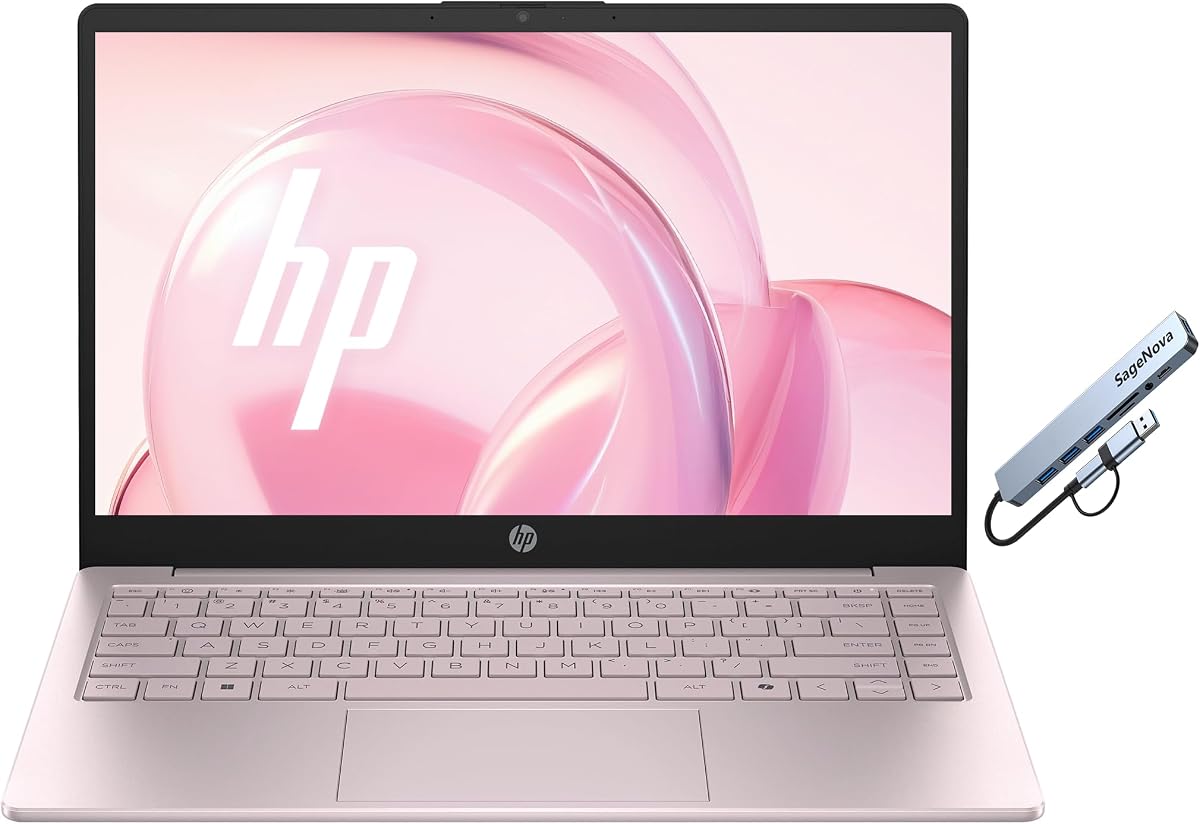
  • Wi-Fi 6, USB-C/A, HDMI, ~3.24 lbs Cherry Blossom Pink
8.6
3
  • Intel N150, 32GB DDR4, 1TB NVMe + 128GB UFS
  • 14" anti-glare LED, Office 365 included, Copilot AI
  • Full student port mix with SD reader, ~3.24 lbs
8.8
4
  • Intel N150, 16GB DDR4, 512GB NVMe + 128GB flash
  • 14" anti-glare, Office 365 year, Wi-Fi 6
  • USB-C, dual USB-A, HDMI, SD reader, pink chassis
8.8
5
  • Intel N150, 8GB DDR4, 256GB SSD + 128GB UFS
  • 14" HD anti-glare, backlit pink keyboard, Copilot key
  • Bundled 5-in-1 hub with Ethernet and SD/MicroSD
8.4
6
  • Intel N150 4-core, 4GB RAM, 128GB UFS storage
  • 14" HD anti-glare, Office 365, privacy shutter
  • USB-C, dual USB-A, HDMI, Copilot key, pink finish
8.6
7
  • Intel Pentium, 8GB RAM, 256GB SSD, Win 11 Pro
  • 15.6" 1080p IPS, 180° hinge, ~6-hour battery claim
  • 2× USB 3.0, Mini HDMI, TF slot, ~3.53 lbs
8
8
  • 4GB RAM with 128GB storage + 512GB SD card claim
  • 14" anti-glare, fast charge, Win 11 + Microsoft 365
  • Rose gold finish aimed at light document work
7
9
  • Ryzen 3 7320U, 8GB LPDDR5, 128GB SSD, S Mode
  • 15.6" FHD IPS, BluelightShield, Copilot key
  • Dual full-function USB-C, Wi-Fi 6, HDMI 2.1
8.8
10
  • Ryzen 3 7320U, 8GB DDR5, 256GB SSD, ~11-hr claim
  • 15.6" FHD 250-nit, numpad, MIL-STD 810H tests
  • Webcam shield, Wi-Fi 5, SonicMaster, black chassis
8.6

1. HP 2026 Ultrabook Laptop for Students - Best Featherweight Carry

HP 2026 Ultrabook Laptop for Students & Home

HP 2026 Ultrabook Laptop for Students & Home

8.8/10★★★★☆

If your nursing program means walking from a morning clinical site to an afternoon lecture with everything on your back, this HP ultrabook’s weight story is the headline. At roughly 3.11 pounds with a compact 14-inch footprint, it is one of the easiest pack machines in this list to live with day after day. The Intel N150 quad-core (up to 3.6GHz turbo, 6MB cache) and Intel UHD Graphics are aimed at documents, streaming lectures, and browser coursework—not CAD or gaming—and that matches most ADN and BSN workloads.

  • Intel Processor N150 up to 3.6GHz with Intel UHD Graphics
  • 8GB DDR4, 256GB SSD + 128GB UFS, Windows 11 Home in S Mode
  • 14" HD anti-glare 250 nits, ~3.11 lbs, Wi-Fi 6, privacy shutter
Check Price →
✓ Pros
  • About 3.11 pounds is realistic for clinical-day backpacks
  • Anti-glare 14-inch panel helps in bright skills-lab lighting
  • Privacy shutter matters in shared dorms and hospital lounges
  • Wi-Fi 6 and a full USB-C/USB-A/HDMI mix reduce dongle panic
  • Tranquil pink design is easy to spot in a pile of black bags
✕ Cons
  • HD 1366×768 is workable but soft for split-screen textbook reading
  • 8GB RAM fills up once Zoom, Canvas, and a simulation tab stack
  • Windows 11 S Mode can block nursing tools that are not Store apps

Detailed review

The 14-inch HD panel uses a micro-edge design, anti-glare coating, and about 250 nits with a claimed 62.5% sRGB coverage. Nursing students spend long stretches reading care plans and PowerPoints; anti-glare is more valuable here than a glossy “vivid” screen that turns into a light fixture under lab fluorescents. The 84% screen-to-body ratio helps the small chassis feel less boxed-in, though the 1366×768 resolution remains a compromise when you want a textbook PDF beside a notes doc.

Memory and storage are honest student-tier: 8GB DDR4 plus a 256GB SSD paired with 128GB UFS. That combination boots quickly and keeps core apps snappy, but you should plan cloud storage (OneDrive, Google Drive, or your school’s system) for recorded lectures and scanned clinical packets. Windows 11 Home in S Mode is positioned as a security-minded setup that prefers Microsoft Store apps. Before you buy, check whether your school’s EHR trainer, exam lockdown browser, or specialty apps require switching out of S Mode—usually possible, but it is a step you should not discover the night before a skills check-off.

Connectivity is stronger than many pastel student machines: Wi-Fi 6 (2×2), Bluetooth 5.4, USB-C 5Gbps for data, two USB-A 5Gbps ports, HDMI 1.4b, and a headphone jack. That means a USB flash drive for a preceptor, an HDMI classroom projector, and a wired mouse can coexist without a hub every day. The HP True Vision 720p camera with dual mics and a physical privacy shutter is the right combo for Zoom clinical conferences—and for closing the lens when the laptop sits open in a shared apartment.

Battery life is marketed for all-day student and home use with a 45W adapter in the box. Expect solid unplugged time for lectures and lighter browsing; continuous video plus multiple browser workspaces will drain faster, so pack the brick for twelve-hour campus days. Who should buy it: first-year nursing students who prioritize carry weight, privacy, and simple Office/web work. Who should stretch to a 16GB or 32GB sibling: anyone already drowning in simultaneous simulation software and research tabs.

Clinical-day packing tip

Keep a slim sleeve inside your clinical backpack so the pink lid does not take scratches from bandage scissors and water bottles. Label the charger brick—shared lounges eat identical 45W blocks.

S Mode checklist for nursing apps

On day one, verify ATI, ExamSoft, Respondus, Shadow Health, or whatever your program uses. If an installer is blocked, switch out of S Mode before the first graded simulation, not during it.

Check Price on Amazon →

We may earn a commission at no additional cost to you.

2. HP Laptop 2026 Copilot AI 16GB/256GB - Best Mid-RAM Pink

HP Laptop 2026 Copilot AI 16GB/256GB

HP Laptop 2026 Copilot AI 16GB/256GB

8.6/10★★★★☆

This configuration is the same friendly HP student platform as the 8GB ultrabook, but the jump to 16GB DDR4 changes how nursing multitasking feels. Shadow Health or similar simulations, a Canvas module, a Google Doc care plan, and a Zoom breakout can coexist without the fan-and-swap stutter that 8GB machines show by mid-semester. The Intel N150 still caps how far you can push creative software, yet for the actual nursing curriculum that is rarely the bottleneck—browser RAM is.

  • Intel N150 4-core up to 3.6GHz with 16GB DDR4 RAM
  • 256GB PCIe NVMe SSD + 128GB flash, Office 365 1-year
  • 14" anti-glare LED, SD reader, Wi-Fi 6, ~3.24 lbs pink
Check Price →
✓ Pros
  • 16GB RAM is the sweet spot for Zoom plus charting practice tabs
  • Office 365 inclusion helps with care plans and group presentations
  • SD card reader is handy for transferring phone photos of whiteboards
  • Cherry Blossom Pink chassis stays portable around 3.24 pounds
  • NVMe SSD keeps boots and Canvas loads feeling immediate
✕ Cons
  • 256GB primary SSD fills fast with offline lecture video libraries
  • Still an N150-class CPU—fine for nursing school, not heavy media editing
  • Display remains a 14-inch student panel, not a bright outdoor outdoor screen

Detailed review

Storage pairs a 256GB PCIe NVMe SSD with 128GB of flash. Boots under ten seconds are the listing’s claim, and the practical takeaway is less waiting between classes when you slam the lid and reopen in a different building. Still, recorded lectures and downloaded textbook chapters will pressure 256GB. Use the SD reader for overflow media and keep active semester folders lean.

The 14-inch anti-glare LED at about 250 nits and 62.5% sRGB is tuned for long indoor sessions: pharmacology Anki decks, Patho outlines, and Netflix decompression after clinicals. Intel UHD Graphics handles video playback and simple slides cleanly. It will not replace a color-critical editing display, and nursing students almost never need that.

Ports mirror the stronger student HPs: Wi-Fi 6, Bluetooth 5.4, USB-C, dual USB-A, HDMI, headphone jack, and the multi-format SD reader. One year of Microsoft Office 365 means Word and PowerPoint for concept maps and group projects without hunting for a campus license on night one. Windows 11 in S Mode appears again—same advice as above: confirm exam browsers early.

At roughly 3.24 pounds in Cherry Blossom Pink, this is still a true carry laptop for nursing students who bounce between skills lab and the library. Choose it over the 8GB model if your program is heavy on web simulations. Choose the 32GB/1TB sibling if you keep years of clinical paperwork offline or share the machine with a roommate’s media library.

Who this mid-tier HP fits

BSN students in second and third semesters who live in browser tools, Zoom office hours, and Microsoft documents—and who want pink HP aesthetics without jumping to the 1TB config.

Study setup that works

Dock to an HDMI classroom display for practice presentations, keep a wired mouse for long care-plan typing, and store clinical PDFs in a dated folder structure so the 256GB drive stays searchable.

Check Price on Amazon →

We may earn a commission at no additional cost to you.

3. HP Laptop 2026 Copilot AI 32GB/1TB - Best Overall for

HP Laptop 2026 Copilot AI 32GB/1TB

HP Laptop 2026 Copilot AI 32GB/1TB

8.8/10★★★★☆

If we are recommending one laptop from this pack for a nursing student who wants fewer compromises through graduation, it is this 32GB/1TB HP. The processor stays in the efficient Intel N150 lane, but memory and storage stop being the semester-three crisis. Thirty-two gigabytes of DDR4 is how you keep a simulation environment, multiple reference tabs, Spotify, and a synchronous lecture from turning into a choreography of closing windows.

  • Intel N150 with 32GB DDR4 for heavy browser multitasking
  • 1TB PCIe NVMe SSD + 128GB UFS for semesters of files
  • 14" anti-glare, Office 365 1-year, Wi-Fi 6, ~3.24 lbs
Check Price →
✓ Pros
  • 32GB RAM is unusually comfortable for EHR sims and research stacks
  • 1TB SSD reduces the constant delete-to-make-space ritual
  • Same portable pink 14-inch chassis nursing students already like
  • Office 365 year plus Copilot AI assistance for drafting study notes
  • Full port mix including SD reader for clinical photo transfers
✕ Cons
  • N150 CPU will not magically accelerate specialty clinical software
  • Costs more than the 8GB/16GB HP twins for the same screen class
  • S Mode and school app compatibility still need a day-one check

Detailed review

The 1TB NVMe SSD plus 128GB UFS is equally practical. Nursing programs generate surprising file bulk: scanned consent practice forms, skills videos you record for instructors, downloaded journal PDFs, and group project assets. Being able to keep prior-semester folders offline—without praying an SD card survives the wash cycle—reduces stress during clinical transitions.

Display and chassis match the other Cherry Blossom Pink 14-inch HPs: anti-glare LED around 250 nits, Intel UHD Graphics for class video, and a carry weight near 3.24 pounds. You are not buying a bigger screen; you are buying headroom inside a familiar portable shell. For many nursing students that is the correct trade, because a 17-inch “desk tank” fights the clinical backpack problem.

Connectivity remains complete: Wi-Fi 6, Bluetooth 5.4, USB-C, dual USB-A, HDMI, SD reader, headphone jack. Office 365 for a year covers the Word/Excel/PowerPoint triad used in care plans, dosage calculation practice sheets, and community-health presentations. Copilot-oriented AI features can help outline study guides; they will not replace your pharmacology flashcard discipline.

Honest limits: this is still integrated graphics and an efficiency CPU. If your electives include serious video production or you dual-major into something GPU-heavy, look elsewhere. For standard nursing school through NCLEX prep browsing and document work, the bottleneck is almost always RAM and disk—and this config solves both while staying backpackable. That is why it is our overall coursework pick.

Ideal buyer

Accelerated BSN students, second-degree nurses returning to school, and anyone who keeps every syllabus PDF forever and refuses to babysit storage warnings mid-rotation.

Versus the 16GB/512GB twin

Pick 32GB/1TB if you leave twenty tabs open during simulation weeks. Pick 16GB/512GB if your budget is tighter and you are disciplined about cloud archives.

Security habit for clinical data

Never store real patient identifiers on a student laptop. Use school-approved systems only, enable Windows Hello or a strong password, and treat this machine as a coursework device—not a charting workstation.

Check Price on Amazon →

We may earn a commission at no additional cost to you.

4. HP Laptop 2026 Copilot AI 16GB/512GB - Best Balanced Storage

HP Laptop 2026 Copilot AI 16GB/512GB

HP Laptop 2026 Copilot AI 16GB/512GB

8.8/10★★★★☆

Think of this SKU as the “most nursing students should actually buy” compromise inside the HP pink family: 16GB of DDR4 for simultaneous class tools, and a 512GB NVMe SSD that will not fill after one semester of downloaded modules. It is less extravagant than the 32GB/1TB overall pick, yet clearly more comfortable than the 8GB/256GB featherweight when your program leans on web simulations.

  • Intel N150, 16GB DDR4, 512GB NVMe + 128GB flash storage
  • 14" anti-glare LED with Office 365 1-year included
  • Wi-Fi 6, USB-C/A, HDMI, SD reader, pink portable chassis
Check Price →
✓ Pros
  • 512GB SSD is a healthier middle ground than 256GB for lecture video
  • 16GB RAM matches real nursing multitasking better than 8GB
  • Office 365 and Copilot key lower friction for writing-heavy courses
  • Same ~3.24 lb pink portability as the other 2026 Copilot HPs
  • SD reader helps move photos of lab whiteboards into study folders
✕ Cons
  • Not as future-proof on RAM as the 32GB configuration
  • Display resolution class remains student HD/LED rather than vivid FHD IPS
  • S Mode may still require a switch for some testing tools

Detailed review

Performance characteristics track the rest of the N150 cohort—snappy enough for Word, Canvas, Zoom, and streaming review videos. Intel UHD Graphics keeps lecture capture playback smooth. You will notice heat and fan behavior more during long Zoom days than during quiet note-taking; that is normal for thin student chassis under sustained video encode/decode.

The 14-inch anti-glare panel remains the indoor-study specialist. If you annotate PDFs for patho and sit near windows, anti-glare helps more than raw saturation numbers. Pairing with an external HDMI monitor at home is a smart nursing-student move: small laptop on campus, bigger screen for weekend care-plan marathons.

Software and ports follow the Copilot AI HP pattern: Wi-Fi 6, Bluetooth 5.4, USB-C, dual USB-A, HDMI, SD reader, headphone jack, Windows 11, and a year of Office 365. That SD slot is oddly useful in nursing school—phone photos of medication math boards and skills-lab posters transfer without depleting cloud quotas on cafeteria Wi-Fi.

Buy this when you want balance. Skip it only if you already know you are a 30-tab researcher (get 32GB) or you need the absolute lightest bag (consider the 3.11 lb 8GB model and stay ruthless about cloud files).

Semester storage plan

Keep the current term on the SSD, archive prior terms to an encrypted external drive, and empty Downloads every Sunday night after clinicals.

When to step up

If your program requires local virtual machines or large offline media packs, jump to the 1TB model rather than living on SD cards.

Check Price on Amazon →

We may earn a commission at no additional cost to you.

5. HP 14" Laptop 2026 Edition - Best Hub Bundle

HP 14" Laptop 2026 Edition

HP 14" Laptop 2026 Edition

8.4/10★★★★☆

This 2026 Edition HP is the classroom-connectivity specialist. The laptop itself looks familiar—Intel N150, 8GB DDR4, 256GB SSD plus 128GB UFS, 14-inch HD anti-glare—but the bundled 5-in-1 expansion hub (USB-A, USB-C, USB 3.0, USB 2.0, SD/Micro SD, and RJ-45 Ethernet) changes the day-one experience in older lecture halls and dorms where Wi-Fi collapses at exam time.

  • Intel N150 quad-core, 8GB DDR4, 256GB SSD + 128GB UFS
  • 14" HD anti-glare, backlit crepe pink keyboard, Copilot key
  • Bundled 5-in-1 hub with Ethernet, USB ports, and SD slots
Check Price →
✓ Pros
  • Included 5-in-1 hub adds Ethernet—gold in flaky dorm Wi-Fi buildings
  • Backlit pink keyboard helps for late-night care-plan typing
  • AI noise reduction on the mics supports clearer Zoom check-ins
  • Privacy shutter and Copilot hotkey are thoughtful student extras
  • Microsoft 365 Personal year gets Word/Excel running immediately
✕ Cons
  • 8GB RAM is the ceiling you will feel during heavy simulation weeks
  • HD panel trails the FHD Acer/ASUS screens for split reading
  • Hub is another piece to track in an already crowded clinical bag

Detailed review

The full-size crepe pink backlit keyboard with an AI Copilot hotkey is a quality-of-life upgrade over non-backlit twins when you study after a late clinical. The HD 720p camera with privacy shutter and dual mics that claim AI noise reduction are aimed at the exact scenario nursing students know: joining a Zoom from a hallway while someone microwaves soup nearby.

Wireless is modern—Wi-Fi 6 2×2 and Bluetooth 5.4—and onboard ports include USB-C 3.2 Gen 1 (data), dual USB-A, HDMI 1.4, headphone jack, and AC smart pin. That is already enough for many days; the hub is your insurance policy for wired Ethernet and extra card readers when a professor asks for files on spot media.

Windows 11 Home in S Mode plus Microsoft 365 Personal for a year covers the document stack. Treat S Mode as before: validate lockdown browsers and simulation clients early. Performance for everyday nursing school tasks is fine; just remember 8GB is less forgiving than the 16GB/32GB Copilot configs when Chrome tab counts explode.

Who it is for: students in Wi-Fi-challenged housing, anyone who presents in rooms that still want HDMI plus a wired network drop, and buyers who like having the hub in-box instead of ordering accessories separately. Who should look at higher RAM HPs: heavy simulation users who never close tabs.

Ethernet exam-week tactic

The night before a remote proctored exam, test the hub’s RJ-45 path on the same network you will use. Wired beats hoping the dorm mesh holds at 8:59 a.m.

Bag discipline

Keep the hub in a zip pocket dedicated to tech, not loose with alcohol swabs. Bent Ethernet clips end careers of otherwise good accessories.

Versus plain 8GB ultrabook

Pay for this Edition when backlight and the hub matter. Choose the lighter 3.11 lb ultrabook when grams and simplicity win.

Check Price on Amazon →

We may earn a commission at no additional cost to you.

6. HP 14" Laptop for Home & - Strict Budget Only

HP 14" Laptop for Home & Office

HP 14" Laptop for Home & Office

8.6/10★★★★☆

This HP exists for one honest use case: you need a temporary Windows machine for light Word work and web portals, and the budget is non-negotiable. The Intel N150 is a respectable efficiency chip, and the 14-inch HD anti-glare screen with privacy shutter looks like its siblings. The problem is the 4GB RAM and 128GB UFS combination in 2026 nursing school reality.

  • Intel N150 4-core up to 3.6GHz with Intel UHD Graphics 600
  • 4GB RAM and 128GB UFS storage—tight for modern multitasking
  • 14" HD anti-glare, Office 365, USB-C/A, HDMI, privacy shutter
Check Price →
✓ Pros
  • Lowest-friction entry into a pink HP student chassis with Office 365
  • Privacy shutter and Copilot key still present at this tier
  • Anti-glare 14-inch panel is fine for basic document coursework
  • USB-C, dual USB-A, and HDMI cover classroom basics
  • N150 CPU is more current than older Celeron bargains
✕ Cons
  • 4GB RAM is a hard limit for Zoom + Canvas + simulation together
  • 128GB storage fills after OS, Office, and a handful of offline files
  • Not our recommendation for a full multi-year nursing program

Detailed review

Modern browsers alone can consume most of 4GB. Add a video meeting and a learning-management tab, and you will feel hitching. Some students survive by using the laptop as a thin client—Chromebook-style habits, everything in the cloud, almost nothing local. That can work for a prenursing semester. It is a rough daily driver once simulations intensify.

Office 365 for a year softens the software cost, and the port set (USB-C, dual USB-A, HDMI, headphone jack) is serviceable. Wi-Fi and Bluetooth are present for dorm life. Just do not confuse “includes Office” with “has enough memory to run Office beside five other things comfortably.”

If this is truly the only option, be ruthless: one browser profile, extensions disabled, storage cleaned weekly, and external cloud for every PDF. Better advice for most nursing students: stretch to the 8GB or 16GB HPs in this same guide. The incremental comfort is larger than the incremental specification sheet suggests.

We include it because the pack includes it—and because transparent warnings prevent regret purchases. Treat it as a bridge device or household spare, not as the machine you want responsible for your entire BSN journey.

Survival settings if you must use 4GB

Close Slack/Discord, use one browser, prefer docs in the browser over desktop apps when possible, and reboot before proctored exams.

Upgrade path

Money that might go to cases and stickers is better spent moving to 16GB RAM in this roundup.

Check Price on Amazon →

We may earn a commission at no additional cost to you.

7. 2026 Laptops Computer 15.6" Pentium - Best Win 11

2026 Laptops Computer 15.6" Pentium

2026 Laptops Computer 15.6" Pentium

8/10★★★★☆

This 15.6-inch Windows 11 Pro machine is the opposite personality of the pink 14-inch HPs: bigger, more “traditional laptop,” with a Full HD IPS panel that makes pathophysiology diagrams and multi-column study guides easier to see. If your eyes hate HD-only 14-inch panels after night shifts of studying, the screen alone is a reason to shortlist it.

  • Intel Pentium with 8GB RAM and 256GB SSD, Windows 11 Pro
  • 15.6" 1920×1080 IPS, 180° hinge, ~6-hour mixed-use claim
  • 2× USB 3.0, Mini HDMI, TF slot, ~3.53 lbs, Office 365 included
Check Price →
✓ Pros
  • True FHD IPS 15.6-inch screen helps when reading dense PDFs
  • Windows 11 Pro can matter for certain campus management scenarios
  • 180° hinge is useful for sharing a care plan across a study table
  • Office 365 included and a stated 2-year warranty story on the listing
  • Numeric-friendly full-size keyboard layout for dosage calculation drills
✕ Cons
  • Pentium-class CPU trails Ryzen 3 options for snappier multitasking
  • Mini HDMI means packing the right cable for classroom projectors
  • Battery claim around six hours may be short for double clinical/class days

Detailed review

Hardware centers on an Intel Pentium processor, 8GB of RAM, and a 256GB SSD—adequate for Office, browsing, and streaming, with the usual 8GB caution during simulation pileups. Windows 11 Pro and Office 365 out of the box are oriented toward business/student readiness; Pro features are overkill for many undergrads but can help in environments that expect certain remote tools.

The 180° hinge is a sleeper study-group feature. Laying the display flat lets classmates review a concept map without rotating the whole machine. Webcam, mic, and speakers cover synchronous classes. Battery marketing cites a 5000mAh pack and up to about six hours of mixed use—plan a charger for days that stack clinical documentation time with evening lecture.

Ports include dual USB 3.0, Mini HDMI, headphone/mic jack, and a Micro TF slot. Mini HDMI is the detail that surprises people in classrooms still wired for full-size HDMI; keep an adapter in your pencil pouch. At roughly 3.53 pounds and 0.8 inches thin, it remains portable, just not as wand-light as the 3.11 lb HP.

The listing emphasizes a 2-year warranty and 6-month return policy with phone support—worth saving if you buy without a campus store safety net. Choose this when screen size and the hinge matter more than pink ultraportable vibes. Choose ASUS/Acer Ryzen models when you want a stronger CPU efficiency story at 15.6 inches.

Study-group use

The lay-flat hinge plus IPS angles make this a natural shared screen for pharmacology review circles in the library.

Cable kit

Pack Mini HDMI to HDMI and a USB-C power bank workflow if your days exceed the six-hour comfort zone.

Check Price on Amazon →

We may earn a commission at no additional cost to you.

8. HP New Gen 14" Rose Gold - Light Document Stand-In

HP New Gen 14" Rose Gold 4GB

HP New Gen 14" Rose Gold 4GB

7/10★★★★☆

This rose gold HP is aimed at visual comfort and quick top-ups more than raw horsepower. The listing highlights an anti-glare 14-inch panel for extended sessions, fast-charge capability to shrink downtime, and a Windows 11 plus Microsoft 365 bundle so Word and PowerPoint are ready. For a prenursing English or intro psych class, that can be enough.

  • 4GB RAM with 128GB storage plus listed 512GB SD card bundle
  • 14" anti-glare display with fast-charge battery emphasis
  • Windows 11 and Microsoft 365 included, rose gold finish
Check Price →
✓ Pros
  • Anti-glare 14-inch panel is easier for long reading than glossy bargain screens
  • Fast-charge messaging helps when you only have short lounge windows
  • Microsoft 365 inclusion covers Word/PowerPoint for basic assignments
  • Rose gold look is easy to identify in crowded lecture halls
  • SD-focused storage story can overflow documents off the tiny internal drive
✕ Cons
  • 4GB RAM is undersized for modern nursing multitasking
  • Lower pack rating (3.5) signals more buyer friction than peers
  • Internal 128GB class storage needs constant management

Detailed review

For nursing major coursework, the 4GB RAM allocation is the same red flag we raised on the other 4GB HP. Browser-based learning tools have grown heavier. You can mitigate with extreme tab discipline, but you should not plan a whole program around mitigation. The storage story leans on 128GB internal space plus a 512GB SD card mention in the title—treat removable media as backup, not as your only durable archive.

Battery fast charging is the feature that fits nursing schedules: twenty minutes in a lounge outlet between sites can matter more than a theoretical all-day number if you forgot to charge after a night of studying. Still, fast charging does not fix RAM pressure during a live Zoom OSCE practice.

Given the lower pack rating relative to the rest of this list, read recent owner comments about performance and heat before you commit. We are not dismissing it for light document duty; we are warning nursing students who need a primary academic machine.

Bottom line: acceptable as a household secondary or a stopgap, not our pick for clinical-heavy semesters. Redirect budget toward any 8GB-or-higher option above whenever you can.

If gift-budget is locked

Ask whether the buyer can contribute the difference toward a 16GB HP instead—the daily frustration gap is real.

Data safety on SD cards

Duplicate critical papers to cloud storage. SD cards in backpacks fail at the worst moment.

Check Price on Amazon →

We may earn a commission at no additional cost to you.

9. Acer Aspire Go 15 AI Ready - Best Large Study

Acer Aspire Go 15 AI Ready Laptop

Acer Aspire Go 15 AI Ready Laptop

8.8/10★★★★☆

Acer’s Aspire Go 15 is the nursing-student pick when your eyes and note layout want a bigger Full HD IPS panel. Pathophysiology figures, ECG strip examples, and two-column study notes simply fit better on 15.6 inches at 1080p than on HD 14-inch panels. Acer BluelightShield is a meaningful comfort feature after a 12-hour clinical when you still have to review for a quiz.

  • AMD Ryzen 3 7320U, 8GB LPDDR5, 128GB PCIe SSD, Win 11 S
  • 15.6" FHD IPS with Acer BluelightShield and Copilot key
  • Dual full-function USB-C, Wi-Fi 6, HDMI 2.1, AcerSense tools
Check Price →
✓ Pros
  • FHD IPS 15.6-inch canvas is kinder for textbook PDFs and Anki
  • Ryzen 3 7320U feels more responsive than many Pentium/N150 days
  • Dual full-function USB-C ports simplify charge and accessory life
  • BluelightShield helps during late post-clinical study blocks
  • Wi-Fi 6 and HDMI 2.1 are a modern classroom connectivity pair
✕ Cons
  • 128GB SSD is tight—external or cloud storage is mandatory
  • 8GB LPDDR5 may be soldered, limiting future RAM upgrades
  • Windows 11 S Mode can block non-Store clinical training apps

Detailed review

Inside, the AMD Ryzen 3 7320U with 8GB LPDDR5 generally feels lively for campus work: multitasking across browser tools, light creative tasks, and Copilot in Windows via the Copilot key. Radeon 610M graphics handle everyday video. This is not a discrete-GPU laptop, and nursing students rarely need one.

The storage caveat is sharp: 128GB SSD. That is the price of admission on this config. You will lean on OneDrive/Google Drive and a USB-C SSD in your bag. Dual full-function USB-C ports make that lifestyle easier—one cable can handle charge/data scenarios depending on accessory support—while HDMI 2.1 and Wi-Fi 6 cover classroom projection and dorm networks.

AcerSense for battery/storage/app habits, plus Acer TNR and PurifiedVoice for clearer video calls, map cleanly onto nursing school Zoom culture. Use them. Clear video check-offs are graded on communication as much as content.

Choose the Aspire Go when screen quality and Ryzen responsiveness matter more than a pink ultraportable aesthetic. Pair it with cloud discipline from day one, or the 128GB drive will define your semester for the wrong reasons.

Who should buy Acer here

Students who study mostly at a desk or library table and want a larger reading surface without moving up to a 17-inch boat.

S Mode + 128GB reality check

Exit S Mode if required by exam software, and buy a small USB-C SSD in the same order as the laptop.

Versus ASUS Vivobook Go

Acer wins on BluelightShield emphasis and dual full-function USB-C. ASUS wins on larger SSD (256GB) and the longer battery/durability marketing.

Check Price on Amazon →

We may earn a commission at no additional cost to you.

10. ASUS Vivobook Go 15.6” FHD Slim - Best for Clinical

ASUS Vivobook Go 15.6” FHD Slim Laptop

ASUS Vivobook Go 15.6” FHD Slim Laptop

8.6/10★★★★☆

Clinical rotations punish weak batteries and fragile plastic. The Vivobook Go’s pitch—Ryzen 3 7320U efficiency, a 42Wh pack marketed up to around eleven hours, and MIL-STD 810H testing for high/low temperature, shock, vibration, and altitude—is unusually aligned with nursing student logistics. You may never take this laptop into a patient room, but you will absolutely use it in cars, shuttle rides, and cafeteria corners between sites.

  • AMD Ryzen 3 7320U, 8GB DDR5, 256GB SSD, Radeon graphics
  • 15.6" FHD 250-nit, up to ~11-hour battery claim, 42Wh
  • MIL-STD 810H tested, webcam shield, chiclet keyboard + numpad
Check Price →
✓ Pros
  • Long battery claim fits stacked clinical-plus-class calendars
  • MIL-STD 810H testing story suits backpacks that live hard lives
  • 256GB SSD is healthier than 128GB peers for offline materials
  • Privacy webcam shield is ideal in shared clinical lounges
  • Numpad helps when drilling dosage calculations quickly
✕ Cons
  • Wi-Fi 5 trails Wi-Fi 6 HPs/Acer for congested dorm networks
  • 8GB RAM still requires tab manners during heavy simulation weeks
  • Black 15.6-inch chassis is less “grab-and-spot” than pink HPs

Detailed review

The 15.6-inch FHD panel at about 250 nits and 45% NTSC is a solid indoor study screen: sharp enough for PDF textbooks, wide enough for side-by-side notes. AMD Radeon graphics cover everyday video. Eight gigabytes of DDR5 and a 256GB SSD strike a better balance than 4GB/128GB bargain machines, though power users may still wish for 16GB when Chrome is a lifestyle.

Typing matters during care-plan marathons. The chiclet keyboard with a numeric keypad is a quiet advantage for dimensional analysis drills and medication math. SonicMaster speakers are fine for lecture playback with headphones ready for shared spaces. The 720p camera with a physical privacy shutter matches the HIPAA-aware habit of covering lenses in mixed company—even when you are only on campus Wi-Fi.

Wireless is Wi-Fi 5 and Bluetooth 5.1—adequate, just not as future-facing as Wi-Fi 6 classmates. If your dorm AP is ancient and crowded, sit closer to the router or use a phone hotspot for exam moments. Ports and charging support fast charging habits that help when outlets are scarce.

We named this the clinical-rotation pick because battery longevity and durability messaging matter more than colorways when your alarm is set for 4:45 a.m. Pair it with a sleeve, keep patient data off local disk, and you have a pragmatic BSN companion that does not pretend to be a gaming rig.

Rotation-week kit

Laptop, charger, privacy-aware webcam habit, offline copies of your own study notes (never patient charts), and a power bank if your sites are outlet deserts.

Versus Acer Aspire Go

Take ASUS for battery/durability/256GB. Take Acer for dual full-function USB-C and BluelightShield emphasis on a similar Ryzen 3 foundation.

Check Price on Amazon →

We may earn a commission at no additional cost to you.

Best Laptops for Nursing Students in 2026: Clinicals, Charts, and

How to Choose a Laptop for Nursing School in 2026

Start with RAM, not marketing AI labels

Nursing coursework is a browser operating system: Canvas, email, EHR trainers, Quizlet, YouTube skills videos, and Zoom. Sixteen gigabytes is the comfort tier for that stack. Eight gigabytes works with discipline. Four gigabytes is a semester of frustration for most people. Copilot keys are nice; memory is necessary.

Screen glare beats screen inches—until you study PDFs all night

Skills labs and hospitals are bright. Anti-glare coatings on the HP 14-inch machines reduce squinting. If you primarily study at a desk and read dense PDFs, the 15.6-inch FHD IPS options from Acer and ASUS are easier on attention and posture. Avoid choosing based on color alone.

Weight is a clinical accessory

Your bag already holds shoes, lunch, a water bottle, and skills supplies. A 3.1–3.5 pound laptop is easier to sustain than a 17-inch desktop replacement. If you drive door-to-door and study in the car, battery claims matter as much as pounds.

Check exam and simulation software before you fall in love

Storage strategy for nursing files

256GB is workable with cloud hygiene. 512GB/1TB is calmer. 128GB requires an external SSD in the same shopping cart. Never store real patient protected health information on a personal laptop—school policy and common sense agree.

Frequently Asked Questions

01

How much RAM do nursing students really need?

Plan for 16GB if you can. Eight gigabytes is the practical minimum for many programs if you close tabs aggressively. Four gigabytes machines in this guide are stopgaps, not ideal four-year companions, because EHR simulations and Zoom stack quickly.

02

Should nursing students buy a MacBook instead?

Some programs are Windows-centric for testing software and certain skills platforms. Others are flexible. Ask your cohort Facebook/Discord group and faculty tech sheet before you commit. This roundup focuses on Windows pack options that fit common nursing-school constraints.

03

Is a 14-inch or 15.6-inch better for clinical students?

Fourteen-inch wins for backpack comfort and quick charting practice on the go. Fifteen-point-six-inch wins for long reading sessions and shared study tables. Neither size belongs in a sterile patient care area—these are academic tools for lounges, libraries, and home.

04

Do I need a numeric keypad for nursing school?

Helpful, not mandatory. Dosage calculation drills go faster with a numpad (ASUS Vivobook Go includes one). Many students use an external USB keypad with 14-inch HPs at home and travel light on clinical days.

05

What about Windows 11 S Mode?

S Mode can block installers outside the Microsoft Store. That becomes a problem if your lockdown browser or simulation client needs a traditional installer. Switching out of S Mode is usually straightforward—do it before the first graded assessment.

06

Can these laptops run EHR training systems?

Most academic EHR trainers are browser-based or lightweight clients. The Intel N150 and Ryzen 3 machines here are aimed at that world. Always check your school’s listed requirements for RAM, browser, and webcam.

07

How important is battery life for nursing students?

Critical on days that combine clinicals with evening class. ASUS markets up to around eleven hours; other machines may land closer to a half day under video load. Carry the charger anyway—outlets are competitive territory.

08

Should I buy extended warranty?

If you are hard on backpacks, accidental coverage can be rational. The 15.6-inch listing that advertises a longer warranty is attractive for buyers without family tech support. Keep proof of purchase and note support numbers in your phone.

09

Are pink HP laptops less powerful than black ones?

No. In this pack the pink HPs are configuration variants of the same Intel N150 student platform. Power differences come from RAM and SSD size, not lid color.

10

What accessories actually help nursing students?

A tough sleeve, a compact HDMI adapter, a wired mouse for long papers, noise-reducing earbuds for library focus, and a USB-C SSD if your internal drive is 128–256GB. Skip novelty gadgets until your core kit is solid.

Conclusion

Nursing school rewards boring reliability: enough memory for simulations, a screen you can read when you are tired, and a chassis you will still willingly carry in month eighteen. In this pack, the HP 32GB/1TB Copilot configuration is the coursework comfort pick, the ASUS Vivobook Go is the rotation-day endurance pick, and the Acer Aspire Go 15 is the large-canvas study pick.

If you are buying on a tighter budget, prioritize 16GB RAM over cosmetic upgrades, and treat 4GB models as temporary bridges only. Confirm exam-software compatibility on night one, keep real patient data off personal drives, and build a charging habit as disciplined as your clinical checklist.

Choose the machine that matches your program’s heaviest week—not the brochure’s happiest photo—and it will disappear into your workflow the way good clinical tools should.