Best Keyboards for Office in 2026
We may earn a commission from links on this page, at no extra cost to you. Learn more.
The right office keyboard fades into the background, letting you type all day in comfort without disturbing the person at the next desk. The wrong one nags at you, with a clattering sound, a cramped layout or a mushy feel that slows your work. For office use the priorities are specific: quiet keys that respect a shared space, a comfortable feel that holds up over long sessions, a full layout with a number pad for real productivity, and reliable connectivity that just works. This guide ranks nine of the best keyboards for office work you can buy in 2026, spanning wired, wireless and mechanical designs, so there is a right pick whether you want whisper-quiet membrane keys, premium wireless convenience or a tactile mechanical board that stays office-friendly.
Top 9 Best Keyboards for Office
Our top 9 picks, reviewed
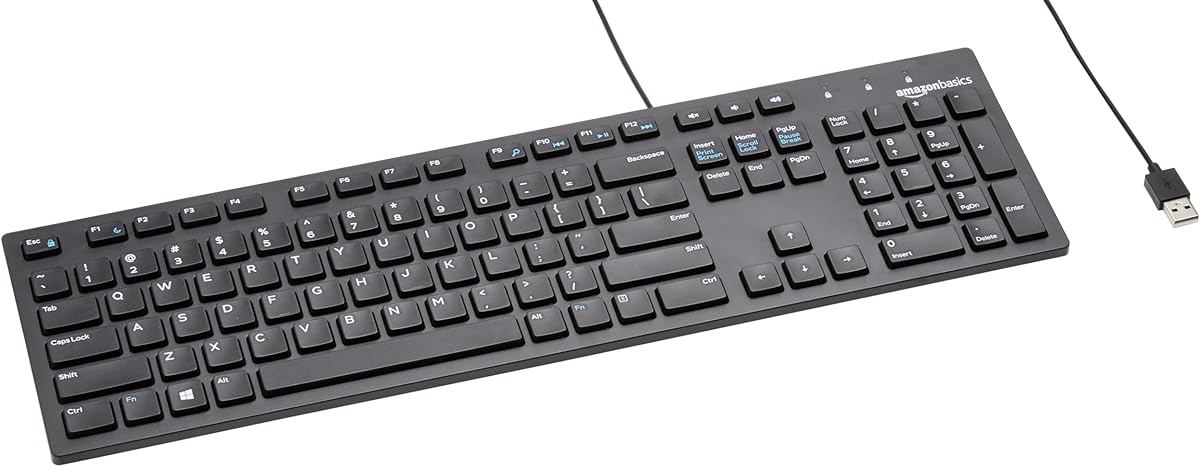
Cherry Stream Wired Keyboard
The Cherry Stream is our top office keyboard because it nails the essentials without fuss. Cherry's SX scissor switches give a precise, satisfying pressure point while staying whisper-quiet, so you can type quickly without disturbing colleagues. The full-size layout keeps a number pad and arrow keys, ten extra keys handle office and multimedia tasks, and a metal plate keeps it sturdy on the desk. For everyday work, it is comfortable, quiet and dependable.
- Type
- Wired USB-A
- Switches
- SX scissor
- Noise
- Whisper-quiet
- Layout
- Full-size, numeric pad
What we liked
- Whisper-quiet keys suit shared offices
- Precise SX scissor typing feel
- Full-size layout with number pad
- 10 office and multimedia shortcut keys
Worth noting
- Wired only, no wireless option
- Plain looks with no backlight
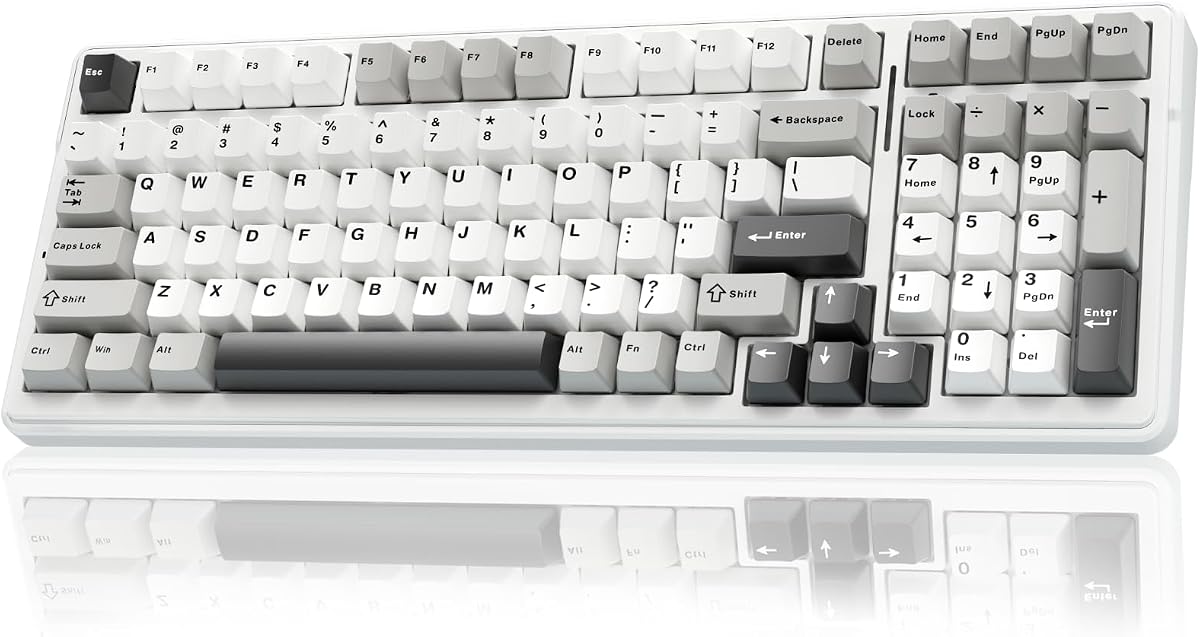
AULA F99 Wireless Mechanical Keyboard
For typists who want a mechanical feel at the office, the AULA F99 is the standout. Pre-lubed linear switches and a gasket-mounted structure with layers of silencing foam deliver a smooth, satisfying keystroke that is quieter than most mechanicals. Triple connectivity links up to five devices, the 96 percent layout keeps a number pad while saving space, and an 8000mAh battery lasts. It is the enthusiast's pick that still works for real work.
- Layout
- 96% compact
- Connectivity
- BT5.0 / 2.4G / USB-C
- Switches
- Pre-lubed linear
- Battery
- 8000mAh
What we liked
- Smooth pre-lubed linear switches
- Triple connectivity across five devices
- Gasket build softens the typing feel
- Large 8000mAh battery for long life
Worth noting
- Louder than membrane office boards
- RGB lighting is showy for some offices
KOPJIPPOM Large Print Backlit Keyboard
The KOPJIPPOM large-print keyboard is a thoughtful office pick for anyone who struggles to read standard keys. Its lettering is four times larger than normal, and an adjustable white LED backlight keeps every key legible in dim light. The full 104-key layout retains a number pad, the spill-proof build survives desk mishaps, and plug-and-play setup needs no drivers. It is an accessible, low-cost board that suits older eyes and low-light desks alike.
- Type
- Wired USB-A
- 4x large font
- Backlight
- White LED
- Layout
- Full-size 104-key
What we liked
- Extra-large print is easy to read
- Adjustable white LED backlight
- Full 104-key layout with number pad
- Spill-proof plug-and-play design
Worth noting
- Wired only, no wireless option
- Basic membrane feel, not premium
Logitech MX Keys S Wireless Keyboard
The Logitech MX Keys S is the premium wireless choice for a modern office desk. Its spherically-dished, low-profile keys give a fast, fluid and notably quiet typing experience, while smart backlighting illuminates as your hands approach and adapts to the room. Bluetooth pairing across three devices and programmable Smart Actions boost productivity, and USB-C charging keeps it topped up. It is a polished, comfortable board for anyone who values convenience and build quality.
- Type
- Low-profile wireless
- Connectivity
- Bluetooth + Bolt receiver
- Feature
- Smart backlighting
- Power
- USB-C rechargeable
What we liked
- Fluid, quiet low-profile typing
- Pairs with up to three devices
- Backlight lights up as hands approach
- Programmable Smart Actions shortcuts
Worth noting
- Among the priciest options here
- No number-pad-free compact version
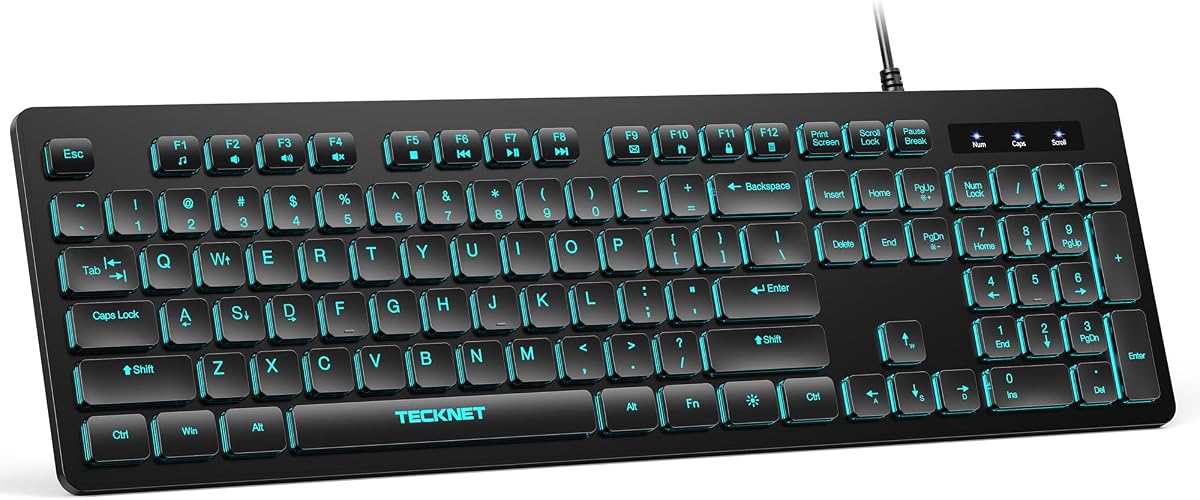
TECKNET Silent Wired Office Keyboard
The TECKNET silent keyboard proves you do not need to spend much for a quiet, comfortable office board. Its low-profile membrane keys keep typing soft and near-silent, ideal for shared rooms and late-night work, and the full-size layout with adjustable tilt feet stays comfortable through long sessions. Twelve FN shortcuts speed up common tasks, and a spill-resistant film rated for 80 million keystrokes adds durability. It is a lot of keyboard for the price.
- Type
- Wired USB
- Noise
- Low-profile silent
- Layout
- Full-size 104-key
- Extras
- RGB, spill-resistant
What we liked
- Quiet low-profile membrane keys
- Full-size ergonomic three-zone layout
- 12 FN multimedia shortcut combos
- Spill-resistant, durable build
Worth noting
- Wired only, no wireless option
- RGB may be too flashy for some
Cherry KC 200 MX Wired Office Keyboard
The Cherry KC 200 MX is the office pick for anyone who wants a mechanical feel without the noise. Its MX2A Silent Red switches deliver a smooth, linear keystroke that stays remarkably quiet, so you get mechanical durability rated beyond 50 million actuations without annoying the room. An anodized metal plate makes it feel premium and stable, and molded keycaps keep their lettering for years. It is a classy, quiet mechanical for serious desks.
- Type
- Wired mechanical
- Switches
- MX2A Silent Red
- Build
- Anodized metal plate
- Feature
- Full N-key rollover
What we liked
- MX2A Silent Red switches stay quiet
- Premium anodized metal build
- Molded, abrasion-resistant keycaps
- Full N-key rollover and anti-ghosting
Worth noting
- Higher price than membrane boards
- Wired only, no wireless option
TECKNET Whisper-Quiet Wired Keyboard
The TECKNET whisper-quiet board bridges gaming and office use, and its near-silent switches make it genuinely office-friendly. An integrated wrist rest and a seven-degree input angle keep your hands in a natural position through long days, while an all-metal base and IP32 spill resistance handle desk wear. The volcano-style switches last up to 50 million keystrokes. If you want ergonomic comfort and durability with a quiet feel, it delivers, just dial down the RGB.
- Type
- Wired USB
- Noise
- Whisper-quiet switch
- Rest
- Integrated wrist rest
- Build
- All-metal panel
What we liked
- Near-silent switches suit the office
- Integrated wrist rest and 7-degree tilt
- Sturdy all-metal panel
- IP32 spill resistance with drainage
Worth noting
- RGB lighting leans toward gaming
- Bulkier than a slim office board
Logitech K270 Wireless Keyboard
The Logitech K270 is the low-maintenance wireless workhorse, and its standout feature is a 24-month battery life that means you almost never think about power. Deep-profile full-size keys give a comfortable, familiar feel with a number pad and arrow keys, eight multimedia keys handle quick tasks, and a spill-proof design shrugs off desk mishaps. Setup is as easy as plugging in the receiver. It is a dependable, no-drama office keyboard from a trusted brand.
- Type
- 2.4G wireless
- Layout
- Full-size, number pad
- Battery
- 24-month life
- Extras
- 8 multimedia keys
What we liked
- Two-year battery life
- Comfortable deep-profile full-size keys
- Spill-proof, built to last
- Simple plug-and-play receiver
Worth noting
- 2.4G only, no Bluetooth
- Deeper keys are slightly louder
AULA S99 Wireless Keyboard
The AULA S99 rounds out the list as a flexible wireless value pick. Triple-mode connectivity over Bluetooth, 2.4G and USB-C lets you switch between office, laptop and mobile setups, and a rotary knob makes volume and media adjustments effortless. The 96 percent layout keeps a numeric keypad while freeing desk space, a foldable stand eases wrist pressure, and programmable macros speed up repetitive tasks. It is a feature-rich board at a friendly price.
- Layout
- 96% with number pad
- Connectivity
- BT / 2.4G / USB-C
- Feature
- Rotary media knob
- Extras
- Programmable macros
What we liked
- Triple-mode wireless flexibility
- Handy rotary volume and media knob
- 96% layout keeps the number pad
- Programmable macro shortcut keys
Worth noting
- Membrane feel, not mechanical
- Retro styling suits some desks only
How We Chose the Best Keyboards for Office Work

Choosing an office keyboard is about fit, not flash. The board that works brilliantly for gaming or coding may be exactly wrong for a quiet shared room, and the cheapest option may nag at you every day with a mushy feel or a clattering sound. So rather than ranking on raw specs, we sorted our picks by the qualities that actually matter at a desk and by who each one suits best. We started by separating the broad families here: quiet membrane boards that keep a shared office peaceful, premium wireless designs built for convenience, and office-friendly mechanicals that offer a tactile feel without the usual noise.
From there we weighed the features that shape a real working day. Quietness came first, because a keyboard that disturbs colleagues is a poor office citizen no matter how good it feels. Comfort and key feel came next, since you may type on this board for six or eight hours at a stretch. We then considered layout and productivity, favouring full-size boards with a number pad and useful shortcut keys, followed by connectivity and battery life, build quality and durability, and overall value. Finally, we kept the list varied on purpose, from a premium Logitech to a budget TECKNET, so there is a sensible pick for any office and any budget.
What to Prioritise in an Office Keyboard
The honest truth is that an office keyboard has a narrower job than a gaming or enthusiast board, and that focus makes choosing easier. Above all it needs to be quiet and comfortable, because the two things you notice most in a shared workspace are how much noise you make and how your hands feel after hours of typing. A whisper-quiet membrane like the Cherry Stream or a silent mechanical like the Cherry KC 200 MX keeps the peace, while a comfortable key profile and a supportive layout keep fatigue at bay. Everything else is secondary to those two fundamentals.
What you are really choosing between is how you want that comfort delivered. One route is a quiet membrane board, which is affordable, soft to type on and undemanding, as with the TECKNET silent model or the KOPJIPPOM large-print board. Another is premium wireless, spending more for the convenience, build quality and smart features of a Logitech MX Keys S. A third is an office-friendly mechanical, trading a little noise and cost for the satisfying, durable feel of the Cherry KC 200 MX or AULA F99. None is objectively best; the right one depends on your budget, your desk and how much you care about typing feel. Decide which of those three matters most and the choice narrows quickly.
Matching the Keyboard to Your Office
For a Quiet, Undemanding Desk
If your priority is keeping a shared room peaceful without spending much, a quiet membrane board is the answer, and the Cherry Stream leads here with its precise, whisper-quiet SX scissor switches. The TECKNET silent keyboard is a strong budget alternative with soft low-profile keys, and the KOPJIPPOM adds oversized, backlit lettering for anyone who wants keys that are easy to read.
For Premium Wireless Convenience
If you want the polished, cable-free experience and are willing to pay for it, the Logitech MX Keys S is the clear pick, with fluid low-profile keys, smart backlighting and programmable shortcuts. For a lower-cost wireless option that still lasts, the Logitech K270 runs two years per battery set and keeps a comfortable full-size layout.
For a Mechanical Feel That Stays Office-Friendly
Typists who love a tactile keystroke need not give it up at work. The Cherry KC 200 MX pairs quiet MX2A Silent Red switches with a premium metal build, while the AULA F99 offers smooth pre-lubed linears and silencing foam in a compact 96 percent frame with triple connectivity. Both feel great without shouting across the room.
For Flexible Multi-Device Work
If you move between a desktop, laptop and tablet, a triple-mode board is the most convenient. The AULA S99 and F99 both switch across Bluetooth, 2.4G and USB-C, and the S99's rotary knob makes volume and media control effortless while its 96 percent layout keeps a number pad.
Features That Matter Most for the Office
Two features shape the office experience more than any others: noise and layout. Noise is the one people underestimate, then regret, because a loud keyboard is a constant low-level irritation in a shared space. Look for switches described as quiet, silent or whisper-quiet, whether that is the membrane keys on the Cherry Stream and TECKNET boards or the specially damped MX2A Silent Red switches on the Cherry KC 200 MX. Even among mechanicals, the pre-lubed linears and layered foam in the AULA F99 make a real difference. If your office is quiet, prioritise this above almost everything else.
Layout is the second essential, because it determines how efficiently you work. A full-size board with a number pad, arrow keys and dedicated shortcuts suits data entry and general productivity, which is why the Cherry Stream, Logitech K270 and KOPJIPPOM all keep the complete layout. If desk space is tight, a 96 percent design like the AULA F99 or S99 keeps the number pad in a smaller footprint. Beyond that, small conveniences add up: multimedia keys for volume and playback, a rotary knob like the AULA S99's, smart backlighting like the Logitech MX Keys S, and spill resistance for the inevitable coffee mishap. Match these to how you actually work and the keyboard quietly makes your day smoother.
A Closer Look at the Top Picks
The Cherry Stream earns the top spot because it does exactly what an office keyboard should, with no weak points. Its SX scissor switches feel precise and satisfying yet stay whisper-quiet, so you type quickly without disturbing anyone, and the full-size layout keeps a number pad, arrow keys and ten handy shortcuts. A metal plate and rubber feet keep it planted, and Cherry's build quality means it should last for years. For most office desks, it is the keyboard we would recommend first.
Behind it, the AULA F99 is the pick for anyone who wants a genuine mechanical feel that still respects a shared room, thanks to its damped linear switches and foam-filled gasket build, while the KOPJIPPOM serves anyone who needs large, backlit keys. The Logitech MX Keys S is the premium wireless choice, the TECKNET silent board and Logitech K270 cover the affordable ends of wired and wireless, and the Cherry KC 200 MX delivers a quiet, premium mechanical. The TECKNET whisper-quiet model adds ergonomic comfort with a wrist rest, and the AULA S99 rounds things out with flexible triple-mode connectivity.
Tips for Getting the Most From an Office Keyboard
A few habits make any office keyboard more pleasant to live with. Set it up with your forearms roughly level and your wrists straight, using the tilt feet found on most boards here to find a comfortable angle, and if your model has a wrist rest, like the TECKNET whisper-quiet board, position it so your hands sit level rather than bending up to the keys. Take short breaks to stretch your hands through the day, since no keyboard replaces the value of moving, and a quiet, low-effort board will help reduce the fatigue that builds over long sessions.
Look after the practical side, too. Keep drinks away from the keys where you can, and lean on the spill-resistant designs, like the Logitech K270 or the IP32-rated TECKNET boards, for the inevitable near-miss. On wireless models, keep an eye on battery status, though the Logitech K270's two-year life and the AULA F99's large cell mean that is rarely a worry. If your office is shared and quiet, double-check the noise level before committing, and buy from a listing with clear return protection so you can send a board back if it feels or sounds wrong for your space. With the right pick from this list, your keyboard becomes the part of your desk you never have to think about.
Final Recommendation
For most office workers, the Cherry Stream is the best keyboard in 2026, combining precise, whisper-quiet scissor keys with a full layout and solid build for dependable all-day use. If you want a mechanical feel that stays office-friendly, the AULA F99 and Cherry KC 200 MX deliver it quietly, while the Logitech MX Keys S is the premium wireless choice and the Logitech K270 the long-lasting budget one. For soft, quiet typing on a tight budget, the TECKNET silent board and large-print KOPJIPPOM both impress. Whichever you choose, prioritise quiet keys and a comfortable layout, and your office days will run a little smoother.
How we picked
We judged each keyboard on typing comfort and feel, how quiet it is in a shared workspace, layout and productivity features like a number pad and shortcut keys, connectivity and battery life, build quality and durability, and overall value. Because office work means long hours and shared rooms, we prioritised quiet, comfortable, full-featured boards over flashy extras, and we mixed wired, wireless and mechanical designs so there is a sensible choice for any desk.
Frequently asked questions
What makes a keyboard good for office use?
The best office keyboards are quiet, comfortable and full-featured. Quiet keys, like the whisper-quiet Cherry Stream or the silent switches on the Cherry KC 200 MX, respect a shared workspace. A comfortable feel and a full layout with a number pad, as on the Logitech K270, support long working days. Reliable connectivity and durability round it out, so the board simply works day after day without complaint.
Are mechanical keyboards too loud for the office?
Many are, but not all. Standard mechanical switches can clatter, which annoys colleagues in a shared room. Office-friendly mechanicals use quiet switches, like the MX2A Silent Red in the Cherry KC 200 MX or the pre-lubed linears and silencing foam in the AULA F99, which keep the tactile feel while cutting the noise. If your office is quiet, choose one of these rather than a clicky gaming switch.
Should I choose a wired or wireless keyboard for the office?
Wired boards like the Cherry Stream and TECKNET never need charging and connect instantly, which suits a fixed desk. Wireless models like the Logitech MX Keys S and K270 cut cable clutter and are easy to reposition; the K270 even lasts two years per battery set. If you switch between a laptop and desktop, a triple-mode board like the AULA F99 or S99 adds the most flexibility.
Do I need a number pad on an office keyboard?
If your work involves any data entry, spreadsheets or accounting, a number pad speeds things up considerably. Full-size boards like the Cherry Stream, Logitech K270 and KOPJIPPOM include one, while the 96 percent AULA F99 and S99 keep a numeric keypad in a slightly more compact frame. If you rarely type numbers, you could save desk space with a tenkeyless design, but most office users benefit from the pad.
How do I keep my office keyboard comfortable during long days?
Choose a board with a comfortable key feel and, ideally, an adjustable tilt or wrist support, like the integrated wrist rest on the TECKNET whisper-quiet model or the low-profile design of the Logitech MX Keys S. Keep your wrists straight, position the keyboard so your forearms are level, and take short breaks to stretch. A quiet, low-effort board also reduces the fatigue that builds over a full working day.