Skip to content

Best Keyboards for Excel and Data Entry in 2026

By Thomas BrianUpdated July 5, 2026

We may earn a commission from links on this page, at no extra cost to you. Learn more.

If your day involves spreadsheets, invoices or long columns of figures, your keyboard is doing more work than almost any other tool on your desk. The right one has a proper numeric keypad for fast number entry, keys that are easy to see and comfortable to hit for hours, and a rock-solid wired connection that never drops a keystroke mid-formula. Get it wrong and you fight your hardware all day; get it right and data entry becomes almost effortless. This guide ranks nine of the best keyboards for Excel and data entry in 2026, from oversized large-print boards to compact numpad-equipped workhorses, so there is an ideal match whether you prize visibility, comfort or a small footprint.

Top 9 Best Keyboards for Excel and Data Entry

Our top 9 picks, reviewed

1Best Overall

Hamile Large Print Light Up Keyboard

The Hamile takes the top spot by nailing the things that matter for data entry: a full 108-key layout with a dedicated number pad, print four times larger than standard so digits are unmistakable, and quiet membrane keys that keep long sessions calm. A foldable stand dials in a comfortable typing angle to spare your wrists, and seven backlight colours keep the keys visible day or night. It is the most highly rated board here for good reason.

Layout
108-key full-size
Print
4X large print
Backlight
7-color, 3 levels
Feel
Quiet membrane

What we liked

  • Highest owner rating on the list
  • Oversized 4X print reads at a glance
  • Foldable stand sets a comfy angle
  • Quiet keys suit shared offices

Worth noting

  • Wired only, so cable on the desk
  • Backlight has fewer modes than rivals
2Best for Visibility

Large Print High-Contrast Keyboard with Wrist Rest

This high-contrast board is built for anyone who spends hours reading and entering numbers. Its 4X print is laser-etched rather than printed, so the characters stay crisp no matter how many thousands of keystrokes they take. An integrated wrist rest, foldable stand and anti-slip pads keep long data-entry stints comfortable and stable, and the included waterproof cover guards against the coffee spills and dust that plague busy desks. There is no backlight, but the daytime clarity is excellent.

Layout
104-key full-size
Print
4X laser-etched
Extras
Wrist rest + dust cover
Hotkeys
12 multimedia

What we liked

  • Laser-etched keys never fade
  • Built-in wrist rest eases fatigue
  • High-contrast print is very readable
  • Includes a waterproof dust cover

Worth noting

  • No backlight for dark rooms
  • Wrist rest adds to desk depth
3Best Slim Wired

X9 Performance Wired Keyboard

The X9 Performance is the value champion for straightforward data entry. It delivers a complete 104-key layout with a 17-key numeric keypad, 14 shortcut keys and a slim 0.79-inch profile with quiet keys, all for a bargain price. A kickstand lets you tilt it for comfort, and the wired USB connection means no batteries and no dropped keystrokes. For a no-frills spreadsheet workhorse that just works, it is hard to beat.

Layout
104-key + 17-key numpad
Profile
0.79in low profile
Hotkeys
14 shortcuts
Extras
Kickstand

What we liked

  • Very affordable and reliable
  • Full 17-key numeric keypad
  • Slim low-profile, quiet keys
  • Kickstand adjusts typing angle

Worth noting

  • Standard-size, non-oversized print
  • No backlight for dim offices
4Best Backlit Value

X9 Large Print Backlit Keyboard

The X9 Large Print board pairs easy-to-read keys with a seven-colour backlight, making it a strong pick for offices that run into the evening. Its bold characters help seniors, students and anyone tired of squinting, while the 107-key full-size layout keeps a number pad on hand for rapid entry. Four brightness levels keep the keys legible in dim rooms, and the wired USB link sets up instantly with no drivers to install.

Layout
107-key full-size
Print
Large bold print
Backlight
7-color, 4 levels
Connection
USB wired

What we liked

  • Large print plus 7-color backlight
  • Number pad for quick figures
  • Bright keys for late sessions
  • Plug-and-play, no software

Worth noting

  • Membrane feel is basic
  • Print smaller than the 4X boards
5Best for Low-Light Work

KOPJIPPOM Large Print Backlit Keyboard

The KOPJIPPOM focuses on clarity in dim conditions with print four times larger than standard and an even white LED backlight that lights every key uniformly. Its full 104-key QWERTY layout keeps the numeric keypad you need for data entry, and foldable feet raise it to a wrist-friendly angle for long sessions. The backlight brightness adjusts or switches off entirely, and the board plugs in and works with no drivers required.

Layout
104-key full-size
Print
4X large print
Backlight
White LED
Extras
Foldable feet

What we liked

  • Crisp 4X large print keys
  • Even white LED backlight
  • Foldable feet ease hand fatigue
  • Broad OS compatibility

Worth noting

  • Single backlight colour only
  • Basic membrane switches
6Best Simple Wired

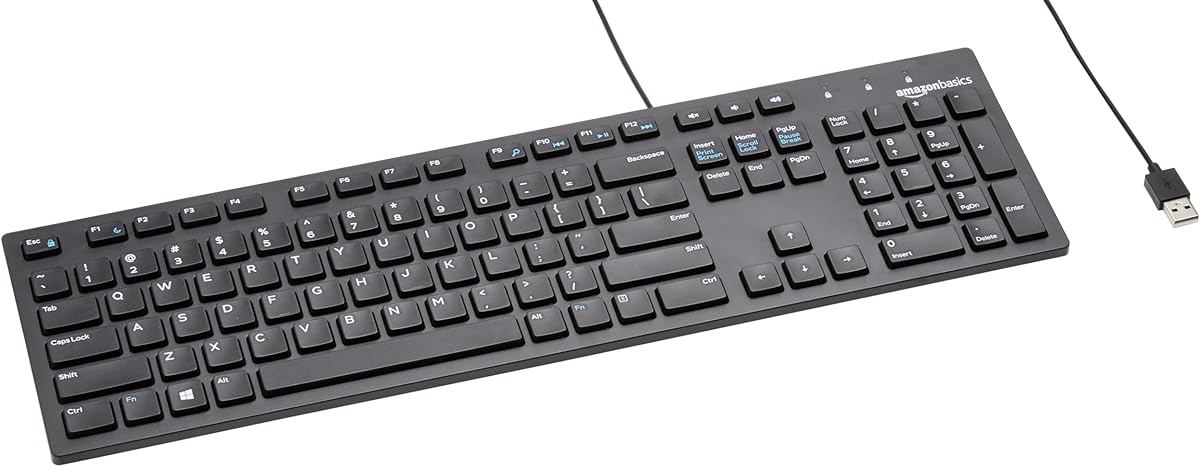
Amazon Basics Wired QWERTY Keyboard

For a fuss-free spreadsheet keyboard, the Amazon Basics wired board covers the essentials cheaply and reliably. It offers a familiar full-size QWERTY layout with a number pad and handy media hotkeys, including a dedicated Calculator key that data-entry users will appreciate. Setup is instant over USB with no software, and Amazon's backing means easy support. It lacks large print or a backlight, but for a dependable everyday workhorse it delivers exactly what most desks need.

Layout
Full-size QWERTY
Connection
USB wired
Hotkeys
Media + Calculator
Compat
Windows

What we liked

  • Dependable, trusted Amazon brand
  • Dedicated Calculator hotkey
  • Simple plug-and-play setup
  • Low, wallet-friendly price

Worth noting

  • No large print or backlight
  • Basic feature set overall
7Best 7-Color Backlit

SABLUTE K11PRO Large Print Backlit Keyboard

The SABLUTE K11PRO combines enlarged 3X print with one of the most flexible backlights here, offering seven colours, eight brightness levels and multiple modes. A standard 104-key layout with an independent numeric keypad keeps rapid data entry quick, and clear yellow Num, Caps and Scroll Lock indicators help you avoid the classic num-lock-off mistake. A tilt stand and a 24-month warranty round out a keyboard built for long, comfortable workdays.

Layout
104-key + numpad
Print
3X large print
Backlight
7-color, 8 levels
Warranty
24 months

What we liked

  • Enlarged 3X print reads clearly
  • Rich backlight with 8 brightness levels
  • Independent Num/Caps indicators
  • Long 24-month warranty

Worth noting

  • Print smaller than the 4X boards
  • Shortcut keys are Windows-focused
8Best Compact with Hubs

Perixx PERIBOARD-220H Compact Keyboard

The Perixx PERIBOARD-220H is the pick for tight desks that still need a number pad. Its space-saving frame keeps the full numeric keypad while shrinking the overall footprint, and two built-in USB hubs on the back handle a mouse, flash drive or separate keypad without extra clutter. Quiet membrane switches with 3mm travel keep typing smooth and low-noise, and a long 5-foot cable gives you flexible placement in any workstation or POS setup.

Layout
Compact + numpad
Ports
2 USB hubs
Feel
3mm quiet keys
Cable
5 ft

What we liked

  • Space-saving layout keeps the numpad
  • Two built-in USB hubs on the back
  • Quiet 3mm membrane key travel
  • Long 5 ft cable for flexible placement

Worth noting

  • No large print or backlight
  • Compact spacing takes adjustment
9Best Add-On Numpad

Kadaon USB Numeric Keypad

Sometimes you do not need a whole new keyboard, just the number pad your laptop lacks, and the Kadaon USB keypad fills exactly that gap. It plugs in and works instantly, adding an 18-key numeric block with an ergonomic tilt that eases wrist strain during long spreadsheet or accounting sessions. Silent keys keep it office-friendly, and its small size makes it easy to move between machines. For numbers-heavy work on a compact laptop, it is a cheap, effective fix.

Type
18-key numeric keypad
Connection
USB plug-and-play
Feel
Silent, ergonomic tilt
Use
Laptop/desktop

What we liked

  • Adds a numpad to numpad-less laptops
  • Ergonomic tilt eases strain
  • Silent keys for shared spaces
  • Very inexpensive and portable

Worth noting

  • Only a keypad, not a full keyboard
  • 18 keys omit some functions

How We Chose the Best Keyboards for Excel and Data Entry

Best Keyboards for Excel and Data Entry in 2026

Data entry is a specific kind of work, and it rewards a specific kind of keyboard. Unlike gaming or casual typing, spreadsheet work is repetitive, sustained and accuracy-critical, so the features that matter here are different from what you might prioritise elsewhere. We began with the single most important requirement: a numeric keypad. Entering figures one-handed on a dedicated number pad is dramatically faster and more accurate than picking them off the top row, so every full keyboard on this list includes one, and we even added a standalone numpad for laptop users who lack the space.

From there we weighed the features that keep accuracy and comfort high across a long shift. Key visibility came next, because a keyboard whose characters are easy to read at a glance means fewer mistakes and less eye strain, which is why large-print boards like the Hamile and the laser-etched high-contrast model rank so highly. We then considered typing comfort, favouring quiet membrane switches, wrist rests and tilt stands that reduce fatigue over hours of use. Finally we prioritised wired reliability, since a dropped keystroke can corrupt a formula and a dead battery can stop work entirely, and we valued the reassurance of clear indicator lights and long warranties that suit a professional desk.

What Makes a Keyboard Good for Number Work

The keyboards that excel at data entry all share a handful of traits, and understanding them makes choosing easy. The foundation is the numeric keypad. That familiar block of digits on the right lets you enter numbers with one hand while your other hand navigates cells, mimicking the fast, blind rhythm of a calculator. Without it, every figure means reaching up to the number row, which is slower and far more error-prone across a day of entry. Boards like the X9 Performance and the Perixx PERIBOARD-220H keep this block intact even in slimmer or more compact bodies.

Beyond the numpad, two things separate a good data-entry board from a merely adequate one: clarity and comfort. Clarity means keys you can read instantly, which is why large-print designs are so popular for number work; the Hamile's 4X characters and the laser-etched print on the high-contrast model leave no room to misread a digit. Comfort means keys that are quiet and low-effort, plus a wrist rest or adjustable tilt to keep your hands neutral. A keyboard that scores well on both lets you work faster and longer with fewer mistakes, which is the whole point. Everything else, from backlights to USB hubs, is a welcome bonus layered on that core.

Matching the Keyboard to Your Workflow

For Maximum Readability

If misreading a figure is your biggest fear, prioritise print size. The Hamile with its 4X characters and the laser-etched high-contrast board make every key unmistakable, cutting entry errors and eye strain during long sessions. The KOPJIPPOM offers similar 4X clarity with an even white backlight for dim rooms. These are the boards to hand anyone whose accuracy depends on seeing keys clearly at a glance.

For Working Into the Evening

Offices that run late or setups in dim corners benefit from a backlit board. The SABLUTE K11PRO leads with seven colours and eight brightness levels, the X9 Large Print pairs bold keys with a seven-colour glow, and the KOPJIPPOM keeps things simple with clean white LEDs. Any of them keeps the number pad and keys legible long after the sun goes down.

For Tight or Shared Desks

Where space is scarce, the Perixx PERIBOARD-220H shrinks the footprint while keeping the full number pad, and its two built-in USB hubs tidy up cable clutter. For a laptop that already has a good keyboard but no numpad, the Kadaon USB keypad clips a dedicated number block onto your workflow without taking a full keyboard's worth of desk.

For a Reliable Everyday Workhorse

If you just want something dependable and cheap that does the job, the Amazon Basics wired keyboard and the X9 Performance both deliver a full layout with a number pad, quiet keys and instant setup. Neither dazzles, but both plug in and get out of your way, which is exactly what a lot of data-entry desks need.

The Numeric Keypad and Layout Essentials

The numeric keypad is the defining feature of a data-entry keyboard, so it is worth understanding what to look for. A standard numpad has 17 or 18 keys, including the digits, arithmetic operators, Enter and a decimal point, arranged like a calculator so your fingers learn the positions and can enter figures without looking. The X9 Performance spells out its 17-key block, and the Kadaon offers 18 keys as a standalone unit, both giving you the full complement needed for spreadsheet and accounting work. Crucially, a Num Lock indicator matters more than people expect; boards like the SABLUTE K11PRO with independent Num, Caps and Scroll Lock lights save you from the frustrating discovery that half your entries did nothing because the pad was off.

Layout size is the other consideration. A full 104-to-108-key board gives you the numpad plus a complete function row and navigation cluster, which suits a spacious desk. A compact board like the Perixx keeps the numpad but trims elsewhere to save room, which is ideal for cramped or industrial setups but takes a short adjustment period as some keys shift closer together. Decide how much desk you can spare, confirm the numpad is present and full-sized, and check for a Num Lock light, and you have covered the layout essentials that make or break number work.

Visibility, Print Size and Backlighting

For repetitive number entry, how easily you can read the keys directly affects both your speed and your error rate, which is why large-print keyboards have become a category of their own. Standard keycaps use small characters that are fine for touch-typists but a liability when you are entering figures quickly or working in less-than-perfect light. The large-print boards here fix that with characters printed three to four times larger than normal. The Hamile and KOPJIPPOM use 4X print, the SABLUTE opts for 3X, and each makes digits impossible to mistake at a glance, which pays off across thousands of keystrokes.

Two refinements are worth noting. First, laser-etched print, as on the high-contrast pick, is far more durable than ordinary printed characters, so the letters and numbers will not wear away under heavy daily use, an important consideration for a keyboard that sees constant number work. Second, backlighting extends readability into dim conditions. The SABLUTE and X9 Large Print offer adjustable multi-colour backlights, while the KOPJIPPOM uses even white LEDs, and all let you dim or disable the glow. If you work in bright daylight, you can skip the backlight and save money with the excellent laser-etched high-contrast board; if you work late or in shadow, a backlit model earns its keep.

Comfort, Noise and All-Day Reliability

Because data entry is sustained work, comfort features that seem minor on paper make a large difference by the end of a shift. A wrist rest, built into the high-contrast keyboard, supports your hands in a neutral position and reduces the strain that builds over hours at the numpad. Foldable feet or tilt stands, found on the Hamile, KOPJIPPOM and X9 boards, let you angle the keyboard to your posture rather than forcing your wrists to bend to it. Even the Kadaon keypad includes an ergonomic tilt for this reason. These small adjustments are the difference between finishing the day fresh or aching.

Noise and reliability round out the picture. In shared offices, quiet membrane switches keep you from becoming the person everyone can hear, and nearly every board here, including the Perixx with its smooth 3mm travel and the Amazon Basics board, is designed for low-noise typing. Reliability, meanwhile, is why every keyboard in this roundup is wired. A USB connection means instant plug-and-play with no drivers, no pairing and no batteries to fail partway through a spreadsheet, and it never drops a keystroke that could break a formula. The Perixx even adds two USB hubs to expand your workstation. For serious, sustained number work, that wired dependability is worth more than any wireless convenience.

A Closer Look at the Top Picks

The Hamile large-print board earns the top spot by scoring well on every axis that matters for data entry. Its 4X print makes digits unmistakable, its 108-key layout keeps a full number pad, its quiet membrane keys suit shared offices, and a foldable stand sets a comfortable angle, all backed by the highest owner rating in the group. It is the board we would put on most number-heavy desks without hesitation.

Close behind, the laser-etched high-contrast keyboard is the visibility specialist, adding a wrist rest and permanent, fade-proof print for buyers who read figures all day. The X9 Performance is the value hero, delivering a full numpad and slim, quiet keys for very little, while the X9 Large Print, KOPJIPPOM and SABLUTE K11PRO cover buyers who want backlighting for dim or late work. The Amazon Basics board is the dependable, no-drama choice, the Perixx PERIBOARD-220H suits cramped desks that still need a numpad and USB hubs, and the Kadaon keypad is the clever fix for laptop users missing a number block. Together they span every data-entry desk.

Final Recommendation

For most spreadsheet and data-entry work, the Hamile large-print light-up keyboard is the best choice in 2026, combining oversized readable print, a full number pad, quiet keys and a comfortable stand into the most highly rated board here. If unbeatable, permanent key clarity is your priority, the laser-etched high-contrast keyboard with its wrist rest is the specialist pick. Budget-focused buyers should grab the X9 Performance for its full numpad at a bargain price, late-night workers the SABLUTE K11PRO for its rich backlight, and cramped desks the compact Perixx PERIBOARD-220H. If your laptop simply lacks a number block, the Kadaon USB keypad solves it cheaply. Match the board to your desk and your eyes, and hours of number work become far less of a chore.

How we picked

We judged each keyboard on its numeric keypad and full-key layout, how clearly the keys read during fast entry, typing comfort over long sessions, noise level in shared offices, and the reliability of its wired plug-and-play connection. Because data entry is repetitive and sustained, we prioritised boards with a real number pad, low-fatigue key feel and features like tilt stands, wrist rests or large print that keep accuracy high across a full workday.

Frequently asked questions

Why does a numeric keypad matter for Excel and data entry?

A dedicated number pad lets you enter figures with one hand at speed, the way accountants and cashiers do, which is far faster and more accurate than reaching for the number row. Every full-size board here, from the Hamile to the Amazon Basics, includes one. If your laptop lacks a numpad, the Kadaon USB keypad adds a standalone block without replacing your keyboard.

Are large-print keyboards only for people with poor eyesight?

Not at all. Oversized print helps anyone doing fast, accuracy-critical data entry by making each key unmistakable at a glance, which cuts errors and eye strain. The 4X print on the Hamile and the laser-etched high-contrast board benefits seniors and visually impaired users most, but many touch-typists find the added clarity reduces fatigue over a long workday too.

Should I choose a wired or wireless keyboard for data entry?

For sustained data entry at a fixed desk, wired is the safer choice, and every keyboard in this roundup is wired. A cable means no batteries to die mid-task, instant plug-and-play setup with no pairing, and zero risk of a dropped keystroke wiping out a formula. Wireless is handy for flexible setups, but wired reliability wins for serious spreadsheet work.

Does a backlight actually help with spreadsheet work?

It helps if you work in dim conditions or into the evening, keeping the number pad and keys visible without straining. Boards like the SABLUTE K11PRO and the X9 Large Print offer adjustable seven-colour backlights, while the KOPJIPPOM uses even white LEDs. If you work only in bright daylight, a non-backlit board like the high-contrast pick saves money without losing clarity.

How do I stop my hands aching after hours of data entry?

Comfort features make a real difference over a full day. Look for a wrist rest, like the one built into the high-contrast board, and a foldable stand or tilt feet to set a natural angle, which most picks here include. Quiet membrane keys reduce the effort per keystroke, and taking short breaks to rest your hands keeps accuracy and comfort high.