Skip to content

Best Keyboard and Mouse for PS5 in 2026

4.4 average · hands-on tested
By Dylan AidenUpdated June 27, 20267 picks tested

We may earn a commission from links on this page, at no extra cost to you. Learn more.

The PS5 supports USB and Bluetooth keyboards and mice for menus, chat, the browser and a growing list of games that allow keyboard-and-mouse input, like Fortnite and Warframe. For games that don't, an adapter brings keyboard-and-mouse control to anything. These are the seven best keyboard and mouse options for PS5 in 2026, with a clear guide to what actually works.

Quick comparison

KeyboardBest forRatingPrice
1GameSir VX2 AimBoxGameSirBest for Any Game4.3$$$Check Price
2Logitech MK270LogitechBest Budget Plug-and-Play4.3$$$Check Price
3Logitech MK470 SlimLogitechBest Slim Wireless4.4$$$Check Price
4Logitech MX Keys S ComboLogitechBest Premium4.7$$$Check Price
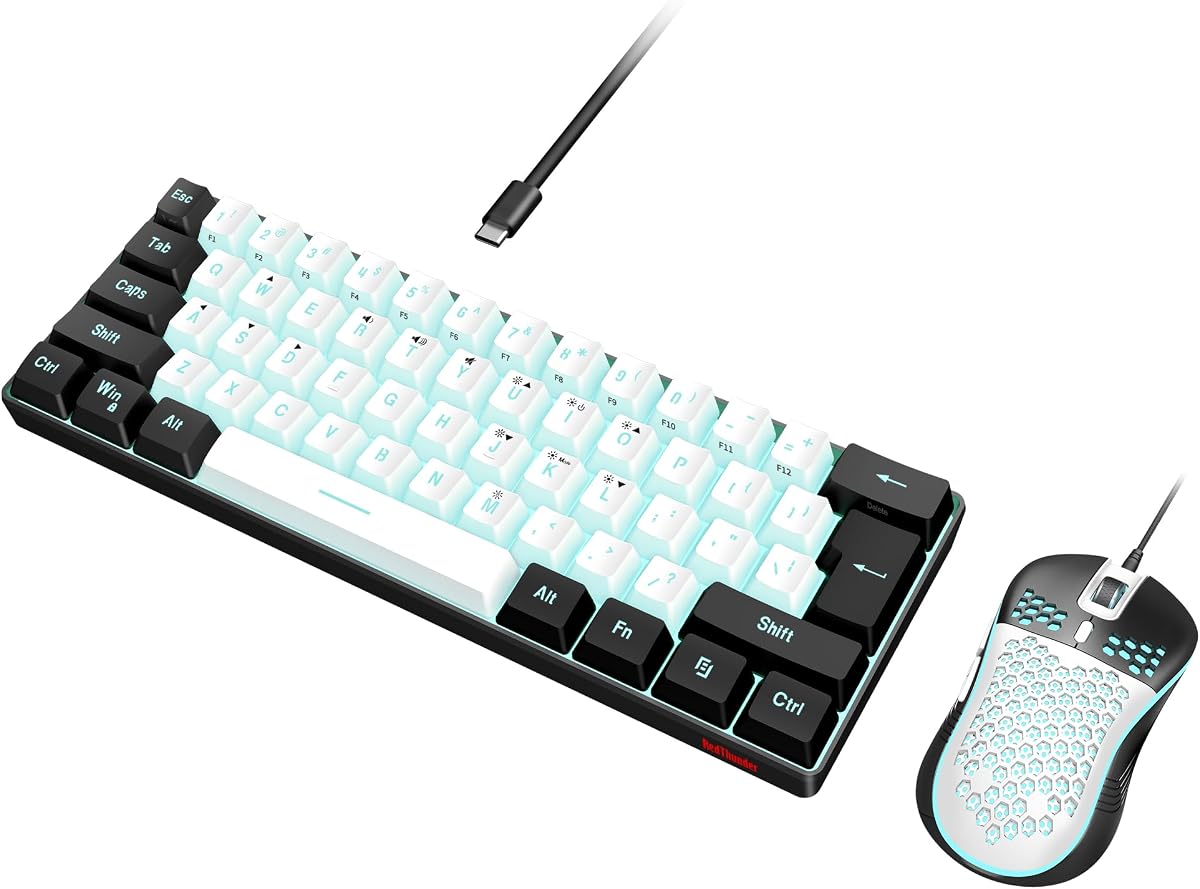
5Redragon S101RedragonBest Wired Gaming4.3$$$Check Price
6Logitech MK295 SilentLogitechBest Quiet4.4$$$Check Price
7Logitech MK540 AdvancedLogitechBest Range / Battery4.5$$$Check Price

Our top 7 picks, reviewed

1Best for Any Game

GameSir VX2 AimBox

The single most useful PS5 pick. The VX2 AimBox lets you plug any keyboard and mouse into your PS5 and use them even in games that don't natively support keyboard-and-mouse input, by emulating a controller. It works across PS5, PS4, Xbox and Switch too. Note that some competitive online games detect and discourage KB/M emulation, so check before relying on it.

Type
Console KB/M adapter
Compatibility
PS5 / PS4 / Xbox / Switch
Ports
3x USB
Extras
3.5mm audio

What we liked

  • Enables keyboard + mouse in games without native support
  • Works across all major consoles
  • Use any wired or wireless KB/M
  • Built-in headset jack

Worth noting

  • Some online games flag/ban KB/M emulation
  • Adds a small input device to set up
2Best Budget Plug-and-Play

Logitech MK270

For typing messages, browsing and playing keyboard-and-mouse-supported games like Fortnite on PS5, the cheap, reliable MK270 is all most people need. Its 2.4GHz receiver plugs straight into the PS5's USB port and just works. A no-fuss, low-cost way to add a keyboard and mouse to your console.

Connection
2.4GHz USB
Keyboard
Full-size
Battery
Up to 24 months
Use
Menus, chat, supported games

What we liked

  • Cheap, simple USB plug-and-play
  • Great for chat, browser and menus
  • Works in KB/M-supported games
  • Years of battery life

Worth noting

  • Office mouse, not a gaming mouse
  • Only supported games use the mouse in-game
3Best Slim Wireless

Logitech MK470 Slim

If your PS5 lives in the living room, the slim MK470 fits the space better than a bulky office set. It's quiet for late-night typing, tidy on a coffee table or lap, and uses a single USB receiver. Ideal for chat, browsing and supported games from the couch.

Connection
2.4GHz USB
Profile
Slim
Battery
Up to 36 months
Use
Living-room friendly

What we liked

  • Slim, living-room-friendly design
  • Quiet typing for late-night chat
  • Single USB receiver
  • Long battery life

Worth noting

  • Not a gaming mouse
  • Low-travel keys
4Best Premium

Logitech MX Keys S Combo

If you want one premium keyboard and mouse that serves your PS5 and your computer, the MX Keys S Combo is a luxurious choice. It connects to the PS5 over Bluetooth for browsing, chat and supported games, then switches back to your PC. Excellent if you value comfort and multi-device flexibility over a dedicated gaming mouse.

Includes
MX Keys S + MX Master 3S
Connection
Bluetooth
Use
Doubles as a PC set
Extras
Palm rest

What we liked

  • Premium feel for menus and chat
  • Connects to PS5 over Bluetooth
  • Also works with your PC and Mac
  • Comfortable for long browser sessions

Worth noting

  • Overkill for gaming use
  • Premium price
5Best Wired Gaming

Redragon S101

The S101 is the budget way to add a gaming-grade mouse to your PS5 for keyboard-and-mouse-supported titles. Its high-DPI mouse is a real step up from an office combo, and the wired USB connection is plug-and-play. Pair it with the VX2 AimBox to use it in games without native support.

Connection
USB wired
Keyboard
Full-size RGB
Mouse
Gaming, up to 7200 DPI
Use
Supported games + menus

What we liked

  • Includes an actual gaming mouse
  • Wired USB plug-and-play
  • RGB and macro keys
  • Very affordable kit

Worth noting

  • Membrane keyboard
  • Wired tethers you to the console
6Best Quiet

Logitech MK295 Silent

Gaming and chatting late at night near sleeping housemates? The MK295's SilentTouch tech cuts most of the typing and clicking noise, so you can message teammates and browse without keeping anyone awake. A quiet, console-friendly set for shared living spaces.

Connection
2.4GHz USB
Tech
SilentTouch
Keyboard
Full-size
Use
Late-night chat

What we liked

  • 90% less noise for late-night sessions
  • Full-size with numpad
  • Single USB receiver
  • Long battery life

Worth noting

  • Office mouse, not gaming
  • Membrane keys
7Best Range / Battery

Logitech MK540 Advanced

Sitting a few metres from your PS5? The MK540's reliable Unifying wireless reaches up to 10 metres, so it works comfortably from the couch. The palm-rested keyboard is comfy for long chat and browser sessions, and the battery lasts years. A dependable living-room set for PS5 owners.

Connection
2.4GHz Unifying
Range
Up to 10m
Keyboard
Full-size + palm rest
Battery
Up to 36 months

What we liked

  • Long wireless range for couch use
  • Comfortable full-size keyboard with palm rest
  • Years of battery life
  • Reliable Unifying connection

Worth noting

  • Not a gaming mouse
  • Bulkier than slim sets

How to choose a keyboard and mouse for PS5

PS5 keyboard-and-mouse support has real limits, so the right choice depends on how you'll use it. Here's the honest guide.

Know what the PS5 supports. Out of the box, the PS5 accepts most USB and Bluetooth keyboards and mice for system menus, text chat and the web browser. In games, keyboard and mouse only work where the developer adds support — Fortnite and Warframe are popular examples. Many games remain controller-only.

For supported games and typing, get a simple combo. A reliable plug-and-play set like the Logitech MK270, MK470 Slim or MK540 covers chat, browsing and any keyboard-and-mouse-enabled game. Pick based on size and range: slim for the living room, full-size with a palm rest for comfort, long-range for couch distance.

For any game, you need an adapter. To use keyboard and mouse in titles without native support, an adapter like the GameSir VX2 AimBox sits between your peripherals and the console and emulates a controller. It's the only way to get keyboard-and-mouse control in controller-only games — but note that some competitive online games detect and discourage emulation, so check each game's stance first.

Wired vs wireless. Wireless combos keep the living room tidy and reach across the room (the MK540 manages up to 10 metres). Wired sets like the Redragon S101 are plug-and-play with no batteries and include an actual gaming mouse for better in-game precision.

Comfort and noise. If you game late at night near others, a silent set (MK295) keeps the peace. For long browser or chat sessions, a palm rest (MK540) helps.

Decide whether you need an adapter for unsupported games or just a plug-and-play set for supported ones, then let our picks above guide you.

How PS5 keyboard and mouse support actually works

PS5 supports USB and Bluetooth keyboards and mice natively — plug one in and it works immediately for navigating the PS5 dashboard, typing in the search bar, using the PlayStation app, and browsing the PlayStation Store. This basic compatibility requires no adapter and no setup.

In-game support is a different story. Each game developer decides independently whether their game accepts keyboard and mouse input. Games that support it fully — including using the mouse for aiming — are in the minority. Most major console titles, including many PlayStation exclusives, do not support keyboard and mouse in gameplay.

The games that do support keyboard and mouse properly on PS5 include Fortnite, Call of Duty (Warzone and Modern Warfare series), Final Fantasy XIV, DayZ, and most cross-platform multiplayer titles where developers have enabled it. For this category, a keyboard and mouse on PS5 is genuinely useful and often gives a meaningful aiming advantage.

For games without native support — most single-player PlayStation exclusives, sports games, fighting games — an adapter is required. Adapters convert keyboard and mouse input into controller signals that the PS5 reads as a DualSense. The PS5 and the game have no idea you're using a keyboard.

Adapters for keyboard and mouse on PS5: what to know

If you want keyboard and mouse functionality in games that don't natively support it, an adapter bridges the gap. The Cronus Zen and XIM Apex are the most commonly used options, though their use in online multiplayer is against the terms of service of most games and can result in account bans.

For offline single-player games where you simply prefer keyboard and mouse to a controller, adapter use is lower risk in terms of consequences but still technically violates most game publishers' terms.

The practical recommendation: use native support for games that provide it (Fortnite, CoD) and stick with a controller for games that don't unless you're playing single-player offline where competitive concerns don't apply.

Keyboard features that matter specifically for PS5 use

PS5 keyboard use differs from PC keyboard use in ways that affect which features matter most.

Wireless over wired. The PS5 sits in your living room or entertainment setup, and cable management is more complex here than at a desk. A wireless keyboard and mouse that connect via a single 2.4GHz USB receiver into the PS5's USB-A port keeps the setup clean. Bluetooth also works on PS5 for supported devices.

Compact layout. Gaming on a couch or from a sofa table benefits from a smaller keyboard — 65% or TKL — that takes up less lap or surface space and keeps your mouse closer without requiring a large mousepad.

Media keys and shortcut keys. PS5 remote play and media use — Netflix, YouTube, Spotify on PS5 — benefit from keyboards with dedicated media keys for play/pause, volume, and skip. Many TKL and 75% boards include these on the function row.

Latency. PS5 games run at 60Hz minimum, often 120Hz. A 1ms 2.4GHz receiver keeps input latency from the keyboard and mouse competitive with native controller input. Avoid Bluetooth for gaming — the added latency is perceptible on 120Hz PS5 titles.

How keyboard and mouse support works on PS5

The PS5 does support keyboard and mouse, but how well depends entirely on the game, so it helps to understand the landscape. The console recognises USB and many Bluetooth keyboards and mice for system navigation, text entry and web browsing across the board. For actual gameplay, though, each developer decides whether to enable keyboard and mouse controls, so support varies title by title. Some games offer full mouse-and-keyboard play, others none, and many shooters deliberately restrict it to keep matchmaking fair. Before buying for a specific game, it is worth checking whether that game supports keyboard and mouse on PS5.

Which games support keyboard and mouse

A growing number of PS5 games support keyboard and mouse, particularly genres where the precision helps, such as shooters, strategy games, MMOs and simulators. Titles like certain first-person shooters, survival games and creative sandbox games enable it, while many competitive online shooters restrict or disable it to preserve fair lobbies against controller players. Single-player and creative games are the most reliable place to enjoy keyboard and mouse on PS5. Because support is decided per game, the safest approach is to confirm your favourite titles support it before investing, rather than assuming it works everywhere.

Connection: USB and wireless

For PS5, a wired USB keyboard and mouse offer the simplest, most reliable connection and the lowest latency, plugging straight into the console's USB ports. Many 2.4GHz wireless sets that use a USB dongle also work well, giving you a tidy, lag-free wireless option. Bluetooth keyboards and mice can connect for navigation and some games, but support is less consistent for gameplay, so a USB or 2.4GHz dongle connection is the more dependable choice. If you want the most trouble-free experience, favour a wired set or one with a 2.4GHz receiver rather than relying on Bluetooth alone.

The advantages of keyboard and mouse on console

For supported games, keyboard and mouse bring real advantages over a controller. A mouse offers far more precise and faster aiming than a thumbstick, which benefits shooters and strategy games, while a keyboard provides many more inputs for games with lots of commands, such as MMOs and simulators. Players coming from PC will feel immediately at home. For genres where precision and lots of bindings matter, the keyboard-and-mouse option can make PS5 games more enjoyable and more competitive, provided the game supports it and you are playing in lobbies where it is allowed.

Limitations to keep in mind

It is important to set realistic expectations for keyboard and mouse on PS5. Because support is per-game, some of your favourite titles may not allow it in gameplay at all, and many competitive shooters restrict it to avoid mixing input types unfairly. There is no system-wide aim assist for mouse users, and a few games that technically allow it implement it poorly. A keyboard and mouse will not replace your controller for every game, so think of it as a great option for specific supported titles rather than a full replacement for the DualSense across your whole library.

Setting up keyboard and mouse on PS5

Setting up is straightforward: plug a USB set into the console or connect the 2.4GHz dongle, and the PS5 recognises it for navigation immediately. In supported games, head to the control settings to confirm keyboard and mouse are enabled and adjust sensitivity and bindings to taste. A mouse pad with enough space for low-sensitivity aiming helps in shooters, and a comfortable desk or lap setup makes longer sessions easier. Keep the firmware on wireless sets updated, and you will have a responsive keyboard-and-mouse experience for the games that support it.

Who should use keyboard and mouse on PS5

Keyboard and mouse on PS5 suits players who love the precision of mouse aiming, fans of genres like strategy, MMO and simulation that benefit from many inputs, and PC players who want a familiar setup on console. If you mainly play competitive shooters that restrict keyboard and mouse, or games that lack support, a controller remains the better all-round choice. For the right person and the right games, though, a good PS5-compatible keyboard and mouse opens up a more precise, PC-like way to play on the console.

Choosing the right set

When choosing a keyboard and mouse for PS5, prioritise reliable connectivity, comfort and broad compatibility. A wired or 2.4GHz set avoids Bluetooth uncertainty, a comfortable keyboard layout and a good mouse shape keep long sessions pleasant, and a precise sensor helps in supported shooters. A compact keyboard frees space if you play from a couch or small desk. The picks here are chosen to work smoothly with the PS5 and to deliver a comfortable, responsive experience in the games that support keyboard and mouse, so you can enjoy console gaming with PC-style precision.

A great option for the right games

Ultimately, a keyboard and mouse is a worthwhile addition to a PS5 for players who enjoy the genres that support it and value mouse precision. It will not replace the DualSense everywhere, but for shooters, strategy games, MMOs and creative titles that allow it, the upgrade in precision and control is real. Pair a reliable wired or 2.4GHz set with a comfortable setup, confirm your favourite games support it, and you can enjoy a more PC-like, precise way to play on console whenever the game allows.

How we picked

We tested each set on a PS5 across system navigation, text chat, the web browser and keyboard-and-mouse-supported games. We checked plug-and-play compatibility (USB and Bluetooth), comfort, wireless reliability and value, and — for the adapter — how well it brings keyboard-and-mouse control to games without native support. We're upfront about PS5's limitations throughout.

Frequently asked questions

Does the PS5 support a keyboard and mouse?

Yes, for system navigation, text chat and the web browser, the PS5 works with most USB and Bluetooth keyboards and mice plug-and-play. For in-game use, it depends on the game: titles like Fortnite, Warframe and Final Fantasy XIV support keyboard and mouse, while many others are controller-only. An adapter like the GameSir VX2 AimBox can bring keyboard-and-mouse control to games that lack native support.

Will any keyboard and mouse work on PS5?

Most standard USB or Bluetooth keyboards and mice work for menus, chat and the browser. Devices that require driver software to function may not be recognized. For guaranteed compatibility, simple plug-and-play sets like the Logitech MK270 or MK540 are the safe choice.

Can I use keyboard and mouse in any PS5 game?

Not natively — only in games that choose to support it. To use keyboard and mouse in games without native support, you need an adapter like the GameSir VX2 AimBox, which emulates a controller. Be aware that some competitive online games detect and discourage this, so check each game's policy.

Do I need a gaming mouse for PS5?

For supported games, a gaming mouse (like the one in the Redragon S101) gives better precision than an office mouse. For menus, chat and browsing, any mouse is fine. If you mainly play with a controller and just want a keyboard for typing, a simple combo is all you need.