Best Everyday USB Office Headset
Logitech H390

- Plug-and-play USB-A with rotating noise-canceling boom
- In-line mute and volume without software installs
- Leatherette cushions and 6.23 ft cable for long calls
Expert Review & Guide
PC headphones with a microphone succeed when teammates hear words, not keyboard clatter, and when you can wear the set through a raid or a stand-up without hotspots. The best headphones with mic for PC in 2026 span humble USB office headsets like the Logitech H390, gaming staples such as HyperX Cloud III and Razer BlackShark lines, and long-battery wireless options that finally take Discord seriously.
This Amazon pack mixes plug-and-play USB stereo, 3.5 mm cross-platform gaming cans, USB-only Chroma showpieces, and 2.4 GHz dual-mode wireless with flip mics. Some models are PC-specialists; others roam to consoles. We stick to pack products, keep affiliate tags, and omit dollar prices because listings move.
Start with the top picks for a fast shortlist, then use the comparison table and reviews when you care about USB versus 3.5 mm, boom clarity, surround software, or whether you need a dongle that survives a backpack.


As an Amazon Associate we earn from qualifying purchases. We may earn a commission at no additional cost to you.
For PC chat, prioritize microphone pattern and connection type before RGB. Specs below are pulled from each listing—no prices—so you can compare drivers, boom features, and wired versus wireless paths.
The H390 is the headset you hand a new hire on day one. Plug the USB-A connector into a PC or Chromebook, and digital stereo plus a rotating noise-canceling boom are ready without hunting for legacy audio codecs. That boring reliability is exactly why it still belongs in a 2026 PC mic shortlist beside flashier gaming cans.
Call quality hinges on the boom’s noise-canceling claim and the ability to rotate it out of the way when you are only listening. In open offices or kitchen WFH setups, that directional placement beats many earbuds sitting low on the chest. In-line volume and mute mean you never dig through Windows sound panels while a client is mid-sentence.
Comfort is padded leatherette with a swivel-mounted cushion design that cleans easily after shared desk use. The adjustable headband fits a wide adult range without pretending to be a steel gaming halo. A 6.23 ft (1.9 m) cable is long enough to stand, stretch, and pace during long conversations—the underrated ergonomics of wired office headsets.
Sound signature prioritizes voices and meeting audio over sub-bass spectacle. Music is fine; competitive footsteps are not the design center. If your PC life is Zoom, Teams, lectures, and light YouTube, that balance is a feature. If you want 7.1 gaming software, look at G432, BlackShark, or Cloud III instead.
Chromebook certification and FSC-minded packaging speak to schools and IT buyers. Home users still benefit: fewer weird Chrome OS mic permission dramas. Keep a USB-C adapter in the laptop sleeve if your machine ditched Type-A ports.
Buy H390 when clarity and simplicity beat RGB. Skip it when surround gaming immersion or wireless roaming is mandatory.
Ideal for back-to-back stand-ups, tutoring, and Chromebook carts. Less ideal as a sole headset for immersive single-player RPGs.
Practice finding the in-line mute by touch. Physical mute saves more professional dignity than software buttons buried in a meeting UI.
We may earn a commission at no additional cost to you.

BlackShark V2 X is the lightweight competitive classic: 240g, memory foam cushions, closed earcups for passive isolation, and a HyperClear cardioid mic that tapers pickup toward the mouth. On a PC with a solid 3.5 mm combo jack—or a USB sound card—you get clear Discord audio without a charging cable across the desk.
TriForce Titanium 50mm drivers divide tuning across highs, mids, and lows for brighter clarity and stronger lows than generic 40mm buds-in-a-headset. Software-enabled 7.1 surround on Windows 10 64-bit can help with positional cues; treat it as a tunable option, not magic. Some competitive players still prefer stereo with a custom EQ.
Cardioid mic behavior is the PC-chat hero. Less keyboard noise from the sides means fewer “you’re eating your mic” complaints. Bend and place the boom consistently; cardioid patterns punish lazy mic angles less than omni mics but still want a palm-width from the mouth.
Cross-platform 3.5 mm support covers PC, Mac, PS4/PS5, Switch, and Xbox with possible adapter needs. That flexibility makes V2 X a single-bag headset for friends who bounce systems. Just remember surround processing claims are Windows-centric.
Comfort comes from breathable foam and low mass rather than lavish leather thrones. Glasses wearers should test temple pressure; the seal that helps isolation can pinch some frames. Take short breaks anyway—even light headsets deserve ear rest.
Choose V2 X for LAN-friendly wired esports vibes. Skip it if you need a USB dongle wireless lifestyle or PC-only Chroma lighting theater.
Keep the boom beside the mouth, not in the breath stream. Cardioid sweet spots reward consistent geometry more than shouting.
Try 7.1 for immersive PvE, then A/B stereo for ranked tactical shooters. Keep whichever helps you react faster after a week—not one night.
We may earn a commission at no additional cost to you.

G432 bridges office-adjacent Logitech DNA and gaming surround. Big 50 mm drivers feed either a USB DAC connection or a 3.5 mm cable, so you can pick the path that sounds cleanest on your motherboard. DTS Headphone:X 2.0 through G HUB markets positional clarity beyond basic 7.1 talk tracks—useful when sneak footsteps decide rounds.
The 6 mm boom flips up to mute, a muscle-memory gift during sudden door knocks. Leatherette cups rotate up to 90 degrees for convenience, and the lightweight band aims to keep pressure off during multi-hour queues. It is comfort through geometry more than memory-foam luxury.
Platform notes in the listing cover PC/Mac via USB DAC or 3.5 mm, mobiles with 3.5 mm, and console scenarios including PlayStation and docked Switch with caveats. Read the connectivity bullets for your exact stack; USB wireless stereo notes in marketing copy should not be confused with a true wireless G432 SKU—this model is the wired dual-connection headset.
Expect G HUB as the tax for DTS and deeper EQ. If you refuse vendor suites, the headset still functions as a solid stereo mic set over USB or analog. Competitive users often store two profiles: immersive DTS for story games, flat stereo for ranked.
Pick G432 when you want Logitech’s flip-mute habits and spatial software on a wired budget-friendly gaming frame. Skip it when HyperX comfort or Razer cardioid tuning already matches your ear better.
Try USB first on laptops with noisy combo jacks. Fall back to 3.5 mm on consoles or when you want the motherboard DAC you already equalized.
Leatherette loves cool rooms. In summer, short breaks or fabric earpad swaps (if compatible aftermarket options exist) keep calls humane.
We may earn a commission at no additional cost to you.
Cloud III exists because uncomfortable headsets ruin focus. HyperX leans into memory foam, a durable aluminum frame, and angled 53mm drivers tuned for entertainment and games rather than only marketing graphs. If your PC sessions mix Discord, cinematic single-player, and the occasional competitive queue, that tuning philosophy fits.
The upgraded 10mm noise-cancelling mic with a mesh filter targets clear voice chat and call accuracy while reducing pops and grit. A mute LED sounds small until you have argued for five minutes on mute. USB-C, USB-A, and 3.5 mm inclusion means fewer “wrong cable” returns when your PC tower and dualsense habits collide.
DTS Headphone:X spatial audio with a lifetime activation claim adds localization for players who want a virtual stage. As always, test stereo versus spatial for your titles. Some hear footsteps better with spatial; others find stereo imaging cleaner.
Durability talk matters for LAN travelers and expressive losers who yeet headsets (please do not). A flexible aluminum frame is the adult answer to brittle plastic headbands that crack at the yoke. Comfort DNA is still the headline: if a headset breaks your flow, aim improves nothing.
Compared with BlackShark V2 X, Cloud III often feels plusher and more connector-flexible. Compared with H390, it is the gaming-forward upgrade when music and immersion matter beside meetings.
Buy Cloud III when comfort and mic confidence share first place. Skip it only if you have already standardized on wireless Nova/BlackShark ecosystems.
Story-driven games, rhythm titles, and movie nights show the tuning. Pure tactical players may still EQ toward flatter response in software.
Label USB-C vs USB-A adapters in your bag. The headset is only as flexible as the connector you actually packed.
We may earn a commission at no additional cost to you.

Ozeino Wireless Gaming Headset
Ozeino’s wireless set chases value-seekers who want dongle latency without flagship branding. A 2.4 GHz USB & Type-C link advertising under 30ms delay is the headline for Fortnite, COD, and RPG immersion with 50mm drivers. Flip mic convenience and a busy onboard control cluster keep volume, mute, and lights reachable mid-fight.
Compatibility is powerful and finicky. Dual USB transmitters must be fully assembled for PS series, PC, laptops, and Mac. Bluetooth mode is aimed at phones, laptops, and Switch, and the listing warns Bluetooth will not directly feed Mac/PS/PC the way you might hope without extra adapters. Xbox is explicitly out.
Wired 3.5 mm backup supports music and calls when batteries die—use it as a parachute, not the primary PC chat path if your board’s mic routing is messy. Keep the sturdy dongle in a labeled pouch; value wireless kits die in couch cushions.
Audio character leans energetic for footsteps and bass hit effects. Competitive purists may still prefer Cloud III or BlackShark tonal balance, but for wireless freedom at this tier, Ozeino is pragmatic.
Choose it for PS5/PC living-room flexibility. Skip it for Xbox households or anyone who refuses to read transmitter assembly notes.
Assemble the 2-in-1 transmitter exactly as instructed. Half-seated USB pieces cause mysterious disconnects blamed on the headset.
2.4G for games, Bluetooth for phone queues, 3.5 mm when the battery LED mocks you before a raid.
We may earn a commission at no additional cost to you.
SteelSeries Arctis Nova 5 Wireless
Nova 5 Wireless is the endurance champion narrative: 60-hour battery, USB-C fast charge that markets six hours from fifteen minutes, and a ClearCast Gen2.X retractable mic claiming 2× clarity with 32kHz/16-bit support. PC players who also jump to PS5 or Switch get a compact USB-C dongle lifestyle instead of a bird’s nest of proprietary bricks.
Neodymium magnetic drivers chase detailed highs, present mids, and deeper bass for mixed gaming. The companion app’s 100+ presets for titles like GTA, FIFA, and Call of Duty are shortcuts for listeners who refuse to hand-tune every EQ band. Use presets as starting points, then nudge to taste.
Quick-switch between 2.4 GHz gaming and Bluetooth 5.3 means a Discord night can yield to a phone call without undocking your brain. Notification beeps for incoming calls while gaming sound small until they save a missed family check-in. On-ear controls for power, mute, volume, and switch keep hands on the mouse.
Mic quality is why Nova belongs in a “headphones with mic for PC” guide rather than only a wireless toys list. Retractable design protects the boom in backpacks, and the higher-bandwidth claim matters when teammates gatekeep voice clarity. Still seat the mic correctly; no chipset fixes a boom under your chin.
Pick Nova 5 when battery anxiety ruins other wireless headsets. Skip it if you want the absolute cheapest dongle kit or prefer HyperX’s wired comfort religion.
Load a game preset, play a familiar map, then adjust one band at a time. Changing everything at once teaches you nothing.
Park the USB-C dongle on the most-used PC and use Bluetooth for secondary devices to avoid constant replugging wars.
We may earn a commission at no additional cost to you.
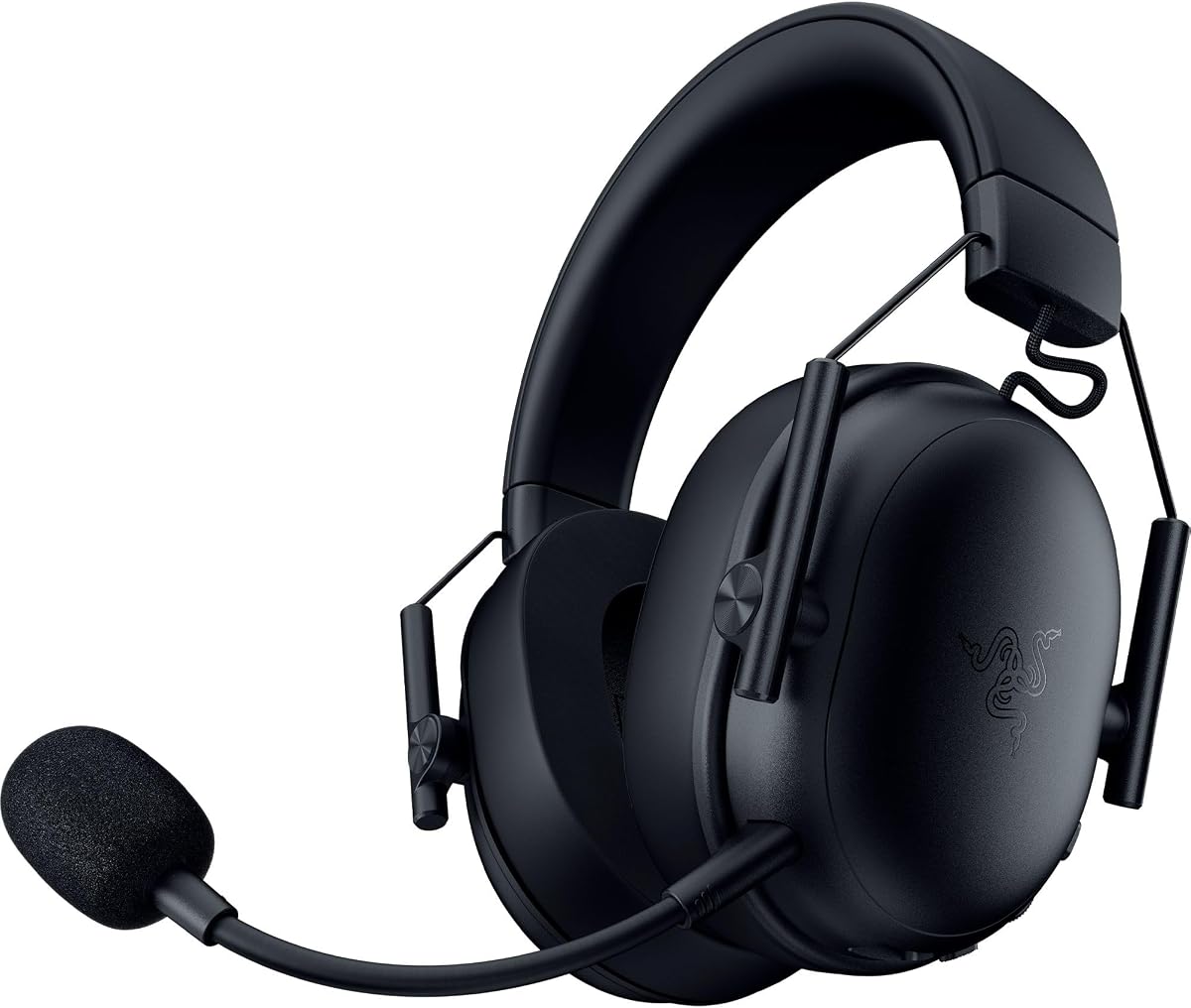
Razer BlackShark V3 X HyperSpeed
V3 X HyperSpeed updates the BlackShark idea with Gen-2 TriForce 50mm drivers, HyperSpeed 2.4 GHz wireless, Bluetooth, USB wired, a detachable HyperClear cardioid mic, and roughly 70-hour battery life in a 270g shell. PC players get competitive latency goals without surrendering phone Bluetooth for breaks.
Gen-2 drivers market improved clarity and positional performance for footsteps. 7.1 surround aims at true-to-life placement—again, validate in your titles. The detachable 9.9mm cardioid mic is the lifestyle detail: remove it for movie flights of fancy, reattach for ranked voice.
SmartSwitch dual wireless behavior is the daily driver feature. Move from PC dongle to Bluetooth phone without a ritual sacrifice. USB wired mode covers firmware moments and dead-battery emergencies.
Comfort stays BlackShark-light rather than Cloud-plush. That suits players who bounce in chair fights and hate yoke pressure. Plush earcups still need cleaning; wireless headsets collect skin oils like wired ones.
Choose HyperSpeed when you loved V2 X but want cut cables. Skip it if a single USB-C Nova dongle ecosystem already owns your house.
Always stow the mic in a zip pocket the moment it leaves the cup. Detachable accessories vanish first.
Prefer HyperSpeed 2.4 GHz for shooters. Bluetooth is for podcasts and calls when milliseconds are social, not competitive.
We may earn a commission at no additional cost to you.

Kraken V3 X USB is honest about its lane: Windows PC via USB-A only. That limitation is liberating if you never leave the tower. TriForce 40mm drivers, HyperClear cardioid mic, 7.1 surround on Windows 10 64-bit, and Chroma RGB earcups build a cohesive Razer PC aesthetic.
Hybrid fabric and memory foam cushions chase cooler long sessions than pure leatherette. The bendable cardioid boom helps seat the sweet spot. Chroma effects are optional immersion; competitive players can dim them without losing mic performance.
Because it will not speak 3.5 mm to a DualSense, treat Kraken as a desk fixture. Bring BlackShark or Cloud III when you travel between console friends.
Buy it for a Windows RGB battlestation that wants a lightweight USB mic headset. Skip it hard if you need multi-device jacks.
Synapse lighting profiles can dim near-black for late raids without abandoning the USB mic Windows already trusts.
Confirm you have a free USB-A port or a quality hub. Do not expect Mac or PlayStation miracles from this SKU.
Slow breathing effects beat seizure strobes on camera. Match brightness to your key lights.
We may earn a commission at no additional cost to you.

G9000 is the spare-headset philosophy: cheap enough to keep under the TV, flexible enough for PS, Xbox (with caveats), PC, and Switch-family devices via 3.5 mm. 40mm drivers and soft memory earpads deliver fine casual sound; LED earcups broadcast “gaming” to the room.
The omni-directional boom’s noise-cancelling marketing helps more than a bare laptop mic, yet cardioid BlackShark/Cloud mics will still win noisy rooms. Seat it close and use the inline mute when dogs erupt.
As a primary competitive PC headset, G9000 is outclassed by Cloud III and BlackShark tuning. As a backup for guests or a dorm loaner, it earns its slot.
Buy as a secondary. Promote it to primary only when budget absolute and multi-console cables matter more than audiophile nuance.
Budget LED headsets earn keep as hospitality hardware near the couch PC—guests get a boom while your Cloud III stays upstairs.
Budget for platform adapters separately. The headset’s multi-platform story often assumes accessories you do not own yet.
If teammates still complain about keyboard noise after mic placement fixes, move to a cardioid USB/3.5 gaming headset higher in this guide.
We may earn a commission at no additional cost to you.

60H Battery Wireless Gaming Headset
This 60H wireless headset (SZ03 lineage in the listing notes) is the feature checklist king: 2.4 GHz around 20ms, Bluetooth 5.4, 3.5 mm backup, 50mm drivers, virtual 7.1, detachable ENC mic with steel fork and pop filter, flip-to-mute with LED, and up to 60 hours with RGB off.
PC and PlayStation users should live on the 2.4 GHz USB-C dongle. Bluetooth handles Mac/Switch/mobile media. Xbox owners must accept wired 3.5 mm only. Those terms are blunt in the listing—respect them to avoid returns.
ENC claiming deep background reduction plus a reinforced mic frame helps Discord clarity when roommates blend. Still, mic technique beats marketing percentages. Quick charge that markets eight hours from fifteen minutes is the raid-night safety net.
Pick it for flexible wireless households that will actually toggle RGB off for endurance. Skip it if SteelSeries app presets or HyperX comfort already decided your wallet.
Map each household device to 2.4G, Bluetooth, or 3.5 mm on a sticky note beside the dongle pouch to prevent platform heartbreak.
Treat lights as a party mode. Daily drivers should prefer dark earcups and the 60-hour claim.
Write your devices on a sticky note and map each to 2.4G, BT, or 3.5 mm before ordering so console gaps do not surprise you.
We may earn a commission at no additional cost to you.
USB headsets (H390, Kraken V3 X, Cloud III USB paths) simplify Windows device selection. 3.5 mm (BlackShark V2 X, BENGOO) depends on your combo jack quality. 2.4 GHz dongles (Nova 5, Ozeino, BlackShark HyperSpeed, 60H set) win when you want cable-free competitive latency. Match the connector to the ports you actually have.
Cardioid booms (BlackShark, Kraken, Cloud-style noise-cancelling mics) generally reject more side noise than omni budget booms. Flip-to-mute and mute LEDs prevent meeting disasters. Place the mic near the corner of your mouth, not in your breath stream.
Memory foam and lighter weight help three-hour raids. Leatherette isolates more but runs warmer. Glasses users should test clamp force. If you WFH eight hours, prioritize cushions over RGB.
DTS, 7.1, and spatial modes can help or muddy mixes. A/B against stereo for a week in your main game. Competitive players often keep stereo with mild EQ.
If 90% of your PC mic time is Zoom and 10% is games, H390-style USB stereo may beat a bass-heavy gaming set. Conversely, pure gamers should not suffer thin office drivers just to save a few dollars of shopping intent.
Open Sound settings, choose the headset’s microphone explicitly for both system and Discord/Teams, and disable exclusive-mode surprises that steal the device.
Position beside your mouth, a thumb’s width away. Aim slightly off-axis to reduce plosives.
Raise mic level until friends hear you clearly, then add noise suppression sparingly. Over-gating makes you sound robotic.
Open offices and households with pets often sound better with PTT than open mic plus heavy suppression.
Nova, Razer, and Logitech suites occasionally fix mic routing bugs—worth a quarterly check.
Logitech H390 remains the plug-and-play answer for meetings. If light gaming matters more, HyperX Cloud III or Razer BlackShark V2 X add better drivers while keeping usable mics.
Not always. A clean 3.5 mm jack plus BlackShark V2 X can sound excellent. USB helps when onboard audio is noisy, when you want separate device entries in Windows, or when your laptop jack is broken.
Cardioid boom mics generally reject more side noise than omni budget booms. Pair them with sensible placement and optional software noise removal. ANC on earcups helps you hear, not necessarily what others hear from your mic—look for ENC/noise-cancelling mic language separately.
Modern 2.4 GHz sets like Nova 5, BlackShark V3 X HyperSpeed, Ozeino, and the 60H tri-mode option advertise low enough latency for most players. Prefer dongle modes over Bluetooth for shooters, keep batteries charged, and test yourself in Aim Lab or deathmatch before trusting a tournament night.
Some USB headsets are PC-only—Razer Kraken V3 X is explicit about that. Consoles often expect 3.5 mm on controllers or licensed wireless dongles. Always read connection bullets before assuming cross-platform magic.
Even comfortable Cloud-style cushions deserve a few minutes every hour or two. Heat and clamp fatigue accumulate. Stretch your neck and reseat hair under the yoke.
No. Many pros use stereo. Try surround features, but keep them only if your awareness improves in the games you play weekly.
Many 3.5 mm and some USB/Bluetooth models work for basic audio. Advanced 7.1 software is often Windows-only. Nova’s Bluetooth path and Cloud III’s connectors are friendlier than PC-only USB Krakens.
Use a cardioid boom close to your mouth, enable light noise suppression, consider a keyboard dampening mod, and switch to push-to-talk. Upgrading from an omni budget mic to BlackShark/Cloud-class booms often helps more than buying another RGB earcup.
If you stream or record, a dedicated condenser/dynamic mic can beat any headset boom. For everyday Discord and meetings, a good headset mic is more convenient and still clear enough when placed well.
For most PC desks, HyperX Cloud III and Razer BlackShark V2 X are the gaming-and-chat sweet spots, while Logitech H390 remains the no-drama USB meeting tool. Wireless seekers should shortlist SteelSeries Arctis Nova 5 for battery and mic bandwidth, BlackShark V3 X HyperSpeed for dual-wireless flexibility, or the 60H/Ozeino options when value features matter most.
Match connection type to your ports, treat mic placement as half the purchase, and only keep surround modes that help your main games. The best headphones with mic for PC in 2026 are the ones your teammates stop complaining about—and that you forget you are wearing until the session ends.