Best Headphones for Office in 2026
We may earn a commission from links on this page, at no extra cost to you. Learn more.
The right office headset disappears the moment you put it on and only reminds you it is there when a colleague says your voice sounds crisp. For desk work and back-to-back video calls, the priorities are different from casual listening: you want a microphone that isolates your voice, ear cushions that stay comfortable through a full shift, and a connection that never drops mid-meeting. This guide ranks nine of the best headphones for office use in 2026, spanning plug-and-play USB headsets, wireless Bluetooth options with charging bases, and richer over-ear pairs that double for music. Whether you live in Teams or just want cleaner calls, there is a sensible pick here.
Top 9 Best Headphones for Office
Our top 9 picks, reviewed
Wireless Headset with AI Noise Cancelling Mic (65H)
This wireless headset is our top office pick because it nails the things that matter at a desk: an AI mic that keeps your voice clean in a noisy room, a one-tap mute for quick privacy, and three connection paths so it works with any PC, Mac or phone. Bluetooth 6.0 keeps latency low on Teams and Zoom, and 65 hours of battery covers a full week of calls between charges.
- Type
- Wireless over-ear
- Mic
- AI noise cancelling, mute
- Connection
- Bluetooth 6.0 + USB-A/C dongle
- Battery
- 65 hours
What we liked
- AI mic cuts up to 97% of background noise
- Three ways to connect: BT, USB-A and USB-C
- One-tap mute for instant privacy
- Long 65-hour battery with fast charge
Worth noting
- Lesser-known brand
- On-ear fit suits calls more than music
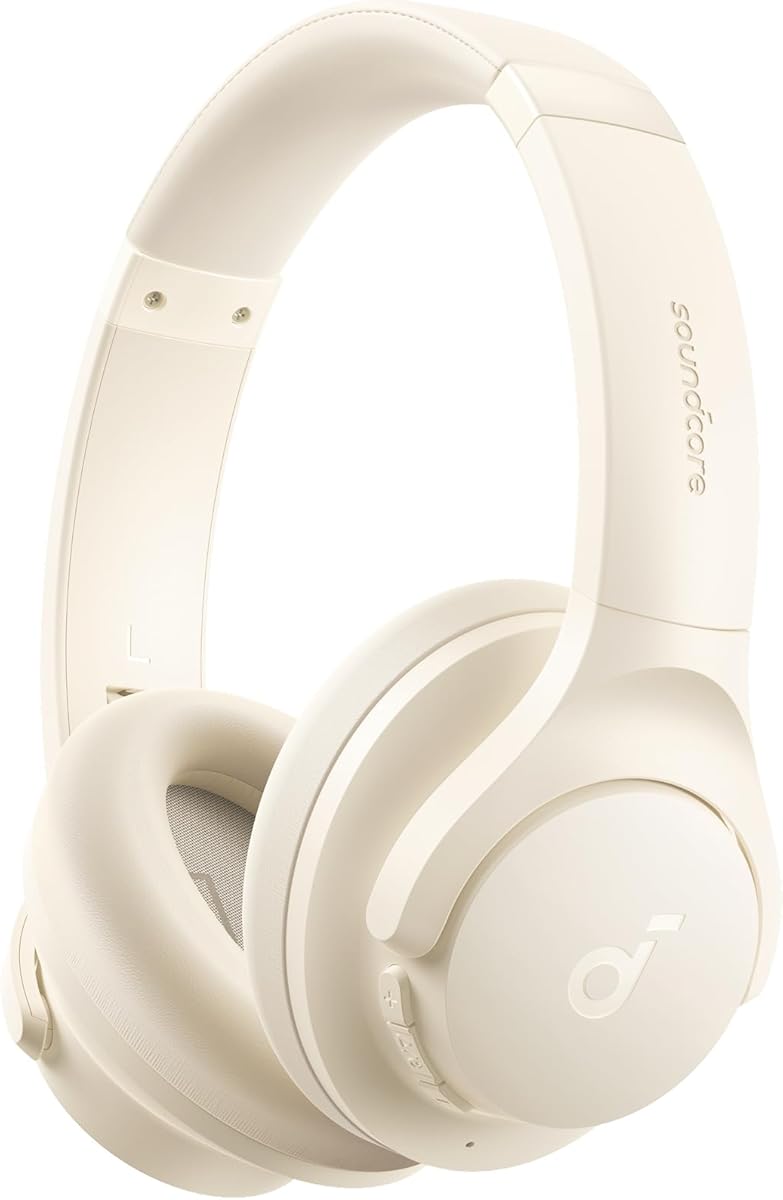
Hybrid ANC Bluetooth Headphones (120H)
If your day mixes focus work with calls, this pair is a versatile bargain. Hybrid active noise cancelling hushes chatter when you need to concentrate, the memory foam cups stay comfortable through long stretches, and the tuned drivers give music real depth. The headline 120-hour battery means you almost never think about charging, and Bluetooth 6.0 keeps calls stable across your laptop and phone.
- Type
- Wireless over-ear
- ANC
- Hybrid, up to 95%
- Connection
- Bluetooth 6.0
- Battery
- 120 hours
What we liked
- Marathon 120-hour battery life
- Hybrid ANC quiets a busy office
- Memory foam cups for long sessions
- Deep bass makes it good for music too
Worth noting
- Wind-resistant mic is fine, not standout
- No wired backup option listed
Mopchnic Wireless Headset with Charging Base
Designed for people who take calls all day, the Mopchnic pairs an ENC boom mic with a charging base that keeps the headset topped up between sessions. Bluetooth 5.3 handles two devices at once, the reversible 270-degree boom suits either ear, and a dedicated mute button gives instant privacy. With 50 hours of talk time and clear voice alerts, it is a tidy fit for call center and home-office duty.
- Type
- On-ear wireless
- Mic
- ENC boom, 270 reversible
- Connection
- Bluetooth 5.3 + USB dongle
- Battery
- 50 hours talk
What we liked
- ENC boom mic built for busy call floors
- Charging base keeps it desk-ready
- Dual-device Bluetooth 5.3 pairing
- Independent mute button and voice alerts
Worth noting
- MFB button only answers phone calls
- On-ear pads warmer than over-ear
Bose QuietComfort Headphones (Ice Blue)
For anyone who wants a name-brand office pair that also sounds great off the clock, the Bose QuietComfort in this limited Ice Blue colour is hard to beat. The noise cancelling is genuinely effective at quieting an open office, the over-ear cushions are famously comfortable, and Aware mode lets you hear a colleague without removing the headphones. It is a premium listening experience that handles calls cleanly too.
- Type
- Wireless over-ear
- ANC
- Quiet and Aware modes
- Connection
- Bluetooth, USB-C
- Battery
- 24 hours
What we liked
- Trusted Bose noise cancelling
- Plush cushions for all-day wear
- Quiet and Aware listening modes
- Adjustable EQ for calls and music
Worth noting
- 24-hour battery trails cheaper rivals
- Mic tuned more for calls than studio work
Logitech H390 Wired Headset (Black)
The Logitech H390 is the dependable office workhorse. There is no pairing, no battery and no fuss: plug the USB-A connector into your computer and you are ready to talk. The rotating boom mic cancels background noise for clear calls, the in-line controls handle volume and mute without hunting through menus, and the padded band stays comfortable through long meetings. For a no-drama Teams or Zoom headset, it is a classic for good reason.
- Type
- Wired over-ear
- Mic
- Rotating noise-cancelling boom
- Connection
- USB-A
- Extras
- In-line controls
What we liked
- Reliable plug-and-play USB connection
- Rotating noise-cancelling boom mic
- In-line volume and mute controls
- Comfortable leatherette cushions
Worth noting
- Wired only, no Bluetooth freedom
- USB-A may need an adapter on newer laptops
Logitech H390 Wired Headset (Rose)
This is the same trusted Logitech H390 headset in a rose colourway, for anyone who wants the dependable plug-and-play experience with a bit more personality on their desk. Everything that makes the black version a staple carries over: the rotating noise-cancelling boom mic, the in-line controls and the comfortable leatherette cushions. It works instantly over USB-A with PCs, laptops and Chromebooks, no software or pairing required.
- Type
- Wired over-ear
- Mic
- Rotating noise-cancelling boom
- Connection
- USB-A
- Extras
- In-line controls
What we liked
- Same proven H390 in a softer rose finish
- Rotating boom mic for clear calls
- Simple plug-and-play USB-A
- In-line controls for volume and mute
Worth noting
- Wired tether limits movement
- Identical performance to the black model
JIAMQISHI USB Headset with Microphone
The JIAMQISHI headset covers the essentials cheaply and lets you connect over USB or a standard 3.5mm jack, which is handy across laptops, tablets and phones. The unidirectional boom mic swings to either side and focuses on your voice while blocking room noise, and the memory foam earpads keep long online classes and Zoom calls comfortable. In-line controls with a mic mute round out a sensible pick for a spare or shared desk.
- Type
- On-ear wired
- Mic
- 270 unidirectional boom
- Connection
- USB + 3.5mm
- Driver
- 40mm
What we liked
- Works over USB or 3.5mm
- 270-degree unidirectional boom mic
- Memory foam pads for comfort
- In-line controls with mic mute
Worth noting
- Plastic build feels budget
- On-ear cups can warm up over hours
AOC USB Headset with Microphone
At just over six ounces, the AOC headset is one of the lightest wired options here, which matters when you wear it all day. It ships ready for both USB-A and USB-C, so it slots into almost any computer, and the boom mic lifts up to mute instantly. Protein-memory cushions ease pressure during long meetings, and the tuned 40mm drivers keep dialogue clear on Teams, Zoom and training videos alike.
- Type
- Over-ear wired
- Mic
- 90 adjustable boom
- Connection
- USB-A/C
- Driver
- 40mm
What we liked
- Light 6.17 oz frame for long shifts
- USB-A and USB-C compatibility
- Lift-to-mute 90-degree boom mic
- Balanced 40mm drivers for calls and video
Worth noting
- Wired only, 6-ft cable to manage
- Simple controls, no companion app
Logitech Zone Vibe 100 Wireless Headset
The Logitech Zone Vibe 100 is the polished, professional choice for people who want a proper business headset without a boom mic in their face. Beamforming mics and DSP capture your voice cleanly while suppressing room noise, and it is certified for Teams, Meet and Zoom so meetings just work. Multipoint Bluetooth lets it float between laptop and phone, and the light build stays comfortable, though the 18-hour battery asks for regular charging.
- Type
- Wireless over-ear
- Mic
- Beamforming noise-canceling
- Connection
- Multipoint Bluetooth
- Battery
- 18 hours
What we liked
- Certified for Teams, Meet and Zoom
- Beamforming mic isolates your voice
- Lightweight, comfortable design
- Multipoint Bluetooth for two devices
Worth noting
- 18-hour battery is modest for the price
- Priciest pick with no wired mode
How We Chose the Best Office Headphones

Choosing an office headset is a different exercise from picking headphones for the gym or the couch. The moment your work runs on video calls, the microphone becomes the single most important component, because it shapes how every colleague hears you. So we started there, weighing how cleanly each pair isolates a voice from keyboard clatter, air conditioning hum and the background chatter of a shared room. The AI mic on our top pick and the ENC boom on the Mopchnic represent the two mature approaches, and both make a noticeable difference on a busy call.
From there we looked at comfort, since an office headset is worn for hours rather than minutes. Weight, cushion material and clamping force all matter, which is why the featherweight AOC and the plush Bose QuietComfort both stand out for different reasons. We then judged connection reliability across USB, dongle and Bluetooth, battery life for the wireless models, and how easily each device dropped into Teams, Zoom and Meet. Finally, we kept the list deliberately varied, from a five-dollar-feel plug-and-play headset to a certified business model, so there is a right answer whatever your desk looks like.
What Makes Office Headphones Different
The temptation is to buy a great pair of music headphones and assume they will handle work. They often will not, at least not well. Consumer headphones are tuned to make music sound impressive, and their microphones are frequently an afterthought designed only for the occasional phone call. An office headset flips those priorities. The drivers still need to sound pleasant for the times you play focus music, but the microphone is engineered first, with a boom or beamforming array positioned to capture your voice and reject everything else.
The second difference is the connection. Music headphones lean almost entirely on Bluetooth, which is convenient but can introduce latency and the occasional dropout that becomes maddening in a meeting. Office-focused models frequently offer a wired USB path or a dedicated dongle, both of which are more stable and lower-latency than pure Bluetooth. The Logitech H390 embraces the wired approach completely, while our top pick and the Mopchnic include a dongle for wireless freedom without sacrificing reliability. Understanding this split is the key to buying the right thing rather than being disappointed by a beautiful pair of headphones that lets you down on calls.
Wired, Dongle or Bluetooth: Picking Your Connection
There are three ways an office headset can reach your computer, and each suits a different working style. A wired USB headset, exemplified by the Logitech H390 in both its black and rose finishes, is the most bulletproof. There is nothing to pair, nothing to charge, and it appears instantly as an audio device the moment you plug it in. If you sit at one desk and value simplicity above all, this is the safest choice, and it never dies mid-meeting.
A dongle-based wireless headset, like our top-ranked AI-mic model or the Mopchnic, gives you freedom to stand and move without the latency and pairing quirks of pure Bluetooth. The small USB dongle creates a dedicated wireless link that behaves almost like a wire, which is why call-center and enterprise headsets favour it. Finally, pure Bluetooth pairs such as the Logitech Zone Vibe 100 and the Bose QuietComfort trade a little stability for the convenience of connecting to a phone as easily as a laptop, and for doubling as everyday listening headphones when the workday ends. Many buyers end up wanting a model that supports two or all three, which is exactly why our winner offers Bluetooth alongside both USB-A and USB-C.
Microphone Quality: The Feature That Actually Matters
If you take away one idea from this guide, make it this: on an office headset, the microphone matters more than the speakers. A boom mic that sits close to your mouth, like those on the Logitech H390, JIAMQISHI and AOC headsets, has a natural advantage because it captures your voice loudly and the room quietly simply through proximity. Add noise-cancelling processing and you get calls where colleagues hear you and not your surroundings.
The newer approach, seen on our top pick and the Logitech Zone Vibe 100, uses smart processing rather than a visible boom. The AI mic on the winning headset claims to remove up to 97 percent of ambient noise, and the Zone Vibe's beamforming array focuses on your voice using multiple microphones and digital signal processing. Both keep your desk looking tidy without a boom in your face. Whichever style you choose, a mute button you can hit instantly, present on the Mopchnic and our top pick, is a small feature that saves you from the classic embarrassment of an accidental hot mic.
Comfort for the Long Haul
An office headset earns its keep over hours, not seconds, so comfort is not a luxury here. Three things determine how a pair feels after a long shift: weight, cushion material and clamping force. The AOC headset makes weight its headline feature at just over six ounces, which is why it stays unobtrusive through back-to-back calls. At the other end, the Bose QuietComfort and the 120-hour hybrid pair use plush over-ear cushions that distribute pressure gently around the ear rather than pressing on it.
Cushion material also affects heat. Memory foam and protein-leather pads, found on most models here including the JIAMQISHI and Mopchnic, are soft and seal well but can warm up over a full day, especially in on-ear designs. Over-ear pairs generally breathe a little better because they surround rather than sit on the ear. If you know you run warm or wear glasses, favour an over-ear model with soft, deep cushions and an adjustable headband so you can dial in the fit precisely and keep the clamping force comfortable.
Battery Life and Charging for Wireless Headsets
If you go wireless, battery life quietly shapes how the headset fits into your routine. A pair that lasts a full working week between charges, like our top pick with its 65 hours or the 120-hour hybrid model, means you almost never think about power, which is exactly how it should be. Contrast that with the Logitech Zone Vibe 100, whose 18 hours is enough for a day of meetings but demands charging most nights, and you can see why raw capacity matters even for a device that stays near a desk.
Charging convenience is the other half of the story. Fast-charge features, present on our top-ranked headset and the 120-hour pair, give you a couple of hours of talk time from a few minutes on the cable, which rescues you when a battery warning appears just before a call. A charging base, like the one bundled with the Mopchnic, is even better for desk life, because the headset tops up automatically every time you set it down. Wired headsets such as the Logitech H390 sidestep the question entirely by drawing power over USB, which is one reason they remain so popular for people who never want to think about charging at all.
A Closer Look at the Top Picks
Our number-one office headset earns the spot by getting the fundamentals right for call-heavy work. Its AI microphone keeps your voice clean in a noisy room, the one-tap mute delivers instant privacy, and the trio of connection options, Bluetooth 6.0 plus USB-A and USB-C, means it slots into any setup you throw at it. A 65-hour battery covers a full working week, and low latency keeps lip-sync tight on video calls. For most people building a home or hybrid office, it is the easy recommendation.
Behind it, the 120-hour hybrid ANC pair is the value champion for anyone who wants strong noise cancelling and marathon battery at a low price, doubling nicely as music headphones. The Mopchnic is the specialist's choice for call-center-style days thanks to its ENC boom and charging base, while the Bose QuietComfort brings premium listening and trusted ANC for people who want their work pair to shine off the clock too. The two Logitech H390 headsets, in black and rose, remain the go-to plug-and-play staples, and the Zone Vibe 100 is the polished, platform-certified pick for professionals who prefer a discreet beamforming mic over a visible boom.
Final Recommendation
For most office and remote workers, the wireless AI-mic headset is the best all-round choice in 2026, combining a genuinely effective microphone, flexible connectivity and a battery that lasts a full week of meetings. If you want strong noise cancelling and enormous battery life for less, the 120-hour hybrid pair is outstanding value, and the Bose QuietComfort is the pick if you want premium sound that carries into your downtime. For a foolproof wired experience, the Logitech H390 in black or rose never lets you down, while call-center users should look at the Mopchnic and its charging base. Match the microphone, comfort and connection to how you actually work, and the right headset will quietly make every call better.
How we picked
We evaluated each pair on microphone clarity and noise handling, all-day comfort, connection reliability across USB, dongle and Bluetooth, battery life for the wireless models, and call-platform compatibility with Teams, Zoom and Meet. Because office work is call-heavy, we weighted mic quality and long-wear comfort above pure music fidelity, and we mixed wired headsets, dongle-based wireless and full Bluetooth pairs so every kind of desk setup is covered.
Frequently asked questions
What matters most in a headset for office and call work?
Microphone clarity comes first, because colleagues judge your calls by how you sound, not how music plays. Look for a noise-cancelling or ENC boom mic like the ones on the Logitech H390 or the Mopchnic wireless headset. After that, prioritise all-day comfort and a reliable connection, then battery life if you go wireless. Pure audio fidelity matters less for a call-heavy desk than these three.
Should I choose a wired USB headset or a wireless one?
A wired USB headset like the Logitech H390 is the most foolproof: no pairing, no battery, and instant plug-and-play on any computer. Choose wireless, such as the AI-mic 65-hour headset or the Zone Vibe 100, if you want to walk around during calls or connect to both a laptop and phone. Many wireless picks include a USB dongle, which pairs more reliably than pure Bluetooth.
Do these headsets work with Microsoft Teams and Zoom?
Yes. USB and dongle headsets appear as a standard audio device and work immediately in Teams, Zoom, Meet, Webex and Skype. The Logitech Zone Vibe 100 is explicitly certified for Teams, Meet and Zoom, and the wireless AI-mic headset supports all the major platforms. Bluetooth-only pairs also work, though a dongle connection generally gives lower latency and steadier call audio.
How important is noise cancellation for office headphones?
There are two kinds and both help. Mic-side noise cancelling, like the ENC on the Mopchnic or AI mic on our top pick, keeps your voice clear so others do not hear your surroundings. Ear-side ANC, as on the Bose QuietComfort or the 120-hour hybrid pair, quiets the room so you can focus. In an open office, a model with both is ideal.
Are on-ear or over-ear headphones better for long office days?
Over-ear pairs like the Bose QuietComfort and the hybrid ANC headphones surround the ear and spread pressure, so they usually stay comfortable longest and stay cooler. On-ear headsets such as the Mopchnic are lighter and more compact but can warm up over many hours. If you take calls all day, prioritise plush over-ear cushions and an adjustable headband.