Expert Review & Guide

Best Gaming Speakers in 2026 for Immersive PC Desktop Sound

Desktop gaming audio has quietly become one of the highest-impact upgrades you can make without rebuilding an entire PC. Built-in monitor speakers and thin laptop drivers can convey dialogue and menus, but they flatten footsteps, muddle explosions, and leave music feeling thin. A dedicated gaming speaker setup restores stereo width, bass authority, and the sense that you are inside the match rather than listening through a cardboard tunnel. In 2026, the market spans compact USB soundbars, RGB satellite pairs, true 2.0 bookshelf systems with Bluetooth, and full satellite-plus-subwoofer stacks that chase cinematic immersion.

This roundup focuses only on real products shoppers are considering right now for PC desks, laptop stations, and hybrid work-and-play setups. We weighed connectivity (USB, AUX, Bluetooth, RCA, USB-C), form factor (soundbar under a monitor versus left/right satellites), lighting features that matter in a gaming room, and how honestly each system handles bass without claiming impossible theater performance from a tiny chassis. Ratings and product details come from the listing data, while the editorial notes below translate those specs into practical buying advice.

Whether you want a clutter-free bar under your ultrawide, a wooden bookshelf pair that doubles for music, or a LIGHTSYNC system that paints the wall behind your monitor, the picks below cover the main decision paths. Start with the three top picks if you want a fast shortlist, then use the comparison table and full reviews to match desk space, ports, and listening habits.

Top Gaming Speaker Picks for 2026

Best Hi-Fi Bookshelf Pair

OHAYO 60W Computer Speakers for Gaming and Music

★★★★★9/10
OHAYO 60W Computer Speakers for Gaming and Music
  • 30W x 2 active stereo with carbon-fiber tweeter and full-range drivers for clearer highs
  • Bluetooth 5.3 plus AUX, RCA, and USB inputs for PC, console, and music sources
  • MDF wooden enclosures and rear bass ports that suit gaming desks and small rooms
Check Price →

As an Amazon Associate we earn from qualifying purchases. We may earn a commission at no additional cost to you.

Gaming Speakers Comparison at a Glance

Use this table to shortlist by layout and connectivity before reading the deeper reviews. Specs emphasize how each system connects and what kind of sound stage it is built for, not marketing wattage alone.

#ProductSpecificationsScore
1
  • 2.1 system with subwoofer + dual satellites
  • DTS:X Ultra surround on Windows PCs
  • LIGHTSYNC RGB + USB/Bluetooth inputs
8.8
2
  • Active 2.0 bookshelf stereo, white finish
  • Bluetooth 5.3, AUX, RCA, USB inputs
  • 30W x 2 with MDF wood enclosures
9
3
  • Satellite speakers + ported subwoofer
  • Wireless control dial for volume and bass
  • Bluetooth, micro USB, and 3.5 mm inputs
8.6
4
  • Active 2.0 bookshelf stereo, black finish
  • Bluetooth 5.3 with AUX, RCA, USB
  • Carbon-fiber drivers and front volume knob
9
5
  • 3-inch carbon-fiber active bookshelf pair
  • Built-in 24-bit DAC via USB connection
  • Side treble, bass, and volume controls
8.6
6
  • Compact PC soundbar under the monitor
  • USB-C power and audio in one cable
  • Chroma RGB with Bluetooth 5.0 pairing
8.4
7
  • 30W powered desktop gaming speakers
  • Bluetooth, AUX, and Type-C connections
  • Six colorful light modes for desk setups
8.8
8
  • Dual-magnet full-range speaker units
  • USB power with 3.5 mm AUX audio
  • Six touch lighting modes, no Bluetooth
8.8
9
  • Slim monitor soundbar, USB/USB-C powered
  • Bluetooth 5.0 and 3.5 mm AUX inputs
  • Ambient light strips and compact footprint
8.6
10
  • Compact under-monitor PC speaker bar
  • USB-C/USB power with AUX audio cable
  • Touch angular game lights, no Bluetooth
8.6

1. Logitech G560 - Best Overall Gaming System

Logitech G560 PC Gaming Speaker System with 7.1 DTS X - Black | 7.1 DTS:X Ultra

Logitech G560 PC Gaming Speaker System with 7.1 DTS X - Black | 7.1 DTS:X Ultra

8.8/10★★★★☆

The Logitech G560 is the clearest “full gaming speaker system” in this pack: dual satellites, a dedicated subwoofer, LIGHTSYNC RGB, and DTS:X Ultra surround aimed squarely at Windows PC players who want more than a thin stereo bar. Where many desktop speakers try to fake scale with EQ boosts, the G560 uses physical separation and a sub to create a wider, deeper sound field. That matters in competitive shooters when you need left-right and distance cues, and it matters just as much in story games when music swells and environmental effects fill the room instead of collapsing into the monitor bezel.

  • Subwoofer + 2 satellite speakers, 240W peak
  • DTS:X Ultra surround for Windows PCs
  • LIGHTSYNC RGB with USB and Bluetooth
Check Price →
✓ Pros
  • True satellite-plus-sub layout that expands game immersion beyond a soundbar
  • DTS:X Ultra helps place footsteps, vehicles, and ability cues in space
  • LIGHTSYNC RGB ties lighting to game audio for a more theatrical desk
  • Works with Windows PCs plus Bluetooth devices for phones and tablets
  • Software control for lighting zones across front and rear projection
✕ Cons
  • Larger footprint than compact bars; needs floor or shelf space for the sub
  • DTS:X Ultra is not supported on Mac OS X according to the listing
  • RGB-heavy aesthetic may feel excessive for a minimal office desk

Detailed review

Power and driver design are part of the pitch. Logitech cites explosive peak power and a unique driver design meant to deliver a large soundscape. In practice, that usually translates to louder, more dynamic playback before breakup compared with USB mini-bars that flatten when you push volume during raid night. The listed SPL figure underscores that this system is built to move air in a bedroom or dedicated gaming room, not merely whisper podcast levels beside a laptop.

LIGHTSYNC is more than decorative candy for many buyers. The lighting reacts to audio in supported games, and you can customize four speaker lighting zones through Logitech software with a huge color range. Front and rear light projection can wash the wall behind your desk, which makes the G560 feel like a room-facing device rather than a quiet office accessory. If you already run RGB keyboards and mousepads, the ecosystem fit is obvious; if you hate lights, you can treat RGB as optional atmosphere rather than a requirement.

Connectivity covers the modern hybrid desk. USB keeps the system tied into the PC for gaming features, while Bluetooth handles phones, tablets, and casual listening when you step away from the keyboard. That dual-path approach is useful if you queue music from a phone between matches or take calls on a tablet. Just remember the platform caveat: the surround processing story is Windows-first, so Mac users should expect a more conventional stereo experience rather than the full DTS:X Ultra feature set.

The tradeoff is physical presence. Satellites need desk real estate, the sub needs a home on the floor or a sturdy shelf, and cable management takes more attention than a single USB-C soundbar. For players who want maximum immersion and already own a dedicated gaming PC desk, that is usually an acceptable exchange. For apartment dwellers who share walls and prefer whisper-quiet late-night sessions, a smaller 2.0 pair or headset-friendly bar may be more practical.

As a top pick, the G560 wins because it commits to gaming priorities: positional audio, bass authority, software lighting, and enough output to make a PC session feel larger than the screen. It is not the smallest or the most music-studio-neutral option here, but if your primary question is “which speakers feel most like a gaming upgrade,” this is the system that answers most completely.

Who should buy the G560

Choose the G560 if you play on a Windows PC, have space for a subwoofer, and want surround cues plus RGB immersion. It is especially strong for FPS, battle royale, and open-world titles where directionality and low-end impact matter.

Skip it if you need a Mac-first surround story, a tiny under-monitor bar, or a speaker system that disappears into a white minimalist office. In those cases, the OHAYO bookshelf pairs or a compact soundbar will fit the desk better.

Setup tips for cleaner positional audio

Place satellites at roughly ear height and angled toward your seat, keep the sub near the desk rather than buried in a closet, and avoid sandwiching satellites against walls if you can. Use Logitech software to confirm lighting zones and verify Windows is sending audio to the G560 as the default device.

If footsteps feel muddy, lower excessive bass boost in game EQ first; a ported sub can mask midrange detail when everything is pushed. Small placement changes often improve clarity more than another software preset.

How it compares in this roundup

Versus the Logitech Z407, the G560 leans harder into gaming surround and reactive RGB, while the Z407 emphasizes wireless room control and a more lifestyle-friendly control dial. Versus OHAYO bookshelf pairs, the G560 offers a bigger low-end foundation and lighting spectacle, while OHAYO stays cleaner for music-focused listening on a smaller desktop footprint.

Check Price on Amazon →

We may earn a commission at no additional cost to you.

2. OHAYO 60W White - Best Hi-Fi Bookshelf Pair

OHAYO 60W Computer Speakers for Gaming and Music

OHAYO 60W Computer Speakers for Gaming and Music

9/10★★★★★

The white OHAYO 60W pair is the highest-rated bookshelf-style option in this pack and the best answer for gamers who also care about music quality. Instead of a plastic soundbar silhouette, you get active stereo speakers with MDF wooden enclosures, a 0.75-inch carbon fiber silk dome tweeter, a 3-inch carbon fiber full-range driver, and rear bass ports. That architecture tends to produce clearer highs and more articulate mid-bass than ultra-slim bars that prioritize desk camouflage over cabinet volume.

  • 30W x 2 active stereo bookshelf speakers
  • Bluetooth 5.3, AUX, RCA, and USB inputs
  • MDF wood cabinets with rear bass ports
Check Price →
✓ Pros
  • Strong rated stereo power for small-room gaming and music
  • Carbon-fiber silk dome tweeter and full-range drivers for clearer detail
  • Versatile Bluetooth 5.3 plus wired inputs for mixed devices
  • White MDF cabinets look intentional on modern desks
  • Front volume knob makes mid-session adjustments easy
✕ Cons
  • True 2.0 design; no dedicated subwoofer for room-shaking LFE
  • Bookshelf footprint needs left and right space beside the monitor
  • “Surround” marketing still depends on stereo placement and content

Detailed review

OHAYO positions these as able to fill a sizable small room with distortion-free output, and the independent sound card story is aimed at smoother desktop playback. For gaming, that usually means dialogue stays intelligible during chaotic mixes, weapon foley keeps more texture, and soundtrack layers do not smear as quickly when you raise volume. For music and streaming between matches, the same drivers make electronic bass lines and vocal tracks more enjoyable than bargain USB cubes.

Connectivity is one of the pair’s strongest practical advantages. Bluetooth 5.3 covers phones and tablets, while RCA, AUX, and USB inputs keep older PCs, turntables, TVs, and media players in play. That flexibility matters if your desk is a hybrid station: game on PC in the evening, stream from a phone on weekends, or plug a secondary source without hunting for dongles. The front volume knob is a small but important ergonomic win when you need to drop level quickly for a Discord call or late-night session.

Aesthetically, the white finish suits light desks, white peripherals, and bright rooms where black speakers can look like leftover office gear. The compact bookshelf stance still needs clear left and right placement; these are not under-monitor bars. Give each cabinet a little breathing room for the rear ports, and avoid burying them behind monitor arms if you want the bass porting to do useful work.

Honesty check: this is not a cinema 5.1 stack. Marketing language around surround should be read as enhanced stereo presence rather than discrete rear channels. If you specifically want a subwoofer thump for explosions, the G560 or Z407 will feel more physical. If you want a cleaner, more musical desktop stereo that still holds up in games, the OHAYO white pair is the more balanced daily driver.

We ranked it as a top pick because the rating, driver materials, and input versatility form a coherent product story for 2026 desks. It is the speaker set you buy when you refuse to choose between “sounds good in Valorant” and “sounds good with playlists,” and you prefer real cabinets over RGB-first plastics.

Best uses on a gaming desk

Place the speakers roughly forming an equilateral triangle with your seat, keep tweeters near ear height, and leave space behind the rear ports. Use AUX or USB for lowest-latency PC gaming when possible, and reserve Bluetooth for casual phone listening.

These shine for RPG soundtracks, creative work music, and hybrid offices where the speakers need to look finished rather than purely gamer-coded.

White vs black OHAYO in this guide

Functionally, the white and black OHAYO 60W models target the same active stereo idea with similar connectivity and driver language. Choose white if your desk theme is light or Scandinavian; choose black if you want the speakers to recede beside dark monitors and RGB gear. Performance expectations should be treated as siblings rather than unrelated tiers.

Check Price on Amazon →

We may earn a commission at no additional cost to you.

3. Logitech Z407 - Best Wireless Control + Sub

Logitech Z407 Bluetooth Computer Speakers with Subwoofer and Wireless Control

Logitech Z407 Bluetooth Computer Speakers with Subwoofer and Wireless Control

8.6/10★★★★☆

The Logitech Z407 is the lifestyle-leaning 2.1 counterweight to the more RGB-obsessed G560. You still get satellites and a ported down-firing subwoofer, but the standout convenience feature is the wireless control dial with a long line-of-sight range. Being able to adjust volume and bass without diving into OS menus is surprisingly valuable during movies, couch-adjacent PC sessions, or multiplayer nights when you are not glued to keyboard hotkeys.

  • 80W peak / 40W RMS 2.1 speaker system
  • Ported down-firing subwoofer for deeper bass
  • Wireless dial plus Bluetooth, USB, AUX
Check Price →
✓ Pros
  • Dedicated subwoofer adds boom that compact bars cannot match
  • Wireless control dial manages volume, bass, play, and pause
  • Dual-position satellites fit vertical or horizontal desk layouts
  • Multiple inputs let you switch among PC and mobile sources
  • Tuned for immersive music, movies, and gaming without RGB dependency
✕ Cons
  • Subwoofer still requires floor or shelf placement and cable runs
  • Less gaming-specific surround branding than the G560
  • Oval satellites take more styling attention than a single soundbar

Detailed review

Logitech tunes the system around immersive sound with clear highs and stronger mid/low foundation, backed by DSP-assisted bass performance. The down-firing ported sub is the reason explosions and music beds feel more complete than on USB soundbars. For gamers who watch a lot of story content or stream movies on the same desk PC, that fuller low end is often more satisfying than chasing another lighting mode.

Connectivity is flexible: Bluetooth, micro USB, and a 3.5 mm input cover common PC and secondary-device scenarios, and you can switch among wired and wireless paths with dedicated buttons. That makes the Z407 practical in mixed households where one person games on the PC while another queues music from a phone. The dual-position satellite design also helps if your desk is narrow; laying speakers horizontally or standing them vertically can salvage awkward monitor arm layouts.

Compared with bookshelf OHAYO pairs, the Z407 sacrifices some “hi-fi wood cabinet” aesthetic for a more complete low-frequency system. Compared with the G560, it trades reactive LIGHTSYNC spectacle and DTS:X Ultra messaging for simpler wireless control and a less esports-coded look. Neither trade is automatically better; it depends on whether your nights are more about ranked cues and RGB immersion or movie bass and easy dial control.

Installation still asks for a little planning. Give the sub space to breathe, keep satellite cables tidy, and place the dial somewhere you will actually reach. If your room is tiny and bass transmission bothers neighbors, use the wireless bass control as a nighttime limiter instead of maxing the sub by default.

We put the Z407 in the top three because it solves a real daily friction point—physical control—while still delivering the subwoofer impact many gamers say they miss after upgrading from monitor speakers. It is the pick for people who want richer desktop audio without committing to a full RGB surround ecosystem.

Who will love the wireless dial

Creators, movie watchers, and gamers who sit slightly back from the desk get the most from the dial. If you constantly toggle Windows volume and hate hunting for the right process slider, the Z407’s hardware control feels like a quality-of-life upgrade.

If you never leave the keyboard and already map volume to a stream deck, the dial is less decisive and you may prefer the G560’s gaming feature set instead.

Placement notes for the subwoofer

Corner placement can exaggerate boom; mid-wall or near-desk placement often sounds tighter. Keep the sub off soft furniture that swallows output, and use the bass dial to find a level where dialogue still sits on top of effects.

Check Price on Amazon →

We may earn a commission at no additional cost to you.

4. OHAYO 60W Black - Best Dark Desk Bookshelf Match

OHAYO 60W Computer Speakers for Music and Gaming

OHAYO 60W Computer Speakers for Music and Gaming

9/10★★★★★

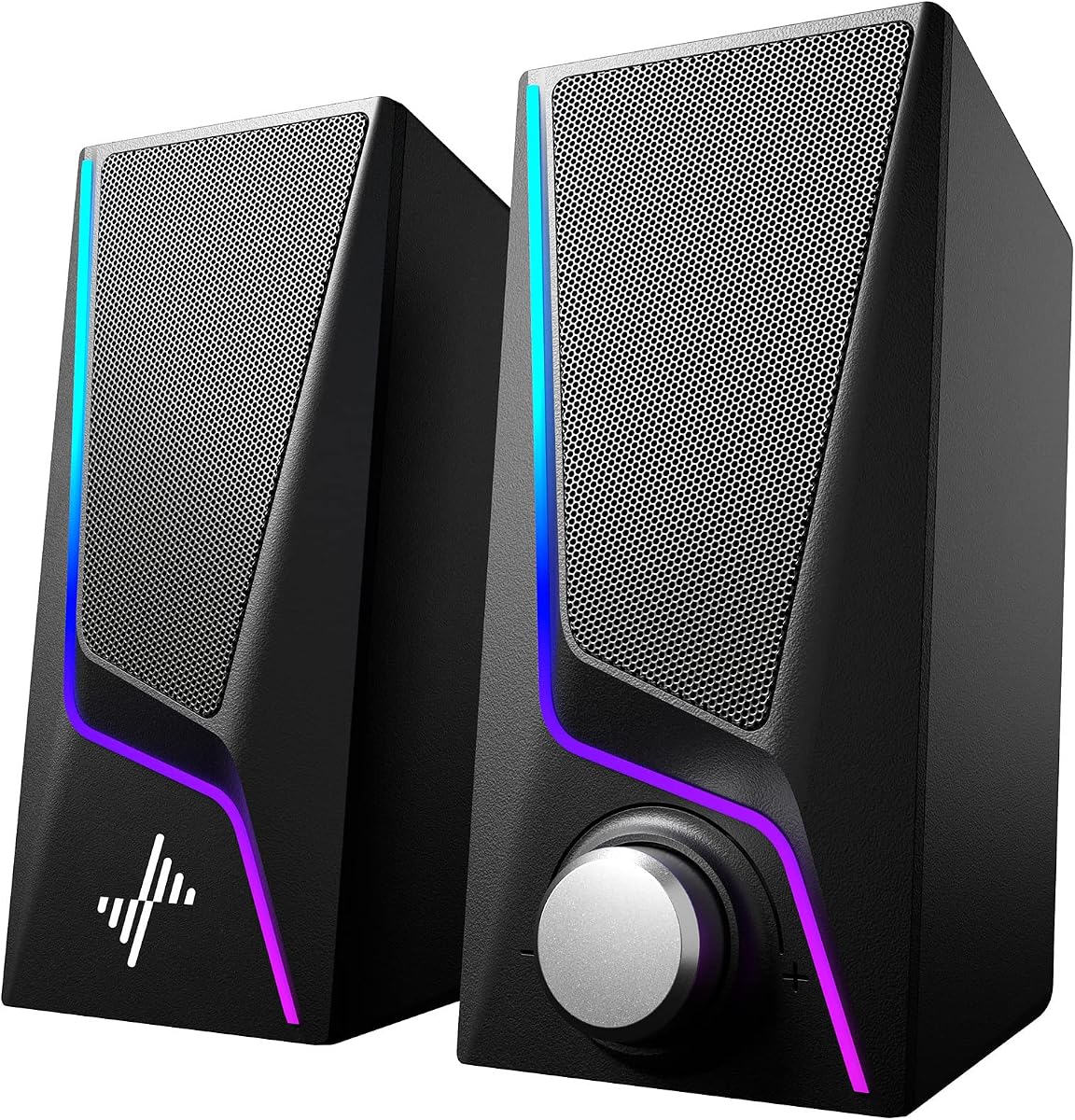
The black OHAYO 60W pair is effectively the stealth finish of the white top-pick sibling: active Bluetooth 5.3 stereo, carbon-fiber driver language, MDF cabinets, rear bass ports, and a front volume knob designed for desktop gaming and music. If your desk is already a constellation of black monitors, stands, and keyboards, this finish usually photographs and lives better than bright white cabinets that draw the eye away from the screen.

  • Black active 2.0 bookshelf computer speakers
  • Bluetooth 5.3 with AUX, RCA, and USB
  • Carbon-fiber drivers and MDF enclosures
Check Price →
✓ Pros
  • Same high-rated active stereo approach as the white OHAYO pair
  • Black finish blends with dark monitors and gaming peripherals
  • Multiple inputs support PCs, phones, and secondary gear
  • Front knob control is convenient during long sessions
  • Wooden cabinets help control resonance versus thin plastic shells
✕ Cons
  • No dedicated subwoofer for maximum explosion impact
  • Needs stereo spacing rather than a single under-monitor slot
  • Overlaps heavily with the white model if you only need one OHAYO set

Detailed review

Sound expectations should track the same strengths: clearer highs from the silk dome tweeter, richer mid-bass from the full-range driver and porting, and enough rated power to fill a bedroom gaming station without immediately sounding strained. The integrated independent sound card claim points to smoother playback from computer sources, which is useful when motherboard audio is mediocre and you want a cleaner daily path without buying a separate DAC first.

For gaming, stereo imaging is the feature to optimize. Place the speakers wide enough to create a stage, keep them out of monitor-arm shadows, and prefer a wired input when competitive latency matters. Bluetooth remains excellent for phone playlists and casual listening, but wired paths are still the safer default for ranked sessions and video editing scrubbing.

Versatility is a recurring OHAYO theme. AUX, RCA, and USB mean you can park these beside a PC today and still use them with a TV, mixer, or secondary streamer later. That future-proofing is why bookshelf actives often outlast gimmick RGB bars that only make sense while a specific aesthetic trend is hot.

The main reason this model sits just outside the top-three badges is redundancy with the white OHAYO pick, not a performance demotion. If you are choosing only one pair from this guide and your room theme is dark, take the black finish without hesitation. If you already selected the white pair, you do not need both.

In short, treat the black OHAYO as the best-looking match for RGB-heavy or charcoal desks that still want real stereo cabinets and broad connectivity rather than a soundbar compromise.

When black is the smarter finish

Black is smarter when your monitor bezels, PC case, and desk mat are dark, or when you shoot desk photos and want speakers to disappear. White can look premium on light oak desks but may clash with neon-heavy battlestations.

Music and gaming balance

Use these when your week is split between competitive games, story titles, and long music sessions. They are less ideal if you specifically want a discrete subwoofer channel for home-theater LFE effects.

Check Price on Amazon →

We may earn a commission at no additional cost to you.

5. Sanyun SW208 - Best USB DAC Bookshelf Option

Sanyun SW208 3" Active Bluetooth 5.0 Bookshelf Speakers

Sanyun SW208 3" Active Bluetooth 5.0 Bookshelf Speakers

8.6/10★★★★☆

Sanyun’s SW208 targets shoppers who want bookshelf manners and a more intentional digital path. The headline feature is a built-in 24-bit DAC on the USB connection, which can pull digital audio from a PC more cleanly than a basic analog AUX loop through a noisy motherboard jack. For gamers who also edit video, produce streams, or listen critically to music, that DAC-aware USB route is a meaningful differentiator in a category full of plug-and-play bars.

  • 3-inch carbon-fiber active bookshelf pair
  • Built-in 24-bit DAC over USB connection
  • Side knobs for volume, treble, and bass
Check Price →
✓ Pros
  • USB path with built-in 24-bit DAC can improve digital source fidelity
  • Dedicated treble and bass knobs help tune games versus music
  • Bluetooth 5.0 adds convenient wireless listening
  • Wood-structure bookshelf design looks more intentional than plastic cubes
  • Quiet standby and noise-filtering claims suit always-on desks
✕ Cons
  • Smaller 3-inch drivers will not match larger 2.1 subwoofer systems
  • White finish may not suit every dark battlestation theme
  • “3D surround” remains a stereo enhancement story, not true rear speakers

Detailed review

The carbon-fiber speaker units and multi-layer voice coil language aim for warm mids, useful bass, and clear highs in a compact 3-inch active design. You will not confuse these with floorstanding hi-fi towers, but within desktop constraints they are built to sound more composed than novelty RGB satellites. The side-mounted total volume, treble, and bass knobs are especially practical: competitive players can reduce bass for footstep clarity, then restore warmth for music or cinematic games without opening software.

Bluetooth 5.0 covers secondary devices, while AUX remains the simple wired fallback. The quiet-standby and noise-elimination claims matter more than marketing usually admits; hissy desktop speakers become fatiguing on a silent Discord lobby or during late writing sessions. A speaker that disappears when idle is easier to live with every day.

Placement follows classic bookshelf logic. Give each cabinet space, form a stereo triangle, and avoid blocking the reflective/direct sound behavior Sanyun describes. Because these are compact, they can sit on a desk shelf or monitor-side stands more easily than a full G560-style satellite and sub array.

Choose the SW208 when tone control and USB DAC convenience are higher priorities than RGB theatrics or a dedicated sub. It is an excellent mid-roundup pick for people graduating from tinny monitor speakers but not ready to dedicate floor space to a woofer box.

If your main titles are bass-heavy action games and you want physical rumble, pair expectations accordingly or look at the Logitech 2.1 systems instead. If your main titles reward midrange detail and soundtrack nuance, the SW208’s control set and DAC path make a smart desktop compromise.

Dialing treble and bass for games

For tactical shooters, start with bass slightly reduced and treble neutrally clear so footsteps and utility cues do not get buried. For single-player adventures, raise bass modestly and keep treble smooth so scores and ambient beds feel fuller without harshness.

USB DAC vs Bluetooth listening

Use USB when the PC is the critical source and you want the internal DAC in play. Use Bluetooth when convenience outweighs absolute fidelity, such as phone playlists while you clean the desk or take a break.

Check Price on Amazon →

We may earn a commission at no additional cost to you.

6. Razer Leviathan V2 X - Best Compact Chroma Soundbar

Razer Leviathan V2 X

Razer Leviathan V2 X

8.4/10★★★★☆

The Razer Leviathan V2 X is the pack’s most focused answer to a common constraint: almost no desk space, but still a desire for better-than-monitor audio and cohesive RGB. It uses two full-range drivers and two passive radiators in a compact soundbar chassis meant to sit beneath a monitor. For ultrawide setups, laptop docks, and battlestations already crowded with mic arms and stream decks, that form factor can be the difference between upgrading speakers and giving up.

  • Compact full-range PC soundbar design
  • Single USB-C cable for power and audio
  • Chroma RGB with Bluetooth 5.0 support
Check Price →
✓ Pros
  • Ultra-compact bar fits cleanly under many monitors
  • USB-C single-cable setup keeps the desk tidy
  • Full-range drivers plus passive radiators improve presence over tiny cubes
  • Chroma RGB integrates with a broad Razer lighting ecosystem
  • Bluetooth 5.0 helps switch between PC and mobile devices
✕ Cons
  • No separate subwoofer for deep, room-filling bass
  • Lower listing rating than several bookshelf options in this pack
  • Best experience assumes interest in Razer software and Chroma

Detailed review

USB Type-C power and audio delivery simplifies installation. One cable for dynamic output up to the listed volume capability means fewer wall warts and fewer accidental unplugs. Bluetooth 5.0 adds low-latency wireless listening and easier jumps between PC and phone, with the Razer Audio app in the mix for device management. That makes the V2 X friendly for Nintendo Switch sessions, tablet videos, and smartphone music without rebuilding the cable nest.

Chroma RGB is the personality layer. Fourteen lighting zones, patterns, and dynamic in-game effects let the bar participate in the same lighting scenes as other Razer gear. If your desk already runs Synapse-driven chroma, the Leviathan V2 X feels native. If you never install vendor software and dislike glow, the lighting story will not justify this pick over a quieter OHAYO or Sanyun pair.

Sonically, expect a big jump over stock laptop speakers and a convenient stereo-bar presentation, not G560-level sub authority. Passive radiators help the small enclosure sound fuller, but physics still applies: a slim bar cannot equal a down-firing subwoofer. Keep expectations honest and the V2 X becomes a strong clutter-free choice rather than a disappointing home theater substitute.

We like it for streamers and RGB desk builders who prioritize silhouette and ecosystem polish. It is also a sensible dorm or apartment pick when floor subs are impractical. Just plan your audio goals first—if bass is the hill you will die on, move to Z407 or G560 before falling for the clean under-monitor look alone.

Among soundbars in this guide, the Leviathan V2 X stands out for USB-C elegance and Chroma depth, while Bluedee and LENRUE chase simpler ambient lighting and lower-complexity plug-and-play paths.

Ideal desk scenarios

Best when the monitor stand leaves a shallow shelf for a bar, cable openings are limited, and you already use Razer peripherals. Also strong for laptop-first desks that occasionally dock a Switch or tablet.

Software and tuning

Install Razer Synapse and the Audio app if you care about lighting scenes and device switching. Spend a few minutes testing profiles with your most common games; a small EQ change can keep dialogue clear when RGB effects tempt you to listen louder than necessary.

Check Price on Amazon →

We may earn a commission at no additional cost to you.

7. BESTISAN - Best Flexible Lighted Desktop Pair

BESTISAN Computer Gaming Speakers for Desktop PC | 30W Powered Monitor Speakers

BESTISAN Computer Gaming Speakers for Desktop PC | 30W Powered Monitor Speakers

8.8/10★★★★☆

BESTISAN’s powered monitor speakers sit in a sweet middle ground: more flexible than AUX-only USB bars, more compact than bookshelf wood pairs, and flashier than office-neutral sets. The 30W driver story targets clear treble and richer bass for gaming, movies, and everyday desktop use. That makes them a practical upgrade when you want stereo separation without committing to a subwoofer box under the desk.

  • 30W powered desktop gaming speakers
  • Bluetooth, AUX, and Type-C connections
  • Six colorful LED lighting modes
Check Price →
✓ Pros
  • Three connection types cover phones, PCs, and modern Type-C devices
  • 30W drivers aim for clearer treble and richer bass than ultra-budget cubes
  • Six light modes let you shift from calm work to vivid gaming
  • Compact footprint fits beside monitors without dominating the desk
  • Plug-and-play operation with simple onboard controls
✕ Cons
  • Not a dedicated subwoofer system for deep LFE effects
  • Lighting is fun but not a full ecosystem like Razer Chroma or LIGHTSYNC
  • Short name truncation in listings can make model comparison confusing

Detailed review

The connectivity trio is the real selling point. Bluetooth handles phones and quick wireless listening, AUX covers classic PC and console jacks, and Type-C supports newer device ecosystems that no longer expose easy headphone ports. For mixed desks that rotate between a desktop tower, a work laptop, and a phone, fewer adapters means fewer excuses to keep suffering through tinny speakers.

Lighting includes six adjustable LED modes spanning calmer glows and more vibrant cycling. That range is useful if the same desk hosts daytime work and nighttime games; you can dim the spectacle for spreadsheets and turn it up for co-op sessions. It will not match the software depth of Logitech LIGHTSYNC or Razer Chroma, but it delivers atmosphere without a steep learning curve.

Ergonomically, the compact chassis is meant to live beside a monitor rather than claim an entire shelf. Intuitive buttons for volume, lights, and connections keep you out of OS menus. That simplicity is ideal for students, first apartment setups, and anyone who wants better sound this week rather than an audiophile project.

Where BESTISAN trails the top picks is ultimate low-end authority and ecosystem polish. If you want cinematic boom, choose Z407 or G560. If you want wooden hi-fi cabinets and tone knobs, choose OHAYO or Sanyun. If you want flexible ports, playful lighting, and an easy stereo pair, BESTISAN earns its place in the shortlist.

Consider it a high-value “desk completion” speaker set: visible upgrade, broad compatibility, and enough output for personal gaming space without intimidating installation.

Who should shortlist BESTISAN

Shortlist these if you need Bluetooth plus wired options, like light customization, and refuse to give up left/right stereo speakers for a single bar. They are especially practical for shared apartments and compact desks.

Quick setup checklist

Decide your primary cable first (Type-C or AUX for the PC), pair Bluetooth as a secondary source, then pick a light mode that does not distract from the monitor. Test peak volume with your loudest game soundtrack to confirm the desk placement does not rattle hollow stands.

Check Price on Amazon →

We may earn a commission at no additional cost to you.

8. Nylavee - Best Budget RGB Satellite Pair

Nylavee Computer Speakers for Desktop

Nylavee Computer Speakers for Desktop

8.8/10★★★★☆

Nylavee’s desktop speakers are a classic modern budget gaming formula done with clearer intent than average: dual full-range magnet units, two bass-boost ports, USB power, 3.5 mm AUX audio, and six touch lighting modes. There is no Bluetooth and no sprawling software suite, which keeps the product honest. You plug power, plug audio, set a light mode, and get an immediate lift over monitor speakers for games, videos, and music.

  • USB-powered stereo desktop speakers
  • 3.5 mm AUX audio, no Bluetooth
  • Six touch lighting modes and bass-boost ports
Check Price →
✓ Pros
  • Dual-magnet full-range units deliver crisp stereo for the size
  • Bass-boost ports add more low-end energy than sealed mini cubes
  • Six touch-controlled lighting modes personalize the desk quickly
  • Simple single-knob power and volume control
  • True plug-and-play USB power with AUX audio for PCs and laptops
✕ Cons
  • No Bluetooth, so phones need a wired AUX path
  • USB power and AUX cables mean two connections to manage
  • Cannot match dedicated subwoofer systems for deep rumble

Detailed review

The bass ports are the feature that makes these more interesting than flat USB bricks. By design, they create stronger vibration energy and a more concentrated low end for movies and gaming. That will not equal a down-firing Logitech sub, but it helps explosions and soundtrack beds feel less anemic on a small desk. Keep the ports unobstructed; shoving the speakers against a wall or cloth can choke the benefit.

Lighting covers symphony, flowing, breathing, and solid color modes through touch control. That is enough variety for most RGB-curious desks without forcing another always-running desktop app. Combined with the simple front knob, the daily experience is intentionally low friction—especially welcome if your PC already runs too many overlays.

Dimensions around three-by-four-by-seven inches make these true satellite-style desk residents rather than under-monitor bars. You will need left and right space. The payoff is actual stereo separation, which helps gaming directional cues more than a single-point bar when you sit in the sweet spot.

Buy Nylavee when you want an affordable lighted stereo upgrade and your devices all still expose AUX. Skip it if wireless phone pairing is mandatory or if you need a one-cable USB-C soundbar. In this roundup it plays the role of value RGB stereo: cheerful, simple, and effective for first upgrades.

It also pairs conceptually with LENRUE and Bluedee as part of the compact/USB-powered tier, while OHAYO and Sanyun occupy the more music-forward wood-cabinet tier above it.

Wired-only reality check

Because audio is AUX-only and USB is power-only, plan cable routing before you mount monitor arms. A nylon cable sleeve or under-desk tray keeps the Y-split from looking messy in photos and in daily use.

Lighting without distraction

For competitive play, solid or breathing modes are usually less distracting than aggressive cycling. Save the flashier modes for menu screens, creative sessions, or photo-friendly desk setups.

Check Price on Amazon →

We may earn a commission at no additional cost to you.

9. Bluedee - Best Slim Bluetooth Soundbar

Bluedee Computer Speakers for Desktop PC

Bluedee Computer Speakers for Desktop PC

8.6/10★★★★☆

Bluedee’s computer soundbar is built for the most common desk complaint: there is nowhere to put speakers. At roughly 16.4 inches wide and only a couple of inches deep and tall, it is meant to slide under a monitor and disappear into the front edge of the workspace. Dual drivers and dual diaphragms, plus anti-magnetic claims against static interference, target a clearer, more immersive listen than the squeaky modules hidden inside many displays.

  • Slim 16.4-inch USB-powered PC soundbar
  • Bluetooth 5.0 and 3.5 mm AUX inputs
  • Ambient light strips with compact depth
Check Price →
✓ Pros
  • Fits neatly under many monitors without stealing desk depth
  • Bluetooth plus AUX covers wireless and wired listening
  • Dual drivers and diaphragms aim for clearer stereo presence
  • USB/USB-C power with a tidy nylon-braided Y-cable approach
  • Ambient lighting adds style without a huge RGB software stack
✕ Cons
  • Soundbar imaging is narrower than spaced satellite pairs
  • No dedicated subwoofer for deep bass enthusiasts
  • Ambient lights are subtler than full Chroma or LIGHTSYNC systems

Detailed review

Two-way connectivity is the convenience win. Use the 3.5 mm plug for reliable PC audio, or Bluetooth 5.0 when you want phone or tablet sound without fighting for the AUX jack. USB power from a laptop, PC, power bank, or adapter keeps the setup driver-free and genuinely plug-and-play. The braided Y-cable concept is explicitly about returning an organized workspace, which matters when your desk already hosts a mic, webcam, and keypad.

Ambient light strips give the bar a soft gaming-desk identity without demanding a Synapse-style commitment. Think mood accent rather than reactive lightshow. That can be perfect for people who want a little glow in photos and evening sessions but still work in the same space during the day.

Eco-minded materials and packaging are part of Bluedee’s pitch, and lifetime after-sales support messaging may reassure first-time buyers who are nervous about lesser-known audio brands. Still, evaluate the product primarily on fit and sound goals: this is a compact stereo bar, not a bookshelf pair and not a 2.1 theater kit.

Choose Bluedee when under-monitor fit and Bluetooth convenience outrank maximum fidelity. It is a strong alternative to the Razer Leviathan V2 X if you want a simpler lighting story and do not need Chroma integration. It is a weaker choice if you have room for real left/right cabinets and care about wider stereo staging.

In a small dorm desk or a shallow secretary-style setup, Bluedee can be the upgrade that actually fits—literally—when every other recommendation in this article is too wide, too deep, or too tall.

Measure before you buy

Check the gap under your monitor and the width of the stand or arm mount. A 16.4-inch bar needs a clear landing strip; some monitor feet and risers leave less usable width than the panel itself suggests.

Bluetooth vs AUX for games

Prefer AUX for competitive PC gaming to minimize wireless variables. Use Bluetooth for phone music, videos, and casual couch-adjacent listening when absolute latency is less critical.

Check Price on Amazon →

We may earn a commission at no additional cost to you.

10. LENRUE G11 - Best Simple Under-Monitor Light Bar

LENRUE G11 Computer Speakers for Desktop

LENRUE G11 Computer Speakers for Desktop

8.6/10★★★★☆

The LENRUE G11 is unapologetically simple: a compact under-monitor speaker with surge stereo ambitions, touch angular game lights, USB/USB-C power, and AUX audio. That narrow feature set is a strength if you want fewer decisions. You are not configuring surround software, pairing Bluetooth profiles, or integrating a lighting ecosystem. You are replacing weak monitor audio with a dedicated bar and adding a bit of desk atmosphere.

  • Compact under-monitor USB-powered speaker
  • AUX audio with USB-C/USB power options
  • Touch angular game lights, no Bluetooth
Check Price →
✓ Pros
  • All-in-one compact bar saves space under the monitor
  • Touch lighting avoids fiddly traditional button clusters
  • USB-C adapter included improves laptop compatibility
  • Top volume knob is easy to reach during games
  • Driver-free plug-and-play for Windows, Mac, and Chrome OS
✕ Cons
  • No Bluetooth wireless listening
  • No headphone port or mic features
  • Not compatible with TVs according to the listing notes

Detailed review

LENRUE highlights multiple amplifier IC horns and distortion-free, noiseless playback for movies, videos, games, and music. In the real world, that should be read as a clear step up from built-in display speakers rather than a claim against premium bookshelf systems. For homework desks, starter gaming PCs, and office-to-evening crossover setups, that step is often exactly what people need.

The touch light design is more thoughtful than it sounds. One-touch light control beats hunting for tiny recessed buttons on the rear of a bar, especially in a dark room. Combined with a top volume knob and cables intended to stay together, the G11 tries to keep both interaction and cable sprawl under control.

Compatibility notes are important. The listing calls out Windows, Mac OS, and Chrome OS friendliness, and includes a Type-C adapter path, but it also clearly states there is no Bluetooth, no headphone port, no mic, and no TV compatibility. Believe those boundaries. If you need to plug headphones into the speaker itself or beam audio from a phone wirelessly, choose Bluedee, BESTISAN, or an OHAYO pair instead.

We rank the G11 as a practical closer in this list: honest, compact, and easy. It will not win a fidelity shootout against Sanyun or OHAYO, and it will not create G560-style immersion. It will, however, solve the “my monitor sounds terrible and my desk is tiny” problem with minimal drama.

If you are gift-buying for a student setup or outfitting a secondary PC, the G11’s constraints are easy to explain and hard to misuse—which is more valuable than another overloaded feature checklist.

Buy this if your needs are narrow

The G11 is ideal when you only need wired PC/laptop audio, want under-monitor fit, and like simple touch lighting. It is a poor fit for Bluetooth households, TV living rooms, or anyone expecting headphone passthrough.

Cable and power tips

Use a stable USB power source; underpowered hubs can limit volume cleanliness on some desks. Keep the AUX run short and away from power bricks when possible to reduce buzz in sensitive setups.

Check Price on Amazon →

We may earn a commission at no additional cost to you.

Best Gaming Speakers in 2026 for Immersive PC Desktop Sound

How to Choose Gaming Speakers for Your Desk

Start with form factor, not wattage stickers

The first decision is physical: under-monitor soundbar, left/right desktop satellites, bookshelf active pair, or satellite-plus-subwoofer system. Wattage numbers are hard to compare across brands because peak and RMS are marketed differently. Form factor determines whether the speakers will even fit, how wide the stereo image can be, and whether bass has a fighting chance.

If your monitor stand leaves a shallow shelf, prioritize Bluedee, LENRUE, or the Razer Leviathan V2 X. If you have open left/right space, OHAYO, Sanyun, Nylavee, and BESTISAN can create a more convincing stage. If you can dedicate floor space, Logitech G560 and Z407 unlock the most physical impact in this pack.

Match connectivity to your real devices

List every source you will use weekly: desktop PC, work laptop, phone, Switch, turntable, TV. Then map ports. AUX remains the latency-friendly gaming default. USB or USB-C can simplify power and sometimes digital audio. Bluetooth is ideal for phones and casual listening but is not always the best competitive path. RCA helps when older or AV gear enters the mix.

Decide how much bass you actually need

Gamers often say they want more bass when they really want clearer mid-bass impact and less distortion at moderate volume. A ported bookshelf pair can satisfy that. True subwoofer systems satisfy the desire for explosions and music beds that you feel as well as hear. Be honest about neighbors, housemates, and late-night sessions before defaulting to the biggest 2.1 option.

Treat RGB as optional immersion, not proof of quality

LIGHTSYNC, Chroma, touch angular lights, and ambient strips can make a desk feel finished, but lighting ecosystems differ wildly. Buy RGB because you enjoy the atmosphere, not because it guarantees better footsteps. Blind listening with lights off is still the right way to judge clarity, harshness, and imaging.

Placement beats presets

Even excellent speakers sound mediocre when jammed against a wall, aimed at your chest instead of your ears, or blocked by a mic arm. Form a stereo triangle when using pairs, keep soundbars centered under the panel, and give subs space to breathe. Small placement changes often outperform another downloadable EQ pack.

Frequently Asked Questions

01

Are gaming speakers better than a headset for competitive play?

They solve different problems. Headsets usually provide better personal positional precision and overnight privacy, while speakers are better for long comfort sessions, shared watching, and the physical sense of being in a game space. Many players keep both: headset for ranked focus, speakers for story games, creative work, and co-op nights. If your household needs silence after hours, a headset remains essential even after you buy excellent speakers.

02

Do I need a subwoofer for gaming on a PC desk?

Only if low-frequency impact is a priority. A good 2.0 bookshelf pair can sound punchy and clear for footsteps, abilities, and music. A subwoofer adds the chest-thump layer for explosions, engines, and cinematic scores. If you live in an apartment with thin floors, start with OHAYO, Sanyun, or a compact bar and add a 2.1 system later if you still crave more bass.

03

Is Bluetooth okay for gaming speakers?

Bluetooth is excellent for phones, tablets, and casual listening, and modern versions such as 5.0 and 5.3 are far more stable than older chipsets. For competitive gaming on a PC, a wired AUX, USB, or USB-C path is still the safer default because it removes wireless codec and interference variables. A practical setup is wired for the PC and Bluetooth as a secondary input for mobile audio.

04

Soundbar or satellite speakers: which is better for FPS games?

Spaced left/right satellites or bookshelf pairs generally create a wider stereo image, which can make side cues easier to interpret when you sit in the sweet spot. Soundbars win on desk fit and simplicity. If FPS performance is the top goal and you have space, prefer G560 satellites, OHAYO pairs, Sanyun, Nylavee, or BESTISAN over the slimmest under-monitor bars.

05

Will RGB lighting affect sound quality?

Not directly. Lighting systems such as LIGHTSYNC, Chroma, or touch LED modes are independent of driver quality. Poor-sounding RGB speakers exist, and excellent non-RGB speakers exist. Choose lighting for atmosphere and ecosystem features, then judge sound on clarity, distortion at your listening level, and how well voices and effects separate in a busy mix.

06

Can these gaming speakers replace a full living-room surround system?

No. Desktop gaming speakers are optimized for nearfield listening at a desk. Even strong 2.1 systems like the Logitech options are not substitutes for a properly placed multi-channel living-room theater. Use them for PC immersion, monitor-centric movies, and small-room music. If you want true rear surrounds and room-filling cinema, you need a different class of hardware and calibration.

07

What is the difference between the white and black OHAYO 60W speakers?

In this pack they are finish variants around the same active stereo concept: Bluetooth 5.3, multiple wired inputs, carbon-fiber driver language, and MDF cabinets. Choose white for light desks and brighter rooms; choose black for dark battlestations. You do not need both unless you are outfitting two different desks.

08

Why does the Logitech G560 mention Mac limitations?

According to the product information, DTS:X Ultra surround is not supported on Mac OS X, even though the speakers can still function as a Bluetooth or conventional speaker system with computers. Windows PC gamers get the fuller surround feature story. Mac users should buy the G560 for sound and LIGHTSYNC character, not for the same surround processing expectations advertised on Windows.

09

How loud should gaming speakers be for a bedroom setup?

Loud enough for immersion at your seat, not loud enough to excite every rattle in the room. If you are distorting drivers or vibrating monitor stands, turn down and improve placement. Nearfield desktop listening often sounds better at moderate levels with clear imaging than at party volume with compressed, harsh output.

10

Which option is best if I only have USB power and almost no desk space?

Start with the slim bars: Bluedee for Bluetooth flexibility, LENRUE G11 for simple wired under-monitor lighting, or Razer Leviathan V2 X for USB-C and Chroma. If you can spare left/right width but still need USB power, Nylavee is a stronger stereo-stage alternative than a single bar.

Conclusion

The best gaming speakers for 2026 depend less on a single wattage number and more on how you sit at your desk. If you want the most complete gaming-system experience in this pack, the Logitech G560 remains the standout for surround-minded Windows PCs with room for a sub and a taste for LIGHTSYNC immersion. If you want musical, high-rated stereo cabinets that still handle games gracefully, the OHAYO 60W pairs are the clearest bookshelf answer. If you want subwoofer weight with everyday wireless control, the Logitech Z407 is the comfort pick.

Everyone else in the list fills a real niche rather than acting as filler: Sanyun for USB DAC tone shaping, Razer for compact Chroma elegance, BESTISAN for flexible lighted desktop stereo, Nylavee for budget RGB satellites, and Bluedee or LENRUE for shallow under-monitor realities. Match the niche to your ports and clearance measurements and you will avoid the most common regret in this category—buying speakers that sound fine in a photo and impossible on your actual desk.

Upgrade with placement discipline, keep a wired path for competitive sessions, and treat RGB as seasoning. Do that, and even a compact desktop system can make your next campaign, ranked reset, or late-night playlist feel substantially more alive than the speakers hiding inside your monitor.