Expert Review & Guide

Best Gaming Monitors for PS5 in 2026: HDMI 2.1 &

The PlayStation 5 is only as sharp and fluid as the screen you plug into it. A living-room TV can look fine from the couch, but a desk-friendly gaming monitor unlocks tighter response, higher useful brightness at close range, and—when the handshake cooperates—120Hz Performance modes with Variable Refresh Rate that make camera pans and aim tracking feel newly continuous. In 2026, the shopping brief for most PS5 owners still collapses to three technical pillars: enough HDMI bandwidth for your target resolution at 120Hz, VRR support that actually engages in the games you play, and a panel size/resolution combo that matches how far you sit from the glass.

This roundup uses a fixed product pack so every recommendation stays shoppable and comparable. At the top sits the ASUS ROG PG32UCDM 32-inch 4K QD-OLED, the pack’s clearest HDMI-era flagship for console spectacle. Samsung’s Odyssey G5 family covers pragmatic QHD desks—flat IPS and ergonomic 27-inch options plus a 32-inch 1000R curve—while Sceptre, KTC, ARZOPA, and ArcticPro fill compact 1080p120, ultrawide-hybrid, and portable niches. Ratings, titles, images, and Amazon URLs come from the pack; judgments about which panels truly serve PS5 120Hz and VRR goals are editorial.

Start with the three top picks if you want a shortlist, then use the comparison table and full reviews to match HDMI expectations, FreeSync/VRR behavior, and desk size. The buying guide explains why HDMI 2.1 matters for 4K120, when HDMI 2.0 1080p120 is still a smart buy, how to enable VRR on the PS5 without chasing myths, and which tradeoffs matter when a portable or ultrawide enters the mix.

Our Top Gaming Monitors for PS5

Best Overall for PS5

ASUS ROG PG32UCDM 32" 4K QD-OLED

★★★★★9.4/10
ASUS ROG PG32UCDM 32" 4K QD-OLED
  • 32" 4K QD-OLED with 240Hz PC ceiling and console-ready UHD clarity
  • VESA DisplayHDR True Black class contrast with 99% DCI-P3 color volume
  • G-SYNC Compatible VRR plus heatsink and burn-in coverage for ownership peace
Check Price →
Best QHD Everyday Pick

Samsung Odyssey G5 G53F 27" QHD

★★★★★9/10
Samsung Odyssey G5 G53F 27" QHD
  • 27" IPS QHD with 200Hz headroom for smooth PC sessions beyond console 120Hz
  • AMD FreeSync Premium and HDR10 for tear-resistant, punchier console nights
  • Black Equalizer and Virtual Aim Point help competitive visibility on dark maps
Check Price →
Best Immersive 32" Curve

Samsung Odyssey G55C 32" Curved QHD

★★★★☆8.8/10
Samsung Odyssey G55C 32" Curved QHD
  • 32" 1000R QHD curve wraps peripheral vision for story-driven PS5 nights
  • 165Hz and 1ms MPRT keep action fluid when frame rates climb
  • HDR10 depth plus Eye Saver Mode for longer, more comfortable sessions
Check Price →

As an Amazon Associate we earn from qualifying purchases. We may earn a commission at no additional cost to you.

PS5 Gaming Monitor Spec Comparison

Every model below comes from the same product pack and is evaluated for PlayStation desk use—not generic PC esports alone. Specs highlight resolution, refresh headroom above 120Hz, HDR posture, and adaptive-sync language. Remember that console modes depend on HDMI handshake details: a high PC refresh rate does not automatically equal HDMI 2.1 4K120, and FreeSync Premium on a monitor is a strong signal for tear-resistant play but still needs correct cables and PS5 video settings.

#ProductSpecificationsScore
1
  • 32" 4K QD-OLED 240Hz, 0.03ms
  • True Black HDR, 99% DCI-P3
  • Built for PS5/Xbox VRR paths
9.4
2
  • 27" IPS QHD up to 200Hz
  • HDR10 + FreeSync Premium
  • Black Equalizer, Auto Source Switch+
9
3
  • 27" QHD 180Hz, 1ms
  • HDR10 + AMD FreeSync
  • Height, tilt, and pivot stand
9
4
  • 32" QHD 1000R curve, 165Hz
  • HDR10 + AMD FreeSync
  • Eye Saver Mode, glare-free finish
8.8
5
  • 34" WQHD 1000R ultrawide
  • 165Hz, 1ms, FreeSync Premium
  • HDR10 VA color and contrast
8.6
6
  • 24.5" FHD curved up to 240Hz
  • FreeSync Premium, 1ms
  • Dual HDMI + dual DisplayPort, speakers
9
7
  • 32" FHD curved, up to 280Hz
  • Adaptive-Sync, HDR10, 128% sRGB
  • Dual HDMI 2.0 + DisplayPort 1.4
9
8
  • 16.1" FHD IPS 144Hz portable
  • 106% sRGB, HDR, eye care
  • USB-C + Mini HDMI for PS5 travel
9
9
  • 22" FHD up to 144Hz
  • HDMI + DisplayPort, speakers
  • Blue-Light Shift, slim bezel
9
10
  • 22" FHD 144Hz, 4000:1 contrast
  • 105% sRGB, eye-care filters
  • HDMI + VGA, 75×75 VESA
9

1. ASUS ROG PG32UCDM - Best Overall for PS5

ASUS ROG PG32UCDM 32" 4K QD-OLED

ASUS ROG PG32UCDM 32" 4K QD-OLED

9.4/10★★★★★

If you want the PlayStation 5 to look like the marketing slides—sharp 4K, deep contrast, and fluid Performance-mode motion—the ASUS ROG PG32UCDM is the clear flagship in this pack. The 32-inch 3840×2160 QD-OLED panel delivers per-pixel lighting that LCD backlights cannot fake, so night missions, space vistas, and HDR cutscenes retain inky blacks beside bright specular highlights. ASUS explicitly positions the monitor for PS5 and Xbox use, which matters when you are shopping specifically for console HDMI behavior rather than a PC-only esports panel.

  • 32" 4K QD-OLED 240Hz, 0.03ms
  • True Black HDR, 99% DCI-P3
  • Built for PS5/Xbox VRR paths
Check Price →
✓ Pros
  • Native 4K OLED makes PS5 Performance and Quality modes look exceptional
  • Near-instant response and deep blacks elevate VRR 120Hz console play
  • Wide DCI-P3 gamut and True Black HDR suit cinematic single-player titles
  • Custom heatsink, graphene film, and 3-year burn-in coverage reduce OLED anxiety
  • USB-C 90W and DisplayWidget Center keep a modern desk tidy and controllable
✕ Cons
  • Premium flagship positioning versus approachable Odyssey QHD options
  • OLED still rewards sensible static HUD and idle-screen habits
  • Bright uncontrolled rooms can favor matte LCD Odyssey panels instead

Detailed review

Refresh and response are the second half of the story. On a PC the PG32UCDM can climb to 240Hz with a 0.03ms response claim, but the console-relevant win is how cleanly it presents high-frame 4K and VRR-friendly output when the PS5 is feeding Performance or 120Hz modes. OLED’s near-instant pixel transitions keep camera pans and aim flicks from smearing the way older VA televisions sometimes do. Pair that with G-SYNC Compatible adaptive sync on the PC side and you have a desk display that does dual duty without feeling compromised.

HDR is where QD-OLED separates itself from the Odyssey LCD majority below. VESA DisplayHDR True Black compliance, true 10-bit color, and 99% DCI-P3 coverage give Quality-mode story games a sense of depth that basic HDR10 LCD panels approximate rather than match. Explosions keep color volume; shadowed corridors stay readable instead of lifting into gray fog. If your PS5 library leans into cinematic single-player titles as much as competitive shooters, that contrast advantage is worth prioritizing.

Ownership features are unusually thoughtful for an OLED gaming monitor. A custom heatsink, advanced airflow, and graphene film target heat management to reduce burn-in risk, while DisplayWidget Center exposes OLED Care tools and picture settings with a mouse instead of a cryptic joystick fight mid-raid. The three-year warranty with burn-in coverage is a meaningful ownership differentiator when static HUDs are part of daily console life. USB-C 90W power delivery also lets compatible laptops share the same premium screen between sessions.

Connectivity and desk fit still deserve a checklist mindset. Use a high-quality Ultra High Speed HDMI cable from the PS5, enable the console’s 120Hz and VRR options where supported, and confirm the monitor input is on the correct HDMI port and picture mode. On PC, DisplayPort remains the path to peak 4K240. Bright, uncontrolled sunrooms may still prefer a matte Odyssey LCD; dimmer dedicated battlestations make the PG32UCDM look unfair.

Who should buy it: PS5 owners who want one premium 4K screen for Quality-mode spectacle and Performance-mode fluidity, plus PC players who refuse to own two flagship displays. Who should skip it: shoppers who mainly need a cheap 1080p120 dorm screen, or anyone unwilling to practice basic OLED hygiene with static menus. Inside this pack, nothing else matches the PG32UCDM for HDMI-era console ambition.

Treat setup as part of the purchase. After connecting HDMI, set the PS5 output to the highest resolution and refresh your game supports, toggle VRR on supported titles, and avoid leaving pause menus burned at max brightness for hours. Used thoughtfully, this ROG panel is the reference point the rest of the roundup is measured against.

PS5 HDMI and VRR checklist

Use an Ultra High Speed HDMI cable, connect to the monitor’s appropriate HDMI input, then in PS5 Settings enable 120Hz output, VRR, and the highest resolution your screen reports. Test both a Performance-mode multiplayer title and a Quality-mode single-player game before you judge HDR presets. If a mode is missing, re-seat the cable and confirm the input is not limited by a PC-only picture profile.

OLED care for console HUDs

Hide static menus when AFK, use OLED Care / pixel cleaning routines from DisplayWidget Center, and avoid parking a bright pause screen at maximum luminance for hours. The included burn-in coverage is a safety net, not a reason to ignore basic hygiene. Mixed SDR and HDR presets per genre keep the panel looking intentional.

Versus Samsung Odyssey QHD picks

Choose the PG32UCDM when 4K contrast and cinematic HDR are the mission. Choose the 27-inch Odyssey G5 models when you want cheaper QHD sharpness, FreeSync Premium conveniences, and a brighter-room LCD lifestyle. The OLED is the reference; the Odysseys are the pragmatic daily drivers.

Check Price on Amazon →

We may earn a commission at no additional cost to you.

2. Samsung Odyssey G5 G53F - Best QHD Everyday Pick

Samsung Odyssey G5 G53F 27" QHD

Samsung Odyssey G5 G53F 27" QHD

9/10★★★★★

Samsung’s Odyssey G5 G53F is the everyday QHD recommendation when you want PlayStation clarity without jumping straight to a 4K OLED budget. The 27-inch IPS panel at 2560×1440 sharpens UI text, minimaps, and distant targets compared with 1080p monitors, while the wide 178-degree viewing angles keep couch-adjacent seating from washing out. A 200Hz refresh ceiling and 1ms MPRT response give the display serious PC headroom, yet the console-relevant question is how cleanly it presents 120Hz-class motion when the PS5 is in Performance mode.

  • 27" IPS QHD up to 200Hz
  • HDR10 + FreeSync Premium
  • Black Equalizer, Auto Source Switch+
Check Price →
✓ Pros
  • IPS QHD sharpness suits both PS5 Performance-mode clarity and PC multitasking
  • 200Hz ceiling leaves headroom when the same desk hosts a gaming PC
  • FreeSync Premium targets smoother VRR-style play with fewer tears
  • Black Equalizer and aim point tools help competitive console shooters
  • Auto Source Switch+ makes hopping between PS5 and PC less fiddly
✕ Cons
  • Confirm HDMI bandwidth for your desired PS5 resolution and 120Hz mode
  • HDR10 is useful but not True Black OLED territory
  • Flat 27-inch canvas feels less wraparound than curved Odyssey siblings

Detailed review

AMD FreeSync Premium is the adaptive-sync headline here. On a PC it reduces tearing and stutter as frame rates fluctuate; on a console desk it is part of the broader VRR conversation—verify your exact HDMI input capabilities and PS5 system settings so Variable Refresh Rate engages where a title supports it. Even when you are locked to a fixed 60 or 120Hz output, the fast IPS response still helps motion read cleaner than sluggish office panels many people inherit.

HDR10 will not match the PG32UCDM’s True Black OLED punch, but brighter highlights and deeper shadow nuance still add presence in supported games and apps. Samsung’s Black Equalizer is often more useful night-to-night for competitive play: lift crushed shadows until enemies in dark corners become readable without nuking overall contrast. Virtual Aim Point adds an on-screen crosshair overlay when a game’s own reticle feels vague, and Auto Source Switch+ reduces the ritual of digging through inputs when you alternate PS5 and PC.

Ergonomics and lifestyle fit are straightforward. Twenty-seven inches at QHD is the classic desk sweet spot—large enough for immersion, dense enough that you do not sit inside individual pixels. IPS color consistency helps if the same monitor doubles as a work screen. Just remember that console resolution modes are a handshake between TV/monitor EDID, cable quality, and the PS5 video settings menu; do not assume every QHD panel advertises every 1440p120 pathway equally.

Buy the G53F when you want a balanced PS5-and-PC monitor with FreeSync Premium, modern Odyssey conveniences, and sharper-than-1080p detail. Skip it if you are chasing reference 4K HDR cinema or a deeply curved 32-inch wrap. As a daily driver focused on fluid 120Hz-class play and honest QHD clarity, it earns the best everyday slot in this guide.

Practical tip: after first boot, set the Windows or console refresh explicitly, enable FreeSync/VRR in the OSD where available, and test one Performance-mode shooter plus one Quality-mode story game before finalizing picture presets. That thirty-minute check reveals more than any spec sheet paragraph.

Who should pick IPS QHD for PS5

Pick the G53F if you sit at a desk, value wide viewing angles for slightly off-center couches, and want one panel for console nights plus PC work. IPS consistency helps Discord, browsers, and spreadsheets between matches, while 200Hz keeps the display future-friendly for a GPU upgrade.

Getting 120Hz-class motion right

Set the PS5 to Performance mode in games that offer it, confirm the system output refresh, and enable VRR only after the monitor reports a compatible handshake. On PC, turn on FreeSync Premium in the OSD and the GPU control panel, then cap frames slightly below the max refresh if you notice edge flicker.

Versus the G51F sibling

The G53F emphasizes IPS panel behavior and a 200Hz FreeSync Premium story. The G51F counters with a more flexible height/pivot stand at 180Hz. Choose G53F for panel type and refresh headroom; choose G51F when ergonomics are the bottleneck.

Check Price on Amazon →

We may earn a commission at no additional cost to you.

3. Samsung Odyssey G5 G51F - Best Ergonomic QHD Value

Samsung Odyssey G5 G51F 27" QHD

Samsung Odyssey G5 G51F 27" QHD

9/10★★★★★

The Odyssey G5 G51F is the ergonomic QHD value play in Samsung’s lineup here: 27-inch 2560×1440 resolution, 180Hz refresh, 1ms response, AMD FreeSync, and a stand that actually adjusts for height, tilt, and pivot. For PS5 owners who sit at a desk for hours, that height range matters as much as raw Hertz—eye-level placement reduces neck strain during long campaigns more effectively than another five hertz on a fixed riser.

  • 27" QHD 180Hz, 1ms
  • HDR10 + AMD FreeSync
  • Height, tilt, and pivot stand
Check Price →
✓ Pros
  • QHD density makes HUD text and distant targets clearer than 1080p TVs
  • 180Hz and 1ms keep motion crisp when a PC shares the desk with PS5
  • Height-adjustable stand reduces neck strain during long story campaigns
  • Black Equalizer and Virtual Aim Point aid competitive visibility
  • Auto Source Switch+ simplifies multi-device living-room or desk setups
✕ Cons
  • Verify supported PS5 output modes over HDMI before assuming 1440p120
  • VA-class contrast varies by room lighting versus IPS G53F sibling
  • Not a 4K OLED replacement for cinematic Quality-mode play

Detailed review

From a console perspective, prioritize clean motion and adaptive-sync readiness over chasing TV-like diagonal size. QHD detail makes inventory screens and subtitled dialogue easier to parse than on many 22-inch 1080p bargains, while FreeSync keeps PC sessions tear-resistant when the same panel hosts a GPU. HDR10 adds highlight snap in compatible titles; treat it as an enhancement rather than OLED-grade grading, then lean on Black Equalizer for competitive maps that bury opponents in shadow.

Samsung’s gamer toolkit is familiar but useful. Virtual Aim Point can steady aim trainers and older titles with soft reticles. Auto Source Switch+ notices when the PS5 wakes and flips inputs, which sounds minor until you live with a PC that also owns the desk. The 180Hz ceiling is more than the PS5’s typical 120Hz game cap, which is exactly what you want for mixed-use battlestations—console tonight, high-frame PC tomorrow.

Tradeoffs are honest. This is not the pack’s 4K HDR showpiece, and curved 32-inch siblings feel more cinematic if immersion is your only metric. Panel characteristics differ from the IPS G53F, so viewing-angle and contrast preferences may steer you between the two Odyssey 27-inch options. Always validate the HDMI mode list for your preferred PS5 resolution and 120Hz output with a certified cable.

Choose the G51F when stand ergonomics, FreeSync smoothness, and QHD clarity are the brief. Pass if you need ultrawide PC immersion or portable travel size. For a height-adjustable PS5 desk monitor that still respects 120Hz ambitions, it remains one of the most sensible buys in the pack.

Setup note: enable the PS5’s performance-friendly video options, match the monitor’s game picture mode, and keep SDR calibrated for ranked queues even if you enjoy HDR for story titles. Consistency beats constantly toggling extreme presets.

Ergonomics first setups

Raise the panel so the top third sits near eye level, keep the DualSense cable or charging station from tugging the stand, and use pivot only as needed for reading long guides. A correct posture beats an aggressive HDR preset you will disable in a week.

Black Equalizer without washing the image

Increase Black Equalizer until shadowed enemies appear, then stop. Overdoing it flattens contrast and can hide muzzle flashes. Keep a separate user preset for horror games that need deeper blacks.

Check Price on Amazon →

We may earn a commission at no additional cost to you.

4. Samsung Odyssey G55C - Best Immersive 32" Curve

Samsung Odyssey G55C 32" Curved QHD

Samsung Odyssey G55C 32" Curved QHD

8.8/10★★★★☆

The 32-inch Odyssey G55C is for players who want the PlayStation 5 to feel bigger without dragging a living-room TV onto the desk. Its QHD panel sits behind a 1000R curve that pulls peripheral vision into the scene—especially effective in racing, flying, and exploration games where the world is the point. At typical monitor viewing distances, 2560×1440 on 32 inches remains coherent, though pixel density is looser than on the 27-inch Odyssey twins.

  • 32" QHD 1000R curve, 165Hz
  • HDR10 + AMD FreeSync
  • Eye Saver Mode, glare-free finish
Check Price →
✓ Pros
  • 1000R curve increases immersion in open-world and racing titles
  • QHD on 32 inches balances detail with a TV-like presence at desk distance
  • 165Hz FreeSync path suits smooth VRR-friendly gameplay
  • Glare-free finish helps mixed lighting rooms
  • Eye Saver Mode and flicker reduction support marathon sessions
✕ Cons
  • Curve is subjective—some prefer flat IPS for HUD-heavy competitive play
  • Confirm HDMI mode support for your preferred PS5 resolution at 120Hz
  • Not OLED contrast; blacks depend on backlight and room control

Detailed review

Motion specs land at 165Hz with a 1ms MPRT claim and AMD Radeon FreeSync. That combination is well aligned with console 120Hz Performance modes: the panel has refresh headroom above 120, adaptive sync support for compatible sources, and response tuning aimed at reducing blur during camera swings. HDR10 widens highlight and shadow presentation, while Samsung’s glare-free finish and Eye Saver Mode acknowledge that many desks live under mixed lamps rather than perfect bias lighting.

Immersion is the G55C’s personality. The curve is not a gimmick for everyone—HUD-centered tactical shooters sometimes feel more natural on flat IPS—but story-first PS5 libraries often benefit from the wrap. If you sit closer than about an arm’s length, try to evaluate curvature preference; if you sit slightly farther, the 32-inch canvas starts to replace the “small TV” role many console fans actually want.

Practical caveats still apply. Confirm HDMI handshake details for 120Hz at your target resolution, use a quality cable, and remember FreeSync branding on the monitor does not automatically guarantee every console VRR edge case. Compared with the ASUS 4K OLED, you trade infinite contrast for a more approachable LCD curved experience. Compared with 22-inch 1080p options, you gain presence and QHD detail at the cost of desk depth.

Buy the G55C when immersive single-player nights are the priority and you like curved Samsung Odyssey styling. Skip it if you need flat competitive geometry, true 4K, or a portable second screen. As a VRR-minded 120Hz-capable desk centerpiece, it is the pack’s best big curved QHD option.

Comfort tip: enable Eye Saver Mode for long RPG sessions, keep brightness matched to room light, and use the curve as a reason to sit centered—off-axis seating wastes the immersion you paid for.

Best for story-first PS5 libraries

If your backlog is exploration, racing, and cinematic action, the 32-inch 1000R curve earns its keep. Sit centered, dim the room slightly, and let HDR10 plus the larger canvas create presence without a full living-room TV.

Curve versus competitive flat panels

Flat 27-inch IPS Odysseys can feel more neutral for aim trainers and tactical shooters. Choose G55C when immersion outweighs geometry purism. Neither choice is wrong—match it to the games you actually launch.

Cable and eye-care notes

Use a quality HDMI cable, enable Eye Saver Mode for RPG marathons, and keep glare-free advantages by avoiding bright lamps directly opposite the panel. FreeSync should be on for PC; console VRR depends on handshake support.

Check Price on Amazon →

We may earn a commission at no additional cost to you.

5. Samsung Odyssey G5 34" - Best Ultrawide Immersion

Samsung Odyssey G5 34" Ultrawide

Samsung Odyssey G5 34" Ultrawide

8.6/10★★★★☆

Samsung’s 34-inch Odyssey G5 ultrawide brings a 1000R WQHD curve, 165Hz refresh, 1ms response, and FreeSync Premium into a panoramic chassis. On a PC, that ultrawide canvas can feel like a seamless dual-monitor productivity and immersion upgrade. On a PlayStation 5, expectations need a colder splash of water: the console is built around 16:9 output, so many games will pillarbox or scale rather than magically fill 21:9 the way PC titles with ultrawide support can.

  • 34" WQHD 1000R ultrawide
  • 165Hz, 1ms, FreeSync Premium
  • HDR10 VA color and contrast
Check Price →
✓ Pros
  • Ultrawide canvas feels panoramic for supported PC titles and media
  • 1000R curve plus FreeSync Premium delivers smooth immersion
  • 165Hz and 1ms keep fast scenes readable
  • HDR10 adds highlight pop in compatible content
  • Large presence without jumping to a living-room TV footprint
✕ Cons
  • PS5 does not natively drive true ultrawide gameplay like a PC GPU can
  • Expect pillarboxing or scaled modes for many console titles
  • Older listing—double-check firmware, ports, and return window

Detailed review

That does not make the panel useless for PS5 owners—it makes it a specialized choice. If your desk is primarily a PC battlestation and the PS5 is a secondary HDMI guest for evenings, the ultrawide still offers excellent FreeSync Premium smoothness, HDR10 color pop, and a wraparound feel for movies or supported content. The 165Hz ceiling remains friendly to high-frame PC play and to console 120Hz modes when the handshake and aspect behavior are acceptable to you.

Image quality follows the VA ultrawide playbook: strong contrast potential, curved immersion, and HDR10 highlights that help darker scenes breathe. Eye-comfort features support long sessions, and the large diagonal replaces a small TV footprint without leaving the desk ecosystem. Multiple ports help a multi-device setup, but you should still dedicate a known-good HDMI cable to the PS5 and label the input.

The honest cons are aspect-ratio reality, listing age, and the fact that a 27-inch 16:9 QHD Odyssey or the 32-inch 4K OLED may frustrate you less if console gaming is seventy percent of usage. Ultrawide shines when PC immersion is the main meal and console is dessert. If you refuse pillarboxing on principle, choose a 16:9 panel from this roundup instead.

Recommend it to hybrid creators and PC-first gamers who occasionally dock a PS5. Avoid it as a pure console monitor shopping answer. Within those bounds, FreeSync Premium and 165Hz still make it a compelling ultrawide performer.

Before buying, check return policies and current firmware notes, then test a few of your actual PS5 games for scaling behavior. Spec sheets rarely capture how you feel about black bars during a boss fight.

PS5 ultrawide expectations

Assume 16:9 output with bars or scaling for many titles. If that breaks immersion for you, buy 16:9 instead. If your PC is primary and PS5 is occasional, ultrawide remains compelling.

FreeSync Premium PC value

On the GPU side, FreeSync Premium plus 165Hz is still a strong ultrawide gaming package. Use DisplayPort for PC peak modes and HDMI for the console guest input.

Check Price on Amazon →

We may earn a commission at no additional cost to you.

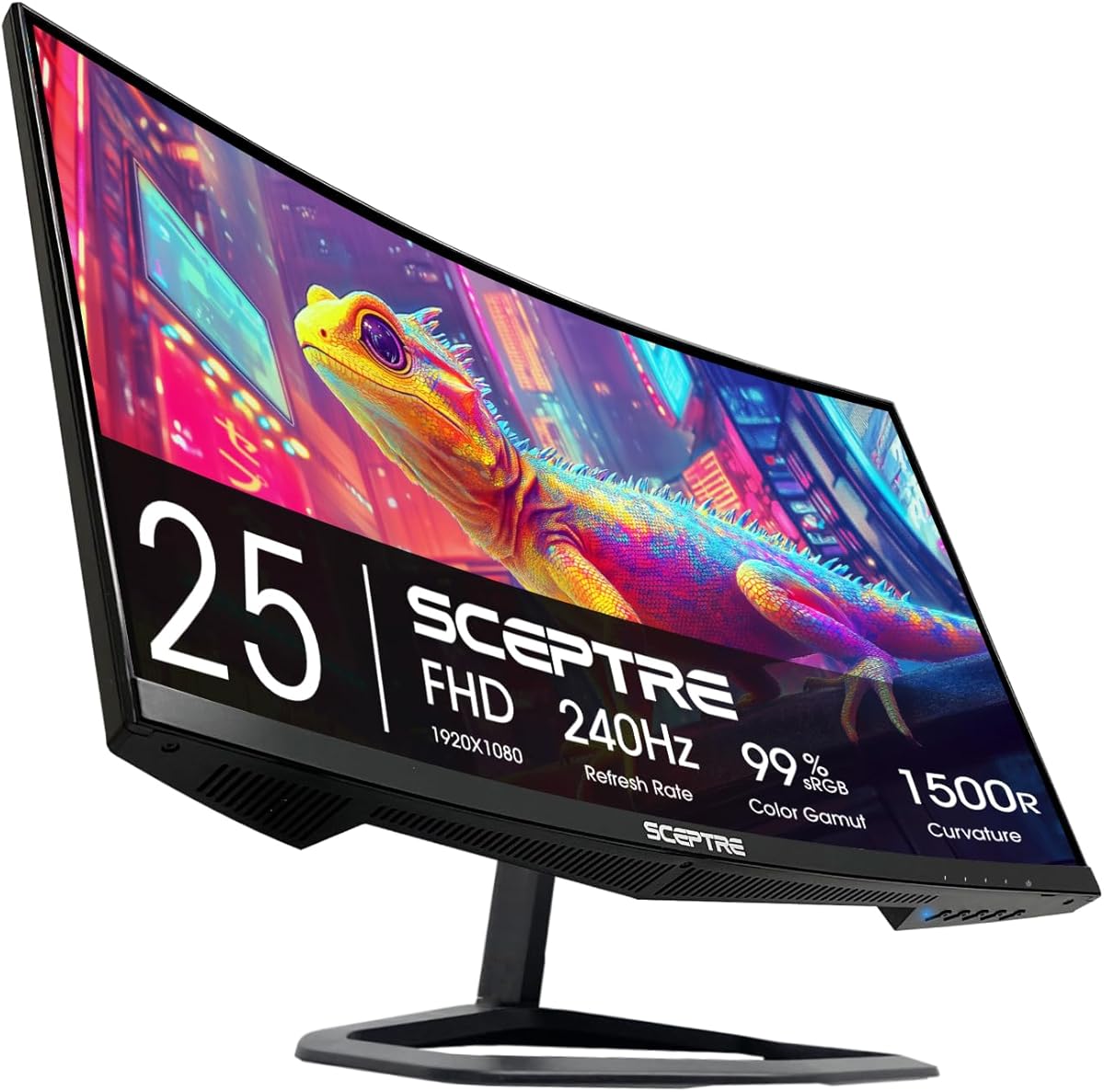
6. Sceptre C255B - Best Compact 120Hz+ Value

Sceptre C255B 24.5" Curved 240Hz

Sceptre C255B 24.5" Curved 240Hz

9/10★★★★★

Sceptre’s C255B curved 24.5-inch monitor is the compact speed pick for PlayStation owners who live in Performance mode at 1080p120. Up to 240Hz refresh and a 1ms response time mean the panel is never the bottleneck when the PS5 is outputting 120Hz—frames have headroom, motion stays tight, and the 1500R curve adds a bit of arcade immersion without demanding a 32-inch desk claim.

  • 24.5" FHD curved up to 240Hz
  • FreeSync Premium, 1ms
  • Dual HDMI + dual DisplayPort, speakers
Check Price →
✓ Pros
  • 240Hz FHD headroom makes 1080p120 on PS5 feel effortless
  • FreeSync Premium aligns with VRR-minded smooth play
  • 1500R curve adds immersion without a huge desk claim
  • Built-in speakers reduce cable clutter for temporary setups
  • Dual HDMI ports simplify PS5 plus a second device
✕ Cons
  • 1080p on 24.5 inches is sharp up close but not a 4K showcase
  • Built-in audio will not replace a soundbar or headset
  • Curvature and VA traits may not suit every competitive preference

Detailed review

AMD FreeSync Premium is the right marketing language for this class: high-refresh, low-latency adaptive sync behavior that keeps uneven frame delivery from shredding the image. On console, treat VRR as a system-level toggle plus per-game support matrix; on PC, FreeSync Premium is more straightforward through DisplayPort. Dual HDMI and dual DisplayPort inputs make it easy to leave the PS5 connected while a laptop or desktop shares the same screen.

Built-in speakers and Blue Light Shift are quality-of-life features rather than audiophile or clinical eye-care miracles, but they matter in dorms and temporary setups where a soundbar is one box too many. The machine-black chassis looks purpose-built for gaming rather than leftover office beige, and the curved FHD image is sharp at normal 24.5-inch viewing distances.

Limitations are predictable. You are not getting 4K OLED cinema. Curvature and panel type may not please every competitive purist who wants a flat IPS aim trainer. Audio remains convenience-grade. Still, as a PS5 120Hz starter that can also serve a high-frame PC, the C255B punches above its size.

Buy it for small desks, 1080p120 focus, and multi-input flexibility. Skip it if QHD sharpness or 4K HDR is non-negotiable. For VRR-minded console play on a budget footprint, it is one of the most pragmatic options in the pack.

Hookup tip: use HDMI for the PS5, set 1080p at 120Hz in system settings where available, enable VRR if supported, and keep a DisplayPort cable handy for the day a PC joins the desk.

Ideal 1080p120 dorm build

Pair the C255B with a PS5 Digital or disc console on a shallow desk, use the dual HDMI ports for a Switch or streaming stick, and rely on FreeSync Premium when a PC appears later. Built-in speakers cover casual audio until a headset lands.

When to upsize later

Move to 27-inch QHD or 32-inch 4K when desk space and budget grow. The C255B remains a valid secondary or travel-alternate screen even after you upgrade your main display.

Check Price on Amazon →

We may earn a commission at no additional cost to you.

7. KTC H32C5 - Best Big-Screen 1080p Speed

KTC H32C5 32" Curved FHD

KTC H32C5 32" Curved FHD

9/10★★★★★

The KTC H32C5 chases a specific fantasy: a 32-inch curved screen with esports-like refresh numbers without paying 4K OLED money. Native 240Hz operation with up to 280Hz overclock territory, Adaptive-Sync, HDR10, and a 1500R HVA curve make it a loud specification sheet. For PS5 owners, the practical win is a huge 1080p canvas that can present 120Hz Performance modes with plenty of refresh headroom and dual HDMI 2.0 ports for console plus a second device.

  • 32" FHD curved, up to 280Hz
  • Adaptive-Sync, HDR10, 128% sRGB
  • Dual HDMI 2.0 + DisplayPort 1.4
Check Price →
✓ Pros
  • Huge 32-inch presence for couch-adjacent desks on a monitor budget
  • High refresh and Adaptive-Sync favor silky 1080p120 console play
  • Strong contrast claim and HDR10 help darker game scenes pop
  • Dual HDMI ports suit PS5 plus another console or streaming stick
  • VESA 100×100 support if the stock tilt stand is not enough
✕ Cons
  • 1080p stretched across 32 inches shows pixel structure up close
  • HDMI 2.0 paths may cap console modes versus true HDMI 2.1 4K120
  • Tilt-only stand lacks height adjustment out of the box

Detailed review

Be clear-eyed about resolution. Spreading 1920×1080 across 32 inches looks bold from the couch end of a desk and softer if you sit nose-close like a competitive PC player. If you want pixel density, the 27-inch QHD Odysseys or the 32-inch 4K ASUS are better fits. If you want size and speed for media and console play at a comfortable distance, the KTC’s formula makes sense.

Color and contrast claims—128% sRGB and a high contrast ratio—help games feel richer than washed-out office panels, and HDR10 can add pop when content supports it. Adaptive-Sync reduces tearing on compatible sources. The included tilt stand covers basic angles; VESA 100×100 is there when you want height via an arm. Headphone jack support keeps headset routing simple.

Console HDMI reality check: the listing emphasizes HDMI 2.0 at high refresh for FHD, which is aligned with 1080p120 ambitions but is not the same thing as HDMI 2.1 4K120 theater. Choose the PG32UCDM when true next-gen 4K console bandwidth is the goal. Choose KTC when you want a billboard-sized 1080p playground.

Recommended for value hunters who prioritize diagonal size and refresh. Not recommended for pixel-peeping QHD/4K fans or height-stand seekers who refuse VESA. As a big-screen 120Hz companion, it earns a fun, honest niche.

Sit a bit farther back than you would with a 24-inch monitor, enable Adaptive-Sync where available, and accept that FHD is the trade that funds the size.

Living with 1080p at 32 inches

Sit farther back than you would with a 24-inch monitor. UI text remains readable, but fine PC desktop work may feel soft. For console gaming and video, the size-to-cost ratio is the appeal.

HDMI 2.0 versus HDMI 2.1 goals

This KTC is a high-refresh FHD machine, not a 4K120 HDMI 2.1 showpiece. If your shopping checklist literally says HDMI 2.1 4K VRR, prioritize the ASUS ROG PG32UCDM instead.

Check Price on Amazon →

We may earn a commission at no additional cost to you.

8. ARZOPA Z1FC - Best Portable Travel Screen

ARZOPA Z1FC 16.1" Portable

ARZOPA Z1FC 16.1" Portable

9/10★★★★★

The ARZOPA Z1FC exists for a different PS5 problem: not “best desk endgame,” but “I need a real screen in a backpack.” The 16.1-inch 1080p IPS panel runs at 144Hz, covers about 106% sRGB, includes HDR framing, and packs a kickstand so hotel desks and kitchen tables become temporary consoles. Mini HDMI plus full-function USB-C connections cover PS5, Xbox, Steam Deck, and laptop duty with fewer dongles than older portable screens.

  • 16.1" FHD IPS 144Hz portable
  • 106% sRGB, HDR, eye care
  • USB-C + Mini HDMI for PS5 travel
Check Price →
✓ Pros
  • Packable 16.1-inch panel turns hotel desks into temporary PS5 stations
  • 144Hz FHD improves motion versus tiny laptop screens
  • Kickstand and slim chassis need almost no setup space
  • 106% sRGB IPS color looks lively for the form factor
  • Mini HDMI path is console-friendly with the right cable adapter
✕ Cons
  • No adaptive sync / FreeSync per the listing—expect possible tearing
  • Not a substitute for a full-size HDMI 2.1 4K120 desk monitor
  • Portable brightness and speakers (if any) trail dedicated gaming displays

Detailed review

Motion is surprisingly usable for the form factor. 144Hz at FHD gives Performance-mode shooters more clarity than a 60Hz portable productivity panel, and the slim chassis means you can travel with a console setup that still feels like gaming rather than emergency triage. Eye-care features and the kickstand’s tilt range help when the only available chair is wrong for a living-room TV.

The listing is refreshingly candid that this model does not include adaptive sync or FreeSync. That is a meaningful asterisk for a roundup centered on VRR: you may see tearing when frame rates fluctuate, and you should not buy the Z1FC as your primary VRR showcase. Buy it because portability outweighs that gap. For tear-free desk play, return to the Odyssey FreeSync Premium options or the ASUS OLED.

Also respect scale. Sixteen inches is immersive on a tray table and tiny after a 32-inch QD-OLED. Brightness, speakers, and stand flexibility are portable-class. Follow ARZOPA’s console connection notes—some setups need specific cable power arrangements—and pack a short Ultra High Speed-capable HDMI solution that fits your kit.

Choose the Z1FC for travel, LAN weekends, and second-screen console sessions. Skip it as your only home monitor if HDMI 2.1 4K120 and VRR are the shopping brief. Within portable constraints, it is the pack’s best grab-and-go PS5 display.

Travel checklist: console, power brick, portable monitor, HDMI cable or adapter, and earbuds. Test the full chain once at home before you rely on it in a hotel with bad Wi-Fi and worse lighting.

Travel kit that actually works

Pack the monitor, PS5 power, HDMI adapter/cable, and a surge-safe power strip. Do a full boot test at home. Portable screens fail more from missing adapters than from panel quality.

VRR caveat in plain language

Without adaptive sync, unstable frame rates can tear. Favor games with strong frame-rate caps, or accept the trade for portability. Home VRR showcases belong on FreeSync Premium or G-SYNC Compatible desk monitors.

Check Price on Amazon →

We may earn a commission at no additional cost to you.

9. Sceptre E225W - Best Small-Desk Starter

Sceptre E225W 22" 144Hz

Sceptre E225W 22" 144Hz

9/10★★★★★

Sceptre’s 22-inch E225W is the small-desk reality check in a roundup full of 32-inch dreams. Full HD at up to 144Hz is enough to unlock the PS5’s 1080p120 Performance modes, built-in speakers reduce accessory sprawl, and the 2026-series machine-black design looks like it belongs next to a DualSense rather than in a cubicle farm. Blue-Light Shift and a near-bezel-free aesthetic round out a simple, focused package.

  • 22" FHD up to 144Hz
  • HDMI + DisplayPort, speakers
  • Blue-Light Shift, slim bezel
Check Price →
✓ Pros
  • Compact 22-inch footprint fits dorms, shelves, and tight battlestations
  • 144Hz FHD covers PS5 1080p120 Performance modes cleanly
  • Built-in speakers help when a headset is not handy
  • Blue-Light Shift eases long evening sessions
  • Minimal bezel design works for simple dual-screen layouts
✕ Cons
  • Small canvas and 1080p will not impress after a 4K OLED demo
  • Feature set is basic versus Odyssey FreeSync Premium models
  • Stand ergonomics are typically tilt-focused on this class

Detailed review

This is not where you come for HDMI 2.1 theater. It is where you come when shelf depth is measured in inches and you still refuse to play on a TV across the room. At 22 inches, 1080p looks crisp, input lag-sensitive genres feel responsive at 120Hz-class output, and HDMI plus DisplayPort cover console-now, PC-later upgrades. Minimal bezels also help if you eventually add a second screen for guides or Discord.

Feature depth is intentionally light versus Samsung Odyssey FreeSync Premium models. You will not get Black Equalizer storytelling or OLED contrast essays. You get a clean FHD gaming panel that does the fundamentals: high enough refresh for modern console Performance modes, basic eye-care toggles, and speakers for quick sessions. For many students and apartment gamers, that is the actual requirement.

Consider viewing distance and ambition. If you sit far away, a 27-inch QHD Odyssey will feel more premium. If you sit close at a narrow desk, 22 inches can be ideal. Pair headphones for serious audio; treat built-in speakers as convenience. Confirm 120Hz output in PS5 settings after connecting—OS defaults sometimes linger at 60Hz and hide the upgrade you paid for.

Buy the E225W for compact 1080p120 duty. Skip it when immersion size or 4K HDR is the point. As an honest starter monitor in this pack, it keeps the PS5 fluid without demanding a furniture redesign.

First-night setup: HDMI to PS5, enable 120Hz where available, set a comfortable Blue-Light Shift level for evening play, and leave DisplayPort free for a future PC.

Small-desk mounting ideas

If the stock stand wastes depth, consider a clamp arm compatible with the panel’s VESA pattern when available, or a low monitor riser that stores the DualSense underneath. Twenty-two inches rewards creative furniture more than giant curves do.

Audio expectations

Built-in speakers are for menus, news, and casual play. Competitive hearing and cinematic bass still want a headset or external speakers.

Check Price on Amazon →

We may earn a commission at no additional cost to you.

10. ArcticPro 22" - Best Budget Frameless 22"

ArcticPro 22" 144Hz FHD

ArcticPro 22" 144Hz FHD

9/10★★★★★

ArcticPro’s 22-inch 144Hz monitor targets the same compact PS5 niche as the Sceptre E225W with a slightly different value story: FHD clarity, a high 4000:1 contrast claim, 105% sRGB color, three-sided frameless styling, eye-care filters, and 75×75 VESA mounting. HDMI handles the PlayStation; VGA is a legacy PC courtesy you can ignore for console use. No built-in speakers means headphones or external audio are part of the plan.

  • 22" FHD 144Hz, 4000:1 contrast
  • 105% sRGB, eye-care filters
  • HDMI + VGA, 75×75 VESA
Check Price →
✓ Pros
  • Affordable 144Hz FHD entry for PS5 1080p120 on small desks
  • Strong contrast claim helps darker scenes on a budget VA-style panel
  • Frameless three-side look feels cleaner than thick office leftovers
  • VESA 75×75 opens arm and wall-mount options
  • Anti-blue-light modes support longer sessions
✕ Cons
  • VGA is legacy—plan on HDMI for the PS5
  • No built-in speakers listed; budget for headphones or external audio
  • Lacks the FreeSync Premium / HDMI 2.1 story of higher-tier picks

Detailed review

For 1080p120 Performance modes, 144Hz again provides the necessary headroom. Motion is smoother than leftover 60Hz office panels, and the contrast-focused tuning can make darker game environments feel less milky than cheap washed-out TN leftovers from a decade ago. Wide 178-degree viewing angles and modest tilt adjustment cover typical desk postures; VESA is the escape hatch when you want proper height on an arm.

Compared with FreeSync Premium Odysseys, ArcticPro is lighter on adaptive-sync marketing and gamer overlays. Compared with the ASUS 4K OLED, it is a different universe of fidelity. That is fine if the brief is “small, sharp, 120Hz-capable, mountable.” Frameless edges also make dual-monitor arrangements with a laptop screen feel less chunky.

Watch the connectivity and audio gaps. You need HDMI for the PS5, a separate audio solution, and realistic expectations about VRR and HDMI 2.1 features. If tear-free adaptive sync is mandatory, spend attention on Samsung’s FreeSync Premium models or the ROG flagship instead. If budget and size dominate, ArcticPro stays in the conversation.

Recommend it for VESA-friendly tiny desks and straightforward 1080p120 console play. Avoid it when you want speakers included or cutting-edge console video features. It closes the pack as a practical budget frameless option.

Mount tip: a simple VESA arm can transform this 22-inch panel from “acceptable tilt” to “perfect eye line,” which often improves comfort more than jumping from 144Hz to 165Hz.

VESA-first comfort upgrade

Budget a basic 75×75 arm if you game more than an hour nightly. Eye-level placement reduces fatigue more than chasing minor refresh bragging rights at this size.

Budget 120Hz without mythmaking

This monitor can present fluid 1080p120 console play, but it is not a HDMI 2.1 4K VRR flagship. Buy it for size and thrift; buy ASUS or Samsung Odyssey models for feature depth.

Check Price on Amazon →

We may earn a commission at no additional cost to you.

Best Gaming Monitors for PS5 in 2026: HDMI 2.1 &

How to Choose a Gaming Monitor for PS5

HDMI 2.1 versus HDMI 2.0 for real PS5 modes

HDMI 2.1 is the clean path to 4K120 with headroom for VRR and ALLM-style conveniences on capable displays. If your dream is Performance mode at 4K with Variable Refresh Rate, prioritize a monitor that explicitly supports console-friendly HDMI 2.1 bandwidth—illustrated in this pack by the ASUS ROG PG32UCDM’s PS5-oriented positioning. HDMI 2.0 is not useless: it commonly carries 1080p120 and many 1440p60 scenarios, which is why Sceptre, KTC, and ArcticPro 1080p panels can still feel transformative versus a 60Hz TV. Match the port generation to the resolution you actually want, not the resolution on the box alone.

VRR on PlayStation: what to verify

Variable Refresh Rate smooths frame-time hiccups when games cannot hold a perfect 60 or 120 FPS. On the PS5, enable VRR in system settings, use a quality HDMI cable, and confirm the display input is in a game mode that allows adaptive sync. Monitor marketing may say AMD FreeSync, FreeSync Premium, Adaptive-Sync, or G-SYNC Compatible—these are related families of variable refresh behavior. They improve the odds of tear-free play, especially on PC, but console compatibility is a handshake. If VRR is missing as an option, check cable integrity, resolution/refresh combination, and whether the title itself supports it.

120Hz Performance mode and resolution tradeoffs

Many PS5 games offer Quality modes near 4K30–60 and Performance modes that target 60–120 FPS at a lower or dynamic resolution. A 1080p 144–240Hz monitor is an excellent Performance-mode partner. A 1440p Odyssey sits in the sharpness sweet spot for desks. A 4K OLED maximizes Quality-mode spectacle and still benefits when titles offer 120Hz pathways. Buy for the mode you play most. Competitive shooter fans often prefer high-refresh FHD or QHD; cinematic players often prefer 4K contrast.

Size, curve, and viewing distance

At desk distance, 24–27 inches remains the aim-friendly zone, 32 inches replaces a small TV, and 34-inch ultrawide is primarily a PC immersion tool with console caveats. Curves like Samsung’s 1000R and Sceptre/KTC 1500R designs increase wraparound presence for racing and exploration. Flat IPS panels keep HUDs geometrically neutral for tactical games. Portable 16-inch screens trade everything for suitcase space. Measure desk depth before you fall in love with a 32-inch curve.

HDR expectations without the brochure fog

HDR10 on LCD Odyssey and value panels can add highlight punch, but peak brightness and black floor vary widely. VESA DisplayHDR True Black on QD-OLED is a different experience: per-pixel dimming, wide DCI-P3 coverage, and contrast that makes Quality-mode nights feel graded. Use HDR when a game’s implementation is strong; keep a calibrated SDR preset for competitive ranked queues where consistency beats spectacle.

Frequently Asked Questions

01

Do I need HDMI 2.1 for a PS5 gaming monitor?

You need HDMI 2.1 if you specifically want 4K120 and the fuller next-gen feature set on a capable display. If you are happy with 1080p120 Performance modes, many HDMI 2.0 gaming monitors in this pack—such as the Sceptre and KTC FHD models—can still feel excellent. Decide your target resolution first, then buy the port bandwidth that unlocks it. The ASUS ROG PG32UCDM is the pack’s clearest pick when 4K console fidelity is mandatory.

02

Will VRR eliminate all stutter on PS5?

VRR reduces tearing and softens frame-time variation, but it cannot invent performance your game does not deliver. CPU-bound hitching, asset streaming stutters, and poorly paced titles can still feel uneven. Enable VRR system-wide, use a proper HDMI cable, and prefer Performance modes when fluidity matters more than peak resolution. On PC shares, FreeSync Premium or G-SYNC Compatible remains the everyday tear-free tool.

03

Is 1440p better than 4K for PS5 on a desk?

At typical desk distances, 27-inch 1440p—like the Samsung Odyssey G5 G53F or G51F—often looks razor sharp and pairs well with Performance-minded play. 4K on a 32-inch OLED like the PG32UCDM wins for Quality-mode detail and HDR contrast, especially if you sit slightly farther back. Neither is universally better; match pixel density to viewing distance and the modes you use most.

04

Can I use an ultrawide monitor with PS5?

Yes, with caveats. The Samsung 34-inch Odyssey G5 ultrawide can display PS5 output, but the console targets 16:9. Expect pillarboxing or scaling rather than true native ultrawide gameplay. Ultrawides make more sense when a PC is your primary device and the PS5 is a secondary HDMI source.

05

Is a portable monitor good enough for PS5?

The ARZOPA Z1FC is good enough for travel and temporary setups: 1080p, 144Hz, and console-friendly connections in a backpack. It is not a VRR showcase—the listing notes no adaptive sync—and it will not replace a 27–32-inch desk monitor for home use. Keep it in the kit for hotels; keep an Odyssey or ROG panel at home for HDMI 2.1 / FreeSync Premium ambitions.

06

What refresh rate should I look for if games cap at 120Hz?

Buy a monitor with at least 120Hz, preferably more. 144Hz, 165Hz, 180Hz, 200Hz, and 240Hz panels all have headroom above the PS5’s common 120Hz game cap, which helps with timing flexibility and future PC use. The Sceptre C255B’s 240Hz and Samsung G53F’s 200Hz are examples of useful overbuild even when console titles stop at 120.

07

Should I prioritize OLED or LCD for PS5?

Choose OLED—here, the ASUS ROG PG32UCDM—when contrast, HDR depth, and cinematic Quality modes are your priority and you will practice basic burn-in hygiene. Choose LCD Odyssey, Sceptre, or KTC panels when bright rooms, lower cost, or specific sizes/curves matter more. Both can support fluid 120Hz-class play; they differ in how shadows and highlights look.

08

Why does my PS5 stay at 60Hz on a 144Hz monitor?

Common causes include a cable that cannot sustain the mode, a monitor input limited to a lower refresh in the current picture mode, or PS5 output settings left at 60Hz. Set 120Hz output in system settings, use Game mode on the monitor, try another HDMI port, and reboot both devices after changes. Also confirm the game itself offers a Performance or 120Hz mode—system 120Hz cannot force a 30 FPS Quality mode to magically double.

09

Are built-in speakers enough for PS5 monitors?

They are enough for menus, voice chat emergencies, and casual sessions on models like the Sceptre E225W and C255B. For cinematic games and competitive audio cues, use a headset or external speakers. ArcticPro’s 22-inch model does not list built-in speakers, so plan audio separately if you choose it.

10

Which monitor in this pack is best overall for PS5?

The ASUS ROG PG32UCDM is the best overall when budget allows: 4K QD-OLED clarity, console-minded positioning, elite HDR contrast, and dual-use PC performance. If you want the best everyday spend, the Samsung Odyssey G5 G53F’s IPS QHD FreeSync Premium package is the pragmatic pick. Immersion seekers should look at the 32-inch G55C curve, and small-desk shoppers should start with the Sceptre C255B for 1080p120 value.

Conclusion

A great PS5 monitor purchase starts with honesty about modes: HDMI 2.1 4K120 and VRR on a flagship like the ASUS ROG PG32UCDM is a different mission than fluid 1080p120 on a compact Sceptre or ArcticPro, and both missions are valid. Samsung’s Odyssey G5 options—especially the IPS G53F, ergonomic G51F, and curved 32-inch G55C—cover the broad middle where most desk players actually live, with FreeSync-minded smoothness and QHD clarity that outperform leftover office screens.

Use the comparison table to shortlist by size and sync features, then read the full reviews for console caveats like ultrawide pillarboxing and portable panels without adaptive sync. Run the setup checklist on day one so 120Hz and VRR are not left disabled in a menu you never opened.

Pick the ROG OLED for reference HDR nights, an Odyssey G5 for balanced daily play, or a high-refresh FHD Sceptre/KTC when size or budget constrains the dream. Plug in a proper HDMI cable, enable the PS5’s performance options, and the right monitor will make Performance mode feel like the console you thought you already owned.