Decide if you need true 100 percent or a denser 96 percent with a pad
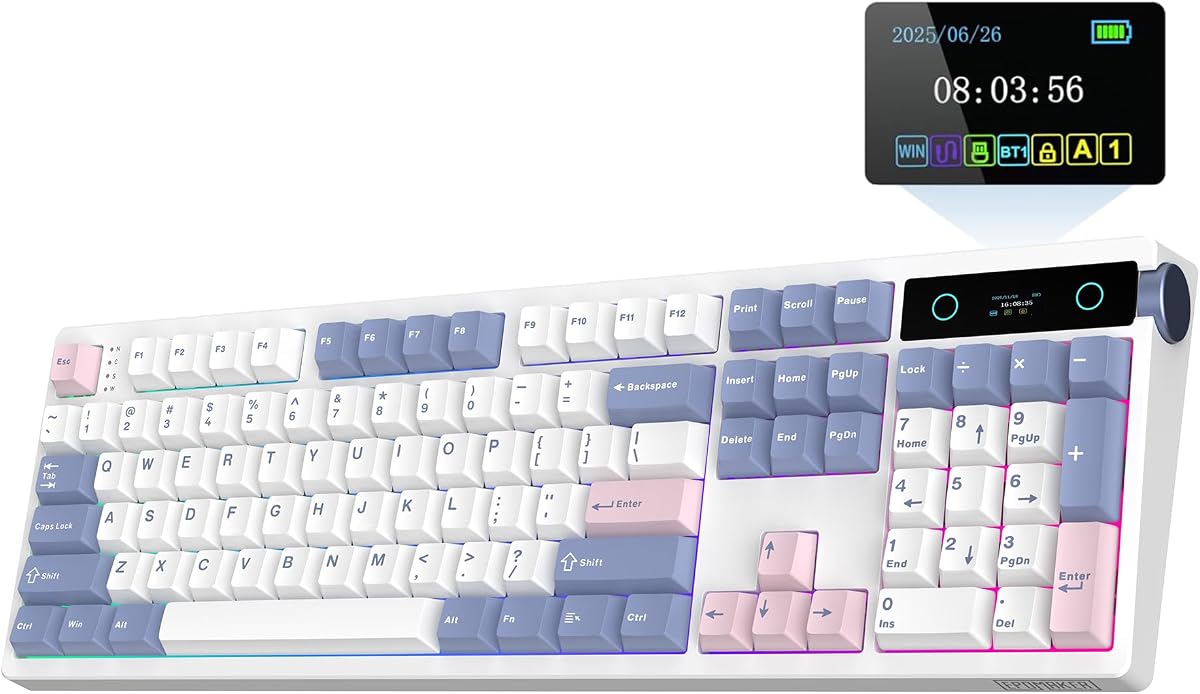
Full size usually means a dedicated number pad, function row, and navigation cluster. True 104-key boards keep classic ANSI spacing that accountants and CAD users already know by heart. Many modern “full feature” boards use a 96 percent or 98-key layout that keeps the pad but tightens gaps so your mouse sits closer. If you enter numbers all day and hate Fn layers, prioritize a standard 100 percent footprint like the EPOMAKER TH108 PRO, AULA F108 PRO, Kisnt KN104, Newmen GM325Pro, or wegear. If you want the pad without the widest chassis, the RK R98 Pro and S98 are smarter desk citizens.
Match switch type to room politics and task speed
Linear reds and cream linears favor gaming and fast typing with less bump. Tactile quiet switches like Logitech’s MX Mechanical tactiles give confirmation without a loud click. Silent linears such as Cherry MX2A Silent Red are the polite choice for glass-walled offices. Blue clickies on the wegear deliver classic mechanical theater—great in a private room, risky on a shared floor. Hot-swap boards (EPOMAKER, AULA, RK, Kisnt, Redragon) let you fix a bad stock feel later; soldered or closed office boards expect you to live with the factory switch.
Wired simplicity versus tri-mode wireless and battery math
Wired boards like the R98 Pro, Cherry KC 200 MX, Redragon, wegear, and Newmen never die mid-spreadsheet and usually feel snappier for competitive play. Tri-mode wireless (Bluetooth plus 2.4 GHz plus USB-C) shines when you hop between a desktop, laptop, and tablet—look at EPOMAKER’s huge 10000mAh claim, AULA’s 8000mAh pack, Kisnt’s 4000mAh cell, RK’s S98, and Logitech’s long MX charge life with lighting off. Prefer 2.4 GHz for games and Bluetooth for secondary devices. Always park a charging cable nearby the first week until you learn real-world drain with RGB on.
Mount style, foam, and keycaps change the sound more than RGB
Gasket mounts with multi-layer foam (R98 Pro, EPOMAKER, Kisnt, AULA’s five-layer stack) mute hollowness and push toward creamy or thocky tones hobbyists chase. Top-mount wireless boards like the S98 feel firmer. Stiff metal-panel designs such as the Newmen and Cherry aluminum tops feel more traditional and planted. Prefer double-shot PBT keycaps when you can—they resist shine better than thin ABS. MDA or sculpted profiles alter finger wrap; low-profile Logitech keys feel closer to laptop decks if you hate tall switches.
Software, knobs, and screens: useful tools or desk jewelry
A volume knob is the most consistently useful luxury on full size boards—RK, EPOMAKER, AULA, and Kisnt make brightness and modes twistable. Smart displays help when you juggle Win/Mac layouts, battery percent, and connection mode, or when you enjoy custom GIFs; they are optional for pure productivity. Macro software matters for MMOs and spreadsheet macros alike—Redragon, Newmen, Kisnt, EPOMAKER, AULA, RK, and Logitech Options+ each approach remapping differently. Quiet office boards may skip flashy software; that is fine if you only need calculator and volume keys.
Budget tiers without chasing fake specs
Entry boards win when they deliver honest mechanical switches, full anti-ghosting, and a layout you will use daily—even if lighting is rainbow-only or keycaps are ABS. Mid tiers should add hot-swap, better foam, and PBT. Premium picks earn their keep with multi-device polish, silent switches, or build mass that stays put. Ignore inflated actuation marketing and focus on whether the listing matches your OS, includes the dongle you need, and discloses that some RGB is side-only (as on the Newmen). Read our cons for each board before you commit.