Best Color Canvas
Lenovo IdeaPad Pro 5 OLED RTX

- 16" 2880×1800 OLED 120Hz with VRR for grading and design
- Ryzen AI 7 350 plus NVIDIA GeForce RTX 5050 discrete GPU
- 16GB RAM, 1TB SSD, USB4, HDMI 2.1, SD reader, MIL-STD testing
Expert Review & Guide
Creator laptops fail in a specific way: they look fast in a Geekbench screenshot and then choke when Lightroom, Chrome, Discord, and a 4K timeline share the same afternoon. In 2026 the machines that actually help photographers, designers, and editors combine honest GPU paths (discrete RTX or strong Radeon iGPU), color-worthy panels when possible, and memory/storage that do not force constant cache purges. Stylus 2-in-1 flexibility still matters for sketch-first illustrators; OLED 120Hz canvases matter for color graders who refuse to guess.
This guide ranks ten pack products from Amazon as they ship—not a curated fantasy studio. Highlights include a Samsung Galaxy Book Pro 360 with S Pen and Thunderbolt 4, a crowd of NIMO Ryzen HS creator machines spanning Radeon 660M, 680M, and 780M graphics with upgradeable RAM, a Lenovo IdeaPad Slim 3i touch with Ryzen 7 and a 1TB SSD, the Lenovo IdeaPad Pro 5 with a 2.8K OLED and RTX 5050, and an Acer Nitro V 16S that brings Ryzen 7 260 plus RTX 5060 muscle for creators who also game.
We call tradeoffs plainly: several NIMO configs share similar silicon with different SSD sizes and ratings; 256GB drives fill during a single wedding shoot weekend; OLED burn-in hygiene is real; and “creator” in a title does not equal DCI-P3 factory calibration. If you need CUDA filters and ray-traced previews, start with the RTX machines. If you live in Affinity/Photoshop with occasional 1080p edits, a Radeon 680M/780M HS laptop with 32GB RAM may be the smarter bag. Reviews follow pack order.


As an Amazon Associate we earn from qualifying purchases. We may earn a commission at no additional cost to you.
Separate stylus 2-in-1s, Radeon iGPU workhorses, OLED+RTX color machines, and gaming-leaning discrete GPUs before you commit. Specs stay practical—no dollar prices.
Photographers who mark up contact sheets and illustrators who think in ink should shortlist a true stylus 2-in-1 before they chase chassis RGB. The Galaxy Book Pro 360 (Book2 Pro 360 lineage in Samsung’s copy) folds through laptop, tablet, stand, and tent modes with an S Pen that makes annotation and sketching feel intentional rather than finger-smeared. For storyboard artists and classroom designers, that posture flexibility is the creative feature—not a bonus gimmick.
Intel Core i7-1260P with Iris Xe, 16GB of memory, and a 1TB SSD cover Lightroom catalogs, Illustrator boards, and 1080p timeline assembly with composure when you respect thermals. Samsung’s up-to-21-hour battery claim with fast charging support is the travel bribe: edit on the plane, sketch in the terminal, top up between gates. Win 11 Pro and a fingerprint reader keep client directories saner than Home editions on random creator boxes.
Ecosystem glue matters if you already shoot on Galaxy phones. Multi Control, Second Screen with a Galaxy tablet, Quick Share, and Samsung Notes sync reduce the friction of moving selects and sketches across devices. Thunderbolt 4 with Power Delivery and DisplayPort, plus dual USB-C and additional I/O Samsung lists, means you can still park at a desk with a sharp external reference monitor—the correct way to color when the laptop panel is “only” FHD.
Where this machine loses to the IdeaPad Pro 5 is panel ambition and discrete GPU acceleration. Where it loses to the Nitro V 16S is raw CUDA horsepower. Where it wins is pen-first creativity in a bag that does not scream gaming LAN party. Iris Xe will frustrate heavy After Effects 3D; it will delight note-and-retouch hybrids.
Tent-mode thermals deserve respect: P-series chips dump heat near hinges. Prefer laptop mode for exports, tablet mode for markup. Keep vents clear on soft beds. Creators who live in Clip Studio, Goodnotes-style Windows apps, and Photoshop will feel at home; CUDA plugin maximalists should keep reading.
Buy it when S Pen + Galaxy workflow + Thunderbolt docking define your week. Skip it when OLED grading accuracy or RTX NVENC is non-negotiable—those jobs belong to the Lenovo Pro 5 and Acer Nitro later in this pack.
Ideal for concept artists, educators who ink on slides, and photographers who cull with stylus marks. Pair with a calibrated external display for final color delivery.
Use Thunderbolt to a dock with an SD reader and Ethernet if your cameras still dump cards daily. The 2-in-1 stays light; the dock holds the mess.
We may earn a commission at no additional cost to you.

NIMO’s Ryzen 5 6600H creator laptop is the pack’s argument for “buy H-series iGPU, leave headroom to upgrade.” Six cores and twelve threads with boosts to about 4.5GHz outrun many U-series thin-and-lights when exports and compiles linger. Radeon 660M (RDNA 2) covers Lightroom-style edits, media playback, and esports titles at 1080p without the heat tax of a full RTX stack—useful when your bag already holds lenses.
Sixteen gigabytes of DDR5 and a 1TB PCIe SSD are the right out-of-box story for students and remote creators. Dual SO-DIMM and M.2 2280 design, with vendor claims toward 64GB RAM and multi-terabyte SSD growth, mean you can start sane and expand when client archives balloon. That philosophy beats soldered 16GB ultraportables that trap you.
100W PD fast charging is an underrated creator feature: one USB-C brick can feed phone and laptop rituals. FHD IPS is adequate for framing and YouTube uploads; deliverables that need print-accurate color still want an external wide-gamut monitor. Two-year warranty language is stronger than many no-name 12-month promises—keep the registration email.
Against the 512GB NIMO sibling, this 1TB cut wastes less time deleting proxies. Against 780M 32GB NIMO units, you trade GPU/RAM headroom for a typically happier rating history in our pack snapshot. Against OLED RTX Lenovo, you trade color theater for upgradeable pragmatism and usually cooler purchase anxiety.
Thermals on HS laptops need desk space—do not smother vents with blanket editing sessions. For DaVinci on battery, lower timeline resolution. For Photoshop, 16GB works until heavy panorama merges; then plan the RAM upgrade the chassis allows.
Choose this when you want a repairable-minded AMD creator daily driver with a full terabyte and PD charging. Step to 8745HS/780M or Nitro RTX when GPU filters and AI denoise dominate every job.
Fill the second SO-DIMM to 32GB before you chase a new laptop. Add a second SSD for scratch/cache disks so your system drive stays clean.
Use the laptop for culls and rough grades; soft-proof on a calibrated desktop display before client delivery. FHD IPS is a tool, not a contract proof.
We may earn a commission at no additional cost to you.

Lenovo’s 2026 IdeaPad Slim 3i creator-facing configuration pairs an 8-core AMD Ryzen 7 170 with a 15.3-inch WUXGA touchscreen and a 1TB PCIe SSD—the kind of daily driver that survives Lightroom libraries and lecture-to-studio lifestyles. Touch on a taller 16:10 canvas is underrated for scrubbing timelines and pinching reference boards. MIL-STD-810H testing language acknowledges that creator bags collide with doors.
Battery storytelling is aggressive: up to about fifteen hours and a fast-charge burst that claims roughly two hours of use from fifteen minutes of charging. Believe directionally for mixed productivity; exports still drink power. For wedding shooters living out of overnight bags, that top-up math matters more than RGB logos.
Memory needs a careful checkout read. The product title advertises 32GB DDR5 while Samsung-style about bullets in the pack still narrate a “massive 16GB” line—marketplace copy drift happens. Confirm the sold configuration on the order page and in Windows after unboxing. Creators should not assume; they should verify.
As a Lenovo, keyboard comfort and warranty pathways feel more mainstream than boutique NIMO shells for some buyers. You will not get RTX NVENC or OLED blacks. You will get a tough, touch-friendly editor’s notebook for Affinity, Photoshop, and Premiere at sensible resolutions.
Against Galaxy Book 360, you trade S Pen ecosystem magic for a more conventional clamshell with taller pixels. Against Nitro RTX, you trade frames and CUDA for carry manners and battery narrative. Against NIMO 680M/780M, you trade peak iGPU muscle for brand familiarity and touch WUXGA.
Buy it as a travel editor’s companion when the checkout RAM matches your multitasking reality. If the unit lands at 16GB, plan lighter catalogs or an eventual upgrade path if the chassis allows—do not gaslight yourself about panorama merges.
Open Settings → System → About immediately. If memory disagrees with the purchased title config, start a return before you install Adobe’s entire planet onto the SSD.
Use the fast-charge window during second-shooter breaks. Keep a small PD bank if Lenovo’s USB-C charging is supported on your exact SKU—confirm ports on the live spec sheet.
We may earn a commission at no additional cost to you.

When NIMO stamps “Gaming-Creator” on a Ryzen 7 8745HS with Radeon 780M, 32GB DDR5, and a 1TB SSD, the hardware brief is clear: maximum integrated graphics ambition for people not ready to haul a thick RTX brick. The 45W TDP HS chip and RDNA 3 iGPU can edit 1080p/entry 4K, stream, and play esports with more dignity than U-series Iris Xe. AI-flavored workloads that lean on AMD’s modern iGPU compute also make more sense here than on a 6600H.
Thirty-two gigabytes is the quiet superpower. Creators underestimate RAM until Puppet pins and 4K caches explode. Pair that with PCIe 4.0 storage and dual-SSD upgrade talk, and the machine becomes a multi-year platform—especially with USB4 external GPU storytelling for later. Take eGPU claims as optional future paths; validate enclosure compatibility before you budget one.
The 3.5 rating is why this is not an automatic Best Overall. Generic gaming-creator chassis can vary in fan curves, screen QC, and BIOS polish. Inspect dead pixels, coil whine, and thermals under a Handbrake encode during the return window. Two-year warranty helps only if you register and keep proof.
100W PD charging again supports single-brick desks. FHD output is fine for drafting; clients paying for print still deserve a reference screen. Versus Nitro RTX 5060, you lose DLSS/CUDA horsepower and gain a lighter iGPU-centric power envelope. Versus 6600H NIMO, you gain real GPU/RAM headroom.
Streaming creators who game at modest settings and edit the same day will understand this machine. Colorists and 3D artists who need OptiX/CUDA should keep sliding to Lenovo OLED RTX or Acer discrete.
Consider it if you accept boutique-brand diligence and want 780M + 32GB + 1TB on PD charging. Skip if you need OEM depot networks or OLED—those priorities live elsewhere in the list.
Run a 20-minute encode, a Premiere playback, and a 1080p game benchmark. Listen for fan bearing noise and watch for thermal throttling drops. Return early if anything feels wrong.
USB4 eGPUs can help, but bandwidth and enclosure costs add up. Treat them as phase-two, not as proof the laptop already equals an RTX 5060.
We may earn a commission at no additional cost to you.
This is the storage-trimmed twin of the 1TB R5-6600H NIMO: identical Ryzen 5 / Radeon 660M creative intent with a 512GB SSD instead of a terabyte. For photographers who archive to NAS or cold drives, 512GB can be enough if scratch disks are managed. For 4K video students dumping every take locally, it becomes a weekly deletion ritual.
Performance character matches the 1TB sibling—H-series stamina, RDNA 2 iGPU for light edits and casual 1080p play, 16GB DDR5 with headroom to grow via dual SO-DIMMs. 100W PD charging remains the cafe hero. Choose this SKU when the seller/price/warranty bundle beats the 1TB cut and you already own external storage discipline.
Because multiple NIMO ASINs look alike, match the image, SSD size, and warranty text precisely. Returning the “wrong twin” wastes shoot weeks. The 4.4 rating alignment with other 6600H units suggests the platform is understood by buyers who wanted AMD HS value.
Creative fit: Lightroom, Capture One (check official support), Photoshop, CapCut/Premiere at 1080p, coding side gigs. Poor fit: Blender GPU renders, CUDA plugins, HDR grading on the internal panel alone.
If you can stretch to the 1TB version without pain, do—the hour you save not managing free space is editing time. If 512GB is the door price to HS AMD, walk through and budget a 2TB external on day two.
Buy for disciplined photo/ remotes. Upgrade RAM before CPU envy hits. Jump to 780M/RTX when your timeline resolution outgrows 660M.
Put Premiere caches and Photoshop scratches on an external SSD. Keep the internal 512GB for apps and current-week projects only.
Same brain, smaller attic. Prefer 1TB unless you are aggressively external-storage native.
We may earn a commission at no additional cost to you.

Pack catalogs sometimes include near-duplicate configurations because availability flips hourly on Amazon. This NIMO 6600H 16GB/1TB unit mirrors the earlier 1TB sibling in silicon and intent, with a different image asset and ASIN. Creators should treat it as an availability alternate: compare fulfilled-by, recent reviews, and return rates, not as a mysteriously different GPU tier.
You still get Radeon 660M visualization for light edits, H-series multi-core for exports, PD charging, and dual-channel upgrade paths. That is enough for many YouTube 1080p channels and photography businesses that finish on desktop. It is not enough to retire a desktop RTX forever.
Shopping advice unique to duplicates: open both 1TB listings, read the newest dozen reviews for QC themes (backlight bleed, fan noise, dead pixels), and pick the healthier seller even if the other is slightly flashier in photos. Warranty registration steps can differ by seller bundle—follow the card in the box.
Creative workflow: ingest to the 1TB drive, edit proxies if needed, archive to NAS weekly. The machine stays snappy when the SSD is not 95% full—basic hygiene that saves “my laptop died” myths.
Against 8745HS models, expect less iGPU headroom. Against Acer Nitro, expect less CUDA. Against Samsung 360, expect more sustained HS power and less pen elegance.
Purchase when this ASIN is the cleanest 6600H 1TB offer in stock. Ignore FOMO between twins; spend FOMO on lenses or a calibrated monitor instead.
Prefer recent reviews mentioning the exact CPU/GPU. Avoid listings with generic five-star spam and zero thermal commentary.
If your next three clients require 4K50 multi-cam with heavy denoise, skip sideways 6600H shopping and move to 780M 32GB or RTX configs.
We may earn a commission at no additional cost to you.
If any machine in this pack deserves the word “creator” without wincing, it is the IdeaPad Pro 5 with a 16-inch 2880×1800 OLED at 120Hz and VRR, AMD Ryzen AI 7 350, and an NVIDIA GeForce RTX 5050. Blacks, contrast, and motion clarity change how you judge skin tones and gradients on battery-powered desks. Designers and editors who have been stuck on cloudy IPS panels will feel the upgrade in the first hour.
RTX 5050 brings discrete horsepower for GPU effects, NVENC exports, and light 3D—finally a CUDA lane among Radeon-heavy NIMOs. Ryzen AI silicon adds NPU-flavored acceleration for supported apps. One terabyte of storage holds active seasons of work. Sixteen gigabytes of RAM is the intentional compromise: workable, upgrade-sensitive depending on chassis serviceability, and worth confirming before you run heavy After Effects comps.
I/O is creator-correct: dual USB-C USB4 with DisplayPort/PD, dual USB-A, HDMI 2.1 up to 8K@60Hz claims, SD card reader, and headphone jack. IR + FHD webcam with privacy shutter, Dolby Atmos speakers, Windows Hello, TPM/Pluton security language, and MIL-STD-810H testing round out a travel-pro story. Luna Grey keeps the vibe studio-serious rather than gamer-loud.
The 3.4 rating is a caution, not an automatic veto. OLED laptops can polarize buyers over glossy reflections, speculative burn-in fear, or thermals under RTX load. Use hide-taskbar habits, vary UI chrome, and enable pixel care features Lenovo provides. Validate fan noise during GPU encodes in the return window.
Versus Nitro V 16S: Pro 5 wins display beauty; Nitro may win GPU tier (5060 vs 5050) and ships 32GB RAM in our pack. Versus Samsung 360: Pro 5 wins color/GPU, loses S Pen fold tricks. Versus NIMO 780M: Pro 5 wins discrete CUDA and OLED, may weigh/thermic differently.
Best Color Canvas because the panel and RTX combo match how professional deliverables are judged. If you need 32GB soldered certainty, confirm service manuals or prefer the Nitro configuration. If OLED care anxiety will ruin your life, pick a high-quality IPS instead—peace of mind is part of creative stamina.
Auto-hide taskbars, avoid static logos burned on for days, use screen-off timeouts, and enable whatever pixel refresh Lenovo ships. Your timeline markers should move; your UI chrome should not be permanent tattoos.
Sixteen gigabytes handles Premiere with proxies and Photoshop with restraint. Heavy 4K multi-cam wants more—plan proxies or verify upgrade paths before the wedding season starts.
Display + RTX is rare in this pack. Rating caution means buy attentively, not that the spec sheet is fiction.
We may earn a commission at no additional cost to you.

Radeon 680M on Ryzen 7 7735HS earned a reputation as the iGPU that made “no discrete GPU” creator laptops respectable for 1080p timelines and light grading. This NIMO configuration brings that silicon with 16GB DDR5, a backlit keyboard, 100W PD, and—less charming—a 256GB PCIe 4.0 SSD. The CPU/GPU story is exciting; the storage story demands an external drive in the same shopping cart.
Eight cores and sixteen threads with boosts near 4.75GHz handle exports, compiles, and multitasking with authority for the class. 680M graphics outrun 660M in many creative/game scenarios. Dual SO-DIMM upgrade talk means you can grow RAM and replace/expand SSD as income grows—do the SSD expansion early.
Two-year warranty and 90-day return language in the listing lower risk if you inspect thermals promptly. Win 11 and PD dual Type-C charging suit student creators who hate proprietary bricks. Light gaming after class is plausible; AAA ultra settings are not the point.
Against 780M 32GB NIMO: less RAM/GPU headroom, better rating in our snapshot, harsher SSD default. Against OLED RTX Lenovo: far less color/CUDA ambition, potentially better value if you already own a desktop grade monitor. Against Samsung 360: more HS sustained power, zero S Pen romance.
Practical build: day one, clone/migrate to a 1TB+ internal if the bay allows, or run projects from a fast USB4/USB-C SSD. Keep 256GB for OS and apps only. Otherwise the five-star happiness fades when Windows Update meets a wedding folder.
Buy for CPU/GPU value if you will expand storage immediately. Do not buy if you refuse external drives and need OLED—those constraints point to other machines.
Order a compatible NVMe upgrade or a rugged 2TB USB-C SSD with the laptop. Transfer templates and stock libraries off the boot drive before Adobe installers land.
1080p YouTubers, photo retouchers, and indie game streamers at modest bitrates. Skip if your pipeline is 4K60 multi-cam with noise-heavy ISO.
We may earn a commission at no additional cost to you.
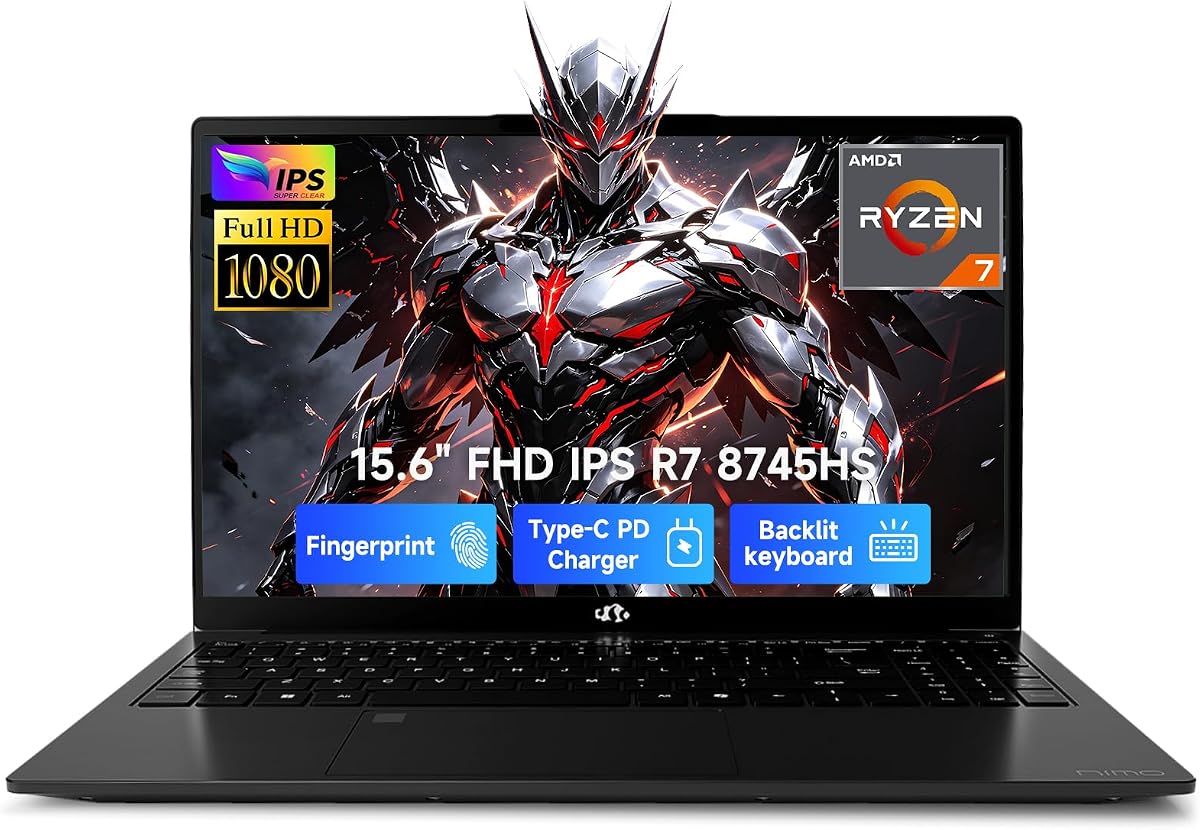
Unit B exists because creator shoppers refresh Amazon and need a second door to the same 8745HS + 780M + 32GB + 1TB idea. Specs and warranty pitches align with the earlier 780M machine; the differing image and ASIN are your clue to compare fulfillment noise, not to imagine a secret GPU. Treat this review as seller-strategy guidance layered on the same performance expectations: excellent iGPU creator horsepower, FHD limits, boutique QC variance.
Why call it out separately instead of shrugging? Because packs list both, and readers deserve pack-order coverage without copy-paste hallucinations that invent new CPUs. Your decision matrix is recent reviews, return friction, and whether the keyboard/webcam placement in photos matches what you want under desk lamps.
Performance expectations stay consistent: RDNA 3 iGPU for 1080p create/stream, 32GB for AI-era multitasking, 1TB for libraries, USB4 as optional eGPU future. Thermals under 45W HS loads need breathable desks. PD charging keeps the brick count low.
If unit A’s seller looks sketchy this week, unit B may be the healthier cart. If both look fine, pick based on price and photos of the actual keyboard deck. Do not double-buy “to be safe.”
Still choose RTX OLED/Nitro when CUDA and color are the business. Still choose Samsung when pens rule. Still choose 680M 256GB only with an external drive plan.
Use this ASIN as a spare key to the 780M castle—not as a different castle.
Compare seller ratings, Q&A about fan noise, and whether warranty is manufacturer vs reseller. Screenshot the spec block at purchase time.
Encode, playback, short game test, then decide within the return window. Boutique HS machines reward decisive incoming inspection.
We may earn a commission at no additional cost to you.
Creators who also ship game highlight reels—or who simply refuse to wait on CPU-only effects—should end this pack on the Acer Nitro V 16S. AMD Ryzen 7 260 plus a GeForce RTX 5060 Laptop GPU with hundreds of AI TOPS on the NVIDIA side, 32GB of DDR5, and a 1TB Gen4 SSD is the discrete-power answer the Radeon iGPU machines cannot give. Premiere exports, Blender viewports, Live portraits, and AI denoise tools that expect CUDA feel at home here.
The 16-inch WUXGA IPS 180Hz display prioritizes motion clarity and workspace over OLED cinema blacks. For editors who scrub dense timelines and creators who play after deadlines, 180Hz is joy; for print photographers, soft-proof elsewhere. Wi-Fi 6 covers upload nights from apartments that are not wired paradises.
Nitro thermals and keyboard ARGB energy are gaming-first. That is a feature when it keeps the RTX fed, and a social downside in silent reading rooms. Use balanced modes for writing days; flip to performance when rendering. Carry weight exceeds Samsung 360—accept the gym tax if GPU hours are income.
Versus IdeaPad Pro 5 OLED: Nitro wins GPU tier and RAM in this pack; Pro 5 wins color magic and a more creator-chic I/O/SD emphasis. Versus NIMO 780M: Nitro wins discrete acceleration outright. Versus Galaxy Book: Nitro wins power, loses pen/tablet modes and thinness.
AI marketing spans CPU overall TOPS and GPU Tensor features including DLSS 4-class technologies—useful for both games and creative apps adopting neural rendering. 4K HDR streaming claims matter for reviewing footage on the same machine you edit.
Best Discrete Power for hybrid creator-gamers who need 32GB, 1TB, and RTX now. Choose OLED Lenovo when the display is the product. Choose 2-in-1 Samsung when the pen is the product. Choose NIMO when the bag must stay lighter and CUDA is optional.
Enable hardware encoding in your NLE, keep the laptop on a hard surface, and use an external SSD for footage so the Gen4 drive focuses on media cache and previews.
Render before the critique meeting, not during it. Performance mode belongs to export blocks; silent libraries deserve quiet profiles.
We may earn a commission at no additional cost to you.

CUDA/NVENC workflows (many Adobe GPU effects, OptiX, some AI denoise tools) love RTX. Affinity/Photoshop/Lightroom-heavy stills pros can thrive on strong Radeon 680M/780M HS chips. Iris Xe 2-in-1s win on pen and travel, not on GPU filters. Be honest about your actual app shelf.
OLED 2.8K (IdeaPad Pro 5) is the on-laptop grading delight with burn-in mindfulness. 180Hz WUXGA (Nitro) is the motion/play delight. FHD IPS (most NIMO/Samsung) is the drafting panel—you will want a reference monitor for client-critical color.
Sixteen gigabytes is a starter for photo and light 1080p video. Thirty-two gigabytes is the comfort zone once After Effects, browsers, and 4K caches coexist. Upgradeable SO-DIMM machines forgive mistakes; soldered ultraportables do not.
1TB should be the creative floor when footage is local. 512GB works with strict externals. 256GB is a system drive, not a library. Dual-SSD designs and USB4/USB-C enclosures are features, not afterthoughts.
If you draw or annotate for hours, Samsung’s S Pen 360 modes can outvalue a slightly faster CPU. If you never uncap a pen, spend that attention on GPU and RAM instead.
NIMO-style HS value is real—and so is QC variance. Lenovo/Samsung/Acer bring clearer depot stories. Read recent thermals reviews, keep return windows sacred, and register warranties the day you unbox.
Not always. Many 1080p channels thrive on Ryzen HS + Radeon 680M/780M with good RAM. RTX becomes important for heavier GPU effects, faster NVENC pipelines, 3D, and AI tools that expect CUDA. Match the GPU to your editor’s effects, not to internet arguments.
OLED’s contrast and deep blacks are fantastic for evaluating images, with caveats: reflections, speculative burn-in from static UI, and the need for careful color management. Many pros still finish on calibrated IPS/OLED desktops. The IdeaPad Pro 5 is the pack’s OLED standout if you accept those habits.
Sixteen gigabytes for photo-heavy and light video work. Thirty-two gigabytes when you stack Adobe apps, browsers, and 4K caches. More than 32GB helps VM/3D outliers. Upgradeable machines let you start at 16–32 and grow.
Amazon catalogs often list storage and cosmetic variants of the same AMD HS platform. Compare SSD size, RAM, GPU (660M vs 680M vs 780M), warranty, and seller quality. Do not invent differences that are not on the spec line.
For sketching, writing, photo culls, and light edits—yes, especially docked over Thunderbolt to a reference monitor. For sustained GPU rendering, use a discrete desktop or an RTX laptop like the Nitro/Pro 5.
Yes if you tolerate fans, weight, and gamer aesthetics. The Nitro V 16S is explicitly a create-and-play machine with the RAM/SSD/GPU creators need. Mute RGB in client meetings if you must.
They can extend life for occasional discrete needs, but enclosures cost money and never perfectly match an internal RTX. Great as phase-two; poor as a reason to underbuy GPU today if you already know you need CUDA daily.
Only with an immediate external SSD plan. Modern creative suites and sample libraries humiliate 256GB drives. Prefer 1TB configs when the budget exists.
If you travel to shoots, yes—hinges and drops are real. It is not waterproof magic, but Lenovo’s testing language on Slim/Pro models is more reassuring than untested plastic shells.
Be aware, not paralyzed. Vary UI layouts, use auto-hide, enable pixel maintenance, and avoid static HUDs at max brightness for days. Editors who leave frozen timelines on overnight at full glow are the risk case.
Creator laptops earn their keep when pixels, GPU path, and storage agree with the work you invoice. In this pack, the Lenovo IdeaPad Pro 5’s 2.8K OLED plus RTX 5050 is the color-and-CUDA canvas to beat, while the Acer Nitro V 16S with RTX 5060 and 32GB of RAM is the discrete-power hammer for hybrid create-and-play careers. Pen-first artists should keep the Samsung Galaxy Book Pro 360 at the top of the stylus shortlist.
AMD HS NIMO machines—especially 680M and 780M configs with sane RAM—prove you do not always need a glowing gaming lid to finish 1080p work, provided you expand tiny SSDs and verify boutique QC. What you should not do is trust the word “creator” in a title without checking GPU, panel, and capacity.
Buy the laptop that matches your app shelf and delivery standards—then spend the money you saved on a calibrated monitor and backup drives, the twin accessories that rescue more portfolios than another RGB keyboard ever will.