Best Overall Desktop
Creative Pebble V3

- 2.25" drivers with Clear Dialog processing for call clarity
- USB-C plug-and-play plus Bluetooth 5.0 and 3.5mm options
- 45° elevated minimalist spheres that fit tight desks
Expert Review & Guide
Fifty dollars used to buy computer speakers that sounded like two alarm clocks arguing. In 2026 the under-$50 band includes USB-C Pebbles with Clear Dialog processing, compact MDF bookshelf pairs with Bluetooth 5.3, clip-on monitor bars that free desk width, and rechargeable soundbars that wander between rooms. The job is still simple: make a PC or laptop sound intentional for calls, classes, games, and background music without funding a living-room tower system.
We reviewed every product in the under-$50 computer-speaker pack—ten listings spanning Creative Pebble V3, OHAYO 60W active bookshelves, Amazon Basics USB and AC twins, Cyber Acoustics clip-on, Tylubio LED bars, Bluedee USB and rechargeable bars, and LENRUE’s touch-light stick. Rankings weigh vocal clarity, cable honesty, footprint, and whether “60W” marketing behaves at desk volumes. Ratings reflect Amazon listing scores at research time.
Need a shortlist? Take Creative Pebble V3 for the cleanest USB-C desktop classic with Clear Dialog. Pick OHAYO’s 60W Bluetooth bookshelf pair when you want real left/right cabinets under fifty. Grab the five-star Tylubio LED under-monitor bar when a single stick and knob control fit your desk better than satellites. Full reviews cover all ten so AC-powered Basics and clip-ons get fair context.


As an Amazon Associate we earn from qualifying purchases. We may earn a commission at no additional cost to you.
Separate true stereo pairs from under-monitor bars and clip-ons before comparing wattage stickers. USB-powered models live on bus power; AC models can play louder but need an outlet. Ratings reflect listed customer scores at research time.
OHAYO’s 60W active pair is how you escape the under-$50 expectation that computer speakers must be plastic eggs. Thirty watts per side, carbon-fiber silk dome tweeters, and three-inch full-range drivers in MDF boxes aim for distortion-aware desktop stereo you can actually angle like real speakers.
Bluetooth 5.3 means the same pair moonlights for phone playlists after work, while AUX, RCA, and USB keep PCs, consoles, and older decks connected. That flexibility is rare when budgets hover under fifty.
MDF construction reduces the hollow ringing cheap ABS satellites love. Place them at ear height, slightly toed in, and leave the front baffles clear of cable piles. Resonance control only helps if you do not bury the ports against a wall.
Gaming and music both benefit from stereo width Pebble-style mono-adjacent spheres cannot match. Calls sound more “in the room” when voices sit between cabinets instead of in one puck.
Choose OHAYO when desk real estate allows a pair. Choose Pebble V3 when one USB-C cable and Clear Dialog matter more than cabinet theater.
Within a best computer speakers under $50 shortlist, OHAYO is the pick that most resembles “real speakers” you might keep after a desk upgrade. If your future includes a nicer interface or DAC, RCA/AUX inputs mean these cabinets are not dead ends.
Form an equilateral-ish triangle with your head; equal distances beat perfect ruler measurements.
Use wired USB/AUX for workdays and Bluetooth for couch spillover so conferencing apps do not fight phone handoffs.
We may earn a commission at no additional cost to you.
Creative Pebble V3 remains the under-$50 desktop default for a reason: amplified USB audio through bigger 2.25-inch drivers, Clear Dialog processing that keeps speech intelligible, and a single USB-C cable that respects minimal setups. Far from audiophile fantasy, it is ruthlessly good at computer jobs.
Clear Dialog is not marketing glitter for call-heavy weeks. Lecture videos, standups, and dialogue-led streams stay understandable without constantly riding OS volume. Music gains from the louder, bassier V3 tuning versus older Pebbles, though it still plays in the near-field lane.
Bluetooth 5.0 and a 3.5 mm input cover phones and legacy jacks when USB-C is busy. The 45° elevated design is functional geometry—drivers point toward ears instead of into a keyboard deck.
Compared with Amazon Basics USB, Pebble V3 sounds like a finished product rather than an emergency spare. Compared with OHAYO, it asks for less space and less aesthetic commitment.
Choose Pebble V3 for the best everyday under-$50 computer speaker experience. Choose a soundbar if your monitor stand stole the satellite footprints.
Creative’s long Pebble lineage also means accessory familiarity—USB-A adapters in the box, predictable driverless behavior on Windows and macOS, and a shape that survives backpack moves between dorm and office better than fragile towers.
Use a direct laptop/PC port when possible; weak hubs can make V3 sound smaller than it is.
If music feels too mid-forward after long call days, toggle any Clear Dialog options in Creative’s guidance and re-test with a familiar track.
Pebble wins processing and USB-C elegance. Basics AC wins raw outlet-powered loudness for users who only need a volume knob.
We may earn a commission at no additional cost to you.

This Tylubio bar is the under-$50 answer when satellites will not fit. Dual high-sensitivity drivers and passive radiators chase crisp highs and balanced bass for footsteps and soundtracks, while the slim chassis hides under the display.
Hybrid USB/Type-C cabling and a front knob make daily use painless. RGB modes entertain gaming nights; one-touch restraint keeps Monday standups boring in a good way.
Measure monitor feet. A 15.9-inch bar fails if a stand claims the cave. When it fits, the clutter win is real—no left/right cable runs across a keyboard mat.
Choose Tylubio RGB when under-monitor life is mandatory. Choose the five-star Tylubio 10W LED model if you specifically want Bluetooth+USB audio input flexibility called out on that listing.
Play a game you know; if radiators are blocked by a metal plate, lift the monitor slightly or use a riser.
Default lights off, enable for personal time—your future self on camera will thank you.
RGB radiator model if you want wired HiFi framing and passive radiator bass; 10W LED model if Bluetooth input switching and vocal focus matter more.
We may earn a commission at no additional cost to you.
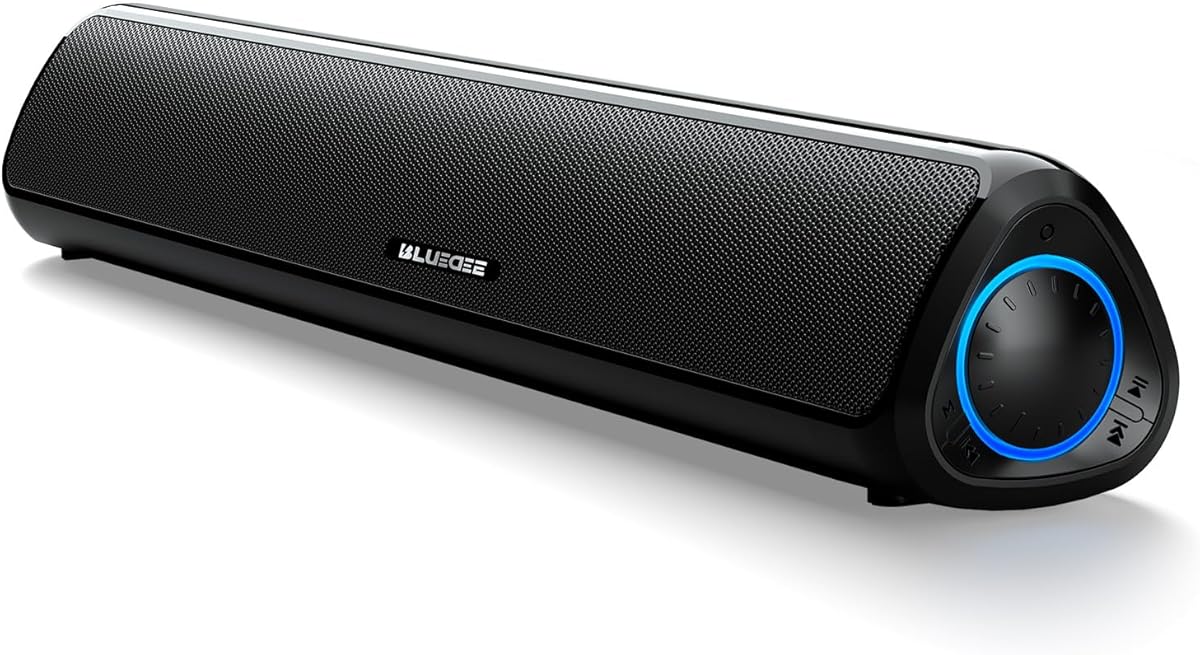
Bluedee’s rechargeable bar punches above typical under-$50 expectations with balanced drivers, tweeters, and Bluetooth 5.3. Up to thirteen hours cordless at moderate volume lets you escape cable nests during clean-desk phases or carry audio to a dining-table work sprint.
For computer use, keep USB-C parked while working, then pull the cord for evening mobility. Clear vocals make it a credible meeting speaker, not only a YouTube stick.
Compared with Pebble V3, you trade Creative’s Clear Dialog brand story for battery freedom and bar geometry. Compared with OHAYO, you trade stereo cabinets for simplicity.
Choose rechargeable Bluedee when flexibility is the scarce resource. Choose Pebble when speech processing and USB-C spheres fit your ritual better.
Hot-desk workers should treat the thirteen-hour claim as moderate-volume reality. Streaming loud lo-fi all afternoon with lights mentally “on” in your head still drains cells—top up during lunch if cordless evenings matter.
Charge during the workday so cordless movie time does not die at the climax.
Pay the rechargeable premium only if you will use cordless mode; otherwise the simpler USB bar saves money and charging attention.
We may earn a commission at no additional cost to you.

The USB-powered Bluedee is the no-drama under-$50 bar: plug power, choose 3.5 mm or Bluetooth 5.0, and stop apologizing for laptop audio. Dual diaphragms and anti-magnetic framing target cleaner playback on metal desks.
It will not win a shootout with OHAYO’s MDF pair, and it should not try. Its virtue is permanence without charge cycles—ideal for office PCs that should just work after a reboot.
Choose this when budgets are tight and rechargeable features would go unused. Upgrade later if you fall in love with under-monitor life and want knobs, radiators, or batteries.
Route USB and AUX together down a monitor arm so the “simple” bar does not become visual noise.
If your desk already lacks a free USB port, prefer AC Basics or a Bluetooth-leaning rechargeable that can sip from a charger brick.
We may earn a commission at no additional cost to you.

Amazon Basics USB speakers are the emergency oxygen mask of computer audio: 5V USB power, 2.2 watts RMS total, a front knob, and a headphone jack. Frequency response listed from about 103 Hz to 20 kHz tells you bass expectations should stay humble.
They shine on secondary PCs—warehouse terminals, classroom machines, travel kits—where “good enough and tiny” beats “almost hi-fi.” For a primary gaming or music desk under $50, Pebble V3 or OHAYO will feel like a different century.
Choose Basics USB when simplicity and size dominate. Choose Basics AC if you have an outlet and want roughly double the RMS power.
Keep a Basics USB pair in a drawer for loaner machines so you never donate your good speakers to a guest laptop.
Use the front jack to silence the room without unplugging the USB power chain.
We may earn a commission at no additional cost to you.

LENRUE G11 targets users who want an under-monitor stick with “surge” stereo energy and one-touch lighting, not a sphere pair. Four amplifier IC horns and a distortion-free pitch aim at movies and games on a budget.
Expect honest dual-cable life. The payoff is predictable powered performance and a volume knob you can find without unlocking Windows.
Choose G11 for powered light-show bars under $50. Choose Cyber Acoustics if clip-on mounting beats under-stand placement.
Map the touch control on day one so you can black out LEDs before camera calls.
LENRUE is always-powered AUX culture. Tylubio leans hybrid cables, knobs, and in one model Bluetooth/USB audio switching.
We may earn a commission at no additional cost to you.

Amazon Basics AC is what to buy when USB bus power feels anemic but you still refuse app-driven RGB bars. At 4.6W RMS with a 68 Hz lower bound, it plays louder and deeper than the 2.2W USB twin while keeping the same brain-dead control surface.
Plug power, plug 3.5 mm, set volume, done. That ritual still matters for parents setting up homework PCs and offices refreshing fleets.
Choose AC Basics for simple louder satellites. Choose Pebble V3 for smarter USB-C speech focus. Choose OHAYO when cabinets and Bluetooth enter the budget.
Use a strip with spaced sockets; fat AC bricks often block neighboring plugs on cheap power boards.
If your laptop already struggles to power hubs and lights, do not ask it to power speakers too—AC offloads the burden.
We may earn a commission at no additional cost to you.

Cyber Acoustics CA-2890 attacks clutter at the source by clipping to the bottom of a monitor. A single USB cable carries power and audio—no separate 3.5 mm hunt—while on-bar controls handle volume, mute, and play/pause.
If your desk is a keyboard + mouse island with zero room for Pebbles, clip-on is the correct topology. Confirm the panel is about an inch thick or less and that the clip clears curved bottoms.
Sound aims for impressively loud, room-filling-for-the-size playback with clearer highs and enhanced bass for the form factor. It will not replace OHAYO cabinets, but it will replace silence.
Choose CA-2890 when desk area is the constraint. Choose under-monitor bars when you dislike clips or own ultra-curved panels.
Chromebook classrooms and thin-client offices are secretly perfect for CA-2890: one USB cable, clip mounts, and physical mute beat teaching a room full of people how to find Windows sound settings.
Check VESA arms and monitor hoods; some accessories block clip jaws even when thickness specs match.
Train yourself to hit the bar mute LED before the software mute—physical feedback prevents accidental open mics.
We may earn a commission at no additional cost to you.
The five-star Tylubio 10W bar is the pack’s highest-rated under-monitor stick, tuned around dual 5W drivers that emphasize crisp highs, detailed mids, and vocal clarity—exactly what computer speakers under $50 should prioritize for human voices.
Bluetooth and USB 2-in-1 audio input, hybrid USB/Type-C power thinking, and a multi-function rotary knob create a modern budget control surface without a remote to lose. Four LED modes decorate without forcing rainbow chaos if you pick breathing or single-color looks.
At roughly 15.7 by 2.7 by 2.5 inches it is purpose-built for under-monitor duty. Measure twice. When it fits, the desk looks finished instead of provisional.
Choose this Tylubio when a highly rated bar with Bluetooth flexibility is the goal. Choose Pebble V3 for classic dual-satellite Clear Dialog life. Choose OHAYO when stereo cabinets still fit.
The perfect rating invites skepticism—read recent reviews for unit variance—but the feature mix of vocal-first drivers, knob control, and Bluetooth/USB switching explains why budget shoppers keep awarding stars.
Learn single-click versus long-press behaviors on day one so LED and source changes do not become mystery toggles mid-call.
This 10W model stresses vocal clarity and Bluetooth/USB input switching. The other Tylubio emphasizes passive radiators and wired HiFi framing—pick based on bass hunger versus voice focus.
Under $50, a 5.0-rated bar can still be near-field only. If you need room-filling party sound, your budget category is wrong—not the product.
We may earn a commission at no additional cost to you.
Satellites (Pebble, Basics, OHAYO) create width. Bars hide under monitors. Clip-ons free the desk entirely. Watt stickers cannot fix a topology mismatch.
USB is clean for laptops; AC Basics and active bookshelves can play louder without taxing ports. If your dock already browns out, stop adding USB audio loads.
Clear Dialog features, tweeters, and mid-focused bars beat bass-heavy marketing for classes and meetings. Add thrill later with EQ or better headphones.
Useful for phones; irrelevant if the PC is the only source. Do not pay for wireless you will disable.
If a webcam sees your desk, prefer light-off controls. Homelab caves can enjoy flowing LEDs guilt-free.
Ask about desk photos before buying satellites for someone with a floating monitor arm and no shelf. When unsure, Pebble V3 or a clip-on travels across more desk types than a wide LED bar that might not fit.
Creative Pebble V3 with Clear Dialog is the safest classic. Tweeter-equipped Bluedee bars and the five-star Tylubio vocal bar are strong under-monitor alternatives. Avoid Deep Bass presets during meetings.
OHAYO’s 30W×2 active pair shows the ceiling is higher than egg speakers, but room-shaking bass still belongs to bigger budgets. Treat them as excellent near-field/desktop stereo, not club monitors.
USB for portability and clean laptop setups. AC when you want more loudness without draining bus power. Match the power method to how crowded your ports and outlets already are.
Satellites if you can place left/right at ear height. Soundbars if the monitor stand owns the desk. Clip-ons if even the under-monitor slot is contested.
Yes for indie games, esports at modest volumes, and general immersion. Competitive players who live on footsteps may still prefer a headset; use speakers for downtime and shared watching.
Ground loops, cheap hubs, and maxed OS volumes amplify hiss. Try a different port, lower digital volume and raise speaker knobs, and keep signal cables away from power bricks.
It can be for video and competitive games. Prefer USB/AUX wired modes for AV sync and reserve Bluetooth for music.
Models with Bluetooth or 3.5 mm yes. USB-only Basics need a computer host. Check the connection list before gifting to a phone-only student.
Years if you avoid chronic clipping at maximum volume. Distortion is what kills cheap drivers—turn it down when they complain.
Pebble V3 for most people; OHAYO if you can place a pair; Tylubio 10W or Cyber clip-on when desk geometry is hostile to satellites.
For shared watching and casual games, yes. For late-night competitive play or privacy on calls, no. Many people keep both: speakers for the room, headset for focus and silence.
The best computer speakers under $50 in 2026 are the ones that match your desk geometry: Creative Pebble V3 for USB-C Clear Dialog desktops, OHAYO for true stereo cabinets, and high-rated Tylubio bars when under-monitor life is destiny. Clip-ons and Amazon Basics still earn honest roles on secondary machines.
Spend the fifty on clarity and fit, not fantasy wattage. If voices sound natural and cables stay sane, you already beat most factory laptop speakers by a mile.
If your first test track is a podcast or a meeting replay rather than an EDM drop, you will choose more wisely in this category. Under fifty dollars rewards speech clarity and fit; chase subwoofer dreams in the next budget tier.