Best Rechargeable Slim
OMOTON 7-Color Backlit
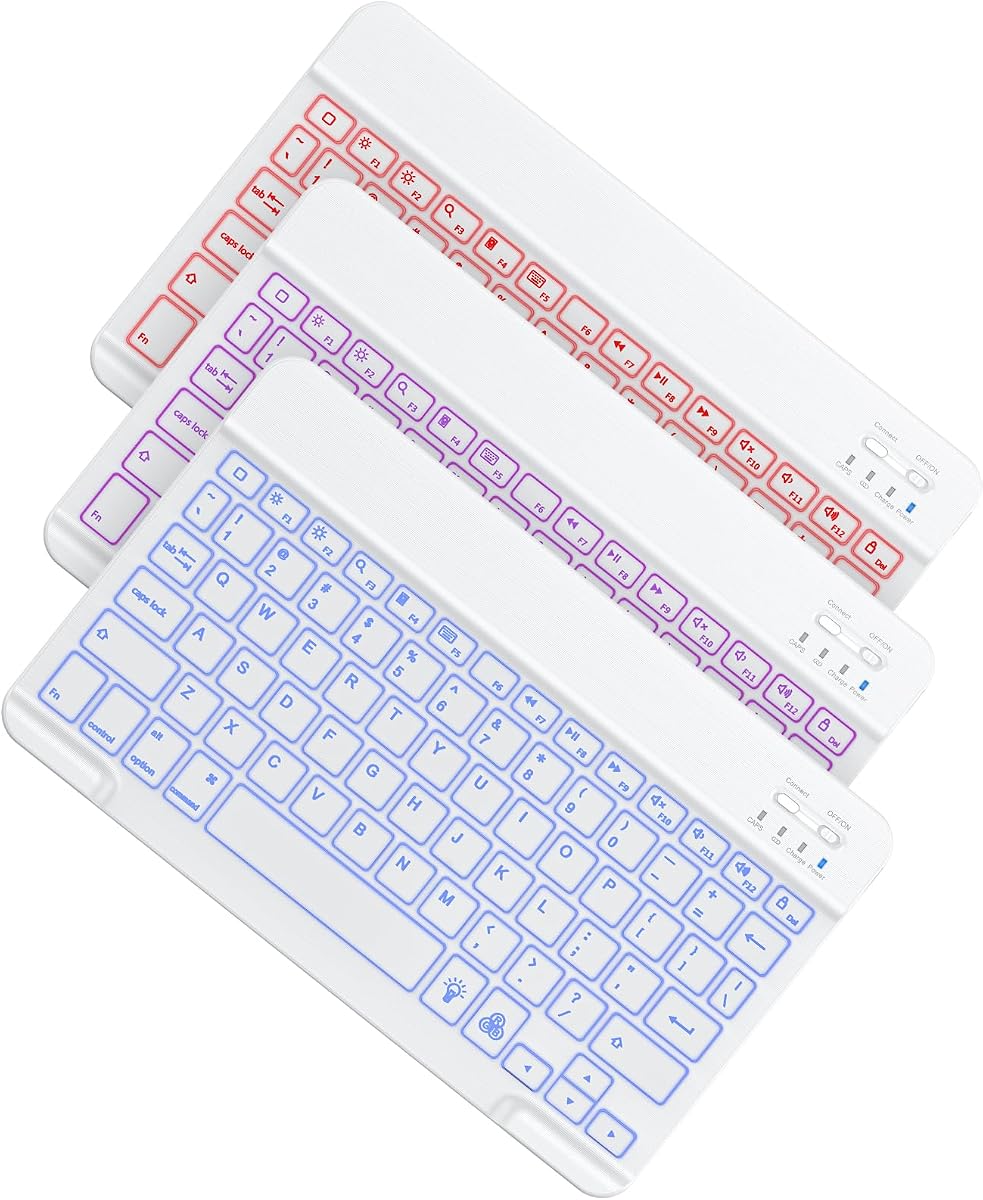
- 7-color LED backlight for dim dorms and café tables
- Built-in 400mAh battery—up to 80 hours with backlight off
- iOS/iPadOS-focused layout with multimedia hotkeys
Expert Review & Guide
An iPad can replace a laptop for essays, Slack threads, spreadsheets, and client decks—but only if the keyboard feels trustworthy. On-screen typing works for short replies; it falls apart when you need sustained speed, accurate punctuation, or the muscle memory of a real QWERTY row. The best Bluetooth keyboards for iPad in 2026 solve that gap without forcing you into Apple’s most expensive first-party accessories.
This guide focuses on ten products people actually buy for iPad typing: ultra-slim boards that disappear into a backpack, rechargeable backlit keyboards for late study sessions, keyboard-and-mouse combos that turn a tablet into a desk workstation, and magnetically detachable folio cases that add a trackpad or pencil slot. Compatibility still matters—some keyboards are iOS-tuned, others speak Windows and Android as well—and a few folio cases only fit iPad A16 11th gen / 10th gen models, so model numbers deserve a glance before you order.
Below you’ll find three standout top picks, a side-by-side comparison of every pack product, and full reviews that dig into battery claims, shortcut keys, noise level, and who each option actually suits. No dollar prices—just the tradeoffs that decide whether a board becomes daily infrastructure or drawer clutter.

As an Amazon Associate we earn from qualifying purchases. We may earn a commission at no additional cost to you.
Use this table to shortlist by form factor—standalone slim board, keyboard-plus-mouse combo, or protective folio—then jump into the full reviews for battery behavior, iPad model fit, and typing feel.

The white OMOTON Ultra-Slim is the “throw it in the laptop sleeve and forget it” answer for iPad typing. At roughly 11.2 inches by 4.7 inches and only 0.2 inches thick, it targets people who already own a protective iPad case and refuse to add another folio’s weight. The 78-key QWERTY layout keeps the essentials without pretending to be a full desktop board, which is exactly what you want on a café table that barely fits a latte and a tablet stand.
Compatibility is the headline strength. OMOTON lists support across recent iPad A16 11th and 10th generation models, older 10.2-inch iPads, iPad Pro and Air sizes including 13-inch and 11-inch lines, iPad mini 6 and 5, plus modern iPhones. That breadth matters if your household shares one keyboard between a Pro for illustration and a basic iPad for homework. The caveat is honest: multimedia function keys are optimized for iPadOS/iOS and may not behave fully on Android or Windows.
Build is straightforward ABS with sensitive keys aimed at daily notes and email rather than gaming. You will not get mechanical-switch drama here; you get a low-profile board that pairs over Bluetooth and then largely stays out of the way. For students who type lecture outlines and travelers who draft emails between flights, that quiet predictability is the feature.
Battery strategy is old-school in a good way. Two AAA cells (sold separately) power the board, with OMOTON claiming up to 400 hours of use and an auto-sleep after ten minutes idle. Their example math—about four hours a day lasting roughly a hundred days—matches how part-time iPad writers actually behave. You trade the convenience of a USB-C charge cable for the ability to swap cells anywhere that sells batteries.
The twelve multimedia hotkeys are where iPad-specific polish shows up. Volume, brightness, music control, and similar one-press actions reduce hunting through Control Center mid-flow. Combined with stable wireless pairing, the Ultra-Slim feels like a purpose-built iOS accessory rather than a generic Bluetooth board with an iPad sticker on the box.
Who should skip it? Anyone who types in low light without a desk lamp will miss backlighting, and anyone who wants a trackpad or mouse included should look at the combos or folio cases later in this list. But if your goal is a light, white, iOS-friendly travel keyboard that does not demand a charger every Sunday night, this OMOTON remains one of the most sensible starting points in the pack.
Because this keyboard has no integrated tablet cradle, plan on a foldable stand, folio kickstand, or propped case. Once the iPad sits at a readable angle, the Ultra-Slim’s compact depth leaves room for a mouse or stylus on the same surface.
Install fresh AAA batteries, enable Bluetooth on the iPad, put the keyboard in pairing mode per the included manual, and select it in Settings. After the first join, reconnecting is usually a power-toggle away. Keep the manual until you learn which hotkeys map to which iPadOS controls.
We may earn a commission at no additional cost to you.

The seenda CTU-301 is less a “keyboard for your bag” and more a “turn this corner of the dining table into an office.” You get a Bluetooth keyboard and mouse together, which matters on iPadOS once you enable pointer support and start treating the tablet like a computer. Quiet keys and low-noise mouse clicks are called out specifically for shared offices, dorms, libraries, and late-night apartments—environments where clicky boards earn dirty looks.
Connectivity is unusually flexible for an iPad-focused combo. Bluetooth 5.0 covers modern tablets and phones with a claimed delay-free range around 33 feet, while a 2.4G USB receiver stored under the keyboard handles desktops or laptops without Bluetooth. Two-device channel switching without constant re-pairing is aimed at people who bounce between an iPad and a work PC in the same sitting.
The integrated tablet holder is the differentiator versus bare boards. seenda specs a roughly 14.4-inch-long, 0.43-inch-wide channel that can hold a 12.9-inch iPad Pro horizontally. That transforms typing posture: screen at eye-friendlier height, keyboard at a fixed slope on its feet. The important caveat is case thickness—overly bulky cases may need to come off for a stable grip.
Layout-wise you get a compact full-size board with a number pad, fifteen hotkeys, FN lock, and a lock key for screen locking. That combination is rare among slim iPad keyboards that sacrifice the numpad to save width. If your week includes budgeting sheets, inventory counts, or grading spreadsheets, the keypad alone can justify the bigger silhouette.
The round, concave typewriter-inspired keys are a taste call. seenda markets a 10-million-press durability claim and fingertip-fitting profiles for blind typing. They feel more playful than Apple’s Magic Keyboard aesthetic, which matches the blue-and-purple colorway. Buyers who want invisible black aluminum will bounce; buyers who want a cheerful desk companion will lean in.
For iPad-only travelers who need something that vanishes into a sleeve, this combo is the wrong shape. For remote workers who keep an iPad on a desk all day and want mouse precision without hunting for matching peripherals, the CTU-301 is one of the most complete workstation kits in this roundup.
Accountants, Etsy sellers updating inventory, teachers entering grades, and anyone living in Numbers or Excel will feel the missing keypad on slim 78-key boards. The CTU-301 keeps that muscle memory intact while still speaking Bluetooth to an iPad.
Test your iPad in the holder with and without its current case. If the fit wobbles, remove the case during keyboard sessions or switch to a thinner shell. Stability matters more than aesthetics when you are typing at speed.
Because the combo also targets Mac, Windows, and Android, key legends and system shortcuts may feel slightly generic compared with iOS-only boards. Spend five minutes learning which FN combinations map to brightness and media on iPadOS so you are not hunting mid-deadline.
We may earn a commission at no additional cost to you.
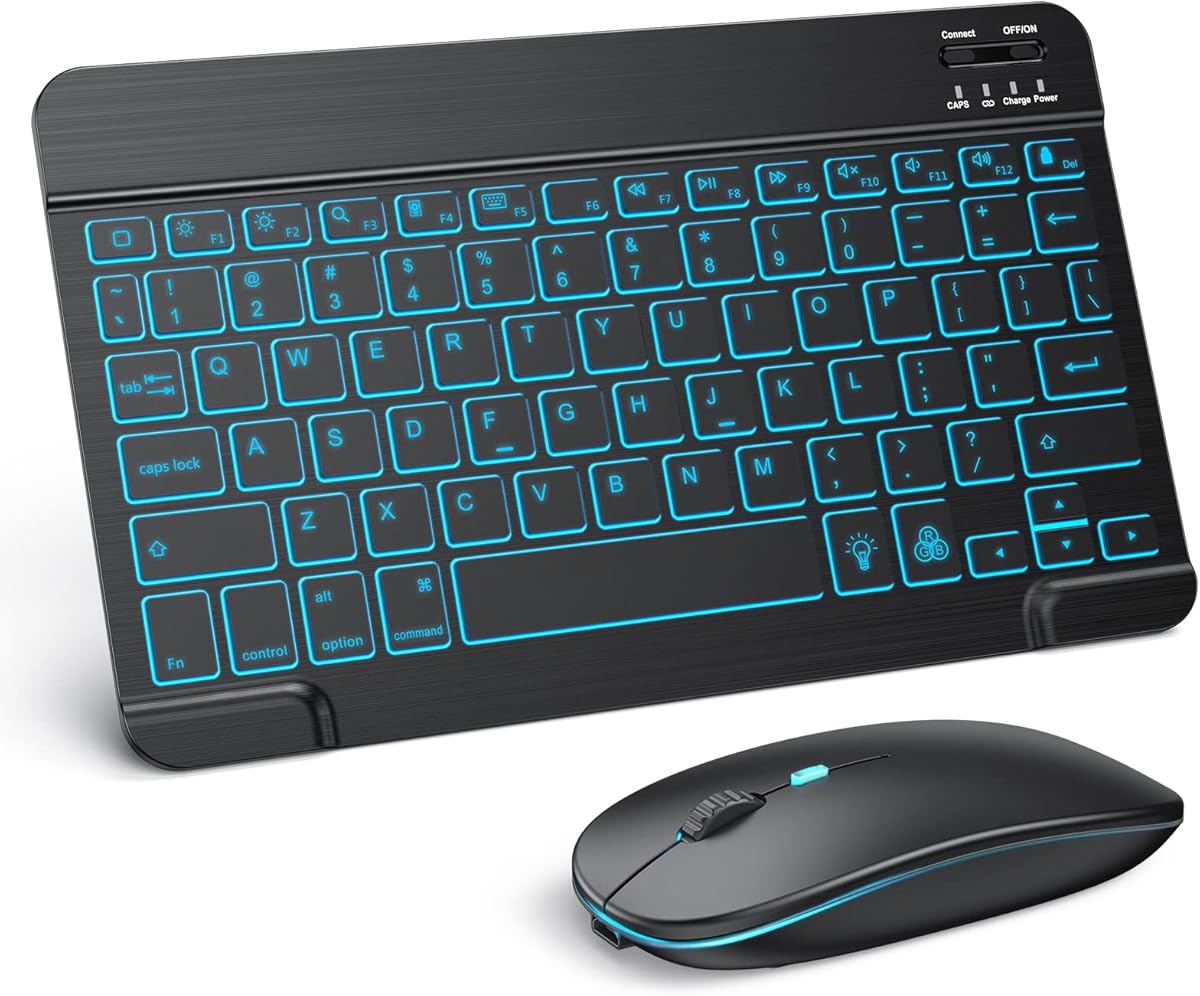
TECURS packages the two accessories most people eventually buy anyway—a Bluetooth keyboard and a Bluetooth mouse—into one black, travel-friendly set with a feature slim boards often omit: seven-color backlighting. If your iPad work happens after the kids sleep, in a dim dorm, or on a night flight with the overhead light off, illuminated legends are not a gimmick; they are how you stop mistyping passwords.
The keyboard uses a scissors-switch design pitched for comfortable, relatively quiet typing. That puts it closer to laptop chiclet feel than clicky mechanical boards. Pair that with a silent mouse offering 800, 1200, and 1600 DPI, and you have a kit that respects quiet spaces while still letting you scrub timelines in video apps or precision-click spreadsheet cells.
Compatibility covers common iPad lines—10.2-inch models, mini, Air, Pro—plus recent iPhones, with an explicit note that the system should be on iPadOS 13 or newer. That bar is easy for most 2026 devices to clear, but it is worth checking if you are rehabilitating an older hand-me-down iPad for a student.
Power is handled by a built-in 400mAh lithium battery in the keyboard. TECURS claims about 40 hours of work with the backlight off, or more than three months of standby on a charge, and includes a USB cable so you are not hunting for disposable AAAs. As with every backlit board, leaving the lights on will drain the cell faster; treat colors as a situational tool, not a permanent rainbow.
Portability is a genuine strength. The ultra-thin keyboard and mouse are meant to slide into a briefcase or handbag and still leave room on a tiny hotel desk. You do not get a cradle like the seenda CTU-301 or Logitech K480, so your iPad still needs its own stand or folio. In exchange, you avoid locking into one tablet size.
Choose TECURS when you want a matched black combo, rechargeable convenience, and night-friendly lighting without committing to a model-specific folio case. Skip it if you need a numpad-heavy desk board or a trackpad built into a protective cover—those jobs belong elsewhere on this list.
Start at 1200 DPI for general browsing and document work, drop to 800 for precise photo edits, and jump to 1600 when you have a large external display or want faster cursor travel across the canvas. The silent clicks keep those adjustments socially acceptable at midnight.
Use backlight only when ambient light fails, power the keyboard off for multi-day storage, and recharge before a long trip rather than mid-flight. Forty hours of lights-off work covers many weeks of part-time iPad writing.
We may earn a commission at no additional cost to you.
If the AAA-powered OMOTON Ultra-Slim is the bare-bones travel board, this 7-color rechargeable sibling is the version you buy when you type after sunset. It keeps the ultra-slim, lightweight philosophy—easy in a backpack, kind to cramped dorm desks—while adding adjustable LED backlighting and a built-in 400mAh battery you top up in about two to three hours.
OMOTON pitches the board as specially designed for iOS and iPadOS, with full support called out for recent iPhones and essentially the whole modern iPad family from Pro and Air down through mini and the 7th–11th generation lineup. It can connect to other Bluetooth phones and tablets, but some features may not function fully outside Apple’s ecosystem. For an article about the best Bluetooth keyboards for iPad, that iOS-first tuning is a feature, not a bug.
Battery numbers tell a clear story. With the backlight off, OMOTON claims up to about 80 hours of typing standby-style use; with the backlight on, continuous runtime drops to roughly five hours. That split is honest: treat lighting as a tool for library corners and café evenings, then switch it off for daytime essay marathons. Auto-sleep behavior and a full charge before a multi-day trip keep anxiety low.
Shortcut hotkeys cover volume, screen lock, media playback, and page switching—the repetitive taps that break flow when you only have the software keyboard. Combined with a claimed 33-foot Bluetooth range and anti-dropout emphasis, the board is aimed at people who move from couch to kitchen counter without wanting to re-pair.
Typing feel stays in the slim-chiclet family: portable first, desktop-replacement second. Students finishing night homework and remote workers polishing docs on the road are the explicit audience, and the white finish photographs cleanly next to light iPad cases. You still need a separate stand or folio for viewing angle, and you will not get a trackpad.
We ranked this our Best Rechargeable Slim top pick because it balances the three things most iPad writers ask for in one thin package: Apple-friendly shortcuts, night visibility, and cable charging instead of disposable cells. If you need a mouse in the box, jump to TECURS or seenda; if you need a protective case fused to the keys, jump to the Harvopu or Hamile folios.
Pack a short USB charging cable in the same pouch as the keyboard. Use a single comfortable backlight color at the lowest brightness that remains readable. Five hours of lights-on time stretches further when LEDs are dim and only active during actual keystrokes.
Pick the 7-color model if you hate battery shopping, type in variable lighting, or want the pack’s highest-rated slim OMOTON. Pick the AAA Ultra-Slim if you want maximum claimed longevity between power events and never need illuminated keys.
We may earn a commission at no additional cost to you.
Folio keyboards change the iPad equation: protection, stand, and typing surface travel as one unit. The Harvopu case for iPad A16 11th generation (11-inch, 2025) and iPad 10th generation (10.9-inch, 2022) goes further by adding a multi-touch trackpad. Tap, swipe, scroll, and app-switching gestures reduce how often you reach for the glass—especially valuable when editing long documents or browsing research tabs.
Model discipline is non-negotiable. Compatible model numbers include A3354/A3355/A3356 for the A16 11th gen and A2696/A2757/A2777 for the 10th gen. Anything else—Pro, Air, mini, older 10.2-inch iPads—is out. Check the tiny “Axxxx” print on the back of your tablet before ordering; that two-minute check prevents the most common folio returns.
The keyboard attaches magnetically and can peel away completely when you want to sketch, watch a lecture, or hand the iPad to a child. Bluetooth reconnects quickly after you power the board on, and Harvopu documents a concrete pairing path: power on, open iPad Bluetooth settings, hold Fn+C for about three seconds, then connect to “Bluetooth Keyboard.” After the first success, subsequent joins are mostly automatic.
Illumination includes seven RGB pure backlight colors with three brightness levels, plus a laptop-like row of iPadOS shortcuts. The 420mAh battery charges over Type-C in roughly two to three hours and auto-sleeps after fifteen minutes idle. That is enough for school days and office blocks if you are not running rainbow mode constantly.
The case itself uses upgraded soft PU with stain resistance and a TPU interior honeycomb pattern for heat dissipation and shock buffering. Three anti-slip grooves let you choose steeper angles for typing versus shallower ones for Pencil work. A pencil holder is part of the package (Pencil not included), which keeps the stylus from migrating to the bottom of a backpack.
We named this Best Folio With Trackpad because the gesture surface is the clearest productivity leap over keyboard-only folios in the pack. It is the wrong purchase for a 13-inch Pro owner, and it replaces whatever case you already love. For the huge population on mainstream 10.9/11-inch iPads who want a navy, laptop-like daily driver, it is the most complete transformation here.
Use a shallower groove when the Apple Pencil (or any stylus) is the main tool so the screen faces you more directly. Flip to a steeper groove for long keyboard sessions to reduce neck strain. The folio’s job is to make those shifts frictionless.
Store the magnetic keyboard inside the folio when commuting so both halves stay protected. At a desk, detach the keys and place the iPad in the groove that matches your chair height—suddenly the same device covers tablet and clamshell modes.
Expect the case, touchpad keyboard, Type-C charging cable, and user manual. Pencil and tablet are not included. If model fit or pairing confuses you, Harvopu points buyers to order history support—worth using before you assume a defect.
We may earn a commission at no additional cost to you.
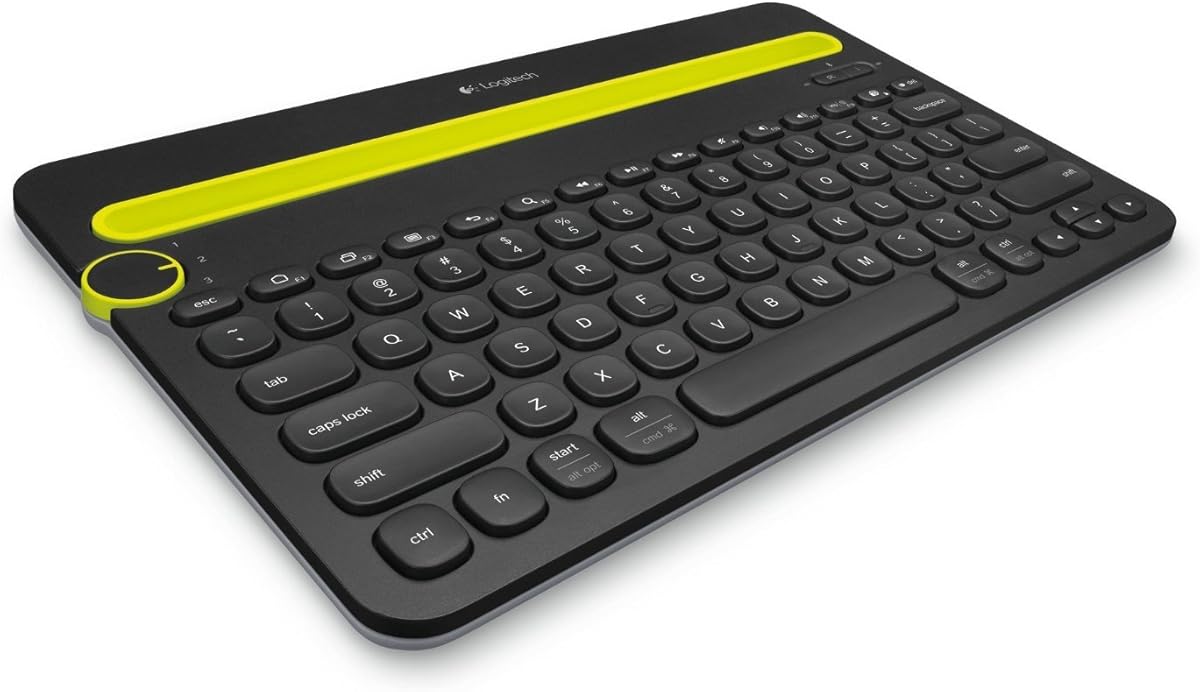
Logitech’s K480 is the multi-device veteran that still earns a seat in 2026 iPad setups because of one brilliantly simple control: a physical Easy-Switch dial. Pair up to three Bluetooth devices—say an iPad, a work Windows laptop, and a phone—then twist to redirect keystrokes. That beats tearing down Bluetooth connections every time your attention shifts.
The integrated cradle is equally practical. It holds phones or tablets up to about 0.4 inches thick and 10 inches wide at a readable angle while you type. Many 10.2-inch and smaller iPads, plus most phones, sit happily there. Owners of 12.9-inch or 13-inch iPad Pro models will need a separate stand; the cradle is sized for the “companion tablet” era more than the largest canvases.
Typing layout stays familiar, with shortcut keys for Windows and Mac usage and a compact footprint that keeps a mouse close for better posture. Wireless range is listed over 10 meters. The board is spill-resistant enough to survive small accidents—coffee near the keyboard is still unwise, but the design acknowledges real desks.
Power is a Logitech strong suit. Two AAA batteries come pre-installed and are rated for up to 24 months depending on use, with a battery indicator light so you are not surprised mid-deadline. For someone who hates charging yet another gadget every week, that longevity is a lifestyle feature.
As an iPad keyboard specifically, the K480 shines when the tablet is one node in a wider device constellation. Students hopping between Chromebook and iPad, freelancers juggling a client Android phone and an iPad Air, or parents sharing a household PC all benefit from the dial. Pure iPad-only travelers may prefer something thinner; folio seekers need a case-shaped product instead.
We kept the K480 as a top pick because multi-device friction is the silent productivity killer in mixed homes and offices. It is not the flashiest board here—no RGB, no trackpad folio—but the cradle-plus-dial combination remains uniquely useful years after launch.
A practical trio: iPad for reading and annotation, Mac or PC for heavy apps, phone for two-factor codes and quick replies. Dial to the iPad for long-form typing, twist to the computer for code or admin tools, twist to the phone when a verification field appears.
Logitech itself points power users toward boards like the K780 when a number pad and dual Bluetooth/USB flexibility matter more. Stay with the K480 when cradle convenience and compact desk presence are the priority.
We may earn a commission at no additional cost to you.

Hamile’s pink folio targets the same mainstream iPad sizes as the Harvopu case—A16 11th generation 11-inch (A3354/A3355/A3356) and 10th generation 10.9-inch (A2696/A2757/A2777/A3162)—but emphasizes a softer aesthetic, pencil storage, and marathon battery claims rather than a trackpad. If color and stylus workflow matter more than gesture navigation, this is the folio lane to study.
The keyboard is magnetically detachable, so you can yank the keys for media consumption or hand the tablet around, then snap them back when class notes start. Shortcut keys and multi-OS compatibility (iOS, Windows, Android) are part of the pitch, though iPad owners will live mostly in the iPadOS shortcut set. Scissor-switch keys with rebound are described as lower noise for long typing blocks—useful in lecture halls.
Battery numbers are aggressive: a 420mAh cell with a claim of at least 230 hours of use, full charge in about two hours over Type-C, and no disposable batteries to replace. Even if real-world results vary with backlight habits, the architecture is clearly aimed at students who forget chargers in dorm rooms.
Seven laser-etched backlight colors make night typing possible and, frankly, more fun. Combined with three viewing grooves, the folio can stand for essays, slide into a shallower angle for videos, or support sketching. The pencil holder and top pen slot, plus a rear cutout for easy stylus removal, show Hamile thought about Apple Pencil–style workflows even though the stylus itself is sold separately.
Materials lean premium-feeling PU outside and flexible TPU honeycomb inside for heat release and drop buffering. Precise cutouts keep ports, speakers, mics, and cameras usable. That matters because a folio you cannot charge through or hear video from becomes shelfware fast.
Pick Hamile when you want a cheerful, protective daily iPad cover with a responsive detachable board and excellent claimed stamina. Pick Harvopu instead when multi-touch trackpad gestures are non-negotiable. Neither replaces a 13-inch Magic Keyboard experience on a Pro—they are purpose-built for the high-volume 10.9/11-inch iPad class.
Carry the folio as your only iPad armor. Type lecture outlines with backlight dimmed, flip the angle for recorded lectures, then pull the Pencil from the holder for diagram markup. That single-object workflow beats juggling a slim keyboard plus a separate case plus a loose stylus.
Without a trackpad you will still tap the screen for many pointer tasks, or add a Bluetooth mouse later. If you already love gestures on a laptop, budget mental energy for that difference—or spend up to the Harvopu trackpad folio in this same size class.
We may earn a commission at no additional cost to you.

This is the black finish twin of the white OMOTON Ultra-Slim earlier in the list, and the hardware story is intentionally the same: a 0.2-inch-thin 78-key Bluetooth board sized about 11.2 by 4.7 inches, built from ABS, aimed at iPad and iPhone users who want portability without folio bulk. Including both colors in a buying guide is not filler—finish choice changes how a keyboard ages in a backpack next to chargers and water bottles.
Compatibility again spans iPad A16 11th/10th generation, classic 10.2-inch iPads, Pro and Air sizes including larger 13-inch class tablets, mini 6/5, and recent iPhones. Function-key behavior remains iOS-optimized, with the same notice that other systems may not get full hotkey fidelity. If your life is Apple-centric, that is fine; if you need Windows FN perfection, look at the Logitech or dual-mode seenda options.
Daily use patterns match the white model. Stable Bluetooth, sensitive keys for notes and email, twelve multimedia shortcuts for volume/brightness/music, and auto-sleep after ten idle minutes. The up-to-400-hour AAA claim (batteries not included) still rewards infrequent typists who would rather swap cells twice a year than remember a cable.
Why choose black? It pairs cleanly with Space Gray and black iPad cases, shows fewer coffee smudges in photos and real life, and looks less “plastic toy” on a professional Zoom desk even though the chassis is still lightweight ABS. Why choose white? It matches silver/white iPads and reads brighter in content photos. Functionally you are not missing a trackpad or backlight either way.
The black Ultra-Slim is easy to recommend as a spare household keyboard: keep one at the office desk and one in a travel pouch, or gift the second color to a partner who shares your iPadOS shortcuts mental model. Just remember you still need a stand, and dark rooms still need a lamp.
If you are deciding between this and the rechargeable OMOTON 7-color board, ask whether illuminated keys matter more than maximum claimed battery longevity. Backlight fans should spend their attention on the 7-color model; bag-minimalists who type mostly in daylight can save complexity with this black AAA slim.
Pair the black board to a work iPad and leave it in a desk drawer, then keep the white board in a backpack for campus. Same muscle memory, zero folio weight, and you stop stealing the “good” keyboard from whoever typed last.
You get the wireless keyboard and a user manual—nothing else. Plan AAA batteries and, optionally, a cheap foldable stand before the first real writing session so day one does not stall on accessories.
We may earn a commission at no additional cost to you.

The seenda SKM64-2 combo is the Apple-household specialist. Where the CTU-301 chases multi-OS desks with a 2.4G dongle and numpad energy, the SKM64 doubles down on macOS 10.12+, iPadOS 13+, and iOS 13+ with a standard Apple keyboard layout and three Bluetooth channels only. There is no USB receiver in the box, and Windows is called out as not fully compatible. That honesty helps: this set is for people already living in Apple land.
Multi-device switching across BT1/BT2/BT3 is the workflow hook. A freelancer can keep a MacBook Pro on channel one, an iPad on channel two, and an iPhone on channel three, then jump keystrokes without re-pairing rituals. For anyone drafting on the iPad and editing on the Mac in the same afternoon, that channel memory is the product.
Quiet typing is a first-class feature. seenda emphasizes tactile feedback without loud clicks, plus enhanced key stability—language aimed at libraries, study groups, and late-night apartments. The matching mouse keeps the aesthetic coherent in white silver rather than forcing a mismatched black peripheral onto a bright desk.
Physically the keyboard is extremely thin at about 0.12 inches, with the mouse around 0.9 inches, in a stainless steel and premium ABS construction. It is meant to disappear into a bag and still look polished on a coworking table. Rechargeable Type-C power with up to 200 hours standby, auto-sleep, and a hardware on/off switch reduces both waste and “is it dead or just sleeping?” confusion.
Compared with TECURS, you trade seven-color backlighting for a cleaner Apple-like visual and stricter ecosystem focus. Compared with Logitech K480, you gain a mouse and a slimmer profile but lose the cradle and the dial’s cross-platform bravado. Compared with folio cases, you gain freedom to use any iPad size you already own—Pro included—because nothing clips to a specific shell.
Buy the SKM64 when your devices say Apple on the back and you want a quiet, rechargeable, channel-switching duo that respects Mac keyboard conventions. Skip it if you still dual-boot a Windows desktop as your main machine; the CTU-301’s dual-mode approach will frustrate you less.
Label mentally: BT1 = Mac, BT2 = iPad, BT3 = iPhone. Resist reordering every week. Muscle memory for the channel switch is half the productivity gain of owning this combo.
If you share walls with roommates or type beside a sleeping partner, prioritize this whisper-quiet set or the TECURS silent mouse kit. Loud boards punish households even when the key feel is otherwise excellent.
We may earn a commission at no additional cost to you.

Arteck’s universal backlit keyboard is the pack’s diplomat. Instead of optimizing only for iPadOS shortcuts, it advertises workable Bluetooth use across iOS iPads and iPhones, Android tablets like Samsung Galaxy Tab, Windows machines, and Macs. Households that share one keyboard between an iPad and a Windows PC—or travelers who borrow whatever tablet is nearby—get flexibility the Apple-tuned boards intentionally refuse.
The headline lifestyle feature is battery endurance: a rechargeable lithium cell claimed to last about six months between charges based on roughly two hours of daily use with the backlight off. Even if your pattern is heavier, that class of longevity beats boards that beg for weekly top-ups. Seven backlight colors with two brightness levels and auto sleep give you night usability without abandoning the long-life story entirely.
Portability numbers are concrete. At about 9.7 by 5.9 by 0.24 inches and 0.37 pounds, the Arteck is easy to slide into a messenger bag beside a 10- or 11-inch iPad. It is not a folio, so your tablet still needs its own armor, but as a second-device keyboard for mixed OS life it travels cleanly.
Typing expectations should stay realistic. This is a slim portable Bluetooth 3.0-class board, not a scissor-switch laptop clone with a trackpad. For essays, email, and browser work on an iPad it is plenty; for heavy shortcut-driven iPadOS power use, the OMOTON boards with dedicated multimedia keys may feel more native. For desk-bound multi-device switching with a cradle, Logitech still owns that niche.
Arteck includes the keyboard, USB charging cable, and welcome guide, and highlights a 24-month warranty with customer service—useful reassurance on a category where cheap no-name boards sometimes vanish. In a 2026 shortlist it remains relevant because cross-platform households have not disappeared, and neither has the need for a light backlit board that does not care which tablet you unlock.
Choose Arteck when universal Bluetooth manners and multi-month charging intervals matter more than iPad-specific hotkey perfection. If your world is iPad-only and you want richer shortcuts or a folio trackpad, spend your attention higher on this list. If your world includes Android and Windows cousins, Arteck earns its closing slot.
Keep the Arteck on the living-room table. Kids finish Android tablet homework, you answer iPad email, a partner jumps onto a Windows laptop for spreadsheets. One rechargeable board, fewer arguments about whose Bluetooth keyboard is whose.
Reserve colors for genuinely dark sessions and prefer the lower brightness step. The six-month estimate assumes backlight off; treat LEDs as occasional tools so the endurance advantage stays real.
We may earn a commission at no additional cost to you.
Most disappointment in this category comes from buying the wrong shape. Slim standalone boards (OMOTON, Arteck) assume you already like your iPad case and stand. Combos (seenda, TECURS) assume you want mouse precision on a desk. Folios (Harvopu, Hamile) assume you want protection and typing fused together—and that your iPad is the exact generation they list.
Ask where the iPad lives. Backpack every day? Slim board. Dining table home office? Combo or Logitech cradle. Always in a bag with no extra case? Folio.
Folio keyboards in this pack for A16 11th generation and 10th generation 10.9-inch iPads will not stretch to Pro, Air, or mini sizes. Flip the iPad, find the A-number, and match it. Standalone Bluetooth keyboards are far more forgiving across generations.
AAA boards can last an impressively long time and swap power in any pharmacy, but you must buy cells. Rechargeable slim boards and combos need a cable habit. Folio keyboards with 420mAh cells and Type-C ports sit in between—convenient if you already charge an iPad nightly on the same brick.
Backlighting always costs runtime. If you live in bright spaces, a non-backlit OMOTON Ultra-Slim or Logitech K480 may frustrate you less than a rainbow board you feel obligated to light up.
Dedicated multimedia keys speed volume, lock, and media control. A trackpad (Harvopu) unlocks multi-finger gestures that feel closest to a laptop. A Bluetooth mouse (TECURS, seenda combos) helps precision work in spreadsheets and creative apps. You rarely need all three on day one—pick the pointing method you already use on a computer.
Shared housing favors quiet keys and silent mice. Spreadsheet-heavy work favors a numpad (CTU-301). Mixed OS desks favor Logitech’s dial or Arteck’s universal manners. Pure Apple homes may prefer the SKM64’s Mac-like layout. Match the keyboard to the social and technical environment, not to a generic “best” badge.
Most Bluetooth keyboards that support external keyboard input will type characters on an iPad, but “works” and “feels native” are different. iPadOS-tuned boards expose multimedia hotkeys and shortcut rows that map cleanly to brightness, volume, lock, and media. Universal boards may type fine while leaving you to Control Center for those actions. Folio keyboards add another constraint: they only fit listed iPad generations. For best results, prefer keyboards that explicitly mention iPadOS/iOS support, then verify any model-specific case fit.
Buy a folio when you want protection, a stand, and a keyboard in one object and you are sure of the exact iPad size—especially the A16 11th / 10th gen folios in this guide. Buy a separate slim keyboard when you already love your case, own multiple iPad sizes, or want to leave the keyboard at a desk. Folios win for students who carry one device; slim boards win for households that share a keyboard across tablets and phones.
Yes if you edit spreadsheets, manage windows-like workflows, or dislike constant finger smudges on the display. iPadOS pointer support makes a mouse genuinely useful. Combos from seenda and TECURS remove the guesswork of matching a random mouse to a random keyboard. They are less ideal for pure couch reading or for travelers who only want one thin board in a sleeve.
Critical if you type on planes, in dorms after lights-out, or at café tables with moody lighting. Optional if you work at bright desks. Remember that backlight-on runtime is always shorter—OMOTON’s rechargeable board quotes roughly five hours with lights on versus far longer with lights off. Treat RGB as a situational aid, not a permanent setting.
It stores connections to multiple Bluetooth devices and lets you rotate among them physically instead of forgetting and re-pairing inside iPad settings. That is especially helpful when an iPad shares a desk with a PC or phone. The tradeoff is a larger desk footprint and a cradle that does not fit the largest iPad Pro widths.
Many in this pack explicitly list iPhone support—especially the OMOTON boards and several combos. Typing long-form on a phone screen with an external keyboard is excellent for travelers who leave the iPad home. Just confirm the product’s compatibility notes and expect some hotkeys to be iPadOS-oriented even when character typing works on iOS.
Because 11-inch-class iPads look similar across years while internal mounting points and dimensions differ. Harvopu and Hamile folios in this roundup fit specific A16 11th generation and 10th generation models only. Ordering by marketing name alone (“11-inch iPad”) is how people accidentally buy a beautiful case that will not close.
AAA wins when you can buy cells in any airport shop and hate hunting for the right cable. Rechargeable wins when you already carry USB-C for the iPad and want less waste. Folio keyboards with 420mAh cells charge relatively quickly and sleep automatically, which suits school weeks. There is no universal winner—match the power system to how you already pack.
A connected keyboard uses some wireless power, but in normal writing sessions the iPad’s display and radios dominate drain. Keyboards with aggressive auto-sleep (ten to fifteen minutes idle on several models here) reduce chatter when you stop typing. If you park a keyboard paired all week without using it, power it off to keep both devices happier.
Not necessarily. Apple’s first-party keyboards offer tight integration, trackpads, and build prestige, especially on Pro models. The pack products here aim at different jobs: cheaper travel boards, colorful student folios, multi-device desk keyboards, and mouse combos. If you need a precise laptop clone for a large iPad Pro and budget allows, first-party remains compelling. If you need practical Bluetooth typing across mixed devices without that commitment, several options above are entirely sufficient.
The best Bluetooth keyboard for your iPad is the one that matches how the tablet actually spends its week. For a rechargeable, backlit slim board with strong iOS manners, the OMOTON 7-color model is the clearest all-rounder in this set. For a desk that juggles tablet, phone, and computer, the Logitech K480’s dial and cradle still feel uniquely practical. For mainstream 10.9/11-inch iPads that should feel like small laptops, the Harvopu folio’s trackpad is the feature that changes daily posture.
Everyone else can shop by constraint: seenda and TECURS when a mouse must be in the box, Hamile when a pink protective folio with long claimed battery life fits your A16/10th gen iPad, Arteck when Android and Windows relatives share the same keyboard, and the black or white OMOTON Ultra-Slim when the only mission is weightless travel typing.
Check your model number, decide on pointing device needs, and be honest about lighting and noise. Do that, and an iPad-plus-Bluetooth-keyboard pairing stops feeling like a compromise and starts feeling like a computer you chose on purpose.