Best Low-Noise 360mm
CORSAIR Nautilus 360 RS Liquid CPU Cooler

- 360 mm radiator with three RS120 high-pressure fans
- Pump rated around 20 dBA with daisy-chain PWM wiring
- Convex cold plate, pre-applied paste, AM5/AM4 mounts
Expert Review & Guide
AMD’s Ryzen 7 9800X3D is a gaming chip first: stacked cache, strong 1% lows, and a thermal personality that rewards good mounting more than theatrical 420 mm radiators. Still, a quality AIO keeps boost behavior consistent in warm rooms, frees dual-tower air clearance for tall RAM, and gives the AM5 socket a quieter summer. This pack mixes purpose-built 360 mm and 280 mm liquid coolers with one complete Skytech Azure 3 prebuilt that already pairs a 9800X3D with a 360 mm ARGB AIO—useful if you would rather skip the DIY mount entirely.
We only use the ten ASINs in the ReviewConsensus pack. Ratings, images, and feature bullets are copied from those listings. Dollar prices are omitted; judge radiator size, pump noise claims, AM5 hardware, and whether you want a simple Nautilus-style cooler or a curved AMOLED showpiece.
Start with the top picks for most 9800X3D DIY builds, then read the Skytech review only if a turnkey RTX 5080-class system is actually what you came shopping for.


As an Amazon Associate we earn from qualifying purchases. We may earn a commission at no additional cost to you.
DIY coolers list radiator size and AM5 support; the Skytech row is a full prebuilt. Specs omit prices so you can compare hardware roles clearly.
CORSAIR Nautilus 360 RS Liquid CPU Cooler
For a 9800X3D DIY build that prioritizes FPS over fountain shows, the Nautilus 360 RS is the pack’s cleanest answer. CORSAIR pairs a 360 mm radiator with three RS120 fans built for static pressure, AirGuide focus, and Magnetic Dome bearings, then keeps the pump around a claimed 20 dBA. That combination matches how people actually use 9800X3D—hours of gaming with headphones off.
The slightly convex cold plate and pre-applied paste matter on AM5’s large IHS. You still should seat the mount evenly, but you are not hunting a separate syringe on install night. Daisy-chained PWM means one CPU_FAN or AIO header can drive the trio without a bird’s nest of splitters fighting your 24-pin.
9800X3D does not need absurd radiator excess, yet a 360 mm Nautilus gives thermal margin when the GPU is an RTX 50-series heater sharing the case. Coolant loop heat still dumps into the same chassis air—mount the rad as intake or exhaust deliberately.
Direct motherboard connection keeps iCUE optional. If you hate RGB suites, this non-ARGB Nautilus is the SKU; lighting fans live on the white ARGB version next door.
Verify your case’s 360 mm thickness clearance including the RS120 fans. A supported mount on paper can still kiss a tall PSU shroud once fans are stacked.
Use the AM5 brackets in the box, remove any stock plastic frame pieces as directed, and tighten in a cross pattern. X3D chips reward even pressure more than over-torqued corners.
Start with a gentle PWM curve tied to coolant or CPU temp. 9800X3D rarely needs 100% radiator scream during 1440p gaming if the case breathes.
We may earn a commission at no additional cost to you.
CORSAIR Nautilus 360 RS ARGB Liquid CPU Cooler
The ARGB Nautilus keeps the quiet 20 dBA pump story and convex cold plate, then swaps in RS120 ARGB fans you can daisy-chain to a single PWM header and a single +5V ARGB header. For glass-sided 9800X3D builds that already light EXPO DIMMs, that is the least painful way to make the radiator match the theme.
Thermally, expect the same 360 mm class behavior as the non-RGB unit. Lighting does not cool the CCD; static pressure and radiator area do. Buy ARGB for the look, not for magic X3D clocks.
Wiring simplicity is the sleeper feature. One PWM and one ARGB run beat three separate fan cables snaking past a vertical GPU. Magnetic Dome bearings and AirGuide tech stay in the pitch for noise control while LEDs do their job.
Socket support mirrors the black model—AM5/AM4 and Intel LGA 1851/1700—so the cooler can move if you ever leave Ryzen. On 9800X3D day one, just confirm the AM5 standoffs match CORSAIR’s diagram.
Choose this when the case is part of the desk aesthetic. Choose black Nautilus when you want the same loop with fewer cables and less dust visibility.
Three RS120 ARGB fans are fine on most board headers, but if you already drive case strips from the same header, use a powered hub to avoid flicker.
Match PSU cables before you obsess over pump caps. A white Nautilus with black spaghetti still looks unfinished.
We may earn a commission at no additional cost to you.

TRYX Panorama SE 360mm AIO Curved Screen GIPHY Built
TRYX Panorama SE is what you buy when the 9800X3D rig is also a display piece. A rotatable 6.67-inch 2K AMOLED (60 Hz, ~400 nits, very high contrast) sits on an Asetek Adela 360 mm loop rated around 280W TDP—more than enough thermal theater for a gaming-first X3D chip, with headroom if you later drop in a hotter Ryzen 9.
KANALI software ties into GIPHY for endless motion content and also accepts local PNG/JPG/GIF/MP4/AVI uploads, split screens, and live stats. That is entertainment layered on cooling, not a substitute for checking your AM5 mount quality.
Three preinstalled ROTA ARGB fans use FDB bearings and ARGB Gen2 LEDs, with four-corner damping pads and a full-load noise claim under about 27.86 dB(A). Quiet enough that headphone gamers may never notice the loop over game audio.
Compatibility spans AM5/AM4 and a long Intel list with all-metal hardware. For 9800X3D, that means you can install confidently today and reuse the cooler if the next CPU is a different socket within that list.
Pick Panorama SE when the pump face is part of the room. Pick Nautilus when you want the watts without the media ecosystem.
Decide rad mount before finalizing the rotatable AMOLED angle so waterfall animations read correctly from the chair.
You do not need 280W of cooler for stock gaming loads—but the quieter fan curve that extra radiator enables is the real everyday win.
We may earn a commission at no additional cost to you.
ARCTIC Liquid Freezer III Pro 280
ARCTIC’s Liquid Freezer III Pro 280 is the anti-spectacle pick for 9800X3D: two P14 Pro 140 mm fans on a 280 mm radiator, native offset mounting that shifts the cold plate toward CPU hotspots, and a PWM VRM fan on the pump block. Gamers who care about board VRMs during long sessions get a cooler thinking past the IHS alone.
P14 Pro fans are described as stronger and quieter than prior P14 units especially at low speeds, with higher max RPM when you need it. That curve shape suits 9800X3D—quiet most of the time, punchy when a game plus Discord plus Chrome spikes package power.
Cable management is baked in: radiator fan PWM wires hide in the tube sleeve so only one visible cable hits the board. In panoramic cases beside a vertical GPU, that single cable is strangely luxurious.
Intel contact frame language in the listing is a reminder this cooler serves dual platforms; on AM5 you will use ARCTIC’s AMD offset hardware instead. Still confirm your case supports 280 mm (two 140s) rather than assuming every front mount is 3×120 only.
Choose LF III Pro 280 when efficiency and VRM airflow beat screen GIFs. Choose a 360 Nautilus when your case is already drilled for triple 120s and you want maximum radiator area.
Follow ARCTIC’s AMD offset instructions so the plate favors the CCD. Guess-centering wastes the Pro feature set.
Some cases list 280 mm top support but choke on thick fans. Measure free depth above the motherboard.
We may earn a commission at no additional cost to you.

Skytech’s Azure 3 is the honest outlier in an AIO roundup: a full gaming desktop with Ryzen 7 9800X3D, GeForce RTX 5080 16GB (brand may vary), 32GB DDR5-6000, 2TB NVMe, an 850W Gold ATX 3 PSU, and a 360 mm ARGB AIO already installed in a white tempered-glass Azure case. If your search for “best AIO for 9800X3D” is really “I want that CPU cooled and gaming tonight,” this listing short-circuits the DIY path.
Skytech emphasizes high-spec liquid cooling so the 9800X3D is not thermally clipped, plus Windows 11 Home, 802.11ac Wi-Fi, and a bloatware-light setup claim. Ports include HDMI and DisplayPort promises with additional USB variety—verify the exact rear I/O photo for your unit.
This is not how you upgrade an existing AM5 board’s cooler. You cannot reasonably buy Azure 3 just to harvest the AIO. DIY builders should stick to Nautilus, ARCTIC, TRYX, or Thermalright rows; prebuilt shoppers should compare total system value instead of radiator brand loyalty.
Warranty language covers one year on parts and labor with free technical support and USA assembly. Factor that service model against the joy (and risk) of self-building.
Choose Azure 3 when time and integration matter more than picking each fan curve yourself. Choose a discrete AIO when you already own—or plan—the rest of the 9800X3D stack.
Buyers who want 9800X3D + high-tier GPU performance without ordering twelve other parts. Not for cooler-only shoppers.
Reseat GPU power connectors, update chipset/GPU drivers, and confirm the AIO pump header is set to PWM in BIOS before chasing game settings.
We may earn a commission at no additional cost to you.

Chill Arc 360mm AIO CPU Cooler
Chill Arc’s black 360 mm AIO chases the same 6.67-inch 2K AMOLED fantasy as pricier panorama units, with 360° rotation for anamorphic wallpapers and monitoring. The listing’s 320W TDP framing and copper cold plate with FEP tubing are aimed at people who want the screen and a safety margin beyond 9800X3D’s typical gaming draw.
Three 120 mm ARGB fans sync with ASUS Aura, MSI Mystic Light, Gigabyte RGB Fusion, and similar ecosystems—handy when the rest of the 9800X3D build already speaks motherboard RGB.
Universal hardware covers AM5/AM4 and Intel LGA 1851/1700/115X. That future-proofs the purchase if the next CPU is not another X3D part.
Jungle Leopard after-sales language appears in the pack copy; keep documentation and mount screws organized. Screen AIOs are only as good as their support when a USB link flakes.
Buy black Chill Arc for dark glass cases. Buy the white twin if your Azure-like theme is snow. Buy Nautilus if you decide the AMOLED is a distraction in competitive play.
Reserve a motherboard USB 2.0 header for the display before you fill every header with RGB controllers and wireless adapters.
Listing calls out low noise, but three ARGB fans on a 360 still need a custom curve. Do not leave them at 100% PWM ‘just in case.’
We may earn a commission at no additional cost to you.

Chill Arc 360mm AIO CPU Cooler
This is the white finish sibling of Chill Arc’s 360 mm AMOLED cooler—same rotatable 2K panel, same 320W TDP positioning, same AM5-ready hardware. You are shopping desk theme, not a different loop architecture.
On a 9800X3D build with white Lian Li or NZXT glass, the pale pump and fans reduce the “black brick in a snow case” problem that plagues many AIOs. ARGB sync still paints 16.8 million colors across the fans when you want saturation.
Installation discipline does not change with color: even AM5 pressure, tubes clear of fan hubs, USB routed for the screen. Pure white bodies forgive fewer fingerprint mistakes on the pump housing.
If you already shortlisted TRYX Panorama SE, compare software ecosystems (KANALI/GIPHY versus Chill Arc’s stack) and warranty comfort. Thermally both pitch high-capacity 360 mm performance.
Pick white Chill Arc for theme coherence. Pick TRYX if GIPHY-native workflows matter. Pick CORSAIR if you want fewer pixels and more brand-long spare parts certainty.
White AIO + black GPU can still look intentional if cables and fans stay white-dominant. Random rainbow modes usually fight the minimalist pitch in the listing.
Dust white radiator fins more often. Intake 360 mm mounts in carpeted rooms tan quickly.
We may earn a commission at no additional cost to you.
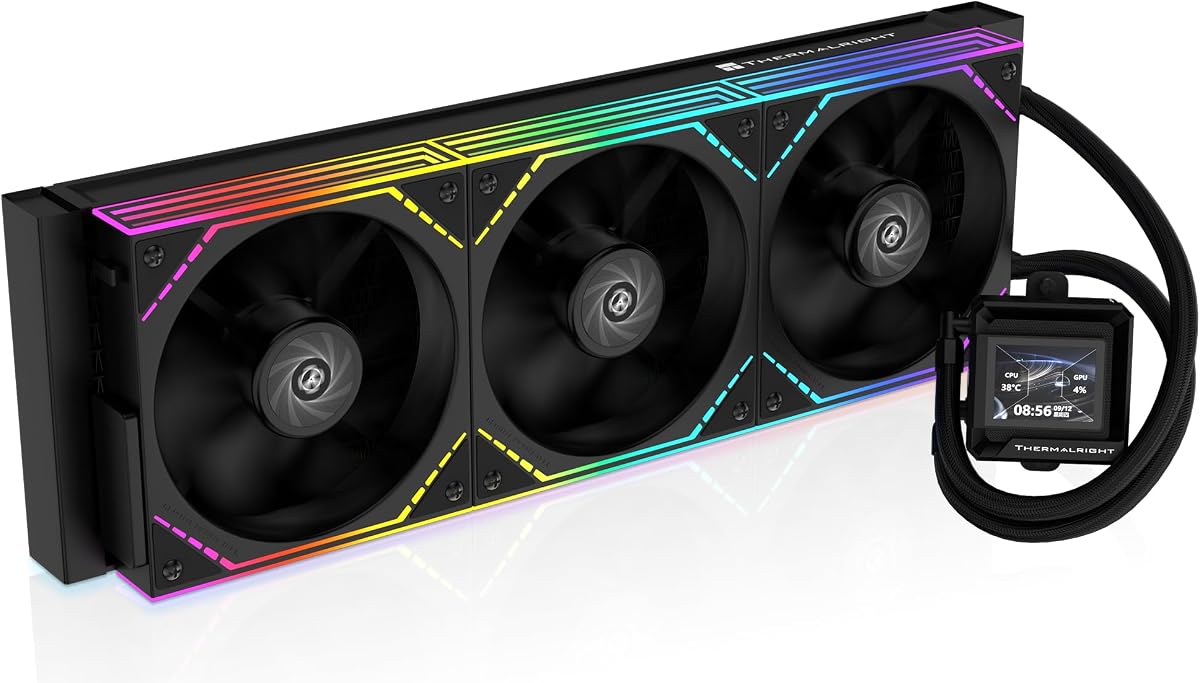
Thermalright FW360 SE ARGB V2 360mm AIO Liquid CPU Cooler
Thermalright’s FW360 SE ARGB V2 hits a practical middle for 9800X3D builders who want a status LCD without a 6.67-inch billboard. A 2-inch screen handles temps, custom images, and GIFs through Thermalright’s software while a 3000 RPM pump and 27 mm-thick 360 mm radiator do the heat work.
Three TL-M12Q 120 mm PWM fans daisy-chain, spin to about 2000 RPM, and claim roughly 68.9 CFM with 2.21 mmH2O of pressure—credible numbers for pushing a dense rad in a gaming case shared with a hot GPU.
AM5/AM4 and Intel LGA 1851/1700/1200/115X support matches what 9800X3D owners need today. The SE V2 is a value LCD path if TRYX/Chill Arc screens feel excessive.
Tune pump and fan PWM separately if your board allows. A 3000 RPM pump left wide open can erase the acoustic gains you bought an AIO for.
Pick FW360 SE when you want Thermalright’s cooler economics plus a modest screen. Pick Wonder Vision in this pack when the curved 2K panel is the entire point.
Install Thermalright’s app if you care about GIF faces; otherwise the cooler still cools with motherboard fan control alone.
27 mm plus fans can exceed slim top mounts. Confirm your case’s total AIO thickness allowance.
We may earn a commission at no additional cost to you.

Lian Li’s Hydroshift II 360 CL (white HS2LCD36RW) targets builders already living in the L-Connect universe. Three CL wireless fans arrive pre-installed on a 360 mm kit with a 2.1-inch 480×480 IPS pump screen and a sliding tube clamp for aligning tubes cleanly across an AM5 board.
Control flexibility is the differentiator: Offline Mode uses a rotatable cap for quick LED/LCD changes and basic coolant/pump readouts; Wireless Mode talks to an L-Wireless Controller; Streaming Mode uses USB and L-Connect 3 for MP4/GIF-level personalization. 9800X3D owners who hate leaving USB headers occupied can lean on offline/wireless day-to-day.
The listing’s troubleshooting note matters: if L-Connect cannot see the device, set the PWM port (CPU_FAN / AIO_PUMP / PUMP) to PWM or DC—not Auto—and try full speed. That BIOS footgun has stranded more AIOs than bad paste.
Server-grade corrugated tubing improves bend radius near tall EXPO kits and dual-slot GPUs. Remove the sliding clamp when fan-to-motherboard clearance is tight, as Lian Li documents.
Buy Hydroshift II when wireless fans and white aesthetics are the build’s north star. Buy Nautilus when you want zero wireless pairing anxiety.
Before blaming Windows drivers, lock the AIO pump header to PWM. It solves a surprising number of ‘USB not detected’ tickets referenced in the pack text.
Align tubes for photos, then check they are not kinked against a GPU shroud when the glass panel closes.
We may earn a commission at no additional cost to you.

Thermalright Wonder Vision 360 UB ARGB Black CPU AIO Cooler
Wonder Vision 360 UB is Thermalright’s curved-screen flagship in this pack: a magnetic 6.67-inch 2K (2400×1080) 60 Hz AMOLED on a 360 mm loop with a pump spinning near 6400 RPM and fans up to about 2150 RPM. The cooler size block lists roughly 403×120×52 mm overall with a substantial pump housing—measure glass clearance.
TRCC software drives 2D/3D media, system metrics, and theme DIY. The screen pulls power from a motherboard 9-pin USB header; the listing even suggests unplugging the pump Type-C as a hardware reset if the panel misbehaves.
Critical AM5 note from the pack: AMD installs use the original motherboard backplate, which is not included with the cooler. Do not throw away your board’s backplate when unboxing a new AM5 motherboard if Wonder Vision is your plan.
For 9800X3D, the thermal ceiling is generous; the acoustic ceiling is what you manage. Create a pump curve that stays calm in-game and only rises during stress tests or massive shader compiles.
Pick Wonder Vision when you want Thermalright’s screen ecosystem at panorama scale. Pick FW360 SE for a smaller LCD, or CORSAIR when you want no screen at all.
Photograph your AM5 board’s rear before teardown. Wonder Vision expects that factory plate—losing it stalls the build.
2150 RPM triple fans will win any noise fight against a quiet Nautilus if left untamed. Cap them in BIOS or TRCC-linked control.
Both chase 6.67-inch class screens; TRYX leans GIPHY/KANALI and Asetek branding, Thermalright leans TRCC and very high pump RPM. Compare software comfort more than resolution math.
We may earn a commission at no additional cost to you.
9800X3D is not a 250W blender chip in most gaming loads. A competent 280–360 mm AIO is about sustained quiet boosts and case flexibility, not preventing immediate meltdown. Buy AMOLED pumps because you enjoy them; buy Nautilus/ARCTIC when acoustics and simplicity win.
360 mm front or top mounts are ideal, but only if fans plus rad thickness clear the motherboard and PSU shroud. ARCTIC’s 280 mm path exists for cases with dual 140 mm mounts. Never force a 360 into a 240-only chassis for Instagram reasons.
Even pressure, correct AMD brackets, and—uniquely for Wonder Vision—retaining the stock motherboard backplate. Offset designs like Liquid Freezer III Pro deserve their AMD offset instructions, not a centered guess.
Skytech Azure 3 solves 9800X3D cooling by selling the whole PC. DIY AIOs assume you already have—or will buy—board, RAM, storage, and GPU. Do not mix those shopping intents.
Pump dBA claims, fan curves, case mesh, and GPU fan ramp interact. A “silent” AIO in a choked case still screams. Plan intake fans alongside the radiator purchase.
Need is strong language—many run happily on strong air coolers—but a 360 mm AIO is a comfortable, quiet choice for sealed glass cases and warm rooms. It also leaves RAM slots open compared with wide dual towers.
Yes for typical gaming and content use. The 360 mm RS stack with a ~20 dBA pump claim is aligned with long, quiet sessions. Extreme ambient temperatures still require case airflow, not only a famous radiator.
ARGB if the radiator is visible and you already sync motherboard lighting. Non-ARGB if the PC is under a desk or you want fewer cables. Cooling fundamentals match closely.
Because it is in the product pack and ships a 9800X3D with a 360 mm ARGB AIO already installed. It is a valid path to a cooled 9800X3D system, not a discrete cooler for existing builds.
When your case has dual 140 mm mounts or cannot fit triple 120s cleanly. ARCTIC’s Liquid Freezer III Pro 280 also adds offset mounting and a VRM fan that many 360 mm fashion AIOs omit.
Only if you enjoy customization. They do not raise 9800X3D frame rates. TRYX, Chill Arc, and Wonder Vision are for builders who look at the PC as much as the monitor.
Set the pump header to PWM (or the manufacturer’s guidance), confirm the pump RPM reads nonzero, then build a fan curve. Lian Li’s pack notes show Auto modes can break USB detection on some kits.
Most list AM5/AM4 support and will mount on later Ryzen chips using the same socket. Always recheck bracket revisions, but a Nautilus or FW360 bought for 9800X3D should not be single-CPU disposable.
Many 9800X3D gamers prefer front intake 360s for cool CPU liquid, accepting slightly warmer case air, or top exhaust to dump heat—both work if fans are strong. Avoid sandwiching a rad with no fresh air path.
For most DIY Ryzen 7 9800X3D builds, a straightforward 360 mm cooler like CORSAIR’s Nautilus RS (black or ARGB) delivers quiet, ample headroom without forcing a media OS onto your pump. ARCTIC’s Liquid Freezer III Pro 280 is the smart deviation when offset mounting, VRM airflow, and 140 mm fans fit your case better than a triple-120 fashion rad.
Screen-heavy options from TRYX, Chill Arc, Thermalright, and Lian Li turn the cooler into décor—excellent if that is the assignment. The Skytech Azure 3 remains the pack’s escape hatch: a full 9800X3D machine with its 360 mm AIO already solved. Match the product type to your actual project, mount carefully on AM5, and let fan curves—not marketing TDP alone—define how quiet the champion gaming chip feels day to day.