Best Quiet 360mm Value
CORSAIR Nautilus 360 RS Liquid CPU Cooler

- 360 mm radiator with three RS120 high-pressure fans
- Pump claimed around 20 dBA with daisy-chain PWM
- Convex cold plate, pre-applied paste, AM5 and LGA 1851
Expert Review & Guide
Spending less than the cost of a midrange GPU on an all-in-one cooler used to mean thin radiators, rattly pumps, and fans that sounded like a hairdryer by week two. In 2026 the under-150 AIO shelf looks different: 360 mm radiators with real static-pressure fans, motherboard-simple wiring, and a few LCD or iCUE Link options that still leave money for RAM and a case with actual mesh. This guide sticks to ten pack products that routinely land in that budget window depending on sales—enough range to cover quiet black builds, white ARGB showcases, and compact 120–240 mm installs.
We only evaluate the ASINs in the ReviewConsensus pack. Images, ratings, socket lists, and about-bullet facts come from those listings. Dollar prices are omitted on purpose; treat “under 150” as the shopping intent that brought you here, then judge radiator size, pump claims, fan quality, and software baggage honestly.
If your case only clears a 240 mm top mount, skip straight to the Kraken and Titan 240 sections. If you have a full 360 mm front or top bay, start with the Nautilus and Aqua Elite 360 picks—those are where most gaming CPUs get the quietest everyday curves.


As an Amazon Associate we earn from qualifying purchases. We may earn a commission at no additional cost to you.
Compare radiator class, fan count, and control style first. Specs skip dollar amounts so you can focus on whether a 120 mm, 240 mm, 280 mm, or 360 mm loop fits your case before you open a cart.
CORSAIR Nautilus 360 RS Liquid CPU Cooler
If you are hunting the best AIO coolers under 150 and your case fits a 360 mm radiator, the black Nautilus 360 RS is the pack’s most sensible default. CORSAIR focuses the listing on cooling first: three RS120 fans with AirGuide focus and Magnetic Dome bearings, a pump claimed around 20 dBA, and a slightly convex cold plate with paste already patterned on. That is exactly the feature mix budget builders should want—area, pressure, and a quiet circulating motor—without paying for a screen you will never stare at while gaming.
Daisy-chained PWM is the install detail that keeps this cooler feeling modern. Instead of three separate fan cables fighting your 24-pin and GPU power, you can land the trio on a single 4-pin motherboard header. For under-150 builds that often skip fancy fan hubs, that wiring simplicity is free performance of a different kind: fewer mistakes, cleaner side-panel photos, and less chance you leave a fan unplugged.
Socket coverage includes Intel LGA 1851 and 1700 plus AMD AM5 and AM4, so the cooler can follow you from a current midrange chip to the next socket refresh without a second purchase. The convex plate matters most on large modern IHS designs where flat plates sometimes leave corners light; still tighten in a cross pattern and verify even paste squeeze-out.
Thermally, a 360 mm loop in this class gives you quieter fan curves than a stretched 240 mm fighting the same CPU. That is the real under-150 win—not chasing a single-digit Celsius brag in a synthetic loop, but keeping fans low during Discord-plus-Chrome-plus-game evenings. Mount the radiator as a deliberate intake or exhaust; coolant heat still dumps into case air either way.
Skip this SKU only if you need lighting, a smaller rad, or ARCTIC’s 280 mm thick-fan approach. Otherwise it is the quiet black workhorse of this list.
Stealth builds, office-adjacent desks, and anyone who already owns case fans they like and does not want another RGB ecosystem.
Measure radiator thickness plus RS120 depth against your front or top mount, and check GPU length if the rad shares the front chamber.
We may earn a commission at no additional cost to you.
CORSAIR Nautilus 360 RS ARGB Liquid CPU Cooler
The white ARGB Nautilus is the same thermal argument as the black unit with a different social life. You still get the ~20 dBA pump claim, convex cold plate, pre-applied paste, and 360 mm radiator, but the fans are RS120 ARGB units that daisy-chain to one PWM header and one +5V ARGB header. For builders shopping best AIO coolers under 150 who also want the radiator to match white RAM and cable combs, this is the cleaner buy than mixing black fans later.
Lighting does not change copper-to-IHS physics. Buy this SKU because you want synchronized soft light without jumping into a full iCUE Link Titan stack. Motherboard ARGB control is usually enough; you are not forced into a desktop suite just to spin the fans.
Magnetic Dome bearings and AirGuide tech remain in the pitch, which matters when three lit fans sit in your peripheral vision. Flicker and rattle ruin showcase builds faster than a missing GIF on a pump screen. Keep ARGB brightness moderate if your desk faces a bedroom wall at night.
Socket support mirrors the black cooler—AM5/AM4 and LGA 1851/1700—so the white aesthetic choice does not trap you on one platform. If you later move the cooler to a different board, the mount kit travels with the same confidence.
Choose ARGB Nautilus when the PC is part of the room. Choose black Nautilus when you want identical cooling with fewer dust fingerprints and one less header occupied.
Three radiator fans plus case strips can overload a single header—use a powered hub if colors flicker under load.
Match PSU cables and GPU shroud color before obsessing over pump-cap chrome; mismatched blacks break the theme instantly.
We may earn a commission at no additional cost to you.

NZXT’s Kraken Plus 240 is the under-150 answer when your case only accepts a dual-fan radiator but you still want a customizable 1.54-inch square LCD on the pump. The Turbine pump is pitched for high flow and head pressure with low noise, while F120P-style high-static-pressure fans push air through the 240 mm rad. That combination is enough for many mainstream gaming CPUs if case airflow is honest.
Zero RPM Mode is the feature that makes this cooler feel special in a budget LCD conversation. At light loads the fans can stop entirely, leaving pump hum as the only moving-part sound. For evening browsing or video calls, that is closer to “silent AIO” behavior than a 360 mm kit stuck at a high minimum RPM.
Installation language emphasizes pre-applied paste and a single breakout cable from the pump cap—helpful when you are building in a cramped Micro-ATX cube. Tool-free brackets covering AM5 and LGA 1851 reduce the classic “where did that standoff go” panic.
CAM control unlocks the screen: live temps, GIFs, custom images, even Spotify or YouTube integrations per the listing. That is fun if you keep the PC on a desk; less relevant if the tower lives on the floor. Do not buy Kraken Plus solely for the screen if thermals are already struggling in a hot case—fix intake dust filters first.
Pick this when 240 mm is your hard ceiling and you want personality on the block. Pick Nautilus 360 or Aqua Elite 360 when you can fit three fans and want more thermal margin for the same shopping budget class.
Non-K midrange chips, well-ventilated cases, and undervolted gaming loads rarely need a 360 mm radiator if fan curves are sane.
Plan a USB header for the LCD path and accept that customization lives in NZXT’s software rather than a bare motherboard RGB app.
We may earn a commission at no additional cost to you.
CORSAIR iCUE Link Titan 360 RX RGB Liquid CPU Cooler
The Titan 360 RX RGB is what you buy under the under-150 umbrella when a sale drops the iCUE Link stack into range and you already like CORSAIR’s ecosystem—or you are starting one. FlowDrive pairs a three-phase pump motor with a precision cold-plate profile, while three pre-mounted RX120 RGB fans handle radiator duty with AirGuide and Magnetic Dome bearing claims familiar from CORSAIR’s better fan lines.
The included iCUE Link System Hub is the differentiator versus Nautilus. Universal connectors let you chain devices to one hub port, which pays off if you later add Link fans or other Link parts. For a one-and-done cooler with no other Link gear, you are still getting tidier wiring than three discrete RGB fan leads, but you are also accepting hub placement and software.
PWM control up to 2100 RPM plus Zero RPM signal support means you can schedule silence at the desktop and aggression only when the CPU package heats. That dual personality is ideal for budget-conscious creators who render occasionally but browse most of the day.
Compatibility covers LGA 1851/1700 and AM5/AM4, matching the rest of CORSAIR’s current AIO story. Install the hub somewhere with USB and power access that will not block a vertical GPU or HDD cage.
Choose Titan 360 when cable ecology and RGB cohesion matter as much as Celsius. Choose Nautilus 360 when you want the radiator class without joining a proprietary connector family.
Mount the System Hub behind the motherboard tray or in a PSU chamber pocket so Link cables do not cross the show side.
Nautilus wins simplicity; Titan wins ecosystem polish and Zero RPM storytelling for mixed-use PCs.
We may earn a commission at no additional cost to you.

Kraken Core 240 RGB is NZXT’s entry 240 mm story: a pump claimed around 3100 RPM, high-static-pressure RGB Core fans in a single frame, and direct motherboard connectivity so you are not hunting a proprietary hub on day one. For builders who want RGB without LCD complexity, it lands in a sweet spot among best AIO coolers under 150 for compact cases.
The single-frame design is both convenience and constraint. Installation is faster because multiple fans share one structure and fewer screws, which helps in short top-mount tunnels. Future fan upgrades are less modular than discrete 120 mm units—you are replacing a bonded assembly, not one blade tray.
PWM adjustments let you tune noise versus cooling without opening CAM for every change, though the cooler remains CAM-ready if you later want NZXT’s ecosystem. That optional software stance is friendlier than LCD models that feel incomplete without a USB data cable.
Pair Core 240 with a case that has a clear 240 mm top or front mount and decent intake. A choked cube will make any 240 mm AIO sound louder than the pump rating suggests because the fans will race to move stagnant air.
Buy Core when you want NZXT aesthetics and RGB on a budget radiator size. Step up to Kraken Plus only if the screen is a must; step to a 360 mm CORSAIR or Thermalright if your case allows more radiator area.
Micro-ATX gaming boxes, short ITX cases with 240 mm roofs, and rebuilds replacing a failing stock tower.
If you never open monitoring overlays, Core’s simpler pump face often looks cleaner than a dim unused screen.
We may earn a commission at no additional cost to you.

CORSAIR iCUE Link Titan 240 RX RGB Liquid CPU Cooler
Think of the Titan 240 RX RGB as the apartment-case version of the Titan 360. You keep FlowDrive’s three-phase pump and precision cold plate, two RX120 RGB radiator fans, Zero RPM capability, and the iCUE Link System Hub—then trade the third fan of radiator length for easier top-mount clearance in mid-towers that never fit a 360.
For under-150 shopping, that trade is often correct. Many “360 mm support” case marketing lines assume thin radiators and no front GPU conflict; a honest 240 mm Titan can outperform a jammed 360 that starves for fresh air. Measure twice.
Link connectivity still shines with only two fans: sequential universal connectors into one hub port beat spaghetti Y-cables behind a dense ITX board. If you already own Link devices, the 240 mm Titan extends the chain instead of introducing a second control language.
Socket support matches the 360—Intel 1851/1700 and AMD AM5/AM4—so platform choice is not the limiter. Case height and rad thickness are.
Pick Titan 240 when Link + 240 mm is the constraint set. Pick Titan 360 when the case and GPU layout clearly allow the longer radiator without choking intake.
Confirm motherboard VRM heatsink and RAM height will not collide with a top-mounted 240 mm block-to-rad tube bend.
Enable Zero RPM in iCUE or board BIOS for idle, then set a steeper curve only above your typical gaming package temperature.
We may earn a commission at no additional cost to you.

Thermalright Aqua Elite 240 V3 Water Cooling CPU Cooler
Thermalright’s Aqua Elite 240 V3 is the classic value play among best AIO coolers under 150: fourth-generation pump head claimed up to about 2800 RPM with a long ~40,000-hour life story, dual TL-C12B-S V2 ARGB fans around 1500 RPM with ≤25.6 dBA noise claims, and motherboard 5V ARGB sync for the fans and illuminated pump logo. You are buying cooling hardware density, not lifestyle branding.
The octagonal pump with swirling rectangle design and ARGB halo under the logo is more distinctive than generic black bricks. If your side panel frames the CPU block, that halo reads as intentional rather than bare plastic.
Airflow claims around 66 CFM per fan with PWM control are appropriate for a 240 mm rad serving mainstream CPUs. Enthusiasts running heavy multi-core all-core loads in hot rooms may still prefer the Aqua Elite 360 in this same family for lower fan RPM at the same temperature target.
Compatibility spans AM4/AM5 and a long Intel list including 115x through 1700 and 1851. That breadth helps if you are refreshing an older board on a tight budget before a full platform jump.
Choose Aqua Elite 240 V3 when you want ARGB and solid ratings without CORSAIR ecosystem cost. Choose Nautilus or Titan when cable polish and brand software matter more than raw value.
Chain the cooler’s ARGB line with case fans on the same 5V header only if total LED load stays within your board’s limits.
Follow Thermalright’s socket-specific metal fastener steps carefully; value kits reward patience more than forced screws.
We may earn a commission at no additional cost to you.

Thermalright Aqua Elite 120 V3 Liquid CPU Cooler
A 120 mm AIO is a compromise product, and Thermalright is honest about the form factor: fourth-gen pump, 120 mm aluminum radiator, ARGB fan with S-FDB bearings, and the same halo pump styling as the larger Elite models. In an under-150 roundup it exists for SFF builders who literally cannot mount anything longer—not for people chasing the quietest 14700K gaming loop.
Expect the fan to work harder than on the 240/360 siblings when package power climbs. That is physics, not a defect. If your CPU is a modest six-core or an efficiency-tuned chip, the 120 mm Elite can still beat a choked low-profile air cooler in some ITX layouts.
Noise claims around ≤25.6 dBA at the fan’s operating window are realistic only if you keep curves gentle. Pegging a single radiator fan at maximum forever will not feel “AIO quiet.” Use motherboard PWM and accept higher temps before higher RPM when the PC sits on a desk.
Socket coverage remains broad, which is useful for older office ITX boards you are quietly upgrading. Just remember AMD installs may rely on the motherboard’s original backplate per typical Thermalright guidance.
Buy Aqua Elite 120 only when radiator length is the bottleneck. If your case fits 240 mm, spend the same shopping energy on the 240 V3 or a Nautilus 240-class rival instead.
Prefer exhaust-out-the-rear 120 mm rad mounts when possible so GPU intake air is not pre-heated by coolant.
Best with moderate TDP parts; pair hot K-series chips with larger radiators from this same guide.
We may earn a commission at no additional cost to you.
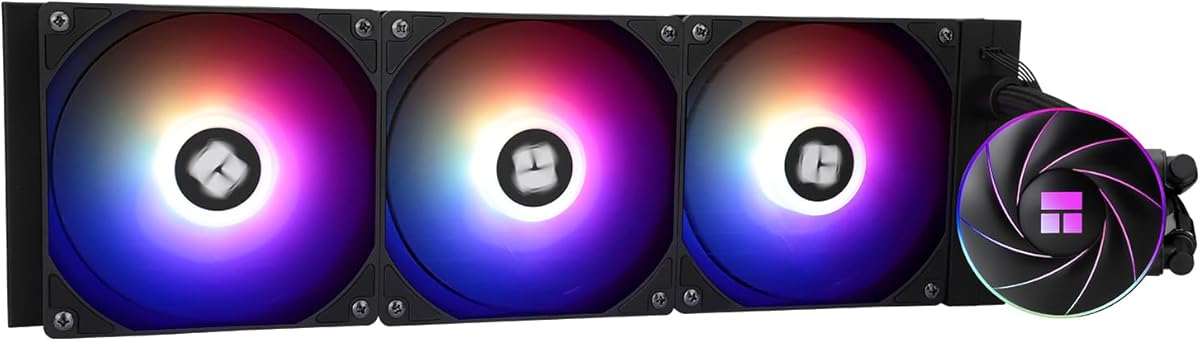
Thermalright Aqua Elite 360 ARGB Liquid CPU Cooler
Aqua Elite 360 ARGB is how Thermalright answers CORSAIR’s 360 mm Nautilus on sheer radiator area while staying deep in under-150 shopping. Three TL-C12C-S ARGB fans rated around 1550 RPM with ~66 CFM and ≤25.6 dBA claims push through a black aluminum 360 mm stack, while the pump uses a 0.1 mm pitch copper mirror base and roughly 2600 RPM operation with a long life claim.
The case-width recommendation over about 250 mm is not fine print to ignore. A 360 mm radiator sideways in a narrow chassis is how tubes kink and fans scrape PSU shrouds. Measure external width and internal front-to-glass clearance before you commit.
ARGB synchronization on 5V 3-pin headers keeps lighting in motherboard software—no mandatory Thermalright desktop suite for colors. That is a plus for builders who already sync ASUS, MSI, or Gigabyte ecosystems.
Against Nautilus, you typically trade some cable elegance and brand polish for more aggressive value and similar radiator class. Against Titan, you avoid Link hubs entirely. Against Aqua Elite 240, you gain the ability to run quieter fan curves on the same CPU.
Pick Aqua Elite 360 when the case is wide enough and you want maximum rad for the money. Pick Nautilus when quieter pump marketing and daisy-chain wiring matter more than squeezing every dollar.
Begin around 40–50% PWM at gaming loads; the triple 120 layout often cools enough without screaming.
Elite 360 wins if your case is 3×120 native; ARCTIC wins if you prefer 140 mm fans and VRM blower tricks.
We may earn a commission at no additional cost to you.

ARCTIC Liquid Freezer III Pro 280
ARCTIC’s Liquid Freezer III Pro 280 ignores the RGB arms race and spends the engineering budget on P14 Pro 140 mm fans, native offset cold-plate mounting, an integrated VRM fan, and hose-integrated PWM cable management. In a best AIO coolers under 150 conversation, it is the pick for people who measure success in board thermals and low-speed acoustics rather than pump GIFs.
P14 Pro fans are described as stronger and quieter than prior P14 units especially at low speeds, with higher maximum speed available when loads spike. That curve shape is ideal for mixed workdays: quiet spreadsheets, assertive compiles.
Offset mounting that shifts the cold plate toward the hotspot is particularly relevant for chiplet CPUs, though Intel users also get contact-frame language in the listing for LGA 1851/1700 pressure optimization. Read the platform-specific hardware steps before you discard brackets.
Cable management is almost a feature product: radiator fan PWM wires hide in the tube sheath so only one visible cable reaches the board. In panoramic cases that alone can justify choosing ARCTIC over a prettier but messier 240 mm kit.
Choose LF III Pro 280 when your case has a clean 280 mm mount and you care about VRM airflow. Choose a 360 mm Nautilus or Aqua Elite when the chassis is already drilled for triple 120s and you want maximum conventional radiator area.
Two 140s can match or beat three entry 120s acoustically; three quality 120s win if the case only supports 360 mm.
RGB showcase builders and anyone without a verified 280 mm rad location should look at Nautilus or Aqua Elite 360 instead.
We may earn a commission at no additional cost to you.
Under this budget, radiator area and case fit decide thermals more than logo embroidery. A well-mounted 360 mm value AIO with sane fans usually runs quieter than a cramped 120 mm premium block fighting the same CPU. Start with your case’s official radiator matrix, then subtract real-world fan thickness and dust-filter depth.
If the matrix says “360 mm front” but your GPU is long, simulate the conflict with cardboard before you buy. Many under-150 returns start as clearance surprises, not pump failures.
Marketing dBA numbers are rarely measured in identical chambers. Treat pump claims like CORSAIR’s ~20 dBA Nautilus figure as directional: useful for comparing within a brand family, weak for cross-brand absolutes. In practice, fan curves and case turbulence dominate what you hear from the chair.
Zero RPM features on Titan and Kraken Plus matter if your PC idles a lot. If you compile or game for hours daily, prioritize radiator size and static-pressure fans over idle-stop gimmicks.
Nautilus and Aqua Elite can live on motherboard headers alone. Titan expects you to place an iCUE Link hub. Kraken Plus wants CAM for the LCD. None of that is evil—just count USB headers and patience as part of the purchase.
If you already run a competing RGB suite, adding a second desktop app for one cooler is a real quality-of-life cost. Prefer motherboard-sync ARGB models when you want fewer trays in the system tray.
Yes for most mainstream and many enthusiast chips if you choose adequate radiator size and keep case airflow healthy. A 360 mm Nautilus, Titan, or Aqua Elite in this pack is the safer bet for hotter processors; 120 mm units are compromises for small cases, not substitutes for proper radiator area. Always validate your specific CPU’s package power against realistic fan noise goals rather than marketing TDP alone.
If the case truly fits a 360 mm radiator without starving the GPU, take the 360 for quieter fan curves. Choose 240 mm when top mounts are short, front chambers are GPU-blocked, or you are building ITX. Kraken Core, Kraken Plus, Titan 240, and Aqua Elite 240 exist for those constraints—not because 240 mm magically matches 360 mm silence under equal load.
Nautilus and Thermalright Aqua Elite models can run on motherboard PWM and ARGB headers without brand suites. Titan coolers include an iCUE Link hub and are designed around that ecosystem for full features. Kraken Plus relies on CAM for LCD customization even though fans and pump can still cool with basic power. Match software appetite to the SKU.
They are worth it if the PC is on your desk and lighting is part of why you built it. They are wasted money—and extra cables—if the case is solid steel under a desk. Thermals do not improve because LEDs exist; buy ARGB for aesthetics after radiator size is settled.
Larger fans can move similar air at lower RPM, which often sounds smoother than small fans spinning faster. ARCTIC also adds offset mounting, a VRM fan, and hidden PWM wires—priorities for thermal-focused builders. You do need a case with real 280 mm support; you cannot assume every 360 mm tray accepts two 140s cleanly.
Only when the chassis forces a 120 mm radiator. The Aqua Elite 120 V3 is a legitimate SFF tool, not a shortcut to cheap high-end cooling. If a 240 mm mount exists, the extra radiator length usually buys more silence than any 120 mm “deal.”
It speeds first installs and reduces beginner mess, which is why Nautilus, Kraken, and several others include it. It is not magic paste—mounting pressure and even contact still matter. If the pre-applied layer looks damaged in shipping, clean it off and apply a known good paste rather than guessing.
The CORSAIR Nautilus and Titan units in this pack list Intel LGA 1851/1700 and AMD AM5/AM4. NZXT Kraken models call out AM5 and LGA 1851 brackets. Thermalright Aqua Elite kits list broad Intel/AMD support including 1851 on the relevant SKUs. Always match the exact listing’s socket line to your board before purchase.
Dust the radiator fins and fans every few months, keep tubes from sharp bends, and avoid running pumps dry if you ever open a loop (these sealed AIOs are not meant for user refills). You do not need annual coolant changes on sealed units. Watch for unusual pump noise changes after years of use as a replacement signal.
For most shoppers chasing the best AIO coolers under 150 in 2026, start with the CORSAIR Nautilus 360 RS in black for quiet no-nonsense cooling, or the white ARGB Nautilus if the PC is a desk centerpiece. Stretch into the iCUE Link Titan 360 when ecosystem wiring and Zero RPM tricks matter, or grab Thermalright’s Aqua Elite 360 when you want maximum radiator metal for the money in a wide case.
If your chassis caps you at 240 mm, Kraken Core, Kraken Plus, Titan 240, and Aqua Elite 240 cover simple RGB, LCD personality, Link polish, and raw value respectively. Tiny 120 mm and specialized 280 mm ARCTIC options exist for SFF and thick-fan niches—not as defaults.
Measure twice, mount evenly, set a calm PWM curve, and let radiator size do the quiet work. That is how an under-150 AIO feels expensive long after the unboxing glow fades.