Best Copilot+ Gaming Hybrid
Acer Nitro 16S AI Copilot+

- Ryzen AI 9 365 Copilot+ path with 73 overall AI TOPS class
- GeForce RTX 5070 Ti Laptop GPU with 992 AI TOPS neural rendering
- 16" WQXGA 180Hz, 32GB DDR5, 2TB Gen4 SSD, Wi-Fi 6E
Expert Review & Guide
AI laptop marketing in 2026 throws three different scoreboards at you at once: NPU TOPS for Copilot+ experiences, GPU AI TOPS for DLSS and local image models, and vague “AI Ready” stickers on machines that merely open the Copilot sidebar. Buyers who actually care about offline Recall-class features, local Stable Diffusion-style workflows, or RTX neural rendering need to sort those claims before the cart fills with the wrong chassis.
This guide reviews ten Amazon pack products as listed—not a fantasy shortlist. You get Acer Nitro and Predator machines pairing Ryzen or Core Ultra CPUs with GeForce RTX 5060 and 5070 Ti Laptop GPUs, true Copilot+ contenders like the Acer Nitro 16S with Ryzen AI 9 365 and the Aspire 14 with Core Ultra 7 256V, NIMO 17.3-inch Ryzen AI 9 HX 370 systems with Radeon 890M and 50 TOPS NPUs, the tablet-like ASUS ROG Flow Z13 with Ryzen AI MAX+ 395 and 128GB LPDDR5X, plus entry “AI Ready” boxes that mainly deliver Copilot keys and modest silicon.
We stay blunt about class differences. An RTX 5070 Ti’s nearly thousand GPU AI TOPS is not the same product category as a 47–50 TOPS NPU Copilot+ ultraportable, and neither excuses a 128GB SSD on an Aspire Go. Duplicate NIMO ASINs in the pack share the HX 370 story with different listing angles—read each review for the distinguishing ports, Wi-Fi, and warranty framing. No dollar prices; specs and fit only.


As an Amazon Associate we earn from qualifying purchases. We may earn a commission at no additional cost to you.
Separate Copilot+ NPU machines, RTX neural-GPU gaming laptops, large-screen Ryzen AI HX creators, and entry AI-Ready systems before you commit. Specs stay practical—no prices.

If your definition of an AI laptop starts with neural rendering in games and CUDA-friendly local models rather than Microsoft’s Copilot+ checklist, the Nitro V 16S is the pack’s clearest mid-tower-in-a-backpack answer. AMD’s Ryzen 7 260 feeds up to roughly 38 overall AI TOPS on the CPU side—enough to assist background AI utilities—while the GeForce RTX 5060 Laptop GPU carries the real horsepower story at about 572 AI TOPS under NVIDIA’s Blackwell-era messaging.
That GPU-first AI story matters for buyers running DLSS 4 Multi Frame Generation, Ray Reconstruction, and creator apps that lean on Tensor Cores. Full ray tracing with neural upscaling is where this chassis earns its keep; chatting with the Copilot pane while browsing is not. Acer pairs the silicon with a 16-inch WUXGA 1920×1200 IPS panel at 180Hz and claims 100% sRGB coverage—practical for gaming clarity and color-okay content work without pretending to be a DCI-P3 reference display.
Memory and storage land in a sweet spot for 2026 AI-curious gamers: 32GB DDR5-5600 across two slots (listed maximum 32GB) and a 1TB Gen4 SSD with a second M.2 bay free. Local image models and video caches love that RAM floor; the dual-slot ceiling is the catch if you hoped to grow past 32GB later. Wi-Fi 6 covers most homes; competitive LAN warriors chasing 6E/7 will look at the Predator and Nitro Copilot+ siblings instead.
Thermally this is still a Nitro: expect audible fans when RTX loads spike, and plan a hard surface so intake vents can breathe. For creators who stream and run a small local LLM helper, the discrete GPU keeps frame times saner than any Radeon 890M 17-inch thin shell in this pack. For students who only want Windows Studio Effects and long battery, this is overkill and louder than necessary.
Stack it against the Helios Neo 16 when you need 5070 Ti and a 240Hz WQXGA canvas; stack it against the Nitro 16S Copilot+ when you refuse to sacrifice official Copilot+ NPU features. The V 16S wins the “I game hard and dabble in GPU AI” brief without forcing a 2TB premium config.
Buy it when Blackwell RTX features define your week. Skip it when your priority list literally says Copilot+ Recall on battery in a library—that job belongs to the Aspire 14 or the Ryzen AI HX NIMO machines.
Gamers using DLSS 4, streamers running NVIDIA broadcast-style effects, and hobbyists fine-tuning local image models benefit more from 572 GPU AI TOPS than from a 40+ TOPS NPU alone.
Use the free M.2 slot for a scratch/cache drive so the system SSD stays clean. Do not expect a RAM bump past the listed 32GB maximum.
Nitro V trades the Neo’s 240Hz WQXGA, G-SYNC suite, and 5070 Ti headroom for more RAM out of the box (32 vs 16GB) and a simpler 180Hz WUXGA panel.
We may earn a commission at no additional cost to you.

Acer’s Predator Helios Neo 16 AI configuration is the pack’s “desktop energy, laptop footprint” swing: Intel Core Ultra 9 275HX up front, GeForce RTX 5070 Ti Laptop GPU behind it, and a 16-inch WQXGA panel sprinting at 240Hz with G-SYNC and Advanced Optimus in the marketing stack. NVIDIA’s about copy pegs the GPU near 992 AI TOPS—the kind of neural-rendering budget that makes ray-traced titles and generative upscalers feel native rather than bolted on.
Intel’s NPU story here is modest—about 13 NPU TOPS for offloading background removal and audio cleanup—not the 40+ TOPS Copilot+ passport. Treat this as an RTX AI laptop first and a light NPU helper second. Intel Application Optimization mentions are a nice bonus for older titles, but they do not redefine the purchase the way the 5070 Ti does.
The display is a Predator highlight: 16:10 WQXGA, up to 500 nits, up to 100% DCI-P3, 3ms overdrive claims, plus G-SYNC. Creators who grade roughly on-laptop will prefer this canvas to the Nitro V’s WUXGA 180Hz panel, even if neither replaces a calibrated desktop reference. Killer Wi-Fi 6E supports cleaner 6GHz channels when your router can play along.
The configuration stumble is memory: 16GB DDR5 alongside a 1TB Gen4 SSD. Modern game launchers plus a local AI assistant plus Chrome will crowd 16GB faster than marketing decks admit. If you cannot reconfigure RAM on your exact SKU, practice ruthless startup hygiene or prefer the 32GB Nitro siblings for multitasking AI workloads.
Noise and heat follow HX + 5070 Ti physics. Desk placement, elevated rear feet if you use them, and avoiding soft beds matter. Compared with the Flow Z13, you gain discrete RTX horsepower and lose tablet flexibility and that absurd 128GB LPDDR5X pool. Compared with the Nitro 16S Copilot+, you gain panel refresh and lose official Copilot+ NPU class and the 2TB / 32GB comfort kit.
Choose the Helios Neo when high-refresh competitive visuals and 5070 Ti neural features are the point of the machine. Pass if you need Microsoft’s Copilot+ feature checklist or more than 16GB without a screwdriver adventure.
Lean on the NPU for light audio/video cleanup and keep the 5070 Ti free for the game + encoder path. Close overlay bloat that steals the scarce 16GB.
Dim for dark-room sessions to reduce eye fatigue; reserve peak brightness for bright rooms and HDR-ish content where the panel can show off.
We may earn a commission at no additional cost to you.
The Acer Nitro 16S AI Copilot+ PC is the rare pack member that refuses to pick a side between Microsoft’s Copilot+ definition and NVIDIA’s neural-GPU definition. AMD’s Ryzen AI 9 365 brings a Copilot+ capable architecture with about 73 overall AI TOPS in Acer’s copy, while the GeForce RTX 5070 Ti Laptop GPU stacks roughly 992 GPU AI TOPS for DLSS 4-class rendering. That dual stack is why it sits in our top picks.
For buyers who want Recall-style Copilot+ experiences when Microsoft enables them on the device, plus the ability to play and create with Blackwell ray tracing, this configuration reads like a future-proofing checklist. Ten-core Ryzen AI 9 365 messaging targets AAA gaming, esports, and 4K HDR streaming alongside private on-device AI—less “Copilot key sticker,” more platform story.
The comfort kit is unusually complete: 32GB DDR5, a 2TB Gen4 SSD, Wi-Fi 6E, and a 16-inch WQXGA 2560×1600 IPS panel at 180Hz with 100% sRGB claims. Local model weights, game installs, and creative caches coexist without the 128GB Aspire Go tragedy. Fans will still spin under combined GPU+NPU load; that is the tax for refusing compromise.
Against the Helios Neo, you trade 240Hz / 500-nit theater and Killer networking for RAM, storage, and Copilot+ legitimacy. Against the Nitro V 5060, you step up GPU class and AI platform maturity. Against NIMO HX 370 machines, you gain discrete RTX and lose the lighter 17-inch aluminum / PD-charger lifestyle.
Realtime creators who generate assets locally, then drop them into Unreal or Premiere, will feel the point of this SKU. Casual Word-and-Netflix buyers will overspend on silicon they never stress. Windows update hygiene matters on Copilot+ devices—feature rollouts still vary by market according to Microsoft’s own caveats.
Buy the Nitro 16S Copilot+ when you want one chassis to satisfy both “AI PC” checklists and serious RTX gaming. It is our Best Overall pick in this AI-laptop pack for that dual mandate.
Confirm your region’s Copilot+ feature availability. Hardware readiness is necessary but not always identical to every preview feature shipping on day one.
Even with 2TB, keep model caches on a dedicated folder and game libraries sorted so Windows Search and AI indexers are not crawling chaos.
Use a performance mode for tournaments; switch to quieter profiles for coding with local assistants so the fans are not narrating your standups.
We may earn a commission at no additional cost to you.

NIMO’s 17.3-inch Copilot+ machine (ASIN B0H287MLHQ) answers a different AI question than the Nitros: how do you get a 50 TOPS NPU, modern Radeon 890M graphics, and a sprawling workspace without strapping a 5070 Ti cooler to your backpack? The Ryzen AI 9 HX 370 with XDNA acceleration is the headline—local AI coding assistants, on-device generative tools, and Copilot+ class experiences without leaning on cloud round-trips for every keystroke.
Radeon 890M on RDNA 3.5 covers AAA at sensible settings, 4K edit pretends, and 3D light work better than older UHD/Iris graphics, yet it will not match the pack’s RTX 5070 Ti machines in ray tracing or Tensor-heavy workflows. That is the intentional trade: quieter thin-ish aluminum, USB4 for optional eGPU experiments later, and less brick weight than Predator-class chassis.
Thirty-two gigabytes of DDR5 with dual SO-DIMM support toward 64GB, plus dual M.2 PCIe 4.0 slots, makes this a grow-with-you AI workstation shell. The 17.3-inch FHD 144Hz panel and 180° hinge favor spreadsheet mosaics, lecture sharing, and esports clarity over color-critical grading. Fingerprint-in-touchpad and a privacy shutter round out the professional-leaning kit.
Portability claims matter here: under 4.6 pounds and about 0.74 inches thick for a 17.3-inch machine is aggressive. Verify feel in person if possible; large panels still demand bigger bags. USB4 at up to 40Gbps, HDMI 2.1, USB-A, audio, and SD coverage make dock life realistic for developers who live in containers and local models all day.
Compare carefully with the other NIMO HX 370 listings in this pack—they share silicon DNA but differ in rating snapshots, Wi-Fi callouts, and accessory emphasis. This ASIN’s 5.0 pack rating and Copilot+/expansion storytelling make it the large-screen iGPU pick; still read recent owner comments for QC variance common to marketplace brands.
Buy it when you want Copilot+ NPU horsepower and a desk-replacing screen without discrete GPU drama. Skip it when Unreal with RTX, DLSS 4, or CUDA denoise plugins pay your rent.
Keep model weights on the fast SSD, run agents locally on the NPU/CPU path, and reserve Radeon 890M for previews. Expand to 64GB when multiple containers and browsers coexist.
USB4 eGPU support is a future option, not a free 5070 Ti. Budget enclosure compatibility research before you assume desktop parity.
We may earn a commission at no additional cost to you.

The Aspire Go 15 wears “AI Ready” the way many 2026 mainstream laptops do: Copilot key, Copilot in Windows assistance, and enough CPU/GPU to keep everyday apps moving—not a 40+ TOPS NPU manifesto. AMD Ryzen 3 7320U, Radeon 610M, 8GB LPDDR5, and a 128GB SSD define a homework-and-streaming class machine that happens to speak Copilot.
That honesty is useful. If your AI needs are summarising PDFs in the Copilot pane, drafting email, and joining calls with Acer’s PurifiedVoice/TNR camera helpers, the Go 15 can be enough. If you planned to host local LLMs, train LoRAs, or edit with RTX acceleration, stop—this SKU will frustrate you before lunch.
The 15.6-inch FHD IPS narrow-bezel panel is fine for Netflix and documents. Dual full-function USB-C, Wi-Fi 6, and HDMI 2.1 cover student docks. Windows 11 Home in S Mode may require switching out of S Mode for broader app installs—budget that friction for anyone outside the Microsoft Store garden.
Storage is the sharp edge: 128GB vanishes under Windows updates and a single creative suite installer. Plan cloud storage or an external SSD on day one. Eight gigabytes of memory similarly caps Chrome tab museums and any flirtation with local AI runtimes.
Against the Lenovo N100 business box, you get a similar “light AI companion” class with Acer’s Copilot-key/AcerSense angle. Against every HX 370 or RTX machine here, you are shopping a different planet. Rating strength (4.4) reflects satisfied everyday users, not power AI adopters.
Buy the Aspire Go 15 as a low-commitment Copilot daily driver for school and light office work. Do not buy it as your “best AI laptop” if the phrase means on-device generative horsepower.
Exit S Mode if you need non-Store apps, move media to cloud/external storage, and keep only essential desktop installs on the 128GB drive.
Jump to Aspire 14 Copilot+ or a NIMO HX 370 when you need real NPU TOPS and a 1TB floor for model caches.
We may earn a commission at no additional cost to you.
The ROG Flow Z13 (2025) is the pack’s science-project-in-the-best-way: a 13-inch kickstand tablet-laptop wrapping AMD’s Ryzen AI MAX+ 395, up to 50 TOPS of NPU, RDNA 3.5 graphics, and a staggering 128GB of LPDDR5X-8000 shared memory. If your AI laptop fantasy is “carry a workstation memory map into a cafe,” this SKU is the myth made SKU.
ASUS leans into Copilot+ PC messaging with ROG Intelligent Assistance for productivity and power efficiency. The Nebula display—16:10 WQXGA-class 2.5K, 180Hz, 3ms, PANTONE validated, 100% DCI-P3—gives creators a color-rich touch canvas rare in gaming 2-in-1s. Vapor chamber and liquid metal talk up sustained quiet-ish performance for the form factor.
Connectivity includes dual USB4 Type-C, HDMI 2.1, Micro-SIM, and a ROG key, with Wi-Fi 7 for next-gen networks. Windows 11 Pro suits encrypted freelance/dev work. A three-month PC Game Pass nod sweetens the entertainment side. Battery claims up to roughly ten hours; real AI compile sessions will drink faster—treat the number as mixed-use optimism.
Tradeoffs are structural. Memory is blazing but soldered—you live with 128GB forever, which is delightful until you wanted cheaper configs. Discrete RTX fans will still prefer Helios/Nitro for pure frame-time leadership in the heaviest titles, even if the Z13’s iGPU-plus-memory combo is uniquely capable for on-device models.
Versus NIMO 17.3 HX 370 machines, you trade screen acreage for true ultraportable 2-in-1 posture and a panel that embarrasses FHD TN/IPS budget screens. Versus Aspire 14, you trade all-day office subtlety for ROG performance ambition and Game Pass energy.
Buy the Flow Z13 when portability, touch/pen-friendly creation, enormous RAM for local AI, and premium build matter more than a classic 16-inch RTX clamshell. It is our Best Tablet AI Workstation pick for a reason.
Use kickstand tent mode for sketching and reviews; clamshell for long typing. Pair USB4 to a portable SSD for project archives so the 1TB stays agile.
Keep the vapor chamber path clear—avoid blocking the tablet back on comforters during long Stable Diffusion sessions.
Micro-SIM support helps field researchers and travelers who need PC data without phone hotspot juggling—confirm carrier bands for your region.
We may earn a commission at no additional cost to you.
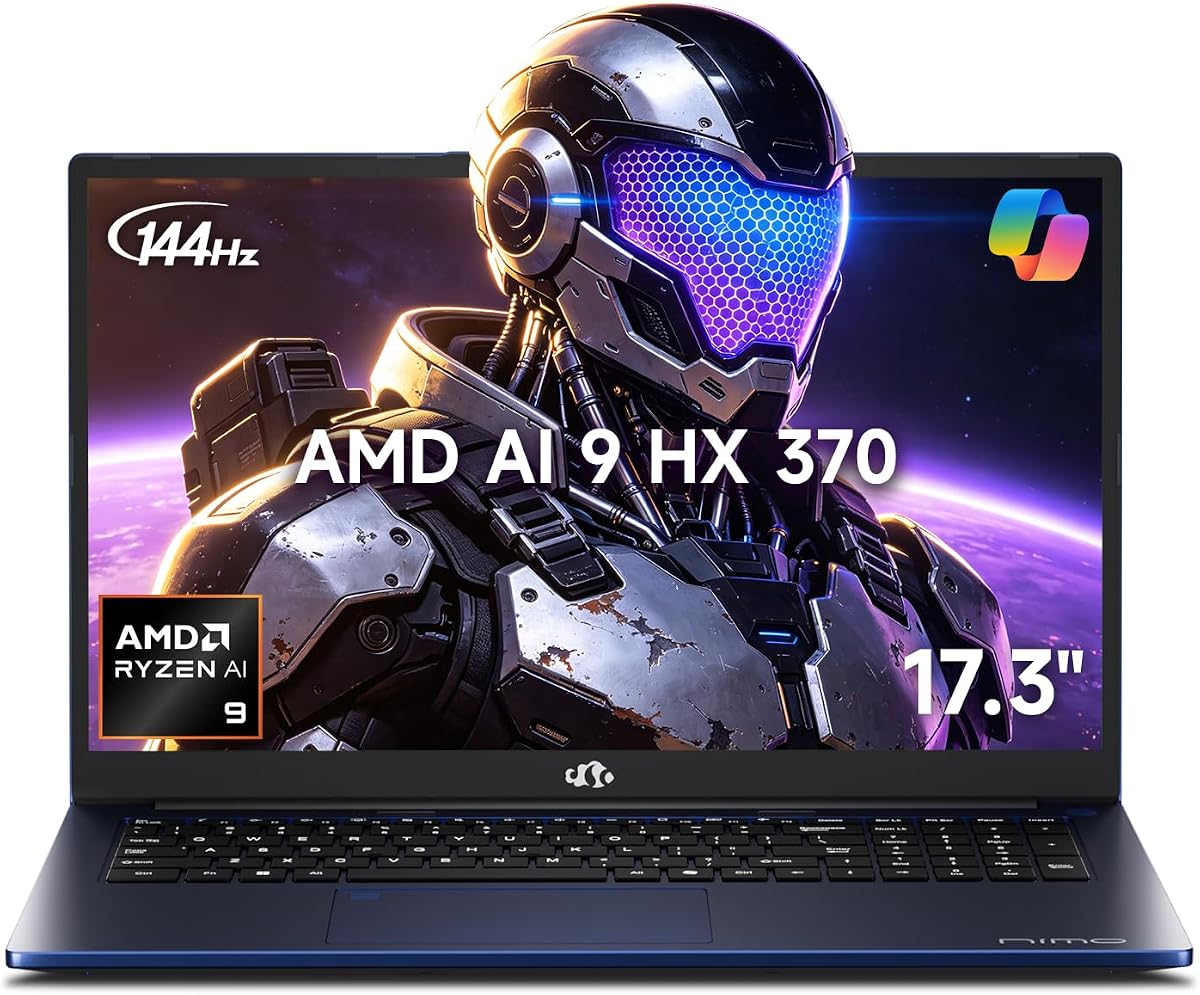
This NIMO 17.3 AI laptop (B0H32M5CG7) shares the Ryzen AI 9 HX 370 and Radeon 890M heart with its Copilot+ twins but markets itself through charger and battery pragmatism: a 100W USB-C PD fast charger with a long cable, a 75Wh pack, and claims that a short top-up returns hours of use. For consultants who already live on USB-C bricks, that accessory story is the differentiator.
Performance framing mirrors the class: local AI, coding, 4K edit attempts, and gaming on 890M without discrete GPU bulk. Thirty-two gigabytes of DDR5 and a 1TB NVMe drive keep multitasking and model caches sane. The 144Hz FHD panel helps esports clarity and smooth scrolling across wide spreadsheets on the big 17.3-inch canvas.
Touchpad fingerprint unlock, backlit keyboard with numpad, and USB4 expansion (dual 8K monitors / eGPU talk) push it toward business-gamer hybrids. Partial U.S. assembly, testing, two-year warranty, and 90-day returns are pitched hard—useful reassurance in a marketplace brand segment where support quality varies.
Why not automatic top pick over the 5.0-rated NIMO sibling? Rating snapshots and feature emphasis differ; Wi-Fi generation callouts are stronger on the Wi-Fi 6E twin. Functionally, expect similar HX 370 realities: strong NPU AI, competent iGPU, large screen, PD lifestyle. Validate the exact wireless adapter and charger contents on the order page.
Against Acer Aspire 14, you gain screen size and raw HX horsepower while losing Intel V-series ultraportable battery legends and aluminum 14-inch grace. Against RTX Nitros, you stay cooler and lighter in spirit but surrender DLSS 4 frame generation leadership.
Pick this ASIN when the included PD charger + 75Wh narrative matches your travel kit. Cross-shop the other NIMO HX 370 rows if Wi-Fi 6E or a higher rating snapshot matters more to you that week.
Charge laptop, phone, and tablet from the 100W PD ecosystem when devices support it—fewer bricks in the sling bag.
75Wh helps, but 17.3-inch panels and HX boosts drain fast under local AI load. Brightness down, discrete-like iGPU loads managed.
We may earn a commission at no additional cost to you.
The Aspire 14 AI Copilot+ PC is the pack’s clearest “take AI to class and through a flight” machine. Intel Core Ultra 7 256V (Series 2) combines CPU, Arc 140V graphics, and an NPU listed up to about 47 TOPS—squarely in Copilot+ territory for Recall preview, richer Windows search, and Click to Do style interactions when your market has the features.
Acer’s battery claim reaches toward 22 hours under specific video playback test settings. Real browsing-plus-Copilot days will land lower, yet the directionality matters: this is the opposite of a 5070 Ti Nitro on battery. Sixteen gigabytes of LPDDR5X and a 1TB SSD are the right ultraportable AI kit—enough memory for everyday local assists, enough disk for documents and a modest model cache.
The 14-inch WUXGA 1920×1200 panel gives taller workspace than old 1080p 14s. Aluminum chassis and a 180° lie-flat hinge support collaborative review on a cafe table. AcerSense key on the backlit keyboard shortcuts device AI helpers for video presence and system tuning—small UX wins that accumulate.
Wi-Fi 6E helps on modern campus networks. What you surrender is upgradeability and discrete GPU headroom. Heavy Unreal, CUDA denoise, and ray-traced gaming belong elsewhere in this guide. What you gain is the AI laptop experience most office buyers actually meant when they searched the keyword.
Against Flow Z13, you trade ROG spectacle and 128GB RAM for quieter professional aesthetics and likely happier battery days. Against NIMO 17.3, you trade screen real estate for true bag portability. Against Aspire Go 15, you leap several classes in NPU, storage, and platform ambition.
Buy the Aspire 14 when Copilot+ on the go is the brief. It is our Best Portable AI Canvas for travelers, analysts, and students who live in documents, browsers, and on-device assistants.
Understand what Recall-class features store locally and configure access thoughtfully on shared household PCs.
Dock to a larger monitor at home so the 14-inch WUXGA remains a travel canvas, not your only color surface.
Microsoft notes Copilot+ experiences vary by device and market—update Windows and do not assume every preview toggle appears instantly.
We may earn a commission at no additional cost to you.

Lenovo’s 15.6-inch 2026 business laptop illustrates how “Copilot AI PC” wording now appears on practical office machines that are not NPU monsters. Intel’s N100 quad-core (up to about 3.4GHz), 8GB DDR5, and a 256GB PCIe 4.0 SSD target Zoom, Excel, browsers, and light Copilot sidebar help—not 50 TOPS on-device generative stacks.
Where it earns shelf space is I/O and security basics: Wi-Fi 6, Bluetooth 5.2, Gigabit Ethernet, two USB-A 3.2, two USB-C with Power Delivery and DisplayPort, HDMI 1.4b, audio jack, firmware TPM 2.0, HD webcam privacy shutter, and a Kensington slot. Small businesses that still hardline into conference room switches will appreciate Ethernet more than another RGB gaming zone.
The 15.6-inch 1920×1080 anti-glare 250-nit panel is an office veteran’s friend under fluorescent lights. At about 3.33 pounds and 0.78 inches, it commutes easily. Fingerprint is not the headline here the way it is on NIMO touchpads; physical privacy shutter and TPM carry the trust story instead.
AI expectations must stay grounded. Copilot in Windows can draft and summarize; the silicon will not gracefully host large local models. Against Aspire Go 15, you gain Ethernet and a slightly larger SSD with similar RAM limits. Against Aspire 14 Copilot+, you lose the modern V-series NPU platform entirely.
Ratings around 4.4 suggest the machine succeeds when buyers want a cheap-to-run business clamshell, not when they chase our top AI picks. IT managers imaging fleets may still prefer Latitude/EliteBook renewed options in other guides; this pack SKU is the new-retail light Copilot companion.
Purchase it for staffers who need ports, TPM, and Copilot-assisted Office days. Redirect power users to HX 370 or Core Ultra V Copilot+ rows immediately.
Enable BitLocker with TPM, set the privacy shutter habit, and redirect OneDrive known folders so the 256GB SSD survives.
HDMI 1.4b is fine for 1080p office monitors; dual 4K dream desks want newer HDMI/DP bandwidth from other machines.
We may earn a commission at no additional cost to you.

The final NIMO 17.3 Copilot+ listing (B0H28JCP6Y) is not filler—it is the twin that spells out Wi-Fi 6E tri-band networking alongside the familiar Ryzen AI 9 HX 370, 50 TOPS NPU, Radeon 890M, 32GB DDR5, and 1TB SSD recipe. If your dorm or co-working space saturates 2.4/5GHz, the 6GHz narrative is the reason to prefer this ASIN over a vaguely specified sibling.
Otherwise the AI story matches the class: local workloads, coding, multitasking, and strong iGPU visuals without discrete GPU thickness. USB4, HDMI 2.1, USB-A, SD reader, and audio cover creator docks. 180° hinge sharing, backlit numpad keyboard, touchpad fingerprint, and privacy shutter repeat the professional checklist.
Battery and charging again emphasize 75Wh capacity and an included 100W PD charger for multi-device top-ups. Aluminum lid/bottom and under-4.6-pound claims keep the large screen almost commute-plausible. Two-year warranty and 90-day returns remain part of NIMO’s trust pitch.
Why review it separately? Pack hygiene. Identical short names with different images/ASINs confuse buyers; we call the Wi-Fi 6E and accessory emphasis so you do not accidentally order the wrong twin. Check the live listing’s wireless card and charger photos before checkout.
Versus Flow Z13, you get more inches and upgradeable SODIMMs but lose 2.5K Nebula gloss and 128GB soldered extravagance. Versus RTX Acer AI gamers, you stay on the NPU-and-iGPU path. Versus Aspire 14, you choose desk replacement scale over ultraportable stealth.
Choose this row when Wi-Fi 6E and the Copilot+ HX 370 large-screen formula align. If another NIMO twin is cheaper with identical confirmed internals that week, compare serial specs line by line—do not assume sameness from the short name alone.
Confirm B0H28JCP6Y vs B0H287MLHQ vs B0H32M5CG7 on wireless, charger inclusion, and warranty text before you click buy.
Enable 6GHz SSID on your router; otherwise Wi-Fi 6E hardware falls back and the differentiator vanishes.
Run a local AI encode, a long Wi-Fi call, and a stress browse test in week one while returns are easy.
We may earn a commission at no additional cost to you.
Copilot+ experiences generally want NPUs in the 40+ TOPS class (Aspire 14’s ~47, NIMO/Flow ~50, Nitro 16S Ryzen AI overall figures). NVIDIA GPU AI TOPS (572–992 in this pack) accelerate DLSS, ray reconstruction, and many local creative/AI apps but do not automatically equal Microsoft’s Copilot+ badge. “AI Ready” plus a Copilot key (Aspire Go, Lenovo N100) usually means software assistance on modest silicon—plan accordingly.
Local LLMs and big RAM caches love Flow Z13’s 128GB or any 32GB HX/RTX kit. Neural gaming and CUDA creators should prioritize RTX 5060/5070 Ti Nitros and the Helios Neo. Students living in Word, Canvas, and Copilot sidebar can save complexity with Aspire 14—or even Aspire Go if storage discipline is real.
USB4 on NIMO and Flow unlocks docks and optional eGPUs. Dual M.2 / SODIMM on several NIMO units extend life. Soldered LPDDR on Aspire 14 and Flow means buy the RAM you need now. Mainstream Acer/ASUS/Lenovo channels differ from marketplace brands—factor warranty friction into the “best” math, not only TOPS charts.
Practically, look for a dedicated NPU strong enough for Copilot+ experiences (often 40+ TOPS), and/or a modern GPU with substantial AI TOPS for neural rendering and local creative acceleration. A Copilot key alone on a weak CPU is software convenience, not an AI platform upgrade.
No. RTX AI TOPS excel at DLSS, many creative accelerations, and GPU-side ML. Copilot+ features key off NPU capability and Microsoft’s enablement. Machines like the Nitro 16S Copilot+ try to deliver both; Helios Neo is RTX-first with a modest NPU.
The ROG Flow Z13’s 128GB LPDDR5X is uniquely friendly to large-memory local workloads. NIMO HX 370 and Acer Nitro configs with 32GB are the pragmatic mainstream picks. Avoid 8GB Aspire Go / Lenovo N100 class machines for local models.
Only if window tiling and desk replacement matter more than bag weight. NIMO’s 17.3-inch HX 370 systems shine as portable monitors-with-keyboards; travelers should prefer Aspire 14 or Flow Z13.
Marketplace listings often remix the same platform with different photos, Wi-Fi callouts, charger stories, and rating histories. Compare ASINs, wireless claims, and included adapters rather than trusting identical short names.
As a cheap Copilot-assisted everyday notebook, possibly. As a generative on-device AI machine, no—the 8GB memory and 128GB SSD are structural limits. Step to Aspire 14 or HX 370 when AI is the purchase reason.
Most modern Windows 11 AI PCs handle lighter Studio Effects-class features; quality and offload efficiency scale with NPU/GPU strength. Copilot+ hardware generally provides the smoother always-on experience.
Not entirely—NPUs can clean up streams and free GPU cycles—but frame rate leadership still tracks RTX class, panel refresh, and cooling. Gamers should rank 5070 Ti / 5060 first, then note Copilot+ as a bonus on the Nitro 16S.
USB4 speeds docks, fast external storage for model datasets, and optional eGPU paths on NIMO/Flow machines. If you live docked at a desk, prioritize it; if you never leave Wi-Fi and a backpack, prioritize battery and weight instead.
Update Windows and GPU/NPU drivers, run a local AI workload, stress Wi-Fi on a video call, check panel uniformity, and verify RAM/SSD match the listing. AI laptops hide weaknesses until indexes, models, and games coexist.
The best AI laptop in 2026 is the one whose accelerator matches your software: Copilot+ NPUs for on-device Windows intelligence, RTX neural GPUs for gaming and CUDA-leaning creation, or honest entry Copilot machines for documents and calls. In this pack, the Acer Nitro 16S Copilot+ is the strongest dual-mandate pick, the Aspire 14 is the traveler’s Copilot+ canvas, and the ROG Flow Z13 is the memory-rich 2-in-1 wildcard.
Acer’s RTX Nitros and Helios Neo cover discrete GPU AI without apology; NIMO’s HX 370 trio covers large-screen Copilot+ iGPU life with expandability and PD charging. Treat Aspire Go and the Lenovo N100 as light companions, not generative workhorses.
Ignore sticker scoreboards that mix NPU TOPS and GPU AI TOPS into one vanity number. Pick the chassis, panel, RAM floor, and accelerator path you will use weekly—then let the rest of the catalog stay on the shelf.