Expert Review & Guide

Best 96 Percent Keyboards 2026: Numpad Compact Boards

Ninety-six percent keyboards exist for a very specific frustration: you want a tenkey for spreadsheets, Discord volume, and inventory hotkeys, but a full-size board steals the mouse pad you actually need for aim. In 2026 the 96% / 98-key layout is the grown-up compromise—arrows and a numpad stay, the empty bezel between blocks disappears, and the footprint lands closer to a TKL than a classic 104-key slab. That makes these boards unusually good for mixed desks where Excel, chat, and competitive shooters share the same surface.

This roundup ranks ten Amazon boards from our 96 percent keyboard pack. We separate gasket cream boards that chase a soft thock from brand wireless boards with tri-mode radios, feature-heavy streamer boards with LCD screens and G-keys, and honest budget options that include a quiet membrane board for shared offices. Ratings reflect Amazon listings at the time of writing. We do not print dollar prices because keyboard deals swing hard during seasonal sales.

Start with the three top picks if you already know you want wireless ROG reliability, a wired creamy gasket daily driver, or a smart-display RK board for desk candy and battery life. Use the comparison table to filter mount style, switch character, and connection type. Then read each review for who should buy, who should skip, and how the board behaves after a week of real typing—not just the first unboxing thock.

Our Top 96% Keyboard Picks for 2026

Best Creamy Gasket

RK ROYAL KLUDGE R98 Pro Wired Mechanical Keyboard

★★★★★9.2/10
RK ROYAL KLUDGE R98 Pro Wired Mechanical Keyboard
  • Gasket mount with five foam layers tuned for a soft, creamy linear typing sound
  • Hot-swappable pre-lubed cream switches and MDA-profile double-shot PBT keycaps
  • Detachable CNC aluminum volume knob plus online driver macros and RGB for Windows and Mac
Check Price →

As an Amazon Associate we earn from qualifying purchases. We may earn a commission at no additional cost to you.

96% Keyboard Comparison: Numpad Layout, Mount, and Connectivity

Scan layout honesty and connection type before you fall for RGB screenshots. Specs below highlight how each board keeps a numpad in a compact frame, what the stock switches feel like, and whether you are buying wired simplicity, tri-mode wireless, or a membrane quiet option. No prices—open the live listing for the current offer.

#ProductSpecificationsScore
1
  • 98-key gasket mount with numpad
  • Pre-lubed cream linear switches
  • MDA PBT keycaps, metal volume knob
9.2
2
  • 96% layout, ~1 cm wider than TKL
  • ROG NX Snow linear, hot-swap
  • Tri-mode BT / 2.4G / USB wired
9.2
3
  • 96% with LCD and rotary dial
  • MLX Fusion tactile switches
  • 8000Hz polling, Virtual Stream Deck
8.2
4
  • 98-key top-mount with smart display
  • BT 5.0 / 2.4G / USB-C tri-mode
  • Hot-swap, 5-layer noise dampening
9.2
5
  • 98-key membrane (not mechanical)
  • Quiet soft touch, rainbow backlight
  • Volume knob, USB-A to Type-C cable
8.6
6
  • S98 smart display wireless variant
  • Pre-lubed creamy sound switches
  • BT / 2.4G / USB-C, hot-swap PCB
8.8
7
  • 98-key full gasket mount layout
  • Hot-swappable creamy thocky switches
  • Wired USB-C with cable routing grooves
8.8
8
  • 96-key AK96 compact with numpad
  • Blue clicky mechanical switches
  • PBT keycaps, dual-side LED lighting
8.4
9
  • 96-key grey AK96 wired layout
  • Blue switches, full key rollover
  • 17 RGB modes plus side LEDs
8.4
10
  • Renewed Vanguard 96 dual-tone
  • MLX Quantum switches, 8000Hz
  • LCD, G-keys; wrist rest not included
9

1. RK R98 Pro - Best Creamy Gasket

RK ROYAL KLUDGE R98 Pro Wired Mechanical Keyboard

RK ROYAL KLUDGE R98 Pro Wired Mechanical Keyboard

9.2/10★★★★★

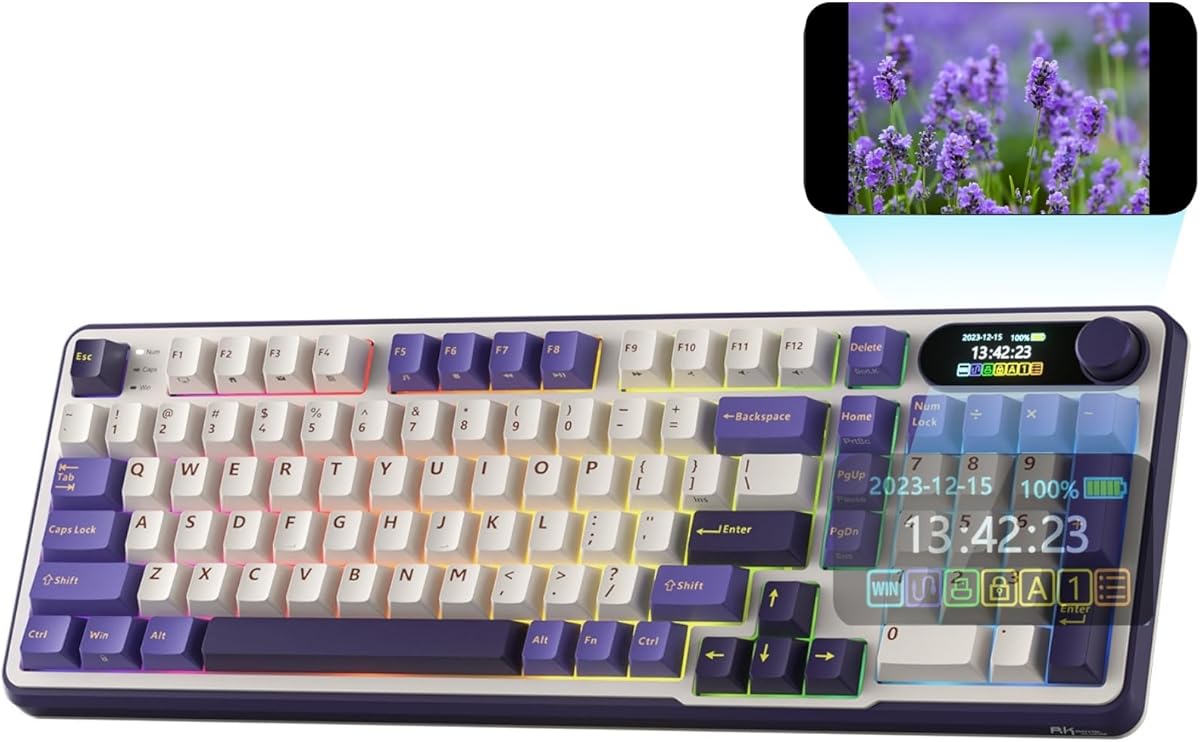
The RK Royal Kludge R98 Pro is the wired creamy board we keep recommending when someone wants a 96% layout that actually sounds finished on day one. The gasket mount and five foam layers do the heavy lifting: bottom-out feels cushioned instead of hollow, and the stock pre-lubed cream linears slide with that soft thock enthusiasts chase without spending a weekend on switch films. For spreadsheet work, Discord volume twists, and late-night ranked queues on the same desk, that combination of numpad access and quiet-ish acoustics is the whole point of this form factor.

  • 98-key gasket mount with numpad and arrows
  • Pre-lubed cream linear hot-swap switches
  • MDA PBT keycaps and detachable CNC volume knob
Check Price →
✓ Pros
  • Gasket mount plus multi-layer foam delivers a soft, creamy typing voice out of the box
  • True 98-key layout keeps numpad and arrows without a full-size desk tax
  • Hot-swap PCB supports 3-pin and 5-pin switches for easy future tuning
  • MDA-profile double-shot PBT keycaps feel wraparound and resist shine better than cheap ABS
  • Online RK driver covers remaps, macros, and RGB on both Windows and Mac
✕ Cons
  • Wired-only connection means no Bluetooth laptop hopping
  • Cream linears are smooth but lack a tactile bump if you prefer click feedback
  • Detachable knob is clever until you misplace it on a messy desk

Detailed review

Layout-wise, the 98-key arrangement keeps the number pad, arrows, and most navigation keys while trimming the wasted plastic that makes a classic full-size board feel like a parking lot. That matters if your mousepad is already fighting a monitor arm. The R98 Pro still feels substantial under the hands, but the right edge of the board sits closer to a TKL footprint than a 104-key slab, so your mouse starts farther left without forcing you onto Fn layers for numbers.

Keycap and switch choices are enthusiast-adjacent rather than bare-bones office plastic. MDA profile sits taller and wraps the fingertips more than flat OEM sets, which some typists love immediately and others need a day to map. Double-shot PBT helps legends stay readable after months of WASD abuse. Because the PCB is hot-swappable, you can park the cream linears if you later want a tactile or heavier linear without soldering—or pull a few keys for experimental silent switches in a shared apartment.

The detachable CNC aluminum volume knob is the party trick. Twist for volume during a raid, and rely on the indicator cluster for Num Lock, Caps Lock, Win Lock, and Mac mode so you are not guessing OS state mid-meeting. RGB modes are plentiful for a desk that likes color, and the online driver is enough for remaps and macros without pretending to be a full QMK ecosystem. Compatibility covers Windows and macOS on a wired link, which is a fair trade if your desk never moves.

Buy the R98 Pro if creamy gasket typing and a real numpad are non-negotiable and you are fine with a cable. Skip it if you need tri-mode wireless for a laptop bag, or if you refuse linears and want a loud blue click on every press. As a daily driver for mixed work-and-play desks, it is one of the most complete wired 96% packages in this pack.

Who should buy the R98 Pro

Choose this board if you type long documents and still hop into games that need a numpad, if your apartment neighbors complain about hollow plastic ping, and if you want hot-swap headroom without paying flagship wireless premiums. It is especially strong for Windows/Mac hybrid desks that stay plugged in.

Setup notes for cream gasket boards

Seat the USB cable cleanly, enable Mac mode if needed via the indicators, and spend ten minutes in the RK online driver locking Win Lock for gaming and remapping any awkward media layer. If the stock cream linears feel too light after a week, hot-swap a heavier linear in modifiers first before changing the whole board.

R98 Pro versus wireless RK S98 models

Pick the R98 Pro when gasket softness and MDA keycaps matter more than a smart display or Bluetooth. Pick an S98 when you need tri-mode radios and on-board status glass. The R98 Pro wins pure wired typing feel in this pack; the S98 boards win desk mobility.


Check Price on Amazon →

We may earn a commission at no additional cost to you.

2. ASUS ROG Strix Scope II 96 - Best Wireless 96%

ASUS ROG Strix Scope II 96 Wireless Mechanical Gaming Keyboard – 96% Full-Size

ASUS ROG Strix Scope II 96 Wireless Mechanical Gaming Keyboard – 96% Full-Size

9.2/10★★★★★

The ASUS ROG Strix Scope II 96 is the wireless flagship pick in this roundup because it treats the 96% layout like a serious daily board instead of a novelty size. ASUS pitches it as only about a centimeter wider than a standard 80% board while keeping the numpad keys that make spreadsheets and MMO bindings sane. On a real desk that difference is the gap between comfortable mouse arcs and constant elbow shuffles. Tri-mode connectivity—Bluetooth for up to three devices, low-latency 2.4GHz ROG SpeedNova, and wired USB—means the same keyboard can follow a gaming PC, a work laptop, and a living-room machine without buying three boards.

  • Compact 96% footprint roughly 1 cm wider than TKL
  • Tri-mode Bluetooth, ROG SpeedNova 2.4GHz, USB wired
  • Hot-swap pre-lubed ROG NX Snow linear switches
Check Price →
✓ Pros
  • Genuine tri-mode wireless with strong battery claims in 2.4GHz use
  • ROG NX Snow linears arrive pre-lubed with dampening foam for cleaner acoustics
  • Includes detachable wrist rest, puller, USB extender, and thoughtful accessories
  • Multi-function wheel and Xbox Game Bar hotkeys suit streamers and console-PC hybrids
  • PC and Mac support with per-key RGB and full macro programming
✕ Cons
  • Brand wireless boards often cost more than RK-class gasket alternatives
  • Linear Snow switches will not satisfy clicky-switch purists
  • Wrist rest is useful but adds bulk when you want pure desk minimalism

Detailed review

Switch and acoustic tuning are more refined than bargain plastic shells. The pre-lubed ROG NX Snow linear switches aim for smooth, thock-leaning travel, and the listing calls out integrated sound-dampening foam plus switch pads to cut ping. Hot-swap support keeps the door open if you later prefer ROG NX Storm clickies or third-party switches. PBT keycaps and per-key RGB keep the board looking intentional after months of use rather than like a rental unit with shiny WASD.

Ergonomics and accessories show ASUS expecting long sessions. Three tilt positions plus a detachable wrist rest help if you type eight hours before hopping into a raid. The multi-function wheel handles media and lighting without diving into menus mid-stream, while F1–F5 hotkeys target Xbox Game Bar and recording workflows. Macro programming across keys matters for creators who treat the board as a control surface, not just a typing slab.

Battery life is a headline claim—up to roughly fifteen hundred hours in 2.4GHz mode depending on lighting habits—so this is one of the few 96% boards in the pack that feels safe as a primary wireless workhorse. Pair that with the included wireless receiver, USB extender for cleaner 2.4GHz placement, cable, puller, and ROG extras, and the unboxing feels complete rather than barebones.

Choose the Scope II 96 if you want brand-backed wireless reliability, a wrist rest in the box, and a layout that keeps full-size function without full-size bulk. Skip it if you are chasing the softest gasket cream board for the least money, or if you refuse linear switches. For hybrid PC/Mac gamers who live on multiple devices, it is the clearest wireless recommendation here.

Best fit for multi-device desks

Use Bluetooth profiles for laptop hopping during the workday, then flip to SpeedNova 2.4GHz for competitive sessions where latency matters. Keep a wired USB cable nearby for firmware nights or when the battery icon finally blinks after weeks of RGB.

Versus Corsair Vanguard 96

The ROG board wins everyday wireless flexibility and accessory completeness. The Corsair Vanguard wins if you specifically want an LCD, G-keys, and Virtual Stream Deck integration on a wired esports-leaning platform. Most people who just need a great 96% wireless board should start with the Scope II 96.

Check Price on Amazon →

We may earn a commission at no additional cost to you.

3. Corsair Vanguard 96 Fusion - Best Streamer Control Deck

Corsair Vanguard 96 Wired Mechanical Gaming Keyboard – 96% Layout

Corsair Vanguard 96 Wired Mechanical Gaming Keyboard – 96% Layout

8.2/10★★★★☆

The Corsair Vanguard 96 with MLX Fusion tactile switches is the feature maximalist of this pack. Corsair’s pitch is blunt: keep a full keyboard with arrows, tenkey, LCD, rotary dial, and six G-keys in a frame roughly the size of a TKL. If your desk is already crowded with a Stream Deck, mic arm, and mouse bungee, consolidating shortcuts onto the keyboard itself is the real upgrade—not another shade of RGB.

  • 96% layout with LCD, rotary dial, and six G-keys
  • MLX Fusion tactile switches with 8000Hz polling
  • Elgato Virtual Stream Deck and FlashTap SOCD support
Check Price →
✓ Pros
  • 1.9-inch full-color LCD turns the keyboard into a personalized control surface
  • Six programmable G-keys plus Virtual Stream Deck mapping for creators
  • 8000Hz hyper-polling targets competitive wired response times
  • FlashTap SOCD handling helps clean up contradictory movement inputs
  • Compact 96% frame keeps numpad utility near TKL width
✕ Cons
  • Lower Amazon rating than several RK and ROG options in this pack
  • Wired-only design; no Bluetooth or 2.4GHz radio
  • iCUE support noted as coming soon at listing time, so software maturity may lag

Detailed review

The luminous 1.9-inch LCD is the centerpiece. Custom animations, images, and system info give the board a presence that plain RGB strips cannot match. Pair that with the rotary dial and G-keys mapped through Elgato Virtual Stream Deck ideas, and the Vanguard starts to feel like a hybrid between a gaming keyboard and a miniature production console. That is perfect for streamers and power users; it is overkill if you only need quiet Excel entry.

Performance features lean competitive. An 8000Hz polling rate aims to shave input lag for wired play, while FlashTap SOCD handling lets you decide how the board resolves conflicting directional inputs—useful in titles where instant direction changes are part of the skill expression. MLX Fusion tactile switches give a bump many gamers prefer over pure linears for confirmation without going full blue-click loud.

Be honest about the tradeoffs. The Amazon rating sits lower than the RK and ROG leaders, which often signals early software friction, niche expectations, or unit variance. The listing also notes iCUE support coming soon, so treat ecosystem polish as a moving target. And because this SKU is wired, laptop couch sessions still need a cable path.

Buy the Fusion Vanguard if LCD personalization, G-keys, and esports polling matter more than wireless freedom. Skip it if you want a soft gasket thock board for shared offices, or if you need Bluetooth for tablet and laptop switching. It is a specialist pick with a clear audience rather than a safe default for every 96% shopper.

Who gets the most from Virtual Stream Deck keys

Creators who already think in Stream Deck actions will map scene switches, mute toggles, and clip shortcuts to G-keys faster than anyone else. Casual typists who never open overlay software should put that budget toward a cream gasket board instead.

Fusion tactile versus Quantum renewed twin

This listing is the MLX Fusion tactile new unit. Later in the roundup we cover a renewed Dual Tone Vanguard with MLX Quantum switches and an explicit note that the wrist rest is not included. Compare switch preference and renewed condition carefully before you choose.

Check Price on Amazon →

We may earn a commission at no additional cost to you.

4. RK S98 Smart Display - Best Smart Display Value

RK ROYAL KLUDGE S98 Wireless Mechanical Keyboard w/Smart Display & Knob | 96% To

RK ROYAL KLUDGE S98 Wireless Mechanical Keyboard w/Smart Display & Knob | 96% To

9.2/10★★★★★

The RK Royal Kludge S98 with smart display (ASIN B0CQ2MBCWZ) is the value wireless pick when you want more personality than a plain RGB bar but less ecosystem lock-in than a full ROG or Corsair stack. The small screen can show custom GIFs, date, connection mode, Win/Mac layout, and battery status—the kind of information you usually dig through OS menus to find. Combined with a twist-and-click knob for volume, lighting, and mode changes, the board feels interactive without needing a second device on the desk.

  • Smart display for GIFs, battery, and mode status
  • Bluetooth 5.0, 2.4GHz, and USB-C wired tri-mode
  • Top-mount hot-swap board with five-layer dampening
Check Price →
✓ Pros
  • On-board smart display makes battery and connection status glanceable
  • Knob control for volume, RGB, brightness, and connection mode is genuinely useful
  • Tri-mode connectivity covers desk PCs and multi-device laptop life
  • Five-layer foam stack reduces hollow case noise for creamier feedback
  • Hot-swap PCB and double-shot PBT keycaps support long-term customization
✕ Cons
  • Top-mount feel is firmer than the gasket R98 Pro if you want maximum flex
  • Smart display novelty fades if you never customize GIFs or status screens
  • Two similar S98 listings in this pack can confuse shoppers—check the ASIN

Detailed review

Connectivity is the practical reason to choose an S98 over the wired R98 Pro. Bluetooth 5.0, a 2.4GHz dongle, and USB-C wired mode cover almost every modern machine. That matters for people who dock a work laptop by day and game on a desktop by night. A large battery claim in the listing supports the idea that this is meant to live untethered for long stretches, though RGB brightness habits will always change real-world endurance.

Typing character comes from a gaming-friendly top-mount structure plus a cushioned five-layer dampening recipe: IXPE switch pad, thicker foams, and a silicone layer aimed at cutting hollow echo. The result is firmer and more direct than a soft gasket board, which some gamers prefer for consistency even if enthusiasts chasing maximum flex still lean gasket. Hot-swap support and double-shot PBT keycaps keep the platform from feeling disposable.

At a 4.6 rating, this S98 listing sits among the stronger community signals in the pack. Still, remember there is a second S98 variant nearby with a creamier pre-lubed switch emphasis and a slightly different rating. Read the product title and ASIN before you buy so you get the screen-and-battery package you expect rather than the near-twin.

Get this S98 if you want wireless freedom, a status display, and a knob-centric workflow on a 98-key layout. Skip it if you specifically want the softer gasket R98 Pro sound signature, or if you prefer a membrane quiet board for a library-like office. For most hybrid workers shopping RK, this is the sweet spot between features and flexibility.

Using the smart display without gimmick fatigue

Set battery percentage and connection mode as your default screen, then add a single subtle GIF if you enjoy desk flair. That keeps the panel useful during work hours instead of turning into a looping distraction while you write.

Top-mount versus gasket expectations

Top-mount boards often feel more planted and consistent for gaming. Gasket boards like the R98 Pro usually feel softer and more muted. Neither is universally better—pick based on whether you want firm feedback or creamy cushion.

Check Price on Amazon →

We may earn a commission at no additional cost to you.

5. 96% Wired Membrane Keyboard - Best Quiet Office 96%

96% Wired Gaming Keyboard

96% Wired Gaming Keyboard

8.6/10★★★★☆

This black/grey 96% wired gaming keyboard is the honesty pick in a roundup full of hot-swap PCBs: the listing itself says it is a membrane silent keyboard, not a mechanical board. That is a feature if you share a studio apartment, join voice calls all day, or simply dislike the clack of blue switches. Soft membrane travel mutes the room while the 98-key layout still gives you a numpad, twelve shortcut keys, and a more practical footprint than a 104-key full-size board.

  • 98-key membrane keyboard with numpad
  • Quiet soft membrane feel, not mechanical
  • Rainbow backlight and volume knob, USB-C cable
Check Price →
✓ Pros
  • Honest quiet membrane typing for offices and shared rooms
  • 98-key layout still keeps a number pad and shortcut keys
  • Volume knob helps during games without hunting function layers
  • Plug-and-play USB-C cable design with no driver requirement
  • Mixed-color keycaps and rainbow lighting add desk personality cheaply
✕ Cons
  • Not a mechanical keyboard—enthusiasts will miss switch customization
  • ABS-style UV-printed keycaps will not match PBT longevity of premium boards
  • Anti-ghosting claims are more limited than full n-key mechanical rollover

Detailed review

For light gaming and everyday Windows or Mac use, the package is straightforward. A volume knob lets you adjust audio without tabbing out. Rainbow backlight modes and mixed-color keycaps make the desk look intentional even though the switch tech is not enthusiast-grade. Two-stage kickstands and anti-slip feet keep the board stable for typing that is more about comfort than actuation science.

Build expectations should stay realistic. UV-printed ABS keycaps can look sharp and feel frosted at first, but they are not the same durability story as double-shot PBT on the RK and ROG boards. Anti-ghosting is listed around twenty-six keys rather than true full n-key rollover, which is fine for most work and casual games but not ideal if you mash complex chorded inputs in competitive titles.

The detachable-style USB-C to USB-A cable at about 1.5 meters keeps storage easier than a fixed thick cord, and plug-and-play compatibility across older and newer Windows versions plus Mac OS means it works as a spare board for family PCs. No software install is a gift when you are setting up a second machine quickly.

Buy this membrane 96% if quiet operation and simple numpad utility matter more than hot-swap experiments. Skip it if you came here specifically for creamy mechanical thock, gasket mounts, or wireless modes. In a best-of list dominated by mechanical options, it earns a place as the shared-office and low-noise alternative—not as a fake mechanical substitute.

When membrane beats mechanical in a 96% size

Open offices, dorm quiet hours, and households with sleeping kids are the classic cases. You still get the space-saving 98-key geometry without broadcasting every keystroke to the room.

Upgrade path if you outgrow it

If you later want real switches, move to the Surmen gasket board or RK R98 Pro and keep this membrane unit as a travel or guest keyboard. That way the quiet board still has a job instead of becoming drawer clutter.

Check Price on Amazon →

We may earn a commission at no additional cost to you.

6. RK S98 Creamy Pre-Lubed - Best Creamy Wireless RK

RK ROYAL KLUDGE S98 Wireless Mechanical Keyboard w/Smart Display & Knob | 96% To

RK ROYAL KLUDGE S98 Wireless Mechanical Keyboard w/Smart Display & Knob | 96% To

8.8/10★★★★☆

This second RK S98 listing (ASIN B0CQ2MSP2B) is the creamier-sounding twin of the smart-display wireless family. On paper it shares the headline tricks: a small screen for GIFs and status, a multi-function knob, Bluetooth 5.0, 2.4GHz, USB-C, five-layer noise dampening, hot-swap sockets, and double-shot PBT keycaps. The differentiator in the title is the creamy sound pre-lubed switch package, aimed at buyers who want that soft thock character without soldering or aftermarket lube days.

  • S98 wireless with smart display and knob
  • Creamy sound pre-lubed hot-swap switches
  • BT 5.0 / 2.4G / USB-C plus five-layer foam
Check Price →
✓ Pros
  • Pre-lubed creamy-sounding switches emphasize acoustics out of the box
  • Same smart display and knob convenience as the sibling S98 listing
  • Tri-mode wireless keeps the board useful across PCs and laptops
  • Multi-layer dampening targets hollow case noise and clearer feedback
  • Hot-swap PCB invites later switch experiments without soldering
✕ Cons
  • Slightly lower rating than the other S98 ASIN in this pack
  • Near-duplicate feature list makes comparison shopping easy to mix up
  • Top-mount structure still will not flex like a full gasket board

Detailed review

If you liked the R98 Pro’s creamy marketing but need wireless, this S98 variant is the conceptual bridge. You keep 98 keys and a compact desk footprint, gain tri-mode radios, and still get a foam recipe designed to cut hollow ping. The top-mount design stays firmer than gasket, so the typing feel is creamy in sound more than marshmallow in flex—important to set as an expectation before unboxing.

Practical desk use mirrors the other S98: twist the knob for volume or RGB, glance at the display for battery and mode, and hot-swap a problem switch instead of retiring the board. That combination is why RK keeps showing up in 96% shopping carts for people who want enthusiast-adjacent features without boutique waitlists.

The 4.4 rating versus 4.6 on the sibling listing is a reminder to read recent reviews on the exact ASIN you are buying. Switch batches, firmware, and fulfillment variance can differ even when photos look identical. If wireless creamy sound is your priority, this is the S98 to shortlist; if you simply want the highest-rated smart-display RK in the pack, compare both pages side by side before checkout.

Choose B0CQ2MSP2B when pre-lubed creamy acoustics and wireless are the headline requirements. Skip it if you already decided on the gasket wired R98 Pro for maximum soft mount feel, or if the ROG Scope II 96’s accessory kit and brand wireless stack appeal more. Either S98 can be excellent—just do not accidentally order the wrong twin.

How to tell the two S98 listings apart

Match the ASIN in the URL, compare the switch wording in the title, and note the rating difference. Image angles also differ slightly. When in doubt, open both Amazon pages and confirm which switch story you want.

Wireless creamy desk setup tips

Use 2.4GHz for gaming latency, Bluetooth for laptop meetings, and wired USB-C when charging or updating. Keep RGB brightness moderate if you want the battery to last through a full workweek of mixed use.

Check Price on Amazon →

We may earn a commission at no additional cost to you.

7. Surmen Creamy GS98 - Best Budget Gasket 96%

Surmen Creamy Keyboard with Number Pad

Surmen Creamy Keyboard with Number Pad

8.8/10★★★★☆

The Surmen creamy 96% board (often referenced around the GS98 idea in the listing copy) is the budget gasket answer for shoppers who want thock without paying for ROG wireless or Corsair LCDs. The practical 98-key layout keeps a number pad and standalone arrows while claiming roughly twenty percent less space than a traditional 104-key keyboard. That is exactly the geometry argument that makes 96% boards worth considering in the first place.

  • 98-key full gasket mount with numpad
  • Hot-swappable switches, puller included
  • Wired USB-C with three-way cable grooves
Check Price →
✓ Pros
  • Full gasket mount targets creamy or thocky acoustics on a budget
  • Hot-swap PCB plus included puller lowers the customization barrier
  • 98-key layout saves space versus traditional 104-key boards
  • Detachable Type-C cable and bottom routing grooves reduce desk clutter
  • RGB effects and macro support cover both gaming atmosphere and productivity remaps
✕ Cons
  • Wired only—no Bluetooth or 2.4GHz option
  • Brand recognition and software polish trail ASUS and Corsair
  • Stock tuning quality can vary more than premium factory-lubed flagships

Detailed review

Gasket structure plus IXPE and thicker foams is Surmen’s acoustic pitch: less hollow cavity noise, clearer feedback, and that creamy or thocky character people now expect even on mid-tier boards. Hot-swap sockets for 3-pin and 5-pin switches, with a puller in the box, mean you can correct a switch you dislike instead of living with it. For first-time customizers, that inclusion matters more than another unused RGB preset.

Desk hygiene details are thoughtfully ordinary in a good way. A detachable Type-C cable and bottom-case grooves that route the cable in three directions keep the setup neat whether your PC tower sits left or right. Sixteen RGB effects and macro customization give enough lighting and remapping for office-gamer desks without demanding a huge software learning curve.

N-key rollover support helps during chaotic game moments when many keys go down together. Still, keep expectations calibrated: this is a wired enthusiast-style board at an accessible tier, not a tri-mode productivity flagship. If your laptop life requires Bluetooth every day, look at the RK S98 or ROG Scope II 96 instead.

Buy the Surmen if gasket thock, hot-swap curiosity, and a clean wired desk are the brief. Skip it if you need wireless, a smart display, or brand ecosystem software. Among pack options, it is one of the clearest “get into creamy 96% without overspending” recommendations.

First week customization plan

Type on the stock switches for several days before swapping anything. Then change only a few problem keys—often Space, Shift, or Esc—so you learn what you dislike instead of rebuilding the whole board on night one.

Surmen versus RK R98 Pro

Both chase gasket cream energy on wired desks. The R98 Pro leans harder into MDA PBT, a CNC knob story, and a stronger rating signal in this pack. Surmen is the leaner custom-starter pick when you mainly want foam, hot-swap, and a compact numpad layout.

Check Price on Amazon →

We may earn a commission at no additional cost to you.

8. GEEZER AK96 Blue Switch - Best Clicky Blue 96%

GEEZER Mechanical Gaming Keyboard with LED Backlit

GEEZER Mechanical Gaming Keyboard with LED Backlit

8.4/10★★★★☆

The GEEZER AK96 is for shoppers who hear “mechanical keyboard” and still want an audible blue-switch click, not a muted cream linear. The compact 96-key layout retains arrow keys and a numeric keypad so you are not jumping to a 60% Fn-layer lifestyle. That makes it a practical office-and-games board if—and only if—your environment can tolerate clicky acoustics.

  • 96-key AK96 layout with arrows and numpad
  • Blue clicky mechanical switches, full key rollover
  • PBT keycaps with dual-side LED lighting effects
Check Price →
✓ Pros
  • Blue switches deliver crisp click feedback many typists still love
  • 96% layout keeps arrows and numpad unlike cramped 60% boards
  • PBT keycaps help legends stay vivid longer than bargain ABS sets
  • Seventeen lighting modes plus side LEDs create a strong dark-room presence
  • Plug-and-play Type-C wired use on Windows and Mac keeps setup simple
✕ Cons
  • Clicky blues are loud for open offices and late-night households
  • No wireless modes or gasket cream tuning for silent thock fans
  • Feature set is more traditional than smart-display or LCD rivals

Detailed review

Lighting is a clear priority. Seventeen built-in modes, brightness and speed controls, and dual-side LED strips give the grey-and-black shell more presence in a dark room than many plain top-light boards. Dedicated media-style controls for volume and playback reduce the need to remember obscure Fn combinations during music or streams.

PBT keycaps are a welcome material choice at this tier, helping characters stay clearer as oils accumulate. Full key rollover support and responsive blue switches favor typists who like tactile-audible confirmation on every press. Two adjustable kickstands and non-slip pads cover basic ergonomics for longer sessions.

Do not buy this board expecting the soft foam thock language used by Surmen and RK cream models. Blues announce themselves. In a private office or gaming cave that can be satisfying; in a quiet open floor plan it can be a social problem. There is also no tri-mode wireless story here—just a Type-C to USB wired connection that works across PC and Mac.

Pick the GEEZER AK96 if clicky feedback, side-light flair, and a compact numpad layout are the checklist. Skip it if you need apartment-friendly volume, gasket cream switches, or laptop Bluetooth. It is a straightforward wired clicky 96% with a clear personality rather than a do-everything flagship.

Noise etiquette check before you buy blues

If you take calls on speakerphone or share walls with light sleepers, choose a cream linear or the membrane board instead. Save blue switches for spaces where click feedback is a feature, not a complaint generator.

GEEZER versus the grey AK96 twin

This pack also includes another AK96-style blue-switch board with a smart creamy-sounding marketing angle. Compare titles, images, and ASINs carefully—similar layouts do not always mean identical tuning or accessory details.

Check Price on Amazon →

We may earn a commission at no additional cost to you.

9. AK96 Smart Grey - Best RGB Side-Glow Value

AK96 Smart Mechanical Keyboard Gaming

AK96 Smart Mechanical Keyboard Gaming

8.4/10★★★★☆

The AK96 Smart Mechanical Keyboard in grey is another compact 96-key blue-switch take aimed at gamers who want colorful side glow and a volume knob without jumping into gasket custom culture. The listing highlights PBT keycaps, retained arrows and numpad, seventeen RGB modes with dual-side LEDs, and full key rollover—familiar ingredients for this size class, packaged with “clicky creamy sounding” language that really means an audible mechanical voice rather than silent foam luxury.

  • 96-key grey compact layout with numpad
  • Blue switches with clicky creamy marketing tone
  • 17 RGB modes, dual-side LEDs, volume knob
Check Price →
✓ Pros
  • Compact 96% geometry keeps arrows and numpad for mixed work and games
  • PBT keycaps resist fade better than the cheapest ABS alternatives
  • Side LEDs plus seventeen modes create a bright, immersive look
  • Volume knob and media keys speed up everyday audio control
  • Simple Type-C wired compatibility with PC and Mac
✕ Cons
  • Blue clicky character still conflicts with truly quiet office needs
  • Wired-only limits couch and multi-device convenience
  • Overlaps heavily with the GEEZER AK96, so differentiation is mostly listing details

Detailed review

In daily use the board’s job is simple: give you a smaller-than-full-size footprint that still supports number entry and navigation keys, then decorate the desk with bright lighting when the room goes dark. Fn shortcuts for mode, brightness, and speed keep lighting control on the board. Adjustable kickstands and rubber feet handle angle and stability the same way most wired value boards do.

Compared with cream gasket options earlier in this guide, the AK96 Smart is less about acoustic engineering and more about accessible mechanical feedback plus spectacle. That is fine if you like click confirmation and RGB theater. It is the wrong aisle if you came for Surmen/RK foam stacks or ROG wireless battery life.

Because this pack already includes the GEEZER AK96 with a very similar feature story, treat these as sibling value clicky boards and pick based on the exact listing details, current reviews, and which visual finish you prefer. Do not assume they are perfectly identical under the keycaps just because the layout family matches.

Buy the AK96 Smart if you want a grey wired 96% with blue switches, side LEDs, and easy plug-and-play habits. Skip it if quiet membrane typing or hot-swap cream gasket culture is what you actually wanted from this roundup. It is a solid value-shaped option, not a premium wireless contender.

Lighting-first buyer checklist

If dual-side LEDs and dense RGB modes are half the reason you are shopping, this style of AK96 makes sense. If lighting is secondary to switch feel, prioritize the R98 Pro, Surmen gasket, or ROG Snow linear boards instead.

Workday practicality on blue switches

Use it in a private room or with a headset culture that already expects keyboard noise. For all-day standups near coworkers, the membrane 96% or a lubed linear board will create fewer awkward glances.

Check Price on Amazon →

We may earn a commission at no additional cost to you.

10. Corsair Vanguard 96 Quantum Renewed - Best Renewed Feature

Corsair Vanguard 96 Wired Mechanical Gaming Keyboard – 96% Layout

Corsair Vanguard 96 Wired Mechanical Gaming Keyboard – 96% Layout

9/10★★★★★

This Corsair Vanguard 96 Dual Tone listing is a renewed unit with MLX Quantum switches, and that renewed status should be the first thing you weigh—not the LCD screenshot. Renewed electronics can be an excellent value when cosmetic wear is light and keys feel consistent, but you should read the condition grade, check photos if provided, and keep the return window in mind. The listing also warns in clear language that a wrist rest is not included, so do not buy expecting the full accessory story of a new bundle.

  • Renewed Dual Tone Vanguard 96 with LCD and G-keys
  • MLX Quantum switches and 8000Hz polling
  • Wrist rest not included; verify renewed condition
Check Price →
✓ Pros
  • Renewed path can put LCD and G-key features in reach for more buyers
  • MLX Quantum switch package differentiates it from the Fusion tactile SKU
  • 8000Hz polling and FlashTap SOCD still target competitive wired play
  • Virtual Stream Deck style workflows remain the productivity hook
  • Strong rating signal on this renewed listing relative to expectations
✕ Cons
  • Explicitly renewed—inspect condition notes and return policy carefully
  • Wrist rest is not included in the package per the listing warning
  • Still wired-only, and iCUE timing caveats may apply like the sibling board

Detailed review

Feature-wise, the renewed Vanguard still promises the headline experience: a compact 96% frame with arrows, tenkey, a vibrant 1.9-inch LCD, rotary dial, and six programmable G-keys. Custom animations and system stats on the screen remain the personality move. Virtual Stream Deck mapping ideas and FlashTap SOCD handling keep the creator-plus-competitive positioning intact even in renewed form.

MLX Quantum switches are the differentiator versus the Fusion tactile new SKU earlier in this guide. If you specifically want the Quantum feel and a dual-tone look, this ASIN is the one to study. Polling at 8000Hz continues the low-latency wired pitch for players who care about response more than Bluetooth convenience.

Software expectations deserve the same caution as on the other Vanguard: notes about iCUE support timing mean you should verify current software status on Corsair’s side before you assume every overlay and lighting integration is polished on day one. Renewed units can also arrive with older firmware, so plan a cable-connected update session after unboxing.

Buy this renewed Vanguard if you want the LCD/G-key platform, prefer Quantum switches, and are comfortable evaluating renewed condition for savings. Skip it if you need a guaranteed complete accessory kit with wrist rest, want wireless, or would rather have a higher-rated cream gasket daily driver with fewer variables. Handled carefully, it can be the feature flagship on a smarter budget; handled casually, renewed surprises can frustrate.

Renewed buying checklist

Confirm the renewed grade, test every key and the LCD immediately, verify the rotary dial and G-keys, and remember the wrist rest exclusion. If anything feels inconsistent, use the return window quickly rather than living with a compromised flagship.

Quantum renewed versus Fusion new

Choose Fusion new when you want tactile switches and a standard new-unit accessory expectation. Choose Quantum renewed when switch preference and dual-tone styling matter more and you accept refurbished tradeoffs for the advanced control surface.

Should streamers start renewed?

Yes—if you already know you will use the LCD and G-keys heavily and you are picky about inspecting condition. No—if the keyboard is your only computer input device and you want zero uncertainty; then the ROG Scope II 96 or RK S98 are safer daily drivers.

Check Price on Amazon →

We may earn a commission at no additional cost to you.

Best 96 Percent Keyboards 2026: Numpad Compact Boards

How to Choose a 96 Percent Keyboard in 2026

Confirm you actually want 96%, not TKL or full-size

A true 96% / 98-key board keeps a numpad and arrows while deleting the empty gap that inflates full-size width. Buy this size if you use the number pad weekly and still want more mouse space. Stay with TKL if you never touch numpad keys. Stay full-size only if you love the classic separated blocks and have desk room to spare.

Mount style changes the voice of the board

Gasket mounts like the RK R98 Pro and Surmen aim for softer, creamier bottom-out. Top-mount boards like the RK S98 often feel firmer and more consistent for gaming. Neither label guarantees perfection—foam layers and case material matter—but mount style is the fastest way to predict flex and sound before you buy.

Switch character: cream linear, ROG Snow, tactile, or blue clicky

Cream and Snow-style linears favor smooth travel and softer sound. Tactile options like Corsair MLX Fusion give a bump without full click noise. Blue clickies on the AK96-family boards announce every press. Hot-swap PCBs reduce regret because you can change direction later; soldered or non-mechanical boards do not offer that escape hatch.

Wired purity versus tri-mode wireless

Wired boards such as the R98 Pro, Surmen, Vanguard, and AK96 models keep latency simple and usually cost less for the same build tier. Tri-mode boards like the ROG Scope II 96 and RK S98 earn their keep when one keyboard must serve a desktop and multiple laptops. If you hate charging rituals, wired still wins.

Screens, knobs, and G-keys are productivity features—or distractions

A volume knob is almost universally useful. A smart display is useful if you actually glance at battery and mode status. An LCD plus G-keys shines for streamers and macro-heavy workflows. If you only write documents and browse, those extras may be money better spent on better keycaps and switches.

Keycap material and profile affect weeks-two comfort

Double-shot PBT resists shine and fading better than thin ABS. MDA and similar sculpted profiles can feel more wraparound than flat sets. If your fingers fatigue on unfamiliar profiles, give yourself a short adjustment window before declaring a board uncomfortable.

Frequently Asked Questions

01

What is a 96 percent keyboard, and how is it different from TKL?

A 96% keyboard, often implemented as a 98-key layout, keeps essential full-size keys—including a number pad and arrows—while compressing the empty space between key clusters. A TKL (tenkeyless) board removes the numpad entirely. Choose 96% when you still enter numbers constantly but want a footprint closer to TKL width. Choose TKL when mouse space matters more than numpad keys.

02

Are 96 percent keyboards good for gaming and office work?

Yes—that dual-use case is why the size exists. Gamers get more mouse room than a full-size board, while office users keep spreadsheet-friendly number keys. Boards like the ROG Scope II 96 and RK S98 add wireless flexibility for mixed laptop and desktop days, while wired gasket options like the R98 Pro and Surmen favor stable desk setups with nicer typing sound.

03

Should I buy gasket mount or top mount for a creamy sound?

Gasket mounts generally flex more and can sound softer when paired with foam, which is why the R98 Pro and Surmen market creamy or thocky results. Top-mount boards like the S98 can still sound good with dampening layers, but they usually feel firmer. If maximum soft cushion is the goal, start gasket. If planted consistency is the goal, top-mount is not a downgrade.

04

Is the membrane 96% keyboard worth considering against mechanical options?

It is worth considering when silence and simplicity beat customization. The membrane board in this roundup is explicitly not mechanical, which means no hot-swap adventures, but also less noise in shared spaces. If you want deep switch tuning, skip it. If you want a quiet numpad compact board for calls and casual games, it can be the more polite choice.

05

What is the difference between the two RK S98 keyboards in this guide?

Both are wireless smart-display 98-key boards with knobs, tri-mode connectivity, dampening layers, and hot-swap PCBs. The B0CQ2MBCWZ listing currently carries the stronger rating signal in our pack snapshot, while B0CQ2MSP2B emphasizes creamy sound pre-lubed switches in its title. Always match the ASIN and recent reviews rather than buying by photo alone.

06

Do I need 8000Hz polling on a 96 percent keyboard?

Only if you are chasing every millisecond in competitive wired play. Corsair Vanguard models advertise 8000Hz hyper-polling for that audience. Most office work and casual gaming will not feel night-and-day differences versus common 1000Hz boards. Prioritize layout comfort, switch feel, and connection type first; chase polling after those basics are right.

07

Is a renewed Corsair Vanguard 96 a safe buy?

It can be, if you treat renewed status as a first-class constraint. Inspect condition details, test the LCD, rotary dial, and every key immediately, and remember the listing states the wrist rest is not included. If you want zero uncertainty or need wireless, choose a new ROG or RK board instead. If you accept refurbished tradeoffs for Quantum switches and the control-surface features, the renewed path can make sense.

08

Are blue switches too loud for an apartment?

Often yes. The GEEZER and AK96 Smart boards use blue clicky switches that produce sharp audible feedback. In apartments with thin walls, late-night sessions can bother others. Prefer cream linears, ROG NX Snow linears, or the membrane option when noise is a household issue.

09

Can these 96 percent keyboards work with Mac?

Most boards in this pack list Windows and Mac compatibility, including the ROG Scope II 96, RK models with Mac mode indicators or layout display cues, and the wired AK96-style boards. You may still need to remap modifier keys for macOS muscle memory. Check the specific listing for Mac notes and test Option/Command placement after setup.

10

Which 96 percent keyboard should most people buy first?

Most mixed work-and-play shoppers should start with either the ASUS ROG Strix Scope II 96 for wireless versatility or the RK R98 Pro for wired creamy gasket typing with a numpad. Choose the RK S98 smart-display models if you want wireless plus on-board status flair for less brand-premium overhead. Move to Corsair only when LCD and G-keys are genuine workflow tools for you.

Conclusion

The best 96 percent keyboard in 2026 is the one that keeps your numpad without stealing your mousepad—and matches the noise, cable, and feature habits you already have. For wireless multi-device life, the ASUS ROG Strix Scope II 96 is the most complete package in this pack. For wired creamy gasket typing, the RK Royal Kludge R98 Pro is the satisfying daily driver. For smart-display wireless value, the higher-rated RK S98 listing earns the third podium slot.

Specialists still have clear lanes: Corsair Vanguard models for LCD and Stream Deck-style control, Surmen for budget gasket curiosity, AK96-family blue boards for clicky RGB fans, and the membrane 96% for truly quiet shared rooms. The renewed Dual Tone Vanguard can unlock flagship features if you inspect condition carefully and accept the missing wrist rest.

Use the comparison table to lock layout and connection type, then read the exact ASIN notes before checkout—especially among near-twin RK and Corsair listings. When the board finally lands on your desk, give the switches a real workweek before you start hot-swapping everything. A good 96% board should disappear into your workflow while still leaving room for the mouse to do its job.