Best Overall
ASUS Vivobook 14 Core 5 120U

- Intel Core 5 120U (10-core, up to 5GHz) for serious daily workloads
- 16GB RAM, 1TB SSD, and a sharp 14-inch FHD IPS panel
- Windows 11 Pro, privacy shutter, and an included 8-in-1 hub
Expert Review & Guide
Fourteen inches is the laptop size that still fits a backpack side pocket without turning your commute into a deadlift. In 2026 that footprint matters more than ever: hybrid workers bounce between kitchen tables and conference rooms, students hop dorm-to-library in one bag, and consultants live out of overhead bins. A 14-inch panel is large enough for spreadsheets and split windows, yet small enough that the chassis rarely breaks three-and-a-half pounds when the brand actually cares about weight.
This guide ranks ten current Amazon 14-inch machines from our curated pack—not a fantasy wishlist. Configurations span efficient Intel N150 ultraportables with Office 365 bundles, a Lenovo V14 Gen 4 with a 10-core i7-13620H and Windows 11 Pro, an ASUS Vivobook with a Core 5 120U and a full terabyte of SSD, and two Dell Latitude 5420 Renewed business units with Thunderbolt-era I/O. We also call out the hard truths: HD (1366×768) panels on several HP models, 4GB RAM configs that will choke a modern Chrome session, UFS storage that is not a PCIe NVMe drive, and resealed or Renewed listings that split warranties across vendors.
If you want a laptop that disappears into a tote and still plugs into a classroom projector, start with the high-RAM thin HPs and the ASUS business Vivobook. If you need genuine H-series horsepower and Ethernet in a 14-inch shell, the Lenovo V14 is the clear performance pick. Renewed Latitudes make sense when you specifically want a touch FHD panel and Thunderbolt on a corporate chassis—and you accept refurbished variability. Read the reviews in pack order below, then use the buying guide to match screen resolution, memory headroom, and OS edition to how you actually work.

As an Amazon Associate we earn from qualifying purchases. We may earn a commission at no additional cost to you.
Scan processor class, memory, display sharpness, and whether the unit is new, resealed-upgraded, or Renewed before you dig into the full write-ups. Specs below stick to travel-relevant facts—no dollar prices.
Fourteen-inch travel laptops fail in two boring ways: they are either too heavy to bother carrying, or so stripped of ports that you need a hub before the first meeting. This green HP Ultra Light tries to dodge both traps. At 3.24 pounds and about 0.71 inches thick, it fits the classic ultraportable silhouette, yet it still offers USB-C, two USB-A ports, HDMI 1.4b, a headphone jack, a media card reader, and an AC smart pin. For students and hybrid workers who still plug into older projectors and flash drives, that layout is the difference between packing one bag and packing a tech pouch every morning.
The Intel Processor N150 is an efficiency chip built for cool, quiet document days—not sustained exporting or modern AAA games. Paired with 16GB of DDR4, though, it becomes a much more honest everyday machine than the 4GB N150 siblings elsewhere in this roundup. Memory headroom is what keeps Teams, a research tab stack, and Word from thrashing. Treat the CPU as “smooth for school and email,” not “beats last year’s H-series,” and the thermal personality of this thin shell makes sense: cooler palms, longer unplugged browsing, less fan drama on a train tray table.
Storage needs a clear-eyed reading of the listing. The marketed 416GB figure combines 128GB of internal UFS-class storage with a 256GB 7-in-1 docking station and a 32GB microSD adapter. That is useful kit for travel photos and overflow files, but it is not the same experience as a sealed 512GB NVMe drive inside the chassis. Plan for OneDrive, Google Drive, or the dock in the bag if your coursework or client folders grow past the internal footprint. Boot and app feel will still benefit from solid-state storage versus spinning disks—just do not expect a single internal library for everything.
The listing discloses that the seal may be opened for the RAM/storage upgrade path, with a one-year warranty on upgraded parts from SnowBell and HP’s original warranty on remaining components. That pattern is common on Amazon-configured notebooks, but corporate buyers who need a single OEM support ticket should pause. For personal shoppers, the upside is getting 16GB in a thin HP that often ships leaner from the factory. Read the warranty split before checkout if you are gift-buying for someone who panics at third-party support language.
Battery behavior tracks the efficient silicon: the pack emphasizes long battery life and HP Fast Charge that aims for roughly 0–50% in about 45 minutes. That matches how people actually use 14-inch machines—short top-ups between classes rather than eight hours parked at a wall. Wi-Fi 6 and Bluetooth cover campus and cafe networks, while the HD camera handles Zoom without pretending to be a studio webcam. Copilot access and a year of Office 365 lower the “day one friction” for anyone leaving Chromebooks or older Windows installs.
Buy this when you want a genuinely light 14-inch carry, enough RAM for modern multitasking, and ports that survive real classrooms. Skip it if you need FHD sharpness for design work, a single large internal SSD with no accessory storage, or factory-sealed corporate procurement paperwork. In this pack it is the most convincing “throw it in the tote and go” Windows option that still remembers HDMI exists.
College students, remote workers, and frequent flyers whose day is browsers, Office, and video calls. The green slim shell and dock accessories suit people who already live in cloud storage.
Skip it if you color-grade video, run local VMs, or refuse any resealed-upgrade warranty language.
The 0.71-inch profile is the lifestyle win; the dual USB-A plus HDMI row is why it stays useful after the honeymoon. Pair the dock kit with cloud backups so the UFS internal drive never becomes the bottleneck that ruins a thin laptop.
We may earn a commission at no additional cost to you.

HP 14 Business & Home Rose Gold
The rose gold HP is the pack’s reminder that not every 14-inch laptop is trying to be a mini workstation. It ships with the same Intel N150 quad-core story—up to 3.6GHz boost, Intel graphics, Wi-Fi 6, and HP Fast Charge—but it lands with only 4GB of RAM and a 128GB SSD. That configuration can still open Windows 11, run Word, and stream a lecture video. It will not gracefully keep twenty research tabs, Slack, and a spreadsheet pivot open at once. If someone in your household needs a pretty secondary machine for email and light homework, this is that lane. If they are your primary work laptop buyer, keep scrolling to the 16GB models.
Display expectations should stay grounded. The 14-inch LED panel is HD at 1366×768, which is serviceable for documents and Netflix in a pinch, but it is noticeably less sharp than the FHD IPS screens on the ASUS Vivobooks and the Lenovo V14. Side-by-side text work on an external monitor will make the laptop panel feel like a compromise. For a dorm desk that mostly docks to a bigger screen, that may be acceptable. For all-day spreadsheet work on the laptop alone, spend your attention on FHD configs instead.
Where this machine still earns a listing is connectivity and software day-one value. You get USB-C 3.0, two USB-A 3.0 ports, HDMI 1.4, a headphone/mic jack, and an SD card reader—enough to connect a mouse, a flash drive, and a classroom projector without improvising. Wi-Fi 6 and Bluetooth keep it current on campus networks. The included year of Office 365 means a student is not blocked waiting for a school license email on night one. The 720p camera is basic but adequate for Zoom attendance.
Think of the N150 here as a calm appliance CPU. It sips power, stays quiet, and avoids the fan roar of gaming chassis. That personality pairs awkwardly with 4GB of memory because the bottleneck shifts from thermals to paging. Close unused browser profiles. Prefer cloud documents over huge local media libraries. If you can stretch to the 8GB or 16GB HP variants in this same roundup, do that instead—same family ergonomics with far less friction.
Cosmetically, rose gold is the differentiator. Not everyone wants black plastic that looks like every other library loaner. For gift buyers who care about the unboxing moment as much as Geekbench charts, that matters. Just be honest in the gift note: this is a light-duty 14-inch Windows notebook, not a creator machine. Pair it with an external keyboard only if the recipient already understands the RAM ceiling.
Choose it for secondary use, very light homework, or a style-first first laptop where cloud storage will carry the file load. Avoid it as a primary machine for developers, analysts, or anyone who refuses to close tabs. In a 14-inch shortlist dominated by memory-hungry Windows 11 installs, 4GB is the cons list that outweighs the pretty lid for most buyers.
Email, one or two Office docs, and a single streaming tab can limp along. School portals that are mostly browser-based are fine if you stay disciplined about open tabs.
Anything involving local photo libraries, light coding IDEs, or constant video calls with screen share will feel pinched quickly.
This listing is sold as a fixed 4GB / 128GB configuration. Do not assume soldered-versus-upgradeable without checking the specific unit’s service manual after purchase. Budget as if the RAM you buy is the RAM you keep.
We may earn a commission at no additional cost to you.
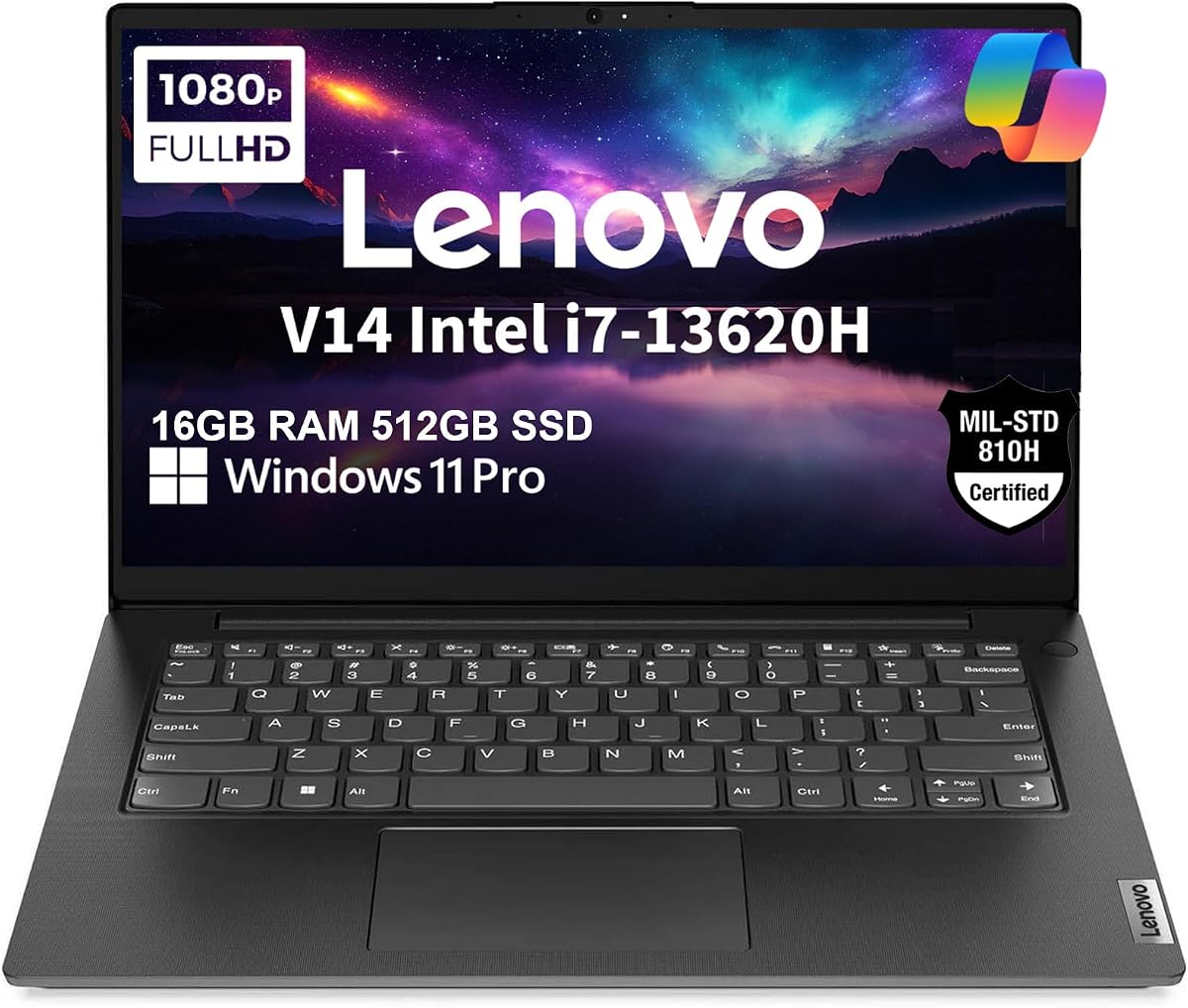
If the rest of this pack feels like a parade of efficient N-series chips, the Lenovo V14 Gen 4 is the plot twist. A 10-core Intel Core i7-13620H in a 14-inch chassis that Lenovo lists around 3.15 pounds is the performance ceiling here for people who still want to carry the machine daily. This is the configuration you shortlist when “portable” cannot mean “waiting on PDF exports” or “closing half your IDE tabs.” Business, college, and home users who outgrew U-series netbook pacing will feel the difference the first afternoon they compile, compress, or juggle a dozen Office windows.
The display story is equally adult. You get a 14-inch FHD 1920×1080 anti-glare panel with TÜV Rheinland low blue light certification—sharper and kinder for long reading sessions than the 1366×768 HD panels on several HP models in this guide. Color gamut is listed around 45% NTSC, which is office-honest rather than creator-grade. Intel UHD graphics will play back video and drive light creative apps, but they will not replace a dedicated GPU for 3D or heavy timelines. Expand the desk with HDMI and USB-C to as many as two external monitors up to 4K at 60Hz when you are home—exactly how a serious 14-inch machine should behave.
Connectivity is where the V14 flexes its commercial roots. Besides Wi-Fi 6 and Bluetooth 5.2, you get Ethernet—still a lifesaver in hotel desks and lab rooms with flaky Wi-Fi—plus USB-C 3.2 Gen 1, USB-A 3.2 Gen 1, USB 2.0, HDMI 1.4b, and an audio combo jack. The 720p camera includes a physical privacy shutter, which is the kind of tactile trust corporate travelers notice. MIL-SPEC 810H testing language signals a sturdier attitude than fashion Chromebooks, even if no laptop is indestructible in a dropped backpack.
Windows 11 Pro is not marketing garnish here. BitLocker, Remote Desktop, and stronger device management matter to freelancers who handle client files and to small offices that do not want Home-edition compromises. Copilot integration is available for the AI-assisted drafting and search habits that are becoming default in 2026 office suites. The 16GB DDR4 plus 512GB PCIe NVMe SSD combination is the cleanest “no asterisks” storage story in the top half of this list—fast boots, fast project folders, no dock dependency.
Lenovo’s disclosure that the computer may be resealed to upgrade the system, with a one-year Lenovo warranty, deserves the same scrutiny we applied to the HP upgrade kits. You are still getting a brand-backed warranty path, but you should buy from a seller you trust and confirm the exact configuration on the invoice. For most personal and SMB buyers, the performance jump outweighs the reseal footnote. For tightly managed enterprise fleets that require sealed factory SKUs only, involve IT before you click.
Pick the V14 when your 14-inch brief includes real CPU headroom, a sharp anti-glare screen, wired networking, and Pro security tools. Pass if you need OLED color, discrete graphics, or absolute fan silence under load. Among Amazon’s current 14-inch pack options, this is the machine that still feels like a workstation after you leave the coffee shop.
Software students, analysts, consultants, and small-business owners who live in browsers plus heavier local apps. Dual-monitor docks at home turn it into a compact desk PC without abandoning travel weight.
Not the pick for AAA gaming or color-managed photo studios.
Enable BitLocker after first login if you travel with sensitive files, and test the Ethernet port once with a cheap USB-C or RJ-45 cable before your first hotel trip. Confirm privacy shutter travel before a flight so you know the camera state at security checkpoints.
The Vivobook wins on SSD capacity (1TB) and bundled hub convenience. The V14 wins on H-series core performance, Ethernet, and MIL-SPEC durability messaging. Choose horsepower and wired networking here; choose storage sprawl and hub kit there.
We may earn a commission at no additional cost to you.

With a 4.9 rating in our pack snapshot, this HP 14 is clearly resonating with buyers who wanted a light Windows notebook without stepping into the 4GB trap. Eight gigabytes of RAM is the practical middle path for Zoom plus documents plus a modest tab stack. The Intel N150 still tops out as an efficiency quad-core around 3.6GHz, so the applause is about balanced daily feel—not about beating the Lenovo i7 upstairs. If your metric is “survives a lecture day without hunting outlets,” the listing’s roughly eleven-hour battery claim and Fast Charge support are the headlines that matter.
Storage is the asterisk every reviewer should say out loud. One hundred twenty-eight gigabytes of UFS is faster than ancient eMMC folklore in many cases, yet it is still a small bucket once Windows, Office, and a photo dump from spring break land. This machine rewards people who already live in OneDrive, Google Drive, or school LMS cloud storage. It punishes people who download every lecture recording locally. Budget an inexpensive external SSD if your program is media-heavy.
Windows 11 Home in S Mode ships with a tighter app lane—great for security-conscious students, occasionally annoying for anyone who needs a random .exe tool for a lab. Switching out of S Mode is a known Windows path, but you should decide up front whether you want that freedom. Copilot and the included Microsoft 365 year reduce the friction of writing papers on day one. The 720p camera and Wi-Fi 6 radio cover the online-class checklist without drama.
Portability matches the Ultra Light sibling at about 3.24 pounds, with USB-C and HDMI 1.4 for projectors and portable monitors. That is the right I/O for dorm-to-classroom life. What it is not is a creator laptop in the Adobe Sensei sense, despite broad marketplace keywording around creators and gaming. Intel graphics will decode video and run casual titles at modest settings; they will not replace a GPU laptop for stream encoding or 3D coursework.
Where this HP shines is honest student and small-business admin work: research, slides, spreadsheets, browser apps, and long battery days. The high rating suggests that buyers who understood those limits left happy. Buyers who expected Final Cut fluidity did not. Read past the keyword stuffing in the title and judge the silicon you are actually getting.
Recommend it when you want a popular, light 14-inch Windows machine with 8GB of breathing room and software already paid for a year. Look elsewhere when you need 512GB+ internal storage, FHD certainty (confirm panel details on the offer page), or unrestricted software installs without touching S Mode. As a crowd-pleasing portable, it earns its badge; as a power user’s only machine, it does not.
Stay in S Mode if you only need Microsoft Store apps and maximum guardrails. Switch out if your coursework requires specialized desktop software. Do the switch on a stable connection before midterms, not during them.
Use HP Fast Charge between classes, dim the panel one notch in lecture halls, and prefer cloud files so the small UFS drive is not constantly rewriting large local caches.
We may earn a commission at no additional cost to you.
The Quiet Blue ASUS Vivobook is the machine we would buy with our own money for most 14-inch shoppers who need one laptop to do nearly everything professional that is not GPU-bound. Intel’s Core 5 120U brings 10 cores and 12 threads with boost clocks advertised up to 5GHz—orders of magnitude more responsive under mixed loads than the N150 class that dominates the budget half of this list. Sixteen gigabytes of RAM and a full 1TB SSD remove the two most common Amazon-laptop regrets: not enough memory and a drive that fills during sophomore year.
The 14-inch IPS FHD panel is the visual adult in the room. Text is sharper, video looks cleaner, and split-window coding or research layouts feel intentional instead of cramped. It will not match a MacBook Liquid Retina for pixel density, and it is not an OLED, but against the HD HPs in this pack it is the screen you stop apologizing for. SonicMaster-tuned speakers make casual Netflix and YouTube less tinny than the average plastic ultraportable, which matters on travel nights when headphones are packed away.
Windows 11 Pro plus a camera privacy shutter tells you who ASUS thinks this buyer is: someone who joins client calls and cares about shoulder-surfing in airports. BitLocker-capable Pro editions simplify encryption habits for freelancers who do not have a corporate IT desk. Copilot support matches the 2026 expectation that writing and research assist live a keystroke away. The included PLUSERA 8-in-1 hub is more than swag—it acknowledges that even well-ported 14-inch machines eventually meet a room with only HDMI, SD, or extra USB needs.
Onboard I/O already covers USB-C 3.2, USB-A 2.0, dual USB-A 3.2, HDMI, and a combo jack, with Wi-Fi 6 and Bluetooth for wireless life. That is a healthier native port set than many ultraportables that ship USB-C-only. What you do not get is a dedicated RJ-45 Ethernet jack; if your office still lives on wired docks, plan on the hub or a USB-C Ethernet adapter. Compared with the Lenovo V14, you trade H-series punch and native Ethernet for more SSD capacity and a friendlier accessory bundle.
Ignore the listing’s broader “up to 40GB RAM / up to 2TB” configuration chart language when you evaluate this specific offer—the unit in our pack is the 16GB / 1TB configuration, which is already the sweet spot for this size class. Buyers who chase maximum RAM soldered configs can look at other ASUS SKUs; buyers who want a coherent, ready-to-work 14-inch business laptop can stop here. Boot times, Lightroom imports of modest photo sets, and multi-document Office days all feel contemporary.
This is Best Overall because it minimizes regret across the variables 14-inch buyers actually fight about: screen clarity, storage longevity, CPU responsiveness, and Pro software features. Skip it only if you need MIL-SPEC Ethernet-first durability (Lenovo) or absolute lightest N150 battery sipping (HP Ultra Light). For everyone else building a 2026 shortlist around a single 14-inch purchase, the Vivobook is the center of gravity.
Consultants, grad students, and small-business owners who want one bag-friendly PC with room for files and apps for years. Excellent if you present often and hate hunting dongles—thanks to native HDMI plus the bundled hub.
Choose ASUS for 1TB storage, IPS FHD comfort, and hub convenience. Choose Lenovo for i7-13620H horsepower, Ethernet, and MIL-SPEC durability messaging. Both beat N150 machines for serious work; they simply win different tiebreakers.
We may earn a commission at no additional cost to you.

Renewed business laptops are where 14-inch shoppers can still touch a proper corporate chassis without buying a brand-new flagship. This Dell Latitude 5420 configuration pairs an 11th-gen Core i7-1185G7 with 16GB of DDR4, a 512GB NVMe SSD, a 14-inch FHD touchscreen, and Thunderbolt 4—features that the budget HP N150 machines simply do not offer. You are buying last-generation Intel performance wrapped in Dell’s Latitude durability language, refreshed through Amazon Renewed. That can be a smart trade if you understand batteries age and lids collect history.
The touch FHD panel is the experiential differentiator. Annotating PDFs, navigating Windows with tap gestures, or demoing software on a conference table feels more natural than on matte non-touch HD panels. Professionals who already use touch on Surface devices will feel at home; purists who hate fingerprints will keep a microfiber cloth in the sleeve. Either way, 1920×1080 remains a meaningful step up for text clarity versus 1366×768.
Thunderbolt 4 is the I/O headline. A compatible dock can feed power, displays, and peripherals through one cable—exactly how modern hybrid desks should work. HDMI and Type-C remain available for simpler rooms. Wi-Fi and Bluetooth cover wireless defaults. Webcam support is present for Teams; do not expect the newer Windows Studio Effects polish of 2024–2026 AI PCs, but for standard corporate calls it is adequate.
Performance sits in an interesting middle. The i7-1185G7 was a strong 11th-gen U-series chip with turbo up to about 4.8GHz, and with 16GB RAM it still handles Office, browsers, light analysis, and many line-of-business apps. It will not match the Lenovo’s 13th-gen H-series under sustained multi-core load, and it lacks the NPU marketing of Copilot+ hardware. For email-heavy consultants and case workers, that gap is academic. For developers compiling large projects, prefer the V14.
Buy Renewed with eyes open. Inspect the seller’s grading notes, renew the battery expectations downward versus new, and budget for Amazon’s Renewed return window as part of your plan—not as a surprise. Cosmetic scuffs are normal; functional issues are not. The 3.7 rating in our pack data is a caution flag to read recent reviews about battery swell, keyboard wear, and charger inclusion before you commit.
Choose this Latitude when you specifically want touch, Thunderbolt docks, and Pro software on a business 14-inch frame at Renewed economics. Skip it if you need maximum warranty certainty, newest AI PC features, or you are uncomfortable evaluating refurbished condition reports. It is a specialist pick, not the default recommendation for first-time laptop buyers.
Confirm charger inclusion, cycle-count or battery health notes if listed, and whether the SSD is the advertised 512GB after arrival with a disk tool. Test Thunderbolt with your dock within the return window.
IT-aware freelancers and office users who already own Thunderbolt docks and want a touch Latitude without paying new-flagship money. Not ideal as a surprise gift for someone who cannot evaluate refurb condition.
We may earn a commission at no additional cost to you.

AMD’s Athlon 7120U gives this moonlight blue HP a different silicon flavor than the Intel N150 crowd, with boosts up to 3.5GHz and Radeon graphics for everyday decode and light entertainment. In real household use, the bigger story is still the 4GB of LPDDR5 memory. LPDDR5 is power-efficient and quick for what it is, but four gigabytes is four gigabytes when Windows 11, Edge, and antivirus claim their share. This is a streaming, homework, and email machine—not a multitasking champion.
Storage improves on several siblings: a 256GB SSD means you can keep more local files before fleeing to the cloud. That alone makes it friendlier for someone who downloads lecture PDFs by the dozen. The 14-inch HD panel at 250 nits with anti-glare coating is tuned for indoor desks more than sunny patios. It is comfortable enough for documents; it will not impress anyone coming from a Retina or 300-nit FHD IPS display.
HP packed in quality-of-life pieces that entry laptops sometimes skip: a camera privacy shutter, a Copilot key for AI assist, Wi-Fi 6, Bluetooth, USB-C, dual USB-A, HDMI 1.4, and a year of Microsoft 365. Windows 11 Home in S Mode again means a locked-down app store path until you opt out. For parents buying a first laptop for a middle- or high-schooler who mostly needs browser homework and Word, that guardrail can be a feature.
Compared with the rose gold 4GB HP earlier, you are mainly choosing AMD versus Intel branding, a larger SSD, and the privacy shutter/Copilot key niceties. Neither machine solves the RAM ceiling. If the buyer’s habits include fifteen Chrome tabs, steer them to the 8GB or 16GB HPs or the ASUS/Lenovo options instead. If their habits are closer to “check the portal, write the essay, watch a show,” this blue HP is a pleasant, lighter-duty companion.
Battery and thinness messaging matches HP’s home-and-office ultraportable pitch. Keep expectations aligned with Athlon-class sustained performance: snappy for light tasks, soft when you open a dozen web apps. Radeon graphics help a bit with video playback smoothness versus the weakest Intel UHD experiences, but they are not a gaming passport.
Buy it for a household secondary PC, a style-conscious student with light needs, or anyone who values the 256GB SSD and privacy shutter in a compact blue shell. Do not buy it as your only machine for remote work that involves constant calls plus research plus local files. The 4.6 rating suggests happy buyers who understood the lane; join them only if you share that restraint.
Great as a shared kitchen-table laptop for recipes, mail, and homework when a desktop already handles heavy work. Weak as the solo PC for a freelance professional.
Add a USB-C hub if you dock often, and lean on the included Microsoft 365 cloud storage so the 256GB SSD stays airy. A simple external mouse reduces trackpad fatigue on long essay nights.
We may earn a commission at no additional cost to you.

This second Latitude 5420 in the pack trims the touchscreen and Thunderbolt-focused storytelling of its sibling and lands on a more basic renewed office brief: Core i5-1145G7, 16GB DDR4, 256GB SSD, FHD panel, HDMI, camera, and Windows 11 Pro. The memory allocation is the smart part. Many renewed business lots ship with 8GB; sixteen keeps Outlook-plus-browser-plus-Teams days civilized even on older U-series silicon. If you have ever used a corporate hand-me-down with 8GB and felt the stutter, you already know why this config matters.
Storage is the narrower gate. A 256GB SSD is fine for Office and a curated project folder; it is stressful if you keep raw video, local Docker images, or years of offline email PSTs. Plan cloud archives or an external drive as part of ownership, not as an optional accessory. The FHD screen still earns preference over HD consumer panels for spreadsheet readability on flights.
As a Renewed unit, condition diligence is the real “spec.” Check recent buyer photos when available, confirm the charger, and run Windows Update plus a battery report during the return window. Latitudes of this generation were workhorses in fleets—keyboards and TrackPoints (on some cousins) trained a generation of analysts—but fleet life means some batteries have seen hundreds of cycles. A good unit feels like a bargain business tool; a tired unit feels like deferred maintenance.
Compared with the i7 touch Latitude above, you give up touchscreen convenience and some CPU headroom while keeping the Pro OS and 16GB philosophy. Compared with new N150 HPs, you gain a more professional chassis ethos and sharper panel class, while giving up new-battery certainty and warranty simplicity. That trade only makes sense for buyers who value the Latitude experience and can evaluate refurb risk.
Workday fit is classic office: documents, browsers, VPN clients, light analysis, video meetings. Creative suites and modern game libraries are the wrong targets. Wi-Fi details are thinner in the short listing bullets, so verify wireless standards on the offer page if your campus requires Wi-Fi 6E specifically—do not assume.
Recommend it for budget-aware professionals who want 16GB on a business 14-inch FHD body and accept Renewed variability. Avoid it for gift-and-forget shoppers or anyone who needs a large internal SSD without accessories. Between the two Latitudes, pick touch + Thunderbolt + 512GB when docking is central; pick this i5 when you mainly need RAM-friendly office basics.
On arrival: check pixel uniformity, keyboard key consistency, battery drain over an hour of video playback, and SSD health in CrystalDiskInfo or Windows’ built-in tools. Return quickly if anything fails.
If your desk uses a Thunderbolt dock or you annotate on screen daily, spend attention on the i7 touch Renewed model instead. This i5 shines when simplicity and 16GB office multitasking are enough.
We may earn a commission at no additional cost to you.

HP’s pale rose gold “Elite” 2026 branding in this pack is aimed squarely at students and lifestyle buyers who want the laptop to look finished on a cafe table. The micro-edge 14-inch HD display, thin portable chassis, Copilot AI assist, and roughly eleven-hour battery narrative are the emotional hooks. LE bundle accessories sweeten the unboxing so the purchase feels complete rather than like a bare tool. For graduation gifts and first-apartment setups, that presentation matters.
Under the styling, you are still in efficient Intel 4-core territory with 128GB of UFS storage and Windows 11 in S Mode. UFS helps boots and app launches feel snappier than old eMMC stereotypes, but capacity remains the governor on how many local courses and photo libraries you keep. Microsoft 365 for a year is the practical offset: live in cloud documents and the small drive hurts less. Fast Charge keeps the “forgot to plug in overnight” mistake recoverable between morning classes.
Because marketplace titles sometimes blur exact memory configurations, verify the RAM amount on the live offer page before you buy—especially if you are comparing against the explicitly 8GB and 16GB HP SKUs earlier in this guide. Do not assume “Elite” means workstation RAM. Assume it means a polished thin HD ultraportable with student software included until the listing proves otherwise.
S Mode again defines the software personality. It is friendly for people who stay inside Edge and Microsoft Store apps; it is a speed bump for anyone who needs niche lab utilities. Copilot integration matches how students already draft outlines and brainstorm. The HD micro-edge panel maximizes perceived screen area in a small lid, though pixel density still trails FHD IPS rivals when you park two documents side by side.
Against the 16GB Ultra Light HP, this Elite lean is more about aesthetic bundle energy than multitasking supremacy. Against the ASUS Vivobook, it cannot compete on FHD clarity or 1TB storage. Its lane is the buyer who prioritizes look, battery storytelling, and included accessories for light academic work. The perfect 5.0 pack rating should be read as strong early satisfaction, not as proof it outruns an i7.
Gift this when the recipient needs a pretty, light Windows laptop for papers and portals—and you have confirmed the RAM/storage on the checkout page. Choose a Vivobook or V14 instead when the recipient’s major involves IDEs, big media, or dual-monitor desks. Style wins here; workstation ambition lives elsewhere in the list.
Include a note about S Mode and cloud storage habits so the recipient does not think the laptop is “broken” when a random installer is blocked. Pair with a simple sleeve in a matching tone if you want the aesthetic story to continue after unboxing.
Re-check RAM, whether Office is a full year subscription, and what the LE bundle physically includes on the current Amazon listing. Bundle contents can shift even when the laptop core stays similar.
We may earn a commission at no additional cost to you.

Closing the pack is a blue ASUS Vivobook that quietly does a lot right: 12th-generation Core i3-1215U with six cores and turbos up to 4.4GHz, 16GB of RAM, a 512GB PCIe NVMe SSD, and a 14-inch FHD IPS-level anti-glare panel at about 250 nits. That combination beats almost every HD/4GB HP configuration in this guide for the work people actually do—research papers, browser stacks, light photo work, and streaming. It is not the fastest ASUS here; the Core 5 120U business model still takes Best Overall. It is the value-shaped FHD answer when you want ASUS screen quality without needing Pro OS features.
Memory and storage are blessedly straightforward. Sixteen gigabytes means Windows 11 Home can keep multiple apps resident without the pagefile thrash that haunts 4GB machines. Half a terabyte of NVMe covers a school year of downloads with room for a modest Adobe or coding toolkit. You are not playing dock-storage arithmetic. For many buyers, that simplicity is worth more than a flashier CPU name on a tiny drive.
The IPS FHD panel at 250 nits is tuned for classrooms and living rooms. Anti-glare helps under fluorescent libraries; outdoors at noon you will still want shade. Compared with OLED flagships it is modest, compared with 1366×768 HD it is the reason your eyes stop squinting at spreadsheet gridlines. Webcam and touchpad coverage are standard ASUS consumer-good—fine for calls and daily navigation.
Ports include USB 2.0 Type-A, USB-C 3.2 Gen 1, dual USB-A 3.2 Gen 1, HDMI 1.4, combo audio, and DC-in, plus Wi-Fi 6. That is a practical travel kit for mice, drives, and projectors. Windows 11 Home is appropriate for personal and school use; if you need BitLocker-centric Pro workflows, step up to the Core 5 Vivobook business configuration or the Lenovo V14 instead.
Performance positioning is the honest middle. The i3-1215U’s efficiency cores help background tasks while turbo handles bursts like opening large decks. Sustained exporting and developer builds still favor the Lenovo H-series. Gaming remains integrated-graphics casual. As a 14-inch daily driver for writing, classes, and light creation, it feels composed rather than heroic—and composed is what most people should want.
Pick this Vivobook when you want FHD + 16GB + 512GB without paying attention to business Pro premiums. Pick the Core 5 Vivobook when you want more CPU, 1TB, Pro, and a hub. Pick Lenovo when Ethernet and H-series matter more than IPS niceties. As a closer for the pack, it is the balanced reminder that a good 14-inch laptop is mostly about not compromising the boring specs that decide happiness six months later.
Undergrad writing-heavy majors, remote workers on SaaS tools, and anyone replacing a worn Chromebook who still wants real desktop software compatibility.
If your week includes heavier multitasking, larger local media, or client-managed security needs, the Core 5 120U Vivobook with 1TB and Windows 11 Pro is the clearer long-term ASUS in this same size class.
We may earn a commission at no additional cost to you.
A 14-inch laptop only wins if you actually carry it. Aim for roughly 3.0–3.5 pounds for true everyday carry; once you drift toward gaming-thick chassis, the size advantage evaporates. Check dimensions against your backpack’s laptop sleeve—some “14-inch” machines still wear thick bezels that change fit. If you walk or transit more than you sit at a desk, prioritize the HP Ultra Light class and slim ASUS bodies before you chase H-series peaks.
Windows 11 in 2026 is unhappy on 4GB. Eight gigabytes is the minimum for students who also take video calls. Sixteen gigabytes is the comfort zone for researchers, tab hoarders, and light creators. Several attractive rose-gold and moonlight-blue HPs in this pack still ship 4GB—beautiful lids, stressful multitasking. If the listing is vague, confirm RAM on the offer page before you fall for bundle photos.
On 14 inches, the jump from 1366×768 to 1920×1080 is not trivia—it changes how many readable columns you can keep open. Choose FHD (Lenovo V14, both ASUS Vivobooks, Dell Latitudes) for writing and analysis. Accept HD only when the machine is a secondary browser appliance or always docks to a monitor. IPS panels also help viewing angles in lecture halls where you share the screen sideways.
Prefer a clear NVMe SSD size (512GB or 1TB) inside the chassis. UFS can feel quick but often arrives in 128GB cuts that fill fast. Hybrid “416GB” kits that mix internal UFS with dock sticks are honest only if you will carry the dock. Renewed business units sometimes land on 256GB—fine with cloud discipline, frustrating for offline media students.
New sealed consumer HPs and ASUS units maximize simplicity. Resealed-upgrade Lenovo/HP kits can deliver more RAM or storage with split warranties—read the disclosure. Amazon Renewed Latitudes can unlock Thunderbolt and touch for less, with variable batteries and cosmetics. Match the risk tolerance to the buyer: gifts favor simple new; IT-aware shoppers can harvest Renewed value.
HDMI saves classroom demos. USB-A saves flash-drive professors. Ethernet on the Lenovo V14 saves hotel weeks. Thunderbolt on the touch Latitude saves desk docking. USB-C-only ultraportables look clean and then cost you a hub forever. Count the ports against your week before you count GPU acronyms you will never use.
Yes for most documents, coding windows, and browsing—especially at FHD. Many professionals prefer 14 inches because the panel is usable without forcing a 15.6-inch slab into a crowded bag. If you constantly tile three windows side by side or edit timelines, consider docking to an external monitor at your main desk while keeping the 14-inch unit for travel.
Sixteen gigabytes is the comfort recommendation for mixed school and work. Eight gigabytes can work for lighter students who close tabs aggressively. Four gigabytes, still present on some rose-gold and blue HP models here, is only for the lightest secondary use. Windows 11 plus modern browsers simply consume more baseline memory than they did five years ago.
Both are solid-state, so both beat old spinning drives. NVMe SSDs in the Lenovo V14 and ASUS Vivobooks generally offer stronger sustained speeds and clearer upgrade/service paths. UFS on several HP models can feel snappy for boots but often ships in smaller capacities like 128GB. Always read the capacity, not just the buzzword.
They can be excellent value if you buy through Amazon Renewed with a fair return window and you test battery health, keyboard feel, and ports immediately. They are riskier as surprise gifts because condition varies. Prefer Renewed when you personally can evaluate the unit; prefer new when you need predictability.
Home is fine for personal schoolwork. Pro matters if you want BitLocker-centric encryption workflows, Remote Desktop hosting features, or finer device management for a tiny business. The ASUS business Vivobook and Lenovo V14 both offer Pro in this pack; several HPs stick to Home or S Mode.
Most students should shortlist the ASUS Vivobook Core 5 for FHD + 1TB + 16GB, the HP Ultra Light 16GB for maximum carry comfort, or the ASUS i3 Vivobook for balanced FHD value. Avoid 4GB configurations unless the laptop is truly a backup. Nursing, engineering, and media majors should also check software requirements before choosing N150-class chips.
With a USB-C or HDMI monitor, the Lenovo V14 and ASUS Core 5 Vivobook can anchor a desk for office work. They will not replace a discrete-GPU desktop for serious 3D, AAA gaming, or 4K timeline editing. Think “desk when docked, bag when not,” not “one chassis for every creative ambition.”
Third-party sellers often install more RAM or storage, then reseal the box. You may gain a better configuration while accepting a split warranty—upgraded parts from the seller’s partner, remaining parts from HP or Lenovo. That can be worthwhile, but only if you read the warranty language and keep documentation.
For web apps, Office, and streaming, a well-memoried N150 can feel more pleasant than an older dual-core i5 starving on 4GB. For heavy multi-core work, newer Core 5, i3-1215U, and especially i7-13620H machines still win. Compare workloads, not just logo generations on the badge.
Believe battery claims directionally—efficiency chips help—but pack the charger for exam weeks anyway. Fast Charge features on HP models are ideal when you can borrow a wall outlet for 45 minutes between commitments. Latitude Renewed batteries deserve extra skepticism until proven on your desk.
The best 14-inch laptop in 2026 is the one that disappears into your bag without disappearing your productivity. For most buyers in this pack, that balance lands on the ASUS Vivobook with the Core 5 120U, 16GB of RAM, a 1TB SSD, and Windows 11 Pro—the fewest long-term regrets per pound. When raw CPU and Ethernet matter more than a terabyte of storage, the Lenovo V14 Gen 4 with its i7-13620H becomes the specialist tool worth the fan noise under load.
Travelers who live in Office and browsers can happily choose the HP Ultra Light 16GB kit and accept HD visuals in exchange for ports and carry comfort. Renewed Latitudes remain smart only for buyers who will inspect batteries and docks with intent. What you should not do is fall for a pretty rose-gold lid wrapped around 4GB of RAM and assume fourteen inches alone makes it a workhorse.
Match memory, panel sharpness, and warranty path to your week—then buy the lightest machine that clears those bars. A 14-inch laptop earns its place when you forget you are carrying it and still finish the work you opened it to do.