be quiet! built its reputation on hush more than hype, and the Light Mount Linear keyboard extends that idea from case fans into the typing deck. Factory-lubed silent linear orange switches, triple-layer foam, and lubricated stabilizers aim at gaming speed without the clack that annoys housemates.
This review targets players and creators who want mechanical precision in shared spaces—apartments, night sessions, office-adjacent desks—without abandoning ARGB flair or a proper media wheel. We look at silence claims, build materials, palm-rest ergonomics, and the IO Center software path.
If you have bounced between mushy membrane boards and loud clicky customs, the sections below explain where Light Mount sits and when a different switch family still makes more sense.
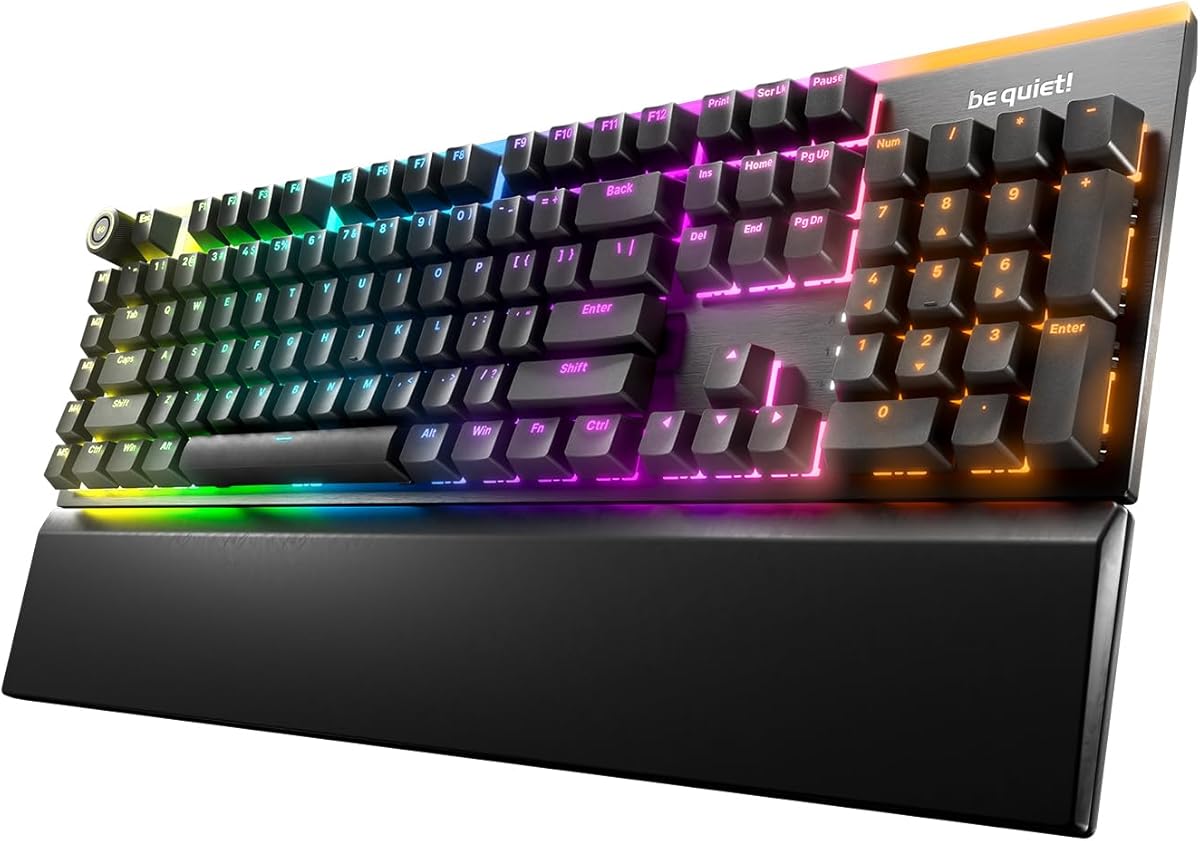
Light Mount’s first impression is restraint. The brushed aluminum plate and PBT doubleshot set look intentional rather than toy-bright, while ARGB still gives per-key glow, top-edge accent, and side underglow when you want the desk to match a luminous PC. The arched diffuser story inside each switch is there to push light through translucent legends cleanly instead of washing the whole cap in haze.
Silence is the product thesis. Pre-lubricated silent linear orange switches reduce both friction scratch and acoustic spike, and be quiet! also calls out stabilizer lubrication on large keys—the usual rattle culprits. Triple-layered dampening places foam between switches and PCB, under the PCB, and in the bottom housing so leftover energy has somewhere to go besides your eardrums. In shared housing, that stack matters more than another unused RGB preset.
The aluminum 3D media wheel is more than decoration. Default volume control with a press-to-mute action covers the majority of real life, while five mechanical macro keys invite media transport or game-specific binds. Compared with hunting Fn layers mid-fight, dedicated keys keep eyes on the monitor. Programmers and editors who mute calls constantly will notice the wheel sooner than pure WASD players might expect.
Ergonomics show up in the folding feet with three angles and the magnetic cushioned palm rest that snaps on when you want a softer wrist line. Detach the USB-C cable when you travel and the board becomes less of a permanent fixture. It is still a substantial keyboard, not a sleeve-friendly 60%, but the detachable cable and palm-rest option make desk reconfiguration less annoying.
Software control lives in be quiet! IO Center, with a lighter web application path also mentioned for configuration. Per-key lighting, remaps, macros, and profiles are the expected toolkit, and the company pitches low resource use while active. If you already run be quiet! mice in the same ecosystem, one control plane is a quiet advantage. If you refuse all vendor software, you still get a strong stock experience, just with fewer theatrical lighting scenes.
Hot-swap support means the silent orange linears are a starting point, not a life sentence. MX-style 5-pin swaps let enthusiasts chase different silent tactiles or heavier linears later. That future-proofing softens the risk of buying a board whose stock switches are almost right. Just remember that foam stacks and plate feel still define the board’s voice after a swap.
Daily use favors apartments, dorms, and night OW/Valorant queues where sound courtesy is part of the social contract. The board will not match a boutique gasket custom’s complexity, and it is not pretending to. It is a branded silent gaming keyboard with thoughtful dampening, durable keycap material, and media controls that survive beyond unboxing day.
Rating context matters: community feedback around this model is more mixed than flagship legends, so treat silence and build claims as directionally strong but verify switch feel preference in person if you can. Within be quiet!’s lane—hush-first peripherals—the Light Mount Linear is coherent. Outside that lane, wireless-first or clicky enthusiasts should keep shopping.
Who it's for
Choose Light Mount Linear if you game or type near sleeping partners, roommates, or open offices and still want mechanical switches plus ARGB. It fits be quiet! ecosystem buyers, media-heavy multitaskers who love a real volume wheel, and anyone upgrading from loud stock gaming boards.
Who should skip it
Skip it if you need Bluetooth or 2.4GHz wireless as a primary connection, prefer crisp tactile or clicky feedback, or want a tiny travel layout. Also skip if you dislike vendor software and refuse even basic remap tools—stock is fine, but the board’s ceiling includes IO Center.
Silence, lighting & desk ergonomics
Silent linears plus triple foam keep typing noise in the polite zone without turning the board mushy. Use ARGB accents deliberately; full rainbow at night undercuts the quiet brand story visually even if acoustics stay soft. Snap on the palm rest for long raids, remove it when you need maximum mousepad width.
Setup tips & verdict
Seat the detachable cable cleanly, set a comfort angle with the feet, and create one IO Center profile for work muted lighting and one for game macros. Verdict: a hush-oriented mechanical gaming keyboard that takes dampening and media control seriously—best when silence is a feature you will actually use every night.
- Silent linear switches keep late-night gaming from dominating the room
- Triple foam stack reduces hollow case ping better than single-sheet boards
- 3D media wheel and dedicated macro keys speed volume and bind control
- PBT doubleshot legends and aluminum plate signal longer-term durability
- Magnetic palm rest and multi-angle feet support longer sessions
- Wired-focused design may disappoint users hunting tri-mode wireless freedom
- Silent linears feel smoother than tactile; fans of sharp bumps should look elsewhere
- Full software lighting and macros assume comfort with be quiet! IO Center
FAQs
How quiet are the Light Mount silent linear switches?
They are designed to be whisper-quiet relative to standard linear and clicky gaming switches, helped by factory lubrication and a triple foam stack. You will still hear soft bottom-out in a silent room, but the sharp clack that travels through walls is the main thing this board tries to remove. Sensitive offices may still prefer true membrane or scissor laptops for absolute minimum noise.
Are the switches hot-swappable?
Yes. be quiet! specifies hot-swap compatibility with other 5-pin MX-style switches, so you can experiment later if silent orange linears are not perfect. Stabilizers are lubricated from the factory, which helps Space and Enter remain civilized after you change nearby switches.
Does the keyboard include a palm rest?
Yes, a magnetic cushioned palm rest snaps onto the board for a more natural wrist angle during long sessions. You can leave it off when you want a flatter profile or more mouse space. Combined with three foot angles, it gives more posture flexibility than fixed low boards.
What does the 3D media wheel control?
By default it adjusts volume and mutes when pressed. Through software you can expand behavior alongside five mechanical macro keys for media transport or game actions. It is one of the more practical hardware extras on the board if you constantly ride volume during streams and movies.
Is Light Mount a wireless keyboard?
The design centers on a detachable USB-A-to-C wired connection rather than tri-mode wireless freedom. That keeps latency simple and charging out of the conversation, but travelers who refuse cables should look at wireless silent boards instead.
What software do I need?
be quiet! IO Center handles per-key ARGB, remaps, macros, and profiles, with a web-based application also noted for configuration. Everyday typing and default media wheel behavior work without a deep dive, but enthusiasts will want the software for profiles.
Are the keycaps PBT double-shot?
Yes. PBT double-shot keycaps are specified for wear resistance and clearer backlighting through translucent legends. They are a meaningful upgrade over thin ABS sets that shine and fade early under heavy use.