Expert Review & Guide

Best Full Size Mechanical Keyboards 2026: Numpad Picks

Full size mechanical keyboards still win when your day runs on spreadsheet math, accounting shortcuts, and tenkey macros that tenkeyless layouts force into awkward layers. In 2026 the category is broader than the old plastic brick with blue switches: you get gasket-mounted cream boards that keep a numpad in a denser 96 percent footprint, true 100 percent wireless decks with smart screens and knobs, quiet Cherry office machines for open floors, and low-profile Logitech tactiles for executives who refuse membrane mush. The constant is dedicated numbers and a layout your muscle memory already trusts.

This ReviewConsensus guide ranks ten Amazon options from our full size mechanical keyboard pack only. We weigh layout honesty (true 104 versus 98-key 96 percent with pad), switch feel and noise, wired stability versus tri-mode battery life, hot-swap flexibility, dampening quality, and whether extras like displays and knobs earn their desk space. Ratings mirror Amazon listing scores at research time. We omit dollar prices because deals swing weekly—follow the live links for current offers.

Start with the three top picks if you want a shortlist, use the comparison table to separate quiet office boards from RGB gaming bargains, then read each review for who the keyboard actually serves. A clicky budget board and a silent MX office keyboard can both be “best” depending on whether you share a room with coworkers or chase audible feedback for late-night raids.

Our Top Full Size Mechanical Keyboard Picks for 2026

As an Amazon Associate we earn from qualifying purchases. We may earn a commission at no additional cost to you.

Full Size Mechanical Keyboard Comparison: Layout, Switches, Connection

Scan this table before RGB blinds you. Specs highlight layout class, switch personality, and how you connect—no prices—so you can tell a silent office Cherry from a gasket wireless showpiece or a clicky starter board in seconds.

#ProductSpecificationsScore
1
  • 104-key full size, gasket creamy
  • Screen + knob, hot-swap PBT
  • Tri-mode, 10000mAh battery
9.4
2
  • 104-key full size, TFT screen
  • BT/2.4G/USB-C, 8000mAh
  • Hot-swap, five-layer dampening
9
3
  • 98-key 96% with numpad
  • Gasket, cream linear hot-swap
  • MDA PBT, metal volume knob
9.2
4
  • True 100% layout with knob
  • Tri-mode, gasket foam stack
  • Hot-swap Bsun linear, RGB
8.8
5
  • 96% wireless + smart display
  • BT/2.4G/USB-C tri-mode
  • Top-mount, creamy hot-swap
8.8
6
  • Full office layout, aluminum top
  • MX2A Silent Red linear
  • Wired USB-A, quiet NKRO
8.8
7
  • Full-size low-profile tactile
  • Bluetooth + Logi Bolt multi-device
  • Smart backlighting, USB-C charge
8.4
8
  • Wired hot-swap red linear
  • 11 backlight modes, macros
  • Anti-ghosting, spare switches
8.6
9
  • 104-key blue clicky wired
  • 11 RGB modes, anti-ghosting
  • Double-shot ABS, media shortcuts
8.4
10
  • 104-key metal top panel
  • Linear red, rainbow + side LEDs
  • Detachable USB, software macros
8.4

1. EPOMAKER TH108 PRO - Best Overall Full-Size

EPOMAKER TH108 PRO Full Size Mechanical Keyboard with Screen & Knob

EPOMAKER TH108 PRO Full Size Mechanical Keyboard with Screen & Knob

9.4/10★★★★★

The EPOMAKER TH108 PRO is the pack’s highest-rated full size mechanical keyboard for a reason: it refuses to make you choose between a real number pad, modern wireless convenience, and the creamy gasket sound people now expect from enthusiast boards. You get a 104-key layout that feels familiar for spreadsheets and RTS macros, wrapped in a thick ABS body that tips the scales past 1.1 kg so the deck stays put when you mash abilities. Factory-lubed Creamy Jade switches aim for out-of-box smoothness instead of a scratchy first week.

  • 104-key full size gasket board
  • Smart screen + multifunction knob
  • Tri-mode wireless, 10000mAh battery
Check Price →
✓ Pros
  • True full-size layout with creamy gasket typing and hot-swap flexibility
  • Huge 10000mAh battery claim supports long wireless sessions
  • Smart screen plus knob make status and volume adjustments effortless
  • Double-shot PBT keycaps and substantial chassis feel planted
  • Tri-mode connectivity covers desktop gaming and multi-device work
✕ Cons
  • Feature-dense board may be overkill if you only need quiet office keys
  • Software and GIF workflows add setup time versus plug-and-play boards
  • Full 104-key footprint still consumes more mouse space than 96 percent options

Detailed review

The smart screen is more than a meme canvas. It can show time, battery, and lighting context while the knob doubles as volume and screen control with FN combinations. Upload custom GIFs or images through the Chrome-based software on Mac or Windows when you want personality, or ignore the art and treat the panel as a status strip. Either way, glancing at connection state beats guessing why shortcuts suddenly feel wrong after a laptop swap.

Wireless endurance is the headline for hybrid desks. EPOMAKER advertises a 10000mAh battery and long wire-free runtime, with cable, 2.4 GHz, and Bluetooth pathways for up to five paired devices. Competitive moments can lean on wired 2 ms claims and 1k polling in 2.4 GHz mode, while Bluetooth keeps a tablet or secondary PC a key combo away. That flexibility matters more on a full size board because you are less likely to own a second travel keyboard.

Customization depth matches the feature list. The hot-swap PCB invites 5-pin switch experiments if Creamy Jade is not your forever feel, and the web-style driver covers remaps, macros, backlight, and sensitivity without pretending every user will solder. Double-shot PBT keycaps resist shine better than bargain ABS, which matters on a 104-key set you will not casually replace tomorrow. RGB is present for gaming flair without being the only reason to buy.

Tradeoffs are honest. This is not the quietest office instrument in the pack—the Cherry Silent Red board still wins for open floors—and the learning curve for screen content is optional complexity. The chassis is proudly large. If your desk is already crowded, consider a 98-key RK instead. For everyone who wants one wireless full size board to rule gaming nights and data-heavy workdays, the TH108 PRO is the strongest all-rounder here.

Buy it when you value battery headroom, gasket cream typing, and a true numpad more than minimalist aesthetics. Skip it only if workplace noise rules demand silent stems or you refuse to manage another rechargeable peripheral.

Who it is for

Hybrid workers and gamers who want one 104-key wireless board with modern gasket acoustics, device hopping, and enough battery confidence to leave the cable in a drawer most weeks.

Setup notes

Pair 2.4 GHz for your main PC, reserve Bluetooth slots for laptop and tablet, then calibrate the screen clock in wired mode before you rely on battery and layout indicators during meetings.

Versus other picks

Choose TH108 PRO over AULA when battery capacity and overall rating matter most; pick RK R98 Pro instead if you want creamy foam tuning in a tighter wired footprint without managing a screen.

Check Price on Amazon →

We may earn a commission at no additional cost to you.

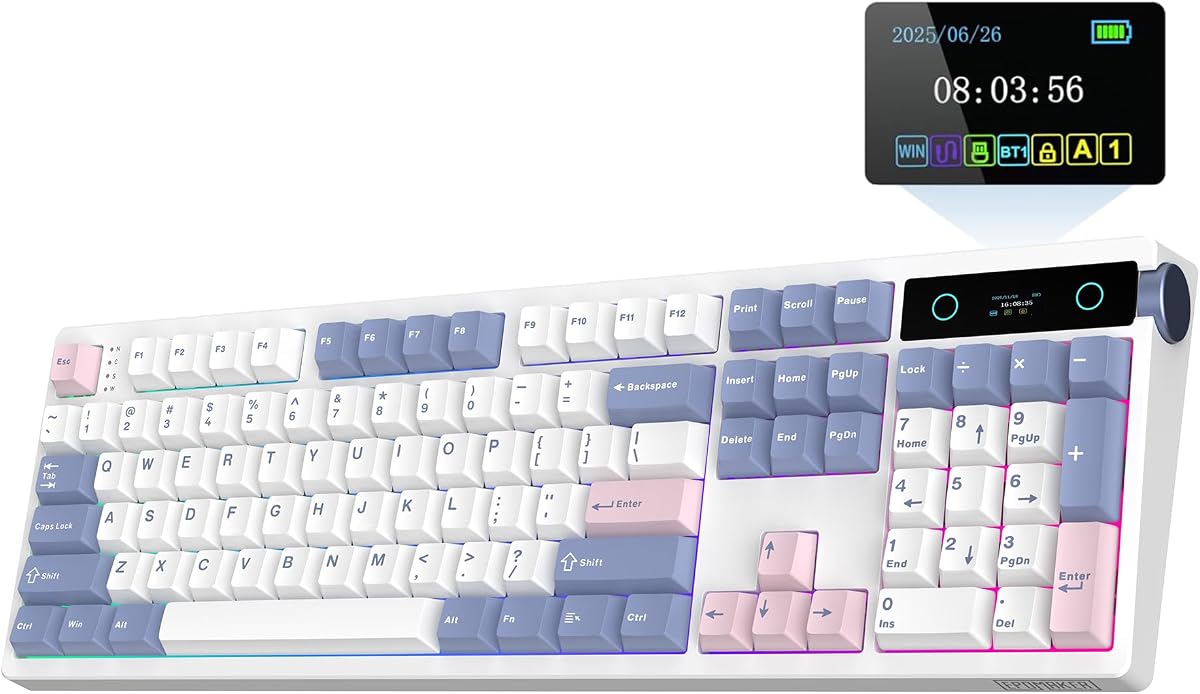
2. AULA F108 PRO - Best Smart Display Full-Size

AULA F108 PRO - Wireless Mechanical Keyboard with Screen & Knob

AULA F108 PRO - Wireless Mechanical Keyboard with Screen & Knob

9/10★★★★★

The AULA F108 PRO targets the same modern full size fantasy as EPOMAKER—screen, knob, tri-mode, hot-swap—with a slightly different balance of battery size and software caveats. You still get a 104-key board for people who refuse to lose the numpad, plus a TFT color display that can show GIFs, volume context, date, battery, backlight, and connection mode. The knob is the daily driver control surface: twist for the things you actually change, click through modes instead of memorizing obscure FN charts.

  • TFT color screen with control knob
  • BT 5.0 / 2.4 GHz / USB-C tri-mode
  • Hot-swap, five-layer foam structure
Check Price →
✓ Pros
  • Full 104-key layout with interactive TFT screen and multifunction knob
  • Tri-mode wireless with 1000 Hz polling on 2.4 GHz and wired paths
  • Pre-lubed switches and five-layer silencing for creamier stock sound
  • Hot-swap 3-pin/5-pin support with pullers included
  • Side-printed PBT keycaps and broad OS compatibility claims
✕ Cons
  • Screen GIF and time calibration need Windows software in wired mode
  • 8000mAh battery is strong but not the largest in this pack
  • Linux F-zone quirks are acknowledged in the listing notes

Detailed review

Connection flexibility is mature. Bluetooth 5.0 handles quick hops across PC, Mac, laptop, and tablets, while 2.4 GHz and USB-C advertise 1000 Hz polling for gaming stability. AULA says you can save up to five devices, which is enough for a desktop, work laptop, living-room machine, and a tablet without constant re-pairing. System switching via the knob helps when you bounce between Windows and Mac layouts during the same afternoon.

Typing character comes from pre-lubricated stabilizers and switches plus an extended silicone pad strategy. Five layers of silencing material and PCB single-key slotting aim to kill cavity noise so the board sounds creamier and feels springier than a hollow plastic slab. That puts AULA in the enthusiast-inspired camp even if you never install custom switches. Hot-swap sockets mean you can still chase a different stem later, and the package includes pullers so day-one experimentation is realistic.

Keycaps are side-printed PBT, a practical choice for RGB glow and longevity. The board’s RGB backlighting supports the gaming look without forcing you into a dim office aesthetic. Just remember the listing note: uploading screen images and calibrating date or time wants Windows software while wired. Tear off the screen’s protective film before you judge clarity—many returns start with that forgotten sticker.

Compared with the TH108 PRO, AULA is the sibling that still feels premium and display-forward while asking you to accept a smaller battery number and a Windows-centric customization path for the fanciest screen tricks. It remains an excellent full size wireless pick if you find the design, switch tune, or current deal more appealing than EPOMAKER’s pack-leading rating.

Choose AULA when you want a true 100 percent wireless custom platform with a color screen you will actually configure. Look elsewhere if you need silent office switches or refuse any software dependency for basic use—core typing still works without the GIF theater.

Who it is for

Full-size fans who want creamy dampened typing, multi-device wireless, and a color status screen without jumping into a DIY gasket kit.

Software reality check

Plan a short Windows wired session to load GIFs and set the clock; afterward you can live wirelessly and still use the knob for volume, modes, and system switching.

Versus Kisnt KN104

AULA leans harder into the interactive display experience; Kisnt focuses on gasket cream sound and tri-mode practicality with a slightly more straightforward productivity pitch.

Check Price on Amazon →

We may earn a commission at no additional cost to you.

3. RK R98 Pro - Best Creamy Wired Value

RK ROYAL KLUDGE R98 Pro Wired Mechanical Keyboard

RK ROYAL KLUDGE R98 Pro Wired Mechanical Keyboard

9.2/10★★★★★

The RK ROYAL KLUDGE R98 Pro is the wired specialist for people who want full-size capability without dragging a barge-wide 104-key shell across the desk. Its 98-key 96 percent layout keeps a number pad, arrows, and most everyday keys while reclaiming space for mouse swipes. That makes it a sneaky favorite for FPS players who still enter inventory numbers or spreadsheet warriors who hate tenkeyless compromises.

  • Gasket mount with five-layer foam
  • Pre-lubed cream linear, hot-swap
  • MDA PBT keycaps, CNC metal knob
Check Price →
✓ Pros
  • Gasket mount and foam stack deliver creamy, thock-leaning stock sound
  • 98-key layout keeps numpad functions in a more mouse-friendly width
  • Hot-swap cream switches and MDA double-shot PBT keycaps feel premium
  • Detachable CNC aluminum volume knob is genuinely useful daily
  • Online RK driver supports remaps, macros, and RGB on Windows and Mac
✕ Cons
  • Wired only—no Bluetooth or 2.4 GHz hopping
  • 96 percent spacing is not identical to classic 104-key gaps
  • Cream linears may be too loud for silent open-office policies

Detailed review

Mount and foam are the soul of the board. A gasket structure with five sound-absorbing layers targets the creamy, thocky signature that used to require aftermarket mods. Pre-lubed linear cream switches arrive smooth, and the hot-swap PCB supports 3-pin or 5-pin replacements if you later want tactiles or silents. You are buying a finished typing experience, not a project kit, yet you keep an exit ramp.

MDA profile PBT keycaps are a tasteful touch. The sculpt wraps fingertips more than flat OEM sets for some typists, and double-shot legends resist fade under RGB. The detachable aluminum CNC volume knob is not a toy—it becomes the control you use constantly for calls and music. Indicator lights for Num Lock, Caps Lock, Win Lock, and Mac mode keep OS switching sane on a board that claims Windows and Mac compatibility.

Because it is wired, latency anxiety disappears and you never babysit a battery. Dynamic RGB with more than twenty modes covers gaming flair, while the RK online driver handles key remaps, macros, and lighting without forcing a heavyweight install narrative. If your aesthetic leans clean, you can leave lighting modest and enjoy the acoustics alone.

The honest limitations are layout purity and silence. If your muscle memory demands exact full-size gaps, step up to EPOMAKER, AULA, or Kisnt. If coworkers sit three feet away, Cherry’s silent reds remain safer. For a home office or gaming den where cable management is already solved, the R98 Pro is one of the most satisfying creamy boards in the pack.

Recommend it as the best wired value when foam-tuned feel matters more than wireless freedom. It is also a smart “first enthusiast” keyboard because hot-swap and PBT leave room to grow.

Who it is for

Desk-conscious users who need a numpad and arrows but want gasket cream typing with zero wireless maintenance.

Typing and gaming balance

Cream linears suit long writing sessions and FPS movement keys alike; add macros in the RK driver if you miss dedicated macro columns from larger boards.

Versus RK S98

Pick R98 Pro for gasket wired purity and a higher pack rating; pick S98 when tri-mode wireless and a smart display justify a firmer top-mount feel.

Check Price on Amazon →

We may earn a commission at no additional cost to you.

4. Kisnt KN104 - Best Tri-Mode Full-Size Value

Kisnt KN104 Wireless Mechanical Keyboard for Office& Gaming | 100% Full Size wit

Kisnt KN104 Wireless Mechanical Keyboard for Office& Gaming | 100% Full Size wit

8.8/10★★★★☆

Kisnt positions the KN104 as the no-compromise full size answer for people who tried compact boards and missed the pad. The listed footprint is a standard 100 percent size, which matters if you want accounting and coding layouts to feel identical to the office keyboard you trained on. A dedicated knob defaults to volume and also folds in backlight control, bridging enthusiast toys and practical office muscle memory.

  • Standard 100% layout with numpad
  • USB-C / 2.4 GHz / Bluetooth 5.0
  • Gasket foam stack, hot-swap linears
Check Price →
✓ Pros
  • Familiar full-size dimensions with dedicated pad for data-heavy work
  • Tri-mode latency claims stay practical across wired, 2.4G, and BT
  • Gasket-mounted multi-layer foam targets marbly thock enthusiasts want
  • Hot-swap pre-lubed Bsun linears invite easy switch experiments
  • Knob, side light bars, and Windows driver macros cover work and play
✕ Cons
  • Advanced driver features are Windows-oriented and prefer wired/2.4G
  • 4000mAh battery is mid-pack versus EPOMAKER and AULA claims
  • Creamy linears still may be too lively for silent open offices

Detailed review

Tri-mode connectivity is tuned with published latency targets: about 2 ms wired, 5 ms on 2.4 GHz, and 11 ms on Bluetooth. That transparency helps you pick the right mode instead of treating wireless as magic. Bluetooth offers three channels for device hopping, while USB-C charging lets you keep typing in wired mode when the 4000mAh pack runs low. Windows and Mac switching support hybrid workers who live across machines.

Sound and feel are clearly a selling point. Kisnt describes gasket mounting with a base dampener, silicone pad, and five foam layers for deeper thock and less distraction. Pre-lubed Bsun linear switches in a light 45–50 gf band feel quick for gaming and long document sprints. Because the PCB is hot-swap for 3-pin and 5-pin switches, you can quiet things down later with silent stems if the cream soundtrack is too much for a roommate.

RGB includes roughly twenty dynamic effects plus edge light bars, controllable by shortcuts or the KN104 driver. Remaps and macros are available when you want spreadsheet accelerators or MMO binds. PBT keycaps help the board look sharper under lighting than bargain ABS sets. Warranty messaging and support claims are unusually customer-friendly for the category, which lowers risk if you are buying your first gasket-style full size.

The KN104 is less flashy than screen-heavy rivals and less corporate than Cherry, which is exactly why it fits so many desks. You get modern foam tuning and wireless convenience without pretending you need a GIF billboard. Battery capacity is enough for mixed use if you dim RGB; heavy lighting will remind you it is not a 10000mAh flagship.

Buy Kisnt when you want classic full-size spacing, creamy gasket character, and tri-mode flexibility at a value-focused point in the pack. Choose EPOMAKER or AULA instead if the smart display is part of your must-have checklist.

Who it is for

Programmers, students, and hybrid workers who live in spreadsheets or IDEs and want wireless freedom without abandoning the number pad.

Desk fit tip

Measure depth before buying—Kisnt notes a matching KN85 exists if you later decide the full 100 percent width crowds your mouse mat.

Customization path

Start with stock Bsun linears for a week, then hot-swap a silent or tactile switch on WASD or modifiers if one zone of the board bothers you.

Check Price on Amazon →

We may earn a commission at no additional cost to you.

5. RK S98 - Best Wireless 96% Display

RK ROYAL KLUDGE S98 Wireless Mechanical Keyboard w/Smart Display & Knob | 96% To

RK ROYAL KLUDGE S98 Wireless Mechanical Keyboard w/Smart Display & Knob | 96% To

8.8/10★★★★☆

The RK S98 is the wireless companion spirit to the R98 Pro, trading gasket wired purity for tri-mode freedom and a smart display that answers the “what mode am I in?” question at a glance. Custom GIFs, date, connection mode, Win/Mac layout, and battery status turn the tiny screen into a practical HUD for multi-device lives. If you regularly break shortcuts because Mac mode was still enabled, that panel earns its keep.

  • Smart display for status and GIFs
  • BT 5.0 / 2.4 GHz / USB-C tri-mode
  • Top-mount, five-layer dampening
Check Price →
✓ Pros
  • Smart display shows battery, mode, layout, and custom imagery
  • Tri-mode wireless covers dongle gaming and Bluetooth device hopping
  • Knob adjusts volume, lighting, modes, and connection context quickly
  • Hot-swap PCB with pre-lubed creamy switches and double-shot PBT
  • Multi-layer foam claims reduce hollow case noise significantly
✕ Cons
  • Top-mount feel is firmer than gasket boards like the R98 Pro
  • 96 percent layout still differs from classic 104-key spacing
  • Feature set overlaps with AULA/EPOMAKER if you insist on true 100 percent

Detailed review

The knob is equally central. Volume is the default joy, but RK also routes connection mode, backlight brightness and speed, and RGB mode or color through twists and clicks. That reduces FN layer memorization on a compact 98-key board where every key already works harder. Gamers get RGB spectacle; office users can keep lighting calm and still enjoy tactile hardware controls.

Acoustically, RK leans on an IXPE switch pad, thicker foam layers, and a silicone dampener to cut hollow sound and chase creamy or thocky feedback. The structure is described as top-mount rather than gasket, so expect a firmer, more direct typing feel than the R98 Pro’s flexier mount. Many typists prefer that snappier consistency for gaming; foam still keeps the tone from turning tinny.

Hot-swap support and double-shot PBT keycaps make the S98 a customization-friendly daily driver. Pre-lubed switches reduce the urge to crack the case on night one. Bluetooth 5.0, a 2.4 GHz dongle, and USB-C wired mode cover nearly every desk scenario, from couch tablet typing to desktop ranked sessions. It is a strong pick when you want RK’s ecosystem and a denser numpad layout without a cable tether.

Choose S98 over larger screen boards when desk width is precious but you refuse to lose the pad. Choose it over the R98 Pro when wireless multi-device life is non-negotiable. If you need silent office manners, neither creamy RK is ideal—Cherry remains the specialist.

Overall, the S98 is the best wireless 96 percent display option in this full-size-focused pack: feature-rich, visually informative, and tuned for people who live between machines.

Who it is for

Multi-device users who want numpad access, status-aware wireless controls, and creamy dampened sound in a width that respects mouse space.

Mount expectation

If you specifically want gasket flex, prioritize the R98 Pro, EPOMAKER, or Kisnt; come to the S98 for firmer top-mount feedback with strong foam cleanup.

Daily workflow tip

Map the display to show battery and layout first; add GIF flair only after the functional widgets prove useful during real workdays.

Check Price on Amazon →

We may earn a commission at no additional cost to you.

6. Cherry KC 200 MX - Best Quiet Office Pick

Cherry KC 200 MX Wired Mechanical Office Keyboard MX2A Silent RED Switches | Mod

Cherry KC 200 MX Wired Mechanical Office Keyboard MX2A Silent RED Switches | Mod

8.8/10★★★★☆

Cherry’s KC 200 MX is the adult in the room when your shortlist is overflowing with side RGB bars and GIF screens. It is a wired mechanical office keyboard with an anodized metal plate and MX2A Silent Red switches designed for smooth linear travel without the attention-seeking click. If you share a open floor, record podcasts nearby, or simply dislike announcing every keystroke, this is the specialist pick in the pack.

  • MX2A Silent Red linear switches
  • Anodized aluminum surface plate
  • Wired USB-A office layout
Check Price →
✓ Pros
  • Genuine Cherry MX2A Silent Red switches prioritize quiet mechanical typing
  • Aluminum top and modern black/bronze styling suit professional desks
  • Status LEDs plus calculator and volume keys speed office workflows
  • Full NKRO and anti-ghosting keep fast typists accurate
  • Laser-etched keycaps and sturdy feet aim at long service life
✕ Cons
  • Wired USB-A only—no Bluetooth multi-device hopping
  • Not a hot-swap RGB gaming showcase
  • Less “creamy thock” character than gasket hobby boards

Detailed review

Switch quality is the point. Cherry rates the MX2A Silent Reds for high actuation life and a quiet linear character that still feels mechanical rather than mushy membrane. You get confirmation through smoothness and consistency, not through a loud bump. That makes long email and documentation days less fatiguing for your neighbors—and often for you.

Practical office details show Cherry’s heritage. White status LEDs live in Caps Lock, Scroll Lock, and Num Lock. Extra keys jump to calculator and volume duties without hunting through software first. Full N-key rollover and anti-ghosting mean dense chorded shortcuts still register. Fold-out feet and non-slip footing keep the board planted on slick desks, while laser-etched legends are built to remain readable after years of abrasion.

What you give up is enthusiast theater. There is no hot-swap experiment loop, no tri-mode tablet hopping, and no gasket foam marketing story. The aesthetic is restrained black and bronze aluminum rather than rainbow edge glow. For many workplaces that is a feature: it looks like equipment, not a toy. USB-A wired connection is simple, though laptop users may need a common adapter.

In this roundup the KC 200 MX is the correct answer whenever noise policy beats novelty. Gamers who want creamy thock should look at RK or EPOMAKER. Multi-device travelers should look at Logitech MX Mechanical. People who type beside coworkers should shortlist Cherry first and only leave if they truly need wireless.

It earns Best Quiet Office Pick by doing one job exceptionally well: quiet, durable, full-layout mechanical typing with professional manners.

Who it is for

Office professionals, finance teams, and shared-room workers who want real mechanical switches without soundtrack drama.

What not to expect

Do not expect gasket thock, per-key RGB playgrounds, or Bluetooth. Expect consistent silent linears and a metal-topped board that disappears into a business desk.

Versus Logitech MX Mechanical

Cherry wins for classic silent linear feel and wired reliability; Logitech wins for low-profile tactiles, smart backlighting, and multi-device wireless Flow workflows.

Check Price on Amazon →

We may earn a commission at no additional cost to you.

7. Logitech MX Mechanical - Best Premium Low-Profile

Logitech MX Mechanical Wireless Illuminated Keyboard Tactile - Graphite | Illumi

Logitech MX Mechanical Wireless Illuminated Keyboard Tactile - Graphite | Illumi

8.4/10★★★★☆

Logitech’s MX Mechanical Illuminated Tactile is the premium productivity interpretation of full size. Instead of tall gaming switches and foam sandwiches, you get low-profile tactile quiet switches with a bump you feel more than hear. The full-size form factor keeps navigation and numbers in familiar places while the reduced key height aims at comfort for people who find traditional mechanical boards tall or noisy.

  • Low-profile tactile quiet switches
  • Bluetooth + Logi Bolt multi-device
  • Smart illumination, USB-C charging
Check Price →
✓ Pros
  • Tactile quiet mechanical switches give feedback without harsh noise
  • Low-profile full-size layout feels closer to modern laptop decks
  • Pairs with up to three devices via Bluetooth or Logi Bolt
  • Logi Options+ unlocks remaps, backlighting control, and Flow
  • Strong battery claims with lighting off and recycled plastic content
✕ Cons
  • Not hot-swap and not a creamy gasket enthusiast toy
  • Low-profile ecosystem differs from standard MX stem keycap shopping
  • Amazon rating sits lower than several value gaming boards in this pack

Detailed review

Wireless polish is classic MX. Pair up to three devices over Bluetooth Low Energy or the Logi Bolt receiver, then hop machines as your workday shifts. Logi Options+ is where the keyboard becomes a workflow tool: customize Fn keys, tune backlighting behavior, and enable Flow-style cross-computer control when your mouse and keyboard ecosystem matches. Smart illumination lights keys as hands approach and adjusts to ambient conditions so you are not stuck with a permanent glow tax.

Battery life is a major reason executives keep MX gear. Logitech cites multi-month endurance with backlighting off and still useful runtime with lighting on, topped up through USB-C. That is a different promise than RGB gaming boards that want weekly charging when effects stay loud. Metal construction and a graphite aesthetic read as office hardware, and Graphite models include a notable share of post-consumer recycled plastic in the parts mix.

The tradeoffs matter for enthusiasts coming from RK or EPOMAKER. You will not hot-swap in a new cream linear on a Saturday. Keycap swapping is not the same open catalog experience as standard-profile boards. The Amazon rating in this pack is solid but not chart-topping, partly because premium expectations are fierce and low-profile tactiles are polarizing if you wanted deep thock.

Still, as a multi-OS professional keyboard spanning macOS, Windows, Linux, iOS, and Android claims, MX Mechanical fills a lane nothing else here occupies as cleanly. It is the board you buy when meetings, multi-computer desks, and quiet tactility outrank gasket flex videos.

Pick it for polished wireless productivity. Skip it if your priority is hot-swap RGB gaming culture or silent Cherry linears with a more traditional key feel.

Who it is for

Professionals who juggle multiple computers and want mechanical feedback in a quieter, lower profile than typical gaming boards.

Ecosystem note

Pair with a Logitech MX mouse if you care about Flow and unified Options+ settings; the keyboard alone still shines for multi-device pairing.

Versus Cherry KC 200 MX

Logitech is the wireless low-profile tactility pick; Cherry is the wired silent linear metal office pick. Choose based on device hopping versus maximum hush.

Check Price on Amazon →

We may earn a commission at no additional cost to you.

8. Redragon K671 - Best Budget Hot-Swap

Redragon Mechanical Gaming Keyboard Wired

Redragon Mechanical Gaming Keyboard Wired

8.6/10★★★★☆

Redragon’s wired mechanical gaming keyboard—listed around the K671 feature set—is the pack’s practical on-ramp into hot-swap full-size-style gaming without demanding enthusiast money. Linear red switches keep actuation light and smooth for RPGs, MMOs, and general typing. Because the board is hot-swappable and includes spare switches plus extra keycaps, a failed or disliked switch does not retire the whole keyboard.

  • Hot-swap linear red switches
  • 11 backlight modes, macro software
  • Full-key anti-ghosting, wired
Check Price →
✓ Pros
  • Hot-swap reds plus spare switches lower the cost of first experiments
  • Macro editing and remaps help MMO, RPG, and office shortcut users
  • Eleven backlight modes with brightness and speed control
  • Full anti-ghosting supports complex key combos
  • Listed double-shot keycaps and lengthy warranty messaging add value
✕ Cons
  • Software notes that LED effect color cannot be changed freely
  • Build and acoustics are more basic than gasket foam flagships
  • Wired-only limits couch or multi-tablet workflows

Detailed review

Lighting covers eleven unique backlight modes with five brightness and speed levels. It is enough ambiance for night sessions even though the software note is clear: you can adjust effects, but you should not expect unrestricted per-effect color playgrounds. Double injection keycaps help legends stay clear when backlighting shines through, which matters more than RGB count for readability.

Macro editing is the productivity and gaming equalizer at this tier. Remap keys, build shortcuts, or collapse multi-key actions into one press for raids and repetitive work. Multimedia shortcuts for calculator, media, volume, and email keep the board useful outside games. Full-key anti-ghosting means simultaneous inputs during hectic moments are less likely to drop.

You should calibrate expectations against gasket cream machines. The Redragon is a wired value board, not a five-layer thock showcase. Acoustics will sound more conventional. That can still be perfectly enjoyable, especially if you plan to learn hot-swap skills before spending more on an EPOMAKER or Kisnt. PC and Mac compatibility claims make it a flexible secondary machine keyboard too.

Warranty messaging of up to 24 months on the listing is reassuring for a first mechanical purchase. Contact support if a switch or LED misbehaves instead of assuming all budget boards are disposable. As a learning platform, this Redragon earns its badge by including the tools—spares, hot-swap, macros—that teach what you actually care about in a later upgrade.

Buy it when budget and hot-swap curiosity lead. Upgrade later if you fall in love with foam-tuned sound or need wireless multi-device battery life.

Who it is for

First-time mechanical buyers and MMO players who want remappable keys, linear reds, and hot-swap practice without a flagship purchase.

Lighting expectations

Enjoy the eleven modes and brightness controls; do not expect the same RGB freedom as higher-end per-key configurators that advertise full spectrum everywhere.

Upgrade path

Use this board to decide whether you prefer linear feel long-term, then jump to Kisnt, AULA, or EPOMAKER if creamy foam and wireless become the new priorities.

Check Price on Amazon →

We may earn a commission at no additional cost to you.

9. wegear Clicky - Best Clicky Full-Size

wegear Wired Mechanical Gaming Keyboard with Clicky Switch

wegear Wired Mechanical Gaming Keyboard with Clicky Switch

8.4/10★★★★☆

The wegear wired mechanical gaming keyboard exists for a specific joy: crisp blue-switch clicks on a full 104-key canvas. If you miss the typewriter-like soundtrack of early mechanical gaming boards, this listing leans into that nostalgia with tactile bumps and audible clicks rather than silent office manners. It is honest about its personality, and that honesty is why it belongs in a full size roundup even beside quieter premium options.

  • 104-key blue clicky switches
  • 11 RGB modes, 5 brightness levels
  • Full anti-ghosting, wired Windows
Check Price →
✓ Pros
  • Classic clicky blue feedback for typists who want audible confirmation
  • True 104-key full size with numpad and twelve multimedia shortcuts
  • Eleven backlight modes with adjustable speed and brightness
  • 100 percent anti-ghosting and Win Lock for gaming focus
  • Double-shot ABS legends and kickstand ergonomics at an accessible tier
✕ Cons
  • Clicky noise is a non-starter for shared offices and quiet households
  • ABS keycaps will shine sooner than PBT on heavy use boards
  • No hot-swap or wireless modes for future tinkering

Detailed review

The layout stays classic. You get a number pad for productivity, tiered keys, and a seven-degree tilt via kickstands so long sessions have a basic ergonomic angle. Four anti-slip pads help during energetic games. Twelve multimedia shortcuts cover play, pause, and volume style needs, while Win Lock (Fn+Win) reduces accidental desktop pops in the middle of a clutch fight.

Lighting uses a striking multi-color row foundation plus eleven dynamic modes with five brightness levels. It will not match the software depth of screen-equipped custom boards, but it delivers a bright night-gaming look. Double-shot ABS keycaps keep legends readable under light, though ABS will polish faster than the PBT sets on RK, EPOMAKER, or Kisnt if you type tens of thousands of words a week.

Performance basics are covered: full anti-ghosting across all 104 keys, mechanical longevity claims in the tens of millions of keystrokes, and Windows focus. There is no hot-swap safety net and no Bluetooth convenience. You buy a straightforward wired clicky machine. For private rooms and people who type by sound as much as by feel, that simplicity is appealing.

Do not gift this board into an open office and expect gratitude. Do consider it for a dorm, studio, or gaming cave where acoustic feedback helps rhythm and accuracy. Compared with linear Redragon or Newmen options, wegear is the deliberate noisy choice rather than a universal recommendation.

It earns Best Clicky Full-Size by delivering exactly that experience—classic blues, full layout, lighted presence—without pretending to be a silent productivity tool.

Who it is for

Typists and gamers in private spaces who actively want clicky blue feedback and a traditional 104-key Windows board.

Noise warning

If anyone sleeps or takes calls within earshot, choose Cherry Silent Red or Logitech tactile quiet instead—clickies travel farther than you expect.

Versus linear budget boards

Pick wegear for soundtrack and bump; pick Redragon or Newmen for smoother quiet-ish linears and, on Redragon, hot-swap experiments.

Check Price on Amazon →

We may earn a commission at no additional cost to you.

10. Newmen GM325Pro - Best Metal-Panel Starter

Newmen GM325Pro Mechanical Keyboard

Newmen GM325Pro Mechanical Keyboard

8.4/10★★★★☆

The Newmen GM325Pro is a straightforward full size gaming keyboard that leads with a rugged metal top panel and linear red switches. If you want the classic 104-key silhouette to feel sturdier than bargain all-plastic decks, the metal plate is the right headline. It keeps the board visually sharp under rainbow lighting and adds a sense of durability for marathon sessions.

  • 104-key metal top panel
  • Linear red switches, full rollover
  • Rainbow effects + RGB side lighting
Check Price →
✓ Pros
  • Metal top panel adds rigidity and a more premium visual than plain plastic
  • Full-size 104-key linear reds suit gaming and everyday Windows use
  • Detachable 1.8 m USB cable helps packing and cable routing
  • Side RGB plus thirteen rainbow mixed lighting presets show well in dark rooms
  • FN shortcuts and software remaps/macros extend utility beyond stock lighting
✕ Cons
  • RGB color control is limited—side lighting is the true RGB zone per listing
  • ABS keycaps and non-gasket structure trail creamy foam boards in feel
  • Wired-only with a more basic feature set than tri-mode rivals

Detailed review

Switch feel is smooth linear red—fast actuation for competitive and casual games, with full-key rollover so simultaneous inputs register cleanly. This is not a silent office switch and not a hot-swap sandbox. It is a wired daily driver for Windows users who want mechanical consistency without configuring five foam layers on day one.

Lighting deserves a careful read. Newmen advertises thirteen preset LED rainbow mixed effects plus RGB side-edge illumination, and the listing clarifies that RGB color freedom focuses on the side lighting. That honesty helps: you get an immersive glow for dark rooms, but you should not expect every key to be a fully independent RGB playground like premium custom firmware boards.

Practical extras include a detachable 1.8-meter USB cable for LAN parties or tidier backpack packing, FN+F1–F11 style shortcuts for media and calculator style tasks, and software that remaps keys, records macros, and personalizes lighting within the board’s limits. Together those features make the GM325Pro more than a pure looker for students and budget gamers.

In the hierarchy of this pack, Newmen sits as a metal-panel starter rather than a category king. Choose it when you want full size presence, linear speed, and side-lit flair for less complexity than screen-and-knob flagships. Step up to Kisnt or EPOMAKER when gasket cream sound and wireless modes become mandatory.

It closes the roundup as an honest value chassis: metal top, 104 keys, red linears, detachable cable—and clear lighting limitations so you buy with eyes open.

Who it is for

Budget-minded Windows gamers who want a full-size metal-top board with linear reds and visible side lighting.

Lighting clarity

Treat rainbow key lighting and RGB side edges as two systems—the side strips are where color customization expectations should focus.

When to spend up

If you catch yourself researching foam mods and Bluetooth after a month, graduate to Kisnt KN104 or AULA F108 PRO rather than forcing this chassis to be something it is not.

Check Price on Amazon →

We may earn a commission at no additional cost to you.

Best Full Size Mechanical Keyboards 2026: Numpad Picks

How to Choose a Full Size Mechanical Keyboard in 2026

Decide if you need true 100 percent or a denser 96 percent with a pad

Full size usually means a dedicated number pad, function row, and navigation cluster. True 104-key boards keep classic ANSI spacing that accountants and CAD users already know by heart. Many modern “full feature” boards use a 96 percent or 98-key layout that keeps the pad but tightens gaps so your mouse sits closer. If you enter numbers all day and hate Fn layers, prioritize a standard 100 percent footprint like the EPOMAKER TH108 PRO, AULA F108 PRO, Kisnt KN104, Newmen GM325Pro, or wegear. If you want the pad without the widest chassis, the RK R98 Pro and S98 are smarter desk citizens.

Match switch type to room politics and task speed

Linear reds and cream linears favor gaming and fast typing with less bump. Tactile quiet switches like Logitech’s MX Mechanical tactiles give confirmation without a loud click. Silent linears such as Cherry MX2A Silent Red are the polite choice for glass-walled offices. Blue clickies on the wegear deliver classic mechanical theater—great in a private room, risky on a shared floor. Hot-swap boards (EPOMAKER, AULA, RK, Kisnt, Redragon) let you fix a bad stock feel later; soldered or closed office boards expect you to live with the factory switch.

Wired simplicity versus tri-mode wireless and battery math

Wired boards like the R98 Pro, Cherry KC 200 MX, Redragon, wegear, and Newmen never die mid-spreadsheet and usually feel snappier for competitive play. Tri-mode wireless (Bluetooth plus 2.4 GHz plus USB-C) shines when you hop between a desktop, laptop, and tablet—look at EPOMAKER’s huge 10000mAh claim, AULA’s 8000mAh pack, Kisnt’s 4000mAh cell, RK’s S98, and Logitech’s long MX charge life with lighting off. Prefer 2.4 GHz for games and Bluetooth for secondary devices. Always park a charging cable nearby the first week until you learn real-world drain with RGB on.

Mount style, foam, and keycaps change the sound more than RGB

Gasket mounts with multi-layer foam (R98 Pro, EPOMAKER, Kisnt, AULA’s five-layer stack) mute hollowness and push toward creamy or thocky tones hobbyists chase. Top-mount wireless boards like the S98 feel firmer. Stiff metal-panel designs such as the Newmen and Cherry aluminum tops feel more traditional and planted. Prefer double-shot PBT keycaps when you can—they resist shine better than thin ABS. MDA or sculpted profiles alter finger wrap; low-profile Logitech keys feel closer to laptop decks if you hate tall switches.

Software, knobs, and screens: useful tools or desk jewelry

A volume knob is the most consistently useful luxury on full size boards—RK, EPOMAKER, AULA, and Kisnt make brightness and modes twistable. Smart displays help when you juggle Win/Mac layouts, battery percent, and connection mode, or when you enjoy custom GIFs; they are optional for pure productivity. Macro software matters for MMOs and spreadsheet macros alike—Redragon, Newmen, Kisnt, EPOMAKER, AULA, RK, and Logitech Options+ each approach remapping differently. Quiet office boards may skip flashy software; that is fine if you only need calculator and volume keys.

Budget tiers without chasing fake specs

Entry boards win when they deliver honest mechanical switches, full anti-ghosting, and a layout you will use daily—even if lighting is rainbow-only or keycaps are ABS. Mid tiers should add hot-swap, better foam, and PBT. Premium picks earn their keep with multi-device polish, silent switches, or build mass that stays put. Ignore inflated actuation marketing and focus on whether the listing matches your OS, includes the dongle you need, and discloses that some RGB is side-only (as on the Newmen). Read our cons for each board before you commit.

Frequently Asked Questions

01

Do I still need a full size mechanical keyboard if I rarely use the number pad?

Not necessarily. If the pad is decorative for you, a tenkeyless or 75 percent board frees mouse space and reduces reach. Keep full size—or at least a 96 percent with pad—if you enter data, use calculator-style shortcuts, bind MMO abilities to the numpad, or share a workstation with someone who expects classic spacing. Many people discover they use the pad more once it is always present. If you are unsure, a denser 98-key board like the RK R98 Pro is a softer compromise than a wide 104-key chassis.

02

What is the difference between a 96 percent keyboard and a true full size keyboard?

A true full size board typically has about 104 keys with standard gaps between the alphas, navigation cluster, and number pad. A 96 percent or 98-key layout keeps the pad and most keys but compresses empty space, often removing a few keys or tightening the frame. Functionally you still get numbers and arrows; ergonomically your mouse sits closer. Gamers who want a pad without a huge board often prefer 96 percent. Accountants who learned touch-typing on corporate keyboards often prefer unmodified 100 percent spacing.

03

Are creamy gasket keyboards quieter than traditional mechanical boards?

Usually they sound deeper and less hollow, which many people perceive as more pleasant, but they are not automatically silent. Foam and gasket mounts reduce case ping and sharp clack; they do not erase switch noise the way dedicated silent stems do. For shared offices, prioritize silent switches such as Cherry MX2A Silent Red or quiet tactiles like Logitech’s MX Mechanical. For a private office or studio, a creamy gasket board can be loud enough to enjoy without sounding cheap.

04

Is hot-swap worth it on a full size keyboard?

Yes if you are curious about switch types or want an easy repair path when one key fails. Hot-swap sockets let you move from linear to tactile or silent without soldering, which is valuable on a 104-key board where replacing a single soldered switch is tedious. It is less critical if you already love a specific silent office switch and never plan to tinker. Budget hot-swap boards like the Redragon and midrange gasket boards like Kisnt or EPOMAKER make experimentation cheap compared with buying a second keyboard.

05

Should gamers choose wired or wireless full size boards in 2026?

Competitive players still benefit from wired simplicity and zero battery anxiety—boards like the R98 Pro, Redragon, Newmen, and wegear keep that path open. Casual and hybrid gamers can trust modern 2.4 GHz modes on EPOMAKER, AULA, Kisnt, and RK S98 when polling rates are high and the dongle sits in a front USB port. Use Bluetooth for secondary devices, not for your main ranked client. If your desk already hides cables, wireless is comfort; if you hate charging rituals, stay wired.

06

Which full size mechanical keyboard is best for an open office?

Start with the Cherry KC 200 MX and its MX2A Silent Red switches, then consider Logitech MX Mechanical tactile quiet switches if you need multi-device wireless and a lower profile. Avoid blue clicky boards like the wegear in shared rooms. Creamy linears can still be audible during fast typing—test noise tolerance with coworkers in mind. An aluminum office aesthetic also draws fewer stares than rainbow side bars if workplace culture is conservative.

07

Do smart screens and volume knobs help productivity or just look cool?

Knobs help daily: volume, brightness, and mode changes without FN gymnastics. Screens help when they show battery, connection mode, Win versus Mac layout, or a clock you actually glance at. Custom GIFs are fun and mostly cosmetic. If you never look away from dual monitors, a screen is optional; if you hot-desk between machines, status info reduces wrong-layout mistakes. Prioritize typing feel first, then buy the display extras on boards that already match your switch and layout needs.

08

Are double-shot PBT keycaps necessary?

They are not mandatory on day one, but they age better under heavy typing. PBT resists the greasy shine that thin ABS develops on WASD and spacebars. Double-shot legends keep letters readable after years. Several boards here include PBT already—RK models, EPOMAKER, AULA, Kisnt—while some value boards use ABS that still feel fine if you are budget-focused. You can always keycap-swap later on standard layouts, though low-profile Logitech sets are a different ecosystem.

09

Can I use these keyboards with Mac, iPad, or Android?

Most list Windows and Mac support; many wireless models also speak to tablets and phones over Bluetooth. Confirm layout switching (Win/Mac) so Command and Option land where you expect—RK, EPOMAKER, AULA, Kisnt, and Logitech document multi-OS use. Some advanced driver features remain Windows-only, especially screen GIF uploads or full RGB suites. For iPad typing, Bluetooth pairing is usually enough even when desktop software is unavailable.

10

How should I maintain a full size mechanical keyboard?

Unplug or power off, pull keycaps in small sections with a proper puller, and clean with a soft brush and compressed air. Wipe the case with a slightly damp microfiber cloth—avoid soaking foam-filled gasket boards. For hot-swap models, reseat any switch that feels scratchy before assuming failure. Keep liquids away from the number pad edge where spills love to run. On wireless boards, do a full charge monthly even if you mostly type wired so the cell stays healthy.

Conclusion

The best full size mechanical keyboard in 2026 is the one that protects your number pad workflow without punishing your ears, desk space, or device habits. If you want a modern wireless flagship with screen flair and creamy gasket typing, the EPOMAKER TH108 PRO is the clearest overall pick in this pack. Prefer a tighter wired desk and enthusiast foam tuning, and the RK R98 Pro delivers outstanding creamy value. Need quiet professionalism, and Cherry’s KC 200 MX Silent Red still feels like the grown-up answer.

Everyone else in this roundup fills a sharp niche: AULA and Kisnt for tri-mode full size customization, RK’s S98 for wireless 96 percent status displays, Logitech MX Mechanical for low-profile multi-device polish, Redragon and Newmen for affordable linear gaming, and wegear when you specifically want clicky feedback on a classic 104-key frame.

Shortlist two boards that match your noise tolerance and connection needs, compare their layouts on your actual desk, and buy from the live Amazon links when the deal looks right. Full size is not outdated—it is still the fastest path to numbers, navigation, and muscle memory that never asks you to remember a layer.