Detailed review
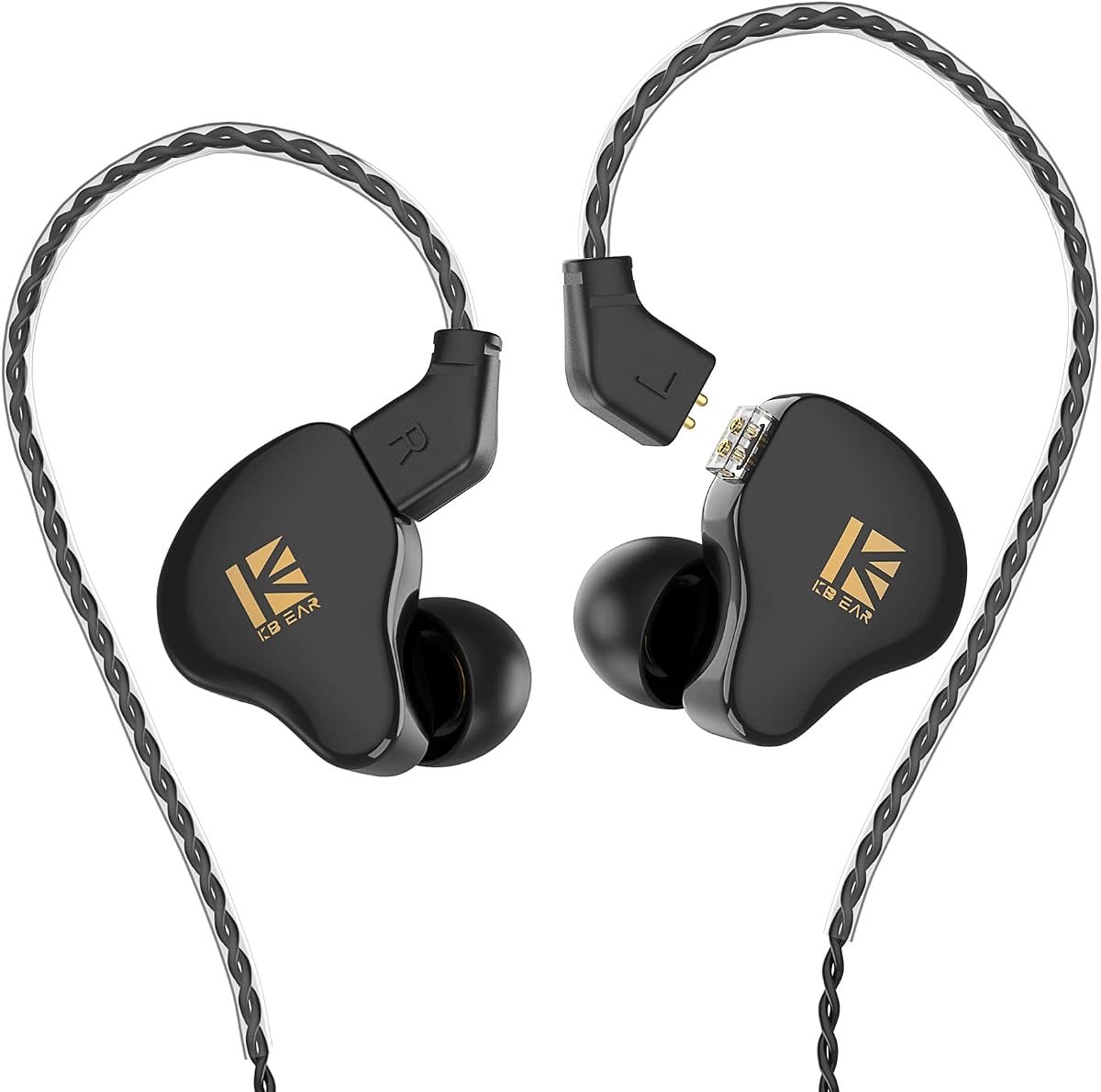
Immersive sound claims here lean on a four-strand 4N pure copper cable and an aluminum alloy nozzle. For podcasts, that combination matters less as a hi-fi flex and more as a path to denser mid-bass and smoother midrange so voices do not turn thin or shouty after an hour. If your library includes interview shows with uneven guest mics, the KS1’s resolution helps you hear when someone leans off-axis without the whole mix collapsing into mush. Music breaks and show themes also benefit from the wider field KBEAR describes, so transitions feel less compressed than on tiny wireless drivers.
Comfort and passive isolation are the real commuting features. High-density PC shells are meant to control internal reflections and stay skin-friendly during long wears. A locked-in tip seal gives you the noise cancelling you actually need for speech: broadband muffling of HVAC, café chatter, and train rumble without the pressure-pump sensation some ANC buds create. If a tip is too shallow, podcasts will sound bright and leaky; if it is too deep, jaw movement on a long walk can fatigue your ear. Spend five minutes swapping the included silicone sizes until dialogue snaps into focus at a moderate volume.
High performance at an accessible tier is part of why these monitors show up for singers and practice sessions, and that same tuning philosophy helps podcast binge listeners who care about clarity more than app EQ graphs. You still need honesty about the lifestyle fit. Wired means zero-latency scrubbing if you edit audio on a laptop, but it also means a cable across a jacket zipper. For pure listening on a phone with no jack, budget for a quality dongle and treat the KS1 as a dedicated speech tool rather than your only pair.
What you get in the kit—cable, earpieces, three tip pairs, and a manual—covers the basics for immediate listening. Warranty and support policies on the listing reduce purchase risk if a cable fails early. As with any entry IEM, tip hygiene and gentle cable coiling keep the channel clear; earwax in the nozzle will dull the midrange faster than any tuning quirk. Used thoughtfully, the KS1 is a focused answer for people who want podcast voices to feel closer to studio monitors than to bass-heavy party buds.
Skip the KS1 if you refuse cables entirely or if you need active noise cancelling for airplane cabins. Choose it if you already own a dongle or jack-equipped laptop and want maximum speech honesty per dollar of complexity. Pair tip fit discipline with a podcast app EQ that only gently lifts presence if needed—many listeners will leave EQ flat and simply enjoy how much less they have to raise volume to understand every line.
Who should choose the KBEAR KS1 for podcasts
Pick these if you edit or critically listen to dialogue, prefer wired reliability, or want passive isolation without charging another case. They especially suit laptop listeners, desk workers near noisy HVAC, and anyone tired of Bluetooth dropouts mid-interview.
Avoid them as a sole commuting solution if your phone has no analog path and you dislike adapters. In that case, look at USB-C wired options like the MORMOQUE EP09 or wireless ANC picks such as the Soundcore P30i.
Setup tips for clearer speech
Start with the medium tips, then move up or down until a gentle seal appears when you insert and twist slightly. Play a familiar podcast at moderate volume; consonants should sound crisp without needing a presence boost. Wipe nozzles weekly so wax buildup does not dull the midrange that makes hosts intelligible.
KBEAR KS1 versus wireless podcast buds
Wireless wins for gym walks and quick pocket storage. The KS1 wins when you care about consistent vocal tone, zero pairing friction, and hearing editing details. Many serious podcast fans keep one wired IEM at the desk and one wireless pair for travel—the KS1 is an excellent wired half of that kit.