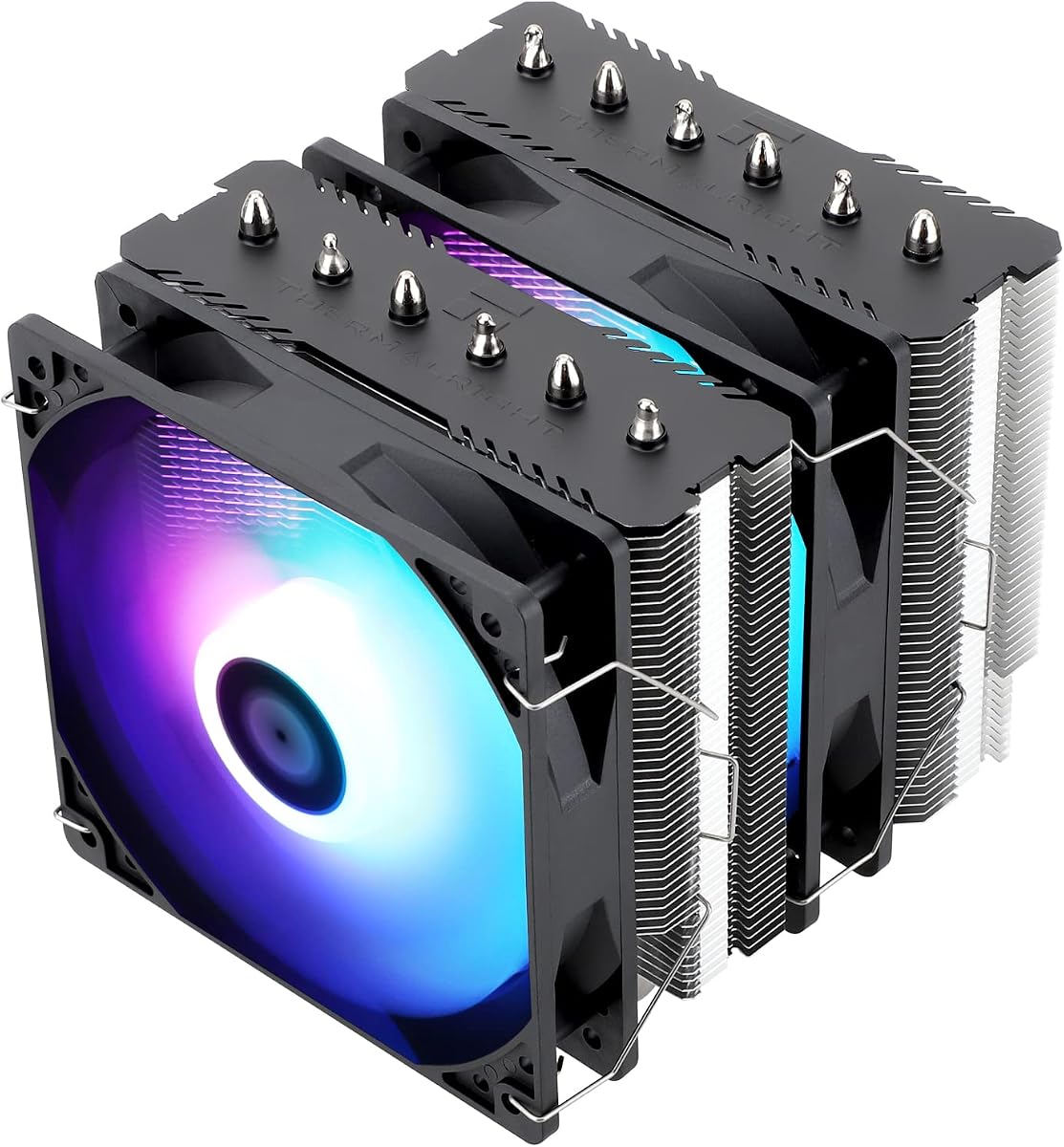
Noctua NH-D15 chromax.Black
- Dual 140 mm NF-A15 fans with Low-Noise Adaptors for near-AIO quiet cooling
- SecuFirm2 mounts for Intel LGA 1851/1700/1200/115x and AMD AM5/AM4
- Six-year warranty, NT-H1 paste included, and all-black chromax finish
Expert Review & Guide
Choosing the best CPU cooler in 2026 is less about air versus liquid as a religion and more about matching heat load, case clearance, noise tolerance, and how much you want the cooler to show in a windowed build. A strong dual-tower air cooler can keep high-core Ryzen and Core Ultra chips in a safe boost window for gaming and creative work. A well-sorted 360 mm AIO can free VRM airflow, look cleaner in a glass panel, and hold lower temperatures when you push sustained all-core loads. Both approaches fail if the cooler is too tall for the chassis, blocks tall memory, or sits on a motherboard socket the mounting kit does not cover.
This roundup uses one curated product pack only: ten coolers spanning value dual towers from Thermalright, the evergreen Cooler Master Hyper 212 Black, premium quiet air from be quiet! and Noctua, three Corsair Nautilus 360 RS variants, and a TRYX Panorama SE 360 with a large curved AMOLED pump screen. Ratings reflect Amazon feedback at research time. We never list dollar prices because cooler pricing moves with bundles and seasonal sales. Specs and review bodies focus on heat pipes, fan behavior, radiator size, socket support, and the practical fit checks that decide whether a cooler actually works in your case.
If you already know your priority, jump to the three top picks for premium quiet air, value dual-tower cooling, or a straightforward 360 mm AIO. Otherwise skim the comparison table for height, lighting, and form factor, then read the ranked reviews for who each cooler serves, who should skip it, and how to install without fighting RAM or side-panel clearance.
As an Amazon Associate we earn from qualifying purchases. We may earn a commission at no additional cost to you.
Compare form factor and height first, then heat-pipe or radiator size, fan noise claims, and lighting. Specs omit prices so you can judge cooling hardware before opening a product page.
The Noctua NH-D15 chromax.Black remains the reference dual-tower air cooler for builders who want maximum quiet performance without committing to tubes, pumps, or radiator mounts. Its extra-wide 140 mm dual-tower layout and six heat pipes move heat into a large fin stack that the twin NF-A15 fans can exhaust efficiently. In practice that means high-boost Ryzen and Intel chips stay cooler at lower fan speeds than most stock or budget single-tower coolers, which is exactly what silent-PC and overclocking enthusiasts care about. The chromax.Black edition keeps the same thermal recipe as the classic NH-D15 while dressing the heatsink and fans in a consistent black finish that fits dark glass builds.
Fan behavior is a big part of why this cooler still ranks at the top of best CPU cooler lists. The NF-A15 fans are PWM controlled and ship with Low-Noise Adaptors, so you can soft-cap peak RPM when your case airflow is already strong or when you prefer a whisper idle profile. Under gaming and mixed workloads the cooler typically ramps smoothly rather than screaming unless you are stress-testing all cores for long periods. That predictability matters in a shared office, a living-room HTPC-style desktop, or any build where fan noise is more annoying than a few degrees of temperature.
Mounting uses Noctua’s SecuFirm2 system with hardware for Intel LGA 1851, 1700, 1200, and 115x plus AMD AM5 and AM4. The AMD offset mounting option helps center the cold plate over hotter zones on many Ryzen chips, which can improve efficiency compared with a perfectly centered generic mount. Installation is more deliberate than a quick clip cooler, but the instructions are clear and the hardware quality is a step above many budget kits. NT-H1 thermal paste is included, so you can finish a reinstall without hunting for a separate syringe.
Clearance is the main reason someone should not pick the NH-D15 by default. Measure case CPU cooler height, check motherboard DIMM height, and confirm that a thick front fan on a long graphics card will not collide with the forward tower. Many mid-towers clear it, yet RAM with towering RGB heat spreaders may force you to run the front fan higher, remove one fan temporarily during install, or choose lower-profile memory. If your case is a compact mesh cube with a short cooler limit, look at the Assassin X120 or Hyper 212 in this same pack instead.
Thermally, expect AIO-adjacent results on most gaming and productivity chips when case intake is decent. The NH-D15 will not magically defeat every 360 mm radiator in a synthetic torture test, but it often matches or beats smaller AIOs while needing zero coolant maintenance and offering a longer warranty story. For creators who leave renders running overnight and gamers who hate pump hum, that trade is attractive. Pair it with a case that pulls fresh air across the motherboard tray and exhausts the rear and top so the dual towers are not recirculating hot GPU air.
Who should buy it: enthusiasts, quiet-build fans, and anyone cooling a high-power AM5 or LGA 1700/1851 CPU who wants proven hardware and does not need RGB. Who should skip it: builders in short-clearance cases, people who want a lit pump face or ARGB fans out of the box, and budget builds where the Peerless Assassin 120 SE already meets temperature targets. If those constraints do not apply, the NH-D15 chromax.Black is still one of the safest premium air picks you can install in 2026.
Choose the NH-D15 chromax.Black when silence, longevity, and dual-tower thermal headroom matter more than lighting. It suits Ryzen 7/9 and high-core Intel gaming or workstation chips in mid-tower and full-tower cases with verified cooler height clearance. It is also a strong upgrade from aging stock coolers when you want fewer moving parts than an AIO.
Dry-fit the towers before applying paste. Confirm RAM clearance with both fans mounted, use the AMD offset plate when the manual recommends it for your socket, and start with a motherboard quiet fan curve before deciding you need the Low-Noise Adaptors. Route fan cables toward the motherboard CPU fan and optional SYS_FAN headers so PWM control stays clean.
Against the Peerless Assassin 120 SE, the Noctua usually runs quieter at similar temperatures and ships with a longer warranty. Against the Dark Rock Pro 5, both chase silence; Noctua wins on ecosystem maturity and adaptor flexibility, while be quiet! offers a mode switch and a denser black aesthetic. Against Corsair’s Nautilus 360, pick Noctua if you want zero radiator plumbing and pick the AIO if your case is AIO-ready and you prefer a cleaner motherboard look.
We may earn a commission at no additional cost to you.
Thermalright Peerless Assassin 120 SE CPU Cooler
The Thermalright Peerless Assassin 120 SE is the cooler that redefined value dual-tower air cooling for a huge wave of builders, and it still belongs near the top of any best CPU coolers shortlist in 2026. Six sintered copper heat pipes, a pure copper base, and a full dual-tower fin stack give it the surface area to handle gaming chips that would cook a basic stock cooler. Twin TL-C12C 120 mm PWM fans push roughly 66 CFM each while Thermalright quotes noise at or under 25.6 dB(A), which is quiet enough for most desk-side PCs when you use a sensible fan curve.
Dimensions matter: 125 × 135 × 155 mm. That height clears many mid-tower cases but not every compact chassis, so check your case’s CPU cooler limit before ordering. The dual-tower layout is designed to leave room for memory modules, which is one reason the PA120 SE became a favorite in gaming builds with moderately tall RGB RAM. Still, ultra-tall heat spreaders can interfere, so dry-fit or check clearance notes for your exact motherboard and DIMM kit before you commit to a full assembly session.
AGHP heat-pipe tech is Thermalright’s answer to orientation issues. Traditional heat pipes can lose efficiency when gravity works against the vapor return path; AGHP aims to keep performance steadier whether the case stands upright or the cooler ends up in a less ideal orientation. Combined with electroplated reflow welding on the pipes and base, the cooler is built to move heat quickly into the fins so the PWM fans can dump it into your case airflow path without needing exotic fan swaps on day one.
Socket support covers Intel 115x, 1200, 1700, 17XX, and 1851 plus AMD AM4 and AM5 with metal fasteners. For AMD, you reuse the motherboard’s built-in backplate rather than receiving a separate one in the cooler box. That is normal for many AM4/AM5 air coolers, but it surprises first-time builders who expect every part in the accessory bag. Intel kits are included for the listed sockets. Always match the standoffs and brackets to your socket diagram before tightening the cold plate evenly.
In real builds the Peerless Assassin 120 SE is the default recommendation when someone asks for the best CPU cooler without spending premium Noctua or be quiet! money. It cools Ryzen 5/7 and Intel mid-to-upper gaming chips for high refresh gaming, streaming, and content work as long as case airflow is not choked. If you overclock aggressively or run multi-hour all-core renders in a warm room, you may still prefer the NH-D15, Dark Rock Pro 5, or a 360 mm Nautilus AIO from this pack for extra headroom and lower fan noise at the same temperatures.
Who should buy it: value-focused gamers, first serious air-cooler upgrades, and anyone who wants dual-tower performance without RGB complexity. Who should skip it: white aesthetic builds that want matching hardware, showpiece RGB fans (see the ARGB SE), or very short cases under roughly 155 mm cooler clearance. For everyone else, the PA120 SE remains one of the smartest cooling upgrades you can make when shopping for best CPU coolers on a practical budget.
Ideal for ATX and larger mATX gaming PCs where you want a stock-cooler replacement on AM5 or LGA 1700/1851 without jumping to liquid. Great when thermals and value matter more than brand prestige or lighting effects.
Confirm case height, leave the AMD motherboard backplate in place, apply a rice-grain or X pattern of quality paste, and connect both fans to a splitter or dual headers so PWM control stays synchronized. Recheck screw torque after the first heat cycle so contact pressure remains even.
The non-ARGB Peerless Assassin 120 SE is the quieter visual choice for black builds and the usual value winner. The ARGB SE adds TL-C12C-S lighting and a similar dual-tower recipe when your case theme needs addressable color without moving to an AIO radiator.
We may earn a commission at no additional cost to you.
be quiet! Dark Rock Pro 5 CPU Cooler
be quiet! built the Dark Rock Pro 5 for people who push CPUs hard and still want a calm acoustic signature. Seven copper heat pipes feed a densely coated black heatsink designed to shed heat during peak all-core loads, including overclocked gaming and workstation systems. The special black coating with ceramic particles is part visual identity and part thermal surface treatment, giving the cooler the signature Dark Rock look that enthusiasts recognize immediately behind a tempered-glass side panel.
The dual Silent Wings PWM fans are the other half of the story. Fluid-dynamic bearings, smooth 6-pole motors, and airflow-optimized blades aim for high pressure without the rattle some high-RPM budget fans produce. The front fan uses a funnel-shaped inlet for stronger pressure into the fin stack, while decoupled mounting reduces vibration transfer into the heatsink. Together they keep the cooler competitive with liquid options for many chips while staying an air cooler you can live with at a desk for long sessions.
The physical Speed Switch between Quiet and Performance modes is unusually practical. Quiet mode caps fans around 1500 RPM for everyday use, browsing, light creation, and quieter gaming. Performance mode allows up to about 2000 RPM when you are rendering, compiling, stress-testing, or chasing lower temperatures during summer heat waves. That binary control is easier for some users than digging through BIOS curves every time priorities change, though you can still use PWM for finer control within each mode’s ceiling.
Installation is designed to feel premium. A black mounting kit with a pre-installed mounting bridge matches the cooler’s stealth theme. The detachable mesh top cover with the integrated middle fan slides in from above, which helps when you need to access the center of the stack or manage cables after the base is secured. Thermal grease is included. As with any large dual tower, verify motherboard VRM heatsink height, DIMM clearance, and case CPU cooler limits before you commit to the purchase.
Performance positioning puts the Dark Rock Pro 5 above casual stock replacements and into the conversation with Noctua’s NH-D15 for silent high-end air cooling. Choose it when you like be quiet!’s acoustic tuning, want a mode switch on the cooler itself, and prefer a darker, more industrial fin stack than brushed aluminum Thermalright towers. It is especially compelling for overclockers who still refuse AIO pumps for reliability or noise-character reasons and want seven heat pipes working under the fins.
Who should buy it: silent-PC builders, overclockers, and premium black builds that want air cooling with serious heat-pipe count. Who should skip it: tight cases, RGB-first show builds, and strict budget upgrades where the Peerless Assassin already hits safe temperatures. If you clear the size check, the Dark Rock Pro 5 is one of the most confidence-inspiring quiet air coolers in this entire roundup of best CPU coolers.
Builders who prioritize low noise under load, run overclocked or high-TDP CPUs, and want a cohesive black cooler without managing AIO tubing. Excellent for content machines that sit near a microphone or in a quiet living space.
Start in Quiet mode for daily gaming and office work. Flip to Performance when benchmarks, exports, or hot ambient temperatures push package power higher. Combine either mode with a motherboard fan curve so fans do not sit at the mode ceiling unnecessarily during light loads.
Both are premium dual-tower silence machines. Noctua brings longer warranty marketing and Low-Noise Adaptors; Dark Rock Pro 5 brings seven heat pipes, a tactile speed switch, and be quiet!’s Silent Wings fan tuning. Pick based on clearance, aesthetics, and which brand’s mounting experience you prefer for your socket.
We may earn a commission at no additional cost to you.
CORSAIR Nautilus 360 RS ARGB Liquid CPU Cooler – Black
Corsair’s Nautilus 360 RS ARGB in black is the pack’s everyday liquid pick for builders who want a full-size radiator without a complicated controller ecosystem. The closed loop pairs a low-noise pump—Corsair quotes roughly 20 dBA—with a convex cold plate that is meant to seat firmly against the CPU heat spreader. Pre-applied thermal paste in an optimized pattern shortens the install, which helps first-time AIO users who otherwise overthink paste volume and spread patterns on day one.
Cooling performance comes from radiator size as much as pump marketing. A 360 mm AIO gives three 120 mm fans a dense fin stack to push air through, which helps when modern CPUs spike hard during boost and then settle into a high sustained package power during creative workloads. The included RS120 ARGB fans use Corsair AirGuide technology and Magnetic Dome bearings to balance static pressure with noise. That combination is aimed at radiator duty rather than open-air case intake alone.
Wiring is intentionally simple. Daisy-chain the three fans so you only need one 4-pin PWM header and one +5V ARGB header on a compatible motherboard. That is a meaningful quality-of-life upgrade over older kits that dumped a nest of splitters behind the tray. Lighting control then lives in your board’s RGB software, which is enough for most users who just want synchronized color without buying a separate Corsair Commander-style hub for a single cooler.
Compatibility covers Intel LGA 1851 and 1700 plus AMD AM5 and AM4. Before buying, confirm your case supports a 360 mm radiator in the location you want—top exhaust is popular for CPU heat, while front intake can work if tube routing and GPU clearance cooperate. Also check motherboard VRM and RAM clearance around the pump block, and leave tube bends gentle so you do not kink the loop. AIOs are sealed, but poor mounting still causes stress on fittings and noisy turbulence.
Compared with dual-tower air coolers in this guide, the Nautilus 360 trades some long-term simplicity for a cleaner CPU socket area and often lower temperatures at a given noise level on hot chips. It will not outrun physics if your case has weak intake or you mount the radiator in a sealed closet of stagnant air. Give it fresh airflow, set a pump header to a constant reasonable speed if your board allows, and let PWM handle the radiator fans based on CPU temperature.
Who should buy it: gamers and creators in AIO-friendly mid-towers who want ARGB, strong 360 mm cooling, and motherboard-simple control. Who should skip it: builders who refuse liquid on principle, cases without 360 mm mounts, and stealth no-light builds that should take the non-ARGB Nautilus RS instead. For a black glass gaming PC, this is the most balanced liquid cooler in the pack.
ATX gaming builds with top or front 360 mm support, especially when the CPU is a high-boost Ryzen or Intel chip and you want ARGB without a premium LCD pump block.
Prefer orientations that keep the pump from becoming the highest point in the loop for long periods. Top-mounted radiators with tubes down are a common safe pattern. Ensure exhaust fans are not fighting a sealed glass sandwich with zero intake.
Cooling architecture is closely related across the three Nautilus 360 RS SKUs. Pick black ARGB for dark RGB builds, white ARGB for white theme matching, and the non-ARGB black model when you want the same radiator class without glowing fans.
We may earn a commission at no additional cost to you.
CORSAIR Nautilus 360 RS ARGB Liquid CPU Cooler – White
The white CORSAIR Nautilus 360 RS ARGB exists because theme matching matters as much as thermals for a large share of showcase builds. Functionally it follows the same Nautilus RS recipe as the black ARGB model: a quiet high-flow pump, convex cold plate, pre-applied paste, and three RS120 ARGB fans with AirGuide blades and Magnetic Dome bearings. The difference is cosmetic—and in white PCs, cosmetics are often the reason someone chooses one cooler listing over another with identical socket support.
Expect the same installation playbook. Mount the radiator where your case provides a clean 360 mm path, seat the block with even pressure on LGA 1851/1700 or AM5/AM4 hardware, and daisy-chain fan power and ARGB so the motherboard only sees one PWM and one +5V lighting connection. That simplicity is the Nautilus pitch: Corsair engineering for strong low-noise cooling without forcing you into a sprawling proprietary lighting ecosystem for a single cooler.
Thermally, a white radiator does not cool differently from a black one of the same size. What changes is how the cooler interacts with case airflow and ambient dust. White builds often use bright LED saturation that makes dusty fan frames obvious, so plan a light cleaning schedule if your room is not sealed. Also watch tube routing against white side panels; dark cables can look messy unless you sleeve or tuck them behind covers.
Choose this SKU when your motherboard, RAM, and case fans are already white or light gray and a black AIO would break the palette. If you are building a black or gunmetal PC, the black ARGB Nautilus is the cleaner match. If you want white hardware but hate glowing fans, you may need to look outside this pack or run the fans in a static soft white and lower brightness, because this listing is the ARGB white model by design.
Noise and pump character should feel familiar if you have used other modern Corsair closed loops: a low-level pump note that is usually masked by case fans once the system is under a desk panel or behind a desk. Radiator fans remain the main acoustic variable. Use a temperature-based PWM curve so the three RS120 units stay calm in desktop use and only climb when the CPU package power rises during games or exports.
Who should buy it: white or silver themed gaming PCs with 360 mm mounts and motherboard ARGB headers. Who should skip it: blackout stealth builds, cases limited to 240 mm radiators, and buyers who want an LCD showpiece pump like the TRYX Panorama SE. For theme-matched liquid cooling without a screen, this is the pack’s clear white pick.
Builders assembling white Corsair-friendly or motherboard-ARGB systems who need 360 mm capacity and do not want a black cooler interrupting the aesthetic.
Match fan brightness to RAM and strip lights, use soft white or pastel effects instead of rainbow cycling if you want a calmer look, and keep radiator intake filters clean so the white frames stay presentable.
Treat the white and black ARGB Nautilus 360 RS as finish variants of one cooling class. Decision criteria should be case color, cable visibility, and whether your existing fans are white—not imagined thermal differences between paint colors.
We may earn a commission at no additional cost to you.
Thermalright Peerless Assassin 120 SE ARGB CPU Air Cooler
The Peerless Assassin 120 SE ARGB is for builders who liked the thermal reputation of the standard PA120 SE but refused a bare aluminum look in a rainbow gaming case. It keeps the dual-tower, six-pipe AGHP structure and swaps in TL-C12C-S ARGB PWM fans. Rated airflow remains in the mid-60 CFM class with noise claimed at or under 25.6 dB(A), so you are not trading away the cooler’s value identity just to get LEDs on the fan frames.
Thermalright lists a TDP class spanning roughly 120 to 245 W for this model, which is marketing shorthand rather than a guarantee for every silicon lottery and case. In practical terms, treat it as a high-value air cooler for mainstream and upper-mid gaming CPUs when airflow is healthy. Extreme multi-hour AVX or all-core workstation torture in a hot room may still favor the NH-D15, Dark Rock Pro 5, or a 360 mm Nautilus. For gaming, streaming, and mixed use, the ARGB SE is usually more than enough.
Dimensions match the non-ARGB sibling at 125 × 135 × 155 mm, so the same clearance rules apply. Check case cooler height, watch tall RAM, and remember AMD installs rely on the motherboard backplate. The aluminum heatsink cover tidies the top of the stack visually when the side panel is open. Because the fans light up, plan an ARGB cable path to a 5V header and confirm your motherboard software can drive the effect you want without flicker or incorrect color order.
Acoustically the TL-C12C-S fans behave like other mid-speed 120 mm PWM units: calm on a quiet curve, more audible when you pin them near their 1500 RPM ceiling. If you chase silence above all else, the Noctua or Dark Rock Pro 5 still make more sense. If you want the Peerless Assassin thermal style with visible flair and you already own ARGB strips and RAM, this SKU avoids the need to replace stock fans later with third-party lighted ones.
Installation mirrors the standard SE: metal Intel and AMD fasteners, copper base, dual fans that should both receive PWM control. After mounting, set a conservative fan curve and a tasteful lighting profile—static colors often look more premium than chaotic rainbow cycles in photos and streams. Keep a spare set of cable ties behind the motherboard tray because ARGB adds one more loom to hide.
Who should buy it: RGB gaming builds that want dual-tower air cooling without AIO tubing. Who should skip it: no-light stealth PCs (buy the plain SE), premium silence seekers, and short cases. As a best CPU cooler pick for colorful mid-range PCs, the PA120 SE ARGB hits a very practical sweet spot.
Gamers who want addressable lighting on a proven value dual tower and already have motherboard ARGB control. Strong upgrade from stock coolers on AM5 and recent Intel sockets.
Connect ARGB to a 5V header only—never force it onto a 12V RGB header. Route the light cable with the fan PWM leads, and use your board’s sync software so the cooler matches RAM and case strips.
ARGB fans on a dual tower light the CPU area differently than a 360 mm radiator glow along the case edge. Pick the ARGB SE when you want motherboard-centric air cooling; pick a Nautilus when you want radiator presence and a clear socket.
We may earn a commission at no additional cost to you.
TRYX Panorama SE 360mm AIO Curved Screen
The TRYX Panorama SE 360 is the pack’s statement liquid cooler: a 6.67-inch curved AMOLED panel on the pump housing with 2K resolution at 60 Hz, high PPI, and a claimed 1,000,000:1 contrast ratio. The screen rotates for multi-angle viewing and pairs with waterfall-style 3D animations that look far more intentional than a tiny square status LCD. If your priority is a best CPU cooler that also acts as a centerpiece, this is the listing that leans all the way into display hardware.
Cooling duties use an Asetek Adela solution with a 27 mm high-density fin radiator and a claimed 280 W TDP cooling capacity. That class of loop is aimed at heavy CPU loads—video encoding, AI processing, compilation, and gaming—rather than only idle desktop browsing. Three preinstalled 120 mm ROTA ARGB fans with fluid-dynamic bearings and ARGB Gen2 LEDs provide the radiator airflow, with corner damping pads to cut vibration. TRYX quotes full-load fan noise below roughly 27.86 dB(A), which is competitive for a lighted triple-fan kit when curves are tuned.
Software is central to the product. TRYX KANALI handles screen content switching, split-screen layouts, and real-time system monitoring. You can upload PNG, JPG, GIF, MP4, and AVI files, and the GIPHY integration lets you browse and apply GIFs without manual downloading when you are on the latest KANALI version. That ecosystem is a feature for tinkerers and a chore for minimalists. Budget time for USB connections, software installs, and content curation if the screen is why you are buying the cooler.
Compatibility includes Intel LGA 1851, 1700, 1200, 1151, 1150, and 1155 plus AMD AM4 and AM5 with all-metal mounting hardware. As with any 360 mm AIO, case radiator support and tube routing decide success more than the marketing TDP number. Give the pump a clear line of sight if you care about the curved panel, because burying a showcase screen behind cable combs defeats the purpose. Also plan USB header usage for the display controller alongside your other front-panel devices.
Compared with Corsair’s Nautilus 360 RS models, the Panorama SE is less about invisible daily cooling and more about visible customization. The Nautilus kits win if you want daisy-chain simplicity and a quieter visual presence. The TRYX wins if the cooler is part of the aesthetic composition of the PC. Thermals should be strong for a modern 360 mm Asetek-based design, but your case airflow and fan curve still decide whether that 280 W class claim feels effortless or strained.
Who should buy it: showcase builders, streamers, and enthusiasts who want a large AMOLED cooler face with deep customization. Who should skip it: silent minimalists, users who avoid vendor software, and anyone whose case cannot mount a 360 mm radiator cleanly. In a best CPU coolers roundup it is the specialist showpiece, not the default recommendation for every gaming PC.
Creators of glass-panel PCs who treat the CPU block as a display surface and are willing to use KANALI for GIFs, metrics, and custom media. Best when the pump faces the primary viewing angle.
Install the latest KANALI release before judging the screen experience, connect the USB link securely, and start with monitoring layouts or subtle animations before loading bright full-screen videos that can distract during gameplay.
Pick TRYX for the curved AMOLED and GIPHY workflow. Pick Corsair Nautilus when you want simpler motherboard-centric ARGB, less software surface area, and a cooler that disappears into a normal gaming aesthetic.
We may earn a commission at no additional cost to you.
CORSAIR Nautilus 360 RS Liquid CPU Cooler – Black
The non-ARGB CORSAIR Nautilus 360 RS is the quiet visual sibling of the lighted Nautilus kits. You still get a 360 mm radiator, a low-noise pump around 20 dBA, a convex cold plate with pre-applied paste, and three RS120 fans with AirGuide technology and Magnetic Dome bearings. What you do not get is addressable lighting on those fans, which is exactly why stealth builders and office PCs should prefer this SKU over the ARGB black and white versions.
Cable management becomes slightly easier because daisy-chaining focuses on a single 4-pin PWM path to a motherboard fan header. There is no extra +5V ARGB loom to route or sync. That reduction sounds minor until you are stuffing cables behind a narrow mid-tower tray already filled with USB, front-panel HD audio, and storage power. For minimalist black builds, matte fans also photograph more cleanly than rainbow frames.
Cooling expectations mirror the other Nautilus 360 RS coolers in this pack: strong everyday and gaming thermals when the radiator receives fresh air and the fans are allowed to ramp under load. The absence of LEDs does not shrink the radiator. If anything, buyers who choose this model often also choose calmer fan curves, so perceived silence can be excellent in a well-vented case. Keep dust filters maintained so the dense radiator fins do not clog and force higher RPM later.
Socket support remains Intel LGA 1851/1700 and AMD AM5/AM4. Installation best practices are unchanged—even pressure on the block, sensible tube bends, and radiator screws tightened in a cross pattern. If you think you might want ARGB in six months, buying the ARGB version now is cheaper than replacing fans later. If you know you want a dark, professional look indefinitely, this non-lighted Nautilus avoids temptation and visual noise.
Stacked against dual-tower air coolers, this AIO still makes sense when you need the socket area clear for tall RAM, want heat exhausted through a top radiator path, or simply prefer the look of tubes in a glass case without LED theater. Stacked against the TRYX Panorama SE, it is the opposite personality: almost no software surface area, no giant screen, just cooling hardware. That restraint is a feature for many best CPU cooler shoppers.
Who should buy it: blackout builds, shared workspaces, and anyone who wants Corsair 360 mm convenience without ARGB. Who should skip it: RGB showcase PCs and white theme builds. If your case fits a 360 and you dislike glowing fans, this is the Nautilus to put on the shortlist.
Stealth gamers, workstation-like desktops, and builders who already have enough lighting elsewhere—or want none at all—while still needing 360 mm liquid capacity.
Fewer cables, fewer software settings, and a cooler visual temperature in photos and video calls. Non-ARGB fans also avoid clashing with a carefully graded white or muted color palette.
If you can fit an NH-D15 or Dark Rock Pro 5 and dislike pumps, air remains simpler long term. Choose this Nautilus when radiator mounting is easy and you want the motherboard tray to stay open above the CPU socket.
We may earn a commission at no additional cost to you.
Cooler Master Hyper 212 Black CPU Air Cooler
The Cooler Master Hyper 212 Black is the classic single-tower answer in a roundup otherwise filled with dual towers and 360 mm AIOs. Four heat pipes and a copper base target solid cooling for AMD Ryzen 7 and Intel Core i7 class chips in normal gaming and productivity use, while the 152 mm height stays friendlier to more cases than a 155–165 mm dual-tower stack. If you are upgrading from a noisy stock cooler and your CPU is not a heat monster, the Hyper 212 Black is still a sensible, widely compatible choice.
The SickleFlow 120 Edge fan uses dynamic PWM control from roughly 690 to 2500 RPM. That wide range is useful: low RPM for idle and light work, high RPM when the package power spikes. You will hear it more at the top end than a Noctua NF-A15 on a Low-Noise Adaptor, but the Hyper 212 was never marketed as a silent flagship. Tune a motherboard curve so 2500 RPM is a rare emergency rather than a constant cruise speed during gaming.
Cooler Master calls out redesigned brackets that simplify installation on AM5 and Intel LGA 1851/1700 platforms. That matters because older Hyper 212 kits sometimes felt fiddly on newer sockets. Paste is included, which keeps the accessory list short. The black tower and fan also match modern dark motherboards better than the silver towers many builders remember from earlier Hyper 212 eras.
Be honest about thermal limits. A four-pipe single tower will not replace a Peerless Assassin dual tower or a Nautilus 360 when you run sustained all-core loads on the hottest desktop parts. It can still be the best CPU cooler for a mid-range gaming build, a quieter office PC, or a case that cannot accept a wide dual tower. Good case airflow remains mandatory; the Hyper 212 moves heat into the chassis, and the chassis must exhaust it.
Clearance is easier than with the NH-D15, yet you should still check RAM height and side-panel distance. The single tower is more forgiving for first builds and for motherboards with tall VRM sinks near the socket. If you later upgrade to a hotter CPU, you can often reuse the same case with a Peerless Assassin or AIO, treating the Hyper 212 as a stepping-stone cooler that already taught you mounting basics.
Who should buy it: builders needing a proven mid-tower-friendly single tower for mainstream CPUs, especially when dual-tower width is risky. Who should skip it: owners of high-TDP overclocked chips, silence perfectionists, and anyone who already knows they can fit the Peerless Assassin 120 SE. As a classic in the best CPU coolers conversation, the Hyper 212 Black earns its place through versatility rather than chart-topping absolute thermals.
Mid-range AMD and Intel gaming PCs, compact mid-towers with moderate cooler height limits, and upgrades from loud boxed coolers where a full dual tower is unnecessary.
Keep the SickleFlow in the lower half of its RPM range for desktop use. Allow higher RPM only when CPU temperature thresholds demand it so the wide 2500 RPM ceiling remains headroom instead of constant noise.
Move to the Peerless Assassin, Dark Rock Pro 5, NH-D15, or a 360 mm Nautilus if you upgrade to a hotter CPU, enable heavy overclocks, or start doing long exports that pin all cores for hours.
We may earn a commission at no additional cost to you.
Thermalright Assassin X120 Refined SE CPU Air Cooler
The Thermalright Assassin X120 Refined SE is the slim problem-solver in this best CPU coolers pack. At 125 × 71 × 148 mm and roughly 1.42 lb, it is built for medium cases and layouts where a Peerless Assassin dual tower would crowd RAM or scrape a side panel. Four 6 mm AGHP heat pipes and a single TL-C12C PWM fan will not rewrite thermal leaderboards, but they offer a quiet, efficient upgrade path for mainstream chips that only need competent air cooling.
Fan specs match Thermalright’s familiar TL-C12C recipe: 120 × 120 × 25 mm, up to about 1550 RPM, roughly 66 CFM, and noise at or under 25.6 dB(A). S-FDB bearings and a claimed long service life aim at set-and-forget reliability. Because there is only one fan from the factory, the cooler stays narrow and simple. Enthusiasts can sometimes add a second fan for push-pull if clearance appears, but most buyers should treat it as a single-fan slim tower and size expectations accordingly.
Socket support is generous: Intel 1150/1151/1155/1156/1200/1700/17XX/1851 and AMD AM4/AM5 with the appropriate metal fasteners. That makes the Assassin X120 Refined SE a flexible spare cooler to keep for rebuilds and platform refreshes. The aluminum heatsink cover gives a slightly more finished top view than a raw cut fin stack, which helps in cases with vertical glass even if the cooler is not an ARGB product.
Use cases where this cooler shines include smallish mid-towers, builds with very tall RAM kits, office PCs, and mid-range gaming systems that never see extreme overclocks. If you are cooling a top-tier Ryzen 9 or a heavily power-unlimited Intel chip for continuous renders, step up to the Peerless Assassin dual tower, a premium dual 140 mm tower, or a 360 mm AIO instead. Matched to the right CPU, the AX120 R SE stays quiet and cool enough that you stop thinking about the cooler entirely.
Installation is straightforward relative to wide dual towers because the slim fin stack interferes less with the first DIMM slot. Still apply even mounting pressure, use quality paste, and confirm your case’s 148 mm cooler clearance—including any top-mounted radiator brackets that steal vertical space. Good front intake helps the single fan exhaust CPU heat toward the rear case fan without creating a hot pocket under a solid side panel.
Who should buy it: builders in tighter cases, tall-RAM configs, and light-to-mid CPU heat loads. Who should skip it: high-TDP overclockers and anyone who already has clearance for the Peerless Assassin 120 SE. Among best CPU cooler options, the Assassin X120 Refined SE is the fit-first pick rather than the absolute-performance pick—and that is why it closes this ranked list.
Compact and clearance-challenged builds, quiet office desktops, and mainstream gaming CPUs that do not justify a dual-tower or 360 mm radiator.
The 71 mm width is the headline feature. It often preserves full-height RAM and reduces collisions with chunky M.2 or VRM shields that sit near the socket on feature-rich motherboards.
Both are single-tower four-pipe coolers. The Assassin X120 Refined SE is slimmer and lighter; the Hyper 212 Black offers a wider PWM RPM range on its SickleFlow fan and a very familiar mounting ecosystem. Choose based on measured width and which bracket style you prefer.
We may earn a commission at no additional cost to you.

A cooler only needs to be as strong as your chip and how you use it. Mainstream gaming CPUs that spend most of their time in bursty game loads can thrive on a quality single tower like the Hyper 212 Black or Assassin X120 Refined SE. Upper-mid and high-core chips that boost hard—or stay loaded during streaming, compiling, and encoding—benefit from dual-tower air such as the Peerless Assassin 120 SE, Dark Rock Pro 5, or NH-D15, or from a 360 mm AIO like the Corsair Nautilus RS family. Match cooler class to sustained package power, not to marketing TDP alone.
Air cooler height limits and AIO radiator mounts are hard constraints. A 155 mm Peerless Assassin will not fit a case rated for 145 mm. A 360 mm Nautilus or TRYX Panorama needs a real 360 mm mounting location with fan thickness accounted for. Also check RAM height, GPU length versus front-mounted radiators, and whether a dual-tower’s front fan collides with the first DIMM slot. Five minutes with a ruler prevents an unmountable cooler and a frustrating return.
Modern dual-tower air coolers closed much of the gap that once made liquid feel mandatory. Air wins on simplicity, long warranties on premium models, and the absence of pump noise or loop aging. 360 mm AIOs win when you want a clear motherboard, top-panel heat exhaust, easier compatibility with tall RGB RAM, or lower temperatures at a given noise target on very hot chips. Neither is universally best; the best CPU cooler is the one your case can breathe through.
PWM control matters more than a single max-RPM number on the box. Look for fans that can idle low—Noctua’s Low-Noise Adaptors, be quiet!’s Quiet mode, and Corsair’s low-dBA pump claims are all tools for living with a PC daily. Set curves in the BIOS or vendor software so temperature targets drive RPM. Lighting fans add cables; non-ARGB versions reduce clutter. Fluid-dynamic and magnetic-dome bearing designs generally last longer and sound smoother than the cheapest sleeve bearings.
Confirm AM5, AM4, LGA 1700, and LGA 1851 support explicitly. AMD air coolers often reuse the motherboard backplate. Intel kits vary by generation—use the correct standoffs. Fresh quality thermal paste applied correctly beats exotic paste used poorly; several coolers here include paste or pre-apply it on the AIO cold plate. Mount with even pressure and recheck after a heat cycle. A slightly underperforming cooler mounted perfectly will beat a champion cooler with a crooked cold plate.
Neither is universally better. High-end dual-tower air coolers like the Noctua NH-D15 chromax.Black and be quiet! Dark Rock Pro 5 can match or beat many smaller AIOs while avoiding pumps and tubes. A quality 360 mm AIO such as the Corsair Nautilus 360 RS often wins on hot chips when you want lower temperatures at a given noise level or a cleaner motherboard. Choose based on case support, noise preference, and maintenance comfort—not brand slogans.
For typical gaming, streaming, and mixed productivity, yes—the Peerless Assassin 120 SE’s six heat pipes and dual 120 mm fans are a popular upgrade from stock coolers on AM5 and modern Intel sockets. Ensure your case clears about 155 mm of cooler height and that airflow is not blocked. If you heavily overclock or run long all-core renders in a warm room, consider the NH-D15, Dark Rock Pro 5, or a Nautilus 360 for more headroom.
Check the cooler’s width and fan placement against your motherboard’s first DIMM slot and your memory’s heatspreader height. Dual towers like the NH-D15 are especially wide; the Peerless Assassin series is generally more RAM-friendly but still not magic with the tallest RGB kits. When in doubt, dry-fit the cooler before applying thermal paste, or choose a slim tower like the Assassin X120 Refined SE.
This pack focuses on 360 mm Corsair Nautilus and TRYX options when liquid is the path. A 360 mm radiator offers more fin area and three fans of airflow, which helps high-power CPUs stay quieter at the same temperature target. If your case only mounts 240 mm radiators, you would need a different cooler than the 360 mm models listed here—or stay on a strong air cooler instead.
Not inherently. Lighting is separate from bearing quality and fan blade design. The Peerless Assassin 120 SE and its ARGB twin use similar TL-C12C-class fans with comparable airflow and noise claims. Likewise, Corsair’s ARGB and non-ARGB Nautilus 360 RS kits share the same general cooling approach. Cable clutter and software complexity rise with ARGB, but noise should be managed with PWM curves either way.
For new builds, confirm AMD AM5 or Intel LGA 1700/1851 support on the cooler listing. This pack’s major models cover those sockets, and many also support older AM4 and Intel 115x/1200 boards for upgrades. Always match the included brackets and standoffs to your exact socket, and remember many AMD air coolers require the motherboard’s stock backplate.
Usually no. The Panorama SE’s defining feature is the large rotatable curved AMOLED and KANALI/GIPHY customization. If you only want temperatures, a Corsair Nautilus 360 RS or a premium air cooler will deliver cooling with less software overhead and a calmer look. Buy TRYX when the display is part of why you want that cooler.
Air coolers mainly risk fan wear, which is easy to replace. AIOs add pump and sealed-loop aging over years. Modern closed loops are far more reliable than early DIY-scare stories, yet they are still more complex. If maximum long-term simplicity matters, premium air from Noctua or be quiet! is psychologically easier. If you accept a pump as a normal PC component and mount the radiator correctly, a Nautilus-class 360 mm AIO is a reasonable daily driver.
Yes. Clean the CPU heat spreader and the old cooler base with isopropyl alcohol, let surfaces dry, and apply a fresh pea or X pattern of quality paste—or use the pre-applied pad on AIO cold plates without wiping it off. Several coolers in this guide include paste. Avoid mixing old cured paste with new paste, and do not overtighten the mount; even pressure matters more than maximum torque.
For quiet office use, prioritize the Noctua NH-D15 chromax.Black or be quiet! Dark Rock Pro 5 in Quiet mode, and set gentle PWM curves. The non-ARGB Corsair Nautilus 360 RS can also be quiet if fan curves are conservative and the case has good airflow. Avoid chasing maximum RPM on the Hyper 212’s 2500 RPM ceiling unless temperatures demand it. Silence comes from cooler choice plus tuning, not from the product photo alone.
The best CPU cooler for your build is the one that clears your case, supports your socket, and matches how hard your CPU actually works. In this pack, the Noctua NH-D15 chromax.Black is the premium quiet air benchmark, the Thermalright Peerless Assassin 120 SE is the value dual-tower default, and the Corsair Nautilus 360 RS ARGB black model is the straightforward everyday liquid pick. Around those anchors, be quiet!’s Dark Rock Pro 5 serves silent overclockers, Thermalright’s ARGB SE and Assassin X120 cover lighted and slim air needs, the Hyper 212 Black remains a compact classic, and the Nautilus finish variants plus TRYX Panorama SE cover white, stealth, and showpiece liquid tastes.
Before you buy, measure cooler height or radiator mounts, check RAM clearance, and decide whether you want zero lights, simple ARGB, or a full AMOLED pump screen. Install with even mounting pressure and a sane fan curve, then validate with a real workload instead of trusting marketing TDP alone. Do that, and any shortlisted cooler here can turn temperature anxiety into a boring, reliable part of a 2026 desktop.