Expert Review & Guide

Best CPU Coolers With Screen 2026: LCD and AMOLED Picks

CPU coolers with integrated screens stopped being a novelty when builders realized a pump block or tower top could double as a live dashboard, a meme canvas, or a clean temperature readout without a second monitor on the desk. In 2026 that category spans compact two-inch IPS squares on budget AIOs, five-inch portrait panels on dual-tower air coolers, curved 6.67-inch AMOLED faces on flagship liquid kits, and everything controlled through TRCC, KANALI, or iCUE instead of a tangle of USB sensor hubs. The screen does not cool your processor by itself—but it changes how you install, cable, and live with the cooler every day.

This roundup uses one product pack of ten screen-equipped coolers: Thermalright Peerless Vision and FW SE AIOs, three Peerless Assassin 120 Vision MAX air variants, TRYX TURRIS 620 and Panorama SE 360, CORSAIR Titan 360 RX LCD, Chill Arc 360, and the PF 360 liquid kit. Ratings reflect Amazon scores at research time. We never list dollar prices because promotions move weekly; compare screen size, resolution, cooler type, TDP claims, and socket kits instead.

Start with the three top picks if you want a default recommendation without reading every review. Use the comparison table to filter by air versus AIO and screen technology, then dive into individual write-ups for software expectations, case clearance, and honest tradeoffs—including when a plain non-screen cooler would frustrate you less.

Top Screen CPU Cooler Picks for Displays, Thermals, and Fit

As an Amazon Associate we earn from qualifying purchases. We may earn a commission at no additional cost to you.

Screen CPU Cooler Comparison: Display, Type, and Cooling Specs

Start with cooler type—air dual-tower versus AIO radiator size—then screen dimensions and resolution, then software ecosystem. Specs omit prices so you can compare hardware before opening a listing.

#ProductSpecificationsScore
1
  • 360mm AIO; 3.95" 480×480 IPS magnetic LCD
  • 3× TL-M12Q fans to 2000 RPM; wireless splicing
  • AM4/AM5; Intel LGA 115x–1851/2011/2066
9.2
2
  • Dual-tower air; 5" 480×854 IPS magnetic top
  • 6×6mm AGHP Gen 5 pipes; 2150 RPM, 69 CFM
  • 164mm tall; AM4/AM5, LGA 1851/1700/115x
9
3
  • White dual-tower; 5" 480×854 IPS screen
  • Six copper heat pipes; dual 120mm PWM fans
  • 164mm height; TRCC via 9-pin USB header
9.6
4
  • 5.0" 1280×720 IPS; KANALI + GIPHY
  • Dual-tower air; 280W TDP; rail ROTA fans
  • LGA 1851/1700, AM4/AM5; 55mm RAM clearance
9.8
5
  • 360mm AIO; 2.1" 480×480 IPS LCD
  • FlowDrive pump; iCUE LINK hub; RX120 RGB
  • LGA 1851/1700, AM5/AM4
9.2
6
  • 6.67" curved 2K AMOLED; rotatable 60Hz
  • Asetek Adela; 280W TDP; 3× ROTA ARGB
  • LGA 1851/1700/115x, AM4/AM5
9.2
7
  • 360mm AIO; 2" 320×240 square IPS magnetic
  • TL-P12W-S fans to 2000 RPM; SS2 buckle
  • AM4/AM5; Intel 115x–1851/2011/2066
8.8
8
  • 360mm; 6.67" 2K rotatable AMOLED
  • 320W TDP claim; 3× 120mm ARGB fans
  • LGA 1851/1700/115x, AM5/AM4
8.8
9
  • Dual-tower; 5" magnetic IPS 480×854
  • Six heat pipes; ≤27 dB(A) dual fans
  • AM4/AM5; LGA 1851/1700/115x
9.6
10
  • 360mm; 5.5" 480×960 LCD; 270° rotation
  • 320W TDP; infinity mirror ARGB fans
  • LGA 1851/1700/115x, AM4/AM5
8.4

1. Thermalright Peerless Vision 360 - Best Big-Screen AIO Value

Thermalright Peerless Vision 360 ARGB Black CPU Aio Cooler

Thermalright Peerless Vision 360 ARGB Black CPU Aio Cooler

9.2/10★★★★★

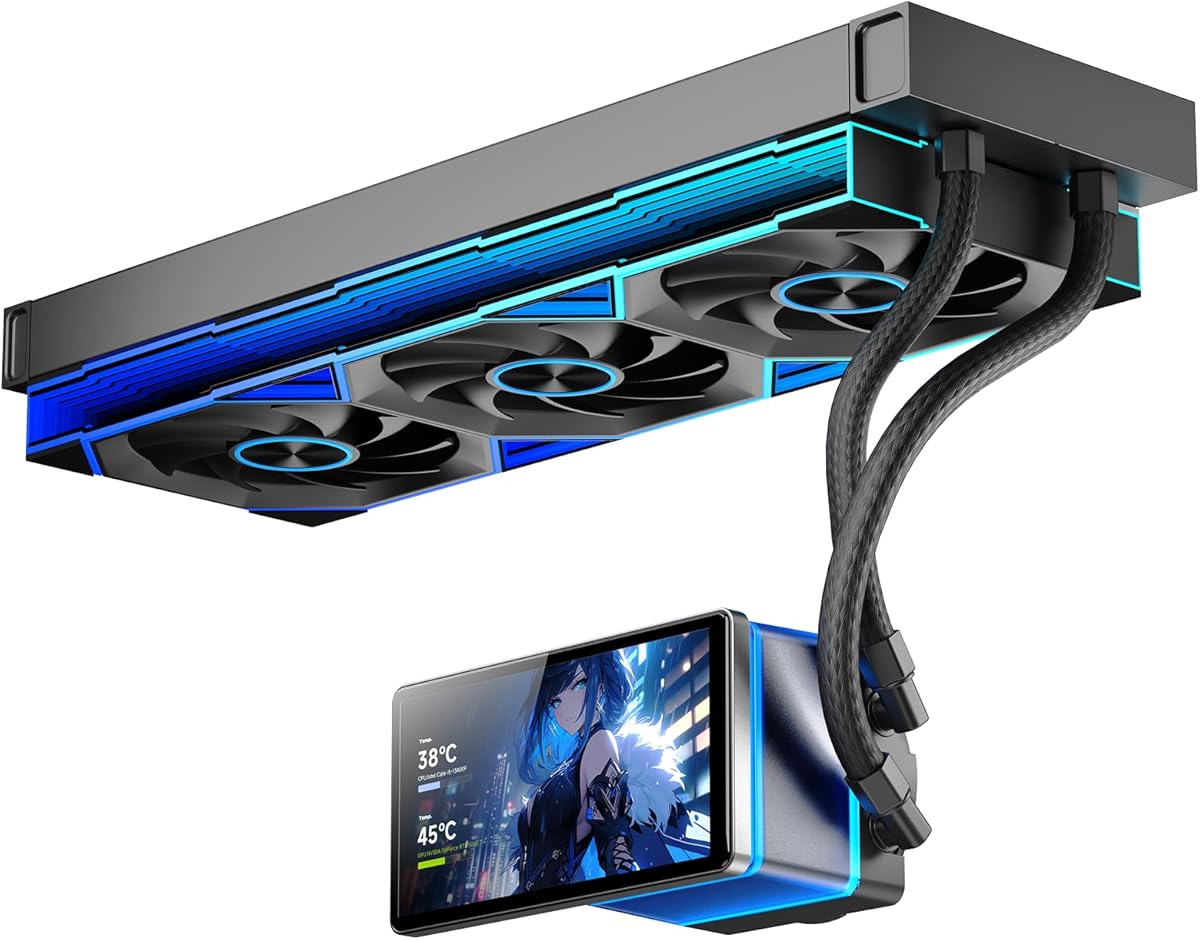
Thermalright Peerless Vision 360 ARGB Black is the pack’s value-minded answer to premium pump LCDs: a 3.95-inch narrow-bezel IPS panel at 480×480 and 60Hz, magnetically attached to the pump head so you can remove it for service without fighting screw posts. TRCC software opens the usual playbook—CPU and system stats, custom static and dynamic backgrounds, video support, and screen-projection-style content—for builders who want the pump block to be the focal point behind tempered glass. Compared with CORSAIR’s smaller 2.1-inch Titan LCD, Peerless Vision wins on raw screen real estate and Thermalright’s aggressive 360mm radiator pairing.

  • 360mm AIO with 3.95-inch 480×480 IPS magnetic screen
  • Three TL-M12Q wireless-splicing fans to 2000 RPM
  • AM4/AM5; Intel LGA 115x through 1851/2011/2066
Check Price →
✓ Pros
  • Large near-square IPS display for stats and DIY themes via TRCC
  • Wireless splicing between fan modules reduces cable clutter
  • 60Hz screen refresh suits animations and screen-style content
  • Infinity-mirror side lighting on TL-M12Q fans adds depth
  • Extremely broad socket list including legacy HEDT platforms
✕ Cons
  • TRCC and USB wiring add setup steps versus plain AIO blocks
  • AMD mounting requires the motherboard’s original backplate
  • 2000 RPM fans need a tuned curve to stay quiet at idle

Detailed review

Under the display sits a full 360mm liquid loop with three TL-M12Q PWM fans. Thermalright specifies up to 2000 RPM with S-FDB bearings aimed at reducing vibration when the radiator hangs from a top exhaust mount. Wireless splicing between fan units trims the wire loom between modules; you still need 4-pin PWM and 5V ARGB paths to the chain, but the visual cable mess common on triple-fan radiators is noticeably cleaner. Infinity-mirror lighting on the fan sides photographs well for stream backgrounds and RGB-forward desks without requiring a separate light strip on the radiator frame.

Compatibility spans AMD AM4/AM5 and a long Intel list including LGA 1700/1851 plus 2011/2066 for older workstation refreshes. The critical AMD caveat repeats across Thermalright listings: mounting uses the motherboard’s stock backplate, which is not included in the box. Photograph screw lengths when you disassemble a new AM5 board and keep that plate in the parts bag. Intel kits ship for the listed sockets; match the manual diagram to your exact LGA generation before applying torque in a cross pattern on the block.

Plan a motherboard USB 2.0 header for TRCC before you finalize fan and ARGB header allocation. Screen coolers consume ports quickly when you also run front-panel USB, RGB controllers, and Wi-Fi modules. Case fit remains the other gatekeeper: confirm true 360mm radiator clearance on top or front, account for infinity-mirror fan thickness, and route tubes so they do not kink against tall RAM or GPU power cables. Top exhaust often keeps GPU intake air cooler than a front-mounted radiator, but only if your chassis height allows the pump block and VRM clearance together.

Thermally, treat Peerless Vision as a mainstream-to-enthusiast 360mm kit suitable for gaming CPUs and many creator chips when radiator airflow is not starved by dust filters or cable covers. The LCD does not add cooling capacity; it adds monitoring and personality. If you never open TRCC and dislike USB cables on the pump, a non-screen 360mm from another roundup will feel simpler. If you want meme GIFs and large numeric readouts on the pump face without CORSAIR’s iCUE LINK stack, Peerless Vision is the Thermalright flagship in this screen-focused pack.

Daily ownership: build a quiet PWM curve first so 2000 RPM fans idle during browsing, then theme the screen second. Seat the magnetic display firmly after moves to LAN events or deep cleaning. Update TRCC when Thermalright posts fixes, and avoid blocking the radiator fin stack with decorative panels that choke exhaust. For show builds that still need genuine 360mm headroom, this model balances screen size, fan technology, and socket breadth better than most competitors here.

Versus Titan 360 RX LCD

Titan integrates iCUE LINK and a brighter small IPS at 480×480. Peerless Vision trades ecosystem polish for a larger magnetic screen and wireless-splicing fans on a Thermalright value path.

AMD install reminder

Do not discard the motherboard backplate. Peerless Vision AM4/AM5 mounting depends on it. Verify standoff height against Thermalright’s video for your socket.

Check Price on Amazon →

We may earn a commission at no additional cost to you.

2. Peerless Assassin 120 Vision MAX (Black) - Best AGHP Screen

Thermalright Peerless Assassin 120 Vision MAX ARGB Black CPU Air Cooler

Thermalright Peerless Assassin 120 Vision MAX ARGB Black CPU Air Cooler

9/10★★★★★

Thermalright Peerless Assassin 120 Vision MAX ARGB Black merges the Peerless Assassin cooling architecture with a 5-inch IPS display at 480×854 resolution on a magnetic top cover. Instead of putting the screen on an AIO pump, the panel sits atop a dual-tower heatsink where it remains visible above RAM and lower-profile VRM heatsinks in windowed builds. Six pure copper heat pipes using AGHP Gen 5.0 technology target gravity-related performance loss in both vertical tower and horizontal test-bench orientations—a detail air-cooler enthusiasts care about when cases lie flat on a desk or when ITX layouts rotate the board.

  • Dual-tower air with 5-inch 480×854 IPS magnetic top
  • Six 6mm AGHP Gen 5.0 heat pipes; nickel-plated copper base
  • 2150 RPM fans, 69 CFM, ≤27 dB(A) claimed
Check Price →
✓ Pros
  • AGHP Gen 5 pipes address gravity effects in vertical and horizontal mounts
  • Large portrait IPS screen for stats and TRCC themes
  • 164mm height fits many ATX mid-towers with offset for GPU clearance
  • Dual S-FDB V2 fans with ARGB edges sync via motherboard software
  • No liquid loop maintenance or pump failure modes
✕ Cons
  • 164mm tower height excludes some compact cases
  • USB-powered screen needs TRCC and a 9-pin header
  • 4.5 rating trails the white and alternate black Vision MAX SKUs

Detailed review

Cooling hardware includes two 120mm fans specified to 2150 RPM ±10%, roughly 69 CFM airflow, and operating noise up to about 27 dB(A). S-FDB V2 bearings aim for longevity and reduced vibration over long render sessions. A nickel-plated micro-engraved copper base joined via reflow soldering helps spread heat from modern high-core CPUs into the fin stack. The offset tower layout is engineered to clear tall RAM heat spreaders and bulky GPU backplates—a recurring pain point on dual-tower coolers without thoughtful heat-pipe routing.

TRCC software powers the display over a motherboard 9-pin USB connection. You get real-time parameter monitoring, custom static and dynamic backgrounds, and video playback once cables are seated and the app detects the module. ARGB lighting on both sides of the five-inch panel adjusts through motherboard lighting software on a separate 5V 3-pin header. Plan both USB and ARGB paths before you zip-tie the tower into place; rear cable holes fill quickly on mATX boards.

At 125×135×164mm overall, this cooler demands case clearance verification. Measure CPU cooler height in your chassis manual and compare against side panel bulge or top panel interference. AMD AM4/AM5 and Intel LGA 1851/1700/115x-class sockets are supported with included mounting kits; AMD again requires the motherboard’s original backplate. Installation follows familiar Peerless Assassin patterns—secure the backplate, apply paste evenly, mount the base, then attach fans in push configuration unless your manual recommends pull on the rear tower.

Versus liquid alternatives in this pack, Vision MAX air avoids pump noise and sealed-loop aging while still delivering a large screen experience. It will not match a 360mm AIO on sustained all-core torture tests on the hottest flagship silicon, but for gaming and moderate creator workloads it keeps CPUs out of aggressive throttle when case airflow is decent. The 4.5 rating on this specific ASIN is slightly below sibling listings; read recent feedback for fan bearing outliers before you buy.

Choose this black Vision MAX when you want AGHP Gen 5 pipes explicitly called out, a matte black tower aesthetic, and tower-top screen visibility without radiator mount requirements. Skip it if your case cannot clear 164mm or if you already committed to a 360mm front radiator that steals fan positions. Pair TRCC with a conservative fan curve so 2150 RPM capability becomes headroom instead of constant noise.

Who it is for

Builders who prefer air cooling reliability, need LGA 1851/1700 or AM5 support, and want a five-inch dashboard without AIO tubing.

RAM and GPU clearance

Heat-pipe offset helps wide GPUs and tall RAM, but measure first on ITX or narrow mid-towers. Fan clips may need adjustment on the front tower if RAM exceeds common height limits.

Check Price on Amazon →

We may earn a commission at no additional cost to you.

3. Peerless Assassin 120 Vision MAX (White) - Best White Screen

Thermalright Peerless Assassin 120 Vision MAX ARGB White CPU Air Cooler

Thermalright Peerless Assassin 120 Vision MAX ARGB White CPU Air Cooler

9.6/10★★★★★

The white Peerless Assassin 120 Vision MAX carries the strongest Amazon rating among Thermalright Vision tower listings in this pack at 4.8, which matters when three visually similar SKUs differ mostly by finish and listing age. Hardware matches the black Vision MAX story: dual towers, six pure copper heat pipes, nickel-plated copper base, two 120mm PWM fans to about 2150 RPM, and a magnetic 5-inch IPS panel at 480×854 for TRCC-driven monitoring and custom themes. The white coating on fins and fan frames aligns with popular snow-build aesthetics where a black radiator or dark tower would break the palette behind tempered glass.

  • White dual-tower with 5-inch 480×854 IPS magnetic top
  • Six copper heat pipes; dual 120mm PWM fans to 2150 RPM
  • 164mm height; TRCC over 9-pin USB; AM4/AM5 and Intel 1851/1700/115x
Check Price →
✓ Pros
  • Highest-rated Vision MAX variant in this pack at 4.8
  • White towers and fans suit snow-themed glass builds
  • Same large portrait screen and TRCC feature set as black models
  • Dual-tower layout clears many tall RAM modules with offset design
  • No pump or liquid maintenance over multi-year ownership
✕ Cons
  • 164mm height still blocks some compact cases
  • White fin surfaces show dust faster than black coatings
  • Screen and ARGB require USB plus 5V headers on the motherboard

Detailed review

Cooling performance targets the same mainstream and enthusiast CPUs as other Peerless Assassin derivatives—gaming Ryzen and Core chips, moderate streaming loads, and creator tasks that spike package power intermittently rather than pinning every core for hours at stock power limits. Airflow claims around 69 CFM and noise up to roughly 27 dB(A) depend heavily on your PWM curve. Out of the box, many boards default to aggressive fan ramps; spend ten minutes in BIOS or vendor software to keep idle browsing quiet while preserving headroom for gaming thermals.

TRCC remains the control path for the display: download from Thermalright’s site, connect the 9-pin USB cable before first launch, and confirm detection prior to mounting the side panel. ARGB on the screen edges and fans sync through a 5V 3-pin motherboard header. White ARGB reflections can look softer and more diffused than black towers with the same LED brightness—photographers and streamers often prefer this SKU for on-camera balance when ring lights hit the interior.

Compatibility covers AMD AM4/AM5 and Intel LGA 1851/1700/115x-class sockets with included metal mounting hardware. AMD installs again require the motherboard’s original backplate; keep it when unboxing a new board. Measure 164mm clearance against your case spec sheet and remember that the magnetic display top adds visual height even when fin height technically fits—some side panels bulge inward near the CPU zone.

Compared with TRYX TURRIS 620 in this roundup, Vision MAX White trades KANALI and 720p for TRCC and a taller portrait IPS at 480×854 on a proven Peerless Assassin foundation. Compared with 360mm AIO screen coolers, you skip radiator mount planning and pump USB routing at the block, but you must still route USB to the tower top. For white mid-towers that cannot fit a 360mm radiator yet have tower height, this is the most cohesive color-matched screen air pick in the pack.

Maintenance is classic air-cooler hygiene: compressed air or vacuum on fins every few months, fan blade wipe-down, and TRCC theme backups before major Windows updates. Remount with fresh paste if you swap motherboards. The 4.8 rating suggests buyers tolerate the software and fitment tradeoffs when the finish matches their build—if you are assembling a white glass showcase and refuse liquid loops, start here before considering black AIO radiators with white fans swapped in.

White build pairing tips

Match white cable extensions and TRCC static backgrounds for a cohesive look. Dim ARGB to medium brightness so the IPS content—not LED hotspots—dominates the tower top.

Versus black Vision MAX ASINs

Cooling architecture is the same family; choose white for aesthetics and this listing’s stronger recent rating, or black when the interior theme is stealth.

Check Price on Amazon →

We may earn a commission at no additional cost to you.

4. TRYX TURRIS 620 - Best Overall Screen Cooler

TRYX TURRIS 620 CPU Cooler 5.0" HP IPS Customizable Screen 280w TDP | 720P

TRYX TURRIS 620 CPU Cooler 5.0" HP IPS Customizable Screen 280w TDP | 720P

9.8/10★★★★★

TRYX TURRIS 620 is the pack’s highest-rated screen cooler at 4.9 and our Best Overall pick because it combines a genuinely sharp 5.0-inch IPS panel at 1280×720 with dual-tower air cooling rated to 280W TDP and a software stack that feels modern rather than bolted on. KANALI handles animations, photos, performance dashboards, MP4/GIF/PNG/AVI content, and native GIPHY integration so you can browse GIF libraries without hoarding files on disk. An embedded processor runs playback independently, which keeps screen transitions smooth when the main CPU is busy gaming or rendering—an underrated detail on display-heavy builds where stuttering pump GIFs would ruin the effect.

  • 5.0-inch 1280×720 IPS display with KANALI and GIPHY
  • Dual-tower air rated 280W TDP; six copper heat pipes
  • Rail-mounted ROTA fans; LGA 1851/1700, AM4/AM5
Check Price →
✓ Pros
  • Top 4.9 rating in the pack with sharp 720p screen density
  • KANALI embedded processor offloads playback from the CPU
  • Native GIPHY browsing without manual GIF downloads
  • Rail-lock ROTA fans reduce clip vibration versus wire retainers
  • Six-year product coverage and KANALI live support cited in listing
✕ Cons
  • Premium positioning versus Thermalright Vision air coolers
  • Large dual-tower footprint still demands case height checks
  • KANALI ecosystem is newer than TRCC or iCUE for some buyers

Detailed review

Cooling hardware uses a compact dual-tower heatsink with reflow-soldered fins and six copper heat pipes feeding a raised micro-convex cold plate meant to close microscopic air gaps against the integrated heat spreader. Rail-mounted ROTA fans replace traditional wire clips for easier installation and less micro-vibration; TRYX cites about 32.5 dBA even at full load, though your case and curve still dominate perceived noise. Heat-pipe offset and 55mm RAM clearance claims help compatibility with tall modules and wide GPUs—verify against your exact board layout because DIMM slot spacing varies.

Socket support focuses on current platforms: Intel LGA 1851/1700 and AMD AM4/AM5, appropriate for most 2024–2026 gaming and workstation builds without legacy HEDT brackets cluttering the box. Installation is still a large air cooler job: plan rear case access, apply paste evenly, torque mounting screws in the recommended pattern, and route KANALI’s USB power before you snap the shroud. The magnetic visual centerpiece sits where passers-by see it first in windowed cases—lean into that with split-screen monitoring plus a subtle animated border rather than cluttering every sensor at once.

Versus Thermalright Peerless Assassin Vision MAX, TURRIS 620 pushes higher resolution, GIPHY native support, and rail fan mounting at a premium tier. Versus 360mm AIO screen coolers, you avoid radiator fitment and pump maintenance but surrender some sustained-all-core headroom on the hottest unlocked chips. For typical gaming loads, streaming, and moderate content creation, the 280W TDP marketing target signals enough margin when paired with sensible case fans.

Ownership experience hinges on KANALI updates. Install the latest build to unlock full GIPHY functions, test USB detection before closing the panel, and save a favorite static dashboard as fallback. TRYX advertises six-year product coverage and 24/7 live support through KANALI—document your purchase for warranty questions. Clean tower fins periodically; the large screen top does not stop dust from accumulating on leading fin edges.

Buy TURRIS 620 when you want the best-rated screen air cooler here, prioritize 720p clarity over 480×854 portrait panels, and enjoy GIF culture without manual curation. Skip it if your case cannot house a premium dual-tower or if you already ordered a 360mm AIO and lack top radiator clearance for a redundant air option. As a centerpiece air solution with legitimate cooling credentials, it earns the top slot in this screen-focused roundup.

KANALI setup tips

Connect USB, install the latest KANALI, verify GIPHY login, then assign a lightweight dashboard before adding heavy MP4 loops. Embedded playback helps, but oversized 4K uploads still waste storage.

Versus Panorama SE AIO

Panorama SE moves heat through a 360mm Asetek loop with a curved AMOLED. TURRIS keeps air simplicity with 720p IPS. Choose TURRIS for no-liquid maintenance; Panorama for flagship AIO thermals and AMOLED drama.

Check Price on Amazon →

We may earn a commission at no additional cost to you.

5. CORSAIR Titan 360 RX LCD - Best iCUE LCD

CORSAIR Titan 360 RX LCD Liquid CPU Cooler

CORSAIR Titan 360 RX LCD Liquid CPU Cooler

9.2/10★★★★★

CORSAIR Titan 360 RX LCD represents the polished premium lane in this pack: a 360mm all-in-one with FlowDrive pumping, three RX120 RGB fans engineered for radiator work, and a 2.1-inch IPS LCD on the pump head at 480×480 resolution, roughly 600 cd/m² brightness, and about 30 FPS for animated content. iCUE displays CPU temperature, custom GIFs, logos, or memes with color depth CORSAIR advertises beyond 16.7 million shades—meaning gradients look smooth rather than banded on camera. It is not the largest screen here, but it is among the brightest and best integrated with a major desktop ecosystem.

  • 360mm AIO; 2.1-inch 480×480 IPS LCD at 600 cd/m²
  • FlowDrive pump; iCUE LINK System Hub; RX120 RGB fans
  • LGA 1851/1700, AM5/AM4
Check Price →
✓ Pros
  • Bright IPS LCD with 30 FPS animations and 16.7M colors
  • iCUE LINK daisy-chain simplifies pump and fan wiring
  • FlowDrive three-phase pump and precision cold plate profile
  • RX120 fans tuned for radiator static pressure with AirGuide
  • Mature CORSAIR software for monitoring and lighting sync
✕ Cons
  • Smaller screen than Peerless Vision or TRYX AMOLED models
  • iCUE LINK hub adds cost and ecosystem lock-in
  • 360mm radiator still demands verified case clearance

Detailed review

iCUE LINK is the wiring story. Connect pump and fans through universal LINK connectors into the included System Hub, then attach one port to the motherboard. That reduces the spaghetti common on separate PWM and ARGB leads for each radiator fan. Builders already running CORSAIR cases, power supplies, or fans gain a coherent control surface; newcomers should budget time to learn iCUE profiles once hardware is detected. LINK is an advantage if you value tidy builds; it is friction if you wanted a standalone cooler without hub hardware.

FlowDrive combines a three-phase pump motor with a precision cold plate surface profile aimed at maximizing contact with the CPU integrated heat spreader. RX120 fans bring AirGuide technology and Magnetic Dome bearings to the radiator side—specs CORSAIR repeats across its high-end cooling line because static pressure through dense fins matters more than open-air CFM numbers. Socket coverage includes Intel LGA 1851/1700 and AMD AM5/AM4, aligned with mainstream 2026 gaming boards.

Case planning mirrors any 360mm AIO: confirm top or front radiator mounts, tube length and orientation, and GPU clearance when front mounting. The LCD module adds personality but does not reduce radiator thickness. Top exhaust remains attractive thermally when chassis height allows. Configure iCUE fan curves so RX120 units ramp with CPU temperature rather than GPU spikes unless you intentionally link sensors for acoustic reasons.

Compare Titan against TRYX Panorama SE when you want AMOLED curvature and GIPHY native browsing; compare against Peerless Vision when raw pump screen size and Thermalright value matter more than LINK integration. Titan wins for CORSAIR loyalists who want a proven hub, bright small LCD, and FlowDrive without experimenting with newer brands. The 4.6 rating tracks with other premium CORSAIR cooling listings—generally solid with occasional software or pump-noise outliers worth testing inside the return window.

Daily tips: update iCUE after major Windows patches, keep hub firmware current, and assign a readable temperature layout for troubleshooting before decorative GIFs. If the screen freezes, check USB and LINK connections before RMAing hardware. For builders who treat software as part of the product, Titan 360 RX LCD is the safest ecosystem bet among screen AIOs in this roundup.

Who should choose Titan

CORSAIR ecosystem builders who want LINK daisy-chain wiring and a bright compact LCD without jumping to TRYX KANALI or Thermalright TRCC.

Screen size expectations

If you need a five-inch or larger panel, look at TURRIS, Vision MAX, Panorama SE, or Chill Arc. Titan optimizes brightness and iCUE integration on a smaller face.

Check Price on Amazon →

We may earn a commission at no additional cost to you.

6. TRYX Panorama SE 360 - Best Premium AMOLED AIO

TRYX Panorama SE 360mm AIO Curved Screen GIPHY Built-in Asetek 280w TDP | 6.67''

TRYX Panorama SE 360mm AIO Curved Screen GIPHY Built-in Asetek 280w TDP | 6.67''

9.2/10★★★★★

TRYX Panorama SE 360mm AIO is the visual flagship of this pack: a 6.67-inch curved AMOLED at 2K resolution, 60Hz refresh, roughly 400 nit brightness, high pixel density, and a rotatable module so windowed cases viewed from the side still show the waterfall 3D animation correctly. Compared with mainstream IPS pump screens, AMOLED contrast and viewing angles read premium in photos and streams—dark backgrounds look truly dark rather than gray IPS glow. The curved glass becomes the identity of the build the same way a vertical GPU once did.

  • 6.67-inch curved 2K AMOLED; 60Hz; rotatable module
  • Asetek Adela platform; 280W TDP; 27mm radiator
  • Three ROTA ARGB fans; KANALI plus GIPHY; LGA 1851/1700/115x, AM4/AM5
Check Price →
✓ Pros
  • Largest curved AMOLED in the pack with 2K density and 400 nit brightness
  • Asetek Adela cooling for heavy gaming and creator workloads
  • Rotatable screen aligns waterfall 3D animations from multiple viewing angles
  • KANALI split-screen and instant content switching
  • Full-load noise claimed below about 27.86 dB(A) with FDB ROTA fans
✕ Cons
  • Premium complexity versus simpler 360mm AIOs without curved AMOLED
  • 360mm mount and USB routing still mandatory
  • AMOLED glare possible under direct desk lighting

Detailed review

Cooling is not cosmetic-only. TRYX adopts Asetek’s Adela professional platform with a 27mm high-density fin radiator, ROTA ARGB fans using FDB bearings, and total capacity marketed around 280W TDP for video encoding, AI workloads, software compilation, and long gaming sessions. That pairs flagship display hardware with a known liquid cooling supplier rather than an unknown pump on a pretty block. Four-corner damping pads on fans target vibration noise; listing claims sub-28 dB(A) even at full load when curves are sane.

KANALI software mirrors TURRIS features: GIPHY native browsing, PNG/JPG/GIF/MP4/AVI uploads, split-screen layouts, and real-time monitoring with instant switching. Install the latest KANALI to unlock complete GIPHY functions. All-metal mounting hardware across Intel LGA 1851/1700/1200/115x and AMD AM4/AM5 aims for even pressure without flexing boards—follow TRYX torque guidance and avoid overtightening on thin ITX plates.

Installation demands 360mm radiator clearance, thoughtful tube bends, and USB routing to the pump without stressing connectors. Rotatable screens require checking orientation locks so cables are not twisted after adjustment. Front versus top mount trades GPU intake temperature against CPU exhaust convenience; Panorama SE does not remove those physics. ARGB GEN2 LEDs on ROTA fans sync with motherboard ecosystems for unified lighting if you resist running every effect at maximum brightness.

Versus Chill Arc—another 6.67-inch 2K AMOLED 360mm entry here—Panorama SE brings Asetek branding, TRYX KANALI GIPHY integration, and curved rotatable hardware at a higher trust tier for buyers who recognize Asetek pumps. Versus CORSAIR Titan, Panorama wins on display size and panel technology; Titan wins on iCUE LINK maturity. Choose Panorama when the case window is the primary audience and you need both show and sustained thermal headroom.

Treat the AMOLED module carefully during install—fingerprints and pressure on curved glass are unforgiving on camera. Test pump and fan acoustics early, update KANALI, and keep radiator filters clean so 280W marketing translates into real-world stable clocks. For builders who want the most cinematic CPU cooler screen in this list without custom loop plumbing, Panorama SE is the premium answer.

Rotatable screen workflow

Set rotation before final tube routing. Capture a photo of the USB header orientation so future maintenance does not require full disassembly.

Asetek advantage

Adela platform familiarity helps buyers who trust Asetek pump longevity. Still verify mounting pressure and fan curves like any 360mm AIO.

Check Price on Amazon →

We may earn a commission at no additional cost to you.

7. Thermalright FW SE 360 - Best Small-Screen 360 AIO

Thermalright FW 240 SE ARGB Black-360mm AIO CPU Liquid Cooler | IPS LCD Screen w

Thermalright FW 240 SE ARGB Black-360mm AIO CPU Liquid Cooler | IPS LCD Screen w

8.8/10★★★★☆

Thermalright FW 240 SE ARGB Black in this pack is the compact-screen 360mm option: a 2-inch square IPS LCD at 320×240 on a magnetic pump module, paired with a 360-sized radiator and TL-P12W-S PWM fans specified to about 2000 RPM. The square panel trades cinematic size for clarity on basic stats and simple PNG or GIF backgrounds—ideal if you want proof-of-concept screen cooling without dominating the pump face. Naming is confusing because the listing says FW 240 SE yet ships a 360mm radiator; trust the ASIN and dimensions here rather than the family name alone.

  • 360mm radiator; 2-inch 320×240 square IPS magnetic pump screen
  • TL-P12W-S PWM fans to 2000 RPM; SS2 all-metal buckle
  • AM4/AM5; Intel 115x–1851/2011/2066
Check Price →
✓ Pros
  • Square IPS screen readable for temps and simple GIFs
  • Magnetic pump module removable for DIY images
  • 360mm radiator area despite compact display footprint
  • SS2 buckle shared with Thermalright air ecosystem for swaps
  • Broad socket coverage including legacy Intel HEDT
✕ Cons
  • 4.4 rating lowest among Thermalright screen models here
  • 320×240 resolution looks coarse versus 720p or 2K panels
  • Product naming references 240 SE while SKU ships 360mm—verify ASIN

Detailed review

Radiator size is listed around 277×120×52mm with a cold head near 67×68×59mm, pump noise up to roughly 29.8 dBA, and fans cooperating with a newer-generation pump aimed at heat absorption efficiency. S-FDB bearings and blade tuning target lower friction noise during long sessions. SS2 all-metal mounting buckles align with Thermalright’s broader air and water line so builders who own other Thermalright coolers may recognize bracket patterns when swapping between tower and AIO strategies on different rigs.

The magnetic LCD pump head supports JPG, PNG, and GIF stills plus CPU temperature monitoring—enough for functional dashboards, not enough for dense 720p layouts. Steerable display positioning helps aim the square panel toward side-window viewers. Compatibility spans AMD AM4/AM5 and Intel sockets from 115x through 1700/1851 plus 2011/2066, similar breadth to Peerless Vision. AMD backplate requirements apply again; do not discard the board plate.

At 4.4 rating this SKU sits below other Thermalright screen entries—read recent reviews for pump noise, software detection, and fan quality outliers. Thermally a 360mm loop still beats smaller radiators for many hot CPUs when mounted with decent case airflow. The screen is not the selling point for extreme overclockers; cooling area is. If you need maximum LCD real estate, step up to Peerless Vision or TRYX models. If you need affordable 360mm liquid with a minimal stats panel, FW SE fills that niche.

Installation follows standard AIO practice: mount bracket, apply paste, attach pump with even pressure, mount radiator fans as push or pull per case airflow plan, route PWM and ARGB, then configure the LCD content. Keep tubes from sharp bends near the magnetic module. Set fan curves before uploading animated GIFs that distract you from audible fan ramp cues during stress tests.

Choose FW SE when budget and simplicity beat panel size, and when a 360mm Thermalright loop with square IPS monitoring is enough. Skip it if you want TRCC’s larger canvas or KANALI GIPHY on day one. It is a pragmatic entry into screen AIOs without flagship aesthetics—respectable cooling hardware with a small honest display rather than a curved AMOLED theater piece.

Naming clarification

FW 240 SE reflects product family; this ASIN is the 360mm radiator variant with 2-inch IPS. Match photos and B0DS256KQP before purchase.

Ideal buyer

Stats-focused builders who want 360mm capacity and a temperature readout without learning advanced media pipelines.

Check Price on Amazon →

We may earn a commission at no additional cost to you.

8. Chill Arc 360 - Best Rotatable AMOLED Value

Chill Arc 360mm AIO CPU Cooler

Chill Arc 360mm AIO CPU Cooler

8.8/10★★★★☆

Chill Arc 360mm AIO competes in the same visual league as TRYX Panorama SE: a 6.67-inch 2K AMOLED on the pump head with 360-degree rotation for system monitoring, dynamic wallpapers, or custom images, plus 3D anamorphic effects that pop behind tempered glass. Jungle Leopard markets 320W TDP capacity with three 120mm ARGB fans to handle high-end processors like Intel Core i9-14900K and AMD Ryzen 9 7950X under heavy loads—claims that assume adequate case airflow and sensible fan curves, not sealed-case torture.

  • 360mm AIO; 6.67-inch 2K rotatable AMOLED
  • 320W TDP claim; copper base; FEP tubing
  • Three 120mm ARGB fans; LGA 1851/1700/115x, AM5/AM4
Check Price →
✓ Pros
  • Same 6.67-inch 2K AMOLED class as flagship curved models
  • 360-degree rotation adjustment for side-window viewing
  • 320W TDP marketing targets i9-14900K and Ryzen 9 7950X class chips
  • ARGB fan sync with major motherboard lighting ecosystems
  • Copper cold plate and FEP tubing emphasized for durability
✕ Cons
  • 4.4 rating suggests more variance than TRYX or CORSAIR tiers
  • Software ecosystem less documented than KANALI or iCUE here
  • Large AMOLED still needs careful handling during install

Detailed review

Hardware highlights include a copper base cold plate, FEP tubing for flexibility and leak resistance branding, and addressable RGB on fans compatible with ASUS Aura Sync, MSI Mystic Light, Gigabyte RGB Fusion, and similar motherboard suites. That matters when you want one lighting profile across case fans, GPU strips, and the AIO without a proprietary hub—contrasting CORSAIR Titan’s LINK approach. Rotation hardware lets you aim the anamorphic effect toward desk viewers or camera mounts on streaming desks.

At 4.4 rating Chill Arc sits below TRYX Panorama SE and several Thermalright entries, so treat owner reviews as mandatory reading for pump noise, software usability, and AMOLED reliability. Feature lists overlap Panorama on paper—large rotatable AMOLED, 360mm scale, ARGB fans—but brand maturity and Asetek pump branding differ. Buyers choosing Chill Arc often accept less documented software in exchange for similar screen size specs on paper.

Installation requires standard 360mm clearance, ARGB and PWM headers, and gentle handling of the rotatable display during tube routing. Program motherboard ARGB at moderate brightness to avoid washing out AMOLED content. Top versus front radiator placement follows the same tradeoffs as every other 360mm kit in this guide: exhaust heat upward when possible, protect GPU intake from preheated air when front mounting.

Versus Panorama SE, Chill Arc lacks TRYX KANALI GIPHY native integration and Asetek Adela naming in the listing, but still targets builders who want a huge rotatable AMOLED without stepping to the highest tier. Versus Peerless Vision, Chill Arc moves to AMOLED and 2K but adds liquid maintenance. Pick Chill Arc when AMOLED size and rotation matter and you are comfortable with a newer brand’s support story.

Long-term, maintain radiator cleanliness and watch for AMOLED cable fatigue if you rotate the module frequently. Save static monitoring layouts for troubleshooting before decorative loops. If the 4.4 rating gives you pause, compare return policies and consider Panorama SE or Titan for more established support paths—otherwise Chill Arc is a legitimate big-screen alternative for bold glass builds.

Rotation and cables

Rotate the module to the desired angle, then secure tubing so repeated adjustments do not stress the display flex cable.

Who should consider Chill Arc

Builders prioritizing 6.67-inch 2K AMOLED size and ARGB motherboard sync over TRYX or CORSAIR ecosystem depth.

Check Price on Amazon →

We may earn a commission at no additional cost to you.

9. Peerless Assassin Vision MAX (Alt Black) - Best Rated Black

Thermalright Peerless Assassin 120 Vision MAX ARGB Black CPU Cooler

Thermalright Peerless Assassin 120 Vision MAX ARGB Black CPU Cooler

9.6/10★★★★★

This Peerless Assassin 120 Vision MAX ARGB Black listing—ASIN B0GCW36Q58—shares the 4.8 rating tier with the white Vision MAX and outscores the alternate black B0GD1CJ71R entry at 4.5 in this pack. Hardware centers on a dual-tower heatsink with six heat pipes, nickel-plated copper base contact, dual 120mm PWM fans, and a magnetic 5-inch IPS display at 480×854 controlled through TRCC over USB. Marketing emphasizes tool-free magnetic top cover installation, ARGB edges on the display, and IPS viewing-angle stability for dashboard layouts viewed from slight off-axis angles through case glass.

  • Dual-tower black finish; 5-inch 480×854 magnetic IPS top
  • Six heat pipes; dual fans ≤27 dB(A) at rated load
  • AM4/AM5; Intel LGA 1851/1700/115x
Check Price →
✓ Pros
  • 4.8 rating matches white Vision MAX tier
  • Magnetic top cover simplifies screen access without screws
  • Mature Peerless Assassin fin and heat-pipe layout
  • TRCC supports dynamic backgrounds and monitoring
  • No radiator mount required versus 360mm AIO alternatives
✕ Cons
  • Functionally similar to other Vision MAX SKUs—pick by ASIN availability
  • 164mm height excludes compact cases
  • Two black Vision MAX listings may confuse shoppers—verify image and ASIN

Detailed review

Cooling behavior aligns with Peerless Assassin reputation: strong air performance for gaming and everyday creator workloads when case airflow is not neglected. Fans claim up to about 69 CFM with noise capped near 27 dB(A) in specifications—real acoustics depend on PWM curves and case damping. Offset tower design continues to help RAM and GPU clearance compared with naive dual-tower layouts that block the first PCIe slot or tallest DIMMs.

Buyers may wonder why two black Vision MAX ASINs appear in one pack. Listings differ by image codes, minor bundle text, and Amazon review history—not necessarily by fin geometry. Compare current availability, shipping, and recent owner photos before choosing B0GCW36Q58 versus B0GD1CJ71R. If AGHP Gen 5.0 is explicitly required, read the longer about text on B0GD1CJ71R; if magnetic top cover simplicity and higher rating matter, this ASIN is the stronger black default.

TRCC setup matches other Thermalright screen products: 9-pin USB, software from official site, verify detection, then customize backgrounds. AMD installs need the motherboard backplate. Intel LGA 1851/1700/115x kits ship in-box. Measure 164mm clearance and plan ARGB headers alongside USB.

Against TRYX TURRIS 620, Vision MAX Black offers TRCC instead of KANALI, portrait 480×854 instead of 720p, and no GIPHY native browsing—but avoids liquid loops and often lands at a different value point depending on daily deals. Against 360mm screen AIOs, you trade radiator thermals for tower simplicity and a top-mounted screen visible above motherboard clutter.

Recommend this ASIN when you want black Peerless Assassin aesthetics, the higher 4.8 confidence signal, and magnetic screen access without hunting the white finish. Skip if case height fails or if you require curved AMOLED on the pump—this is IPS tower territory. Maintain fins, tune curves, and treat TRCC like part of the ownership experience.

Choosing between black Vision MAX ASINs

Prefer B0GCW36Q58 for 4.8 rating and magnetic cover focus. Consider B0GD1CJ71R if AGHP Gen 5.0 marketing lines matter to your purchase documentation.

Install tip

Attach fans after seating the base so the magnetic display does not interfere with screwdriver access on the front tower.

Check Price on Amazon →

We may earn a commission at no additional cost to you.

10. PF 360 - Best Budget Large LCD AIO

PF 360 CPU Water AIO Cooler Liquid Cooling|5.5-inch LCD Magnetic Screen|360mm AR

PF 360 CPU Water AIO Cooler Liquid Cooling|5.5-inch LCD Magnetic Screen|360mm AR

8.4/10★★★★☆

PF 360 closes the pack as the budget large-LCD 360mm AIO: a 5.5-inch LCD at 480×960 resolution with magnetic mounting, 270-degree rotation in 90-degree steps, and custom software supporting imported video and pictures plus hardware data visualization. Infinity mirror ARGB fans and dual-ring ARGB on the water block sync to motherboard 5V headers for whole-machine lighting unity—an aesthetic play similar to premium kits at a lower rating tier. The 4.2 Amazon score demands careful reading of recent buyer feedback before you commit.

  • 360mm AIO; 5.5-inch 480×960 LCD with 270° rotation
  • 320W TDP claim; 165.1 CFM combined fan airflow
  • Infinity mirror ARGB fans; LGA 1851/1700/115x, AM4/AM5
Check Price →
✓ Pros
  • Large 5.5-inch portrait LCD larger than CORSAIR Titan face
  • 270° rotation at 90/180/270 steps for viewing angles
  • Magnetic screen assembly and custom software for media import
  • High combined CFM spec with 320W TDP marketing
  • Siamese infinity mirror ARGB fans for unified lighting look
✕ Cons
  • 4.2 rating lowest in the pack—scrutinize recent reviews
  • Less established brand support than TRYX, CORSAIR, or Thermalright
  • ≤30 dBA claim may not match aggressive default fan curves

Detailed review

Cooling marketing cites aluminum integrated heat sink design on the cold plate path, up to 320W TDP, fan speeds from about 800 to 2000 RPM, combined airflow near 165.1 CFM across three fans, and static pressure around 2.05 mmH2O. Radiator dimensions near 379×120×27mm with about 400mm tubing length fit standard 360mm mount patterns. Pump speed targets roughly 2700 RPM. These numbers describe potential, not guarantees—case airflow and mounting pressure still decide real temperatures on Ryzen 9 and Core i9 class CPUs.

Screen customization is the headline feature at this rating level. Magnetic assembly, multi-angle display, and imported media backgrounds let builders experiment with large pump LCDs without jumping to TRYX AMOLED pricing. Software usability and long-term support are less documented than KANALI, TRCC, or iCUE; treat the first week as a trial window and verify pump noise, LCD detection, and fan PWM behavior before the return period closes.

Socket coverage includes Intel LGA 1851/1700/1200/115X and AMD AM4/AM5— adequate for most current gaming boards. Installation follows familiar AIO steps with extra attention to ARGB daisy-chaining on infinity mirror fans that can brighten quickly at default settings. Dial brightness down for cleaner photos and less competition with LCD content on the pump face.

Compare PF 360 against Thermalright Peerless Vision when you want a similarly large screen on the pump: Peerless Vision carries higher ratings and TRCC maturity; PF 360 pushes 5.5-inch 480×960 and infinity mirror fans at a budget tier with more buyer variance. Compare against Chill Arc when you prefer AMOLED rotation over LCD infinity mirrors. PF 360 fits builders who prioritize screen size and ARGB theater on a 360mm loop and accept researching support themselves.

If reviews mention pump whine or LCD flicker, exercise returns early. Set conservative fan curves, secure tubing away from the rotatable module, and keep radiator filters clean. PF 360 is not the pack’s safest default recommendation, but for experimenters wanting a big magnetic LCD with ARGB infinity fans, it completes the screen-cooler category at the value end.

Due diligence before buying

Read the latest 30-day reviews for pump noise and software detection. The 4.2 rating is a yellow flag, not a veto, if recent feedback is stable.

Rotation settings

Use 90/180/270 steps to align the 480×960 panel with your case window. Re-check tube bend radius after rotation.

Check Price on Amazon →

We may earn a commission at no additional cost to you.

Best CPU Coolers With Screen 2026: LCD and AMOLED Picks

Screen CPU Cooler Buying Guide: Displays, Software, and Fitment

Air cooler screens versus AIO pump displays

Screen-equipped air coolers like the Thermalright Peerless Assassin 120 Vision MAX and TRYX TURRIS 620 mount the panel on a magnetic tower top cover rather than on the pump block. That keeps the display visible above RAM and GPU territory in many mid-towers, but it also adds height—164mm on the Thermalright Vision MAX line—so you must verify case CPU cooler clearance before ordering. AIO screens live on the pump head, which sits lower over the socket but still needs USB power for most software suites and careful tube routing so cables do not tug the display module.

Neither layout cools better purely because the screen is larger. Thermals still come from heat pipes, fin area, radiator size, and fan airflow. Treat the display as a monitoring and personalization layer you pay for in dollars, USB headers, and occasional software updates. If you will never open TRCC, KANALI, or iCUE, a non-screen cooler from another guide may save complexity without sacrificing temperatures.

Resolution, panel type, and readability

This pack spans 320×240 two-inch squares on the Thermalright FW SE through 480×480 and 480×854 IPS panels on Thermalright Vision products, 1280×720 on TRYX TURRIS, and 2K AMOLED on TRYX Panorama SE and Chill Arc. Higher pixel counts matter when you show dense sensor grids or crisp GIFs; lower resolutions can look fine for a large temperature numeral and a logo. AMOLED curved panels deliver contrast and viewing angles that IPS struggles to match in photos, but they also draw more power and may need brighter ambient lighting control to avoid glare on curved glass.

Refresh rate shows up on premium entries—60Hz on Peerless Vision and Panorama SE—while CORSAIR’s Titan LCD targets 30 FPS for animations. For static dashboards the difference is minor; for video loops and meme GIFs it is noticeable. Pick the panel that matches how you will actually use it, not the highest spec on the chart alone.

Software ecosystems: TRCC, KANALI, and iCUE

Thermalright TRCC drives Peerless Vision AIOs and Peerless Assassin Vision air coolers over a motherboard 9-pin USB header. Expect real-time monitoring, custom backgrounds, and video support on larger models. TRYX KANALI adds GIPHY native browsing on TURRIS and Panorama SE, split-screen layouts, and an embedded processor that handles playback without loading the CPU—useful when you run heavy games and still want smooth animations on the cooler face.

CORSAIR iCUE and iCUE LINK on the Titan 360 RX LCD integrate the pump screen with RX120 fans and the included System Hub for daisy-chain wiring. That is the most cohesive premium ecosystem in this pack if you already own CORSAIR fans and controllers. Budget time on day one to install software, confirm USB detection, and save a fallback static image in case an update resets themes.

Cooling capacity and noise

Marketing TDP figures—280W on TRYX air and AIO, 320W on Chill Arc and PF 360—describe design targets, not guarantees on your exact chip and case. A 360mm AIO with three aggressive fans generally beats a dual-tower air cooler on sustained all-core loads, but a quality dual-tower with a huge screen like TURRIS 620 can still keep gaming CPUs comfortable when case airflow is solid. Noise follows fan RPM: 2000–2150 RPM ratings need tuned PWM curves or they will announce themselves during light desktop work.

Rail-mounted ROTA fans on TRYX models and S-FDB bearings on Thermalright units aim to reduce vibration. Infinity-mirror and ARGB fan rings add visual weight but do not replace static pressure through radiator fins. Plan radiator position—top exhaust versus front intake—before you commit to a 360mm screen AIO that also needs a USB cable path to the pump.

Sockets, clearance, and long-term ownership

Verify AM5, AM4, LGA 1700, and LGA 1851 explicitly for 2026 builds. Several Thermalright listings note AMD installs require the motherboard’s original backplate—not included in the box. Intel kits are generally complete, but read the diagram for your exact LGA generation before torqueing screws. RAM clearance matters on offset dual-tower designs: TRYX publishes 55mm on TURRIS; tall RGB heat spreaders may force fan height adjustments on any 164mm tower.

Screen coolers are still coolers first. Keep radiator dust filters clean, remount with fresh paste if you swap boards, and treat USB-powered displays as components that may need driver or firmware attention after major OS updates. Buy from sellers with workable returns, test pump and fan noise inside the return window, and photograph cable routing while the panel is open so future upgrades go faster.

Frequently Asked Questions

01

Do CPU cooler screens actually help cooling performance?

No. The LCD or AMOLED module is for monitoring and customization. Cooling performance comes from heat pipes, fin stacks, radiator area, pump flow, and fan airflow. A larger screen does not transfer more heat. Choose the cooler class—dual-tower air or 360mm AIO—that matches your CPU and case first, then pick the display size that fits your desk aesthetic and software patience.

02

Which software controls Thermalright screen coolers?

Thermalright TRCC is the control center for Peerless Vision AIOs and Peerless Assassin Vision MAX air coolers. It connects through a 9-pin USB header on the motherboard. TRCC supports static and dynamic backgrounds, system parameter readouts, and video playback on supported models. Download it from Thermalright’s official site, connect the USB cable before launching, and verify the screen is detected before closing the case panel.

03

What is TRYX KANALI and does it need internet?

KANALI is TRYX’s software for TURRIS 620 and Panorama SE coolers. It handles screen content, real-time monitoring, split-screen layouts, and native GIPHY browsing so you can pull GIFs without manual downloads. An embedded processor on TRYX hardware runs playback independently to reduce CPU load. You will want network access for GIPHY features and for updates; local image and video uploads work for offline customization once files are imported.

04

Is the CORSAIR Titan 360 RX LCD worth it versus Thermalright Peerless Vision?

Titan pairs a smaller but very bright 2.1-inch 480×480 IPS LCD with FlowDrive pumping, iCUE LINK hub, and RX120 RGB fans in a polished CORSAIR ecosystem. Peerless Vision offers a larger 3.95-inch magnetic screen and wireless-splicing fans at a different value point with TRCC instead of iCUE. Choose Titan if you are building around CORSAIR LINK components and want tighter integration. Choose Peerless Vision if raw screen size on the pump and a big 360mm radiator matter more than hub-based wiring.

05

Can I use a screen air cooler in a compact mid-tower?

Sometimes, but height is the gatekeeper. Peerless Assassin Vision MAX units are 164mm tall plus the magnetic display top. Measure from the CPU socket to the side panel or top panel cutout in your case manual. TRYX TURRIS 620 is also a dual-tower design with a 5-inch screen—verify height and RAM clearance the same way. If clearance is tight, a 360mm AIO moves heat to the case edge but requires radiator mount space instead of tower height.

06

Why do some listings say 240 SE but show 360mm radiator?

Thermalright’s FW 240 SE naming reflects product family lineage while this pack SKU ships a 360mm radiator with a 2-inch magnetic IPS pump screen. Always read radiator dimensions in the specs—277×120×52mm radiator size and three-fan layouts—rather than relying on the model name alone. When in doubt, match the ASIN in this guide to the listing photos before purchase.

07

Do AMOLED screen AIOs like Panorama SE and Chill Arc need special care?

Treat them like premium displays: avoid sharp impacts on the curved glass during install, keep USB cables seated firmly, and use manufacturer software for brightness and content rather than forcing offline files through unsupported paths. AMOLED contrast looks stunning behind tempered glass but can show fingerprints during mounting—clean with a microfiber cloth before closing the panel. Rotatable modules on Panorama SE and Chill Arc need their locking orientation checked so tubes are not twisted.

08

Will a screen cooler work without installing software?

The CPU cooling function works without TRCC, KANALI, or iCUE—fans and pumps respond to PWM headers. The display may show a default image or blank state until software configures it. If you refuse to run vendor apps, you lose most of the reason to buy these models. Consider a plain AIO or air cooler from another guide instead of paying for hardware you will not configure.

09

How loud are screen-equipped coolers under gaming loads?

Noise depends on fan RPM and your curve more than the screen itself. Models rated to 2000–2150 RPM can stay quiet at moderate PWM points for gaming if the radiator or tower has headroom. Under sustained all-core loads, fans will audibly ramp—especially on 360mm kits pushing hot flagship CPUs. TRYX ROTA rail fans and Thermalright S-FDB bearings help vibration character, but they do not eliminate airflow noise when heat spikes.

10

Which screen cooler in this pack is best for a white build?

The Thermalright Peerless Assassin 120 Vision MAX ARGB White at 4.8 rating is the dedicated white dual-tower option with a 5-inch IPS top display. Pair it with white case panels and TRCC themes for a cohesive snow aesthetic. White AIO alternatives in other guides exist, but within this screen-only pack the Vision MAX White is the clearest color-matched air choice without wrapping a black radiator in custom shrouds.

Conclusion

The best CPU cooler with a screen in 2026 is the one that fits your case, matches the software you will actually open, and still moves enough heat for your processor without screaming fans. For most builders in this pack, TRYX TURRIS 620 earns Best Overall with its 4.9 rating, sharp 720p IPS panel, KANALI plus GIPHY integration, and serious dual-tower cooling headroom. Step up to TRYX Panorama SE when you want a curved 2K AMOLED on a 360mm Asetek loop, or choose Thermalright Peerless Vision 360 when you prefer a huge magnetic pump display on a value-minded liquid kit.

Specialists still matter: Peerless Assassin Vision MAX variants for tower-top screens without liquid maintenance, CORSAIR Titan 360 RX LCD for iCUE LINK cohesion, Thermalright FW SE for compact square IPS on a 360mm budget path, Chill Arc and PF 360 for large rotatable LCD AIOs at different ratings, and the two black Vision MAX ASINs when stock or bundle differences matter on Amazon. Compare socket kits and clearance before screen size, then software ecosystem, then aesthetics.

Install carefully, reserve a USB header before you cable the panel, set a humane fan curve on day one, and keep radiators or tower fins dust-free. Do that, and any of these display-equipped coolers can make a modern gaming or creator PC feel both cooler and more personal through the glass than a plain block ever could.