Expert Review & Guide

Best CPU Coolers for ITX Builds 2026 Compact Guide

ITX builds fail cooler shopping for a predictable reason: people buy for wattage charts and discover their sandwich case only clears a 37 mm slab. In 2026, the right order is still measure the case, choose a height class, then match cooler mass and fan quality to a CPU you are willing to undervolt if needed. Low-profile air coolers from Noctua, Thermalright, and be quiet! dominate true SFF, while a classic tower like the Hyper 212 only belongs when your “ITX” chassis is secretly tall.

This roundup sticks to one fixed product pack so every image, URL, ASIN, and rating maps to a real listing. You will see 65 mm and 37 mm Noctua chromax and classic low-profiles, a ladder of Thermalright AXP90 coolers from 36 mm through full-copper 53 mm, a quiet 45 mm Pure Rock LP, and one taller Cooler Master option for roomy compact cases. We omit dollar prices because ITX cooler deals shift constantly.

Use the three top picks if you already know your clearance band. Otherwise scan the comparison table for height and socket clues, then read each review for fit notes, noise behavior, and honest limits—especially where a cooler is AM5-only or too tall for sandwich shells.

Top ITX CPU Cooler Picks for Small Form Factor Builds

Best Overall for ITX

Noctua NH-L9x65 chromax.Black

★★★★★9.2/10
Noctua NH-L9x65 chromax.Black
  • 65 mm all-black low-profile design for sandwich and slim ITX cases
  • 95×95 mm footprint stays clear of RAM and near-socket connectors
  • NF-A9x14 PWM fan, NT-H1 paste, and SecuFirm2 for AM5 and modern Intel
Check Price →
Best Ultra-Low for AM5

Noctua NH-L9a-AM5 chromax.Black

★★★★☆8.8/10
Noctua NH-L9a-AM5 chromax.Black
  • Only 37 mm tall for the shortest AM5 HTPC and SFF shells
  • Tailored footprint for full RAM and PCIe clearance on AM5 boards
  • chromax.Black NF-A9x14 PWM cooler with NT-H1 and SecuFirm2
Check Price →
Best Full-Copper Low Profile

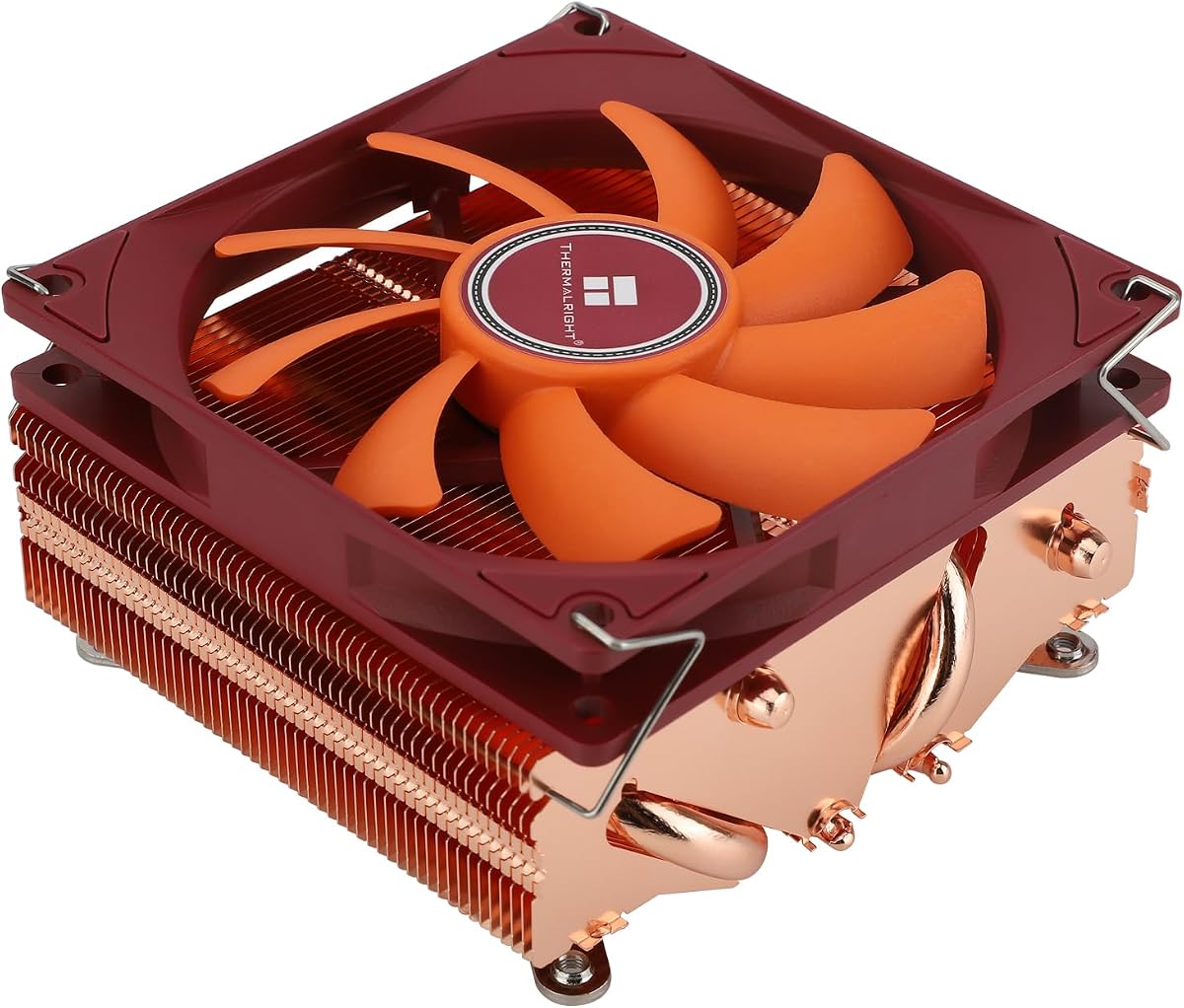
Thermalright AXP90-X53 Full Copper

★★★★☆8.8/10
Thermalright AXP90-X53 Full Copper
  • 53 mm full-copper sink with 4×6 mm AGHP heat pipes
  • TL-9015R slim PWM fan with strong airflow for the height class
  • AM4/AM5 and Intel 1700/1851/115x hardware without RAM height drama
Check Price →

As an Amazon Associate we earn from qualifying purchases. We may earn a commission at no additional cost to you.

ITX CPU Cooler Comparison: Height, Pipes, and Sockets

Compare clearance height and platform support before brand loyalty. Specs intentionally exclude prices so you can filter by fit and cooling hardware alone.

#ProductSpecificationsScore
1
  • 65 mm chromax.Black low-profile tower
  • 95×95 mm footprint; NF-A9x14 PWM fan
  • LGA 1851/1700/1200/115x; AM5/AM4 SecuFirm2
9.2
2
  • 65 mm brown premium low-profile cooler
  • Clears RAM/PCIe on most boards; LNA included
  • NT-H1 paste; AM5/AM4 and modern Intel mounts
9.4
3
  • 37 mm height for sandwich and slim AM5 ITX
  • 100% RAM/PCIe clearance on AM5 boards
  • NF-A9x14 PWM + LNA; AM5 SecuFirm2 only
8.8
4
  • 53 mm full-copper sink; 4×6 mm AGHP pipes
  • TL-9015R 92 mm PWM, up to 2700 RPM
  • AM4/AM5 and Intel 1700/1851/115x/1200
8.8
5
  • 36 mm ultra-low profile; nickel-plated sink
  • 4×6 mm AGHP pipes; ≤22.4 dB(A) fan claim
  • AM4/AM5 and Intel 115x through LGA 1851
9.2
6
  • 45 mm Pure Rock LP; ~100 W TDP class
  • be quiet! 92 mm fan, max ~30.6 dB(A)
  • Intel 1700/1200/115x; AMD AM5/AM4
9
7
  • 47 mm black nickel low-profile cooler
  • TL-9015B slim PWM; 4×6 mm AGHP pipes
  • AM4/AM5 and Intel 115x/1200/1700/1851
8.6
8
  • 53 mm white aluminum fin stack + copper base
  • TL-9015W PWM; ~42.6 CFM, ≤22.4 dB(A)
  • AM4/AM5 and Intel through LGA 1851
8.4
9
  • 36 mm black ultra-slim ITX cooler
  • TL-9015B PWM; 4×6 mm heat pipes
  • AM4/AM5 and Intel 115x/1200/1700/1851
8.6
10
  • 152 mm single tower; 4 heat pipes, copper base
  • SickleFlow 120 Edge PWM, 690–2500 RPM
  • AM5 and LGA 1851/1700 kits; taller ITX only
9.4

1. Noctua NH-L9x65 chromax.Black - Best Overall for ITX

Noctua NH-L9x65 chromax.Black

Noctua NH-L9x65 chromax.Black

9.2/10★★★★★

ITX cooling is mostly a clearance problem dressed up as a thermal problem. The Noctua NH-L9x65 chromax.Black solves the first half with a 65 mm total height and a deliberately tiny 95×95 mm footprint, then attacks the second half with Noctua’s familiar NF-A9x14 slim 92 mm PWM fan, NT-H1 paste, and SecuFirm2 hardware for current Intel and AMD sockets. In 2026 sandwich layouts, console-style shells, and HTPC cubes, that combination is still the default “buy once” answer when your case chart lists a cooler limit somewhere near 65–70 mm.

  • 65 mm chromax.Black low-profile tower
  • 95×95 mm footprint; NF-A9x14 PWM fan
  • LGA 1851/1700/1200/115x; AM5/AM4 SecuFirm2
Check Price →
✓ Pros
  • All-black chromax finish matches modern ITX themes
  • 65 mm height fits many sandwich and slim shells that reject towers
  • Tiny 95×95 mm footprint stays clear of RAM and near-socket headers
  • Mature SecuFirm2 mounts and NT-H1 paste reduce install friction
  • PWM fan plus Low-Noise Adaptor for desk-quiet curves
✕ Cons
  • Still a low-to-moderate TDP cooler—hot unlocked chips need undervolt or case airflow help
  • Premium pricing versus similarly tall Thermalright options
  • 65 mm may still be too tall for the absolute slimmest sandwich cases

Detailed review

The chromax.Black treatment matters more in ITX than in mid-towers because the cooler sits in the visual center of the build. Brown Noctua classic finish can look intentional in wood-and-beige living-room PCs, but most modern mini PCs chase matte black GPUs, dark cables, and stealth panels. An all-black L9x65 disappears into that palette instead of announcing itself as a leftover from 2015 marketing photos.

Thermally, treat this cooler as a low-to-moderate dissipation specialist. Noctua’s own guidance points at efficient desktop chips and selected X3D or non-extremes rather than every unlocked flagship running stock boost forever. That is not a dodge—it is how low-profile physics works. A short fin stack cannot fake a dual-tower’s surface area. Pair it with an undervolt, a sensible power limit, and case airflow that actually feeds the top of the cooler, and it stays composed in silent living-room duty.

Assembly is where Noctua still earns the premium. SecuFirm2 feels boring in the best way: metal bars, clear socket kits, and enough documentation that you are unlikely to invent a custom torque guess. The Low-Noise Adaptor is especially useful in ITX because case resonance amplifies fan harshness. Running a slightly lower ceiling RPM often improves the whole system more than chasing two degrees of CPU delta.

RAM and PCIe clearance are the quiet reasons this cooler became an SFF staple. Tall memory kits and thick dual-slot GPUs fight for the same millimeters as oversized coolers. The L9x65’s compact square keeps near-socket USB headers, EPS cables, and DIMM latches reachable after install—maintenance details that matter when your entire PC is a five-liter puzzle.

Choose the chromax NH-L9x65 when your case clears roughly 65 mm, you want black stealth aesthetics, and your CPU plan is efficient rather than maximum all-core fireworks. If your shell only allows mid-30 mm coolers, jump to the NH-L9a-AM5 or a Thermalright X36. If you have a roomy ITX tower that still clears 150 mm, a Hyper 212-class cooler will outperform any low-profile option in this pack.

Who should buy the chromax L9x65

Buyers with ~65 mm cooler clearance, black ITX themes, and CPUs in the efficient-to-moderate heat range will get the most from this cooler. It is especially strong for HTPC streaming boxes, quiet office mini PCs, and sandwich gaming builds that already undervolt.

Skip it if your case limit is under 60 mm or if you need maximum all-core turbo on a hot flagship without power limits.

Setup tips for sandwich ITX

Install the motherboard-side hardware before dropping the board into a cramped case whenever the shell allows. Route the EPS cable and front USB leads before final fan seating so you are not fighting the 95×95 mm footprint later.

Apply a modest NT-H1 amount, mount firmly and evenly, then create a PWM curve that stays gentle until mid-70s Celsius. Recheck temps after the first week once dust settles on mesh intakes.

Versus other pack picks

Against the brown L9x65, this is the aesthetic upgrade with the same clearance story. Against Thermalright X53 copper, Noctua usually wins on stock acoustics and mount polish; copper X53 can fight harder per millimeter of height. Against the L9a-AM5, the L9x65 needs more height but cools a wider set of chips more comfortably.

Check Price on Amazon →

We may earn a commission at no additional cost to you.

2. Noctua NH-L9x65 - Best Classic Premium

Noctua NH-L9x65

Noctua NH-L9x65

9.4/10★★★★★

The original Noctua NH-L9x65 is the same engineering story as the chromax sibling with the famous brown-and-beige fan and heatsink. It remains one of the highest-rated low-profile coolers in this pack for a reason: the 65 mm height, RAM-friendly footprint, NF-A9x14 PWM fan, NT-H1 paste, and SecuFirm2 mounting kit have been validated across years of HTPC and ITX builds. If color matching is secondary to proven quiet behavior, this is still an easy recommendation.

  • 65 mm brown premium low-profile cooler
  • Clears RAM/PCIe on most boards; LNA included
  • NT-H1 paste; AM5/AM4 and modern Intel mounts
Check Price →
✓ Pros
  • Highest pack rating among the classic Noctua low-profile line
  • Same 65 mm clearance envelope and careful RAM/PCIe footprint
  • Excellent long-term support and mounting kit quality
  • Quiet NF-A9x14 behavior with LNA for HTPC living-room builds
  • Offset AM4/AM5 mounting option for better die coverage
✕ Cons
  • Brown/beige Noctua colors clash with many all-black ITX themes
  • Same moderate TDP ceiling as the chromax sibling
  • Not the right pick if your case only clears sub-50 mm coolers

Detailed review

In practice, the brown L9x65 and black L9x65 behave like twins. Both ask you to respect Noctua’s CPU compatibility list, both reward undervolts, and both prefer cases that can feed air across the short fin stack. The brown unit often shows up in refurbished or long-running product listings, so confirm you are buying a current mounting kit that includes LGA 1700/1851 and AM5 hardware if those sockets matter to you.

Acoustic character is the main reason people stay loyal. The slim 92 mm fan is not silent at full tilt, but with the Low-Noise Adaptor and a sane motherboard curve it becomes the kind of broadband whisper that disappears under a TV or desk. That matters more in ITX than in a mid-tower because the cooler sits centimeters from thin metal panels that can ring.

Installation stays approachable for first-time SFF builders. You get a complete paste packet and metal hardware instead of a scavenger hunt for motherboard backplates. AMD users should look at the offset mounting guidance Noctua publishes—small shifts in contact over the CCD can reclaim meaningful temperature margin on Ryzen chips.

Where the brown L9x65 loses is purely aesthetic and opportunity cost. If your build is already chromax, dark powdercoat, and black GPU shrouds, the classic Noctua palette becomes the loudest visual element in an otherwise stealth machine. Performance parity with the black version means you should pick based on theme and availability rather than expecting a thermal win.

Buy the classic NH-L9x65 for HTPCs, wood-veneer living-room PCs, and any ITX project where proven quiet cooling outranks matching an all-black interior. Skip it when your case clearance is under about 60 mm or when you need AM5 ultra-low 37 mm fitment—the NH-L9a-AM5 is the specialist for that niche.

Best fit scenarios

Ideal for living-room PCs where brown accents are acceptable or hidden, and for builders who prioritize the long Noctua track record over matching a black GPU.

Also a smart spare cooler to keep for service shops that see many ITX repair jobs across Intel and AMD sockets.

Noise and fan control

Use the Low-Noise Adaptor if your motherboard curve is aggressive by default. In media centers, cap RPM so dialogue and music never compete with coil-like fan peaks.

Clean the slim fan every few months; short coolers sit closer to dusty intake paths in many HTPC layouts.

When to choose chromax instead

If the cooler will be visible through a mesh or glass panel next to black components, spend the upgrade on chromax.Black. Thermal performance parity means the decision is almost entirely about finish and current kit contents.

Check Price on Amazon →

We may earn a commission at no additional cost to you.

3. Noctua NH-L9a-AM5 chromax.Black - Best Ultra-Low for AM5

Noctua NH-L9a-AM5 chromax.Black

Noctua NH-L9a-AM5 chromax.Black

8.8/10★★★★☆

The NH-L9a-AM5 chromax.Black is Noctua’s answer to AM5 boards trapped in the shortest sandwich and console-style cases. At roughly 37 mm tall, it clears shells that reject even the 65 mm L9x65, while the tailored footprint is designed for full RAM and PCIe compatibility across ITX, mATX, and ATX AM5 motherboards. If your build is Ryzen 7000/9000 in a volume-obsessed chassis, this is the premium ultra-low pick in the pack.

  • 37 mm height for sandwich and slim AM5 ITX
  • 100% RAM/PCIe clearance on AM5 boards
  • NF-A9x14 PWM + LNA; AM5 SecuFirm2 only
Check Price →
✓ Pros
  • Only 37 mm tall for the tightest AM5 ITX and HTPC shells
  • Tailored footprint promises full RAM and PCIe clearance on AM5
  • chromax.Black looks intentional in dark sandwich layouts
  • Includes NT-H1 paste and SecuFirm2 for AM5
  • Six-year-class Noctua warranty confidence for portable SFF rigs
✕ Cons
  • AM5-only mounting—no Intel or AM4 support in this SKU
  • 37 mm mass limits it to moderate heat loads even more than the L9x65
  • Premium cost for a cooler that demands careful CPU choice and undervolt

Detailed review

That height advantage is also a thermal warning label. Less cooler mass means you must choose CPUs carefully: moderate heat Ryzen parts, thoughtful PBO limits, and undervolts are part of the product, not optional extras. Noctua positions the L9a family for chips with restrained sustained dissipation. Trying to force a hot all-core gaming flagship in a sealed aluminum brick will teach you about thermal throttling quickly.

The chromax.Black finish keeps the cooler visually coherent next to dark AM5 ITX boards and short GPUs. The NF-A9x14 slim fan with PWM and Low-Noise Adaptor remains the acoustic heart of the product. Idle can be nearly forgotten; load noise rises as a smooth whoosh rather than a cheap whine when the curve is tuned.

Mounting is AM5-focused SecuFirm2 with NT-H1 included. That specialization is a feature for Ryzen builders and a hard stop for Intel or AM4 upgraders. Do not buy this SKU expecting a universal bracket bag. If you might swap platforms later, a dual-socket Thermalright AXP90 or the multi-socket L9x65 is more flexible.

Because the cooler is so short, case airflow becomes half the cooling solution. A dust-clogged intake mesh or a GPU that exhausts into a dead zone will erase the L9a’s advantages. Plan fan direction so fresh air reaches the CPU pocket, and avoid stuffing every cable into the same chamber as the heatsink.

Pick the NH-L9a-AM5 chromax.Black when your AM5 ITX case chart lists cooler limits near 37–40 mm and you value Noctua’s mount quality and warranty posture. Choose a taller L9x65 or copper AXP90-X53 when you have the millimeters—those taller low-profiles simply move more heat for the same fan diameter class.

Who it is for

AM5 ITX builders in sub-40 mm cases who still want premium mounts, paste, and warranty posture. Perfect for compact Ryzen productivity boxes and carefully tuned SFF gaming PCs.

CPU pairing notes

Favor efficient Ryzen models and use PBO/curve optimizer thoughtfully. Consult Noctua’s compatibility guidance rather than assuming every X3D or X SKU is ideal at stock.

Good case airflow is mandatory; this cooler cannot invent intake that the chassis does not provide.

Platform limitation

Because this SKU is AM5-only, Intel builders should look at the L9x65 or AXP90 options instead. Future platform hops may require a different cooler purchase.

Check Price on Amazon →

We may earn a commission at no additional cost to you.

4. Thermalright AXP90-X53 Full Copper - Best Full-Copper Low Profile

Thermalright AXP90-X53 Full Copper

Thermalright AXP90-X53 Full Copper

8.8/10★★★★☆

Thermalright’s AXP90-X53 Full Copper is the value-performance disruptor in this ITX pack. At 53 mm tall with a pure copper base and fin assembly plus four 6 mm AGHP heat pipes, it targets builders who want more thermal mass than ultra-slim 36 mm coolers without climbing to Noctua’s 65 mm envelope. The TL-9015R 92 mm slim PWM fan can spin up to about 2700 RPM for stubborn heat spikes while claiming a modest noise floor when dialed back.

  • 53 mm full-copper sink; 4×6 mm AGHP pipes
  • TL-9015R 92 mm PWM, up to 2700 RPM
  • AM4/AM5 and Intel 1700/1851/115x/1200
Check Price →
✓ Pros
  • Full copper construction improves thermal mass for short ITX bursts
  • 53 mm height clears more cases than 65 mm coolers while staying low
  • AGHP heat pipes help in vertical and horizontal case orientations
  • No memory height interference on typical ITX DIMM layouts
  • Broad AM4/AM5 and modern Intel socket coverage with metal hardware
✕ Cons
  • Full copper adds weight; handle the board carefully during installs
  • Fan acoustics at 2700 RPM can get sharp in thin cases
  • Backplate orientation quirks on some boards need the long-screw workaround

Detailed review

Full copper is the headline. Aluminum stacks are lighter and cheaper; copper stores and spreads heat differently, which can help short gaming or export bursts in cramped ITX volumes. The tradeoff is weight. Support the motherboard during install and transport, and do not treat the cooler like a handle for the whole board.

AGHP heat-pipe tech is especially relevant in ITX because cases mount sideways, vertically, or even in odd desk orientations. Pipes that fight gravity-related dry-out keep performance more consistent when the PC is a living-room cube one year and a LAN backpack the next. Secondary soldering between pipes and fins further reduces weak thermal joints.

Compatibility spans AM4/AM5 and Intel LGA 1700/1851/115x/1200 with metal fasteners. Read the install notes about reversing the backplate or using long screws when the AXP90-X plate conflicts with rear motherboard components—common on dense ITX PCBs. AMD users may need to work with the board’s stock metal backplate rather than assuming a full plastic-bracket workflow.

Acoustically, expect a wider swing than Noctua. At gentle PWM points the TL-9015R is fine for desk use; near maximum it can sound busy in thin metal. A custom fan curve that rises only after eighty-plus degrees often yields a better daily experience than leaving BIOS on a steep default.

Choose the full-copper X53 when you want aggressive low-profile cooling under a ~53 mm lid, prefer copper construction, and are willing to manage fan curves. If your case only clears the mid-30 mm class, step down to an X36. If stealth black Noctua aesthetics and quieter stock tuning matter more than copper mass, the L9x65 chromax remains the safer premium default.

Who benefits most

SFF gamers and creators who clear 53 mm and want copper thermal mass without jumping to 65 mm Noctua height. Excellent when the case is tight but not extremely slim.

Installation caveats

Read the reverse-backplate and long-screw instructions before you force anything on a dense ITX board. Support the board because full copper is heavy.

After mounting, confirm the fan direction pushes air toward your case exhaust path rather than into a GPU shroud dead zone.

Tuning for noise

Cap the 2700 RPM fan in software or BIOS for daily use, then allow a steeper ramp only under sustained render loads. Most ITX users prefer a warmer CPU to a louder desk.

Check Price on Amazon →

We may earn a commission at no additional cost to you.

5. Thermalright AXP90 X36 - Best Ultra-Slim Value

Thermalright AXP90 X36

Thermalright AXP90 X36

9.2/10★★★★★

The Thermalright AXP90 X36 exists for one brutal constraint: cases that laugh at 47 mm and 53 mm coolers. Thirty-six millimeters of total height, a nickel-plated low-profile sink, four 6 mm AGHP pipes, and a TL-9015 slim PWM fan make it one of the most clearance-friendly air coolers in this pack. If your ITX or HTPC manual basically says “laptop-thin or go home,” start here.

  • 36 mm ultra-low profile; nickel-plated sink
  • 4×6 mm AGHP pipes; ≤22.4 dB(A) fan claim
  • AM4/AM5 and Intel 115x through LGA 1851
Check Price →
✓ Pros
  • 36 mm height survives cases that kill almost every other air cooler
  • Strong value for ultra-slim HTPC and console-style ITX builds
  • Nickel plating resists corrosion in dusty living-room machines
  • 92 mm slim PWM fan stays relatively quiet for the size class
  • Wide Intel and AMD socket support including AM5 and LGA 1851
✕ Cons
  • 36 mm coolers are clearance kings, not high-TDP kings
  • Stock fan pressure is modest versus taller stacks
  • Finish and packaging feel less premium than Noctua

Detailed review

You trade heat capacity for fit. The X36 can keep efficient CPUs honest in well-ventilated mini PCs, but it will not rewrite physics for a power-hungry unlocked chip in a sealed shell. Plan undervolts, check sustained package power, and prefer CPUs known to behave in SFF. That discipline is how people get excellent results from ultra-low coolers.

Nickel plating helps with corrosion resistance and keeps thermal resistance low over years of living-room dust cycles. The all-metal mounting approach with a backplate feels more confidence-inspiring than flimsy push-pin coolers from older OEM eras. Socket support covers AM4/AM5 and a wide Intel range including newer LGA 1851 boards depending on the kit in the box—verify before you buy if you are on the newest Intel platform.

Noise stays reasonable when the fan is not pinned at its ceiling. Thermalright’s ≤22.4 dB(A) claim reflects a best-case operating point; thin cases can amplify whatever remains. Still, for the size class, the X36 is quieter than struggling with a taller cooler that scrapes a side panel and runs flat-out forever because it never seated correctly.

Versus the black X36 in this same pack, the nickel version is the aesthetic for silver accents, industrial HTPCs, and builds that already show bare metal. Thermally they are siblings. Versus the Noctua L9a-AM5, the X36 is the multi-socket value play; Noctua is the AM5 specialist with stronger brand support and usually nicer fan tuning out of the box.

Buy the AXP90 X36 when clearance is under about 40 mm and budget discipline matters. Skip it if you clear 53–65 mm and want fewer thermal compromises—those extra millimeters of fin stack are free performance once the case allows them.

Clearance-first checklist

Measure the real socket-to-panel gap yourself. Manufacturer case charts are sometimes optimistic once tempered glass gaskets and cable edges are included.

If you have even 47–53 mm available, consider upsizing before you commit to 36 mm.

Best workloads

HTPC decode boxes, home servers with efficient CPUs, and light gaming ITX builds with undervolts. Not ideal as a set-and-forget solution for the hottest desktop chips.

Check Price on Amazon →

We may earn a commission at no additional cost to you.

6. be quiet! Pure Rock Low Profile - Best Quiet Mid-Height

be quiet! Pure Rock Low Profile

be quiet! Pure Rock Low Profile

9/10★★★★★

be quiet!’s Pure Rock Low Profile targets builders who want a European brand’s acoustic priorities in a 45 mm package. Rated around a 100 W TDP class with a quality 92 mm fan claiming a maximum near 30.6 dB(A), it occupies the useful middle height between ultra-slim 36 mm coolers and the taller 53–65 mm class. Socket coverage includes Intel LGA 1700/1200/115x and AMD AM5/AM4, which makes it a flexible pick for mixed upgrade paths.

  • 45 mm Pure Rock LP; ~100 W TDP class
  • be quiet! 92 mm fan, max ~30.6 dB(A)
  • Intel 1700/1200/115x; AMD AM5/AM4
Check Price →
✓ Pros
  • 45 mm height sits in a useful mid-band between 36 mm and 65 mm
  • be quiet! fan tuning prioritizes living-room noise levels
  • ~100 W TDP class fits many non-K and efficient Ryzen chips
  • Clean all-black look without flashy RGB distractions
  • Straightforward Intel and AMD socket kits for current platforms
✕ Cons
  • Official ~100 W TDP class rules out hot gaming flagships without heavy tuning
  • Fan noise ceiling is higher than Noctua’s LNA-equipped setups
  • Less copper mass than full-copper Thermalright X53 options

Detailed review

Forty-five millimeters is a sweet clearance number for many compact cases that reject towers but still have a little more room than sandwich extremes. If your case lists 50 mm or 55 mm cooler limits, the Pure Rock LP often fits with a small safety margin for manufacturing tolerances and aftermarket paste thickness.

The brand’s value proposition is noise character. Even when the numerical ceiling is not the lowest on paper, be quiet! fans tend to avoid sharp tonal peaks that thin ITX panels love to amplify. For a PC under a TV or on a writing desk, that subjective smoothness can matter more than winning a synthetic stress-test chart.

Do respect the 100 W class positioning. This is a cooler for efficient gaming chips, productivity Ryzen/Intel parts, and HTPC CPUs—not for chasing maximum boost on the hottest desktop silicon in a sealed cube. Combine it with sane power limits and you get a calm, compact system; ignore the guidance and you will hear the fan work harder than the marketing photos suggest.

Install is typical modern low-profile fare: metal hardware for each platform, compact sink, single slim fan. Cable routing is simple because there is only one PWM lead to a CPU_FAN header. Keep RAM clearance in mind even though the profile is short; some ITX boards place chunky VRM heatsinks that can kiss the side of any low-profile cooler.

Choose the Pure Rock LP when you want ~45 mm fitment, quiet daily manners, and broad socket support without jumping to Noctua pricing. Prefer a copper AXP90-X53 or Noctua L9x65 when you need more thermal headroom and your case clears those taller stacks.

Who should choose Pure Rock LP

Anyone needing ~45 mm height, quiet manners, and multi-socket flexibility for office or media ITX PCs in the ~100 W class.

Practical setup

Mount with even pressure, connect PWM to CPU_FAN, and avoid jamming thick RAM heat spreaders into the sink edge on compact boards.

If temps run high, improve case intake before blaming the cooler—45 mm designs need fresh air.

Compared with Thermalright mid-heights

Pure Rock LP emphasizes acoustic refinement; X47/X53 models emphasize aggressive fin/pipe value. Pick based on whether silence or peak cooling margin matters more in your room.

Check Price on Amazon →

We may earn a commission at no additional cost to you.

7. Thermalright AXP90 X47 Black - Best 47 mm Black

Thermalright AXP90 X47 Black

Thermalright AXP90 X47 Black

8.6/10★★★★☆

The AXP90 X47 Black is Thermalright’s dark mid-height low-profile: 47 mm tall, black nickel plating, four 6 mm AGHP pipes, and a TL-9015B slim PWM fan. It sits neatly between the X36 ultra-slim twins and the X53 models, which makes it a clearance match for cases that publish cooler limits around 50 mm. If your theme is matte black ITX and you cannot stretch to 53–65 mm, this is the intentional aesthetic pick.

  • 47 mm black nickel low-profile cooler
  • TL-9015B slim PWM; 4×6 mm AGHP pipes
  • AM4/AM5 and Intel 115x/1200/1700/1851
Check Price →
✓ Pros
  • 47 mm black finish fits dark ITX themes between X36 and X53 heights
  • AGHP pipes and reflow-soldered fins are serious for the price class
  • Slim 92 mm PWM fan keeps the stack short and RAM-friendly
  • Metal backplate mounting feels sturdier than clip-only budget coolers
  • Good socket coverage for AM5 refreshes and Intel 1700/1851 boards
✕ Cons
  • Middle height that fits neither ultra-slim nor 65 mm-clearance sweet spots for everyone
  • Lower Amazon rating than the best Noctua and X36 options in this pack
  • May need careful screw/backplate attention on crowded ITX boards

Detailed review

Black nickel is not only cosmetic. The plating aims at corrosion resistance and stable thermal interfaces over time, useful in HTPCs that live for years between cleanings. Reflow-soldered fins and an all-metal mounting platform are the same practical Thermalright language you see across the AXP90 family.

Performance expectations should track height. The X47 generally out-muscles 36 mm coolers when airflow is equal, yet it will not match a full-copper 53 mm stack or a 65 mm Noctua in sustained dissipation. Use it for mainstream ITX CPUs, light gaming, and creative machines that stay within moderate package power.

Fan behavior mirrors other TL-9015 variants: quiet enough when PWM is gentle, assertive when the BIOS dumps it to 100 percent. In a thin steel case, spend ten minutes on a custom curve after the first boot. That single habit separates “surprisingly refined SFF PC” from “why is my mini PC screaming.”

Socket support covers AM4/AM5 and Intel 115x/1200/1700/1851 according to the listing, with metal fasteners in the box. As with other AXP90 coolers, watch for backplate conflicts on dense ITX boards and follow Thermalright’s long-screw or reverse-plate notes when needed.

Pick the X47 Black when 47 mm is your real ceiling and you want a stealth look. If you can take 53 mm, the copper X53 is the stronger thermal story. If you need 36 mm, do not force this cooler—panels do not negotiate.

Ideal builds

Dark ITX and HTPC systems with roughly 50 mm cooler limits and mainstream CPUs. Looks cohesive with black chromax GPUs and dark cables.

Tradeoffs to accept

You are choosing a compromise height. It is not the thinnest or the strongest Thermalright in the pack—it is the one that matches a specific clearance band and colorway.

Check Price on Amazon →

We may earn a commission at no additional cost to you.

8. Thermalright AXP90-X53 White - Best White Accent Build

Thermalright AXP90-X53 White

Thermalright AXP90-X53 White

8.4/10★★★★☆

The AXP90-X53 White brings the 53 mm AXP90 silhouette into bright builds: white TL-9015W slim PWM fan, light finishes, copper base with aluminum radiator material, and four heat pipes using AGHP techniques. Thermalright cites roughly 150 W class potential and the same ~42.6 CFM / ≤22.4 dB(A) fan sheet as related X53 models. For white or silver ITX themes, it is the pack’s dedicated accent cooler.

  • 53 mm white aluminum fin stack + copper base
  • TL-9015W PWM; ~42.6 CFM, ≤22.4 dB(A)
  • AM4/AM5 and Intel through LGA 1851
Check Price →
✓ Pros
  • White fan and sink suit snow-themed and light ITX interiors
  • 53 mm height is a practical middle ground for many sandwich cases
  • PWM control up to 2700 RPM gives headroom when airflow is poor
  • Advertised ~150 W class cooling for moderate gaming chips
  • Includes paste and platform-specific metal fasteners
✕ Cons
  • Aluminum radiator body is less thermally dense than the full-copper X53
  • White finishes show dust faster in living-room HTPCs
  • Lowest rating in this pack—double-check mount quality on your board

Detailed review

Understand the material split versus the full-copper X53. Aluminum fins keep weight and cost down; copper on the base preserves contact quality with the CPU IHS. In many ITX workloads the difference is modest if case airflow is good. Under prolonged all-core loads in a hot sandwich case, the full-copper sibling is the more serious thermal tool.

White parts show dust, pet hair, and cable dye transfer faster than black chromax gear. If your ITX PC lives on a carpeted media console, budget occasional compressed-air sessions so the white fan does not become a gray timeline of neglect. That is an ownership note, not a performance flaw.

Installation and socket coverage remain broad: AM4/AM5 and Intel through LGA 1851 with metal fasteners. AMD installs may rely on the motherboard’s original backplate. Keep the PWM cable tidy; white builds punish messy black looms more than dark builds do.

The rating in this pack is the lowest of the ten, so treat user feedback about mounting quirks or unit variation seriously. Seat the cooler evenly, use the included paste correctly, and verify temps with a short stress pass before you close a hard-to-open sandwich case for the last time.

Buy the X53 White when theme coherence is the point and 53 mm clearance exists. Buy the full-copper X53 or a Noctua L9x65 when cooling margin and long-term brand support outrank matching a white GPU shroud.

Theme-driven buying

Choose this when a white interior is part of the design brief. Cooling is capable for the height, but the full-copper X53 is the stronger thermal twin.

Maintenance

Dust on white fans is visible. Schedule cleaning, especially if the PC sits near a projector or TV that kicks up living-room dust.

Quality expectations

Given the lower pack rating, inspect mounting hardware on arrival and validate thermals before final cable-managed assembly.

Check Price on Amazon →

We may earn a commission at no additional cost to you.

9. Thermalright AXP90 X36 Black - Best Black Ultra-Slim

Thermalright AXP90 X36 Black

Thermalright AXP90 X36 Black

8.6/10★★★★☆

The AXP90 X36 Black is the stealth twin of the nickel X36: same 36 mm ultra-low mission, black visual language, TL-9015B slim PWM fan, and four 6 mm heat pipes with AGHP heritage. It is the cooler you buy when the case is merciless about height and the rest of the build is already dark powdercoat and black cables.

  • 36 mm black ultra-slim ITX cooler
  • TL-9015B PWM; 4×6 mm heat pipes
  • AM4/AM5 and Intel 115x/1200/1700/1851
Check Price →
✓ Pros
  • Black 36 mm profile for stealth ultra-slim ITX and HTPC cases
  • Same ultra-low envelope as the nickel X36 with a darker aesthetic
  • AGHP pipes and slim PWM fan keep noise manageable when undervolted
  • Metal mounting hardware for AM4/AM5 and common Intel sockets
  • Ideal when case manuals list cooler limits near 37–40 mm
✕ Cons
  • Ultra-low mass means aggressive multi-core CPUs will throttle sooner
  • Listing socket notes have historically been less consistent than Noctua’s matrices
  • Black coating does not improve cooling over the nickel X36 twin

Detailed review

Ultra-slim black coolers shine in console-like ITX PCs that sit in plain sight. Guests see a clean mini PC; they do not see a beige fan hub. Just remember that paint does not add fins. Thermally you are still in the most constrained air-cooler class in this roundup.

Use the same CPU discipline as any 36 mm cooler: efficient silicon, undervolt where possible, and case intakes that are not decorative mesh over foam that never gets cleaned. Pairing this cooler with a hot unlocked chip in a sealed aluminum shell is how SFF horror stories get written.

Mounting hardware covers common AMD and Intel sockets in the AXP90 pattern. Some listing copy across X36 variants has been less tidy than Noctua’s matrices historically, so confirm AM5 or LGA 1851 inclusion for your exact SKU before you tear down a working machine.

Compared with the Noctua NH-L9a-AM5, the X36 Black is the cheaper multi-socket path into the mid-30 mm club. Compared with the X47/X53 blacks, it is the emergency clearance parachute. Compared with the Hyper 212, it is a different product category entirely.

Choose X36 Black for sub-40 mm black ITX builds on a value budget. Step up in height the moment your case allows—every extra centimeter of cooler is usually worth more than chasing exotic fan swaps on a 36 mm sink.

When black X36 wins

Stealth ultra-slim builds that need 36 mm clearance and already standardized on black components. Same thermal class as nickel X36 with better theme match for dark PCs.

Avoid these pairings

Hot unlocked CPUs in sealed cases, or any build where you refuse to undervolt or limit power. Ultra-low coolers require cooperation from the silicon.

Check Price on Amazon →

We may earn a commission at no additional cost to you.

10. Cooler Master Hyper 212 Black - Best Tall ITX

Cooler Master Hyper 212 Black

Cooler Master Hyper 212 Black

9.4/10★★★★★

The Cooler Master Hyper 212 Black is the odd but important inclusion in an ITX cooler roundup: a 152 mm single-tower air cooler with four heat pipes, a copper base, and a SickleFlow 120 Edge PWM fan. Most sandwich and slim ITX cases cannot fit it. Some larger ITX towers, cube cases, and “ITX motherboard in a surprisingly tall shell” builds can—and when they can, the 212 will cool harder than any low-profile unit here.

  • 152 mm single tower; 4 heat pipes, copper base
  • SickleFlow 120 Edge PWM, 690–2500 RPM
  • AM5 and LGA 1851/1700 kits; taller ITX only
Check Price →
✓ Pros
  • Much higher cooling headroom than true low-profile ITX coolers
  • Familiar Hyper 212 install experience with modern AM5/1851 brackets
  • SickleFlow 120 Edge PWM covers quiet idle and aggressive load curves
  • Four heat pipes and copper base suit R7/i7 class chips in open ITX
  • Great when your ITX case still clears about 152 mm of cooler height
✕ Cons
  • 152 mm height is incompatible with most true sandwich and slim ITX cases
  • Can overhang RAM or VRM zones depending on board layout
  • Larger 120 mm fan needs side-panel and cable clearance that thin cases lack

Detailed review

That is the editorial point. “Best CPU cooler for ITX” is not automatically “shortest cooler.” ITX is a motherboard form factor, not a universal height law. If your case manufacturer lists 160 mm CPU cooler clearance, insisting on a 53 mm low-profile leaves performance on the table for no reason.

The modern Hyper 212 Black updates the legendary budget tower with simplified brackets for AM5 and Intel LGA 1851/1700 platforms and a PWM fan that spans roughly 690–2500 RPM. Idle can be calm; load ramps are familiar mid-tower sounds. In a compact case with a side panel close to the fan, expect more noise than a low-profile slim 92 mm setup, but also expect lower CPU temperatures on hotter chips.

Fit checks matter more than brand lore. Measure from the socket to the side panel or top panel depending on orientation, account for cable ridges and tempered glass thickness, and verify RAM clearance because single towers can overhang DIMM slots on compact ITX boards. If any of those checks fail, stop and buy a true low-profile cooler instead of hoping the panel will “flex a little.”

For CPUs in the R7/i7 conversation, the four-pipe copper-base design is appropriate when airflow is decent. It will not match elite dual towers, yet it demolishes ultra-low coolers in sustained Cinebench-style loads. That headroom also means fewer aggressive undervolts just to stay under thermal limits.

Buy the Hyper 212 Black only after you confirm ~152 mm clearance in your specific ITX or compact case. Everyone else in a true SFF shell should ignore the famous name and pick from the low-profile Noctua, Thermalright, or be quiet! options above.

Measure twice

Confirm 152 mm cooler clearance, RAM height compatibility, and side-panel proximity before purchasing. Most true ITX SFF cases will fail this check.

When the 212 makes sense

Roomy ITX towers, cube cases, and compact mATX-like shells that accept an ITX board but still offer mid-tower cooler height. In those systems it is often the best thermal buy in this pack.

If clearance is uncertain, default to a low-profile Noctua or Thermalright rather than gambling on panel flex.

Check Price on Amazon →

We may earn a commission at no additional cost to you.

Best CPU Coolers for ITX Builds 2026 Compact Guide

How to Choose a CPU Cooler for ITX and SFF Cases

Measure clearance before you shop

ITX shopping starts with a ruler, not a TDP spreadsheet. Open the case manual for maximum CPU cooler height, then measure from the top of the CPU socket area to the panel or GPU that will sit above it in your layout. Sandwich cases often have different limits depending on motherboard tray orientation and whether you use a riser.

Add a couple of millimeters of safety margin for paste thickness, mounting spring tension, and panel gaskets. A cooler that “should” fit at exactly 65.0 mm may kiss the glass once everything is torqued. If your measurement is 40 mm, ignore every 65 mm recommendation in this guide and stay in the X36/L9a class.

Match cooler mass to CPU behavior

Low-profile coolers are honest about their limits when manufacturers publish compatibility lists. Efficient 6- and 8-core chips, many X3D parts with sensible limits, and HTPC CPUs are the natural partners. Unlocked flagships at stock power in sealed cubes are how people end up returning coolers that did nothing wrong.

Undervolting and power limits are normal SFF tools, not admissions of defeat. A 53 mm copper cooler with a tuned Ryzen often feels faster in real use than a taller cooler fighting thermal throttling because the case cannot breathe.

Airflow is half the cooler

Short heatsinks need fresh air delivered to their fins. Dust filters, restrictive front mesh, and GPUs that exhaust into the CPU pocket can erase the difference between premium and budget low-profiles. Plan intake and exhaust so the CPU chamber is not a dead zone.

Fan curves matter more in ITX because panels amplify noise. Prefer PWM control and spend time after the first boot flattening steep default curves.

Socket kits and future upgrades

Confirm AM5, AM4, LGA 1700, and LGA 1851 support for your exact SKU. Some coolers in this pack are universal; the NH-L9a-AM5 is intentionally AM5-only. If you expect to reuse a cooler across an Intel-to-AMD jump, prioritize multi-socket SecuFirm2 or AXP90 kits.

Also check RAM clearance and near-socket headers. ITX boards pack USB, EPS, and chunky VRM sinks tightly; a “compatible” cooler can still make cable work miserable if the footprint is wide.

When a tower belongs in an ITX build

If your case clears ~150 mm, a Hyper 212-class tower will outperform every low-profile option here on hot CPUs. ITX describes the motherboard, not a vow of suffering. Use low-profile gear for true SFF volume targets; use towers when the shell allows.

Frequently Asked Questions

01

What cooler height do most ITX cases actually need?

There is no single ITX height. Sandwich and console-style cases often land between 37 mm and 70 mm, while larger ITX towers can clear 150 mm or more. Always trust your case manual and a physical measurement over forum folklore. If you only remember one number from this guide, remember that buying a 65 mm cooler for a 40 mm case wastes a week of returns.

02

Is a low-profile air cooler enough for gaming ITX builds?

Yes for many efficient CPUs when the case has real intake and you accept undervolts or modest power limits. Noctua L9x65 and Thermalright AXP90-X53 class coolers are daily drivers in countless SFF gaming PCs. They struggle when paired with the hottest unlocked chips in sealed aluminum shells. Match silicon to cooler class instead of expecting a 36 mm sink to hide a flagship’s full stock behavior.

03

Should I buy an AIO instead for ITX?

AIO liquid coolers can work in ITX when the case has radiator mounts and you accept pump noise plus long-term maintenance risk. This pack focuses on air coolers because low-profile air remains the simplest reliable path for many HTPC and sandwich builds. If your case is designed around a 240 mm radiator and you want maximum CPU headroom, an AIO can be valid—but it is a different shopping exercise than the products reviewed here.

04

Noctua brown vs chromax.Black—does performance change?

For the NH-L9x65 pair in this pack, treat performance as effectively matched. Choose chromax.Black for stealth and modern dark themes; choose classic brown if you like the Noctua look, find a better kit bundle, or the cooler will be hidden. Fan model, fin stack, and mounting quality matter far more than paint.

05

Why does the NH-L9a-AM5 only support AM5?

Noctua optimized that SKU’s footprint and SecuFirm2 hardware specifically for AMD’s AM5 socket ecosystem. The benefit is guaranteed RAM/PCIe clearance on AM5 boards in a 37 mm package. The cost is zero Intel or AM4 support in the box. Multi-platform builders should pick the L9x65 or a Thermalright AXP90 instead.

06

Is full copper worth it on the AXP90-X53?

Full copper adds thermal mass and a premium construction feel, which can help in short ITX bursts and warm cases. It also adds weight, so handle installs carefully. If your case clears 53 mm and you push moderate-to-high package power, copper is attractive. If you are on a light HTPC CPU, aluminum-fin X53 White or a quieter Noctua may satisfy you with less mass.

07

Can the Cooler Master Hyper 212 work in ITX?

Only in ITX-compatible cases that still offer roughly 152 mm of CPU cooler clearance and enough RAM/side-panel space for a 120 mm tower. Most sandwich SFF cases cannot use it. When the case allows, the 212 often cools hotter CPUs better than every low-profile option in this roundup. Measure first; brand nostalgia second.

08

How quiet are 92 mm slim fans in thin metal cases?

They can be excellent at low PWM steps and fatiguing at maximum RPM. Case panels amplify tonal peaks. Use motherboard curves, Noctua’s Low-Noise Adaptor where included, and avoid leaving fans at 100 percent “just in case.” A slightly warmer CPU with a smoother fan curve usually feels more premium in living-room ITX PCs.

09

Do I need thermal paste beyond what is included?

The Noctua coolers include NT-H1, and the Thermalright and Cooler Master options in this pack also ship with paste suitable for a first install. You do not need aftermarket paste to get valid results. Replace paste during future remounts or if you disturb the cooler after years of heat cycling.

10

What is the safest default pick if I am unsure?

If your case clears about 65 mm and your CPU is not an extreme heat hog, the Noctua NH-L9x65 chromax.Black is the safest all-around default in this pack. If clearance is under 40 mm on AM5, take the NH-L9a-AM5. If you need 53 mm of copper value on a budget, take the Thermalright AXP90-X53 Full Copper. Unsure about clearance at all—stop and measure before any purchase.

Conclusion

The best CPU cooler for ITX is the one that clears your panel, supports your socket, and matches a CPU plan you can actually cool in a small volume. In this pack, the Noctua NH-L9x65 chromax.Black is the balanced default for many 65 mm-class builds, the NH-L9a-AM5 chromax.Black owns ultra-short AM5 shells, and the Thermalright AXP90-X53 Full Copper is the standout value when you want extra thermal mass at 53 mm.

Below those headlines, the classic brown L9x65 remains a quiet legend, the AXP90 X36 twins solve merciless clearance problems, the X47 Black and X53 White cover theme and mid-height niches, and be quiet!’s Pure Rock LP delivers a refined ~45 mm option. The Hyper 212 Black is the reminder that some ITX cases are tall enough for real towers—use it only after you measure.

Start with clearance, be honest about CPU heat, tune the fan curve, and your mini PC will stay small without sounding like a hair dryer. That is the whole ITX cooling game in 2026.