Expert Review & Guide

Best CPU Coolers for Gaming 2026: Air and AIO Picks

Gaming CPUs in 2026 run hotter and boost longer than the chips that shipped with stock coolers a few years ago. A Ryzen 7 or Core Ultra under a long multiplayer session, a content-creation encode between matches, or an all-core synthetic load will expose weak heatsinks as thermal throttling, fan roar, and board VRM heat you feel through the case. Choosing the best CPU cooler for gaming is less about chasing liquid cooling fashion and more about matching radiator size or tower clearance to your case, socket, and noise tolerance while keeping sustained clocks stable.

This roundup sticks to one product pack: dual-tower air coolers from Thermalright and be quiet!, a classic Cooler Master Hyper 212 single tower, and several 360 mm all-in-one liquid coolers from CORSAIR, Minorsonic, and PCCOOLER—including LCD pump-block options for showpiece builds. Ratings reflect Amazon scores at research time. We never list dollar prices because cooler promotions change weekly; compare heat-pipe counts, fan specs, radiator length, and socket kits instead.

If you already know your lane, jump to the three top picks for value dual-tower air, premium silent air for overclocked gaming PCs, and a straightforward 360 mm AIO. Otherwise use the comparison table to filter by height and features, then read each review for fit notes, RAM clearance, and who should skip that model.

Top Gaming CPU Cooler Picks for Thermals, Silence, and Value

Best Overall for Gaming

Thermalright Peerless Assassin 120 SE CPU Cooler

★★★★★9.4/10
Thermalright Peerless Assassin 120 SE CPU Cooler
  • Six AGHP heat pipes and dual 120 mm PWM fans keep gaming CPUs cool without AIO upkeep
  • 155 mm dual-tower design clears most ATX mid-towers while leaving room for tall RAM
  • AM4/AM5 and Intel LGA 1700/1851 metal kits cover current gaming sockets
Check Price →
Best Silent High-End Air

be quiet! Dark Rock Pro 5 CPU Cooler

★★★★★9.4/10
be quiet! Dark Rock Pro 5 CPU Cooler
  • Seven copper heat pipes and dual Silent Wings PWM fans for overclocked gaming systems
  • Quiet/Performance speed switch lets you prioritize silence or max cooling mid-session
  • Ceramic-particle black coating and refined mounts suit premium dark gaming builds
Check Price →

As an Amazon Associate we earn from qualifying purchases. We may earn a commission at no additional cost to you.

Gaming CPU Cooler Comparison: Air Towers vs 360mm AIOs

Start with cooler type and size—single tower, dual tower, or 360 mm radiator—then check fan noise claims, lighting, and socket support. Specs intentionally omit prices so you can compare cooling hardware before opening a listing.

#ProductSpecificationsScore
1
  • Single tower, 4 heat pipes, copper base
  • SickleFlow 120 Edge PWM, 690–2500 RPM
  • 152 mm tall; AM5 and LGA 1851/1700 kits
9.4
2
  • Dual tower, 6×6 mm AGHP heat pipes
  • Twin TL-C12C 120 mm PWM, ≤25.6 dB(A)
  • 125×135×155 mm; AM4/AM5, LGA 1700/1851
9.4
3
  • 360 mm AIO, white, RS120 ARGB fans
  • Low-noise pump ~20 dBA; convex cold plate
  • Daisy-chain PWM/ARGB; LGA 1851/1700, AM5/AM4
9.4
4
  • Slim single tower, 4×6 mm AGHP pipes
  • One TL-C12C 120 mm PWM, ≤25.6 dB(A)
  • 125×71×148 mm; tight mid-towers and ITX
9.4
5
  • 360 mm AIO with 2.1-inch IPS LCD pump block
  • FlowDrive engine; 3× RX120 RGB fans
  • iCUE LINK System Hub; LGA 1851/1700, AM5/AM4
9.2
6
  • 360 mm AIO, ceramic bearing pump ~3000 RPM
  • 3-phase motor; 3× PWM ARGB fans to 1600 RPM
  • 12-channel radiator; LGA 1851/1700, AM5/AM4
8.8
7
  • Dual tower, 6 heat pipes, 5-inch IPS LCD top
  • Dual fans to 2150 RPM; 69 CFM, ≤27 dB(A)
  • 125×135×164 mm white ARGB; TRCC software
9.6
8
  • 360 mm AIO with 2.4-inch customizable IPS LCD
  • 2600 RPM pump; fans 500–2500 RPM ARGB
  • AM5/AM4 and LGA 1851/1700; needs USB for LCD
8.8
9
  • Dual tower, 7 copper heat pipes, black ceramic coat
  • 2× Silent Wings FDB PWM; Quiet/Perf switch
  • Designed for overclocked high-airflow gaming PCs
9.4
10
  • Dual tower PA120 SE with TL-C12C-S ARGB fans
  • Six AGHP pipes; ~1500 RPM, ≤25.6 dB(A)
  • 125×135×155 mm; AM4/AM5 and Intel 1700/1851
9.4

1. Cooler Master Hyper 212 Black - Best Budget Single

Cooler Master Hyper 212 Black CPU Air Cooler

Cooler Master Hyper 212 Black CPU Air Cooler

9.4/10★★★★★

The Cooler Master Hyper 212 Black remains the default upgrade path for gamers who just left a stock cooler and want quieter, more consistent temperatures without committing to a dual tower or a liquid loop. Four heat pipes and a copper base are aimed squarely at Ryzen 7 and Intel Core i7-class chips, which covers a large share of 1440p and competitive 1080p gaming builds. At 152 mm tall, the cooler still clears most mainstream ATX and many micro-ATX cases, so you are less likely to discover a side-panel collision after the motherboard is already installed.

  • Four heat pipes with copper base for R7 and i7-class gaming chips
  • SickleFlow 120 Edge PWM fan spanning 690–2500 RPM
  • 152 mm height with simplified AM5 and LGA 1851/1700 brackets
Check Price →
✓ Pros
  • Proven single-tower layout fits a huge range of mid-tower gaming cases
  • PWM SickleFlow fan can stay quiet at idle and ramp under load
  • Updated brackets ease installs on current AMD and Intel gaming sockets
  • Thermal paste included so first-time builders can mount without extra shopping
  • Black finish blends with most RGB and dark-theme gaming PCs
✕ Cons
  • Four heat pipes trail dual-tower coolers on sustained high-TDP gaming CPUs
  • Single 120 mm fan has less headroom than twin-fan Peerless Assassin models
  • Tall RAM with oversized heat spreaders can still crowd the fan path

Detailed review

Cooler Master’s SickleFlow 120 Edge fan uses dynamic PWM control from roughly 690 to 2500 RPM. That wide range matters in a gaming PC because desktop idle and menu browsing should stay nearly silent, while a long raid, battle-royale endgame, or shader compile can ask for more airflow without forcing a fixed high speed. Pair the cooler with a reasonable motherboard fan curve and you can keep case noise from competing with headset audio during late-night sessions.

Installation is one of the Hyper 212’s lasting advantages. Redesigned brackets target AM5 and Intel LGA 1851 and 1700 platforms with fewer fiddly steps than older Hyper 212 generations. That matters when you are swapping coolers in a finished gaming rig full of GPU cables and front-panel wires. Included thermal paste removes one more shopping cart item for first builds, though enthusiasts who already prefer a specific compound can wipe and reapply without drama.

Thermally, expect a clear step up from most boxed coolers on mid-range gaming CPUs, especially when boost clocks hold longer under mixed CPU-and-GPU loads. The Hyper 212 is not trying to out-cool a Peerless Assassin 120 SE or a Dark Rock Pro 5 on a heavily overclocked flagship. If your processor regularly sits near the top of its power limit during streaming-plus-gaming workloads, a dual tower or 360 mm AIO from this same pack will give you more margin.

Chassis airflow still decides whether the Hyper 212 feels premium or merely adequate. A case with a blocked front intake or a GPU that dumps heat into a stagnant mid-chamber will raise CPU intake air temperature and compress the cooler’s advantage. Keep front and rear fans moving fresh air, leave cable bundles off the heatsink fins, and you will hear the SickleFlow fan less often at the same frame rates.

Choose the Hyper 212 Black when you want a familiar, widely documented cooler for a Ryzen 5/7 or mid-high Intel gaming chip in a clearance-conscious case. Skip it if you already know you need dual-tower headroom for aggressive all-core loads, or if your build theme demands ARGB towers and LCD screens—those roles belong to other products in this roundup.

Who should buy the Hyper 212 Black for gaming

Buyers upgrading from a noisy stock cooler on a mid-range AM5 or LGA 1700/1851 gaming CPU, especially in cases that cannot accept a thick dual tower, get the most value here. It is also a safe spare cooler for a second PC or a LAN-party machine where simplicity beats showpiece lighting.

Setup tips for stable gaming temperatures

Confirm 152 mm cooler clearance against your case manual before ordering. Mount with even pressure, connect the fan to a CPU_OPT or CPU fan header with PWM enabled, and set a gentle curve that only ramps hard above your typical gaming package temperature. Recheck the side panel after install so the fin stack is not compressed.

Hyper 212 vs Peerless Assassin 120 SE

The Hyper 212 wins on simplicity and slightly shorter height in many builds. The Peerless Assassin 120 SE wins on sustained cooling thanks to six heat pipes and two fans. If your case supports about 155 mm and you game on higher-TDP chips, step up to the dual tower.

Check Price on Amazon →

We may earn a commission at no additional cost to you.

2. Thermalright Peerless Assassin 120 SE - Best Overall for

Thermalright Peerless Assassin 120 SE CPU Cooler

Thermalright Peerless Assassin 120 SE CPU Cooler

9.4/10★★★★★

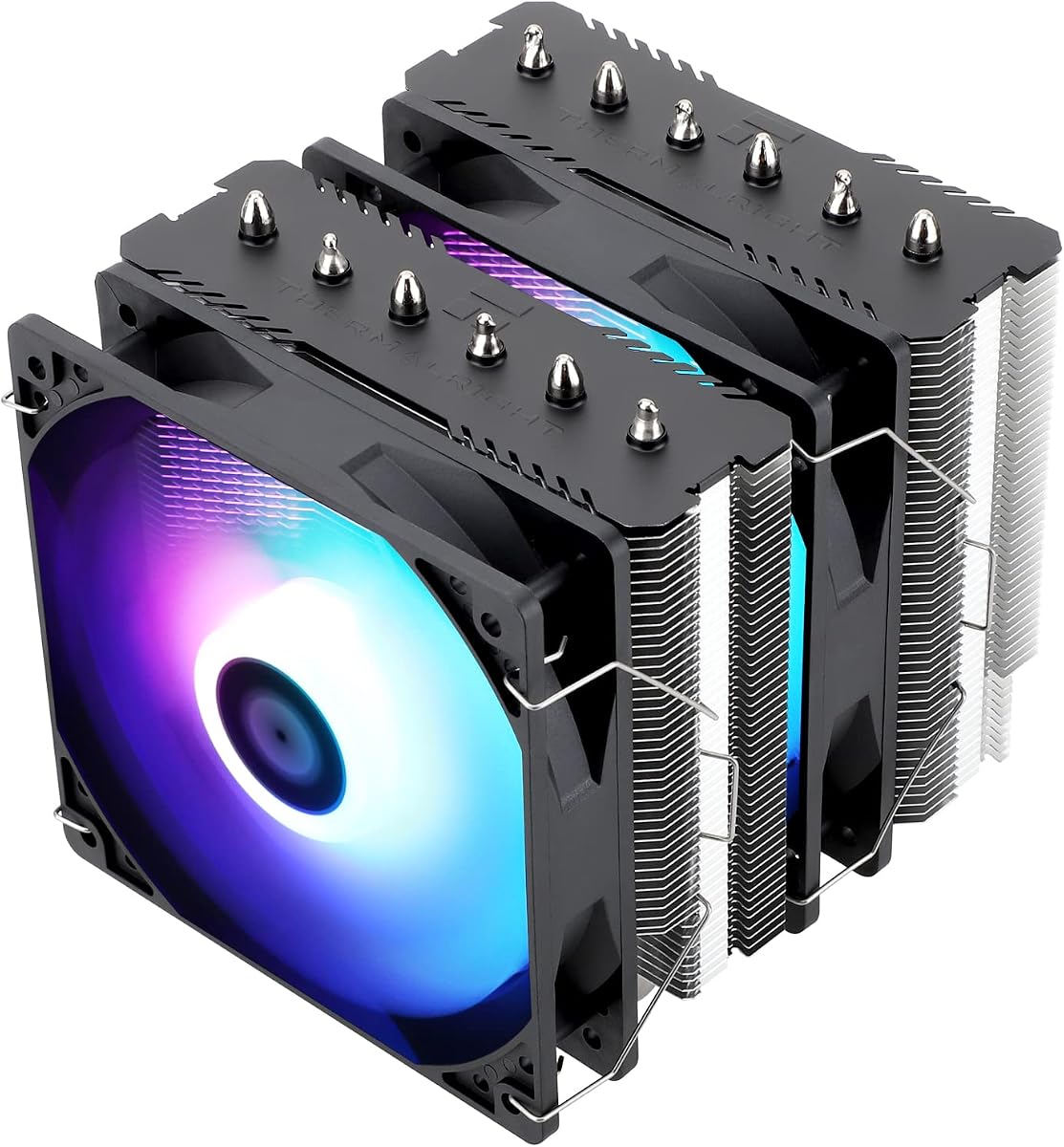
The Thermalright Peerless Assassin 120 SE is the cooler we point most gaming builders toward when the case has dual-tower clearance and the goal is strong thermals without liquid cooling. Six pure copper heat pipes using Thermalright’s AGHP approach, a copper base, and a full dual-tower fin stack give it the surface area to keep Ryzen and Intel gaming chips from slamming into thermal limits during long sessions. The 125×135×155 mm envelope is large but still mainstream for ATX mid-towers that advertise 160 mm or taller CPU cooler support.

  • Dual-tower aluminum heatsink with six 6 mm AGHP copper heat pipes
  • Twin TL-C12C 120 mm PWM fans rated around 1550 RPM and ≤25.6 dB(A)
  • 125×135×155 mm footprint with Intel and AMD metal mounting kits
Check Price →
✓ Pros
  • Excellent cooling-per-complexity balance for modern gaming CPUs
  • Dual fans and six heat pipes handle long gaming-plus-background loads
  • Claimed noise stays restrained when fans are not pegged at the top of their range
  • Wide socket coverage including AM5 and Intel LGA 1700/1851
  • RAM clearance-minded dual-tower layout suits many RGB memory kits
✕ Cons
  • 155 mm height still fails in some compact or aquarium-style cases with tight roofs
  • Stock fans are performance-focused rather than boutique ultra-silent designs
  • AMD installs rely on the motherboard’s original backplate, which is not in the box

Detailed review

Two TL-C12C 120 mm PWM fans sit in a push configuration that prioritizes airflow through dense fins. Manufacturer ratings cite about 1550 RPM, up to roughly 66 CFM, and noise at or below 25.6 dB(A) under their test conditions. In a real gaming PC, what you hear depends on case panels, GPU fans, and your curve—but the Peerless Assassin’s reputation is that it can stay composed at moderate PWM duties while still having headroom when a CPU-heavy game or compile spikes package power.

AGHP heat-pipe tuning helps the cooler behave more consistently whether the tower is oriented for a typical vertical motherboard layout or other orientations that can challenge ordinary heat pipes. That is useful for gamers who move systems between desks, deskside stands, or LAN setups where the case is not always sitting in the same orientation relative to gravity. The electroplated reflow construction and copper contact surface aim for reliable heat transfer once paste spread and mount pressure are correct.

Socket support covers the platforms gamers actually buy: AMD AM4 and AM5, plus Intel 115x, 1200, 1700, and 1851 families with the appropriate metal fasteners. Read the AMD note carefully—installation uses the motherboard’s stock backplate rather than a Thermalright-supplied AMD plate. That is normal for many air coolers, but it means you should not discard the board’s backplate during a previous cooler swap if you plan to move to the Peerless Assassin later.

Compared with the Assassin X120 Refined SE in this pack, the Peerless Assassin is the clear pick for higher-wattage gaming CPUs and for anyone who streams, records, or runs Discord overlays plus browser tabs while playing. Compared with the ARGB and Vision MAX siblings, the plain SE trades lighting and screens for a simpler, often quieter visual and electrical footprint. Compared with 360 mm AIOs, it avoids pump noise, tubing routing, and long-term liquid anxiety while still delivering competitive gaming thermals in a well-ventilated case.

Memory clearance is better than many older dual towers, but you should still measure tall RGB DIMMs and any chunky VRM or M.2 heatsinks near the socket. The dual fans leave intentional room for memory chips, yet extreme RGB fortresses can still force you to move the front fan higher or temporarily remove a fan during RAM installs. Plan cable routing so PWM leads do not rub the heatsink or block the GPU’s top edge.

Buy the Peerless Assassin 120 SE if you want the best default gaming cooler in this pack for most AM5 and LGA 1700/1851 builds. Skip it only if your case cannot take 155 mm of height, you need an LCD showpiece, or you specifically want be quiet!’s acoustic tuning and mode switch on the Dark Rock Pro 5.

Ideal gaming builds for the Peerless Assassin 120 SE

1440p and 1080p gaming PCs with Ryzen 5/7 or Intel mid-to-high chips, creators who occasionally encode, and anyone replacing a failing stock cooler in a standard mid-tower will see the biggest jump. It is also a strong recommendation for LAN-ready PCs that need reliability without AIO tubing snags during travel.

Noise and fan-curve advice for competitive play

Start with a PWM curve that holds low RPM until your CPU package temperature approaches the point where boost behavior changes, then ramp smoothly. Many gamers prefer a slightly warmer but quieter curve during ranked sessions, then a more aggressive profile for offline benchmarks or long renders. Avoid 100 percent fan speed unless you are stress-testing.

Air cooler vs 360 mm AIO for the same CPU

If your case has excellent front or top 360 mm radiator support and you want lower CPU temps under extreme sustained loads plus cleaner tower aesthetics, consider the CORSAIR Nautilus or Titan. If you want fewer failure points and easier long-term ownership, the Peerless Assassin remains the smarter everyday gaming choice.

Check Price on Amazon →

We may earn a commission at no additional cost to you.

3. CORSAIR Nautilus 360 RS ARGB - Best 360mm Gaming

CORSAIR Nautilus 360 RS ARGB Liquid CPU Cooler – 360mm AIO – Low-Noise – Direct

CORSAIR Nautilus 360 RS ARGB Liquid CPU Cooler – 360mm AIO – Low-Noise – Direct

9.4/10★★★★★

The CORSAIR Nautilus 360 RS ARGB is the pack’s cleanest answer when a gaming build needs liquid cooling without diving into CORSAIR’s full iCUE LINK LCD stack. A 360 mm radiator and three RS120 ARGB fans give you the surface area and static pressure to pull heat off modern gaming CPUs that boost aggressively for long stretches. The white finish targets snow-theme and bright tempered-glass cases that photograph well and stay visible on a streaming desk.

  • 360 mm all-in-one with three RS120 ARGB radiator fans
  • Low-noise pump rated near 20 dBA with convex cold plate
  • Daisy-chain PWM and +5V ARGB; LGA 1851/1700 and AM5/AM4
Check Price →
✓ Pros
  • Full 360 mm radiator surface suits high-power gaming and boost-heavy CPUs
  • Pump acoustics stay restrained for a liquid cooler in a desk-side gaming PC
  • Pre-applied paste and convex cold plate speed a clean first mount
  • Daisy-chained fans cut cable clutter behind a white or glass show build
  • Motherboard ARGB and PWM headers keep control simple without mandatory hubs
✕ Cons
  • Requires a case with true 360 mm radiator clearance and sensible tube routing
  • White aesthetic may not match all-black parts without intentional theming
  • Liquid coolers still add pump and seal considerations versus dual-tower air

Detailed review

CORSAIR highlights an efficient low-noise pump that keeps coolant moving while claiming roughly 20 dBA at the pump. In practice, pump hum is often the detail gamers notice during quiet menu screens or story cutscenes when GPU fans drop. A restrained pump makes the Nautilus easier to live with than flashier AIOs that sound busy even when the CPU is idle. Pair that with PWM fan control and you can keep the radiator fans calm until temperatures actually demand airflow.

The convex cold plate and pre-applied thermal paste are practical for gaming builders who want a first-time AIO install to go smoothly. Convex contact aims to improve pressure against the CPU heat spreader, while factory paste removes one messy step—though you should still seat the block carefully and tighten mounts in a cross pattern. Direct motherboard connection for fans and lighting fits builders who prefer not to add proprietary controllers for a single cooler.

RS120 ARGB fans use CORSAIR AirGuide technology and Magnetic Dome bearings with an eye toward radiator duty: higher static pressure through dense fins rather than open-case airflow alone. Daisy-chaining PWM and ARGB lines means you can fill one 4-pin fan header and one +5V ARGB header instead of weaving six separate leads through the case. That cable reduction matters in compact mid-towers where GPU power cables and front IO already crowd the motherboard tray.

Compatibility covers Intel LGA 1851 and 1700 plus AMD AM5 and AM4, which is the gaming socket set that matters in 2026. Before you buy, confirm your case supports a 360 mm radiator in the top or front without blocking the GPU, vertical mount brackets, or reservoir-style cable channels. Measure tube length mentally against your motherboard layout so the pump block is not fighting a tall VRM heatsink or an awkwardly placed 24-pin connector.

Versus the Titan 360 RX LCD in this pack, the Nautilus trades the IPS screen and iCUE LINK hub for simpler wiring and a lower visual profile. Versus air coolers like the Peerless Assassin or Dark Rock Pro 5, the Nautilus frees the socket area for a cleaner look and can improve thermals in cases with strong radiator exhaust paths—but it introduces liquid-loop ownership. Pick Nautilus when your case is AIO-ready and you want white ARGB liquid cooling without LCD complexity.

Who this Nautilus 360 fits

Gamers building white or mixed-theme glass PCs, creators who need cooler CPU temps during encode-plus-game workloads, and anyone whose dual-tower air cooler would block tall RAM or a side panel should shortlist this AIO.

Radiator placement for gaming thermals

Top exhaust is a common default for CPU-focused cooling; front intake can work if you accept warmer GPU intake air. Keep tubes from kinking, avoid resting the pump as the highest point in a way that traps air long-term, and ensure radiator fans are oriented for your preferred intake/exhaust plan.

Nautilus vs Titan 360 RX LCD

Choose Nautilus for simpler motherboard-controlled ARGB and no LCD dependency. Choose Titan if you want the 2.1-inch pump display, FlowDrive branding, and iCUE LINK ecosystem integration in a black showpiece build.

Check Price on Amazon →

We may earn a commission at no additional cost to you.

4. Thermalright Assassin X120 Refined SE - Best Slim Tower

Thermalright Assassin X120 Refined SE CPU Air Cooler

Thermalright Assassin X120 Refined SE CPU Air Cooler

9.4/10★★★★★

The Assassin X120 Refined SE is the gaming cooler to consider when your case manual laughs at 155 mm dual towers. At 148 mm tall and only about 71 mm wide, it slides into medium chassis, smaller ATX layouts, and boards packed with chunky VRM sinks or first-slot GPUs that leave little room above the DIMM slots. Four 6 mm AGHP heat pipes and a copper-focused thermal path still beat most stock coolers for Ryzen 5 and mainstream Intel gaming chips.

  • Slim single tower at 125×71×148 mm with four AGHP heat pipes
  • TL-C12C 120 mm PWM fan around 1550 RPM and ≤25.6 dB(A)
  • AMD AM4/AM5 and Intel LGA 115x/1200/1700/1851 hardware included
Check Price →
✓ Pros
  • Narrow 71 mm width clears crowded boards and many tall RAM kits
  • 148 mm height fits medium cases that reject full dual towers
  • Same quiet-leaning TL-C12C fan family as larger Thermalright models
  • AGHP heat pipes help orientation flexibility in compact gaming PCs
  • Light weight is easier on motherboards than massive dual-tower coolers
✕ Cons
  • Four pipes and one fan cannot match Peerless Assassin dual-tower cooling
  • High-TDP gaming flagships will run warmer under sustained all-core load
  • Aluminum cover styling is subtle rather than RGB showpiece

Detailed review

The included TL-C12C PWM fan mirrors the acoustic targets Thermalright uses on larger coolers: roughly 1550 RPM, around 66 CFM potential, and claimed noise at or under 25.6 dB(A). With only one fan you have less absolute airflow than a Peerless Assassin, but you also have fewer bearings to hear and a simpler cable path. Gamers in dorms or shared rooms often prefer that trade if their CPU is not a top-bin power hog.

Thermalright rates the fan bearings for long industrial-style service life and uses S-FDB designs aimed at durability. That matters more for a always-on gaming PC than for a machine that sleeps twenty hours a day. The aluminum heatsink cover tidies the top of the tower so the cooler looks intentional in a tempered-glass case even without ARGB rings.

Socket kits span older Intel 115x boards through LGA 1700 and 1851, plus AMD AM4 and AM5, so the Assassin X120 works for upgrades and fresh builds alike. As with other Thermalright air coolers, follow the platform-specific fastener instructions carefully. A slim cooler is forgiving of RAM height, but you should still confirm GPU clearance if you mount a second fan later as an optional push-pull experiment.

In gaming terms, treat the Assassin X120 as a strong mid-range cooler and a clearance specialist—not as a substitute for the Peerless Assassin or Dark Rock Pro 5 on CPUs that regularly hit high package power. If you play GPU-bound esports titles on a modest CPU, this slim tower can be almost overkill. If you play CPU-heavy simulation, strategy, or stream while gaming on a hot chip, prioritize a dual tower or 360 mm AIO from this list.

Buy the Assassin X120 Refined SE for compact gaming cases, MATX builds with busy motherboard real estate, and quiet upgrades where dual-tower width is the blocker. Skip it when you already cleared a large dual tower and want maximum thermal headroom for the same socket.

Best use cases in gaming PCs

Smaller mid-towers, travel PCs, and builds with tall RGB RAM that would collide with a dual-tower front fan are the sweet spot. It is also a practical cooler for office-gaming hybrids that need low idle noise.

Installation notes

Apply a thin paste layer, mount the bracket firmly, and seat the single fan so it pulls or pushes consistently with your case airflow. Because the tower is slim, leave a little cable slack so the PWM wire does not tug the fan out of its clips during side-panel closure.

Check Price on Amazon →

We may earn a commission at no additional cost to you.

5. CORSAIR Titan 360 RX LCD - Best LCD Showpiece

CORSAIR Titan 360 RX LCD Liquid CPU Cooler

CORSAIR Titan 360 RX LCD Liquid CPU Cooler

9.2/10★★★★★

The CORSAIR Titan 360 RX LCD is for gamers who want their cooler to be part of the desk spectacle, not just a thermal component. The 2.1-inch IPS panel runs at 480×480 with a bright backlight and up to about 30 FPS animation, so real-time CPU temperature, custom GIFs, memes, or a team logo can sit front-and-center in a glass panel build. That visibility is especially useful for streamers whose camera angle includes the PC interior.

  • 360 mm AIO with 2.1-inch 480×480 IPS LCD on the pump block
  • FlowDrive cooling engine and three pre-mounted RX120 RGB fans
  • iCUE LINK System Hub included; Intel 1851/1700 and AMD AM5/AM4
Check Price →
✓ Pros
  • IPS LCD can show CPU temps, GIFs, or team branding during streams
  • iCUE LINK simplifies sequential component connections through one hub port
  • RX120 fans are tuned for radiator static pressure and RGB presence
  • FlowDrive pump and cold-plate profile target high-performance gaming CPUs
  • Black aesthetic matches most high-end dark gaming cases
✕ Cons
  • LCD and hub ecosystem add setup steps versus motherboard-only AIOs
  • Requires case room for a 360 mm radiator plus hub cable planning
  • Software-dependent features mean you should budget time for iCUE configuration

Detailed review

Cooling hardware still has to do real work. CORSAIR’s FlowDrive engine pairs a three-phase motor pump with a precision cold-plate profile meant to maximize contact on the CPU heat spreader. Combined with a 360 mm radiator and three RX120 RGB fans, the Titan is positioned for high-performance gaming CPUs that spend long stretches near boost limits. Magnetic Dome bearings and AirGuide fan design aim to keep radiator noise under control while moving air through dense fins.

iCUE LINK is the installation philosophy: universal connectors chain components into the included System Hub so you are not hunting for every header on a crowded board. That can dramatically clean a show builds’s cable story, but it also means you should read CORSAIR’s connection order and leave an accessible hub location during the build. Builders who hate proprietary ecosystems may prefer the Nautilus RS, which leans on standard PWM and ARGB headers instead.

RGB on the RX120 fans and the LCD together create a cohesive CORSAIR look when the rest of the system already uses iCUE-friendly parts. If your motherboard lighting is from another brand, you can still cool excellently, but unifying animations may take more compromise. Plan an internal USB or hub connection path early so you are not dismantling a finished GPU install to add one more cable.

Socket support matches current gaming platforms: Intel LGA 1851 and 1700, AMD AM5 and AM4. Confirm your case’s 360 mm mounting points can take the radiator thickness with fans installed, and check whether a vertical GPU kit or thick front dust filters steal the space you thought you had. LCD coolers also need you to keep the pump block orientation readable from your usual seating position.

Choose the Titan 360 RX LCD when the cooler is a centerpiece of a black RGB gaming PC and you want temperature telemetry on the block itself. Choose the Nautilus if you want similar 360 mm cooling with less software surface area, or stick with air if you prefer zero liquid and no screens.

Streaming and creator angles

On-camera builds benefit from the LCD’s custom imagery and live temp readout. Creators who already live in iCUE for fans, RAM, and peripherals will feel less friction adding the Titan than someone starting from a blank software stack.

Setup checklist

Mount the radiator first in a clear case, route tubes without sharp bends, connect the iCUE LINK chain to the System Hub, verify LCD content in software, then set fan and pump profiles for gaming versus idle. Update firmware if CORSAIR prompts you after first install.

Titan vs PCCOOLER DC360

Both offer LCD personalization on 360 mm AIOs. Titan emphasizes CORSAIR FlowDrive, RX fans, and iCUE LINK. PCCOOLER DC360 offers a slightly larger 2.4-inch screen and its own software path with high-RPM fans—compare ecosystem preference and case USB availability.

Check Price on Amazon →

We may earn a commission at no additional cost to you.

6. Minorsonic 360mm AIO - Best Value 360mm AIO

Minorsonic AIO CPU Cooler

Minorsonic AIO CPU Cooler

8.8/10★★★★☆

Minorsonic’s 360 mm AIO aims at gamers who want liquid cooling headroom and ARGB flair without buying into a premium ecosystem brand. The headline hardware is a ceramic bearing pump spinning up to about 3000 RPM for strong coolant flow and claimed long life, paired with a three-phase, four-pole motor that Minorsonic says reduces vibration and noise. For desktop gaming, that combination is about keeping package temperatures stable when a CPU boosts during open-world traversal, physics-heavy scenes, or background downloads.

  • 360 mm AIO with ceramic bearing pump up to about 3000 RPM
  • Three-phase motor design; three PWM ARGB fans up to 1600 RPM
  • 12-channel radiator; daisy-chain fans; LGA 1851/1700 and AM5/AM4
Check Price →
✓ Pros
  • 360 mm radiator format for gaming CPUs that outgrow single-tower air
  • Ceramic bearing pump and 3-phase motor target smoother long sessions
  • PWM ARGB fans balance airflow with quieter low-load behavior
  • Daisy-chain wiring reduces header congestion on busy gaming boards
  • Current Intel and AMD gaming socket kits included
✕ Cons
  • Brand familiarity and long-term support trail CORSAIR for some buyers
  • Amazon rating sits below the pack’s top air coolers and CORSAIR AIOs
  • Still needs full 360 mm case support like any large liquid cooler

Detailed review

The radiator uses a 12-path water-cooling layout with a low-resistance hydraulic design and fin density chosen for surface contact. On paper that is exactly what you want behind three 120 mm fans: enough channels to spread heat, without turning the radiator into an immovable brick of airflow resistance. Real results still depend on case intake quality and whether you mount the radiator as intake or exhaust.

Fans are PWM-controlled and ARGB-lit, with speeds up to roughly 1600 RPM. That ceiling is more modest than some high-static-pressure packs that climb toward 2500 RPM, which can be a feature if you hate roar during late-night ranked games. The cooler will rely more on radiator area and pump flow than on screaming fans—fine for many gaming chips, less ideal if you insist on the absolute loudest-cooler-for-benchmarks approach.

Daisy-chained fan connections to a single 4-pin PWM and 5V ARGB header are a practical quality-of-life win. Gaming motherboards already spend headers on case fans, AIO pumps, and RGB strips; collapsing three radiator fans into one chain keeps the build tidier. Socket support covers Intel LGA 1851/1700 and AMD AM5/AM4, matching the CPUs most readers in this guide will install.

Because the rating is a step below the CORSAIR and Thermalright leaders in this pack, treat Minorsonic as a value-oriented AIO pick: verify seller fulfillment, read recent install photos for your case model, and be ready to set your own fan curves in BIOS or software. It can be a strong thermal upgrade over stock or slim air coolers when the case is ready for 360 mm.

Pick Minorsonic when you want 360 mm ARGB liquid cooling and ceramic-pump marketing at a more approachable tier. Pick CORSAIR Nautilus or Titan when brand ecosystem, LCD features, or higher community install volume matters more to you.

Who should consider Minorsonic

Budget-conscious gaming builders with confirmed 360 mm mounts, RGB-focused mid-towers, and CPUs that run warm on single-tower air coolers are the main audience. It is less compelling if you already own a Peerless Assassin that meets your thermals.

Tuning for quiet gaming

Cap fan PWM in the BIOS so 1600 RPM is a rare spike, not a cruise speed. Keep the pump on a dedicated header if your board offers one, and avoid mounting the radiator in a dusty floor-level intake without filters.

Versus other 360 mm options in this guide

Nautilus focuses on low-noise CORSAIR RS fans and white aesthetics. Titan and PCCOOLER add LCD personalization. Minorsonic competes on pump specs and simpler ARGB daisy-chain value without a screen.

Check Price on Amazon →

We may earn a commission at no additional cost to you.

7. Thermalright Peerless Assassin 120 Vision MAX - Best Dual-Tower LCD

Thermalright Peerless Assassin 120 Vision MAX ARGB White CPU Air Cooler

Thermalright Peerless Assassin 120 Vision MAX ARGB White CPU Air Cooler

9.6/10★★★★★

The Peerless Assassin 120 Vision MAX ARGB White takes the dual-tower formula gamers already trust and stacks a magnetic 5-inch IPS display on top. At 480×854 resolution, the screen is large enough to show system stats or custom themes without squinting through a side panel, which makes it a distinctive alternative to pump-block LCDs on AIOs. You still get six pure copper heat pipes and a nickel-plated copper base for contact quality on AM5 and Intel gaming CPUs.

  • Dual-tower air cooler with magnetic 5-inch 480×854 IPS top display
  • Six copper heat pipes, nickel-plated base, dual fans up to 2150 RPM
  • 125×135×164 mm; ARGB fans; TRCC software via motherboard USB header
Check Price →
✓ Pros
  • Highest rating in this pack with true dual-tower gaming cooling
  • Large 5-inch IPS screen for temps, themes, and video-style content
  • 2150 RPM fan headroom for hot CPUs during long sessions
  • White ARGB styling suits bright showcase gaming PCs
  • Keeps air-cooler ownership model—no pump or radiator tubes
✕ Cons
  • 164 mm height demands careful case clearance checks
  • LCD needs a free internal USB 9-pin connection and TRCC software
  • Faster fans can be more audible than the quieter SE non-LCD models if uncapped

Detailed review

Cooling performance is driven by the twin-tower radiator and dual fans spinning as high as about 2150 RPM with roughly 69 CFM and claimed noise at or under 27 dB(A). That is more aggressive than the standard Peerless Assassin 120 SE’s ~1550 RPM fans, so the Vision MAX can push harder when a gaming CPU dumps heat—useful for high-refresh competitive play on CPU-heavy titles or for creators who leave recording software running. Use PWM wisely so those fans are not parked at the top of the range during chat menus.

Overall dimensions of 125×135×164 mm mean you must verify cooler height against your case. Many ATX mid-towers clear 160–166 mm, but aquarium panels, shallow side glass, and some mesh covers do not. Thermalright notes the dual-tower layout is engineered with tall RAM and GPU installation in mind, yet a 5-inch top module changes the visual stack and can affect how close the cooler sits to a roof-mounted radiator or fan.

TRCC software is central to the LCD experience: monitor parameters, apply static or dynamic backgrounds, and even handle video-style playback according to Thermalright’s feature set. Power and data for the screen come through the motherboard’s USB 9-pin header, so inventory your internal USB availability before you commit—RGB hubs and wireless receiver adapters often compete for the same connector. Download software from the official source and seat cables fully before troubleshooting a blank screen.

White ARGB fans and the display module make this cooler a natural fit for white or silver gaming themes that would clash with all-black dual towers. Socket support includes AMD AM4/AM5 and Intel LGA 1851/1700/115x families with mounting kits in the box. AMD installs still rely on the motherboard backplate. S-FDB V2 fan bearings are called out for longevity, which matters if the PC stays powered for long gaming days.

This is the pack’s most ambitious air cooler: high rating, LCD theater, and dual-tower thermals without liquid. Choose it when you want a showpiece that still behaves like an air cooler. Choose the plain Peerless Assassin 120 SE when you want similar cooling DNA with less height, less USB dependency, and fewer moving software parts.

Who the Vision MAX is for

Showcase builders, white-theme gamers, and streamers who want a huge on-cooler display without routing AIO tubes will get the most enjoyment. Enthusiasts who never open control software may prefer a non-LCD SE model.

Clearance and USB planning

Measure from the motherboard standoffs to the side panel, not just the advertised case cooler height marketing line. Reserve a USB 9-pin cable path that will not pinch against the GPU shroud, and test TRCC themes before you cable-tie everything permanently.

Vision MAX vs CORSAIR Titan LCD

Vision MAX keeps dual-tower air cooling and a larger 5-inch top screen. Titan moves heat through a 360 mm liquid loop with a smaller pump LCD and iCUE LINK. Pick based on whether you want air simplicity or AIO radiator performance and ecosystem.

Check Price on Amazon →

We may earn a commission at no additional cost to you.

8. PCCOOLER DC360 - Best Customizable LCD AIO

PCCOOLER DC360 360mm AIO CPU Cooler

PCCOOLER DC360 360mm AIO CPU Cooler

8.8/10★★★★☆

PCCOOLER’s DC360 targets gaming and creator PCs that want a customizable LCD without necessarily buying a CORSAIR stack. The 2.4-inch IPS panel can show live system information or user media through PCCOOLER software, including stills and motion content. Adjustable screen orientation is a thoughtful touch when your radiator sits up top versus up front and the pump logo would otherwise read sideways.

  • 360 mm aluminum radiator AIO with 2.4-inch IPS LCD pump block
  • 2600 RPM pump; three 120 mm fans from 500–2500 RPM with ARGB
  • AM5/AM4 and LGA 1851/1700/1200/115x; internal USB required for LCD
Check Price →
✓ Pros
  • 2.4-inch IPS LCD supports PNG, JPG, GIF, and MP4-style custom content
  • Wide 500–2500 RPM fan range for quiet idle and aggressive gaming loads
  • Pre-installed fans and 400 mm tubing help flexible radiator placement
  • Screen orientation adjustment suits top or front radiator layouts
  • Solid socket coverage for current gaming platforms
✕ Cons
  • Case must fit roughly 394×120×27 mm radiator plus 25 mm fans
  • LCD features need a free internal USB connection and vendor software
  • Community familiarity is thinner than CORSAIR’s AIO ecosystem

Detailed review

Thermally, the cooler combines a 360 mm aluminum radiator, a pump rated around 2600 RPM, and three high-static-pressure 120 mm fans. Fan speeds spanning about 500 to 2500 RPM give you a real quiet floor for desktop use and a loud-but-cold ceiling for stress or summer LAN weekends. PWM control is the mechanism that makes that range useful—leave the fans on a smart curve rather than a flat high percentage.

ARGB lighting ties into a standard 5V 3-pin header so motherboard software can sync colors with the rest of a gaming build. Pre-installed radiator fans and tidier cable routing reduce the chance of a first-time AIO install turning into a rats nest. Four-hundred-millimeter tubing is long enough for many top-mount and front-mount scenarios in mid-towers, but you should still dry-fit before final screw-downs.

PCCOOLER is explicit about prerequisites: confirm the case supports the radiator dimensions with fans, and confirm an internal USB connection is free for the LCD. Those two checklist items eliminate most buyer remorse. Socket hardware covers Intel LGA 1851/1700/1200/115x and AMD AM5/AM4, which matches upgrade paths from older gaming PCs as well as new AM5 builds.

As with other value LCD AIOs, set expectations around software polish and long-term updates compared with bigger brands. The cooling hardware can still be an excellent fit for a Ryzen or Intel gaming CPU that runs hot on air, especially if you like putting clan tags or animated art on the pump. Keep dust filters clean so the high-RPM fans are not fighting a clogged radiator six months later.

Choose the DC360 when custom media on a 2.4-inch screen and a broad fan RPM band matter more than brand ecosystem. Choose CORSAIR Titan if you already standardize on iCUE LINK, or choose a Peerless Assassin air cooler if you want to avoid USB-powered displays entirely.

Creator and gaming desk setups

Builders who record face-cam with the PC in frame, or who simply enjoy personalizing every ARGB zone, will appreciate the DC360’s media flexibility. Pair it with cable extensions that match your theme so the USB and ARGB leads disappear into the tray.

Before you order

Measure radiator mounting depth including fan thickness, check GPU length if the radiator is front-mounted, and locate a spare USB 9-pin. If any of those fail, pick an air cooler from this guide instead of forcing a 360 mm LCD AIO.

Check Price on Amazon →

We may earn a commission at no additional cost to you.

9. be quiet! Dark Rock Pro 5 - Best Silent High-End

be quiet! Dark Rock Pro 5 CPU Cooler

be quiet! Dark Rock Pro 5 CPU Cooler

9.4/10★★★★★

be quiet!’s Dark Rock Pro 5 is the premium air cooler in this gaming pack when silence and overclocking headroom matter more than screens or rainbow fans. Seven copper heat pipes and a special black coating with ceramic particles give the heatsink both thermal capability and the trademark Dark Rock look. The company explicitly calls out heavily overclocked systems, which aligns with enthusiasts who push gaming CPUs beyond stock power limits.

  • Seven high-performance copper heat pipes with ceramic-particle black coating
  • Dual Silent Wings PWM fans with Quiet and Performance mode switch
  • Designed for overclocked gaming systems; thermal grease included
Check Price →
✓ Pros
  • Acoustic engineering focus suits headset-off or open-back headphone gaming
  • Seven heat pipes and dual fans handle high-power overclocked CPUs
  • Hardware Quiet/Performance switch changes the cooler’s personality instantly
  • Iconic Dark Rock styling elevates premium black gaming builds
  • Decoupled fan mounts reduce vibration noise through the heatsink
✕ Cons
  • Large dual-tower coolers need generous case and RAM clearance planning
  • No ARGB or LCD theater for RGB-first show builds
  • Premium positioning versus value dual towers like Peerless Assassin SE

Detailed review

Two Silent Wings PWM fans use fluid-dynamic bearings, smooth 6-pole motors, and airflow-optimized blades. The front fan’s funnel-shaped inlet is meant to raise air pressure into the fin stack, while decoupled mounting with vibration-isolating elements reduces the buzz that can travel through a metal case. For gamers who play without a headset, or who use open-back headphones, those details are the product.

The physical Speed Switch between Quiet and Performance modes is unusually practical. Quiet mode caps fans around 1500 RPM for everyday gaming and content consumption. Performance mode allows up to about 2000 RPM when you want the cooler to unleash maximum capacity during a weekend benchmark, a long render, or a heat wave. Flick the switch without digging through BIOS menus mid-session.

Installation is designed to feel premium: a black mounting kit, pre-installed mounting bridge elements, and a detachable mesh top cover with the middle fan inserting from above. That top cover approach can make RAM installs and cable work less miserable than wrestling a fully assembled dual tower in a cramped case. Still measure height and DIMM clearance—Dark Rock coolers are substantial.

Compared with Thermalright’s Peerless Assassin 120 SE, the Dark Rock Pro 5 typically costs more attention to acoustics and finish, while the Assassin often wins pure value thermals. Compared with 360 mm AIOs, Dark Rock Pro 5 avoids pumps and tubing while remaining competitive for many overclocked gaming chips in airflow-friendly cases. It will not light up a livestream backdrop; it will disappear into the soundscape.

Buy Dark Rock Pro 5 when your gaming PC is a blacked-out performance machine and fan noise is a first-class constraint. Skip it if you need ARGB synchronization, an LCD, or the cheapest path to dual-tower temperatures—that is what the Peerless Assassin models are for.

Overclocking and sustained gaming loads

Use Performance mode when validating an overclock or playing CPU-bound titles in a warm room. Return to Quiet mode for narrated story games, late-night queues, and productivity days so the fans stay out of your microphone’s way.

Build aesthetics

The ceramic-particle black coating and mesh top are meant to be seen in a tinted-glass case without RGB crutches. Pair with dark motherboard shrouds and non-RGB fans if you want a coherent stealth theme.

Dark Rock Pro 5 vs Peerless Assassin 120 SE

Assassin SE is the value gaming default with six pipes and twin TL-C12C fans. Dark Rock Pro 5 is the acoustic and finish upgrade with seven pipes, Silent Wings fans, and a hardware mode switch. Same general dual-tower mission, different priorities.

Check Price on Amazon →

We may earn a commission at no additional cost to you.

10. Thermalright Peerless Assassin 120 SE ARGB - Best ARGB Dual

Thermalright Peerless Assassin 120 SE ARGB CPU Air Cooler

Thermalright Peerless Assassin 120 SE ARGB CPU Air Cooler

9.4/10★★★★★

The Peerless Assassin 120 SE ARGB is the lighting-forward twin of the pack’s best overall gaming air cooler. You still get a dual-tower aluminum heatsink, six 6 mm AGHP heat pipes, a pure copper base, and the same general 125×135×155 mm size class that made the non-RGB SE a favorite. The difference is the TL-C12C-S fan pair with addressable RGB effects for builders who refuse a dark heatsink in a neon case.

  • Peerless Assassin dual tower with six AGHP heat pipes
  • Dual TL-C12C-S ARGB PWM fans around 1500 RPM, ≤25.6 dB(A)
  • 125×135×155 mm; AM4/AM5 and Intel LGA 1700/1851/115x support
Check Price →
✓ Pros
  • Same dual-tower cooling recipe as the non-RGB SE with lighting added
  • ARGB fans sync through standard 5V-style lighting setups common on gaming boards
  • Claimed TDP range suitable for many mid-to-high gaming CPUs
  • RAM-conscious dual-fan layout remains practical for RGB memory kits
  • Strong alternative when you want Peerless thermals in a lit case
✕ Cons
  • ARGB cables add a wiring step the plain SE avoids
  • Lighting does not improve thermals versus the non-RGB twin
  • Still a 155 mm cooler—compact cases may not qualify

Detailed review

Fan specs sit near 1500 RPM with about 66 CFM and noise claims at or below 25.6 dB(A), closely echoing the standard SE. Thermalright’s materials also mention a broad TDP capability band for the cooler family, which aligns with using this dual tower on gaming CPUs from mainstream to higher-power parts—within the limits of your case airflow. ARGB does not cool silicon; it just makes the fans part of the light show.

For gaming aesthetics, syncing cooler LEDs with RAM, case fans, and GPU side plates creates a unified look that cameras love. Use motherboard RGB software or a controller that speaks the same 5V ARGB language, and avoid mixing incompatible 12V RGB headers. Cable routing matters more than on the plain SE because you now have lighting leads plus PWM leads to hide.

Socket support again covers AMD AM4/AM5 and Intel LGA 1700/1851/115x-style platforms with metal fasteners. Installation best practices match the non-RGB model: even mount pressure, quality paste application, and a PWM curve that respects your ears during long matches. If you already own the non-RGB SE and only want lights, swapping just the fans can be an alternative—but buying the ARGB kit is the straightforward path for a new build.

Choose this cooler when Peerless Assassin thermals are the goal and ARGB is mandatory. Choose the non-RGB SE when you want the same cooling with simpler wiring, or the Vision MAX when you want a full LCD top instead of fan lighting alone. Against AIOs, the ARGB SE still wins for owners who prefer air reliability with a splash of color.

In a packed mid-tower gaming PC, the Peerless Assassin 120 SE ARGB often hits the sweet spot: dual-tower temperatures, recognizable performance, and enough lighting to match a themed build without committing to liquid cooling or a five-inch display module.

ARGB sync tips for gaming cases

Connect ARGB to a header that your motherboard software actually controls, set a single effect across devices, and dim LEDs if they reflect in a glossy monitor or webcam lens during streams.

When to pick ARGB SE over Vision MAX

Pick ARGB SE if you want fan lighting without a 164 mm LCD tower or USB dependency. Pick Vision MAX if the display is the point of the build and your case clears the extra height.

Maintenance

Dust the fin stacks every few months with gentle air so ARGB fans are not spinning faster to compensate for clogged fins. Confirm lighting cables remain seated after transporting the PC to a LAN.

Check Price on Amazon →

We may earn a commission at no additional cost to you.

Best CPU Coolers for Gaming 2026: Air and AIO Picks

How to Choose a CPU Cooler for Gaming in 2026

Start with case clearance and cooler type

Every cooler in this guide fails if it does not physically fit. Check maximum CPU cooler height for air towers and radiator mounts for AIOs before you fall in love with an LCD screen or a seven-heat-pipe fin stack. Dual-tower air coolers around 155–164 mm need honest mid-tower room; 360 mm AIOs need unobstructed top or front mounts plus tube clearance around tall GPUs.

Choose air when you want fewer failure points, easier long-term ownership, and strong gaming thermals in a ventilated case. Choose a 360 mm AIO when you need lower CPU temperatures under extreme sustained loads, a cleaner socket area for aesthetics, or when dual-tower width fights your RAM and side panel.

Match cooler capacity to CPU behavior, not just the name on the box

A GPU-bound esports title on a modest six-core chip may run happily on the Hyper 212 or Assassin X120. A Ryzen 7 or Core Ultra that boosts hard while you stream, record, or tab between browsers needs the Peerless Assassin dual towers, Dark Rock Pro 5, or a 360 mm AIO. Think about sustained package power during your real sessions, not only a one-minute idle screenshot.

Noise, fans, and curves matter as much as peak degrees

Gaming PCs sit a few feet from your ears. PWM fans, Quiet/Performance switches, and sensible BIOS curves determine whether a cooler feels premium. Dark Rock Pro 5 and carefully tuned Peerless Assassin builds can sound calmer than an AIO whose radiator fans are left on a steep default curve. Always retune after install.

Sockets, mounts, and paste

Confirm AM5, AM4, LGA 1700, or LGA 1851 support in the cooler kit. Note Thermalright’s AMD backplate requirement on several models. Use the included paste correctly or substitute a trusted compound—poor contact ruins even seven heat pipes. Remount if temperatures look abnormal after the first boot.

Lighting and LCD extras

ARGB fans and IPS pump or tower screens are optional. They need headers, USB connections, and software time. If you never open RGB apps, buy the plain Peerless Assassin 120 SE or Dark Rock Pro 5 and spend your attention on case airflow instead.

Frequently Asked Questions

01

Do I need an AIO liquid cooler for gaming in 2026?

Not necessarily. Dual-tower air coolers like the Thermalright Peerless Assassin 120 SE and be quiet! Dark Rock Pro 5 cool most gaming CPUs extremely well when the case has airflow and clearance. Choose a 360 mm AIO when you want lower sustained temperatures on hot chips, a cleaner look around the socket, or features like LCD pump blocks—and when your case truly supports the radiator.

02

Is the Peerless Assassin 120 SE enough for Ryzen 7 and similar gaming CPUs?

For the vast majority of gaming workloads, yes. Six heat pipes and dual PWM fans give the Peerless Assassin 120 SE the capacity to hold boost behavior in check during long sessions, especially compared with stock coolers. Extremely high power limits, aggressive overclocks, or poorly ventilated cases may still push you toward Dark Rock Pro 5 or a 360 mm AIO in this guide.

03

How quiet are these coolers during games?

Quietness depends on fan curves as much as hardware. be quiet! Dark Rock Pro 5 is purpose-built for low noise with a Quiet mode near 1500 RPM. Peerless Assassin models claim mid-20s dB(A) at rated conditions but can get louder if you peg PWM. AIOs add pump sound; CORSAIR’s Nautilus emphasizes a low-noise pump near 20 dBA, which helps during quiet game menus.

04

What cooler height should I look for in a mid-tower gaming case?

Many mid-towers clear 160 mm or more, which fits the Hyper 212 at 152 mm, Peerless Assassin SE models at 155 mm, and sometimes the Vision MAX at 164 mm—but always check your exact case. Do not rely on a friend’s case measurement. Glass panels and cable-management covers can steal millimeters.

05

Will a dual-tower cooler block my RAM?

Sometimes. Thermalright designs the Peerless Assassin family with memory clearance in mind, but extremely tall RGB heat spreaders can still interfere with the front fan. The slim Assassin X120 Refined SE is the safer pick when DIMM height is extreme. Dry-fitting RAM before final fan installation saves frustration.

06

Do LCD coolers affect gaming performance?

The LCD itself does not raise frame rates. It can display temperatures and custom art while the cooler’s fans, radiator, or heat pipes do the thermal work. Ensure you have USB connectivity and accept that software will use a little system attention. Thermally, compare radiator size or tower design, not screen inches, when predicting FPS stability.

07

Air cooler or 360 mm AIO for a gaming PC that also streams?

Streaming adds CPU load, so cooler headroom matters more than in GPU-only esports. A strong dual tower often suffices. If you encode on the CPU at high settings while playing demanding games, a 360 mm AIO such as the CORSAIR Nautilus, Titan, Minorsonic, or PCCOOLER DC360 can provide extra thermal margin—provided the case mounts it properly.

08

Why does Thermalright say AMD needs the motherboard backplate?

Several Thermalright air coolers in this pack mount on AMD using the board’s original backplate rather than including a replacement plate. That is common, but it surprises builders who removed and lost the plate during a previous cooler install. Keep the stock AMD backplate whenever you change coolers on AM4 or AM5.

09

Can I mix these coolers with any case fans?

Yes. CPU coolers handle local heat at the socket; case fans determine the air they breathe. Use a coherent intake/exhaust plan so a Peerless Assassin or AIO radiator is not inhaling stagnant GPU heat. Dust filters help high-RPM fans stay effective longer.

10

Should I replace thermal paste on a new cooler?

Most coolers here include paste or pre-applied pads on AIO cold plates. Factory applications are fine when you mount carefully. Enthusiasts sometimes substitute a preferred compound for consistency across builds. The bigger risk is uneven mount pressure—not brand of paste—so tighten screws in a cross pattern and verify temperatures after the first gaming session.

Conclusion

For most gaming PCs in 2026, the Thermalright Peerless Assassin 120 SE remains the clearest starting point: dual-tower capacity, broad socket support, and no liquid upkeep. Step up to the be quiet! Dark Rock Pro 5 when silence and overclocking polish are worth the premium air-cooler experience, or move to the CORSAIR Nautilus 360 RS ARGB when your case is ready for a white 360 mm AIO with simple daisy-chained lighting.

If your build is about spectacle, the Peerless Assassin 120 Vision MAX, CORSAIR Titan 360 RX LCD, and PCCOOLER DC360 put temperatures and custom visuals on display, while the Assassin X120 and Hyper 212 Black cover tighter cases and budget single-tower upgrades. The Minorsonic 360 and Peerless Assassin SE ARGB round out value liquid and lit-air options without leaving this pack.

Measure twice, mount once, and spend ten minutes on a fan curve after the first boot. The best CPU cooler for gaming is the one that fits, stays quiet enough for your desk, and keeps boost clocks honest during the games you actually play—not the one with the busiest marketing checklist.